
Domain 1.0 | Networking Concepts — 23% of exam
Learning Objectives
By the end of this lesson, you will be able to:
- Describe the purpose of security groups and explain how they differ from network access control lists (NACLs)
- Explain the function of an internet gateway and a NAT gateway within a VPC, and describe how they differ
- Describe a dedicated private connection between on-premises infrastructure and a cloud provider, and explain why an organization would choose one over the public internet
- Compare a site-to-site VPN with a dedicated private connection in terms of cost, performance, and use case
- Trace a complete traffic flow showing how these connectivity options work together within a real VPC deployment
Key Terms
| Term | Definition |
|---|---|
| Security Group | A stateful, instance-level virtual firewall in a cloud environment that controls inbound and outbound traffic to a specific resource using allow rules |
| NACL (Network Access Control List) | A stateless, subnet-level traffic filter in a cloud environment that can explicitly allow or deny traffic, evaluated independently for inbound and outbound directions |
| Internet Gateway | A VPC component that enables communication between resources in the VPC and the public internet, required for any resource that needs a public IP address |
| NAT Gateway | A VPC component that allows resources in a private subnet to initiate outbound connections to the internet without exposing them to unsolicited inbound internet traffic |
| Elastic/Public IP | A static, internet-routable IP address that can be assigned to a cloud resource to make it directly reachable from the internet |
| Dedicated Connection | A private, physical network connection between an organization’s on-premises infrastructure and a cloud provider’s network, bypassing the public internet entirely |
| Site-to-Site VPN | An encrypted tunnel connecting an organization’s on-premises network to a cloud VPC over the public internet |
| VPC Peering | A direct network connection between two separate VPCs, allowing resources in each to communicate as if they were on the same network |
Explanation
Picking Up Where VPCs Left Off
Lesson 1.3.1 established what a VPC fundamentally is: a logically isolated network space within a shared public cloud provider’s infrastructure. That lesson deliberately left one question unanswered — once you have a VPC, how does traffic actually get in and out of it, and how do you control that traffic at a fine-grained level? This lesson answers exactly that question, covering the connectivity components that turn an isolated VPC into a functioning, controllably connected part of an organization’s overall network.
Security Groups: Stateful, Instance-Level Filtering
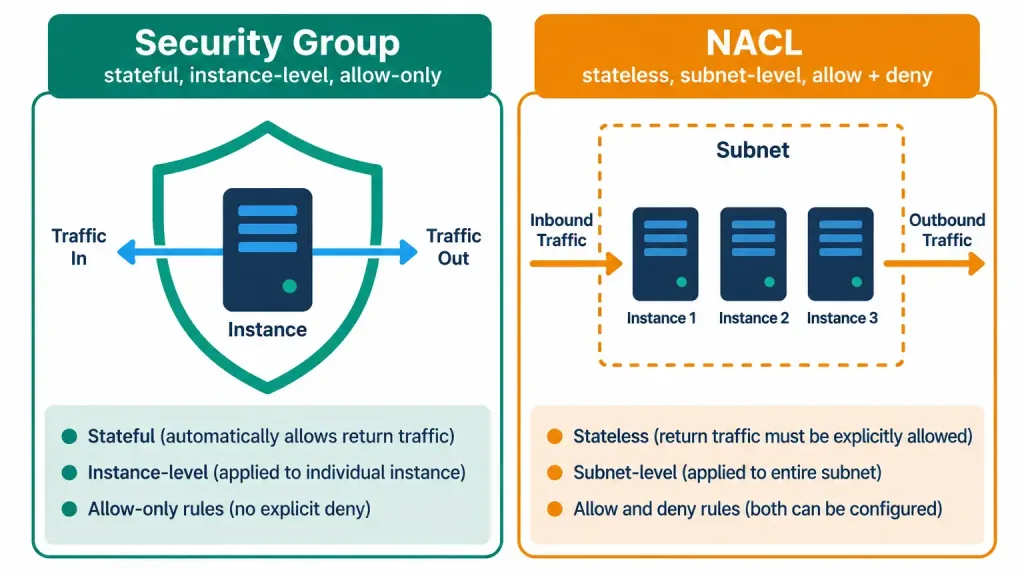
A security group is a virtual firewall applied directly to individual cloud resources — most commonly virtual machine instances — controlling what traffic is allowed to reach that specific resource and what traffic that resource is allowed to send out. Security groups share a conceptual lineage with the firewalls covered in Lesson 1.2.2: both use rule-based filtering to control traffic, and both are stateful, meaning that once an outbound connection is permitted, the corresponding inbound return traffic is automatically allowed without needing a separate explicit rule for it.
Security groups are typically allow-only — you specify what traffic should be permitted, and anything not explicitly allowed is implicitly denied, similar in spirit to the implicit “deny any” behavior at the end of an on-premises firewall’s rule list. A security group might, for example, allow inbound traffic on port 443 (HTTPS) from anywhere, and allow inbound traffic on port 22 (SSH) only from a specific administrative IP range, while denying everything else by default.
Consider a concrete walkthrough of that statefulness in action: a web server’s security group allows inbound traffic on port 443 from any source. A client somewhere on the internet opens an HTTPS connection to that server. Because the security group is stateful, the return traffic from the web server back to that client is automatically permitted, without requiring any separate outbound rule — the security group recognizes that this outbound traffic is simply the response to an already-permitted inbound connection.
This is functionally identical to how a stateful on-premises firewall behaves, just applied at the level of an individual cloud resource rather than an entire network boundary. It’s also worth noting that most cloud providers apply security group rules per resource but allow the same security group definition to be reused across many resources simultaneously — an administrator typically defines a security group once (say, “web-tier-sg”) and attaches it to every instance serving that role, rather than redefining the same rule set individually for each one.
NACLs: Stateless, Subnet-Level Filtering
A network access control list (NACL) provides a second, complementary layer of traffic filtering, but at the subnet level rather than the individual instance level, and with two critical differences from security groups worth memorizing precisely for the exam:
- NACLs are stateless. Unlike a security group, a NACL evaluates inbound and outbound traffic completely independently — permitting an outbound connection does not automatically permit its return traffic; a separate explicit rule is needed for each direction.
- NACLs can both allow and explicitly deny traffic, using numbered rules evaluated in order, similar in spirit to an on-premises firewall’s ordered rule list — whereas security groups are generally allow-only.
Because a NACL applies at the subnet level, it affects every resource within that subnet uniformly, while a security group can be tailored individually to each specific resource. In practice, both layers are commonly used together: NACLs provide a broad, subnet-wide baseline of traffic control, while security groups provide fine-grained, resource-specific rules on top of that baseline — another example of the layered “defense in depth” principle introduced in Lesson 1.2.2.
A concrete NACL rule set might look like this: rule 100 allows inbound HTTPS traffic from anywhere; rule 200 explicitly denies inbound traffic from a specific known-malicious IP range; and a final catch-all rule denies everything else not otherwise matched — numbered and evaluated in order, in exactly the same conceptual style as the ordered firewall rule lists covered in Lesson 1.2.2.
Because NACL rules are stateless, an administrator configuring one must remember to add matching rules for both directions of any traffic flow — for example, both an inbound rule allowing HTTPS requests to arrive, and a separate outbound rule allowing the corresponding responses to leave — since neither direction is automatically inferred from the other the way it would be with a stateful security group.
Consider why relying on only one of these two layers can leave a gap: if an organization used only permissive NACLs with no security groups at all, every resource in a subnet would share exactly the same broad traffic rules, with no ability to give one particularly sensitive server (say, a database) tighter restrictions than its neighbors in the same subnet. Conversely, relying only on security groups with fully open NACLs removes the subnet-wide safety net that would otherwise block obviously malicious traffic before it ever reaches the point of being evaluated resource-by-resource. Using both together closes this gap: the NACL provides a coarse, subnet-wide filter, and security groups then apply the finer, resource-specific policy inside that already-filtered traffic.
Side-by-Side: Security Groups vs. NACLs
| Characteristic | Security Group | NACL |
|---|---|---|
| Scope | Individual instance/resource | Entire subnet |
| Statefulness | Stateful (return traffic automatically allowed) | Stateless (each direction evaluated independently) |
| Rule types | Allow only (implicit deny for everything else) | Both explicit allow and explicit deny |
| Rule evaluation | All applicable rules considered together | Numbered rules evaluated in order |
Internet Gateways: The Front Door to the Public Internet
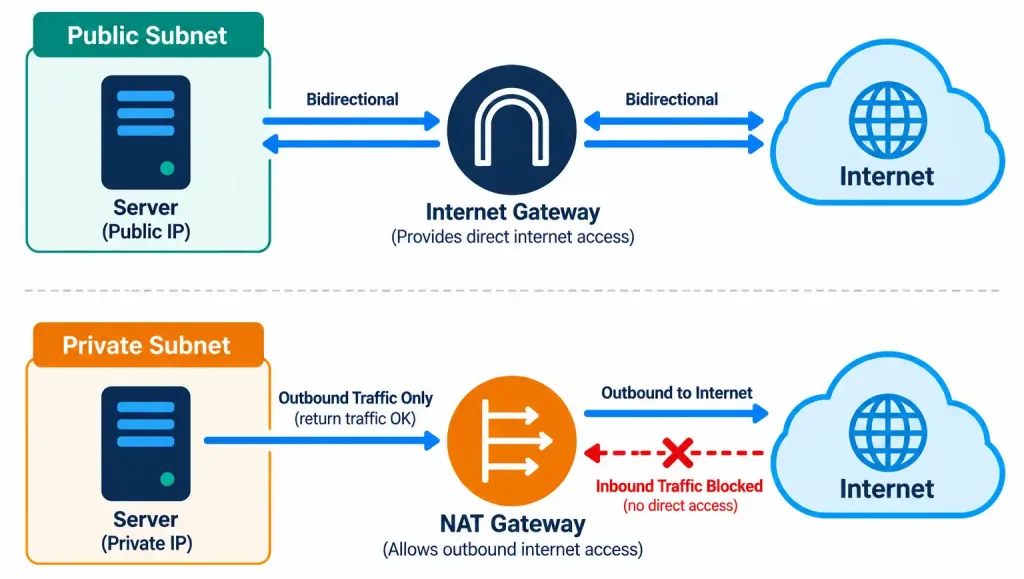
An internet gateway is the VPC component that makes communication between the VPC and the public internet possible in the first place. Without an internet gateway attached to a VPC, resources inside that VPC have no path to or from the internet at all, regardless of any other configuration. A resource that needs to be directly reachable from the internet — a public-facing web server, for example — needs both a public IP address and a route through the internet gateway; together, these allow genuinely bidirectional traffic, with the outside world able to initiate connections into that resource, not just receive responses to connections the resource itself initiated.
An internet gateway itself is a relatively simple, horizontally scaled component managed entirely by the cloud provider — there’s no capacity limit an administrator needs to plan around the way there might be with a physical on-premises internet-facing router. Its role is purely to provide the path between the VPC and the internet; it does not, by itself, perform any traffic filtering at all.
That filtering job belongs entirely to the security groups and NACLs covered earlier in this lesson — a subnet can have a perfectly functional route to an internet gateway and still have every single inbound connection blocked, if its security groups and NACLs are configured to deny that traffic. This separation of concerns — the internet gateway providing pure connectivity, and security groups/NACLs providing the actual access control — is a distinction worth holding onto clearly.
NAT Gateways: Outbound Access Without Inbound Exposure
Many resources inside a VPC — application servers, database servers, internal processing systems — need to reach the internet for legitimate reasons (downloading software updates, calling external APIs) but should never be directly reachable from the internet, since exposing them would needlessly increase their attack surface. This is precisely the problem a NAT gateway solves.
Resources sit in a private subnet with no public IP address and no direct route to an internet gateway; instead, their outbound traffic is routed through a NAT gateway, which translates their private addresses to its own public address for the outbound request and routes the corresponding response back to the correct internal resource — conceptually similar to the NAT translation performed by a home router, just implemented as a managed cloud service.
The critical distinction to internalize: a NAT gateway allows outbound-initiated traffic and its return responses, but it does not allow the internet to initiate new inbound connections to the private resources behind it. This is precisely the opposite traffic pattern from an internet gateway serving a public resource, and mixing these two up is one of the most common points of confusion — and most frequently tested distinctions — in this entire lesson.
Most major cloud providers offer NAT gateways as a fully managed service — meaning the organization doesn’t need to provision, patch, or scale the underlying NAT infrastructure itself, unlike an on-premises NAT-performing router or firewall that an organization would need to manage directly. This managed nature is itself a good example of the broader shift toward cloud-managed infrastructure discussed in the previous lesson: the function (network address translation for outbound-only access) is conceptually identical to what a home or office router performs, but the operational burden of running it is shifted onto the cloud provider.
Side-by-Side: Internet Gateway vs. NAT Gateway
| Characteristic | Internet Gateway | NAT Gateway |
|---|---|---|
| Enables | Bidirectional traffic for resources with public IPs | Outbound-only traffic for resources in private subnets |
| Inbound connections from the internet | Allowed, if the resource has a public IP and appropriate rules | Not allowed — only responses to traffic the private resource itself initiated |
| Typical resource placement | Public subnet | Private subnet |
| Typical use case | Public-facing web servers, load balancers | Application servers, databases needing outbound updates/API calls |
Connecting Back to On-Premises: Dedicated Connections and Site-to-Site VPNs
Everything covered so far in this lesson concerns traffic between a VPC and the broader internet. But in a hybrid cloud deployment — introduced in the previous lesson — an organization also needs a reliable way to connect its on-premises infrastructure directly to its cloud VPC, and two main options exist for this:
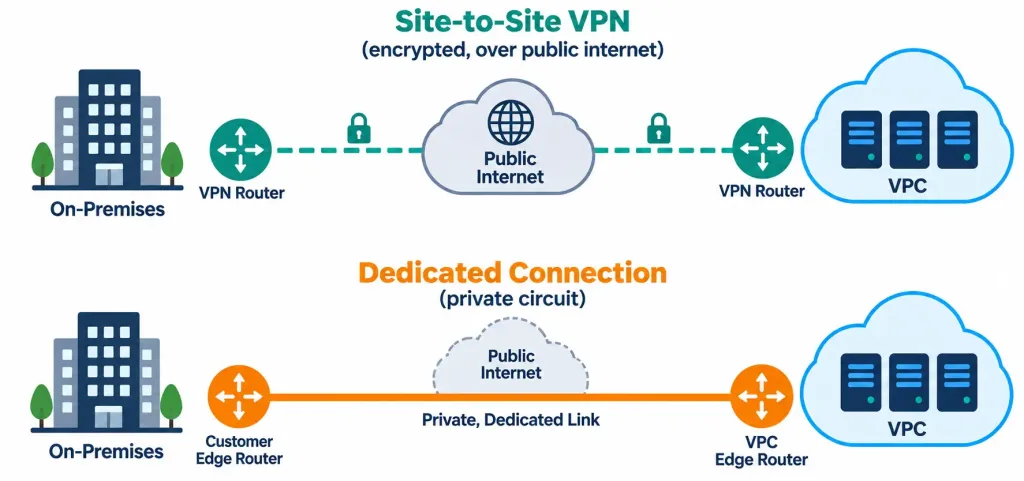
- A site-to-site VPN creates an encrypted tunnel between an organization’s on-premises network and its cloud VPC, running over the existing public internet. This is relatively quick and inexpensive to set up, since it doesn’t require any new physical infrastructure — but because it still travels over the public internet, its performance and latency are subject to the same variability and congestion as any other internet traffic.
- A dedicated connection (the cloud-networking equivalent of a leased line) is a private, physical network connection running directly between an organization’s on-premises infrastructure and the cloud provider’s network, entirely bypassing the public internet. This delivers more consistent performance, lower latency, and often enhanced security (since the traffic never traverses the shared public internet at all), at meaningfully higher cost and with a longer setup lead time, since it typically requires physical circuit provisioning through a telecommunications provider.
The choice between the two mirrors a pattern you’ve already seen elsewhere in this course: a site-to-site VPN offers lower cost and faster setup at the expense of consistency, much like NAS trades performance guarantees for simplicity compared to a dedicated SAN fabric. An organization with steady, high-volume, latency-sensitive traffic between its data center and its cloud VPC — for example, continuously replicating a large on-premises database to cloud-based disaster recovery infrastructure — is a strong candidate for a dedicated connection; an organization with occasional, lower-volume connectivity needs is often well served by a site-to-site VPN instead.
Choosing Between a Site-to-Site VPN and a Dedicated Connection
As with the deployment model decision covered in the previous lesson, exam scenarios describing this choice usually hinge on identifiable constraints rather than requiring rote memorization. Cost sensitivity and a need for fast setup point toward a site-to-site VPN — it can typically be established in hours using existing internet connectivity, with no new physical circuits required.
A requirement for guaranteed, consistent bandwidth and the lowest possible latency — common for real-time applications, large-scale data replication, or organizations transferring enormous volumes of data on an ongoing basis — points toward a dedicated connection, despite its higher cost and longer provisioning lead time (often weeks, since it typically involves a telecommunications provider physically running or provisioning a circuit). Many organizations use both simultaneously in practice: a dedicated connection for primary, high-priority traffic, with a site-to-site VPN configured as an automatic backup path in case the dedicated connection ever becomes unavailable — combining the performance benefits of one option with the resilience benefits of the other.
VPC Peering: Connecting VPCs to Each Other
One more connectivity concept worth knowing: VPC peering creates a direct network connection between two separate VPCs — potentially belonging to the same organization or to two different organizations — allowing resources in each VPC to communicate with each other as if they were part of the same network, without that traffic needing to traverse the public internet at all. This is distinct from everything else covered in this lesson so far, since it connects VPC-to-VPC rather than VPC-to-internet or VPC-to-on-premises; an organization running separate VPCs for different applications or business units might use peering to allow controlled communication between them while still keeping each VPC’s other resources isolated.
A subtlety worth knowing: VPC peering connections are generally not transitive. If VPC A is peered with VPC B, and VPC B is separately peered with VPC C, that does not automatically mean VPC A can communicate with VPC C — a direct peering connection would need to be established between A and C as well, if that communication path is needed. This non-transitive behavior is a frequently tested nuance, since it’s easy to assume peering “chains together” the way a series of directly connected network segments might.
Route Tables: The Traffic Cop Behind All of This
Every connectivity component covered in this lesson — internet gateways, NAT gateways, VPC peering connections, and dedicated connections alike — is ultimately tied together by a VPC’s route tables, which determine where traffic destined for a given address range actually gets sent.
A subnet’s route table might send traffic destined for 0.0.0.0/0 (essentially, “anywhere not otherwise specified”) to an internet gateway, marking that subnet as public; a different subnet’s route table might send that same 0.0.0.0/0 traffic to a NAT gateway instead, marking it as private; and traffic destined for a peered VPC’s specific address range would be routed toward that VPC peering connection rather than toward the internet at all.
Route tables are what actually implement the public-versus-private subnet distinction discussed throughout this lesson — the presence or absence of a public IP address matters, but it’s the route table that ultimately determines whether a given subnet’s traffic has any path to the internet gateway in the first place, and through which mechanism.
Putting the Complete Picture Together
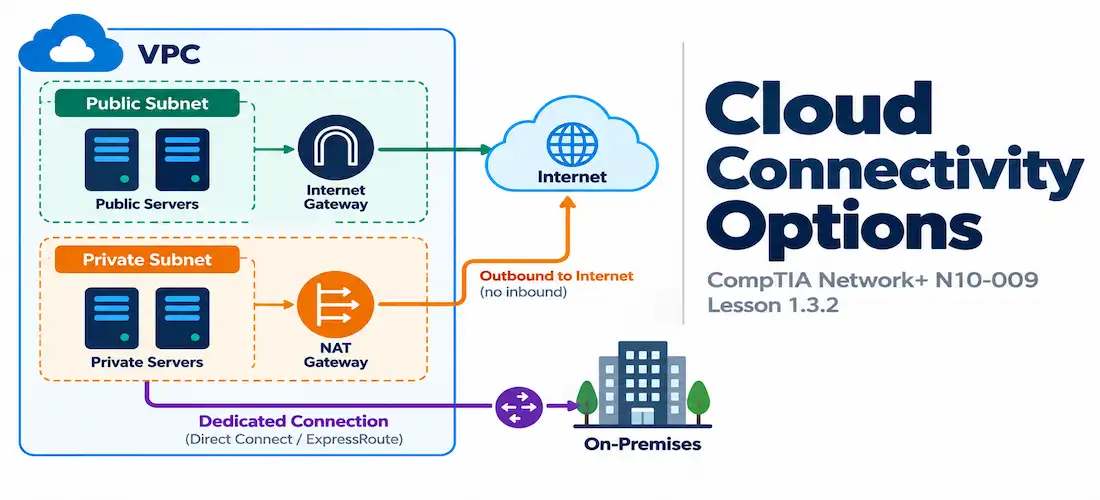
Consider a single VPC hosting a typical three-tier web application. Its public-facing web servers sit in a public subnet, reachable through the internet gateway with assigned public IPs, protected by security groups that allow inbound HTTPS traffic and a NACL providing a subnet-wide baseline of allowed traffic. Behind them, application and database servers sit in a private subnet with no public IPs at all — they can reach the internet for software updates through a NAT gateway, but nothing on the internet can initiate a connection to them directly.
The organization also maintains a dedicated connection back to its on-premises data center for continuous, latency-sensitive database replication, while a separate, lower-priority connection to a partner organization’s analytics VPC is handled through VPC peering. Every component covered in this lesson has a distinct, non-overlapping role in this picture — which is exactly the kind of layered traffic flow exam scenario questions are built to test.
Trace what happens when a customer visits the website: their browser’s HTTPS request reaches the internet gateway, which routes it to a web server’s public IP. That web server’s security group permits inbound port 443 traffic, and the request passes through. Because the security group is stateful, the response traffic flowing back to the customer is automatically permitted without a separate rule.
If the web server needs data from the private database tier, that request travels entirely within the VPC — it never touches the internet gateway or NAT gateway at all, since both endpoints are inside the same VPC. Separately, if the database server needs to download a routine security patch, that outbound request is routed through the NAT gateway, which translates its private address for the outbound connection and correctly routes the response back — all while that same database server remains completely unreachable from any unsolicited connection originating on the internet.
Each of these three traffic patterns — public inbound, internal VPC-to-VPC, and private outbound — is handled by a different, purpose-built component, and correctly identifying which component governs which pattern is precisely the skill exam scenario questions in this domain are testing.
Recognition-Level Verification Concepts
This objective is conceptual/comparative, so there’s no hands-on cloud networking configuration expected on the exam yet. It’s worth recognizing, at a glance, what these components typically look like in a cloud provider’s route table or configuration output:
- A route table entry sending
0.0.0.0/0traffic to an internet gateway (commonly labeled with an ID likeigw-xxxx) indicates a public subnet with direct internet access. - A route table entry sending
0.0.0.0/0traffic to a NAT gateway (commonly labeled with an ID likenat-xxxx) indicates a private subnet with outbound-only internet access. - A security group’s rule list typically shows only allow rules with a source, protocol, and port; a NACL’s rule list typically shows explicitly numbered allow and deny rules evaluated in order.
Common Exam Traps
- Security groups are stateful; NACLs are stateless. This is the single most tested distinction in this lesson — memorize the pairing directly, since the terms themselves offer no hint toward which is which.
- An internet gateway enables bidirectional traffic for public resources; a NAT gateway enables outbound-only traffic for private resources. A scenario describing a server that should never accept unsolicited inbound connections but still needs outbound internet access is describing a NAT gateway use case, not an internet gateway use case.
- A site-to-site VPN still travels over the public internet (encrypted, but still over shared infrastructure); a dedicated connection does not travel over the public internet at all. Don’t assume “private connection” and “VPN” are interchangeable terms — a VPN is a method of securing traffic over a shared public path, while a dedicated connection avoids that shared public path entirely.
- VPC peering connects VPCs to each other, not a VPC to the internet or to on-premises infrastructure. Don’t confuse it with an internet gateway, NAT gateway, dedicated connection, or VPN — it solves a distinctly different connectivity problem.
- Security groups and NACLs are complementary layers, not competing alternatives — much like the NIDS/HIDS and firewall/IDS/IPS layering covered in Lesson 1.2.2, real deployments commonly use both together rather than choosing one over the other.
- VPC peering is not transitive. A peering connection between VPC A and B, plus a separate one between B and C, does not grant A and C connectivity — that would require its own direct peering connection.
- Route tables, not the mere presence of a public IP, ultimately determine whether a subnet has internet access at all, and through which path. A resource can have a public IP assigned and still have no actual internet reachability if its subnet’s route table doesn’t send traffic toward an internet gateway.
Lesson 1.3.2 Practice Questions
Cloud Connectivity Options · 17 questions · Network+ N10-009, Domain 1.0
Which of the following best describes a security group in a cloud environment?
An administrator configures a NACL to allow inbound HTTPS traffic but forgets to add a corresponding outbound rule permitting the response traffic. What is the most likely result?
What is the primary purpose of an internet gateway in a VPC?
Which two of the following are true about a NAT gateway?
Based on this route table, what does this configuration indicate about Subnet A?
An organization needs guaranteed, consistent, low-latency bandwidth for continuously replicating a large on-premises database to the cloud, and cost is a secondary concern. Which connectivity option best fits this need?
Which statement correctly distinguishes a site-to-site VPN from a dedicated connection?
Which two of the following are true about VPC peering?
A database server in a private subnet needs to download software updates from the internet but must never accept any unsolicited inbound connection. Which component correctly provides this behavior?
Which of the following best describes how security groups and NACLs are typically used together?
Based on this NACL rule set, what happens to inbound traffic from 198.51.100.0/24?
VPC A is peered with VPC B, and VPC B is separately peered with VPC C. A network engineer expects resources in VPC A to now be able to reach resources in VPC C directly. Is this expectation correct?
What ultimately determines whether a subnet has a path to the internet, and through which mechanism?
Which two of the following are true about internet gateways?
An organization wants a low-cost, quickly deployable connection between its office and its cloud VPC, and can tolerate some variability in performance since the connection is used only occasionally. Which option best fits?
Why might an organization configure both a dedicated connection and a site-to-site VPN for the same on-premises-to-cloud link?
Based on this route table, what does this configuration indicate about Subnet B?
Summary
Security groups provide stateful, allow-only, instance-level traffic filtering; NACLs provide stateless, allow-and-deny, subnet-level traffic filtering — and they're typically used together, not as alternatives
An internet gateway enables bidirectional traffic for resources with public IP addresses; a NAT gateway enables outbound-only traffic for private resources that should never accept unsolicited inbound connections
A site-to-site VPN connects on-premises infrastructure to a VPC over the public internet at lower cost; a dedicated connection does the same over a private physical circuit that bypasses the public internet entirely, at higher cost and with more consistent performance
VPC peering connects two separate VPCs directly to each other, distinct from any of the internet-facing or on-premises connectivity options covered elsewhere in this lesson
A real VPC deployment typically combines several of these components simultaneously, each handling a distinct part of the overall traffic flow — public-facing resources, private backend resources, on-premises connectivity, and inter-VPC connectivity all solved by different, purpose-built components working together



