
Domain 4.0 | Network Security — 14% of exam
Learning Objectives
By the end of this lesson, you will be able to:
- Explain what a digital certificate actually does and why it matters beyond just encryption
- Describe the core components of PKI, including public/private key pairs and the certificate authority
- Explain the certificate chain of trust from root CA down to an end-entity certificate
- Distinguish self-signed certificates from CA-issued certificates and identify appropriate use cases for each
- Recognize common certificate validation failures and their consequences
Key Terms
| Term | Definition |
|---|---|
| Digital Certificate | A file that binds a public key to a verified identity, enabling both encrypted communication and identity verification |
| PKI (Public Key Infrastructure) | The overall system of certificate authorities, certificates, and key pairs used to issue and validate trust |
| Certificate Authority (CA) | A trusted entity that issues and digitally signs certificates, vouching for the identity they contain |
| Self-Signed Certificate | A certificate signed by its own creator rather than a trusted third-party CA |
| Chain of Trust | The path from an end-entity certificate up through intermediate CAs to a trusted root CA, used to validate authenticity |
Explanation
From Encryption to Certificates
The previous lesson covered encryption protecting data in transit — but encryption alone only answers “can this data be read by an eavesdropper.” It doesn’t answer a genuinely different question: “am I actually talking to the server I think I’m talking to.” That second question is exactly what digital certificates and the PKI system behind them exist to solve.What a Digital Certificate Actually Does
A digital certificate binds a public key to a verified identity — a domain name, an organization, or a specific device. When a client connects to a server using TLS, the certificate the server presents serves two distinct purposes at once: it provides the public key needed to establish encrypted communication, and it lets the client verify that the entity on the other end is genuinely who it claims to be, rather than an impostor positioned somewhere on the network path.
This second purpose is easy to overlook. Encryption alone would still let two parties communicate securely even if one of them were secretly an attacker impersonating the intended server — certificates are what close that specific gap, by having a trusted third party vouch for the identity behind the public key.
PKI: The System Behind Certificates
PKI (Public Key Infrastructure) is the overall system that makes certificates trustworthy. At its core, PKI relies on asymmetric cryptography: a mathematically related public/private key pair, where anything encrypted with the public key can only be decrypted with the corresponding private key, and vice versa. The public key can be freely shared (and is exactly what a certificate distributes), while the private key must stay secret, known only to its owner.
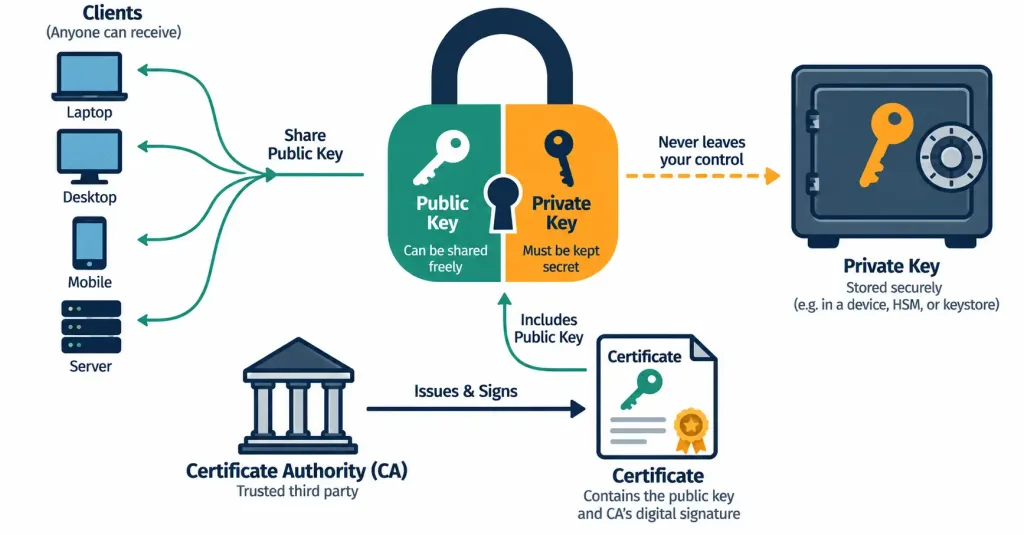
A certificate authority (CA) is the trusted entity within this system responsible for issuing certificates and digitally signing them — that signature is what allows anyone else to verify the certificate hasn’t been tampered with and genuinely came from a CA they’ve chosen to trust.
Certificate Authority and Chain of Trust
CAs themselves are organized hierarchically. A root CA sits at the top of the hierarchy, and its trust is typically built directly into operating systems and browsers ahead of time. Rather than issuing every certificate directly, root CAs commonly delegate to intermediate CAs, which then issue the actual end-entity certificates that websites and devices present.
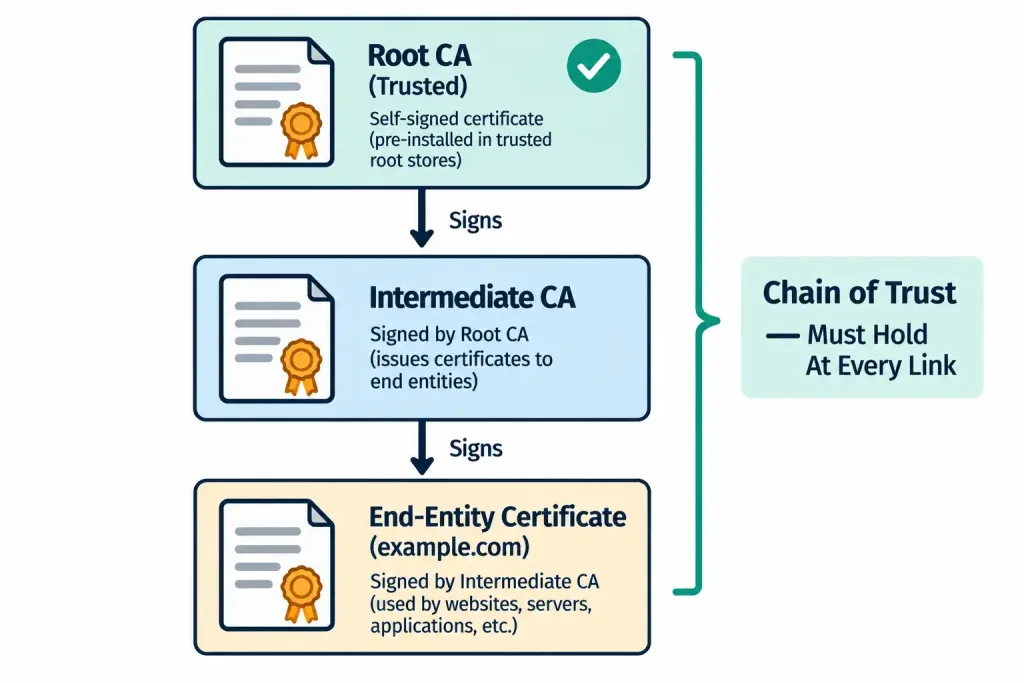
When a client receives a certificate, it validates it by walking this chain of trust: checking that the end-entity certificate was signed by an intermediate CA, that the intermediate CA’s own certificate was signed by a root CA, and that the root CA is one the client already trusts. If that chain holds together all the way up, the certificate is considered valid; if it breaks anywhere along the way, the client has no basis for trusting the identity the certificate claims to represent.
Self-Signed vs. CA-Issued Certificates
Not every certificate is signed by a recognized CA:
- A self-signed certificate is signed by its own creator rather than a trusted third party. Because there’s no independent CA vouching for it, browsers and clients typically display a warning when they encounter one, since there’s genuinely no external verification behind the identity claim. Self-signed certificates are still useful in specific situations — internal testing environments, development systems, or scenarios where trust has already been established out-of-band some other way — but they’re a poor choice for anything public-facing where users have no independent way to confirm the certificate’s legitimacy.
- A CA-issued certificate comes from a recognized certificate authority whose root is already trusted by browsers and operating systems, meaning clients trust it automatically without any warning, since it passes chain-of-trust validation cleanly.
The choice essentially comes down to whether the audience connecting to the system already has an independent reason to trust it, or whether they need the CA’s vouching to establish that trust in the first place.
Certificate Validation Failures and Their Consequences
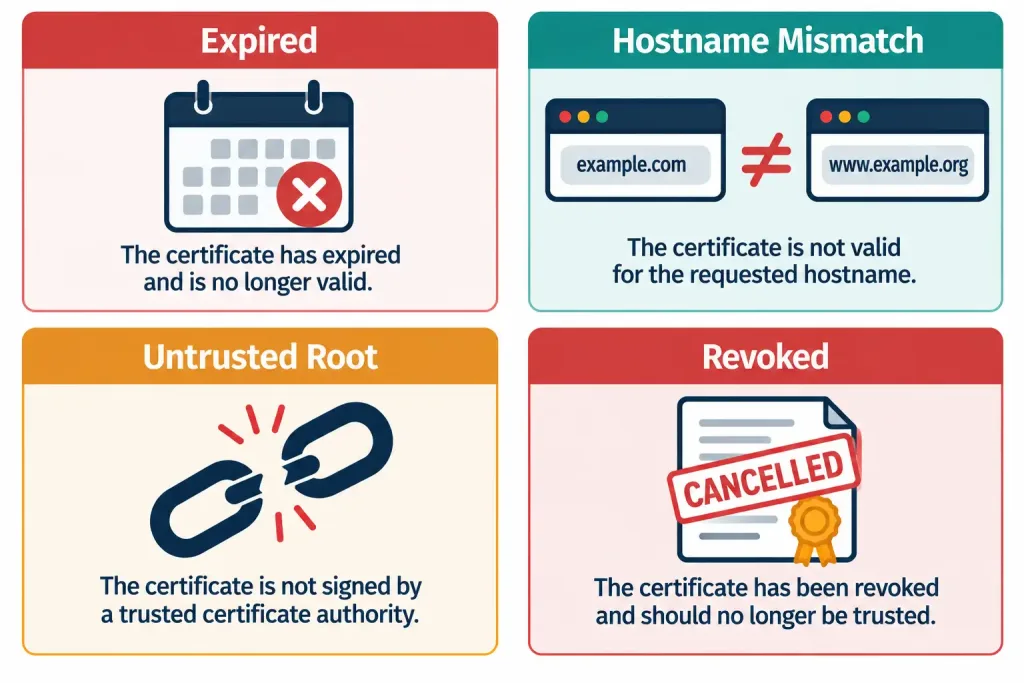
A certificate can fail validation for several distinct reasons, each with a different underlying cause:
- Expired certificate — the certificate’s validity window has passed, and it needs to be renewed.
- Hostname mismatch — the certificate was issued for a different domain name than the one actually being accessed.
- Untrusted root — the chain of trust leads back to a root CA the client doesn’t recognize, as is the case with a self-signed certificate.
- Revoked certificate — the issuing CA has explicitly invalidated the certificate before its normal expiration, typically because the private key was compromised.
Recognition-Level Verification Concepts
A few patterns are worth recognizing on sight:
- A certificate presented without any independent third-party signature, triggering a browser warning, is a self-signed certificate.
- A validation process that walks upward from an end-entity certificate through intermediate CAs to a trusted root describes the chain of trust.
- A certificate error citing a domain name that doesn’t match the site being visited points to a hostname mismatch, not an expiration or trust issue.
- A certificate error appearing alongside evidence of significant clock drift on the client device points to a time synchronization problem, not necessarily a genuine certificate defect.
Common Exam Traps
- A certificate does more than enable encryption — it verifies identity. Don’t treat certificates as purely an encryption mechanism; their trust-verification role is equally important and frequently the actual point being tested.
- A self-signed certificate isn’t inherently “broken” or malicious — it simply lacks third-party validation, which is a legitimate tradeoff in specific internal or testing contexts, not universally wrong.
- The chain of trust must hold at every link, not just at the end-entity certificate. A valid end-entity certificate signed by an intermediate CA whose own certificate doesn’t trace back to a trusted root still fails validation overall.
- Different certificate validation failures have different root causes — expiration, hostname mismatch, untrusted root, and revocation are not interchangeable explanations, even though they can all present as a similar-looking browser warning.
- A certificate error doesn’t always mean the certificate is actually invalid. Client-side clock drift from a failed NTP sync can produce a convincing but ultimately misleading certificate error.
Lesson 4.1.2 Practice Quiz — Certificates & PKI
17 questions covering digital certificates, PKI, certificate authorities, chain of trust, self-signed vs. CA-issued certificates, and validation failures.
N10-009 · Domain 4.1Summary
A digital certificate binds a public key to a verified identity, enabling both encrypted communication and confirmation that the other party is genuinely who they claim to be.
PKI relies on asymmetric public/private key pairs, with a certificate authority (CA) issuing and signing certificates to vouch for the identities they contain.
The chain of trust runs from an end-entity certificate through intermediate CAs up to a trusted root CA; validation requires every link in that chain to hold.
Self-signed certificates lack third-party validation and trigger warnings, making them suitable for internal or testing contexts but not public-facing use; CA-issued certificates are trusted automatically.
Certificate validation can fail due to expiration, hostname mismatch, an untrusted root, revocation, or — easy to overlook — client-side clock drift from a failed NTP synchronization.



