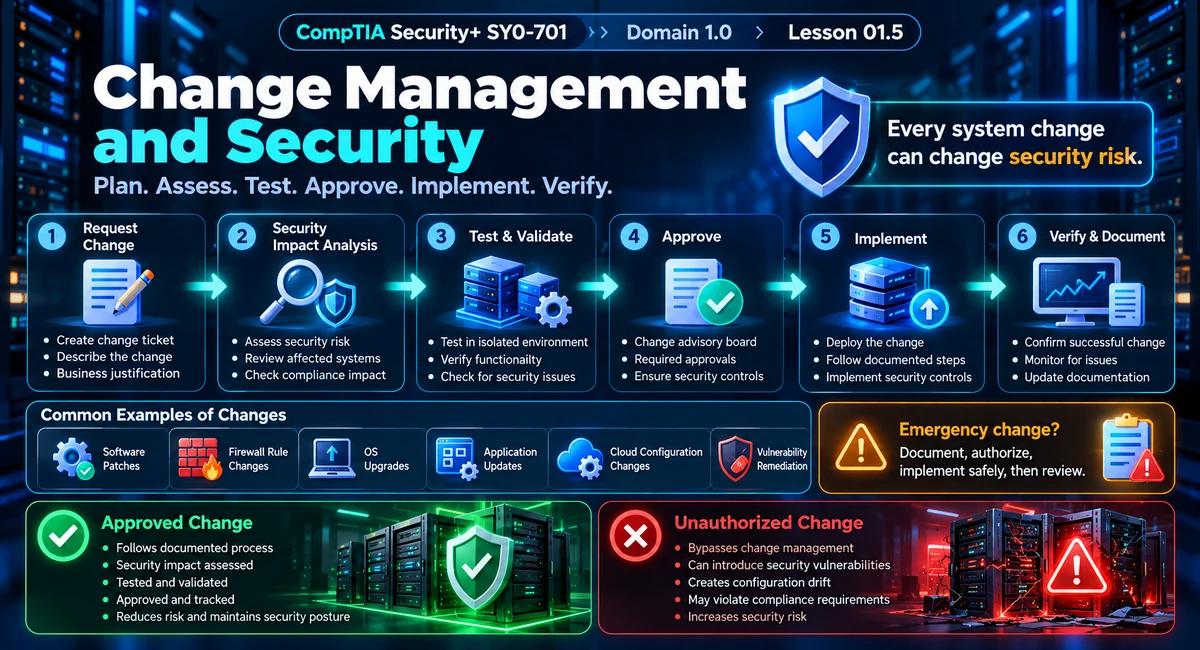
Secure change workflow · Request → assess → test → approve → implement → verify
What You'll Learn
- Why meaningful system changes can affect security, availability, and compliance.
- How to use a structured change-management process from request through verification.
- How security impact analysis, testing, approvals, maintenance windows, and rollback plans reduce risk.
- How documentation, version control, baselines, and monitoring help detect unauthorized or harmful changes.
- How to solve change-management scenario questions on Security+ SY0-701.
What Is Change Management in Security?
Change management is the structured process used to plan, evaluate, approve, implement, and track changes to systems, configurations, software, infrastructure, and related documentation. The security goal is not to stop change; it is to make change controlled, understood, and reversible whenever practical.
A firewall rule update, operating-system patch, cloud configuration change, application deployment, identity-policy change, or vulnerability remediation can alter a system's security posture. Security-focused configuration management includes requesting changes, evaluating their security impact, testing, obtaining the required approval, implementing, verifying, documenting, and monitoring the result.
A change can be useful and still be a security event. The important question is how the change affects the system's risk and security controls.
Why a Routine Update Can Become a Security Issue
Security controls depend on configuration. A software patch may change default settings. A firewall rule can expose a service. An application update can introduce a new dependency. A cloud change can expand permissions or alter network exposure. Even a change intended to fix a vulnerability can create downtime or compatibility problems.
Could protection change?
Check whether permissions, configurations, exposure, monitoring, or security controls will change.
Could service be disrupted?
Assess downtime, restarts, dependencies, maintenance windows, and availability requirements.
Can you prove what changed?
Use tickets, approvals, version records, test results, and monitoring evidence to preserve a reliable history.
The Change Management Lifecycle
A practical security-focused workflow can be remembered as request, record, assess, test, approve, implement, verify, and document. Organizations may combine or reorder individual steps, but the core principle remains the same: make the change visible, analyze its effect, control implementation, and confirm the result.

1. Change Request
The process starts by documenting what needs to change, why it is needed, which systems are affected, the expected outcome, and the proposed implementation window. The request creates accountability and allows stakeholders to understand the intended modification before it happens.
2. Ownership and Stakeholders
A change should have an identified owner and the appropriate stakeholders. The owner coordinates the work and remains responsible for the change. Stakeholders can include system owners, security personnel, operations teams, application owners, management, and business representatives whose services may be affected.
3. Security Impact Analysis
Impact analysis asks what could change from a security perspective. Review confidentiality, integrity, availability, authentication and authorization behavior, network exposure, logging, privacy, compliance, dependencies, and operational effects.
When a scenario asks what should happen before a configuration or system change, consider impact analysis and testing before implementation.

4. Testing and Validation
Whenever practical, test the proposed change in a non-production or staging environment. Testing should verify both expected functionality and security effects. A successful functional test does not automatically prove that a change is secure. Administrators should also verify permissions, exposed services, logging, security-control behavior, and relevant application dependencies.
5. Approval Process
After impact analysis and testing, the change moves through the organization's approval process. A Change Advisory Board (CAB) or similar authority may review significant changes, while smaller or pre-approved changes may use standardized approval paths. The governance model varies by organization.
6. Maintenance Window
A maintenance window is a planned period in which changes are performed with known operational constraints. Scheduling a change during an appropriate window can reduce business disruption and gives support teams time to prepare for expected restarts or temporary outages.
7. Implementation
Implementation should follow the documented procedure and the approved scope. Administrators should use the planned configuration, preserve change records, and avoid unrelated modifications during the same activity because unrelated edits make troubleshooting and accountability harder.
8. Verification and Monitoring
After implementation, verify that the change achieved its intended result and did not introduce unexpected security or availability problems. Monitoring can include logs, alerts, performance data, configuration comparison, vulnerability checks, and application or service health checks.
Rollback, Backout, and Recovery Plans
A rollback or backout plan defines how to return the system to a known-good state if the change fails or creates unacceptable risk. The plan should identify what will be restored, who will perform it, what evidence will be captured, and how success will be verified.
A rollback plan is not the same as “we will fix it if something breaks.” A useful plan is specific, documented, tested when practical, and linked to a defined trigger.
| Planning Element | Purpose | Example |
|---|---|---|
| Current baseline | Know the approved starting state. | Saved firewall configuration. |
| Backout trigger | Define when rollback should begin. | A critical service fails after deployment. |
| Rollback steps | Restore the known-good state. | Restore the prior package and configuration. |
| Post-rollback verification | Confirm service and controls are healthy. | Validate access, logging, and application health. |
Documentation, Version Control, and Baselines
Good change management creates an audit trail. Documenting what changed, why it changed, when it changed, who approved it, who implemented it, and what the test results showed makes troubleshooting and security investigations easier. Configuration change control includes tracking, review, approval or disapproval, implementation, documentation, and monitoring.
Preserves previous and current versions of scripts, configurations, infrastructure definitions, and documentation.
Defines a known approved configuration used for comparison and controlled updates.
Captures scope, owner, approvals, dates, test results, implementation details, and outcome.
Shows whether the implemented change caused unexpected behavior or security impact.
Technical Security Implications of Changes
Security+ scenarios often hide the risk inside a technical side effect. Look for changes involving allow lists and deny lists, restricted activities, service restarts, application restarts, downtime, legacy applications, dependencies, ports, firewall rules, permissions, authentication settings, and logging.
| Change | Security Question | Typical Risk |
|---|---|---|
| Firewall rule | Does the new rule expose a service? | Unintended network access. |
| OS update | Will services, drivers, or security settings change? | Downtime or configuration changes. |
| Application deployment | Does the application add permissions or dependencies? | New attack surface. |
| Cloud configuration | Did identity, storage, network, or exposure settings change? | Misconfiguration and expanded access. |
| Vulnerability remediation | Does the fix alter functionality or availability? | Service interruption or dependency conflicts. |
| Allow/deny list | Could an approved or blocked resource become reachable? | Unexpected access or blocked legitimate activity. |
| Legacy application | Does it rely on an older runtime, protocol, or dependency? | Compatibility failure or security regression. |
Emergency Changes
An emergency change may be necessary when delaying a security fix creates greater risk than making the change immediately. Examples include urgent vulnerability remediation, active incident containment, or a critical security-control failure.
Emergency does not mean undocumented. The emergency process may shorten or alter normal approvals, but organizations should still record what changed, why it changed, who authorized it, and what post-change review is required.
Standard vs. Emergency Change
| Characteristic | Standard Change | Emergency Change |
|---|---|---|
| Planning | Planned in advance. | Urgent response. |
| Testing | Normally tested before implementation. | Testing may be constrained by urgency. |
| Approval | Normal approval path. | Emergency authorization path. |
| Afterward | Normal verification and documentation. | Strong emphasis on post-change review and documentation. |
Unauthorized Changes and Configuration Drift
An unauthorized change bypasses the approved process or exceeds the approved scope. Such changes can introduce vulnerabilities, weaken security controls, create configuration drift, or make investigations harder because the documented baseline no longer matches the actual system.
Configuration changes are modifications from an established documented baseline. After an approved change, the organization updates the baseline and continues to review, test, document, and monitor the modified system.
Real-World Change Management Example
Scenario: A company must patch a public-facing web server because a critical vulnerability was discovered.
Request: The administrator creates a change ticket describing the patch, affected server, risk, expected downtime, and maintenance window.
Impact analysis: The team checks dependencies, authentication settings, firewall exposure, logging, application compatibility, and expected availability impact.
Testing: The patch is tested in staging when practical.
Approval: Authorized stakeholders review the test results and approve the production change.
Implementation: The patch is installed during the approved maintenance window using the documented procedure.
Verification: Security scanning, application checks, monitoring, and log review confirm that the server is protected and operational.
Documentation: The change record and configuration baseline are updated with the completed work and verification results.
Security+ Exam Traps
“Just deploy the patch.” A security fix still needs controlled planning, testing, and verification when circumstances allow.
Testing alone is not approval. A successful test does not authorize production deployment by itself.
Rollback is not the same as backup. A rollback plan describes how to return to a known-good state after a failed change.
Emergency does not mean undocumented. Urgent changes still require accountability and post-change review.
Version control is not only for developers. Configuration files, scripts, documentation, and infrastructure definitions can all benefit from version history.
Connect the change to security impact. Look for permissions, exposed services, downtime, restarts, legacy dependencies, logging, and control changes.
Quick Reference: Change Management
| Concept | Purpose | Exam Clue |
|---|---|---|
| Change request | Document the proposed modification. | What is changing and why? |
| Impact analysis | Identify security and operational effects. | What could this change affect? |
| Testing | Validate function and security behavior. | Use staging when possible. |
| Approval | Authorize implementation. | CAB or designated authority. |
| Maintenance window | Control timing and disruption. | Scheduled implementation. |
| Backout plan | Restore the known-good state. | What if the change fails? |
| Documentation / baseline | Preserve change history and approved state. | Track, compare, and re-baseline. |
| Monitoring | Detect unintended outcomes. | Verify the change after deployment. |
Security+ Scenario Walkthrough
For exam questions, focus on the timing and purpose of the action. “Before the change” usually points toward impact analysis, testing, approval, or a backout plan. “After the change” points toward verification, monitoring, documentation, and baseline updates. “Urgent security issue” points toward an emergency change process rather than simply ignoring change management.
Further Reading and Related Guides
Practice Questions
10 scenario-based questions. Expand each question to see its answer and explanation.
Answer
Create a documented change request describing the proposed modification, reason, affected system, and expected impact.
Why this matters
The request creates accountability. Impact analysis, testing, approval, and implementation follow the documented request.
Answer
Perform a security impact analysis.
Why this matters
A new network rule changes the attack surface. The team should identify risks to exposure, access, controls, and logging before deployment.
Answer
Validate the change against production dependencies and confirm its security and functional impact.
Why this matters
A successful test in one environment does not automatically prove a change is safe for production.
Answer
Approval by the designated change authority or authorized stakeholders.
Why this matters
Testing produces evidence; approval authorizes the change. A test alone is not permission to deploy.
Answer
A rollback or backout plan.
Why this matters
The plan documents how to reverse a failed change and restore a known-good state.
Answer
A maintenance window.
Why this matters
A planned window controls expected disruption and helps stakeholders prepare for restarts or outages.
Answer
Use the organization's emergency change process, document the implementation, and perform a post-change review.
Why this matters
Urgency may accelerate approval but should not eliminate accountability or documentation.
Answer
It provides a known approved state for comparison and recovery.
Why this matters
Baselines support change control, drift detection, troubleshooting, auditing, and rollback decisions.
Answer
An unauthorized change can bypass security review, weaken controls, and cause configuration drift.
Why this matters
Bypassing change control removes impact analysis, accountability, testing, and approved documentation.
Answer
Verify configuration, logs, security controls, application health, and system behavior after implementation.
Why this matters
Post-change verification confirms the intended outcome and helps detect unintended security or operational problems.
Exam Quiz
Lesson 01.7 — Change Management · 15 questions · 10 minutes
Change Management — Exam Simulation
15 scenario-based questions covering impact analysis, testing, approvals, maintenance windows, rollback, documentation, baselines, emergency changes, and verification.
Your timer starts when you select Start Quiz.
Question will appear here.
Quiz complete
Lesson 01.7 — Summary
Review the essential change-management concepts before continuing through Security+ Domain 1.0.
Request, assess impact, test, approve, implement, verify, document, and monitor the change.
Review access, exposure, confidentiality, integrity, availability, dependencies, and logging.
Rollback plans, configuration baselines, and version history support return to a known-good state.
An emergency may accelerate approval, but accountability, documentation, and post-change review still matter.
Before: impact analysis, testing, approval, rollback planning. After: verification, monitoring, documentation, baseline update.
Supplementary reading: Security Frameworks: NIST, ISO 27001, and CIS Controls. This remains supplementary material rather than one of the ten core lessons.