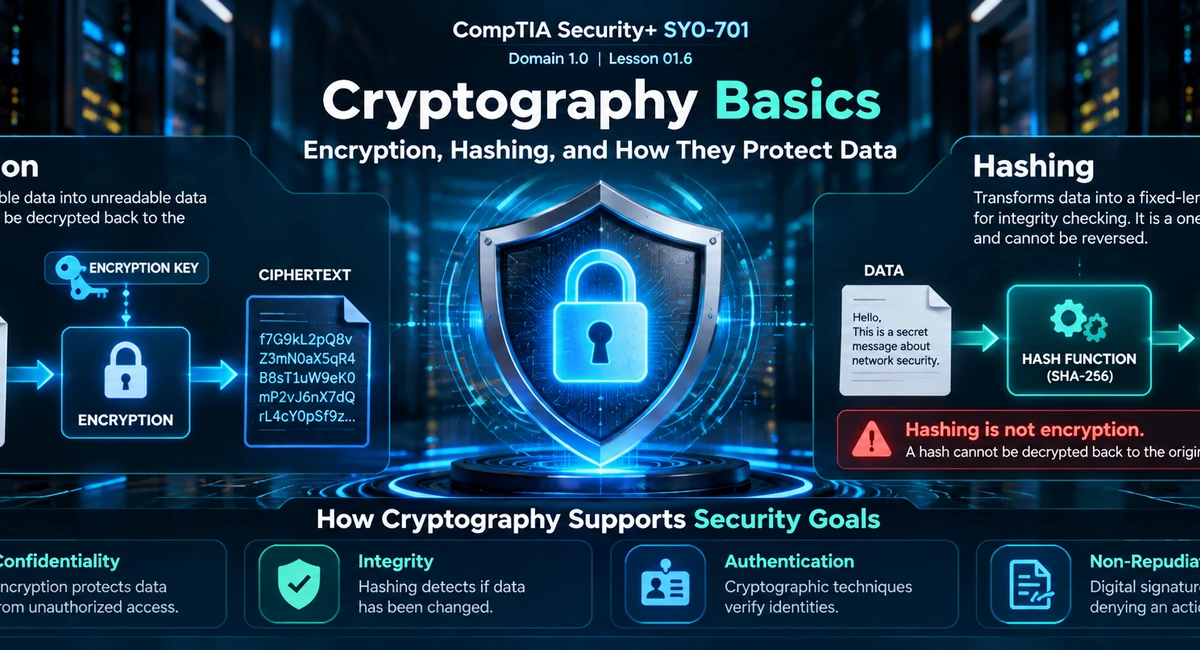
- How cryptography supports confidentiality, integrity, authentication, and non-repudiation.
- How encryption, hashing, encoding, tokenization, data masking, and steganography differ.
- How encryption protects data at rest and in transit, including disk, volume, database, file, and field-level encryption.
- Why password storage requires unique salts and a suitable password-hashing or key-stretching design.
- What key length, key exchange, hybrid encryption, and key lifecycle management mean.
- How TPMs, HSMs, KMS platforms, and secure enclaves help protect cryptographic keys.
- How to recognize cryptography clues in Security+ SY0-701 scenarios.
What Is Cryptography?
Cryptography uses mathematical methods, algorithms, keys, and protocols to protect information and enable trusted digital communication. Depending on the technique and its implementation, cryptography can support confidentiality, integrity, authentication, and non-repudiation.
For Security+ scenarios, identify the security objective before selecting a technique. Encryption is primarily associated with confidentiality. Cryptographic hashing helps verify integrity. Password-hashing systems help verify passwords without storing them as readable plaintext. Digital signatures can support integrity, origin authentication, and non-repudiation when keys and supporting processes are trustworthy.
Encryption: protect confidentiality.
Hashing: produce a digest for verification and integrity-related uses.
Password hashing: verify a password without storing the original password.
Digital signatures: help verify content integrity and the signer associated with a signature.
A hash is not ciphertext that can simply be decrypted into the original data.
The Basic Cryptography Vocabulary
| Term | Meaning | Security+ Clue |
|---|---|---|
| Plaintext | Original readable or usable data before encryption. | Before encryption |
| Ciphertext | Data produced by encryption. | Requires the appropriate key and decryption process for recovery. |
| Cryptographic key | A value used by a cryptographic algorithm. | Key protection is essential. |
| Hash / digest | Fixed-length output produced by a hash function. | Integrity verification or password-verification design |
| Algorithm | The mathematical procedure used for a cryptographic operation. | AES, RSA, SHA-256, and related names |
| Salt | A unique value included in password-hashing input. | Helps prevent identical passwords from producing identical stored verifier values. |
| Key exchange / agreement | A process for establishing shared keying material. | Session setup is not the same operation as encrypting every message. |
Encryption: Protecting Data Confidentiality
Encryption transforms plaintext into ciphertext using a cryptographic algorithm and key. Authorized users or systems can recover the data with the appropriate decryption process if they possess the required keying material and permissions.
Encryption is designed to protect confidentiality. Someone who copies encrypted information should not be able to understand its contents merely by reading the ciphertext. Real protection also depends on secure key management, suitable algorithms, correct implementation, and appropriate configuration.

Data at Rest
Data at rest is information stored on a device or storage system rather than actively moving across a network. Examples include laptop drives, file servers, databases, removable media, cloud storage, and backups.
Encryption at rest can reduce the impact of a stolen laptop or copied storage device. Its effectiveness depends on how keys are protected and whether an attacker can access the device while it is already unlocked or the data is available to an authenticated session.
Common Encryption Scopes
Full-disk encryption
Protects the contents of a drive. Common for laptops and workstations that may be lost or stolen.
Volume encryption
Protects a logical storage volume or partition. A device can have separate encrypted volumes.
File or folder encryption
Protects selected files or directories instead of necessarily encrypting the entire drive.
Database encryption
Protects database storage or selected database content, depending on the design.
Record or field-level encryption
Protects selected records, columns, or fields when specific values need their own protection boundary.
Backup and removable-media encryption
Protects backup sets, external drives, and portable media if they are misplaced or accessed without authorization.
Data in Transit
Data in transit is information moving between systems. Examples include browser-to-server traffic, application-to-database connections, remote-access sessions, and transfers across public or private networks.
Technologies such as TLS and VPNs can use cryptographic mechanisms to protect communications in transit. When a scenario requires information to remain private while travelling, think encryption and confidentiality.
Data at rest
Information stored on a disk, in a database, in cloud storage, or in a backup.
Exam clue: disk, file, volume, database, or field encryption.
Data in transit
Information travelling between endpoints over a network.
Exam clue: TLS, a protected VPN connection, or secure transport.
Hashing: Protecting Integrity and Verifying Data
A cryptographic hash function accepts input data and produces a fixed-length output called a hash value or digest. For a suitable modern hash function, even a small input change should produce a substantially different digest with overwhelming probability.
SHA-256 belongs to the SHA-2 family. A trusted digest can help an administrator detect whether a downloaded file differs from the version represented by that digest. The comparison is useful only when the reference digest itself comes from a trustworthy source.

The Avalanche Effect
A useful hash-function property is that a small input change should result in a substantially different digest. If one character in a downloaded file changes, the newly calculated digest should differ from the trusted digest. Security tools can compare these values to help detect modification or corruption.
One-Way Behavior and Collision Resistance
One-way behavior means it should be computationally infeasible to recover the original input from the digest alone. Collision resistance means it should be computationally infeasible to find two different inputs that produce the same digest.
These are distinct properties. A hash function is not a normal decryption mechanism, and collision resistance is not a promise that collisions are mathematically impossible.
Hashing produces a digest for verification. Encryption is designed to let an authorized party recover protected plaintext. Do not choose hashing when the scenario says the original information must later be decrypted.
| Property | Encryption | Cryptographic hashing |
|---|---|---|
| Primary objective | Confidentiality | Integrity verification and related security functions |
| Output | Ciphertext | Fixed-length digest |
| Normal recovery | Designed for authorized decryption | Not designed to be decrypted into the original input |
| Examples | AES-based storage encryption, TLS-protected communication | SHA-256 file verification, digest generation |
Salting and Secure Password Storage
Applications should not normally store users’ passwords as readable plaintext. A secure password-storage design stores a verifier produced with a suitable password-hashing function, rather than keeping the original password for later retrieval.
What Is a Salt?
A salt is a unique value added to the input before password hashing. A different salt means the same password can produce different stored verifier values in different accounts. Salts also make precomputed lookup tables less useful against a collection of independently salted password hashes.
A salt is not the user’s password and does not need to function as a secret encryption key. It does not replace a suitable password-hashing function. Its purpose is to make password-hash attacks more expensive and prevent simple reuse of precomputed results across accounts.
What Is Key Stretching?
Key stretching makes password-based guessing more computationally expensive by applying a deliberately costly derivation process. Depending on the algorithm, a password-storage or key-derivation design may use work factors, iteration counts, memory costs, or a combination of these.
- PBKDF2: a password-based key derivation function that uses repeated processing controlled by an iteration count.
- bcrypt: an adaptive password-hashing function with a configurable work factor.
- Argon2: a password-hashing family designed to make password guessing more expensive; Argon2id is a commonly considered variant.
For password storage, the algorithm, work factor, implementation, and salt all matter. A fast general-purpose digest such as SHA-256 alone is not a substitute for a suitable password-hashing design.
| Use case | Goal | Key consideration |
|---|---|---|
| File verification | Help detect changes | Compare the calculated digest against a trusted reference. |
| Password storage | Verify a password without storing it in plaintext | Use suitable password hashing and a unique salt. |
| Password-based key derivation | Derive key material from a password or passphrase | Use an appropriate derivation function and parameters. |
| Digital-signature workflow | Bind signed content to integrity and signer-key evidence | Hashing is combined with asymmetric signature operations. |
Symmetric and Asymmetric Cryptography: The Basic Difference
Symmetric cryptography uses the same shared secret key for encryption and decryption. Asymmetric cryptography uses a mathematically related public/private key pair. These approaches solve related but different problems.
One shared secret key
- Generally efficient for large amounts of data.
- AES is an important example.
- The shared key must be protected and established securely.
Public and private key pair
- Supports public-key operations.
- Used with digital signatures and certificates.
- Can participate in key establishment, depending on the protocol.
This lesson covers the foundational distinction. Continue with Symmetric vs. Asymmetric Encryption for algorithms, use cases, and hybrid approaches.
Hybrid Encryption and Key Exchange
Real-world protocols often combine cryptographic techniques. A protocol can use asymmetric cryptography or a key-agreement method to establish shared session key material, then use symmetric cryptography to protect bulk session data efficiently.
Key exchange or key agreement is about establishing keying material; it is not the same operation as encrypting every application message. In modern TLS configurations, ephemeral key agreement can also support perfect forward secrecy, helping protect past sessions against later compromise of a long-term authentication key when the protocol and implementation provide that property.
When a scenario mentions secure session setup followed by efficient protection of large volumes of data, recognize the combination of key establishment and symmetric session encryption.
Cryptographic Algorithms and Key Length
An algorithm and its key length both influence security, but a larger key size does not automatically make every system secure. Algorithm design, attack history, protocol, implementation, key generation, and key management all matter.
| Name | Function / family | Study point |
|---|---|---|
| AES | Symmetric encryption | A widely used modern encryption algorithm; 128-bit and 256-bit key sizes are common examples. |
| RSA | Asymmetric cryptography | Recognize public/private key operations; key sizes and uses should follow current guidance. |
| ECC | Elliptic-curve cryptography | Supports public-key operations and can provide comparable security strength with smaller keys than some alternatives. |
| SHA-256 | Cryptographic hash function | Produces a 256-bit digest; it is not an encryption algorithm. |
| MD5 and SHA-1 | Legacy hash functions | Do not treat them as preferred choices where modern collision resistance is required. |
Organizations should select approved algorithms and key sizes that meet their requirements and current standards. Deprecated algorithms, weak configuration, poor random-number generation, and exposed keys can undermine a design even when another component appears strong.
Cryptographic Key Management
Cryptography can fail if keys are not managed properly. Key management includes key generation, storage, distribution or establishment, use, rotation, revocation, backup where appropriate, and secure destruction.

Use an appropriate, secure generation process.
Limit access and secure key storage.
Follow lifecycle rules, permissions, and rotation requirements.
Retire keys when compromised or no longer needed.
TPM vs. HSM vs. KMS vs. Secure Enclave
These terms describe related but different ways of protecting and managing keys. They should not be treated as interchangeable.
| Technology | What it does | Typical scenario clue |
|---|---|---|
| TPM | A trusted platform module provides hardware-backed functions for protecting keys and supporting platform measurements and integrity features. | A computer uses hardware-rooted trust, secure boot, or drive-protection features. |
| HSM | A hardware security module is a dedicated device or appliance designed to protect cryptographic keys and perform cryptographic operations. | An organization needs dedicated, high-assurance protection for signing or encryption keys. |
| KMS | A key management service or system manages key lifecycle operations, access policies, rotation, and application integration. It may use HSM-backed protection. | A cloud or enterprise environment centrally manages keys for many workloads. |
| Secure enclave / trusted execution environment | A protected execution area designed to isolate sensitive operations or material, depending on the platform. | A device isolates sensitive key operations or credentials from ordinary application execution. |
Why Key Protection Matters
If an attacker obtains the relevant decryption key, encryption may no longer protect the data from that attacker. Good key protection includes least-privilege access, secure storage, auditing, recovery arrangements, rotation or revocation procedures, and controls for compromised or retired keys.
Key escrow means retaining key material or recovery capability under controlled conditions so it can be recovered under defined circumstances. Weak access controls and governance can make escrow a security risk. Certificate authorities and certificate lifecycle details are covered separately in the Public Key Infrastructure (PKI) lesson.
Encryption vs. Other Forms of Data Protection
Some techniques reduce exposure or change how information is represented without performing conventional encryption. Identify the actual protection goal when these terms appear in Security+ scenarios.
Encoding
Changes data representation for transport, storage, or compatibility. Base64 is an example. Encoding does not provide confidentiality by itself.
Steganography
Hides the existence of a message inside a carrier, such as an image or audio file. It does not necessarily encrypt the message.
Tokenization
Replaces a sensitive value with a token that maps back to the original through a protected system. A token is not simply decryptable ciphertext.
Data masking
Conceals all or part of sensitive data in a display or dataset, often for testing, demonstrations, or limited-access workflows.
Base64 is encoding, steganography hides the existence of information, tokenization substitutes a value, and data masking obscures data. None should automatically be chosen as a substitute for encryption when cryptographic confidentiality is required.
Blockchain, Hashes, and Public Ledgers
A blockchain is a type of distributed ledger that commonly links blocks using cryptographic hashes and may use digital signatures to authenticate transactions. Consensus and governance mechanisms help participating systems agree on ledger state.
Hash-linked blocks can make changes to previously recorded data detectable because changing a block can affect subsequent hash links. However, blockchain does not make tampering mathematically impossible, guarantee that the original data was truthful, or automatically make public ledger entries confidential.
- Hashes: help link records and make certain modifications detectable.
- Digital signatures: can help associate a transaction with control of a signing key.
- Consensus: helps participating nodes agree on accepted ledger state under the system’s rules.
- Confidentiality: is separate. Public availability can expose transaction information unless additional privacy measures are used.
Cryptography and Security Goals
| Security goal | Cryptographic technique | Example |
|---|---|---|
| Confidentiality | Encryption | Encrypted laptop storage or protected network traffic |
| Integrity | Hashing, message authentication codes, digital signatures | Detecting unexpected file changes or verifying a signed release |
| Authentication | Certificates, digital signatures, and other mechanisms | Verifying the identity associated with a trusted server certificate or signature |
| Non-repudiation | Digital signatures plus trustworthy identity, key control, and supporting evidence | Providing evidence that content was signed using a particular private key |
Cryptographic mechanisms support these goals, but do not automatically guarantee them in every situation. A digital signature does not prove that signed content is factually true or that the signing key was never compromised. Key trust, implementation, and supporting processes matter.
Common Cryptography Mistakes
Security+ Scenario Strategy
Identify the requirement first, then match the technique to the problem. Pay attention to words such as protect, detect, verify, hide, replace, establish, and recover; they can point to different solutions.
For additional context, review Non-Repudiation and Digital Signatures and the CIA Triad. Continue with the Security+ SY0-701 guide hub for the complete series.
Practice Questions
10 scenario-based questions. Expand each card to reveal the answer and explanation.
Cryptography Basics Exam Quiz
Article 01.8 · 15 multiple-choice questions · 10 minutes · questions and answer options shuffled on each attempt.
This exam covers encryption, hashing, salting, key stretching, key management, hardware key protection, and common cryptography traps.
15 Questions
Lesson-specific topics
10 Minutes
Timed attempt
Instant Feedback
Answer explanations
Full Review
All questions at end
Lesson 01.8 — Summary
Cryptography Basics: Encryption, Hashing, and How They Protect Data
Module 01: General Security Concepts · Domain 1.0 · Exam domain weight: 12%
Key Takeaways
| Concept | Primary idea | Exam clue |
|---|---|---|
| Encryption | Confidentiality | Keep information unreadable to unauthorized users. |
| Hashing | Integrity / verification | Detect data changes or compare digests. |
| Salt | Password protection | Different salted verifiers for identical passwords. |
| Key stretching | Raise password-guessing cost | Work factor, iterations, or memory cost. |
| Symmetric | Shared secret | Efficient bulk data encryption. |
| Asymmetric | Public/private key pair | Signatures, certificates, or key establishment. |
| Key management | Lifecycle control | Generate, store, protect, rotate, revoke, and destroy. |
| TPM / HSM / KMS | Key protection or management | Match device, dedicated hardware, or service to the scenario. |
| Tokenization / masking | Substitute or obscure sensitive values | Not automatically encryption. |
| Blockchain | Distributed ledger with cryptographic techniques | Tamper evidence is not confidentiality or guaranteed truth. |
Exam Tips — Lesson 01.8
- Unreadable to unauthorized users → encryption and confidentiality.
- Detect changes or compare a digest → hashing and integrity verification.
- Identical passwords with different verifier values → unique salts.
- Make password guesses more costly → suitable password hashing and key stretching.
- Public/private key pair → asymmetric cryptography.
- Dedicated hardware for key protection → HSM; device hardware root of trust can indicate TPM.
- Hide a message inside an image → steganography, not necessarily encryption.
Common Pitfalls
Security+ SY0-701 Exam Domains
Security Frameworks remains a supplementary guide rather than a numbered lesson in the core ten-lesson sequence.
Further Reading and Related Guides
Continue learning on NetworkUstad:
- Security+ SY0-701 Guide Hub — browse the certification lesson series.
- Change Management and Security — review security-focused change control.
- Non-Repudiation and Digital Signatures — signatures, integrity, and proof of origin.
- The CIA Triad — confidentiality, integrity, and availability.
External references:
- NIST: Cryptography — foundational terminology.
- NIST: Encryption — plaintext, ciphertext, algorithms, and keys.
- NIST: Cryptographic Hash Function — hash-function properties.
- NIST SP 800-132 — password-based key derivation for storage applications.
- NIST: Key Management Guidelines — key lifecycle and management guidance.