Muhammad Khattak

Routing and switching specialist, CCNA certified, with extensive experience in network configuration and troubleshooting. Covers OSPF, EIGRP, VLAN management, and advanced routing concepts.
Visual Diagram Showing Subnet Ranges, Binary Host Bits, And Required Hosts To Illustrate How Subnetting Is Determined Based On Host Requirements.
CCNA

Master Subnetting Based on Host Requirements: Unleash Efficient Subnetting Success with Our 2025 Guide

Subnetting involves a trade-off: borrowing more host bits increases subnets but reduces hosts per subnet. For example, a /16 network with 16 host bits can be subnetted to /22 (64 subnets, 1022 hosts) or /28 (4096 subnets, 14 hosts), guiding network design as of June 2025. We consider either the host requirement or the network...

Muhammad Khattak 4 min read
/8 Prefix
CCNA

Creating 4000 Subnets from a /8 Prefix – Exclusive How to Guide

Some organizations need more subnets. For example, a small ISP requires 4000 subnets for its clients. Each client required abundant space in the host portion to create their subnets. The network address 115.0.0.0/8 has a default subnet mask of 255.0.0.0 or /8 prefix. The /8 prefix means that there are 24 host bits available to...

Muhammad Khattak 2 min read
Classless Subnetting Examples
CCNA

Classless Subnetting Examples – Exclusive Details 2025

Classless subnetting evolved from classful limitations, introducing CIDR (Classless Inter-Domain Routing) in 1993 to address IP exhaustion. CIDR allows borrowing bits from any host position (e.g., /25 from /24), enabling efficient address allocation, a shift critical for modern networks as of June 2025. Classless subnetting allows administrators to create smaller subnets (e.g., /25 from /24)...

Muhammad Khattak 6 min read
Network Topology Showing Collision Domain And Broadcast Domain Boundaries Overlaid On The Same Devices
CCNA

Collision Domains and Broadcast Domains Explained

Understanding where a collision domain ends and where a broadcast domain ends is one of the most fundamental spatial-reasoning skills in networking, and it’s tested constantly on the CCNA exam through topology diagrams. This guide covers both concepts precisely, works through a single consistent topology example for each, and covers the real problems that happen...

Muhammad Khattak 9 min read
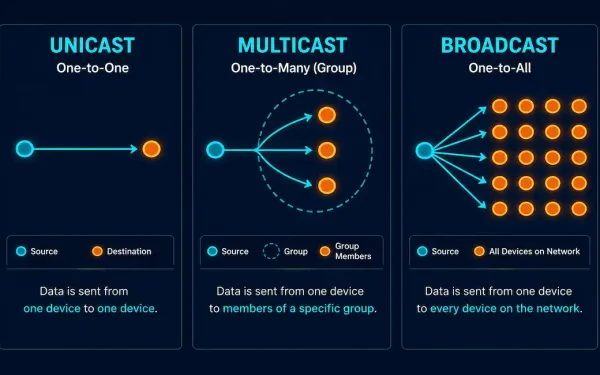
The Image Compares Unicast, Multicast, And Broadcast Communication Methods. It Features A Dark Background On The Left With The Title &Quot;Unicast Vs Multicast Vs Broadcast&Quot; Written In White. On The Right, Three Diagrams Visually Represent Each Communication Type. The Top Diagram Shows Unicast, Where A Single Source Establishes Individual Connections To Multiple Destinations. The Middle Diagram Illustrates Multicast, Where One Source Sends Data To Selected Destinations Via A Network. The Bottom Diagram Depicts Broadcast, Demonstrating A Single Source Transmitting Data To All Destinations Within The Network. The Networknutsad Logo Is Visible In The Bottom Left Corner.
CCNA

Unicast, Multicast, and Broadcast Communication Explained

Every packet that moves across a network is delivered using one of three fundamental communication methods: unicast, multicast, or broadcast. Each defines how many devices receive a given transmission — one, a selected group, or all of them — and choosing the right one is central to how efficiently a network runs. As video streaming,...

Muhammad Khattak 7 min read
Five-Step Flowchart Of Cisco Interface Configuration From Selection To Activation
CCNA

Cisco Router Interface Configuration: A Complete CLI Guide

Configuring a router’s interfaces correctly is foundational to everything else that router does. A misconfigured or disabled interface means no traffic flows, regardless of how well everything else on the device is set up. This guide covers the full interface configuration process, from selecting the right interface through verification and troubleshooting, using the core commands...

Muhammad Khattak 8 min read
Cisco Router R1 With Console Cable Connection And Two Vty Access Paths Shown — Telnet Marked As Insecure Plain Text To Avoid And Ssh Marked As The Encrypted Login Local Method — With A Command Sequence Panel And A Login Banner Warning Showing No Welcome Wording
CCNA

Basic Cisco Router Configuration: Complete Step-by-Step Guide

Different IP networks cannot communicate with each other without a router. Routers do this job by forwarding packets from one IP network to another using routing. Before a router can do any of this, some basic configuration is required. This guide covers the complete basic Cisco router configuration process, using Cisco Packet Tracer for simulation,...

Muhammad Khattak 11 min read
Network Diagram Showing Two Hosts, A Switch, And A Router As The Default Gateway Routing Packets Between The Local Subnet And The Internet
CCNA

Host Default Gateway and Routing Table: A Complete Guide

When a host needs to reach another device, two components decide where its traffic goes: the host’s default gateway and its routing table. Together they answer a single question for every packet — “Is this destination on my own network, or do I need to hand it off to a router?” This guide explains how...

Muhammad Khattak 7 min read
Technical Diagram Showing Three Cisco Switch Port Connection Scenarios: Successful Auto-Negotiation In Green, Duplex Mismatch With Collision Icon In Red, And Speed Mismatch With Link-Down Indicator In Amber, With Cli Commands Below
CCNA

Duplex and Speed Settings on Cisco Switches: Complete Configuration Guide

Duplex and speed settings are the most fundamental configuration parameters for each switch port. By default, Cisco switches auto-negotiate both speed and duplex with connected devices. When this negotiation works correctly, both ends of the link establish the highest common speed and the best available duplex mode without any manual intervention. When it fails —...

Muhammad Khattak 10 min read
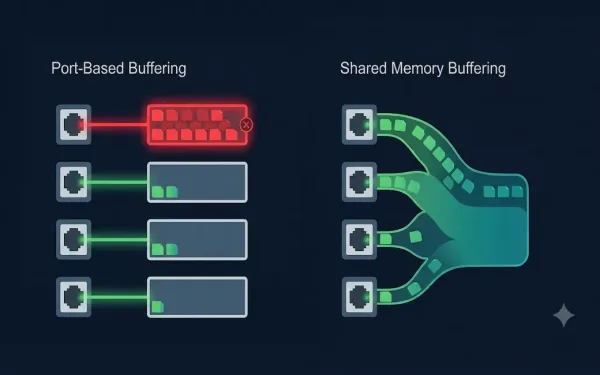
Comparison Diagram Showing Port-Based Buffering With Separate Fixed Buffers Per Port, One Overflowing While Others Sit Idle, Versus Shared Memory Buffering With One Dynamic Pool Flexibly Allocated Toward The Busier Port
CCNA

Memory Buffering on Cisco Switches: Techniques and Best Practices

Ethernet switches employ memory buffering to manage data traffic efficiently, ensuring frames are temporarily stored when a destination port faces congestion. Effective buffering is crucial to prevent frame loss, which can degrade network performance, increase latency, and trigger retransmissions, ultimately impacting user experience and reliability. This guide covers the two core buffering methods, advanced techniques...
Muhammad Khattak 8 min read