Muhammad Khattak
Routing and switching specialist, CCNA certified, with extensive experience in network configuration and troubleshooting. Covers OSPF, EIGRP, VLAN management, and advanced routing concepts.
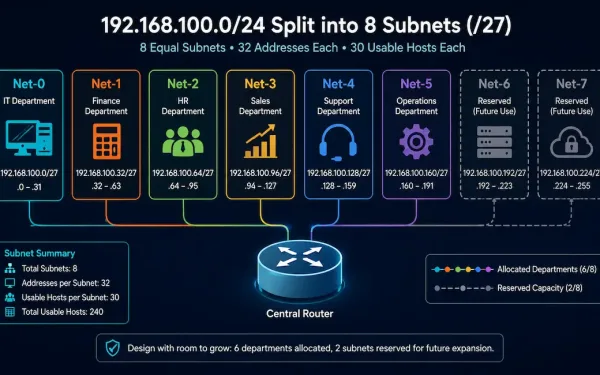
Subnetting Based on Network Requirements
Sometimes the number of subnets an organization needs matters more than the number of hosts each one supports. A company separating traffic by department, for instance, cares primarily about ending up with enough distinct subnets, one per department, even if that means each subnet has more host capacity than strictly necessary. This guide works through...
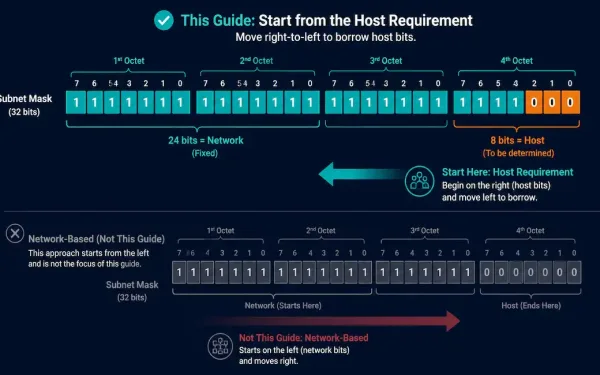
Subnetting Based on Host Requirements
There are two ways to approach a subnetting problem: start from how many subnets you need, or start from how many hosts each subnet needs to support. This guide covers the second approach, host-based subnetting, which flips the usual left-to-right bit-borrowing process on its head and starts from the right instead. The Core Trade-Off Subnetting...
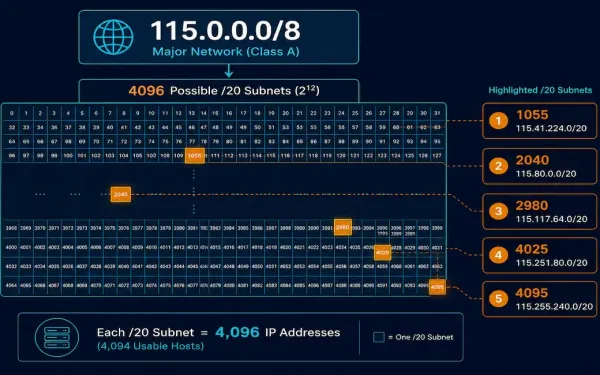
Creating 4,000 Subnets from a /8 Prefix
Some organizations need far more subnets than a typical /24-based design provides. A small ISP allocating a separate subnet to each of 4,000 clients is a realistic example: with a /8 network to work with, there’s plenty of host-portion room to borrow from. This guide works through the full process, including five completely worked examples...
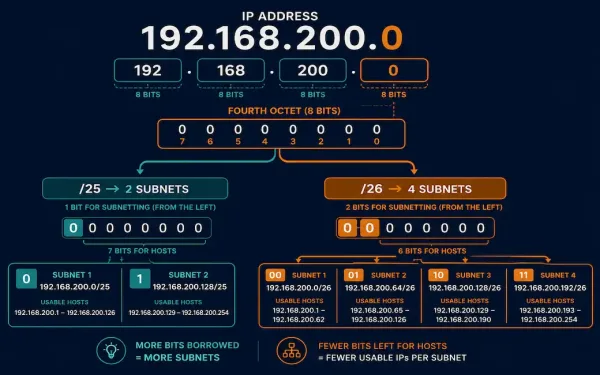
Classless Subnetting Examples: Two Fully Worked Problems
Classless subnetting, made possible by CIDR (Classless Inter-Domain Routing) since its introduction in 1993, lets an administrator borrow bits from any position in the host portion of an address, rather than being restricted to classful boundaries like /8, /16, or /24. This guide works through two complete subnetting problems on the same base network, step...
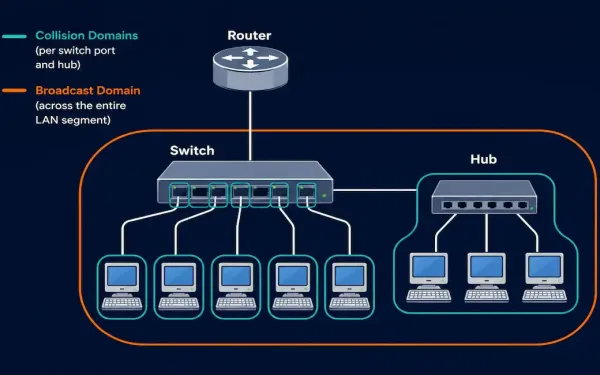
Collision Domains and Broadcast Domains Explained
Understanding where a collision domain ends and where a broadcast domain ends is one of the most fundamental spatial-reasoning skills in networking, and it’s tested constantly on the CCNA exam through topology diagrams. This guide covers both concepts precisely, works through a single consistent topology example for each, and covers the real problems that happen...
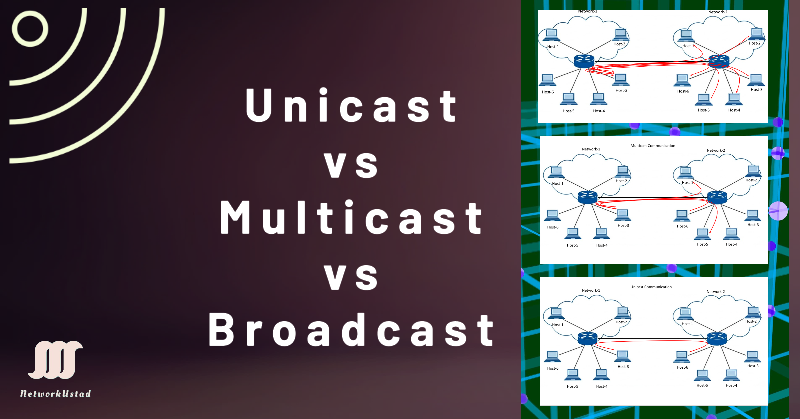
Unicast, Multicast, and Broadcast Communication Explained
Every packet that moves across a network is delivered using one of three fundamental communication methods: unicast, multicast, or broadcast. Each defines how many devices receive a given transmission — one, a selected group, or all of them — and choosing the right one is central to how efficiently a network runs. As video streaming,...
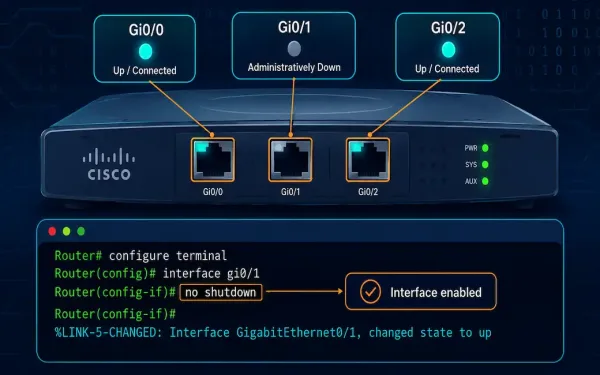
Cisco Router Interface Configuration: A Complete CLI Guide
Last updated: October 2026 — corrected for technical accuracy and modernized for current best practice. Configuring router interfaces correctly is one of the first real skills a CCNA candidate needs, and it’s also one of the easiest places to make a small mistake that causes a confusing failure later. This guide walks through interface types,...
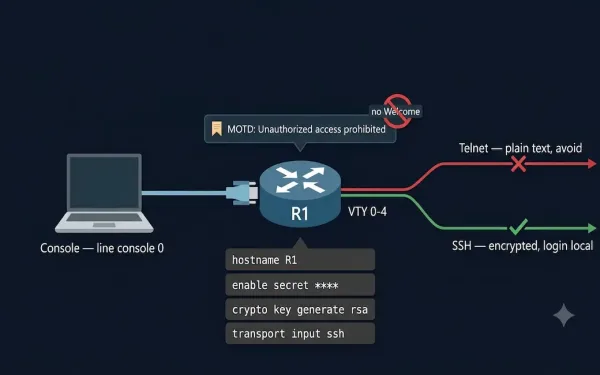
Basic Cisco Router Configuration: Complete Step-by-Step Guide
Different IP networks cannot communicate with each other without a router. Routers do this job by forwarding packets from one IP network to another using routing. Before a router can do any of this, some basic configuration is required. This guide covers the complete basic Cisco router configuration process, using Cisco Packet Tracer for simulation,...
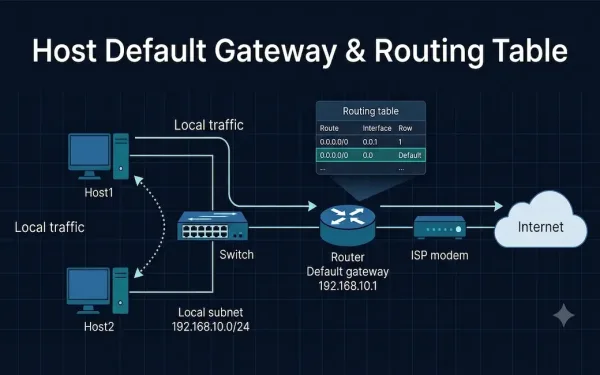
Host Default Gateway and Routing Table: A Complete Guide
When a host needs to reach another device, two components decide where its traffic goes: the host’s default gateway and its routing table. Together they answer a single question for every packet — “Is this destination on my own network, or do I need to hand it off to a router?” This guide explains how...
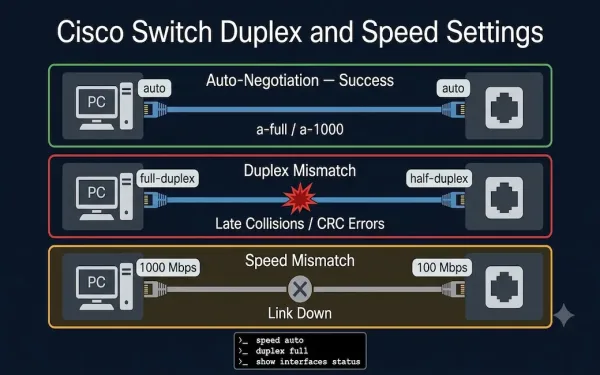
Duplex and Speed Settings on Cisco Switches: Complete Configuration Guide
Duplex and speed settings are the most fundamental configuration parameters for each switch port. By default, Cisco switches auto-negotiate both speed and duplex with connected devices. When this negotiation works correctly, both ends of the link establish the highest common speed and the best available duplex mode without any manual intervention. When it fails —...