Muhammad Khattak
Routing and switching specialist, CCNA certified, with extensive experience in network configuration and troubleshooting. Covers OSPF, EIGRP, VLAN management, and advanced routing concepts.
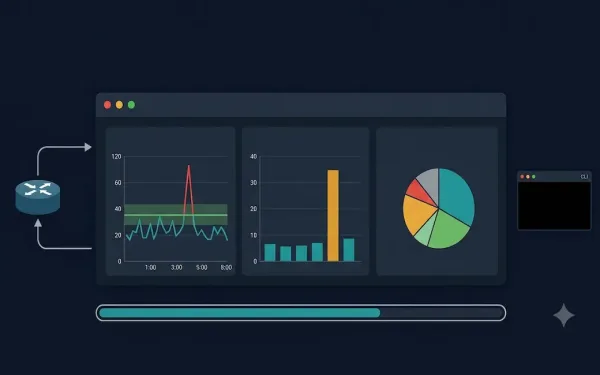
Network Baseline: What It Is, How to Establish One, and Why It Matters
Do you know your standard network throughput volume and the types of traffic used in your network? If you cannot answer those questions with specific numbers, you need a network baseline. A network baseline is one of the most valuable tools available to network administrators for monitoring performance, detecting anomalies, and troubleshooting problems before they...
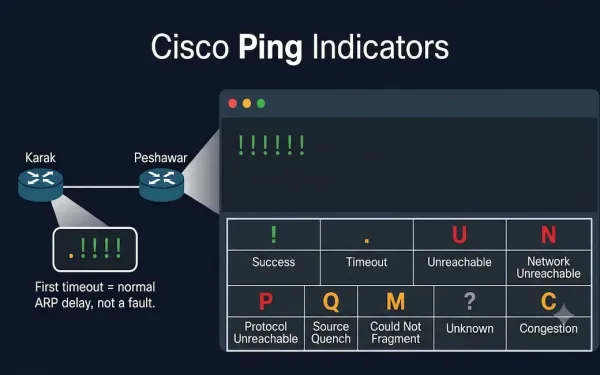
Understanding Ping Indicators and Ping Results in Cisco IOS
The ping command is a fundamental network troubleshooting tool that uses the Internet Control Message Protocol (ICMP), as defined in RFC 792, to test connectivity between devices. It is essential for CCNA (ICND1, ICND2) and CCNP (ROUTE, SWITCH, TSHOOT) exam preparation, helping students verify Layer 3 connectivity by interpreting ping results correctly. This guide covers...
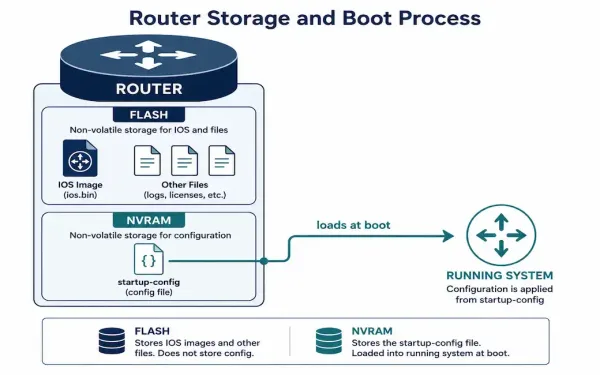
Cisco Router File System: Flash, NVRAM, and Backup Methods
Every Cisco router runs on a small, purpose-built file system that stores the IOS image, configuration files, and a handful of supporting files. Understanding how it’s organized — and how to back it up properly — is a core skill for anyone managing Cisco equipment, whether that’s for CCNA study or day-to-day network administration. This...
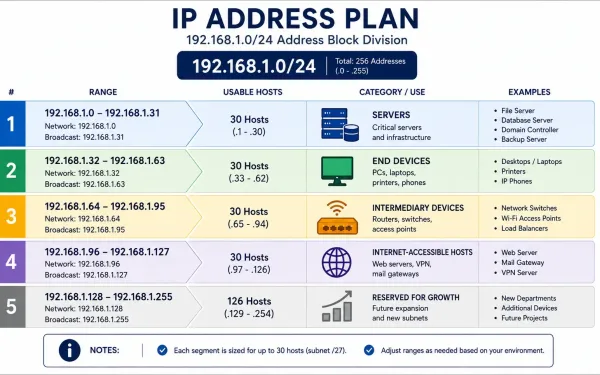
IP Address Planning for a Small Network
Every device on a network needs a unique IP address, but “make sure nothing conflicts” is a low bar. Good IP address planning goes further: it groups devices logically, makes troubleshooting faster, and makes security policy dramatically easier to write and maintain. A network where you can tell a device’s role just by looking at...
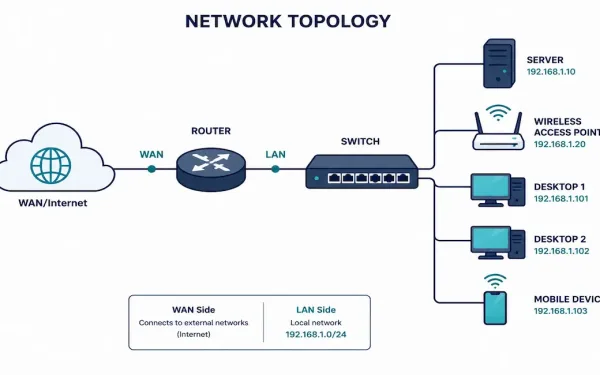
Small Network Topologies: Design, Configuration, and Growth Planning
Most businesses don’t run sprawling enterprise networks — they run small ones: a single router, one or two switches, a handful of access points, and a modest number of users. Understanding how to design, secure, and eventually grow a small network well is one of the most practically useful skills in networking, precisely because it’s...
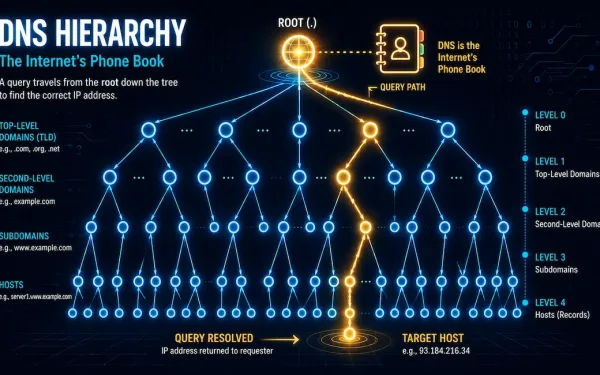
Domain Name System (DNS): Message Format, Hierarchy, and Cisco Configuration
DNS translates human-readable domain names, like networkustad.com, into machine-readable IP addresses, like 64.91.237.241. It’s the backbone of modern networking. Without it, you’d need to memorize an IP address for every site you visit. For CCNA and CCNP students, DNS matters beyond just browsing the web. It underpins how devices find each other across IP networks,...
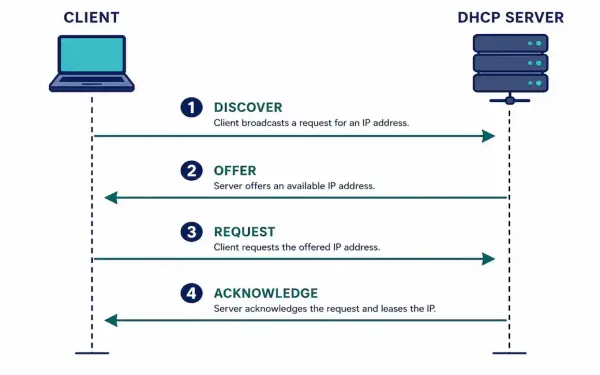
Dynamic Host Configuration Protocol (DHCP): How It Works and How to Configure It
Dynamic Host Configuration Protocol automates one of the most repetitive tasks in networking: assigning IP addresses, subnet masks, default gateways, and DNS servers to every device that joins a network. Without it, every device would need manual configuration — workable for a handful of servers, unmanageable for an office of hundreds of laptops and phones...
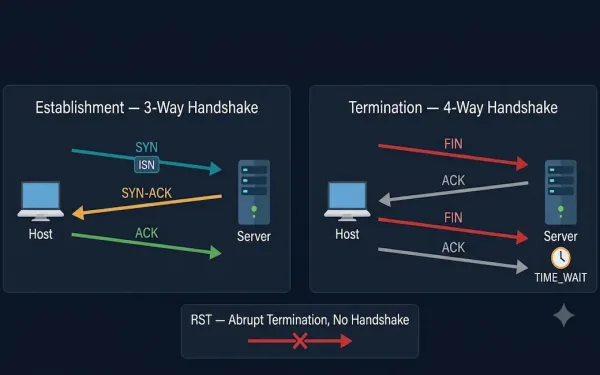
TCP Connection Establishment and Termination
All application processes on a server use unique port numbers. A network administrator can use default ports (e.g., 80 for HTTP, 21 for FTP) or configure custom ports manually, ensuring no conflicts. An active server application listening on an open port means the transport layer accepts and processes segments addressed to that port number. Every...
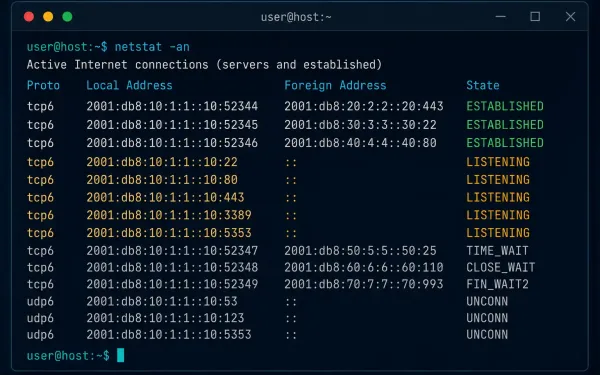
The Netstat Command: Monitor and Troubleshoot Network Connections
Knowing which TCP connections are active on a host is one of the fastest ways to catch a problem before it becomes an incident. An unexplained outbound connection can mean malware. A port stuck in the wrong state can mean a misbehaving application. The netstat command gives you visibility into both, on Windows and Linux...
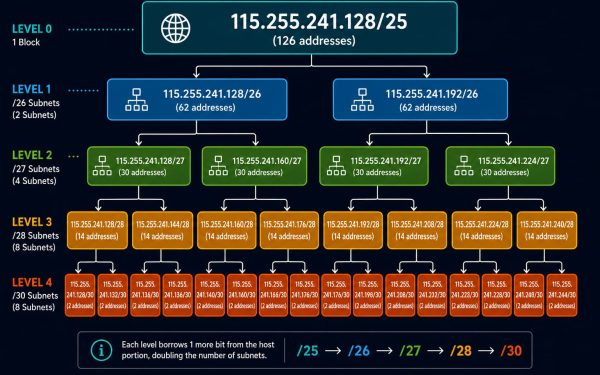
Variable Length Subnet Masking (VLSM) Explained
VLSM lets a single address block be divided into subnets of genuinely different sizes, rather than forcing every subnet to share one uniform mask. This guide continues directly from the network-requirement subnetting example covered previously, taking one of those eight /25 subnets and subdividing it further, three levels deep, to show exactly how VLSM avoids...