
Networking
CCNA tutorials, Cisco guides, and enterprise networking insights for IT professionals.
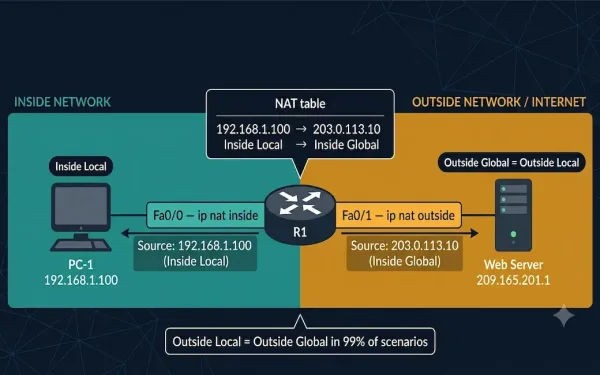
NAT Terminology Explained: CCNA 200-301 Must-Know Address Types
As discussed before, NAT translates private IP addresses into public IP addresses. In the process of translation, there are different operations involved, and understanding each of them requires understanding NAT terminology. Before understanding NAT in detail, it is important to understand the four NAT address types — inside local, inside global, outside local, and outside...
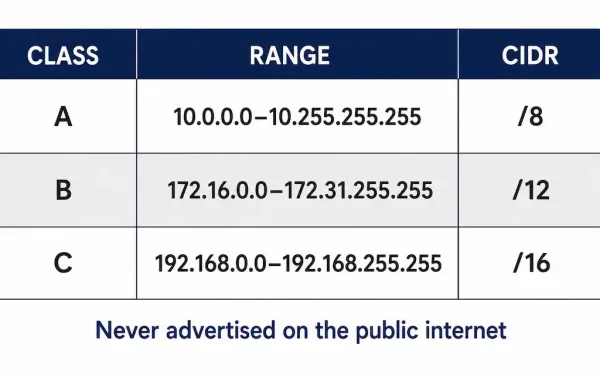
Network Address Translation (NAT) & RFC 1918 Private IPv4 Addresses
IPv4 only has about 4.3 billion addresses total — a number that looked enormous in the early 1980s and nowhere near enough once personal computing and the web took off. Network Address Translation, alongside RFC 1918 private addressing, is the pairing that kept IPv4 usable for decades past when it otherwise would have run out....
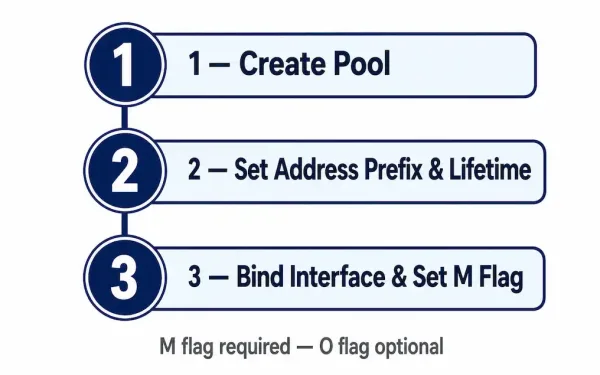
Configuring a Stateful DHCPv6 Server on a Cisco Router
Stateful DHCPv6 is the IPv6 mode that behaves the way DHCPv4 always has: the server assigns the address itself, tracks which client has which address, and hands out supplementary options alongside it — no SLAAC involved on the client side at any point. That’s the core distinction from stateless DHCPv6, and it changes almost every...
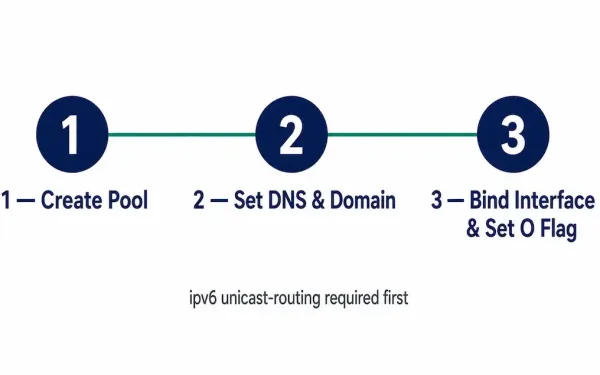
Configuring a Stateless DHCPv6 Server on a Cisco Router
Stateless DHCPv6 does one job and one job only: it hands out supplementary configuration — DNS servers, a domain name — to clients that have already generated their own IPv6 address through SLAAC entirely on their own. It never assigns an address itself, under any circumstances. That distinction shapes every command in this setup, and...
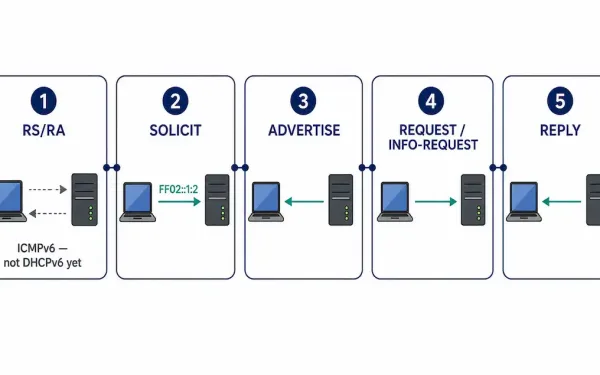
How DHCPv6 Operation Works
DHCPv6 doesn’t start the way DHCPv4 does. There’s no equivalent of a client blindly broadcasting into the dark hoping something answers — in IPv6, the very first thing that happens is an ICMPv6 Router Advertisement, and that message is what tells a client whether it should even bother starting a DHCPv6 conversation at all in...
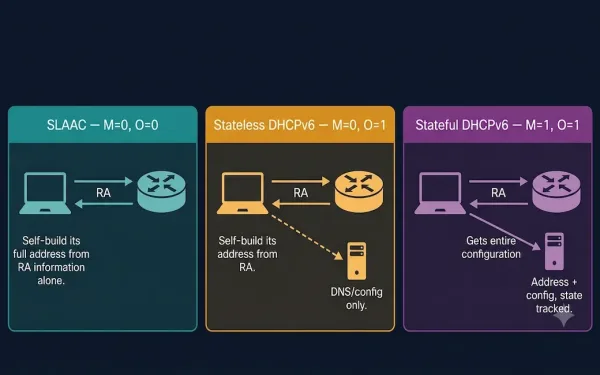
SLAAC and DHCPv6
Recall that the router sends a Router Advertisement (RA) message, and the settings within that RA message decide whether a client can obtain its IPv6 address information automatically using SLAAC, DHCPv6, or a combination of both. This guide covers both methods, the three possible RA flag combinations, and how to configure and verify each on...
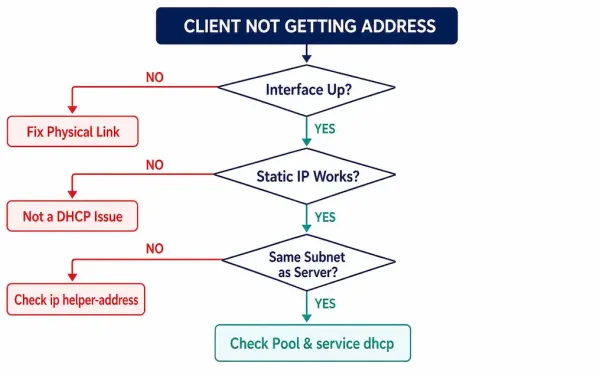
How to Troubleshoot DHCPv4 Problems
DHCP failures rarely announce their cause directly — a client just sits without an address, or ends up with the wrong one, and the actual reason could be anywhere from a bad cable to a missing relay command to a full address pool sitting quietly exhausted. What separates a fast fix from an hour of...
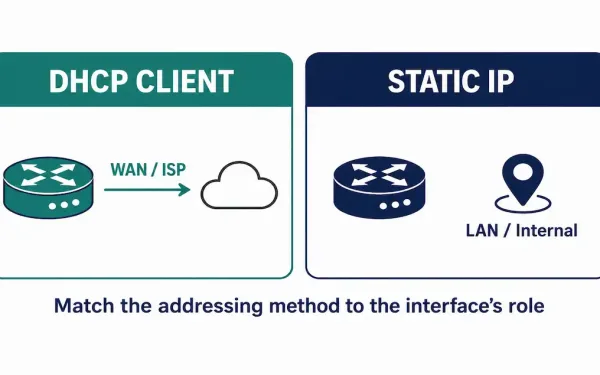
Configuring a Router as a DHCPv4 Client
A router can learn its own IP address the same way an ordinary client computer does — by asking a DHCP server for one, instead of having an address typed in manually on the device itself. This isn’t the normal setup for a router’s internal, LAN-facing interfaces, where a stable, known address matters. But it’s...
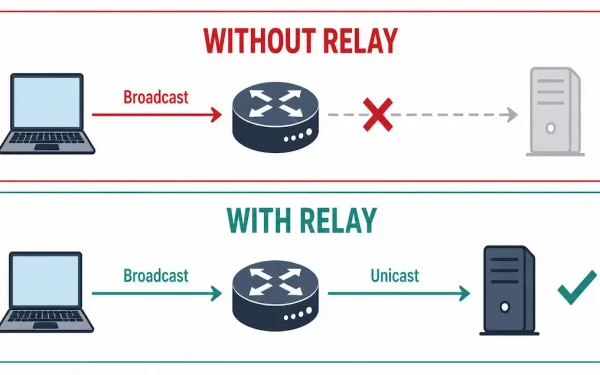
What Is DHCPv4 Relay?
Routers don’t forward broadcast traffic between subnets — that’s the whole point of a router, keeping broadcast domains contained. Most of the time that’s exactly what you want. But DHCP’s initial DISCOVER message is a broadcast, sent by a client that has no IP address yet and therefore no way to address anything directly. If...
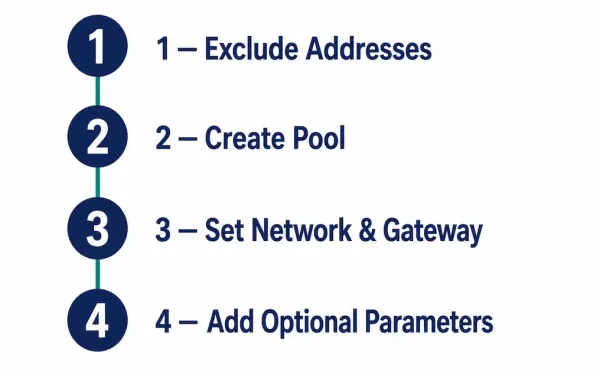
Configuring a Basic DHCPv4 Server on a Cisco Router
A Cisco router doesn’t need a dedicated server to hand out IP addresses — IOS can run the DHCP server role itself, assigning and managing addresses from a defined pool to clients on the LAN without any separate hardware or software required. This is the “Easy IP” setup common in small offices and labs, and...