
CCNA
Cisco Certified Network Associate certification resources
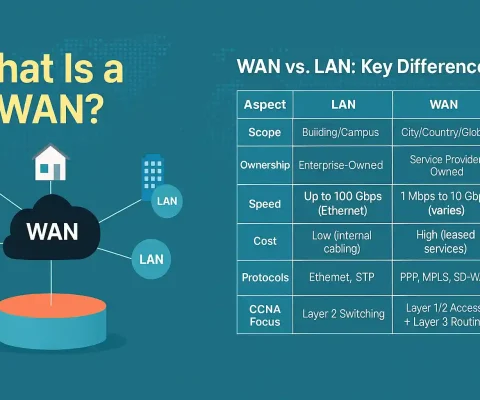
Introduction to WAN Technologies
Wide-area networks (WANs) are used to connect different LANs together. They can bridge LANs within a city, country, or global region. For CCNA candidates, understanding WANs is crucial for the 200-301 exam’s Network Fundamentals domain (15-25% weightage). CCNP students dive deeper into scalable WAN designs via ENCOR (20-30% on WAN optimization). Here’s why WANs matter:...

Basic EIGRP Troubleshooting Commands – Exclusive Introduction
Due to the importance of EIGRP troubleshooting problems related to this protocol is an important ability for a network administrator. There are numerous commands that are important during EIGRP troubleshooting. The most used command for EIGRP troubleshooting is the “show ip eigrp neighbors”, “show ip route”, and “show ip protocols”. The commands can also be...
MD5 Routing Protocol Authentication – Exclusive Explanation
Network security is an important consideration for network administrators. The router install in a public network is at risk each time, anyone with a packet sniffer can read information propagating between routers. The router can be attacked through the interruption of peer devices or the falsifying of routing information. Interruption of peers is less critical...
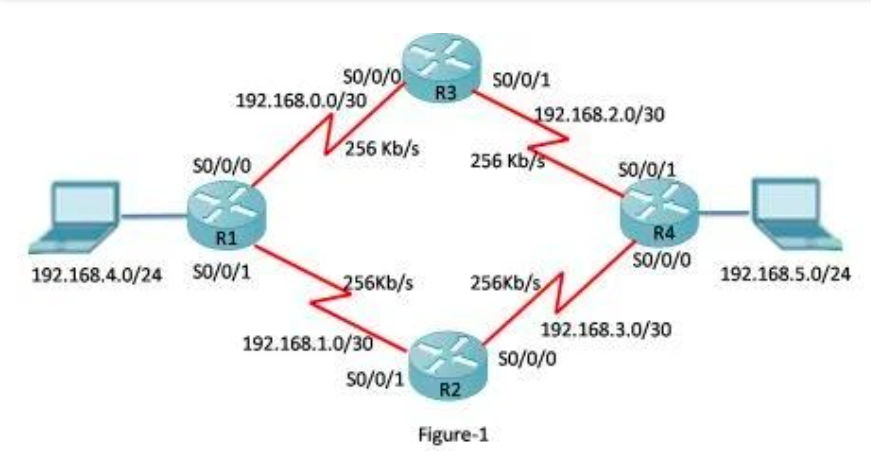
How to Configure EIGRP Load Balancing for IPv4
EIGRP is a Cisco proprietary routing protocol. Router-enabled EIGRP calculates the best route to a destination using the metric value based on the link bandwidth and delay. The protocol selects the shortest path and installs that path in the routing table. If the destination has more than one path with the same administrative distance and...

EIGRP Hello Protocol – Exclusive Explanation
Hello Intervals and Hold Times – EIGRP for IPv4 EIGRP uses the Hello protocol to establish and maintain a connection with its neighbor and monitor the established connection. It sends a Hello packet periodically to its neighbor. The rate at which EIGRP sends a Hello Packet is known as the Hello interval. The Hold timer...
How to Configure EIGRP Bandwidth
EIGRP Bandwidth for IPv4 EIGRP utilizes 50 % of an interface’s bandwidth for EIGRP information by default. Utilizing a half interface bandwidth not allowing enough bandwidth for the routing of normal traffic and prevents the EIGRP process from over-utilizing a link. We can change to default bandwidth utilization ratio using the command “ip bandwidth-percent eigrp”....
How to Propagate the Default Static Route using EIGRP
The IP address 0.0.0.0/0 is reserved for the default static route. The default route is not routing protocol-dependent; we can use it with any currently supported routing protocol. Usually, the static default route is configured on the edge router, where a network is connected outside the EIGRP routing domain and propagates the default static route...
How to Configure EIGRP Manual Summary Routes
We can configure manual summary routes without enabling the auto-summary. We can also use a manual summary if auto-summary is enabled because EIGRP is a classless routing protocol. Classless routing protocol includes the subnet mask in the routing update; therefore we can configure manual summarization using the supernet routes. In supernetting, we can aggregate multiple...
How to EIGRP automatic summarization
Route summarization is the most common tuning method of EIGRP. It allows a router to group multiple networks and advertises them as one large group using a single, summarized route. The capability to summarize routes is very important due to the rapid growth of networks. Route summarization reduces the number of routes in a larger...
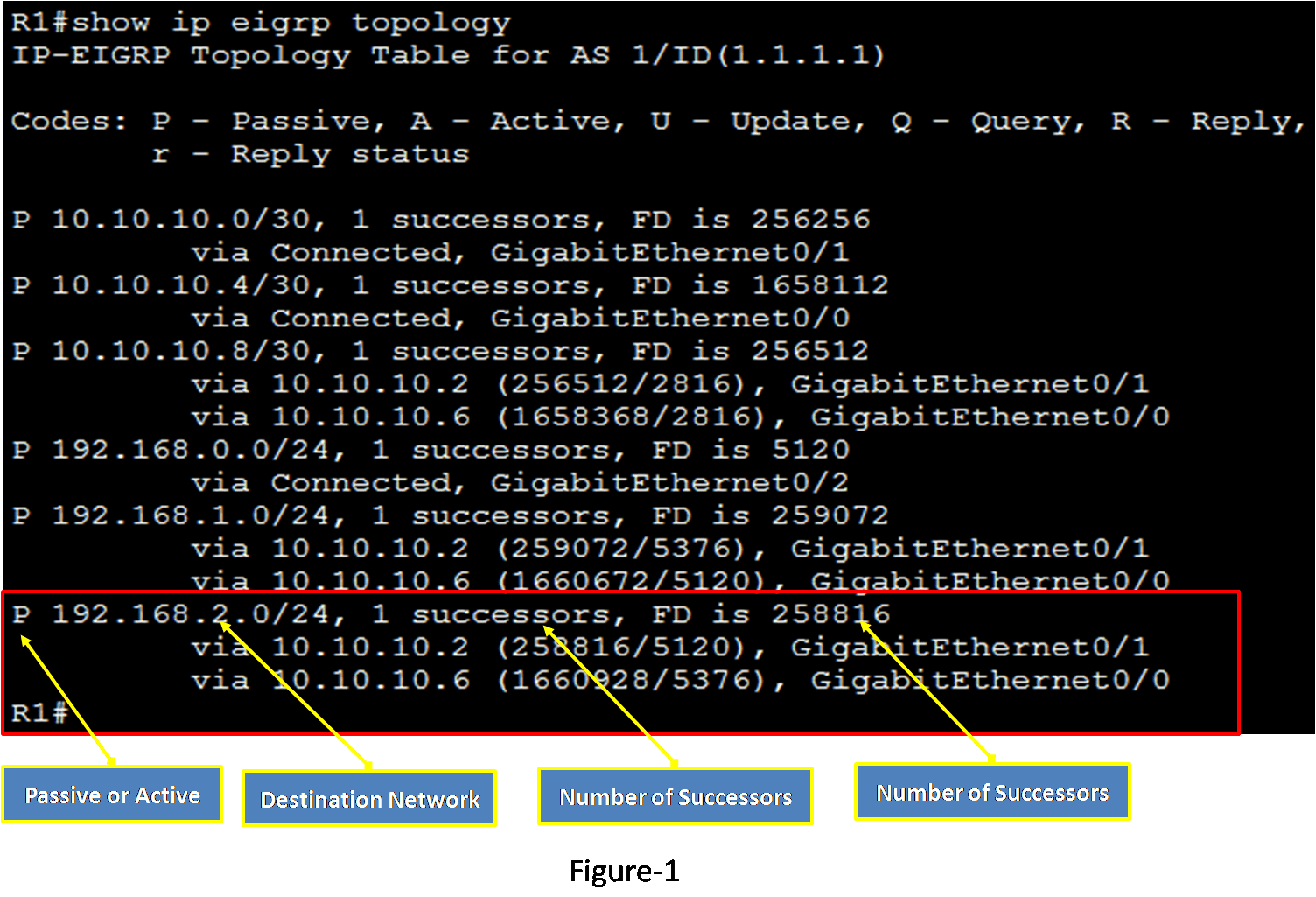
Topology Table – Exclusive Introduction
The EIGRP topology table contains all of the information about all known routes received from EIGRP neighbors. As an EIGRP router learns routes from its neighbors, those routes are stored in its EIGRP topology table. If a neighbor is advertising a possible route, it has to be using that route to forward packets to the...