
CCNA
Cisco Certified Network Associate certification resources
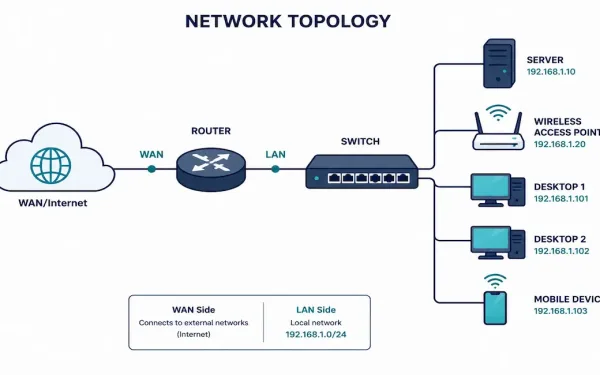
Small Network Topologies: Design, Configuration, and Growth Planning
Most businesses don’t run sprawling enterprise networks — they run small ones: a single router, one or two switches, a handful of access points, and a modest number of users. Understanding how to design, secure, and eventually grow a small network well is one of the most practically useful skills in networking, precisely because it’s...
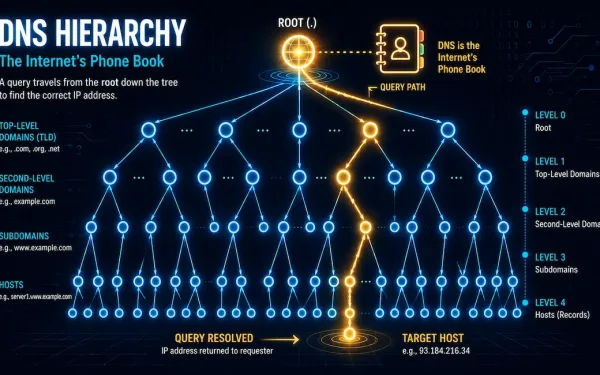
Domain Name System (DNS): Message Format, Hierarchy, and Cisco Configuration
DNS translates human-readable domain names, like networkustad.com, into machine-readable IP addresses, like 64.91.237.241. It’s the backbone of modern networking. Without it, you’d need to memorize an IP address for every site you visit. For CCNA and CCNP students, DNS matters beyond just browsing the web. It underpins how devices find each other across IP networks,...
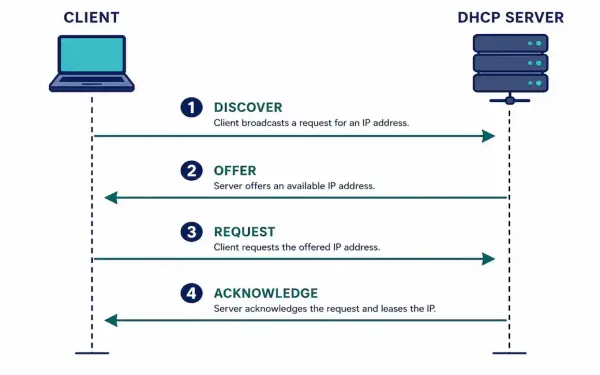
Dynamic Host Configuration Protocol (DHCP): How It Works and How to Configure It
Dynamic Host Configuration Protocol automates one of the most repetitive tasks in networking: assigning IP addresses, subnet masks, default gateways, and DNS servers to every device that joins a network. Without it, every device would need manual configuration — workable for a handful of servers, unmanageable for an office of hundreds of laptops and phones...
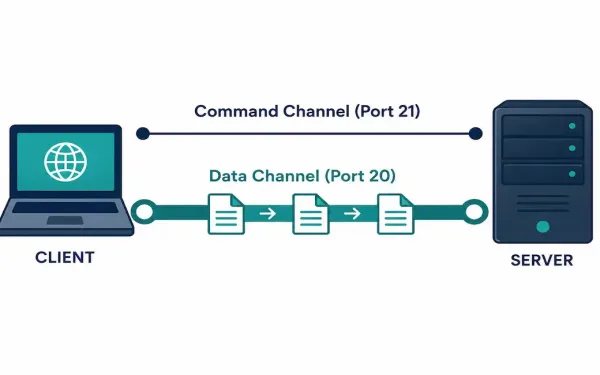
File Transfer Protocol (FTP): How It Works and How to Secure It
File Transfer Protocol is one of the oldest application layer protocols still in active use today. Its original specification, RFC 114, dates back to 1971 — decades before the modern web existed. It’s still worth understanding in depth, both because it shows up regularly in CCNA and CCNP material and because plenty of real infrastructure...
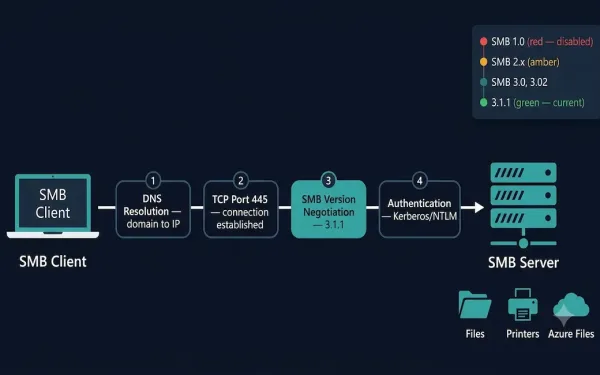
Server Message Block (SMB) Protocol: A Complete Guide
The Server Message Block (SMB) protocol enables hosts to share files, directories, printers, and other resources across a network as if those resources were local. It is a request-response protocol that operates at the Application layer, using TCP port 445 for direct communication. Every message in the SMB protocol follows a standard structure: a fixed-size...
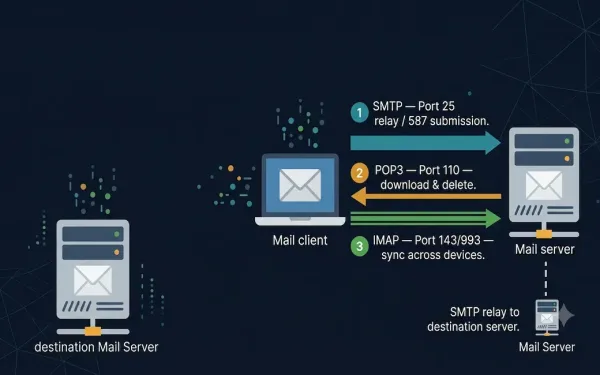
Email Protocols: SMTP, POP3, and IMAP
Email is one of the primary services running on the internet. The email server stores email messages in a database, and email uses a store-and-forward method for sending and holding messages. Email clients communicate with servers running mail services to send and receive email, and the client-connected server in turn communicates with other mail servers...
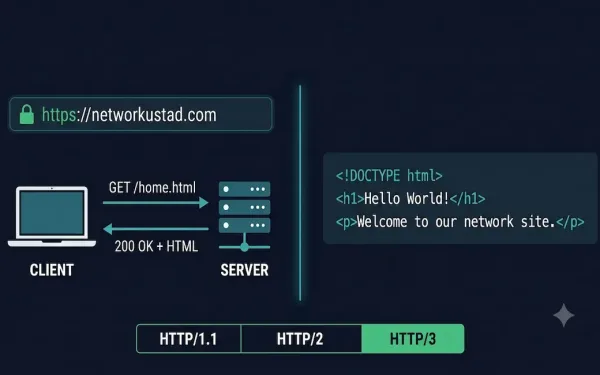
HTTP and HTML Explained: How the Web Communicates
HTTP and HTML are the two foundational technologies behind every web page you visit. They work together but do completely different jobs. HTTP (HyperText Transfer Protocol) is the application-layer protocol that governs how data is requested and delivered between a web server and a client. HTML (HyperText Markup Language) is the markup language that structures...
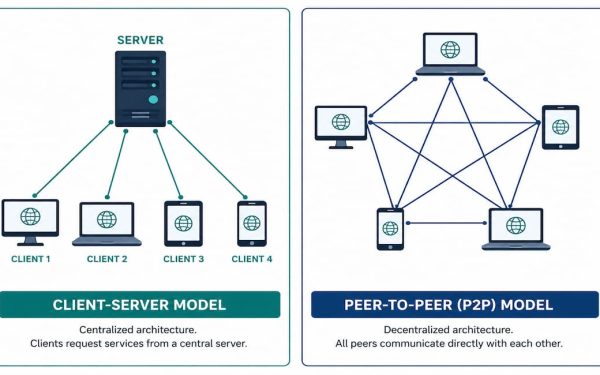
Client-Server vs. Peer-to-Peer: Network Models Explained
Almost every network interaction you have falls into one of two models: client-server, where a dedicated device provides a service to others, or peer-to-peer, where devices share resources directly with each other, no dedicated server required. Understanding both — and knowing which one a given application actually uses — matters for everything from troubleshooting to...
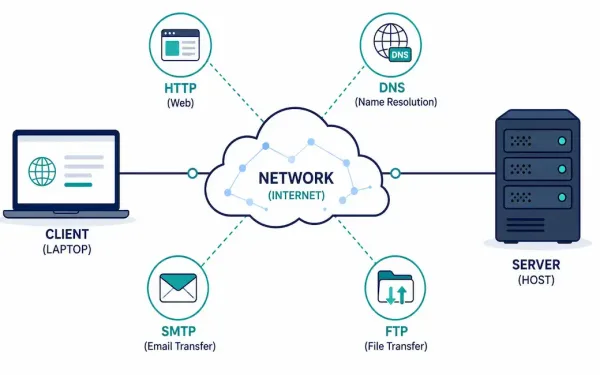
The Application Layer: Protocols, Function, and How It Fits the Network Stack
Every time you load a web page, send an email, or transfer a file, you’re using the application layer — the topmost layer of the network stack, and the only one most users ever interact with directly. Everything below it exists to support what happens here. This guide covers what the application layer actually does,...
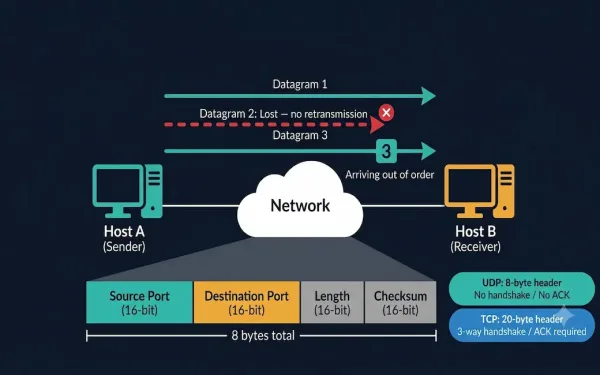
User Datagram Protocol (UDP): Complete Guide for CCNA
The User Datagram Protocol (UDP) is a lightweight Transport Layer protocol that provides fast, low-overhead data transmission between applications without establishing a connection first. Defined in RFC 768, UDP is one of the two core Transport Layer protocols alongside TCP and is directly tested on the CCNA 200-301 exam. Understanding UDP — its header structure,...