
Domain 4.8 | IP Services — 10% of exam
Learning Objectives
By the end of this lesson, you will be able to:
- Explain why SSH replaced Telnet as the standard for administrative remote access.
- Configure the prerequisites SSH requires before key generation will succeed: hostname and domain name.
- Generate an RSA key pair and configure VTY lines to accept SSH-only connections.
- Configure local username-based authentication for SSH login.
- Verify SSH is enabled and functioning using
show ip sshand a live connection test.
Key Terms Glossary
| Term | Definition |
|---|---|
| SSH (Secure Shell) | A protocol providing encrypted remote CLI access to a network device. |
| Telnet | An older remote access protocol that transmits credentials and session data in plaintext. |
| RSA key pair | A public/private cryptographic key pair generated on a device, required for SSH to function. |
| VTY line | A virtual terminal line used for remote CLI sessions (Telnet or SSH) into a device. |
| Transport input | The interface/line configuration setting controlling which protocols (Telnet, SSH, both) are accepted for incoming connections. |
| Local authentication | Verifying login credentials against a username/password database stored directly on the device, rather than an external server. |
Why SSH Replaced Telnet
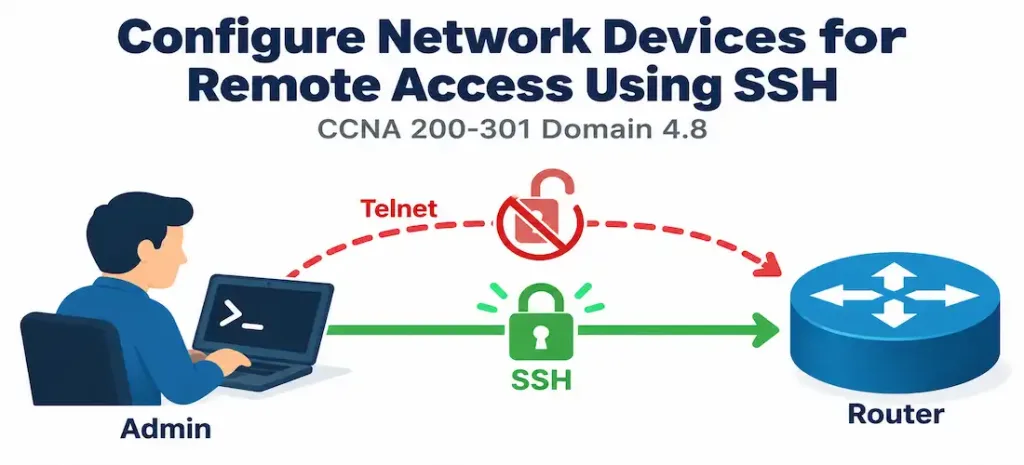
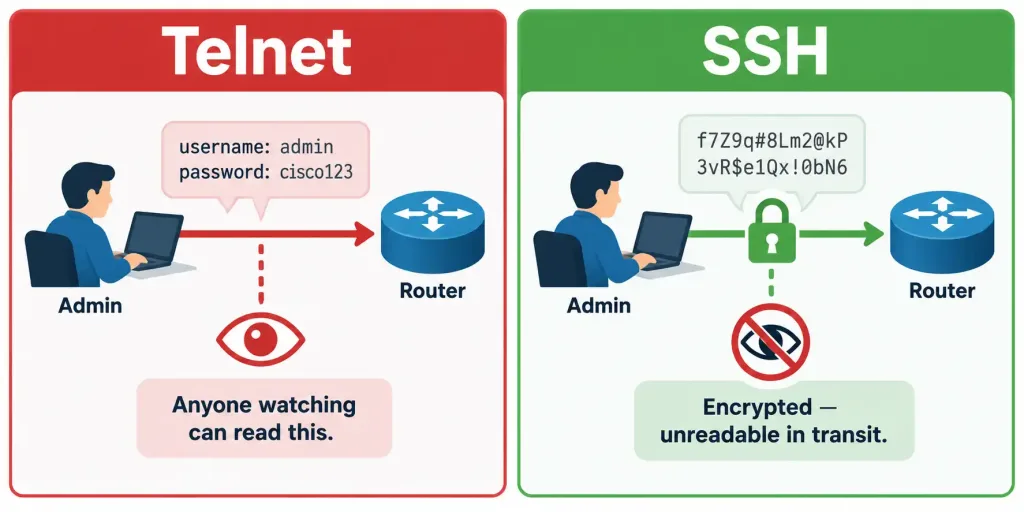
Telnet was, for a long time, the standard way to remotely access a network device’s command line. It’s simple and universally supported — and it has a critical flaw that makes it inappropriate for any security-conscious environment: Telnet transmits everything in plaintext, including the username and password used to log in. Anyone able to observe traffic on the path between an administrator and the device — a compromised switch, a tapped link, a malicious actor on a shared network segment — can capture those credentials directly, in full view, with no special tools beyond basic packet capture.
SSH (Secure Shell) solves this by encrypting the entire session, credentials included, using cryptographic key exchange to establish a secure channel before any authentication or command data is transmitted. Functionally, SSH provides the same remote CLI access Telnet always has — an administrator connects, authenticates, and runs commands exactly as before — but with the traffic itself protected from casual or even fairly sophisticated interception. This single difference is why virtually every modern security guideline treats SSH as mandatory and Telnet as something to actively disable, not merely something optional to skip enabling.
Prerequisites: Hostname and Domain Name Before Key Generation
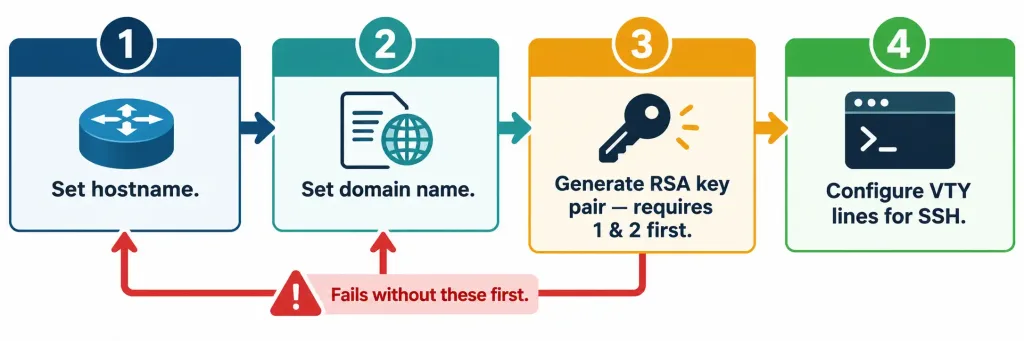
SSH’s encryption depends on an RSA key pair generated locally on the device, and that key generation process has a specific, easy-to-miss prerequisite: a hostname and a domain name must both be configured before the RSA key pair can be generated.
hostname R1
ip domain-name example.com
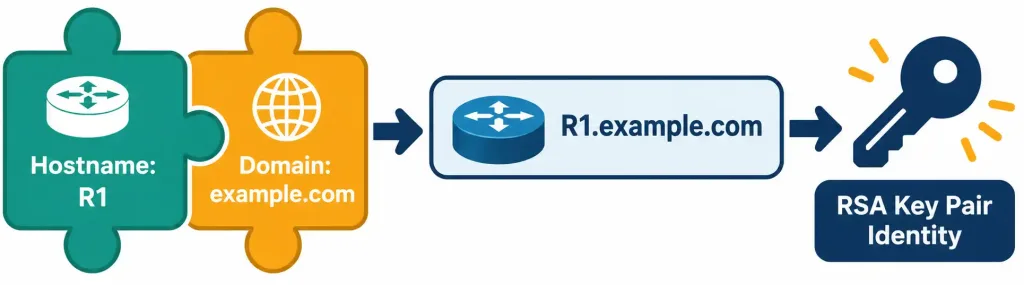
The reason is structural, not arbitrary: the RSA key generation process constructs the key’s identity using the device’s fully qualified domain name — combining the hostname and domain name together (R1.example.com, in this example). Without both pieces already configured, IOS has no complete identity to build the key around, and the crypto key generate rsa command will fail outright rather than proceeding with an incomplete or placeholder identity. This ordering requirement is one of the most common early stumbling points in SSH configuration labs — an administrator who runs the key generation command first, before setting a hostname and domain, will hit an error that isn’t always immediately obvious in its cause if they don’t already know this dependency exists.
Generating the RSA Key Pair
With the hostname and domain name in place, key generation proceeds:
crypto key generate rsaIOS prompts for a key size, commonly offering a choice such as 512, 768, 1024, or 2048 bits. Larger key sizes provide stronger cryptographic security at the cost of slightly more processing overhead during the initial key exchange — for any real deployment, 2048 bits is the generally recommended modern minimum, since smaller key sizes are considered weak by current security standards even though older documentation and some lab exercises still reference smaller values as functional minimums. Once generated, this key pair is what SSH uses to establish its encrypted session with connecting clients.
Restricting VTY Access to SSH Only
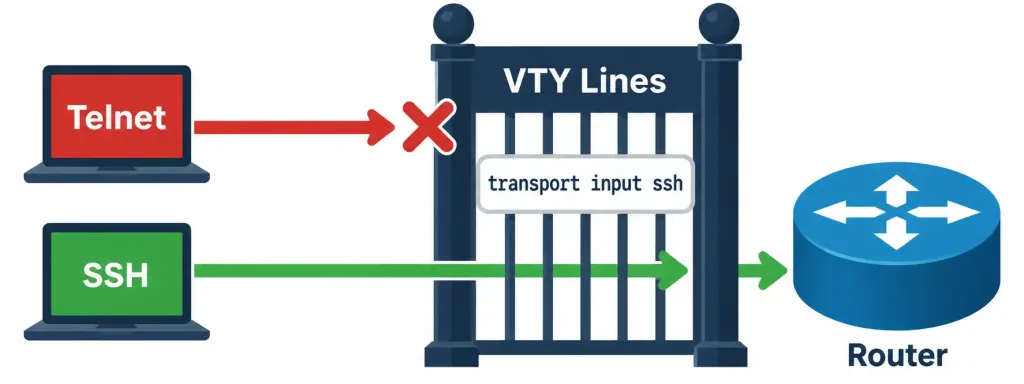
Generating a key pair alone doesn’t disable Telnet or force incoming connections toward SSH — that requires explicit configuration on the device’s VTY lines, the virtual lines used for remote CLI sessions:
line vty 0 4
 transport input ssh
 login local
The transport input ssh command is what actually restricts incoming remote connections to SSH exclusively — by specifying only ssh rather than telnet or all, Telnet connections are implicitly rejected on these lines, even though nothing explicitly says “disable Telnet.” This is a detail worth being precise about: the command doesn’t have a separate “disable Telnet” action distinct from simply not including it in the accepted transport list. If both protocols needed to remain available during a transition period, transport input telnet ssh would accept either, with SSH still available for any client capable of using it.
login local tells the device to authenticate incoming connections against a locally stored username/password database, rather than expecting no authentication at all or delegating authentication to an external server (a more advanced topic beyond this objective’s scope). This pairs directly with a locally configured user account:
username admin secret StrongPassword123Using secret here rather than password matters: secret stores the credential using a strong hash, while the older password keyword stores it in a considerably weaker, reversible format by default. For any real deployment, secret is the appropriate choice, and recognizing the difference between the two keywords is a detail worth carrying forward into broader device-hardening practices beyond just this specific SSH configuration.
Common Misconceptions
- “Generating an RSA key pair automatically disables Telnet.” Key generation only enables SSH to function; Telnet remains available on the VTY lines until
transport inputis explicitly configured to exclude it. - “
crypto key generate rsacan be run before configuring a hostname and domain name, as long as they’re set eventually.” The command requires both to already be configured at the moment it runs, since the key’s identity is built from them directly — it will fail without them in place first, not simply generate a placeholder identity to be corrected later. - “
passwordandsecretare interchangeable keywords for setting a login credential.”secretapplies a strong hash to the stored credential; the olderpasswordkeyword stores it in a much weaker, more easily reversible format by default —secretis the appropriate modern choice. - “SSH is only relevant for external, internet-facing access.” SSH matters for any remote administrative access, including purely internal management traffic — internal networks aren’t inherently trusted just because they’re not internet-facing, and internal credential interception is a real risk worth defending against too.
- “Once SSH is configured, no further verification is needed.” Configuration succeeding doesn’t guarantee a working connection — actually testing an SSH session from a client, alongside
show ip ssh, is the only way to confirm the full chain (key generation, VTY configuration, authentication) is genuinely functional end to end.
Configure and Verify: Full Lab Walkthrough
Topology: R1 needs secure remote management access from an administrator’s workstation on the same network, with Telnet access removed entirely in favor of SSH.
Step 1 — Configure the hostname and domain name, required before key generation:
Router(config)# hostname R1
R1(config)# ip domain-name example.com
Step 2 — Generate the RSA key pair, choosing a strong key size:
R1(config)# crypto key generate rsa
How many bits in the modulus [512]: 2048
% Generating 2048 bit RSA keys, keys will be non-exportable...
[OK] (elapsed time was 3 seconds)
Step 3 — Create a local user account using secret for strong credential storage:
R1(config)# username admin secret StrongPassword123Step 4 — Configure the VTY lines to accept SSH only, authenticating against the local user database:
R1(config)# line vty 0 4
R1(config-line)# transport input ssh
R1(config-line)# login local
Step 5 — Optionally, tune SSH-specific timers and retry limits for additional hardening:
R1(config)# ip ssh time-out 60
R1(config)# ip ssh authentication-retries 3
These two commands limit how long an unauthenticated SSH session can remain open before being dropped, and how many failed login attempts are permitted before the connection is closed — both reasonable hardening steps beyond the bare minimum needed for SSH to function at all.
Step 6 — Verify SSH is enabled and correctly configured:
R1# show ip ssh
SSH Enabled - version 2.0
Authentication timeout: 60 secs; Authentication retries: 3
Confirming version 2.0 here matters — SSHv1 has known cryptographic weaknesses, and modern IOS defaults to and strongly prefers version 2 once a sufficiently large RSA key has been generated. Seeing version 1 reported here would be a signal worth investigating rather than assuming everything is equally secure regardless of version.
Step 7 — Confirm from the administrator’s workstation with an actual SSH connection attempt, the most direct functional test available:
admin-pc$ ssh admin@192.168.1.1
Password:
R1>
A successful login here confirms the entire chain worked: hostname and domain configured correctly, RSA key generated, VTY lines correctly restricted and pointed at local authentication, and the user account credentials matching. Configuration succeeding at each individual step doesn’t guarantee this final connection will work — this live test is the one verification step that confirms the whole system together, not just its individual pieces in isolation.
Host Key Verification: What the Client Actually Checks
The first time an administrator connects to a given device via SSH, most SSH clients display a fingerprint of that device’s public key and ask for explicit confirmation before proceeding — something like “the authenticity of host ‘192.168.1.1’ can’t be established, are you sure you want to continue connecting?” This is the client’s way of surfacing the RSA key pair generated earlier in this lesson: the client has no prior record of this device’s key, so it can’t yet confirm it’s really talking to the device it expects rather than something impersonating it on the network path.
Once accepted, most clients cache that key locally and will automatically flag it as a serious warning — not a routine prompt — if a future connection to the same address presents a different key than the one previously recorded. This is a genuinely useful security signal: a device’s key shouldn’t normally change, so an unexpected change can indicate the device was reconfigured (a legitimate but noteworthy event, such as after a factory reset) or, in a worse case, that something else is now intercepting connections to that address. Understanding this behavior — rather than reflexively accepting every key-change warning without a second thought — is a practical piece of judgment that goes beyond the bare configuration commands covered above.
Worth noting for completeness: successful and failed SSH login attempts are commonly recorded via syslog (%SSH-facility messages, following the same structure covered in objective 4.5), which is a practical reason centralized logging and SSH hardening are often implemented together — a spike in failed SSH authentication attempts logged to a centralized syslog server is a meaningful early signal of a brute-force attempt worth investigating.
Packet Tracer Practice Activity
Scenario: A router currently allows Telnet access with no encryption. Your task is to migrate it to SSH-only remote access with local authentication, removing Telnet entirely.
Part 1: Configure basic identity. Set the router’s hostname and a domain name.
Part 2: Generate the RSA key pair. Use a 2048-bit key size.
Part 3: Create a local user account. Use the secret keyword, not password.
Part 4: Restrict VTY access to SSH only. Apply transport input ssh and login local on line vty 0 4.
Part 5: Verify. Run show ip ssh on the router to confirm SSH is enabled at version 2.0. From a PC in the topology, attempt an SSH connection to the router’s management IP address and confirm successful login with the configured credentials. Then attempt a Telnet connection to the same address and confirm it is refused.
Expected result: The SSH connection succeeds and reaches the router’s CLI prompt; the Telnet attempt fails to connect at all, confirming transport input ssh correctly excluded it. If SSH itself fails to connect, check show ip ssh first for the enabled/disabled state and reported version before assuming a credentials problem.
Troubleshooting Patterns
“crypto key generate rsa fails or isn’t accepted.” Confirm both a hostname and a domain name are already configured — this command depends on both being present to construct the key’s identity, and will not proceed without them.
“SSH connections are refused entirely.” Confirm transport input ssh (or transport input telnet ssh) is actually applied on the VTY lines, and confirm show ip ssh reports SSH as enabled with a valid key already generated — a missing RSA key means SSH cannot function even if VTY lines are otherwise correctly configured.
“Telnet still works even though SSH is configured.” This means transport input still includes telnet (or is set to all) rather than being restricted to ssh alone — check the exact VTY line configuration rather than assuming SSH configuration alone disables Telnet.
“Login fails even though the username and password look correct.” Confirm login local is actually configured on the VTY lines — without it, IOS may be expecting a different authentication method entirely (or none at all, if only login without local is set, which expects a line password rather than a username/password pair).
“show ip ssh reports version 1.99 or version 1 instead of 2.0.” This typically indicates a key size too small to support SSHv2 exclusively, or an older IOS default — regenerating the RSA key pair at a larger size (2048 bits) commonly resolves this, since SSHv2 requires a sufficiently large key. Note that version 1.99 specifically indicates the device supports both SSHv1 and SSHv2 simultaneously for backward compatibility, which is itself worth tightening to SSHv2-only in a genuinely hardened deployment.
Frequently Asked Questions
Can SSH and Telnet both remain enabled during a migration period? Yes — configuring transport input telnet ssh allows both simultaneously, useful for a gradual migration before finally restricting to SSH-only once all administrators have confirmed SSH access works for them.
Does login local require creating a separate account for every administrator? Not necessarily — login local checks against whatever local username/password entries exist, which could be a single shared account or individual accounts per administrator, though individual accounts are generally better practice for accountability and auditing purposes.
What happens if the RSA key pair is deleted after SSH has already been configured? SSH will stop functioning until a new key pair is generated, since the encrypted session depends entirely on that key material being present; VTY line configuration alone isn’t sufficient without a valid key.
Is a 2048-bit key always necessary, or is a smaller key acceptable for a lab environment? For a pure lab environment with no real security stakes, a smaller key size will technically work, but building the habit of using 2048 bits (or larger) from the start avoids carrying a weak-security habit forward into a production configuration later.
Does SSH configuration alone secure a device completely? No — SSH secures the remote access channel itself, but overall device security also depends on strong credentials, appropriate access control, keeping software updated, and other hardening practices well beyond just this single objective’s scope.
Is login local the only authentication option available for SSH access? No — larger deployments commonly centralize authentication through AAA (Authentication, Authorization, and Accounting) against an external server rather than maintaining local accounts on every device individually, which becomes increasingly impractical as the number of managed devices grows. login local remains a perfectly valid and common choice for smaller environments or as a fallback method, but recognizing that it’s one option among several is useful context beyond this objective’s immediate scope.
Should idle SSH sessions be automatically disconnected? Yes, as a general hardening practice — an idle, authenticated session left open indefinitely on an unattended terminal is itself a security risk. The exec-timeout command on a VTY line configures automatic disconnection after a period of inactivity, a complementary hardening step alongside the SSH-specific settings covered in this lesson.
SSH Configuration and Security: Practice Quiz
Test your knowledge of Telnet weaknesses, SSH setup, RSA keys, VTY lines, authentication, and SSH hardening.
Summary
- SSH replaces Telnet for administrative remote access specifically because Telnet transmits credentials and session data in plaintext, while SSH encrypts the entire session.
- A hostname and domain name must be configured before
crypto key generate rsawill succeed, since the RSA key’s identity is built from the device’s combined fully qualified domain name. transport input sshon the VTY lines restricts incoming connections to SSH only, implicitly excluding Telnet;login localauthenticates against a local username/password database.- The
secretkeyword should be used overpasswordwhen configuring local credentials, since it applies a strong hash rather than a weaker, more easily reversible storage format. show ip sshconfirms SSH is enabled and reports its version, but an actual SSH connection attempt from a client remains the most direct way to verify the entire configuration chain is genuinely functional end to end.



