
Domain 4.0 | Network Security — 14% of exam
Learning Objectives
By the end of this lesson, you will be able to:
- Explain how ACLs filter traffic and why rule order and implicit deny matter
- Describe URL filtering and content filtering as distinct security controls
- Explain trusted and untrusted network zones and why internal trust still has limits
- Describe the screened subnet (DMZ) and the purpose it serves
- Identify appropriate zone and filtering configurations for common scenarios
Key Terms – Security Rules & Zones
| Term | Definition |
|---|---|
| ACL (Access Control List) | An ordered list of permit/deny rules that filters traffic based on criteria like source/destination IP, port, and protocol |
| Implicit Deny | The default rule at the end of an ACL that blocks any traffic not explicitly matched by an earlier rule |
| Trusted Zone | A network segment, typically internal, generally assumed to carry a lower baseline risk than external networks |
| Untrusted Zone | A network segment, typically external or internet-facing, assumed hostile by default |
| Screened Subnet (DMZ) | A buffer network segment between trusted and untrusted zones, hosting public-facing services in isolation from both |
Explanation
Closing Out Module 4: Enforcing Rules and Boundaries
The previous lesson covered controls operating at the device and port level — hardening, port security, 802.1X. This final lesson in Module 4 moves up a level, to the rules and zone boundaries that govern what traffic is allowed to flow where across the network as a whole.ACLs: Filtering Traffic by Rule
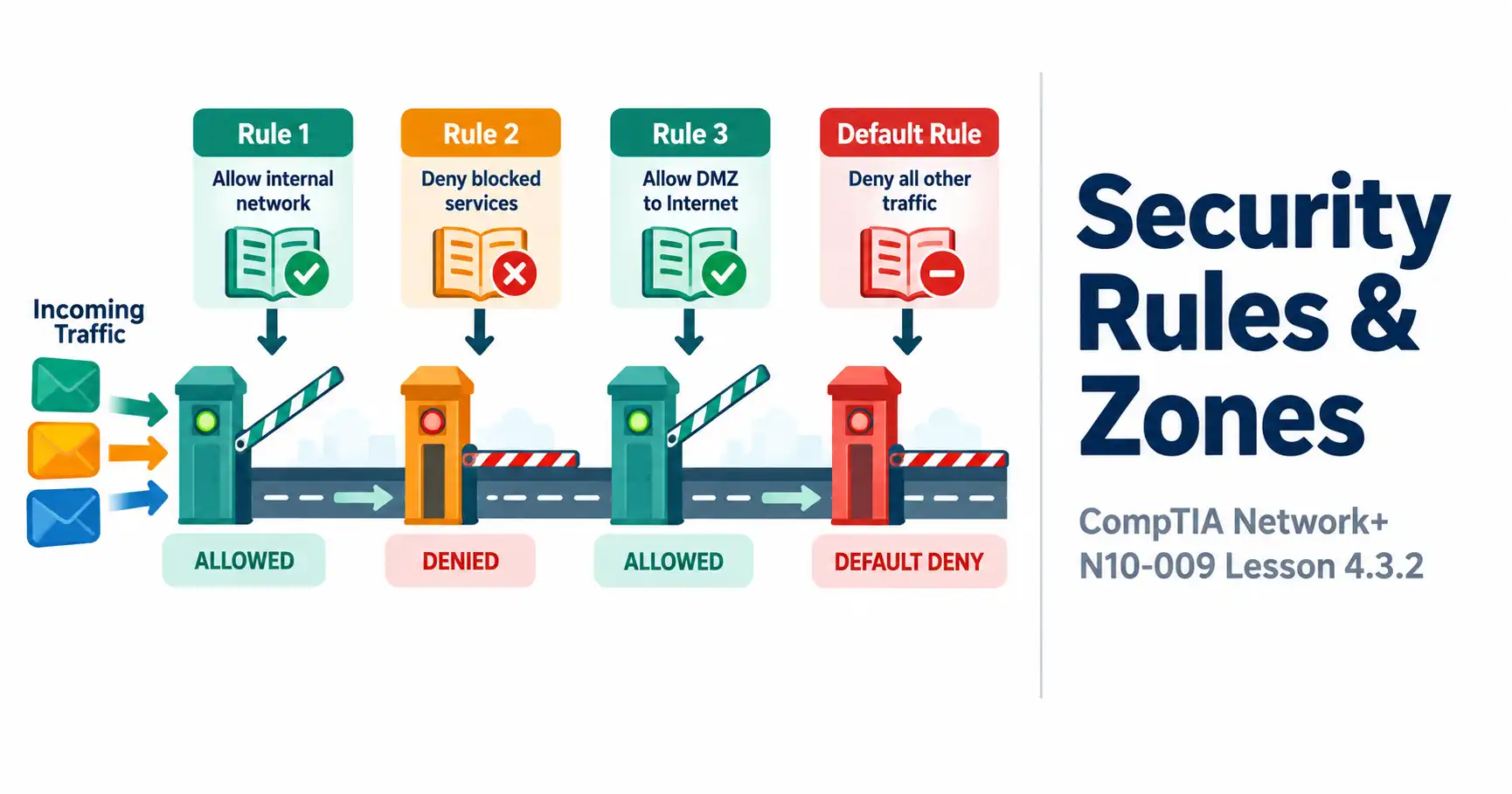
An ACL (Access Control List) is an ordered list of permit and deny rules, each matching traffic based on criteria like source and destination IP address, port number, and protocol. When traffic arrives, the device evaluates the ACL’s rules in order, from top to bottom, applying the first rule that matches — which makes rule order genuinely significant, since a broad rule placed too early can unintentionally match traffic that a more specific rule further down was meant to handle instead.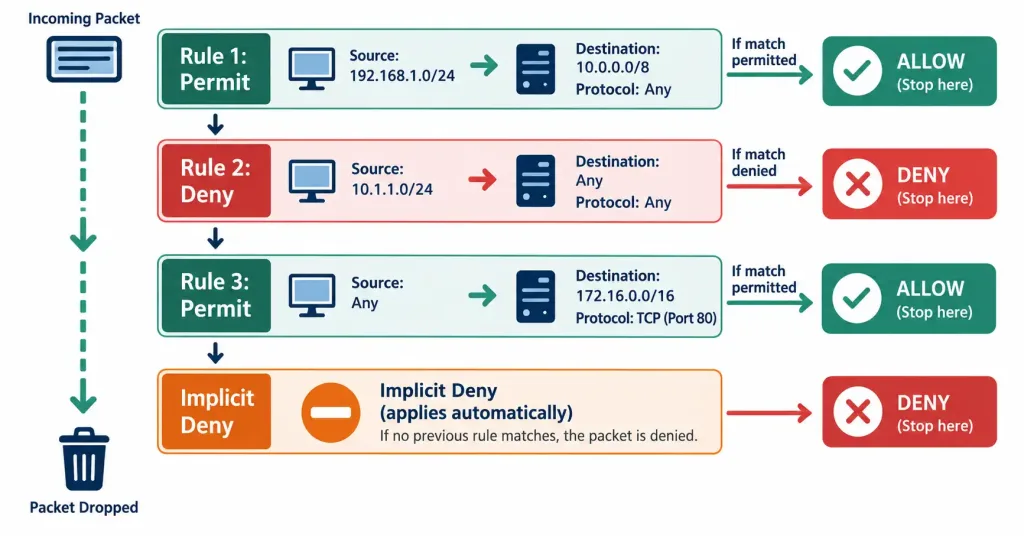
Every ACL ends with an implicit deny — even if no rule in the list explicitly says “deny everything else,” that behavior is assumed by default. Any traffic that doesn’t match any of the preceding permit rules is blocked automatically. This has a real practical implication: a poorly written ACL missing a rule for legitimate traffic doesn’t fail open — it fails closed, silently blocking traffic nobody intended to block.
URL Filtering and Content Filtering
Two related but distinct controls manage what users can access on the web:
- URL filtering blocks or allows access based on specific websites or categories of websites — blocking known malicious domains, or restricting access to entire categories like gambling or social media sites, based on the URL itself.
- Content filtering goes a step further, inspecting the actual content being accessed or transmitted rather than just the URL — blocking specific file types, scanning for particular keywords, or filtering based on the nature of the content itself regardless of which URL it happens to be hosted on.
The distinction matters because URL filtering can be bypassed by content hosted at an unfiltered URL, while content filtering catches the actual material regardless of where it’s hosted — though content filtering is also generally more resource-intensive, since it requires inspecting content rather than just checking a destination against a list.
Trusted vs. Untrusted Zones
Networks are commonly divided into zones based on assumed trust level:
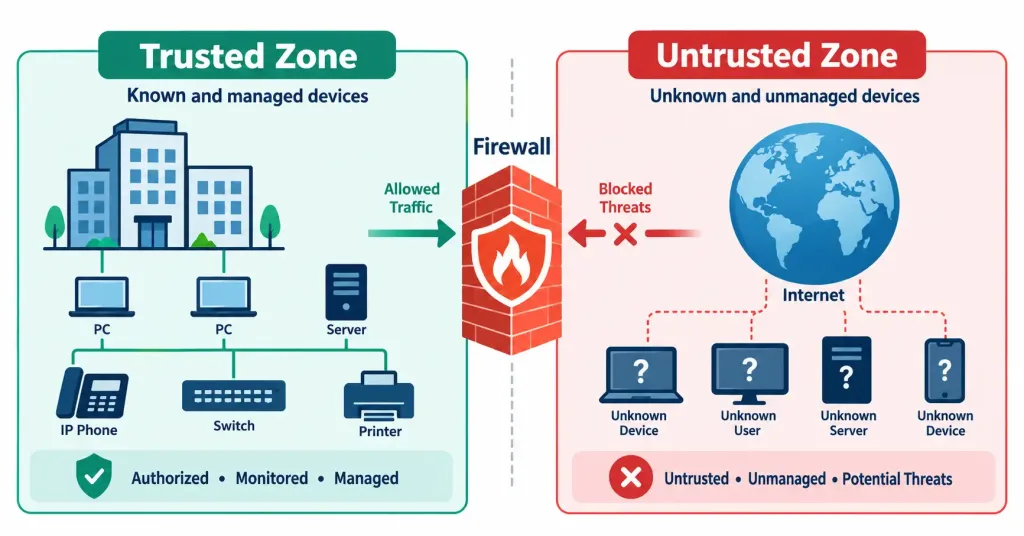
A trusted zone — typically the internal corporate network — is generally assumed to carry a lower baseline risk than external networks, since it’s populated by managed devices and authenticated users. This doesn’t mean it should be blindly trusted, though: the segmentation principles covered earlier in this module exist precisely because even “trusted” internal zones benefit from further isolation between different device categories and risk levels.An untrusted zone — the public internet, or any network segment outside organizational control — is assumed hostile by default, with no baseline trust extended to traffic originating from it.
Screened Subnet (DMZ)
Some services — a public website, a public-facing mail server — genuinely need to be reachable from the untrusted internet, but placing them directly on the trusted internal network would expose that internal network to unnecessary risk if one of those public-facing services were ever compromised. The screened subnet (commonly still called a DMZ, or demilitarized zone) solves this by creating a buffer segment positioned between the trusted internal zone and the untrusted external zone.
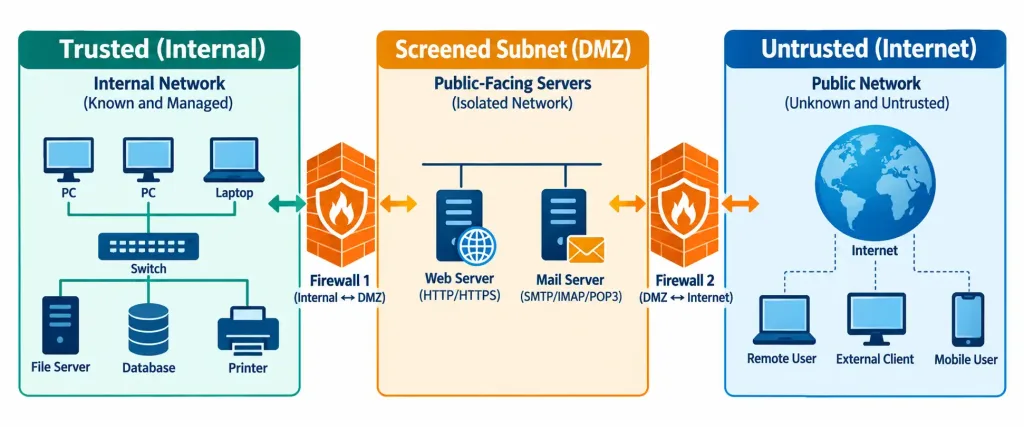
Public-facing services live in this buffer zone, reachable from the internet as needed, but isolated from the trusted internal network by its own set of firewall rules. If an attacker compromises a service sitting in the screened subnet, they still don’t have a direct path into the trusted internal network — they’ve only gained a foothold in an intentionally isolated, lower-value segment, significantly limiting the practical impact of that compromise.
Recognition-Level Verification Concepts
A few patterns are worth recognizing on sight:
- Traffic silently blocked despite no explicit “deny” rule matching it points to the ACL’s implicit deny catching unmatched traffic.
- A restriction based on a website’s address or category is URL filtering; a restriction based on the actual file type or content being transmitted is content filtering.
- A public-facing web server placed in its own isolated segment, reachable from the internet but firewalled off from the internal network, describes a screened subnet.
- Traffic originating from the internal corporate network being treated with a different baseline assumption than traffic from the internet reflects the trusted/untrusted zone distinction.
Common Exam Traps
- ACL rule order determines behavior — identical rules in a different order can produce different results. Don’t assume rule order is a cosmetic detail; a broad early rule can shadow a more specific rule placed after it.
- Implicit deny exists whether or not it’s explicitly written, and a missing permit rule for legitimate traffic results in that traffic being silently blocked, not silently allowed.
- URL filtering and content filtering are not interchangeable. URL filtering acts on the destination address; content filtering acts on the actual material being accessed or transmitted.
- A trusted zone is a relative risk assumption, not a guarantee of safety. Internal segmentation still matters even within a zone generally considered trusted.
- A screened subnet’s value comes from isolating public-facing services from the internal network specifically — it’s not simply “a network with more security,” it’s a deliberate buffer limiting the blast radius of a public-facing compromise.
Lesson 4.3.2 Practice Quiz — Security Rules & Zones
17 questions covering ACLs, implicit deny, URL/content filtering, trusted/untrusted zones, and the screened subnet (DMZ).
N10-009 · Domain 4.3Summary
ACLs filter traffic using ordered permit/deny rules, always ending in an implicit deny that blocks anything not explicitly matched.
URL filtering restricts access based on website address or category; content filtering inspects the actual material being accessed or transmitted, catching more but at higher processing cost.
Trusted zones (typically internal) carry a lower baseline risk assumption than untrusted zones (typically external), though internal segmentation still matters within a trusted zone.
A screened subnet (DMZ) isolates public-facing services in a buffer segment between trusted and untrusted zones, limiting the impact if one of those services is ever compromised.
This lesson completes N10-009 objective 4.3 (Security Features, Defense Techniques & Solutions) at 2/2 lessons, and closes out Module 4 (Network Security) at 8/8 lessons.



