
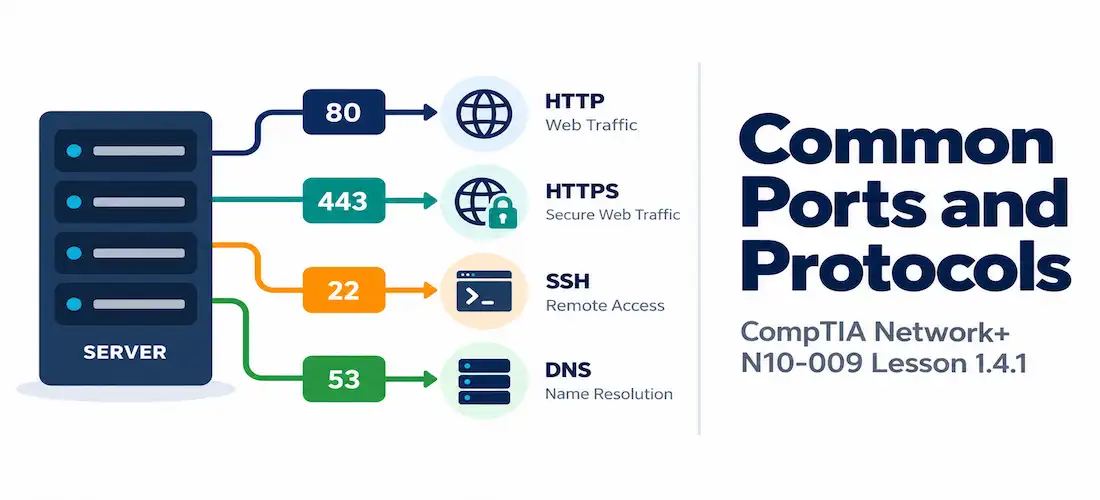
Domain 1.0 | Networking Concepts — 23% of exam
Learning Objectives
By the end of this lesson, you will be able to:
- Explain the purpose of port numbers and describe the three port number ranges
- Identify the standard port number(s) associated with each of the commonly tested application-layer protocols
- Recognize which protocols use TCP, which use UDP, and which use both
- Identify the secure/encrypted variant of a protocol and its corresponding port number, where one exists
- Recognize port numbers in captured or logged traffic and identify the protocol most likely associated with them
Key Terms
| Term | Definition |
|---|---|
| Port Number | A 16-bit value used at the Transport layer to identify a specific process, application, or service on a host |
| Well-Known Ports | Port numbers 0–1023, reserved for the most common, standardized protocols and services |
| Registered Ports | Port numbers 1024–49151, registered with IANA for specific applications but not as tightly controlled as well-known ports |
| Dynamic/Private Ports | Port numbers 49152–65535, used temporarily by client applications for outbound connections and not permanently assigned to any specific service |
| Socket | The combination of an IP address and a port number, uniquely identifying one end of a specific network connection |
| Ephemeral Port | A temporary port number, typically drawn from the dynamic/private range, assigned to a client for the duration of a single connection |
Explanation
Why Ports Exist
Lesson 1.1 introduced the idea that the Transport layer adds port numbers so that a receiving host knows which specific application or service a given piece of data is intended for. Without port numbers, a server could only run one network service at a time — every request arriving at that server’s IP address would have nowhere else to go.
Port numbers solve this by letting a single IP address host dozens or hundreds of distinct services simultaneously, each listening on its own designated port: a web server listening on port 80, a mail server listening on port 25, an SSH daemon listening on port 22, all running on the same machine, all reachable at the same IP address, distinguished only by which port a given connection targets.
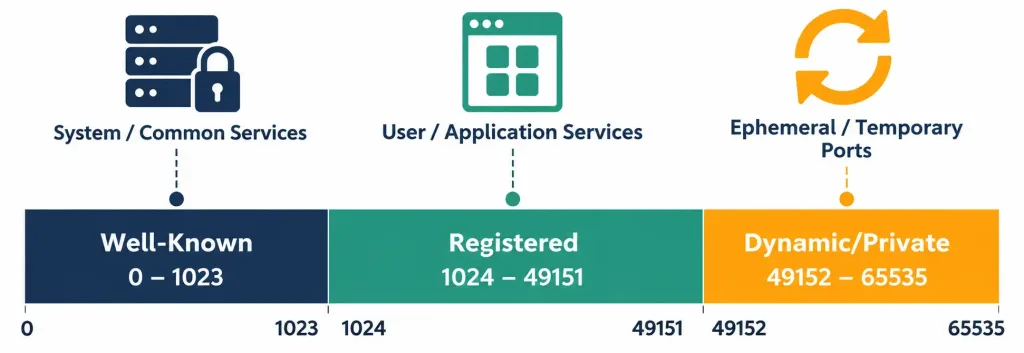
Port numbers are 16-bit values, giving a total range of 0 through 65535, divided into three defined ranges:
- Well-known ports (0–1023) are reserved for the internet’s most fundamental, standardized services — HTTP, HTTPS, DNS, SSH, and the rest of the protocols covered in this lesson overwhelmingly fall into this range.
- Registered ports (1024–49151) are registered with IANA (the Internet Assigned Numbers Authority) for specific applications, but with less strict oversight than well-known ports — many database and application-specific services live here.
- Dynamic/private ports (49152–65535), also called ephemeral ports, are not permanently assigned to any service at all. Instead, a client’s operating system temporarily assigns one of these ports to identify the client side of an outbound connection for its duration, then releases it once the connection closes.
Understanding this range structure matters for a subtle but frequently tested reason: when your browser connects to a web server on port 80, your browser’s own side of that connection is using a randomly assigned ephemeral port from the dynamic range — port 80 is only the destination port on the server side, not the port your own machine is using.
Walking through a concrete example makes this concrete: suppose a laptop at 192.168.1.50 opens a web browser and navigates to a website hosted at 203.0.113.10. The operating system assigns an ephemeral port — say, 52341 — to represent the client side of this connection. The resulting socket pair for this single connection is 192.168.1.50:52341 talking to 203.0.113.10:80.
If that same laptop opens a second browser tab to a completely different website a moment later, the OS assigns a different ephemeral port for that second connection, since each simultaneous connection needs its own unique local socket to keep the operating system’s networking stack from confusing the return traffic for one connection with another. This is precisely why a packet capture or netstat listing of a busy client machine shows dozens of different high-numbered local ports all in use simultaneously — each one represents a distinct, currently open connection, not some kind of anomaly.
File Transfer Protocols
| Port | Protocol | Transport | Purpose |
|---|---|---|---|
| 20 | FTP (data) | TCP | Transfers the actual file data in an active-mode FTP session |
| 21 | FTP (control) | TCP | Carries FTP commands and responses; the connection a client first establishes |
| 22 | SFTP | TCP | Secure file transfer, tunneled over the same port as SSH |
| 69 | TFTP | UDP | Trivial File Transfer Protocol — a simplified, connectionless file transfer protocol commonly used for transferring configuration files or firmware to network devices |
| 989/990 | FTPS | TCP | FTP secured with TLS/SSL encryption |
FTP is worth pausing on specifically, since it’s a frequent source of confusion: unlike almost every other protocol in this lesson, FTP uses two separate ports — port 21 for the control connection (commands like “list files” or “get this file”) and port 20 for the actual data transfer itself in active mode. TFTP, despite the similar name, is an entirely different, much simpler protocol that runs over UDP rather than TCP and has no authentication mechanism at all — it’s typically used only on trusted internal networks for tasks like pushing a configuration file to a switch or router.
Remote Access Protocols
| Port | Protocol | Transport | Purpose |
|---|---|---|---|
| 22 | SSH | TCP | Secure Shell — encrypted remote command-line access and secure file transfer (SFTP/SCP) |
| 23 | Telnet | TCP | Unencrypted remote command-line access — largely obsolete for security reasons but still tested |
| 3389 | RDP | TCP | Remote Desktop Protocol — remote graphical access to Windows systems |
SSH’s role as the secure, encrypted replacement for Telnet is one of the most reliably tested single facts in this category — if a scenario mentions needing secure remote CLI access, the answer is SSH (22); if it describes legacy, unencrypted remote access, the answer is Telnet (23).
RDP occupies a related but distinct niche: rather than command-line access, it provides a full graphical desktop session, making it the standard choice for remotely administering Windows servers and workstations where a visual interface is genuinely needed rather than just a command prompt.
All three protocols in this category share a common thread worth noting — each one exists to let an administrator operate a remote machine as though sitting directly in front of it, differing mainly in whether that access is encrypted (SSH, RDP) or not (Telnet), and whether it’s command-line (SSH, Telnet) or graphical (RDP).
Email Protocols
| Port | Protocol | Transport | Purpose |
|---|---|---|---|
| 25 | SMTP | TCP | Simple Mail Transfer Protocol — sending email between mail servers |
| 587 | SMTP (submission) | TCP | The modern standard port for a mail client submitting outgoing mail to its server, typically with authentication and encryption |
| 110 | POP3 | TCP | Post Office Protocol v3 — retrieving email, typically downloading and removing it from the server |
| 995 | POP3S | TCP | POP3 secured with TLS/SSL |
| 143 | IMAP | TCP | Internet Message Access Protocol — retrieving email while keeping it synchronized on the server across multiple devices |
| 993 | IMAPS | TCP | IMAP secured with TLS/SSL |
The exam-relevant distinction between POP3 and IMAP is worth internalizing here even though the full mechanics go beyond Domain 1: POP3 is oriented around downloading mail to a single device (traditionally removing it from the server afterward), while IMAP keeps mail synchronized on the server, making it the natural fit for checking the same mailbox from multiple devices. Every secure variant in this table follows the same consistent pattern you’ll see repeated throughout this lesson: the encrypted version uses a distinct, higher-numbered port rather than the same port with encryption simply layered on top.
Name Resolution and Directory Protocols
| Port | Protocol | Transport | Purpose |
|---|---|---|---|
| 53 | DNS | TCP and UDP | Domain Name System — translating domain names to IP addresses |
| 67 | DHCP (server) | UDP | The port a DHCP server listens on for client requests |
| 68 | DHCP (client) | UDP | The port a DHCP client listens on for server responses |
| 389 | LDAP | TCP | Lightweight Directory Access Protocol — querying and modifying directory services (such as user account directories) |
| 636 | LDAPS | TCP | LDAP secured with TLS/SSL |
DNS is one of the few protocols in this entire list that uses both TCP and UDP, and the reason is worth understanding rather than just memorizing: ordinary DNS lookups use UDP for speed and low overhead, since a typical query and response are small, but DNS falls back to TCP for larger responses (such as zone transfers between DNS servers, or responses too large to fit in a single UDP packet). DHCP is another protocol worth remembering as a two-port pair, much like FTP — port 67 for the server side and port 68 for the client side, corresponding to the well-known DORA process covered in later domains.
Web Protocols
| Port | Protocol | Transport | Purpose |
|---|---|---|---|
| 80 | HTTP | TCP | Hypertext Transfer Protocol — standard, unencrypted web traffic |
| 443 | HTTPS | TCP | HTTP secured with TLS/SSL — the standard for virtually all modern web traffic |
| 8080 | HTTP (alternate) | TCP | A commonly used alternate port for HTTP, often for proxy servers or secondary web services |
HTTP and HTTPS are almost certainly the two most universally recognized port numbers on this entire list, and for good reason — they’re the foundation of ordinary web browsing. The relationship between them follows the exact same secure-variant pattern already seen with POP3/POP3S and IMAP/IMAPS: HTTPS isn’t “HTTP with a setting turned on,” it’s a genuinely distinct, dedicated port carrying TLS-encrypted traffic.
Port 8080 is worth knowing specifically because it shows up so often in real-world contexts beyond the exam itself — many web application servers, development environments, and proxy servers default to 8080 specifically to avoid needing elevated administrative privileges that binding to a port below 1024 typically requires on most operating systems, since only well-known ports carry that restriction by convention.
Network Management and Monitoring Protocols
| Port | Protocol | Transport | Purpose |
|---|---|---|---|
| 161 | SNMP | UDP | Simple Network Management Protocol — the port a managed device listens on for monitoring queries |
| 162 | SNMP (traps) | UDP | The port a management station listens on for unsolicited trap/alert messages sent by managed devices |
| 514 | Syslog | UDP | Standard logging protocol used to send system log messages to a centralized logging server |
| 123 | NTP | UDP | Network Time Protocol — synchronizing clocks across devices on a network |
SNMP follows the same two-port pattern as DHCP, but in the opposite direction of what many students initially assume: port 161 is used for a management station querying a device, while port 162 is used for a device proactively sending an unsolicited trap to the management station — the direction of who initiates communication flips between the two ports, which is exactly why this pairing shows up often in exhibit-based exam questions.
Database Protocols
| Port | Protocol | Transport | Purpose |
|---|---|---|---|
| 1433 | Microsoft SQL Server | TCP | Default port for Microsoft’s SQL Server database engine |
| 3306 | MySQL | TCP | Default port for the MySQL (and MariaDB) database engine |
While full database administration is well outside Network+’s scope, recognizing these two default ports is common enough in scenario and exhibit questions — particularly ones describing a firewall or security group blocking database connectivity — that they’re worth memorizing alongside the rest of this list.
A typical scenario might describe an application server that can reach a database server’s IP address (confirmed via a basic connectivity test) but still fails to establish an actual database connection — a strong hint that a firewall or security group somewhere along the path is blocking the specific database port (1433 or 3306) even though more general connectivity is intact, illustrating why memorizing the correct port matters even for troubleshooting scenarios that aren’t explicitly about databases as a topic.
Voice, Video, and Session Initiation Protocols
| Port | Protocol | Transport | Purpose |
|---|---|---|---|
| 5060 | SIP | TCP and UDP | Session Initiation Protocol — establishing, modifying, and tearing down VoIP calls and video sessions |
| 5061 | SIP (secure) | TCP | SIP secured with TLS |
SIP itself doesn’t carry the actual voice or video media — it only handles call setup and signaling — but it’s the protocol Network+ expects you to associate with VoIP call establishment specifically.
Security and VPN-Related Ports
| Port | Protocol | Transport | Purpose |
|---|---|---|---|
| 500 | IKE / IPSec | UDP | Internet Key Exchange — negotiating security associations for an IPSec VPN tunnel |
| 1701 | L2TP | UDP | Layer 2 Tunneling Protocol, commonly paired with IPSec for VPN tunneling |
| 1723 | PPTP | TCP | Point-to-Point Tunneling Protocol — an older, largely deprecated VPN protocol |
These ports connect directly back to the site-to-site VPN concept introduced in Lesson 1.3.2 — the encrypted tunnel described there is, at the protocol level, typically built using IPSec (negotiated over port 500) or one of the tunneling protocols in this table.
IPSec itself is often described as a suite of protocols rather than a single one, and port 500’s role specifically is negotiating the security association — essentially, the encryption keys and parameters both endpoints will use — before the actual encrypted tunnel traffic begins flowing. PPTP, while still occasionally encountered in older deployments, is considered cryptographically weak by modern standards and has been largely superseded by IPSec-based and other more modern VPN technologies; it’s included here primarily because it still appears in exam objectives and legacy documentation, not because it represents current best practice.
Routing Protocol Ports
| Port | Protocol | Transport | Purpose |
|---|---|---|---|
| 179 | BGP | TCP | Border Gateway Protocol — the routing protocol used to exchange routes between autonomous systems on the internet |
BGP stands out in this entire list as one of the few core routing protocols that operates over a well-known TCP port at all — most interior routing protocols like OSPF operate directly over IP without using TCP or UDP port numbers in the same way, which is itself a fact worth remembering by contrast.
BGP’s use of TCP specifically (rather than UDP or a raw IP-based approach) makes sense given its role: exchanging routing information between different organizations’ networks across the wider internet benefits from TCP’s reliability and connection-oriented guarantees far more than an interior routing protocol operating within a single, controlled network typically does.
This is a useful data point to keep in mind as you move into Domain 2’s routing content — not every protocol that moves data across a network necessarily rides on top of TCP or UDP the way the application-layer protocols in this lesson do.
Ports in the Context of Firewalls and Security Groups
Every port covered in this lesson connects directly back to concepts introduced earlier in this module. Recall from Lesson 1.2.2 that a firewall’s rules typically specify a destination port as part of deciding what traffic to permit or deny — a rule permitting “TCP port 443 from anywhere” is explicitly leveraging the port knowledge covered in this lesson to allow HTTPS web traffic while implicitly leaving everything else subject to whatever rule comes next.
Similarly, the security groups and NACLs covered in Lesson 1.3.2 filter cloud traffic using these exact same port numbers — a security group allowing inbound port 22 only from a specific administrative IP range is a direct, practical application of knowing that SSH operates on port 22. Every diagnostic and security concept covered later in this course that references “blocking a port” or “opening a port” is referring directly back to the numbers memorized in this lesson.
The Pattern Behind the Secure Variants
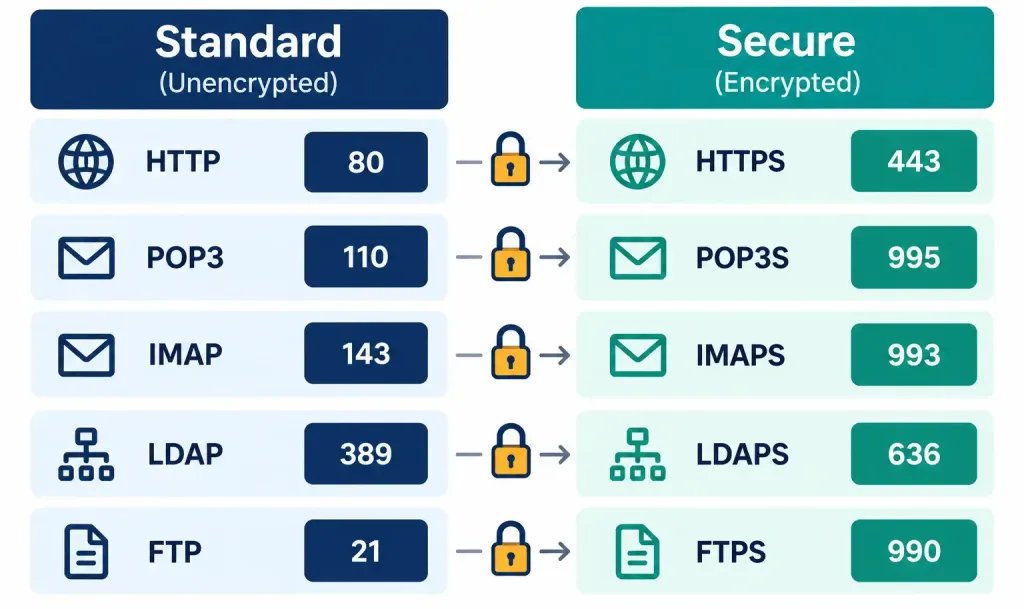
Looking back across every category in this lesson, a consistent pattern emerges that’s worth stating explicitly, since recognizing the pattern is more valuable for the exam than memorizing each pair as an unrelated fact: HTTP (80) → HTTPS (443), POP3 (110) → POP3S (995), IMAP (143) → IMAPS (993), LDAP (389) → LDAPS (636), FTP (21) → FTPS (989/990), SIP (5060) → SIP secure (5061). In every one of these pairs, adding encryption to a protocol means moving to a distinct, dedicated port — never simply “turning on” encryption over the original port. Once this pattern clicks, recalling the secure variant’s port number becomes a matter of recognizing the pattern rather than memorizing six unrelated numbers.
Strategies for Memorizing This List
Given how much of this lesson is pure recall rather than conceptual reasoning, it’s worth spending a moment on how to memorize it efficiently rather than treating all fifty-some port numbers as a single undifferentiated wall of facts:
- Group by category first, number second. Rather than memorizing “port 25 is SMTP” as an isolated fact, memorize “the email protocols are 25, 587, 110, 995, 143, 993” as a cluster, and lean on the secure-variant pattern described above to derive half of that cluster from the other half.
- Anchor unfamiliar numbers to familiar ones. If you already know port 80 (HTTP) and port 443 (HTTPS) cold, use them as reference points — LDAP’s 389 and LDAPS’s 636 are easier to remember once you’ve internalized that every secure variant simply gets its own dedicated port, following the same underlying pattern you already know from HTTP/HTTPS.
- Practice recognizing ports in context, not just as flashcard facts. A port number presented in isolation (“what is port 443?”) is a different mental task than recognizing that same port number inside a firewall rule, a packet capture, or a
netstatlisting — and the exam far more often tests the latter. Working through exhibit-style practice questions that embed these port numbers in realistic output is significantly more representative of the actual exam experience than memorizing a bare list. - Revisit the two-port pairs (FTP, DHCP, SNMP) specifically, since these are disproportionately likely to appear in exhibit and scenario questions precisely because there’s a right and a wrong direction to get confused about within each pair.
Recognition-Level Verification Concepts
This objective is about recognition and recall rather than hands-on configuration. It’s worth knowing what a port number looks like in the kind of output you’ll actually encounter, both on the exam and in real troubleshooting:
- A
netstat(or similar) command’s output shows active connections as local and remote addresses combined with port numbers, in the formIP:port— for example,192.168.1.10:443indicates a connection using port 443 (HTTPS) on that host. - A firewall rule or packet capture referencing a destination port is describing which service on the destination host the traffic is intended for, regardless of what source port the originating client happened to use.
Consider a realistic (simplified) netstat line: TCP 192.168.1.10:52341 203.0.113.10:443 ESTABLISHED. Reading this correctly means recognizing that 192.168.1.10 is the local machine, using ephemeral port 52341 for this specific connection, talking to a remote server at 203.0.113.10 on port 443 — immediately identifiable as an outbound HTTPS connection, since 443 is the well-known destination port and 52341 is clearly just a temporary local assignment. Being able to read a line like this correctly, distinguishing the meaningful well-known port from the meaningless ephemeral one, is exactly the kind of applied recognition skill that exhibit-based exam questions in this domain are built around.
Common Exam Traps
- FTP uses two ports (20 and 21); DHCP uses two ports (67 and 68); SNMP uses two ports (161 and 162). These three pairs are the most commonly tested “protocols with more than one port number” — know all three, and know which port does what within each pair.
- DNS uses both TCP and UDP — don’t assume it’s UDP-only. UDP handles typical lookups; TCP handles larger transfers like zone transfers.
- The secure variant of a protocol is a different port, not the same port with encryption toggled on. This applies consistently across HTTPS, POP3S, IMAPS, LDAPS, and FTPS.
- The port number identifies the destination service, not the connection as a whole. The client side of any connection is almost always using a temporary, essentially meaningless ephemeral port from the dynamic range — don’t mistake a high, unfamiliar port number in a packet capture for something unusual if it’s clearly on the client side of a normal connection.
- Don’t confuse SIP with the actual media stream it sets up. SIP (5060/5061) handles call signaling and setup only — the encrypted voice or video data itself travels over separate media protocols and port ranges not covered by SIP’s own port numbers.
- A blocked port produces a specific, recognizable symptom pattern — basic IP-level connectivity (such as a successful ping) working fine while a specific application fails to connect — that’s worth associating directly with “check whether the relevant port is open,” a troubleshooting instinct that gets built on heavily once you reach Domain 5.
Lesson 1.4.1 Practice Questions
Common Ports and Protocols · 17 questions · Network+ N10-009, Domain 1.0
Which port range is used for well-known, standardized protocols such as HTTP and SSH?
Based on this netstat line, which protocol is most likely being used?
Which two port numbers are both associated with FTP?
A network administrator needs to push a configuration file to a switch on a trusted internal management network, using a simple, connectionless protocol with no authentication. Which protocol and port fit this description?
Which transport protocol(s) does DNS use?
Based on this firewall rule, what type of traffic is being explicitly permitted?
Which two ports are both associated with DHCP?
A network management station needs to receive an unsolicited alert message the moment a monitored switch detects a critical fault, without the management station having to continuously poll the switch. Which port is involved?
Which port is the standard modern port for a mail client submitting outgoing mail with authentication and encryption?
An application server can successfully ping a database server's IP address, but the application itself fails to connect to the database. A firewall rule review shows the following. What is the most likely cause?
Which two of the following port/protocol pairings are correctly matched?
A remote worker needs full graphical desktop access to a Windows workstation in the office, not just a command-line session. Which port is relevant?
Which protocol is responsible for negotiating the security association used to establish an IPSec VPN tunnel?
Based on this packet capture snippet, which routing protocol is most likely in use?
A student memorizing port numbers wants a faster way to recall that LDAPS uses port 636 without memorizing it as an isolated fact. Which strategy from this lesson applies?
Which statement correctly distinguishes an ephemeral port from a well-known port?
A laptop opens two browser tabs to two different websites at nearly the same time. Based on the netstat output below, what explains the two different local port numbers?
Summary
Port numbers let a single IP address host many distinct services simultaneously, and fall into three ranges: well-known (0–1023), registered (1024–49151), and dynamic/private/ephemeral (49152–65535)
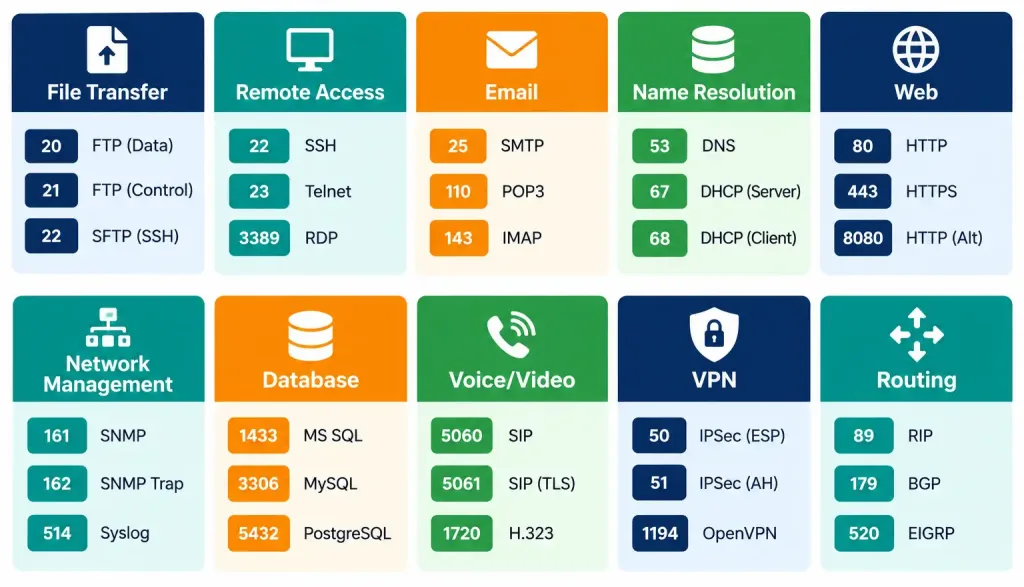
File transfer, remote access, email, name resolution, web, network management, database, voice/video, VPN, and routing protocols each have standard, commonly tested port numbers worth memorizing by category rather than as an undifferentiated list
Several protocols use more than one port number for different purposes — FTP (20/21), DHCP (67/68), and SNMP (161/162) are the three most frequently tested examples
DNS is unusual in using both TCP and UDP depending on the size and type of the request
Secure/encrypted variants of a protocol consistently use a separate, dedicated port rather than the original port with encryption simply added — recognizing this pattern makes recalling secure-variant port numbers far easier than memorizing each one independently



