
CCNA
Cisco Certified Network Associate certification resources
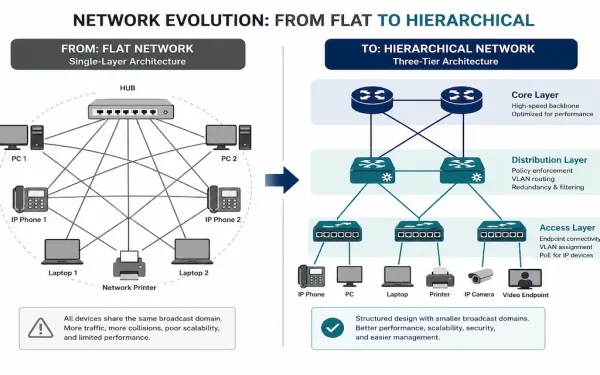
The Role of Switched Networks: From Flat LANs to Hierarchical Design
Early campus LANs relied on hubs and repeaters — simple devices that repeated every incoming signal out every other port, regardless of who actually needed it. As networks grew, this flat design became a genuine bottleneck: more devices meant more broadcast traffic flooding every segment, whether or not it was relevant there. Switched networks, built...
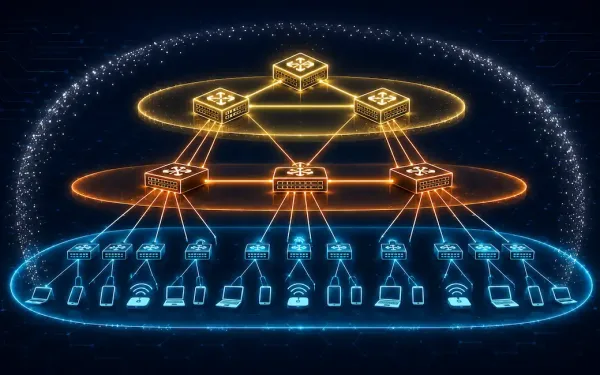
Cisco Borderless Networks: Hierarchical Campus Design Explained
Cisco Borderless Networks is an architecture designed to enable secure, seamless connectivity for any user, device, or location, integrating wired and wireless access with unified policy and performance management. It’s built to address common enterprise IT challenges — mobility, security, and scalability — using Cisco Catalyst switches, ISR routers, and management tools like Cisco DNA...
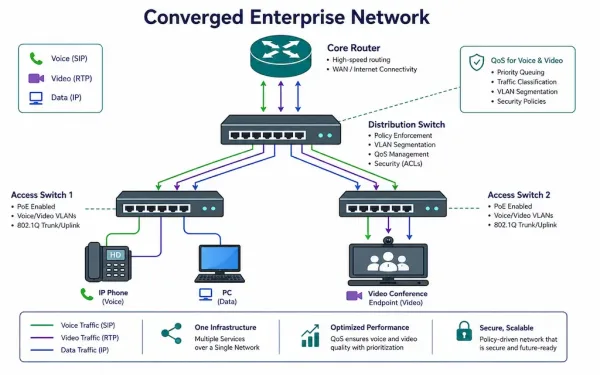
What Is a Converged Network? Architecture, QoS, and Cisco Tools
A converged network carries voice, video, and data over a single IP infrastructure, rather than maintaining separate physical networks for phones, video systems, and computers. This is standard practice in modern enterprise networking, but making it work well — without voice calls sounding choppy the moment someone starts a large file transfer — depends entirely...
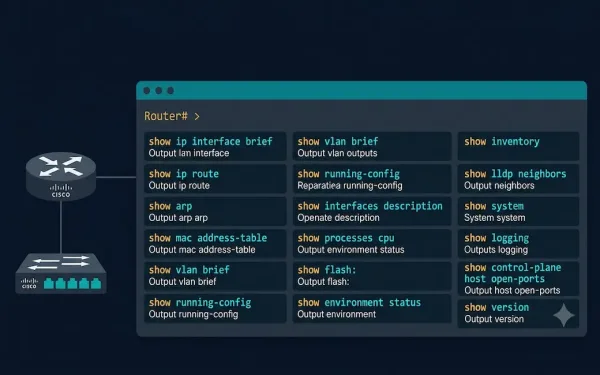
Important Show Commands in Cisco IOS: Complete Reference Guide
The show commands display important information about a device’s configuration and operation in Cisco IOS Command Line Interface (CLI) mode. Network administrators use show commands to check device status, interfaces, processes, and configuration files to confirm operational status, verify configurations, and diagnose problems — all without disrupting live traffic. The network administrator can also view...
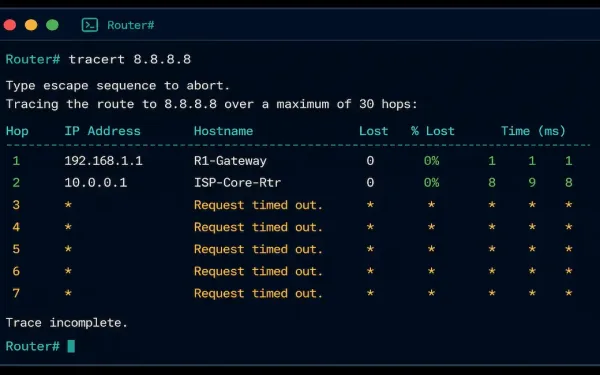
Traceroute and Tracert: How They Work and How to Read the Output
When a connection fails somewhere between your device and its destination, ping tells you that something’s wrong, but not where. Traceroute — called tracert on Windows — fills that gap by mapping every router hop along the path, showing exactly how far a packet gets before something stops responding. This guide covers how traceroute actually...
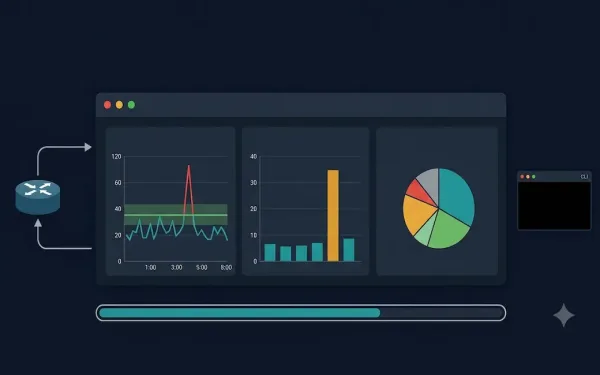
Network Baseline: What It Is, How to Establish One, and Why It Matters
Do you know your standard network throughput volume and the types of traffic used in your network? If you cannot answer those questions with specific numbers, you need a network baseline. A network baseline is one of the most valuable tools available to network administrators for monitoring performance, detecting anomalies, and troubleshooting problems before they...
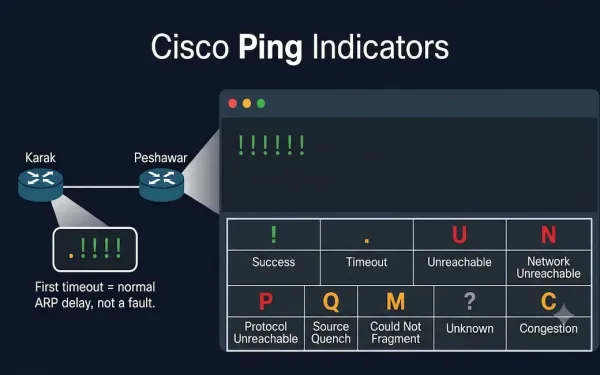
Understanding Ping Indicators and Ping Results in Cisco IOS
The ping command is a fundamental network troubleshooting tool that uses the Internet Control Message Protocol (ICMP), as defined in RFC 792, to test connectivity between devices. It is essential for CCNA (ICND1, ICND2) and CCNP (ROUTE, SWITCH, TSHOOT) exam preparation, helping students verify Layer 3 connectivity by interpreting ping results correctly. This guide covers...
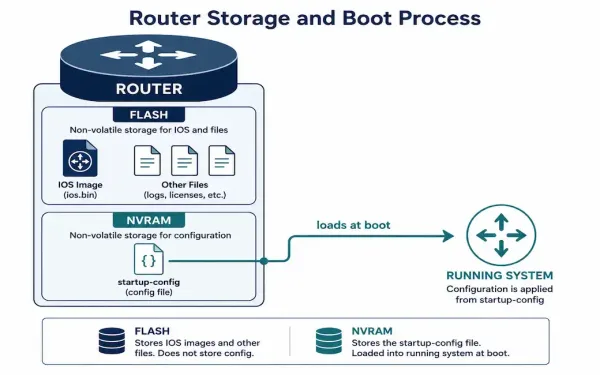
Cisco Router File System: Flash, NVRAM, and Backup Methods
Every Cisco router runs on a small, purpose-built file system that stores the IOS image, configuration files, and a handful of supporting files. Understanding how it’s organized — and how to back it up properly — is a core skill for anyone managing Cisco equipment, whether that’s for CCNA study or day-to-day network administration. This...
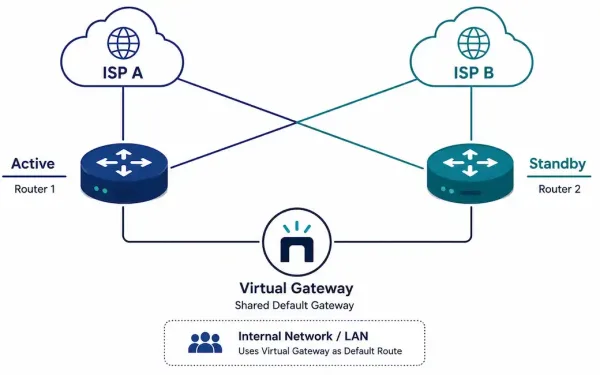
Redundancy and Traffic Management for Small Networks
A single point of failure is exactly what it sounds like: one router, one link, or one ISP connection that, if it fails, takes the whole network down with it. Redundancy eliminates these single points of failure. Traffic management ensures that when bandwidth gets tight, the traffic that actually needs priority — voice, video —...
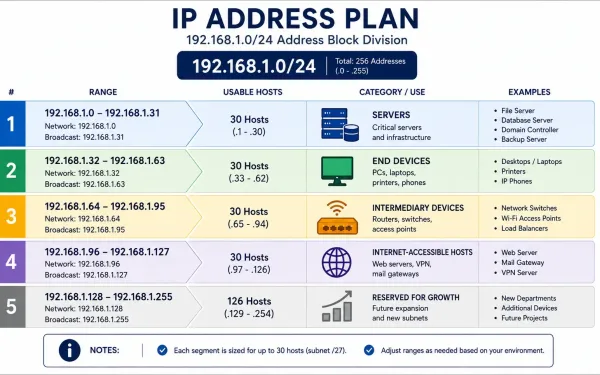
IP Address Planning for a Small Network
Every device on a network needs a unique IP address, but “make sure nothing conflicts” is a low bar. Good IP address planning goes further: it groups devices logically, makes troubleshooting faster, and makes security policy dramatically easier to write and maintain. A network where you can tell a device’s role just by looking at...