
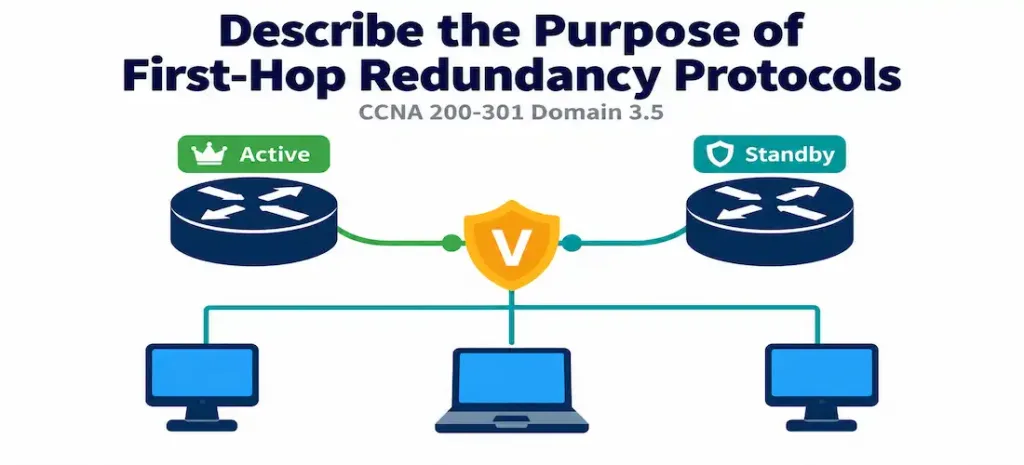
Domain 3.5 | IP Connectivity — 25% of exam
Learning Objectives
By the end of this lesson, you will be able to:
- Explain the single-point-of-failure problem that First-Hop Redundancy Protocols (FHRPs) exist to solve.
- Describe how HSRP uses a virtual IP address and virtual MAC address to make gateway failover transparent to end hosts.
- Distinguish between the active and standby roles in an HSRP group, and explain how Hello messages and the dead timer detect a failure.
- Explain the purpose of HSRP priority and the
preemptkeyword, including why preemption doesn’t happen automatically without it. - Recognize VRRP and GLBP by name and general purpose, and explain how each differs from HSRP at a conceptual level.
Key Terms Glossary
| Term | Definition |
|---|---|
| First-Hop Redundancy Protocol (FHRP) | A category of protocols that let multiple routers share a single virtual gateway address, so hosts survive the failure of any one router. |
| Default gateway | The IP address a host sends traffic to when the destination is outside its local subnet. |
| HSRP (Hot Standby Router Protocol) | Cisco’s proprietary FHRP, using an active/standby model with a shared virtual IP and virtual MAC address. |
| Virtual IP address | The shared gateway IP address configured as the default gateway on end hosts, not tied to any single physical router. |
| Virtual MAC address | The shared MAC address associated with the virtual IP, generated in a predictable format tied to the HSRP group number. |
| Active router | The HSRP group member currently forwarding traffic sent to the virtual IP/MAC. |
| Standby router | The HSRP group member monitoring the active router’s health, ready to take over if it fails. |
| Hello message | A periodic message HSRP routers exchange to confirm the active router is still functioning. |
| Dead timer | The length of time a standby router waits without hearing a Hello before declaring the active router failed. |
| Priority | A configurable value determining which HSRP group member becomes active — higher value wins. |
| Preempt | A configuration keyword allowing a higher-priority router to reclaim the active role after recovering from a failure. |
| VRRP (Virtual Router Redundancy Protocol) | The open, vendor-neutral standard equivalent to HSRP. |
| GLBP (Gateway Load Balancing Protocol) | Cisco’s proprietary FHRP that actively load-balances across multiple routers simultaneously, rather than leaving standby routers idle. |
The Problem: A Gateway Is a Single Point of Failure
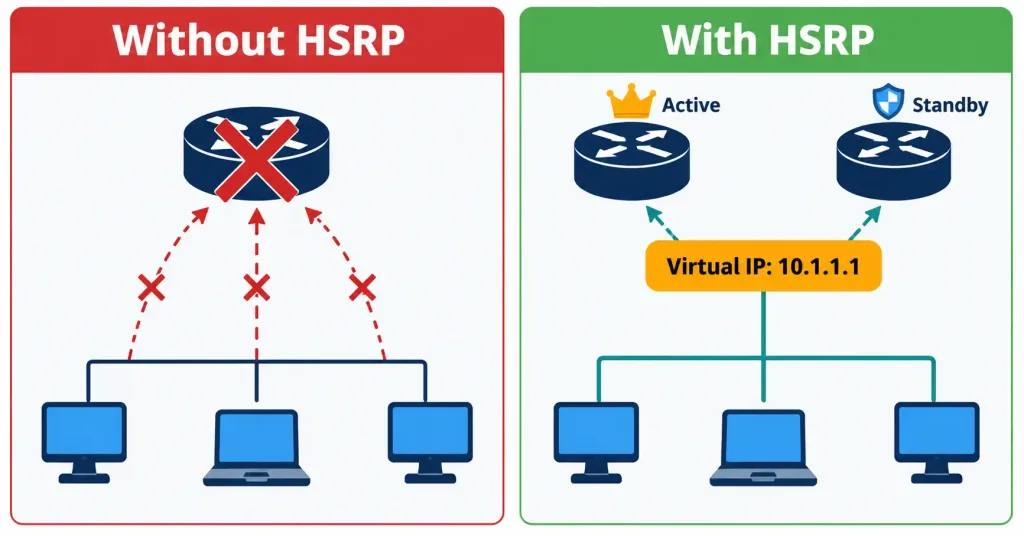
Every host on a typical LAN segment is configured with exactly one default gateway IP address — the address it sends traffic to whenever the destination lives outside its own subnet, conceptually the host-side counterpart to the default route a router itself uses, covered in Lesson 3.3. That configuration is simple and it works, right up until the router at that address stops responding. When that happens, every host on the segment loses its path off the local network, even if a second, perfectly healthy router sits on the exact same segment ready to take over the job.
Hosts have no built-in mechanism to notice the failure and try a different gateway; they were configured with one specific IP address, and they’ll keep sending traffic to it whether or not anything is listening on the other end.
This is the problem First-Hop Redundancy Protocols exist to solve, and it’s worth sitting with the phrase “first hop” for a moment, because it’s precise rather than generic. The very first hop a packet takes as it leaves a host’s own subnet is the single most fragile point in the entire path to any remote destination — everything downstream of it might have rich redundancy, multiple paths, and dynamic routing protocols recalculating around failures in milliseconds, and none of that matters if the packet never gets past the host’s own gateway in the first place.
HSRP’s Solution: A Gateway Nobody Can See Fail
HSRP (Hot Standby Router Protocol) is Cisco’s proprietary answer to this problem, and its core idea is elegant: instead of hosts pointing at any individual router’s real IP address, two or more routers share a virtual IP address and a virtual MAC address, and hosts are configured with that shared virtual address as their default gateway.
From a host’s perspective, the gateway is a single, permanent, always-available device. In reality, it’s a role that one physical router is currently performing — and that role can transparently move to a different physical router without a single host ever needing to change anything, notice anything, or even briefly lose ARP resolution for the gateway’s MAC address, because the MAC address moves along with the role.
Active and Standby Roles
Within an HSRP group, routers take on one of two roles:
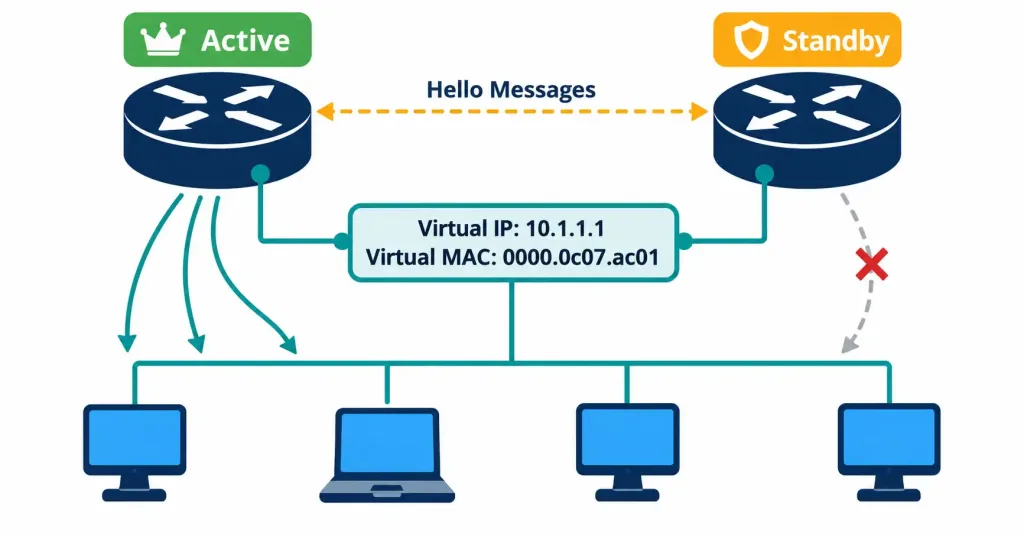
- The active router is the one actually forwarding traffic sent to the virtual IP and virtual MAC at any given moment. Only one router holds this role at a time.
- One or more standby routers sit ready to take over, continuously monitoring the active router’s health.
Health monitoring happens through periodic Hello messages the active router sends to the standby routers. If Hellos stop arriving and the dead timer expires — by default, roughly three times the Hello interval — the standby router concludes the active router has failed and takes over the virtual IP and virtual MAC itself, immediately beginning to forward traffic on their behalf. This transition is exactly what makes the failure “transparent”: from a host’s point of view, the same gateway IP and the same gateway MAC address simply kept working, even though a completely different physical router is now doing the actual forwarding.
Priority and Preempt: Choosing (and Reclaiming) the Active Role
Which router becomes active in the first place — and which one takes back that role after a recovery — is governed by two related but distinct settings.
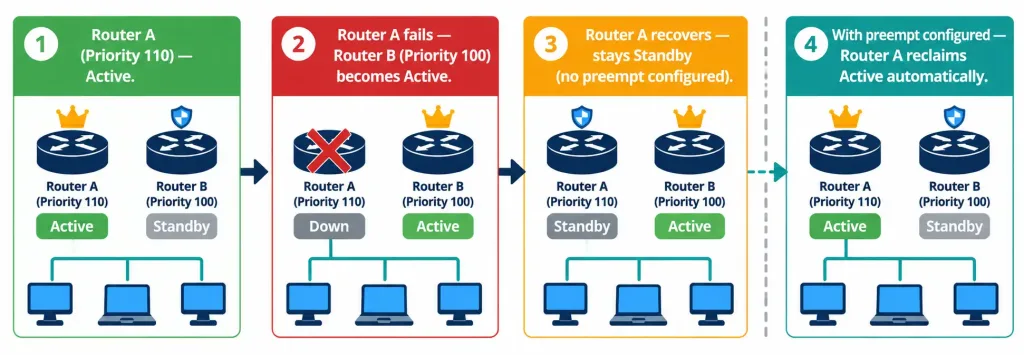
Priority is a configurable value (default 100, range 0–255) assigned per router within the group. When an HSRP group first comes up, the router with the highest priority becomes active; ties are broken by the highest IP address on the relevant interface. This is configured with:
standby 1 priority 110Here, group 1’s priority is set to 110, above the default of 100, making this router the preferred active candidate over any group member left at the default value.
Preempt solves a specific and easily missed problem: without it, once a standby router has taken over as active following a failure, it stays active even after the original, higher-priority router recovers and comes back online. HSRP does not automatically hand the active role back just because a “more deserving” router has returned — by design, HSRP prioritizes stability over always having the theoretically optimal router active, since forcing another failover the moment the original router reboots would just be a second disruptive event on top of the first. If you want the original, higher-priority router to reclaim the active role automatically once it’s healthy again, you must explicitly configure:
standby 1 preemptWithout this line, a “flapping” router that goes down and comes back up will simply remain in standby indefinitely, even at a numerically higher priority than the current active router — a detail that surprises engineers who assume priority alone determines the active router at all times, rather than only at initial election.
interface GigabitEthernet0/1
 ip address 10.1.1.2 255.255.255.0
 standby 1 ip 10.1.1.1
 standby 1 priority 110
 standby 1 preempt
Reading this configuration top to bottom: this router’s real interface address is 10.1.1.2; it participates in HSRP group 1, sharing the virtual IP 10.1.1.1 (the address hosts on this segment should use as their default gateway); its priority of 110 makes it the preferred active router; and preempt ensures it reclaims that role automatically if it ever loses and later regains it.
HSRP Versions: A Brief but Testable Detail
HSRP has two versions worth knowing at an awareness level, and the exam occasionally tests the specific numbers rather than just the concept that two versions exist.
| Feature | HSRPv1 | HSRPv2 |
|---|---|---|
| Hello multicast address | 224.0.0.2 | 224.0.0.102 |
| Supported group numbers | 0–255 | 0–4095 |
| Virtual MAC address format | 0000.0c07.acXX | 0000.0c9f.f0XX |
| IPv6 support | No | Yes |
Both versions serve the identical fundamental purpose described throughout this lesson — the differences are addressing and scale details rather than a change in the core active/standby concept. HSRPv2’s larger group range exists to support environments with far more VLANs than HSRPv1’s 256-group ceiling could accommodate, and its IPv6 support reflects the reality that gateway redundancy is just as necessary on an IPv6 segment as on an IPv4 one. I
n practice, most modern Cisco platforms default to HSRPv2, though the version can be explicitly set per interface with standby version 1 or standby version 2 if interoperability with older equipment requires it — mismatched versions between two routers intended to be in the same group will prevent them from forming a relationship at all, since they’re listening on different multicast addresses entirely.
VRRP and GLBP: Related Protocols, Different Trade-offs
CCNA expects you to recognize two related FHRPs by name and general purpose, without the same depth of configuration knowledge expected for HSRP.
VRRP (Virtual Router Redundancy Protocol) is the open, vendor-neutral standard that accomplishes essentially the same goal as HSRP — a shared virtual gateway address with automatic failover — but isn’t tied to Cisco equipment, making it the appropriate choice in a mixed-vendor environment where HSRP simply isn’t an option on non-Cisco devices.
GLBP (Gateway Load Balancing Protocol) is Cisco-proprietary like HSRP, but solves a different inefficiency: in a standard HSRP deployment, the standby router does nothing but wait — it forwards zero traffic under normal conditions, representing wasted capacity on a fully functional router. GLBP allows multiple routers to actively forward traffic simultaneously, load-balancing across the group rather than leaving backup capacity completely idle, while still providing the same failover protection if one member fails.
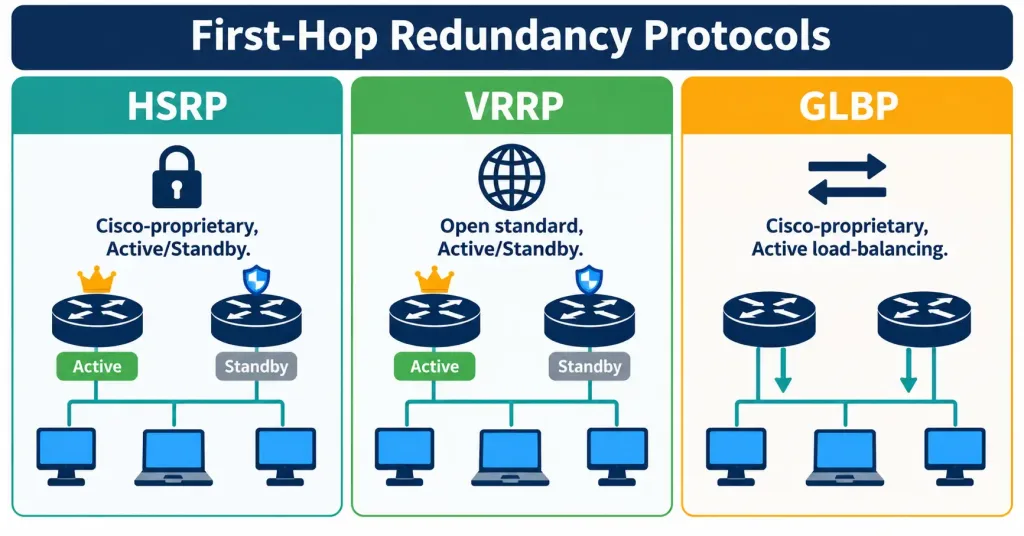
The exam’s own framing is worth repeating plainly: HSRP is the protocol to know in real depth for CCNA — its roles, its Hello/dead-timer mechanism, priority, and preempt are all fair game for detailed questions. VRRP and GLBP are tested at the level of “what is this and why would you choose it,” not at HSRP’s level of configuration and behavioral detail.
Common Misconceptions
- “The virtual IP address belongs to one specific physical router.” It doesn’t belong to any single router permanently — it’s a shared identity that moves to whichever router currently holds the active role.
- “A higher-priority router automatically takes back the active role as soon as it recovers.” This only happens if
preemptis explicitly configured. Without it, a recovered router simply becomes standby again, even with a higher priority than the current active router. - “HSRP load-balances traffic between the active and standby routers.” Standard HSRP does not load-balance; the standby router forwards nothing under normal conditions. GLBP is the protocol that actually distributes traffic across multiple routers.
- “VRRP and HSRP are the same protocol with different names.” They accomplish the same goal through a similar active/standby-style model, but HSRP is Cisco-proprietary while VRRP is an open standard — meaning VRRP can be used across mixed-vendor equipment where HSRP cannot.
- “Hosts need to be reconfigured when the active router changes.” The entire point of the virtual IP and virtual MAC is that hosts never need to change anything — they were never configured with any individual router’s real address in the first place.
Configuration Example and Verification
This objective is framed as “describe the purpose,” not “configure and verify,” so there’s no full multi-device lab here — but seeing how the concept is verified on a live device makes the theory concrete, and IOS gives you a direct way to check exactly which role a router currently holds.
Given the configuration shown earlier on a router named HQ-RTR1, verify HSRP’s operating state with:
HQ-RTR1# show standby brief
                     P indicates configured to preempt.
                     |
Interface   Grp  Pri P State   Active          Standby         Virtual IP
Gi0/1       1    110 P Active  local           10.1.1.3        10.1.1.1
This single line confirms everything at a glance: group 1, this router’s priority of 110, the P flag confirming preempt is enabled, this router’s current state (Active), and the standby router’s real IP address (10.1.1.3) backing it up — all while hosts on the segment continue using 10.1.1.1 as their gateway, unaware of any of these details.
For a fuller view of the same information, including Hello and dead timer values currently in effect:
HQ-RTR1# show standby
GigabitEthernet0/1 - Group 1
  State is Active
    2 state changes, last state change 00:42:17
  Virtual IP address is 10.1.1.1
  Active virtual MAC address is 0000.0c07.ac01
    Local virtual MAC address is 0000.0c07.ac01 (v1 default)
  Hello time 3 sec, hold time 10 sec
    Next hello sent in 1.792 secs
  Preemption enabled
  Active router is local
  Standby router is 10.1.1.3, priority 100 (expires in 8.416 sec)
  Priority 110 (configured)
  Group name is "hsrp-Gi0/1-1" (default)
The virtual MAC address shown here, 0000.0c07.ac01, follows HSRPv1’s predictable format — the vendor prefix 0000.0c07.ac followed by the group number in hex (01 for group 1) — which is a useful detail for recognizing HSRP-generated MAC addresses in packet captures or ARP tables during troubleshooting.
Troubleshooting Patterns
“Both routers in the group show themselves as Active.” This is a serious symptom, typically caused by a Layer 2 connectivity problem preventing Hello messages from reaching each other — each router believes it’s alone on the segment and correctly elects itself active, unaware the other router made the same decision. Check trunk configuration, VLAN membership, or any access list that might be silently filtering the Hello multicast traffic.
“The router with the higher priority isn’t active, even after I fixed the issue that took it down.” Confirm preempt is configured. Without it, this is expected behavior, not a fault — the recovered router simply doesn’t reclaim the active role automatically.
“Failover takes longer than expected, and hosts briefly lose connectivity.” Check the configured Hello and dead timers. Default timers (3-second Hello, 10-second dead timer) mean up to 10 seconds of outage before the standby detects the failure and takes over — this can be tuned lower for faster failover if the environment calls for it, at the cost of slightly more Hello traffic and a small risk of false failure detection on a congested segment.
“Hosts lose connectivity to the gateway entirely, even though one router in the group is clearly still up.” Confirm the hosts are actually configured with the virtual IP address as their gateway, not one router’s individual real interface address. Pointing a host directly at a physical router’s real IP defeats the entire purpose of HSRP — that host has no failover protection at all, regardless of how well HSRP itself is configured.
Frequently Asked Questions
Can an HSRP group have more than one standby router? Yes — an HSRP group can include multiple standby routers, though only one router at a time is designated the “active standby” that would take over next if the active router fails; the others remain in a listening state.
Does HSRP require identical hardware on both routers? No. Any two Cisco routers capable of running HSRP can participate in the same group, regardless of model, as long as both support the feature and are configured consistently for the same group number and virtual IP.
What happens to existing traffic flows during an HSRP failover? Traffic sent to the virtual IP and MAC continues to be delivered correctly once the new active router takes over those addresses, since Layer 2 and Layer 3 addressing for the gateway itself hasn’t changed from the hosts’ perspective. Any state specific to the previous active router’s forwarding path (such as active NAT translations, if configured) may not automatically transfer, depending on the specific features involved.
Is HSRP only usable on Ethernet segments? HSRP is used almost exclusively on multi-access LAN segments, since its entire purpose is providing gateway redundancy for hosts on a shared local network — it isn’t a general-purpose routing protocol for WAN links.
Why would I choose VRRP over HSRP if I’m using all Cisco equipment? In an all-Cisco environment, HSRP is generally the natural choice since it’s fully supported and well understood; VRRP becomes the more relevant choice specifically when mixed-vendor equipment is involved and a vendor-neutral standard is required for interoperability.
Can HSRPv1 and HSRPv2 routers form a group together? No. Because the two versions listen on different multicast addresses and use different virtual MAC formats, a router running HSRPv1 and a router running HSRPv2 on the same interface will never see each other’s Hello messages, and no relationship will form — both sides will simply believe they’re alone on the segment. Matching the version explicitly on both routers is a basic prerequisite that’s easy to overlook, since the mismatch produces no error message, only a group that silently never converges.
First-Hop Redundancy Protocols: Practice Quiz
HSRP, VRRP, GLBP, Virtual IPs, Failover, and Gateway Redundancy
Summary
- First-Hop Redundancy Protocols solve the problem of a default gateway being a single point of failure for hosts on a LAN segment.
- HSRP uses a shared virtual IP and virtual MAC address; hosts point at the virtual IP, and the active role can transparently move between physical routers without any host reconfiguration.
- Only one router is active at a time, forwarding traffic under normal conditions; standby routers monitor the active router’s health via Hello messages and take over if the dead timer expires.
- Priority determines which router becomes active initially;
preemptmust be explicitly configured for a recovered higher-priority router to automatically reclaim the active role — it does not happen by default. - VRRP is the open-standard equivalent to HSRP for mixed-vendor environments, while GLBP is Cisco-proprietary like HSRP but actively load-balances traffic across multiple routers instead of leaving standby capacity idle.



