
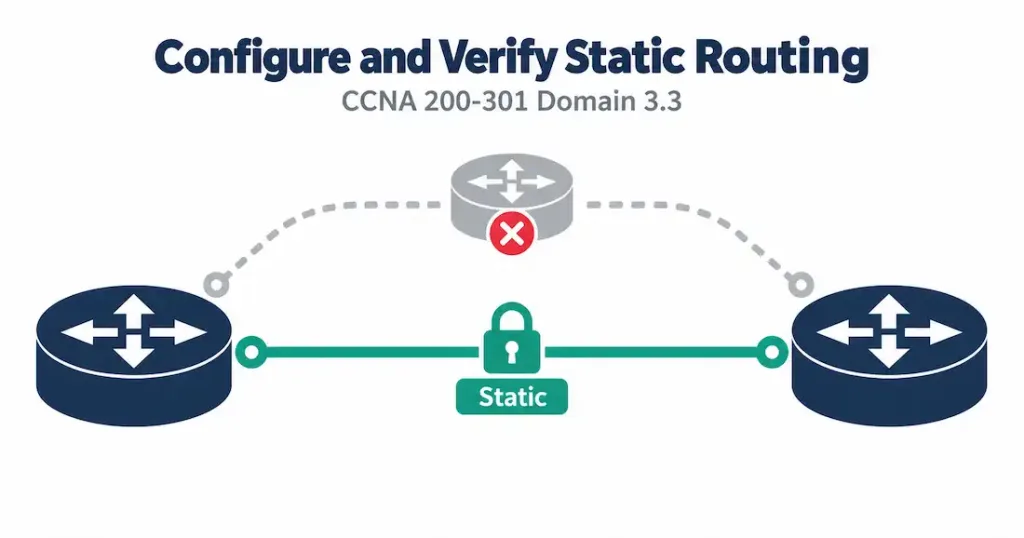
Domain 3.3 | IP Connectivity — 25% of exam
Learning Objectives
By the end of this lesson, you will be able to:
- Configure an IPv4 static route using both a next-hop IP address and an exit interface, and explain when each form is appropriate.
- Configure an IPv6 static route using an IPv6 next-hop address, including the global command needed before IPv6 routing will function at all.
- Configure and justify a default route for a stub network, in both IPv4 and IPv6.
- Configure a floating static route as a backup path, correctly setting its administrative distance relative to the primary route.
- Verify static routes are installed and active using
show ip route static,show ipv6 route static, and related commands.
Key Terms Glossary
| Term | Definition |
|---|---|
| Static route | A manually configured routing table entry pointing to a specific destination network via a next-hop address or exit interface. |
| Next-hop IP address | The IP address of the neighboring router a packet should be forwarded to next, used as the target in a static route. |
| Exit interface | The router’s own local interface a static route sends traffic out of, used instead of or alongside a next-hop address. |
| Recursive lookup | The extra routing table lookup a router performs to resolve a next-hop IP address down to a physical exit interface. |
| Default route | A route matching any destination not more specifically matched elsewhere in the table (0.0.0.0/0 for IPv4, ::/0 for IPv6). |
| Gateway of last resort | The informal name for the route IOS uses when no other route in the table matches a destination — typically the default route. |
| Floating static route | A static route intentionally configured with a higher administrative distance so it only activates if a preferred route disappears. |
| Stub network | A network with only one path in or out, making it a strong candidate for static routing rather than a dynamic protocol. |
| Quad-zero route | Informal name for the IPv4 default route, ip route 0.0.0.0 0.0.0.0 <next-hop>. |
| Dual-stack | Running IPv4 and IPv6 simultaneously on the same device or network, each with its own independent routing table and static routes. |
What a Static Route Actually Is
A static route is the routing table equivalent of writing a sticky note on the router’s desk: “if you ever need to reach this network, send it here.” Nothing about it is dynamic, nothing about it is discovered — an engineer typed it in, and it stays exactly as typed until someone changes it. That simplicity is both its greatest strength and its most important limitation, and this lesson spends real time on both sides of that coin, because the exam tests the trade-off as much as it tests the syntax.
Lesson 3.1 covered the anatomy of a routing table entry, and Lesson 3.2 covered how a router chooses among competing entries. This lesson sits at the intersection: static routes are one of the sources that can populate that table, and understanding how they behave — including how their administrative distance interacts with everything from 3.2 — is the whole point of “configure and verify” here rather than just “describe.”
IPv4 Static Route Syntax
The basic IPv4 static route command has three required pieces of information:
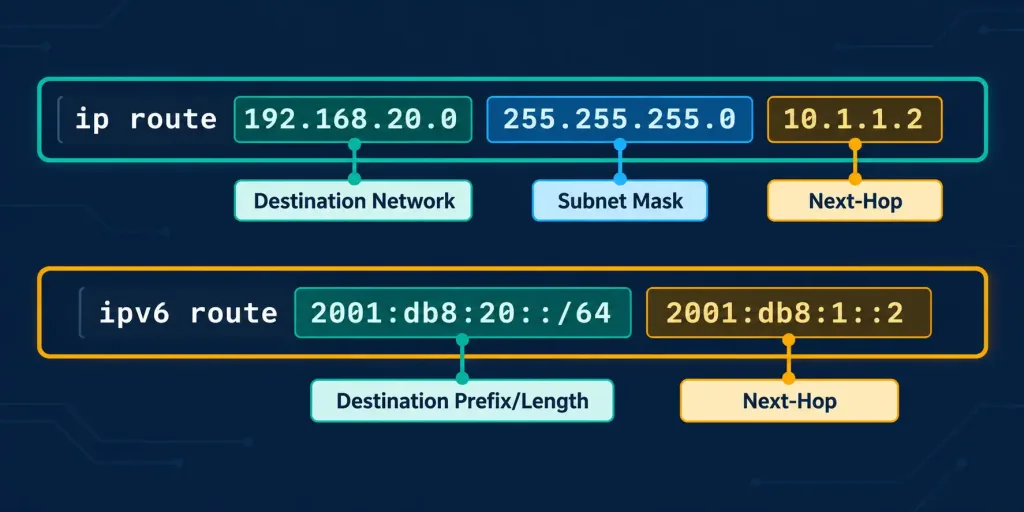
ip route 192.168.20.0 255.255.255.0 10.1.1.2Reading it left to right: 192.168.20.0 is the destination network, 255.255.255.0 is that network’s subnet mask, and 10.1.1.2 is the next-hop IP address — the address of the neighboring router that should receive packets destined for that network. This is the most common form you’ll write and the one most CCNA labs expect by default.
An alternative form replaces the next-hop address with the router’s own outbound interface:
ip route 192.168.20.0 255.255.255.0 Serial0/0/0Both forms tell the router the same fundamental thing — how to reach 192.168.20.0/24 — but they resolve differently under the hood, which matters more than it looks like it should. More on that shortly.
IPv6 Static Route Syntax
IPv6 static routes follow the same logical shape, adapted to IPv6 addressing and prefix notation:
ipv6 route 2001:db8:20::/64 2001:db8:1::2Here, 2001:db8:20::/64 combines the destination prefix and its length into a single field — IPv6 doesn’t use a separate dotted-decimal mask the way IPv4 does — and 2001:db8:1::2 is the next-hop IPv6 address. One detail catches almost everyone at least once: IPv6 routing is not enabled by default on Cisco IOS. Before any IPv6 static route (or any IPv6 routing at all) will function, the router needs:
ipv6 unicast-routingSkip this single global command, and every correctly typed IPv6 static route will sit in the configuration doing absolutely nothing — it won’t even throw an error, which makes it a frustrating one to troubleshoot blind.
Next-Hop vs. Exit Interface: Why the Choice Matters
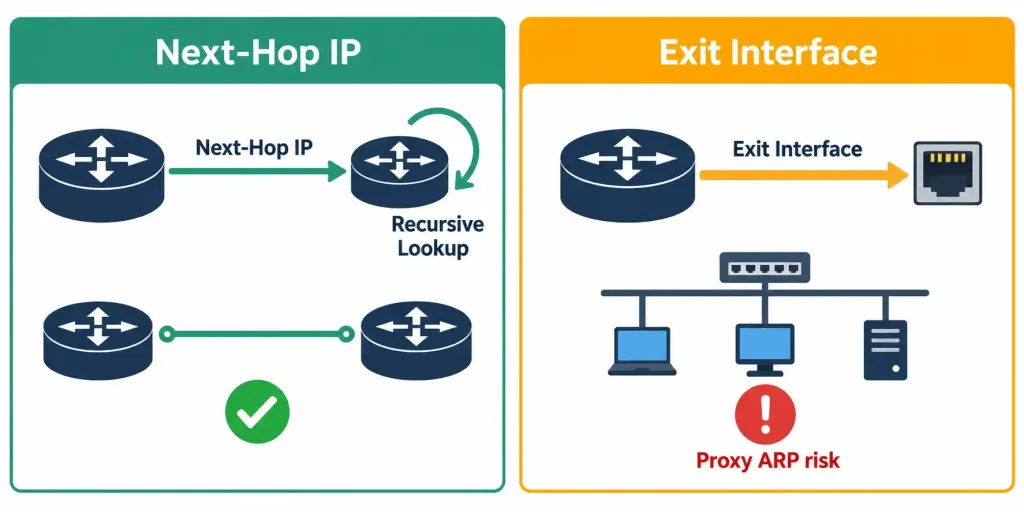
This is the part of the objective that separates “I can type the command” from “I understand what the command does.” When you specify a next-hop IP address, the router has to perform a recursive lookup: it takes that next-hop address and looks it up in the routing table to figure out which physical interface actually gets a packet there. That’s an extra step, executed for every route lookup, though in practice CEF caches this so the performance cost is minimal on modern hardware.
When you specify an exit interface instead, the router skips that recursive step — it already knows exactly which physical door to send the packet through. On a point-to-point link (a serial interface, a point-to-point GRE tunnel), this works perfectly and is arguably the cleaner choice, because there’s only ever one device on the other end anyway.
The trap is using an exit-interface static route on a multi-access network — an Ethernet segment with more than one possible neighbor. If you configure ip route 192.168.20.0 255.255.255.0 GigabitEthernet0/1 and that interface connects to a switch with several routers on it, the router now believes every single host on 192.168.20.0/24 is directly reachable off that one interface.
It will generate an ARP request for the actual destination IP address of every packet, rely on proxy ARP from the correctly-configured router further along the path to answer, and generate unnecessary ARP traffic and CPU overhead in the process. It often still works, which is exactly why it’s a dangerous habit — it’s inefficient and fragile rather than outright broken, so it can survive in a lab environment and then cause real problems at scale.
The safest general guidance, and the one the exam rewards: use a next-hop IP address on multi-access networks, use either form (next-hop or exit interface) on true point-to-point links, and if you want the reliability benefits of both, specify both the exit interface and the next-hop address in the same command — this is called a fully specified static route and it eliminates the recursive lookup while still avoiding the proxy-ARP problem, because the router knows both which interface to use and exactly which Layer 2 address to resolve.
Default Routes: The Route for Everything Else
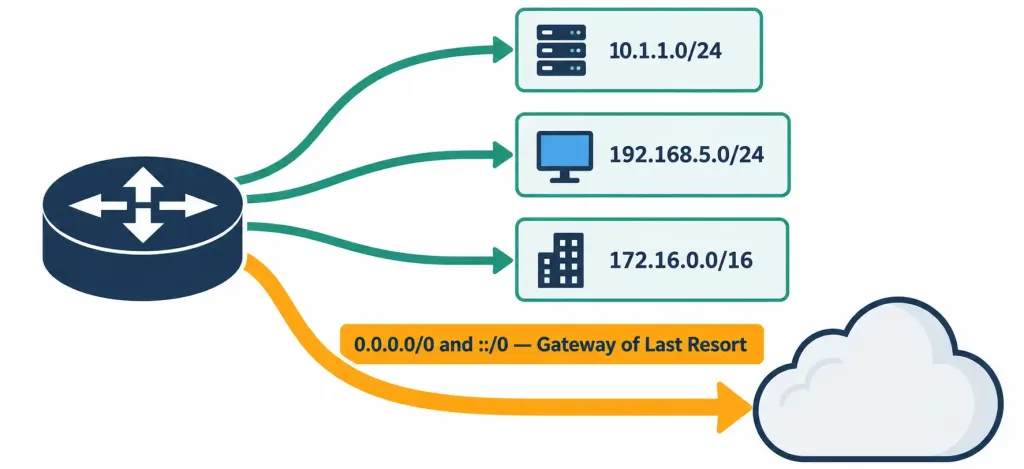
A default route is a special static route that matches any destination address not more specifically matched by anything else in the table — it is, quite literally, the least specific route possible, sitting at the opposite end of the spectrum from the /32 host routes discussed in objective 3.2’s longest-prefix-match coverage. Because it’s the least specific route by definition, it only ever gets used when nothing better exists — which is exactly the point.
IPv4 default route:
ip route 0.0.0.0 0.0.0.0 <next-hop>The destination network 0.0.0.0 with mask 0.0.0.0 mathematically matches every possible IPv4 address, since a mask of all zeros means zero bits need to match for the comparison to succeed.
IPv6 default route:
ipv6 route ::/0 <next-hop>::/0 is IPv6’s equivalent — a zero-length prefix that, by definition, matches every possible IPv6 address.
When a router installs a default route, IOS refers to it informally as the gateway of last resort, and you’ll see that phrase appear directly in show ip route output once one is configured. Default routes are the textbook fit for a stub network — a site with exactly one way in and out, like a small branch office with a single WAN link back to headquarters. There’s no meaningful routing decision to make at a stub site; every packet not destined for the local LAN needs to go the same direction regardless, so a single default route replaces what would otherwise be dozens of individually configured routes to every remote subnet in the organization.
Administrative Distance and Floating Static Routes
Recall from objective 3.2 that static routes carry a default administrative distance of 1 — extremely trusted, second only to directly connected interfaces. That default can be overridden by adding an optional value at the end of the command:
ip route 192.168.20.0 255.255.255.0 10.1.1.2 200This creates what’s known as a floating static route: a backup path that sits dormant in the configuration, present but not installed in the active routing table, because something else with a better AD (a dynamic protocol route, or another static route) is currently preferred. The moment that preferred route disappears — a link fails, a neighbor goes down — the floating static’s AD of 200 suddenly becomes the best available option for that prefix, and IOS installs it automatically, with zero manual intervention.
This is a direct, practical application of everything objective 3.2 taught about the forwarding-decision hierarchy. The floating static only ever competes at the administrative distance stage of that hierarchy — and only when its prefix length ties with whatever it’s meant to back up. A floating static route configured with a shorter or longer prefix than the primary route it’s supposed to replace will behave unpredictably, exactly as the longest-prefix-match discussion in 3.2 would predict. If you’re building a backup route, match the prefix length of what you’re backing up, or you’re not actually building a backup — you’re building a different route that happens to activate under similar conditions.
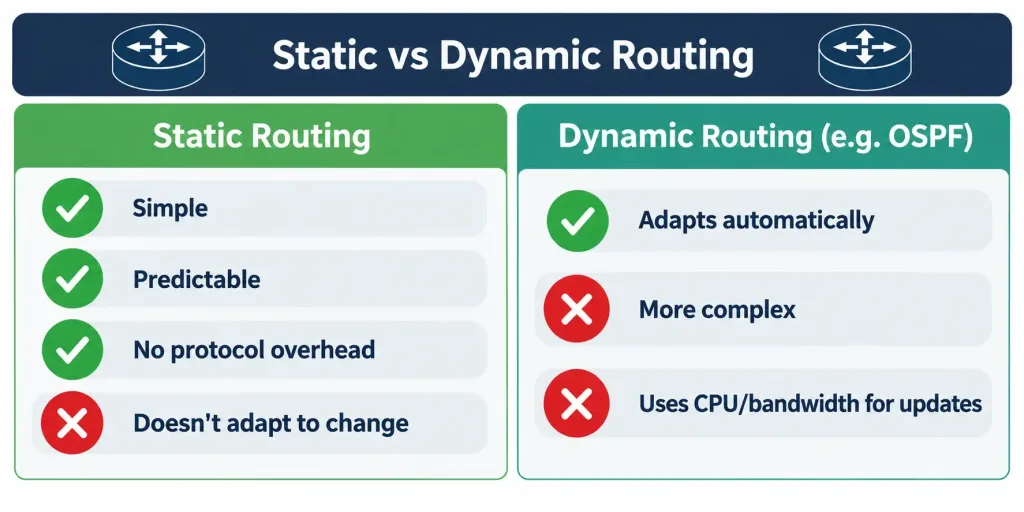
Static vs. Dynamic: The Trade-off Underneath Everything in This Domain
Static routing offers three genuine advantages: it’s simple to understand at a glance, it’s completely predictable (the path a packet takes is exactly the path an engineer decided it should take, with no negotiation or convergence behavior to reason about), and it consumes zero ongoing CPU or bandwidth on routing protocol overhead — no hello packets, no periodic updates, no adjacency maintenance.
Its cost is equally real: static routes do not adapt. If a link fails and no floating static or dynamic protocol is present to take over, traffic to that destination simply stops, silently, until a human notices and fixes the configuration. If a new subnet is added to the network, every router that needs to reach it requires a manually added static route — this doesn’t scale gracefully past a handful of routers and a handful of subnets.
This is why static routing is the right tool for small, stable, predictable topologies — a stub branch office, a lab environment, a single default route pointing toward an ISP — while dynamic protocols like OSPF (covered in objective 3.4) exist specifically to handle larger networks or topologies that change often enough that manual maintenance becomes impractical. Neither approach is universally “better”; the exam consistently frames this as a scenario-matching skill, not a strict hierarchy.
Common Misconceptions
- “Using an exit interface instead of a next-hop address is always the more efficient choice.” True only on point-to-point links. On multi-access (Ethernet) networks, an exit-interface-only static route causes unnecessary proxy ARP traffic and can produce fragile, hard-to-diagnose behavior.
- “IPv6 static routes work automatically once configured, just like IPv4.” IPv6 routing must be explicitly enabled with
ipv6 unicast-routingbefore any IPv6 static route takes effect — a step IPv4 configurations never require. - “A floating static route just needs any higher AD than the primary route.” It needs a higher AD and the same prefix length as the route it’s meant to back up. A mismatched prefix length means it isn’t really backing anything up — it’s a different, independently competing route.
- “Static routes never change, so they never need maintenance.” They never change automatically. If the topology changes and nobody updates the static configuration, traffic silently breaks. “Predictable” and “maintenance-free forever” are not the same claim.
- “The IPv6 default route uses 0.0.0.0/0, same as IPv4.” IPv6’s default route is
::/0— the IPv4 quad-zero notation doesn’t carry over.
Configure and Verify: Full Lab Walkthrough
This objective explicitly calls for a configure-and-verify treatment, so let’s build a small, realistic topology and walk through it end to end — both IPv4 and IPv6, side by side.
Topology: HQ-RTR1 sits at headquarters with a LAN of 192.168.10.0/24 (IPv4) and 2001:db8:10::/64 (IPv6). BR-RTR1 sits at a branch office — a textbook stub network — with a LAN of 192.168.20.0/24 (IPv4) and 2001:db8:20::/64 (IPv6). The two routers connect directly over a serial WAN link addressed 10.1.1.0/30 (IPv4) and 2001:db8:1::/64 (IPv6), where HQ-RTR1 holds 10.1.1.1 / 2001:db8:1::1 and BR-RTR1 holds 10.1.1.2 / 2001:db8:1::2.
   [HQ-RTR1]  10.1.1.1 <---Serial WAN link---> 10.1.1.2  [BR-RTR1]
   LAN: 192.168.10.0/24                        LAN: 192.168.20.0/24
   LAN: 2001:db8:10::/64                       LAN: 2001:db8:20::/64
   WAN: 2001:db8:1::1                          WAN: 2001:db8:1::2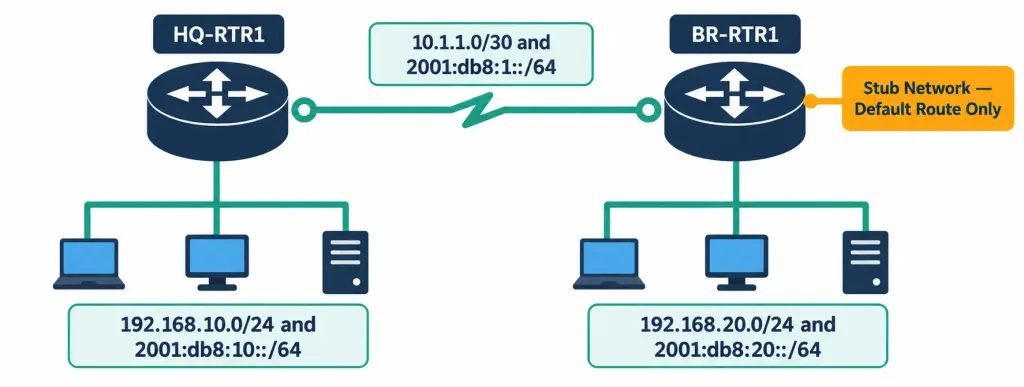
Since this is a point-to-point serial link, either next-hop or exit-interface form is valid here — we’ll use next-hop addressing for clarity and consistency with the recursive-lookup discussion above.
Step 1 — Enable IPv6 routing on both routers (required before any IPv6 static route will function):
HQ-RTR1(config)# ipv6 unicast-routing
BR-RTR1(config)# ipv6 unicast-routing
Step 2 — Configure the IPv4 static route on HQ-RTR1, pointing toward the branch LAN:
HQ-RTR1(config)# ip route 192.168.20.0 255.255.255.0 10.1.1.2Step 3 — Configure the matching IPv6 static route on HQ-RTR1:
HQ-RTR1(config)# ipv6 route 2001:db8:20::/64 2001:db8:1::2Step 4 — Because BR-RTR1 is a stub network with exactly one way out, configure default routes instead of specific ones back toward HQ:
BR-RTR1(config)# ip route 0.0.0.0 0.0.0.0 10.1.1.1
BR-RTR1(config)# ipv6 route ::/0 2001:db8:1::1
This is the practical payoff of the earlier discussion: rather than BR-RTR1 needing an individual static route for every subnet that might exist back at headquarters (which could grow over time), one default route in each protocol handles all of it, permanently, regardless of how many subnets HQ eventually adds.
Step 5 — Verify the IPv4 static routes are installed:
HQ-RTR1# show ip route static
      192.168.20.0/24 [1/0] via 10.1.1.2

BR-RTR1# show ip route static
S*    0.0.0.0/0 [1/0] via 10.1.1.1
The asterisk next to BR-RTR1’s entry confirms it’s the gateway of last resort — IOS marks the active default route this way in the table.
Step 6 — Verify the IPv6 static routes are installed:
HQ-RTR1# show ipv6 route static
S   2001:DB8:20::/64 [1/0]
     via 2001:DB8:1::2

BR-RTR1# show ipv6 route static
S   ::/0 [1/0]
     via 2001:DB8:1::1
Step 7 — Confirm end-to-end reachability from a branch host’s perspective, using extended ping from BR-RTR1 sourced from its LAN interface:
BR-RTR1# ping 192.168.10.1 source 192.168.20.1
Type escape sequence to abort.
Sending 5, 100-byte ICMP Echos to 192.168.10.1, timeout is 2 seconds:
Packet sent with a source address of 192.168.20.1
!!!!!
Success rate is 100 percent (5/5), round-trip min/avg/max = 1/2/4 ms
Five exclamation points confirm five successful replies — the static routes on both ends are correctly directing traffic in both directions, which is worth stressing: static routing is not “configure one router and you’re done.” Both ends of the conversation need a route describing how to get back, or you’ll see one-way connectivity failures that look like a routing problem on the wrong router.
Packet Tracer Practice Activity
Scenario: You are provisioning a new branch office connection. HQ-RTR1 already routes for the corporate network; BR-RTR1 is a new stub site with a single serial WAN link back to HQ and no other path in or out. Your task is to establish full IPv4 and IPv6 reachability using only static routes — no dynamic routing protocol is permitted for this activity.
Addressing table:
| Device | Interface | IPv4 Address | IPv6 Address |
|---|---|---|---|
| HQ-RTR1 | GigabitEthernet0/0 | 192.168.10.1/24 | 2001:db8:10::1/64 |
| HQ-RTR1 | Serial0/0/0 | 10.1.1.1/30 | 2001:db8:1::1/64 |
| BR-RTR1 | GigabitEthernet0/0 | 192.168.20.1/24 | 2001:db8:20::1/64 |
| BR-RTR1 | Serial0/0/1 | 10.1.1.2/30 | 2001:db8:1::2/64 |
| HQ-PC1 | NIC | 192.168.10.10/24 | 2001:db8:10::10/64 |
| BR-PC1 | NIC | 192.168.20.10/24 | 2001:db8:20::10/64 |
Build this topology in Packet Tracer (or GNS3) using the diagram above extended with the two PCs on their respective LANs, matching the addressing table exactly.
Part 1: Configure basic device settings. Set hostnames on both routers, configure all interfaces per the addressing table above, and enable ipv6 unicast-routing on both devices before proceeding — skipping this step will make Part 3 appear broken even though the commands themselves are correct.
Part 2: Configure IPv4 static routing. On HQ-RTR1, add a static route to 192.168.20.0/24 via 10.1.1.2. On BR-RTR1, add a default static route (0.0.0.0 0.0.0.0) via 10.1.1.1, since BR-RTR1 is a stub site with no reason to know about individual HQ subnets.
Part 3: Configure IPv6 static routing. Mirror Part 2 in IPv6: on HQ-RTR1, add a static route to 2001:db8:20::/64 via 2001:db8:1::2; on BR-RTR1, add a default route (::/0) via 2001:db8:1::1.
Part 4: Verify. From HQ-RTR1 and BR-RTR1, confirm both static routes appear using show ip route static and show ipv6 route static. From BR-PC1, ping HQ-PC1’s IPv4 and IPv6 addresses and confirm success. From HQ-PC1, ping BR-PC1’s addresses and confirm success in both directions.
Expected result: Both show ip route static outputs display exactly one entry each, BR-RTR1’s IPv4 entry is marked with an asterisk as the gateway of last resort, and all four ping tests (IPv4 and IPv6, in both directions) succeed. If a ping fails in only one direction, check the router on the receiving end first — a one-way failure almost always means that side is missing its return route, not that the sending router’s configuration is wrong.
Troubleshooting Patterns
“I configured the static route and it’s not showing up in show ip route.” Run show ip route static first to confirm whether it’s present but simply not selected (check for a competing route with better AD or longer prefix, per objective 3.2), versus genuinely absent (check for a typo in the destination network, mask, or next-hop address in show run).
“My IPv6 static route is configured correctly but does absolutely nothing.” This is almost always a missing ipv6 unicast-routing command. IOS accepts and stores the IPv6 static route regardless, giving no warning that IPv6 routing itself is disabled globally.
“Traffic reaches the destination but replies never come back.” Check the return path on the far-end router. Static routes are not automatically bidirectional — each router only knows what you’ve explicitly told it, and a missing route on the reply path produces exactly this symptom.
“My floating static route never activates, even after I unplugged the primary link.” Confirm the floating static’s prefix length exactly matches the primary route it’s meant to replace. A mismatched prefix length means the floating route was never actually competing for the same traffic in the first place, regardless of its AD.
“A static route using an exit interface works in the lab but breaks intermittently in production.” This is the classic multi-access proxy-ARP symptom. Convert the route to use a next-hop address, or fully specify both the exit interface and the next-hop address together.
Frequently Asked Questions
Can a single static route command specify both an exit interface and a next-hop address? Yes — this is called a fully specified static route, and it’s the recommended approach on multi-access networks where you want to avoid both the recursive lookup and the proxy-ARP overhead of an interface-only route.
Do static routes support load balancing across multiple paths? Yes. If you configure two static routes to the same destination network with the same administrative distance (the default, unless overridden), IOS installs both and load-balances traffic across them, typically per-destination by default.
Is a default route required on every router in a network? No. Default routes make sense on stub or edge devices with a single way out. A core router with multiple valid paths to different parts of the network generally should not have an unqualified default route, since that could mask legitimate routing failures instead of surfacing them.
What administrative distance should I use for a floating static route? Anything higher than the AD of the route you’re backing up, and lower than 255 (unreachable). A common practical choice is well above typical IGP values (110, 90) but still below iBGP (200), so it activates as expected without accidentally outranking something you didn’t intend to replace.
Does the order I type static routes in the configuration matter? No. IOS evaluates the resulting routing table using the same longest-prefix-match, AD, and metric hierarchy from objective 3.2 regardless of configuration order — the order you type commands in has no bearing on which route wins.
IPv4 & IPv6 Static Routing: Practice Quiz
Static Routes, Recursive Lookup, Floating Routes & Default Routes
Summary
- IPv4 static routes use
ip route <destination> <mask> <next-hop or exit-interface>; IPv6 static routes useipv6 route <prefix>/<length> <next-hop>, and requireipv6 unicast-routingenabled first. - Prefer a next-hop address on multi-access networks to avoid proxy ARP overhead; either form works cleanly on point-to-point links, and specifying both together gives the benefits of each.
- Default routes (
0.0.0.0 0.0.0.0for IPv4,::/0for IPv6) match any destination not more specifically matched elsewhere, making them ideal for stub networks with a single path out. - Floating static routes use a deliberately higher administrative distance to sit dormant as backups, but only function correctly as a backup if their prefix length matches the route they’re meant to replace.
- Static routing trades adaptability for simplicity and zero ongoing protocol overhead — appropriate for small, stable topologies, while larger or frequently changing networks call for dynamic routing protocols like OSPF.



