
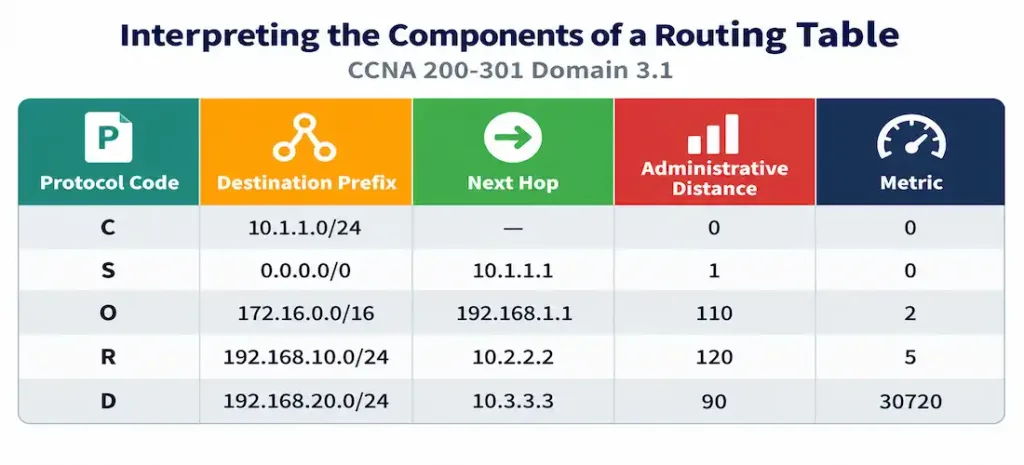
Domain 3.1 | IP Connectivity — 25% of exam
Learning Objectives
By the end of this lesson, you will be able to:
- Identify each field in a routing table entry and explain what it represents
- Explain administrative distance and recall the default values for common route sources
- Distinguish administrative distance from metric, and explain when each one actually applies
- Describe the gateway of last resort and when it’s actually used
Key Terms
| Term | Definition |
|---|---|
| Routing table | The data structure a router uses to determine where to forward traffic |
| Administrative distance (AD) | A per-source trustworthiness rating used to choose between routes from different sources |
| Metric | A value used to choose the best path among routes from the same source |
| Next hop | The IP address of the next router along the path to a destination |
| Gateway of last resort | The default route used when no more specific entry matches a destination |
Explanation
Welcome to Domain 3: The Largest Section of the Exam
Domain 2 covered how switches and wireless infrastructure build the access layer of a network. Domain 3, IP Connectivity, carries the single largest weight on the entire CCNA exam at 25% — and it starts here, with the routing table itself, since every other routing concept covered in this domain builds directly on understanding what’s actually inside it and why.
A Complete Routing Table, Read Field by Field
Rather than introducing each field in the abstract, it’s more useful to look at real, representative output first and then unpack what every piece of it actually means.
R1# show ip route

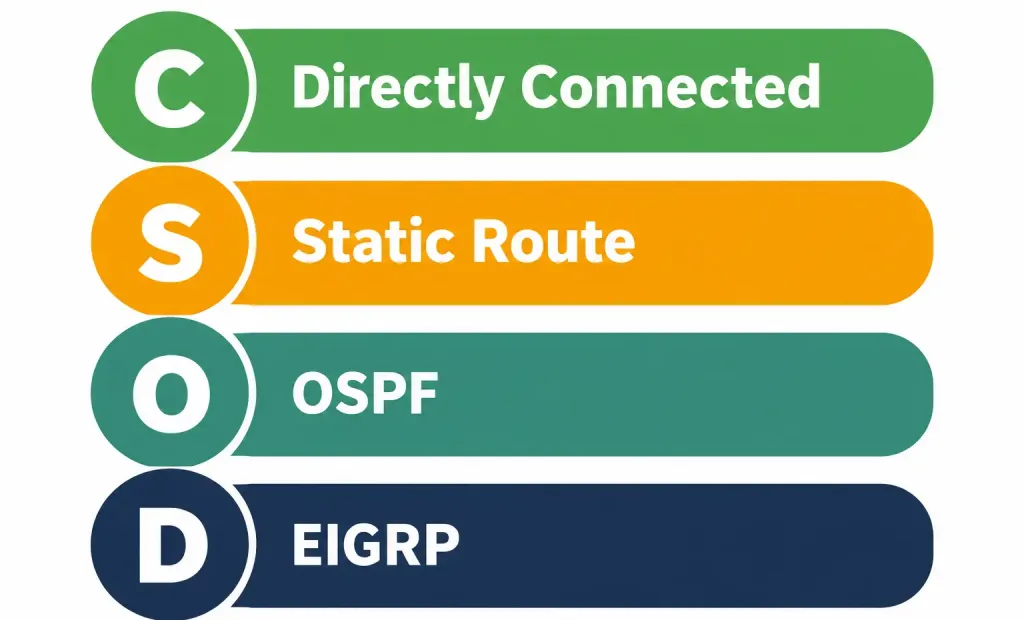
Codes: C - connected, S - static, O - OSPF, D - EIGRP

Gateway of last resort is 203.0.113.1 to network 0.0.0.0

S*   0.0.0.0/0 [1/0] via 203.0.113.1
C    10.1.1.0/24 is directly connected, GigabitEthernet0/0
C    10.1.2.0/24 is directly connected, GigabitEthernet0/1
S    192.168.10.0/24 [1/0] via 10.1.1.2
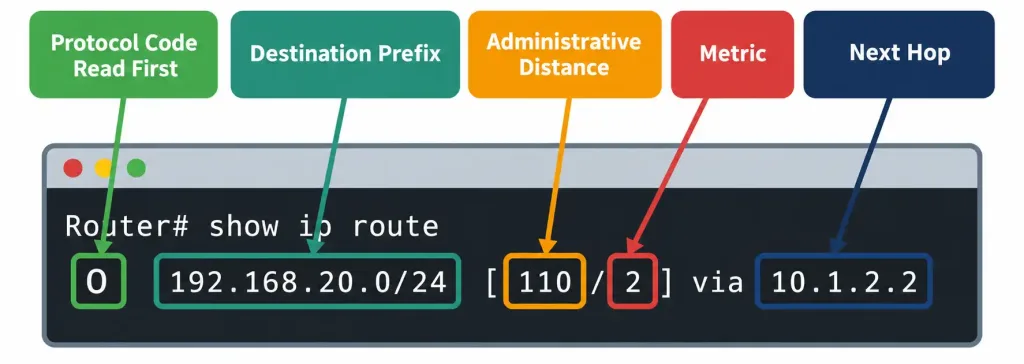
O    192.168.20.0/24 [110/2] via 10.1.2.2, 00:14:32, GigabitEthernet0/1
Every single line here follows the same underlying structure, even though the specific details differ. Working through each field in turn:
Routing Protocol Code: The First Thing to Read
The single letter (or letters) at the start of each line identifies where that specific route came from — and this is worth treating as literally the first thing you read on any routing table line, since it immediately tells you what kind of route you’re looking at before considering anything else about it.
- C — directly connected. The router has an interface configured with an address on this network; no routing protocol was needed to learn about it at all.
- S — static. An administrator manually configured this route.
- O — OSPF. Learned dynamically through the OSPF routing protocol.
- D — EIGRP. Learned dynamically through EIGRP.
Worth noting directly from the sample output above: the S* on the default route isn’t a typo or a different code entirely — the asterisk specifically marks this static route as a candidate default route, directly connected to why it appears as the gateway of last resort, covered in full later in this lesson.
Prefix and Network Mask: The Destination Being Described
Each entry’s prefix (like 192.168.20.0/24 from the sample output) identifies the actual destination network that entry describes — expressed in the same CIDR notation covered in depth in the earlier IPv4 subnetting lesson. Everything covered there about calculating network addresses, broadcast addresses, and usable host ranges from a given prefix applies directly here: a routing table entry’s prefix is simply identifying which specific network a router knows how to reach, using the exact same addressing logic already covered.
Worth being precise about what “matching” a prefix actually means for forwarding purposes: when a router receives a packet, it compares the packet’s destination address against every prefix in its routing table, looking for the most specific (longest) matching prefix — a concept that gets its own full, dedicated treatment in the very next lesson on forwarding decisions, but worth flagging here as directly connected to the prefix field this lesson is introducing.
Next Hop: Only One Step, Not the Whole Path
The next-hop field (the IP address following via in the sample output, such as 10.1.1.2 for the static route to 192.168.10.0/24) identifies the next router along the path toward that destination — not the complete path, just the single next step.
This directly echoes a concept introduced back in the very first lesson of this course: a router doesn’t need to know the entire route to a destination, only the correct next hop — trusting that whatever router receives the packet next will, in turn, make its own correct next-hop decision based on its own routing table. This is precisely why routing scales to something as large as the global internet: no single router anywhere needs a complete map of the entire path to every possible destination, only a correct next hop for each one it’s responsible for.
A worth-noting exception: directly connected routes (marked with C) don’t show a next hop at all in the sample output above — instead showing the local outgoing interface directly. This makes sense once you consider what a directly connected route actually represents: the destination network is directly attached to this router’s own interface, meaning there’s no “next router” involved in reaching it at all — the router itself is the final hop for that specific network.
Administrative Distance: Trusting One Source Over Another
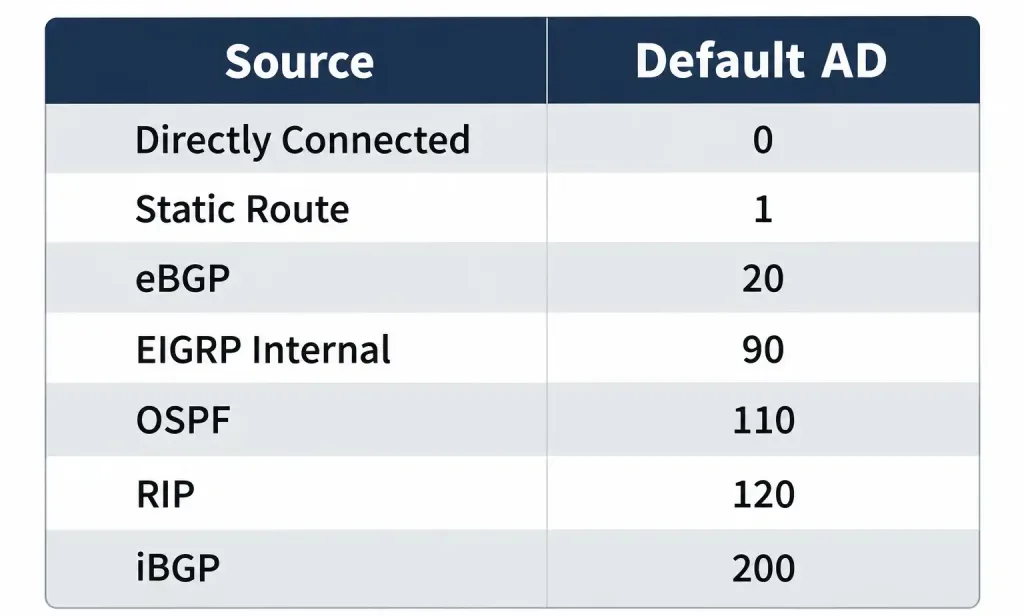
Administrative distance (AD) is a per-source trustworthiness rating, ranging from 0 to 255, used specifically to choose between multiple routes to the identical destination learned from different sources — lower AD values are more trusted, and win.
The full set of default administrative distances worth memorizing precisely, since this table is directly, repeatedly testable:
| Source | Default AD |
|---|---|
| Directly connected | 0 |
| Static route | 1 |
| eBGP | 20 |
| EIGRP (internal) | 90 |
| OSPF | 110 |
| RIP | 120 |
| iBGP | 200 |
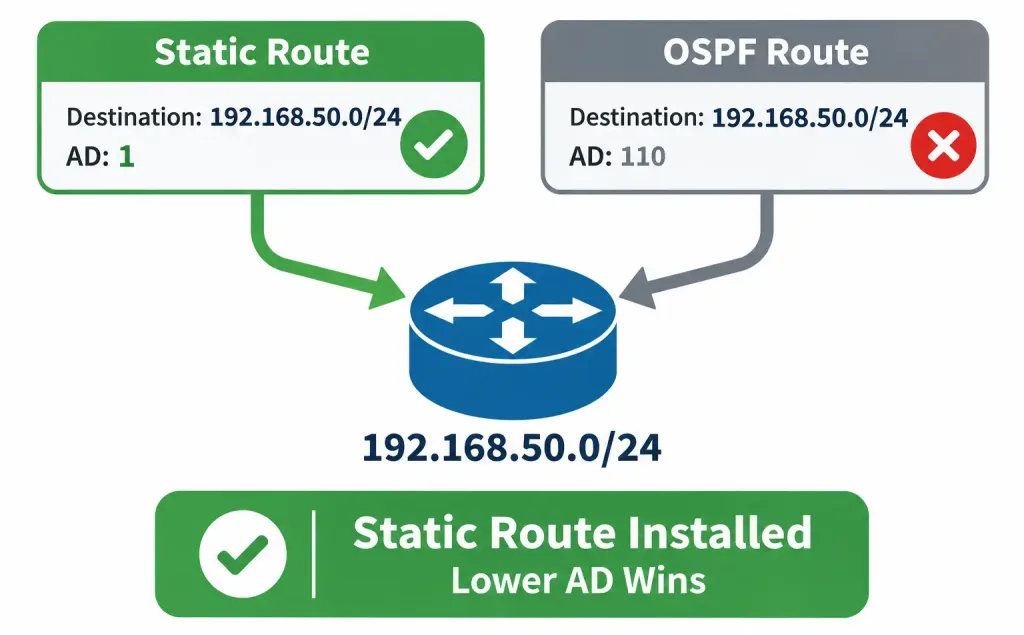
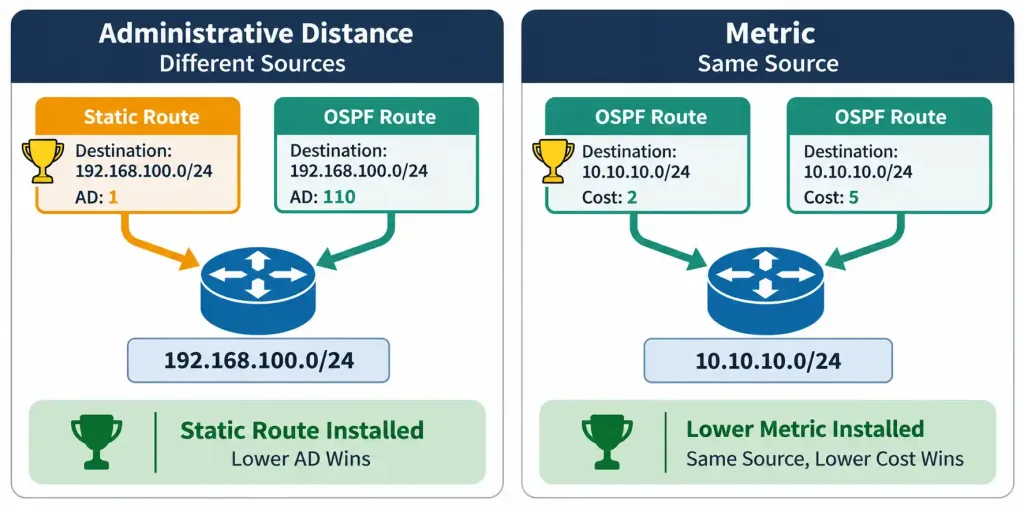
Worked example demonstrating exactly why this table matters in practice: suppose a router learns about the identical destination network, 192.168.50.0/24, from two different sources simultaneously — a manually configured static route, and dynamically through OSPF. Both routes describe the exact same destination network, but they can’t both be installed as the active route the router actually uses.
The router compares their administrative distances: the static route carries AD 1; the OSPF-learned route carries AD 110. Since 1 is lower than 110, the static route wins and is the one actually installed in the routing table and used for forwarding, with the OSPF-learned route held in reserve, ready to be installed instead only if the static route were ever removed or became unavailable.
Why directly connected routes carry AD 0, the lowest possible value, worth understanding rather than just memorizing: a directly connected route represents the most certain, most directly verifiable information a router can possibly have — it’s not learned secondhand through any protocol or manual configuration at all, it’s simply an interface the router itself is physically, directly attached to. This maximal trust is exactly why directly connected information always wins over literally any other source describing the same destination.
A genuinely important clarification worth stating explicitly: administrative distance is a purely local, per-router configuration value — it is never transmitted or exchanged between routers as part of any routing protocol’s actual operation. Each router independently applies its own AD values (whether left at the defaults shown above, or manually adjusted by an administrator) when deciding which locally-known source to trust for a given destination; it isn’t information that travels across the network the way, say, an OSPF cost value gets exchanged and calculated collaboratively between routers.
Metric: A Genuinely Different Comparison, Within One Source
Metric is worth distinguishing from administrative distance with real precision, since conflating the two is one of the most common points of confusion on this specific objective. Metric determines the best path when multiple routes to the same destination exist from the same routing source — a fundamentally different comparison scenario than AD, which specifically compares across different sources.
Worked example, deliberately contrasted against the AD example above: suppose a router learns about the identical destination, 192.168.60.0/24, through OSPF via two different paths — one through GigabitEthernet0/0 with an OSPF cost of 2, another through GigabitEthernet0/1 with an OSPF cost of 5. Both routes came from the identical source (OSPF), so administrative distance provides no basis for choosing between them at all — both would carry the identical AD of 110. This is exactly the scenario metric resolves: the lower-cost path (cost 2) wins, since it represents the better path according to OSPF’s own internal calculation, without needing to invoke AD’s cross-source trust comparison at all.
The clean, memorable distinction worth carrying forward: administrative distance answers “which source do I trust more for this destination?” Metric answers “given multiple paths from the same source, which one is actually better?” These are genuinely different questions, asked and answered at different points in the routing table’s own logic — and recognizing which question a given scenario is actually asking is precisely the skill this distinction tests.
Looking directly back at the sample routing table’s OSPF entry — O 192.168.20.0/24 [110/2] via 10.1.2.2 — the bracketed numbers [110/2] show exactly both values together: 110 is the administrative distance (confirming this route’s source is OSPF), and 2 is the metric (OSPF’s own calculated cost to reach this specific destination via this specific path). This bracket notation, [AD/metric], appears consistently across dynamic and static routes alike in show ip route output, and being able to immediately read both values out of it is a genuinely practical, frequently tested skill.
Gateway of Last Resort: The Catch-All Destination
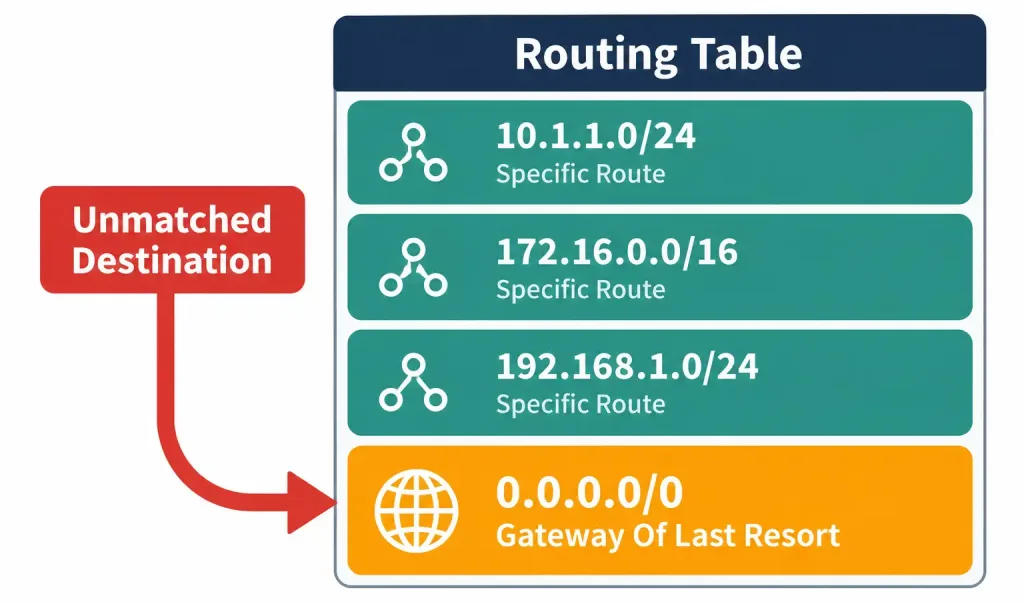
The gateway of last resort is the default route — the entry used specifically when a destination doesn’t match any more specific entry anywhere else in the routing table. In the sample output at the start of this lesson, Gateway of last resort is 203.0.113.1 to network 0.0.0.0 identifies exactly this: any destination not covered by a more specific route (the directly connected networks, or the specific static and OSPF routes shown) falls back to being forwarded toward 203.0.113.1 instead.
Why this matters practically: without a configured gateway of last resort, a router receiving a packet for a destination it has no specific route to would simply drop that packet, since it has genuinely no idea where to send it. A default route provides a deliberate fallback — commonly configured pointing toward an internet service provider’s own router, precisely because a router can’t realistically maintain a specific routing table entry for every single destination that exists across the entire internet, but it can maintain one single, simple rule: “anything I don’t specifically recognize, send toward my ISP, and let their infrastructure figure out the rest from there.”
Worked example connecting this directly back to the sample output: a packet destined for 8.8.8.8 (a well-known public address, not matching any of the specific networks shown in the sample routing table) has no specific matching entry anywhere in that table. Rather than being dropped, it matches the default route (0.0.0.0/0) instead, and gets forwarded toward 203.0.113.1 — the gateway of last resort — exactly as intended, precisely because this fallback exists to catch destinations no more specific entry accounts for.
Common Misconceptions Worth Correcting Directly
“Administrative distance and metric are basically the same thing, just with different names.” As covered in detail above, this is precisely the confusion worth avoiding — AD compares across different sources; metric compares within the same source. They answer genuinely different questions and are consulted at different points in a router’s decision-making, not interchangeable synonyms for the same underlying concept.
“Lower administrative distance always means the route will actually be used, regardless of anything else.” This gets ahead of itself in a way worth flagging directly, since it previews exactly what the next lesson covers in full depth: administrative distance is genuinely important, but it is not the first thing a router checks when choosing how to forward a packet.
Longest prefix match is checked first, before administrative distance is ever considered at all — a highly specific route from a “worse” (higher-AD) source can still be preferred over a less specific route from a “better” (lower-AD) source, precisely because prefix specificity is evaluated before administrative distance in a router’s actual forwarding logic. Full detail on this exact sequence is the specific subject of the next lesson in this domain.
“Administrative distance is exchanged between routers as part of routing protocol operation.” As covered directly above, this is inaccurate — AD is a purely local, per-router configuration value, never transmitted between routers as part of any protocol’s actual message exchange, unlike a metric value (such as OSPF cost), which genuinely is calculated and exchanged collaboratively as part of the protocol’s own operation.
“A directly connected route needs a next-hop address just like any other route.” As covered above, directly connected routes specifically show an outgoing interface rather than a next-hop IP address, precisely because there’s no “next router” involved at all in reaching a network the router itself is directly attached to.
Frequently Asked Questions
Can administrative distance values be manually changed from their defaults?
Yes — an administrator can manually configure a different AD value for a specific route or routing protocol, deliberately overriding the default trust ranking in scenarios where a specific design reason calls for it, though the default values covered in this lesson remain the standard, most commonly tested and most commonly encountered configuration in practice.
What happens if two routes to the identical destination have the exact same administrative distance and the exact same metric?
Some platforms and configurations support load balancing across genuinely tied paths, forwarding traffic across both simultaneously rather than choosing just one — though the specific behavior can vary by platform and routing protocol configuration, and this scenario sits somewhat beyond this specific objective’s core scope.
Does every router on a network need to use identical administrative distance values?
No — AD is configured independently on each router, and while using consistent values across a network is generally sensible administrative practice for predictability, there’s no technical requirement that every router in a network share identical AD configuration; each router simply applies its own configured values when making its own local routing decisions.
Why does eBGP have a notably lower administrative distance (20) than iBGP (200), despite both being BGP?
This reflects a deliberate design choice in how BGP itself is typically used: eBGP (exchanging routes between different autonomous systems, typically an organization and its ISP) is generally treated as more authoritative for external routing information than iBGP (exchanging BGP routes within a single autonomous system), which typically relies on an interior routing protocol for the actual detailed internal path information rather than iBGP’s own metric providing that detail directly.
Is the gateway of last resort always a static route specifically?
Not necessarily — while a manually configured static default route is a common and straightforward way to establish a gateway of last resort, a default route can also be learned dynamically through a routing protocol under appropriate configuration, and would still serve the identical gateway-of-last-resort function once installed in the routing table.
A Systematic Method for Reading Any Routing Table Line
Bringing every field covered in this lesson together into one repeatable process, worth practicing until it becomes automatic: given any single line of show ip route output, work through it in this order.
- Read the code first. Is this connected, static, or a specific dynamic protocol? This immediately tells you the route’s origin before considering anything else.
- Identify the prefix. What specific destination network does this line actually describe? Apply the subnetting skills from the earlier IPv4 lesson if you need to reason about the actual address range this prefix covers.
- Check the bracketed values, if present. Directly connected routes won’t show them at all; every other route type shows
[AD/metric]— the first number confirms the source’s trust ranking, the second shows that source’s own internal path calculation. - Identify the next hop or outgoing interface. Where does traffic matching this entry actually go next?
Worked example applying this systematic method to a genuinely new line, not yet covered in this lesson: D 172.16.5.0/24 [90/2172416] via 10.1.3.1, 00:05:12, GigabitEthernet0/2. Step one: the D code identifies this as an EIGRP-learned route. Step two: the destination is 172.16.5.0/24. Step three: [90/2172416] shows AD 90 (matching EIGRP’s default administrative distance from the table above, confirming step one’s identification).
A metric of 2172416 (EIGRP’s own internal composite metric calculation, a considerably larger raw number than OSPF’s typically smaller cost values, though the specific EIGRP metric calculation formula sits beyond this lesson’s scope). Step four: traffic matching this entry forwards toward 10.1.3.1, out GigabitEthernet0/2. This same four-step process applies identically regardless of which specific protocol or route type a given line actually represents.
Show IP Route & Administrative Distance: Practice Quiz
Test your knowledge of routing table codes, administrative distance, metrics, default routes, and route selection.
Summary
- Every routing table entry includes a protocol code, prefix, next hop (or outgoing interface for connected routes), administrative distance, metric, and potentially a role in the gateway of last resort.
- The protocol code should be read first, identifying a route’s source: C (connected), S (static), O (OSPF), D (EIGRP), among others.
- Administrative distance (0-255, lower wins) chooses between routes to the same destination from different sources; the default values (connected 0, static 1, eBGP 20, EIGRP 90, OSPF 110, RIP 120, iBGP 200) are directly testable.
- Metric chooses the best path among multiple routes from the same source — a genuinely different comparison than administrative distance, which compares across different sources.
- The bracket notation [AD/metric] in show ip route output shows both values together for any non-connected route.
- The gateway of last resort is the default route, catching any destination not matched by a more specific entry, rather than letting the router drop that traffic.
- Administrative distance is checked after longest prefix match in a router’s actual forwarding decision — a sequence covered in full in the next lesson.



