

Domain 3.2 | IP Connectivity — 25% of exam
Learning Objectives
By the end of this lesson, you will be able to:
- Explain the exact order of operations a router follows when choosing among multiple matching routes: longest prefix match, then administrative distance, then metric.
- Identify the longest prefix match among several candidate routes to the same destination address.
- Predict which route a router will install and use when two or more routes overlap in coverage but differ in prefix length, source, or metric.
- Use
show ip routeand related verification commands to confirm which route is actually being used for a given destination, rather than assuming based on administrative distance alone. - Recognize and avoid the single most common exam misconception about this topic: that administrative distance is checked before prefix length.
Key Terms Glossary
| Term | Definition |
|---|---|
| Forwarding decision | The process by which a router selects one route from its routing table to forward a specific packet toward its destination. |
| Longest prefix match (LPM) | The rule that, among all routes matching a destination address, the router prefers the route with the most specific (longest) subnet mask. |
| Prefix length | The number of leading bits in an address that define the network portion, expressed as the /number in CIDR notation (e.g., /24, /25). |
| Administrative distance (AD) | A per-source trustworthiness rating (0–255) that a router uses to choose between routes learned from different sources when prefix length ties. |
| Metric | A protocol-specific value used to rank multiple routes from the same source when both prefix length and AD tie. |
| Routing Information Base (RIB) | The router’s full routing table, containing all candidate routes it has learned, before any forwarding-decision filtering is applied. |
| Forwarding Information Base (FIB) | The optimized, hardware- or software-accelerated table (built from CEF) that the router actually consults at forwarding time. |
| Floating static route | A static route configured with a deliberately higher AD so it only becomes active if a preferred dynamic route disappears. |
| Route source | The origin of a route entry — connected, static, or a specific dynamic routing protocol (OSPF, EIGRP, RIP, BGP, etc.). |
| Overlapping routes | Two or more routes whose address ranges cover the same destination address, even though their prefix lengths differ. |
Why the Order of Operations Matters
Objective 3.1 introduced you to the anatomy of a routing table entry — network address, prefix length, next hop, administrative distance, metric, and route source. Knowing what those fields mean is only half the picture. This lesson answers the question that 3.1 deliberately left open: when a router has several entries that could all get a packet to the same destination, which one does it actually pick?
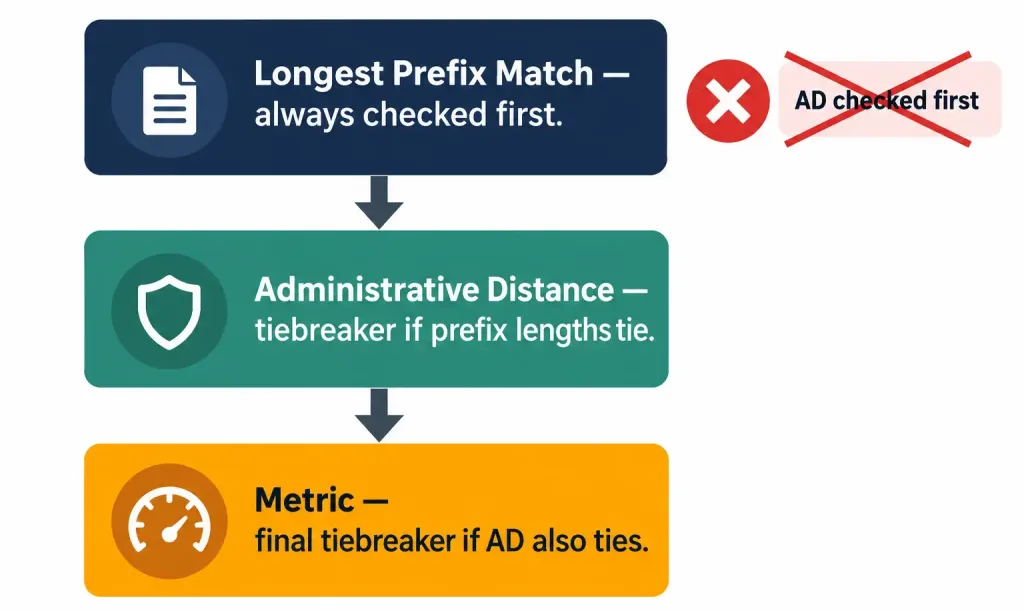
The answer is not arbitrary, and it is not “whichever route has the best AD.” It follows a strict, three-step hierarchy, checked in this exact order, every single time:
- Longest prefix match — always evaluated first, with no exceptions.
- Administrative distance — only relevant if step 1 produces a tie.
- Metric — only relevant if steps 1 and 2 both tie.
Here’s the part that trips up a surprising number of otherwise well-prepared candidates: administrative distance is often taught as “the” tiebreaker for route selection, and in isolation that’s true. But AD is never even consulted until longest prefix match has already been applied. If two routes don’t cover the exact same prefix length, AD is irrelevant to the comparison — the router isn’t choosing between two equally valid paths, it’s choosing between two different destinations that happen to overlap.
Step 1: Longest Prefix Match
Every route in a routing table defines a range of addresses, not a single address. A route to 10.1.1.0/24 covers every address from 10.1.1.0 through 10.1.1.255 — 256 addresses. A route to 10.1.1.0/25 covers only 10.1.1.0 through 10.1.1.127 — half that range, but with more bits pinned down as “network.” A route to a single host, 10.1.1.10/32, covers exactly one address.
When a packet arrives destined for 10.1.1.10, all three of those routes technically “match” — the destination address falls within all three ranges. Longest prefix match says: among all matching routes, pick the one whose mask is the longest, because it is the most specific description of where that address actually lives.
Think of it like mail delivery. “Somewhere in this country” is a match. “This city” is a more specific match. “This street, this house number” is the most specific match of all — and a competent postal worker uses the most specific address available, not the vaguest one, even though the vaguer description isn’t technically wrong.
It helps to see this at the bit level rather than just the decimal notation, because the router itself is doing binary comparison, not decimal reasoning.
Destination address:  10.1.1.10   = 00001010.00000001.00000001.00001010

Route A: 10.1.1.0 /24  mask = 11111111.11111111.11111111.00000000
         Matches first 24 bits of the destination — matches.

Route B: 10.1.1.0 /25  mask = 11111111.11111111.11111111.10000000
         Matches first 25 bits of the destination — matches, and it
         matches one bit further than Route A.

Route C: 10.1.1.10 /32 mask = 11111111.11111111.11111111.11111111
         Matches all 32 bits of the destination — matches, and it
         matches every bit.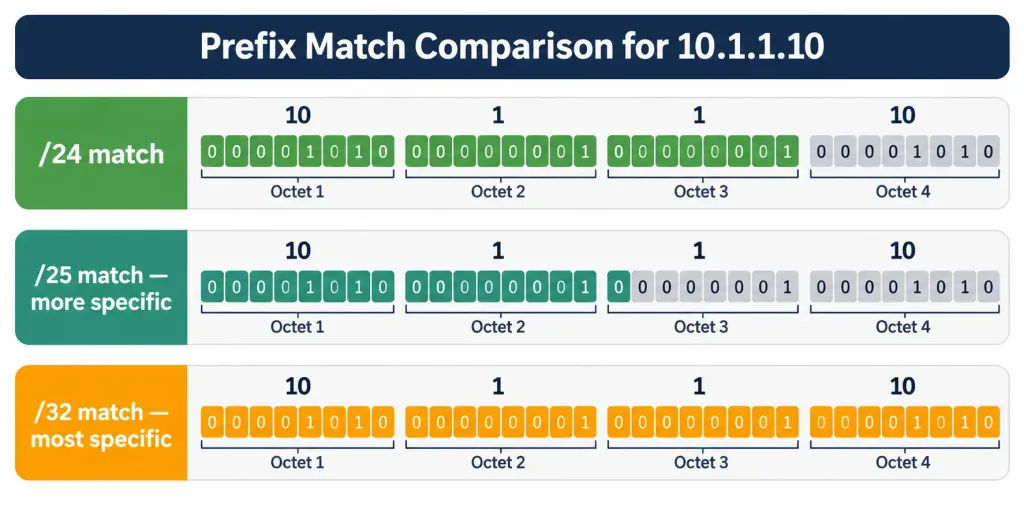
If all three routes existed in the table simultaneously, Route C (/32) would win, because 32 matched bits is more specific than 25, which is more specific than 24. This holds true regardless of where each route came from. A directly connected /32 host route, a static /32 route, and an OSPF-learned /32 route would all tie for prefix length against each other — but any of them would still beat a /24 route from any source, including a source with a numerically better (lower) administrative distance.
This is the single most important sentence in this lesson: prefix length is compared first, in isolation, before the router even looks at where each route came from. AD only enters the picture once two or more routes are tied at the same prefix length.
Step 2: Administrative Distance Tiebreak
Once longest prefix match has narrowed the field to routes that share the exact same prefix length, and only then, the router looks at administrative distance. AD exists to answer a different question than LPM does: not “which route is most specific,” but “which source do I trust more, when two sources are telling me equally specific things about the same destination?”
Cisco IOS assigns default administrative distances per source:
| Route Source | Default Administrative Distance |
|---|---|
| Directly connected | 0 |
| Static route | 1 |
| eBGP | 20 |
| EIGRP (internal) | 90 |
| OSPF | 110 |
| IS-IS | 115 |
| RIP | 120 |
| EIGRP (external) | 170 |
| iBGP | 200 |
| Unknown/unreachable | 255 |
Lower is more trusted. A static route (AD 1) will be preferred over an OSPF route (AD 110) to the same prefix length, because IOS is designed to assume a human-configured static route reflects deliberate administrative intent, and it defaults to trusting that intent over what a dynamic protocol discovered on its own.
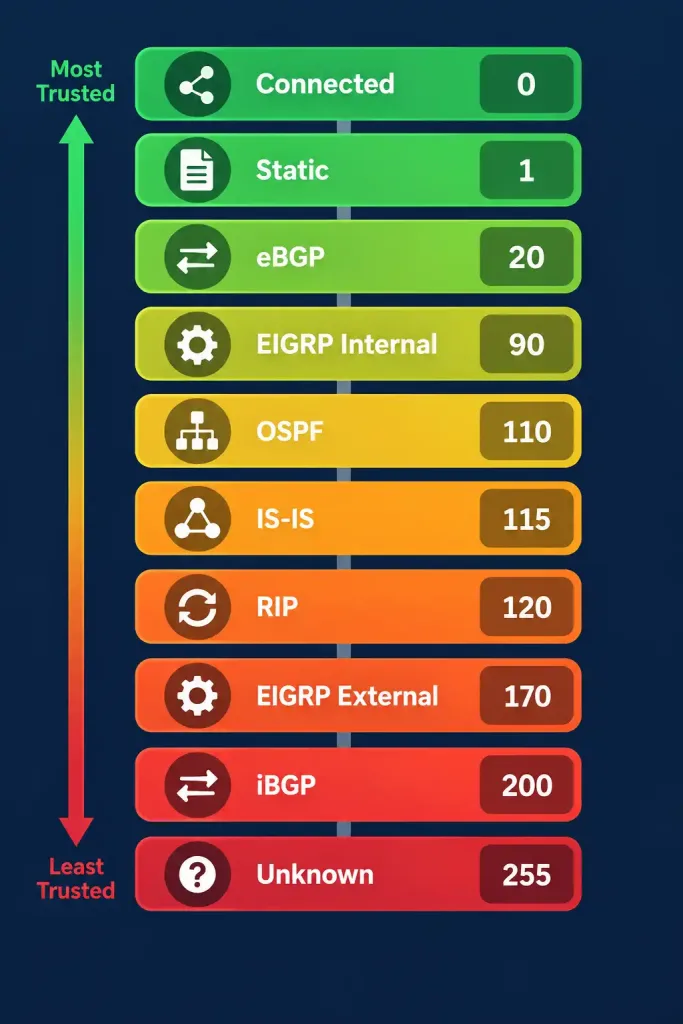
Notice the qualifier that keeps reappearing: same prefix length. If a static route targets /24 and an OSPF route targets /25 for overlapping space, AD is not compared at all, because step 1 already eliminated the /24 route from contention before step 2 ever runs. This is precisely the scenario in this lesson’s worked example below, and it’s worth sitting with until it feels obvious, because the exam will test it from several different angles.
Step 3: Metric Tiebreak
If two routes somehow tie on both prefix length and source (meaning they came from the same routing protocol, since AD is assigned per-source and identical sources produce identical AD), the router needs one more tiebreaker: metric. Metric is protocol-specific, meaning it only makes sense to compare metrics between two routes from the same protocol — comparing an OSPF cost to an EIGRP composite metric is meaningless, which is exactly why AD exists as the layer above metric in this hierarchy.
| Protocol | Metric Basis |
|---|---|
| RIP | Hop count (lower is better, max 15) |
| OSPF | Cost, derived from cumulative interface bandwidth (lower is better) |
| EIGRP | Composite metric from bandwidth and delay by default (lower is better) |
| BGP | A chain of path attributes (weight, local preference, AS-path length, and others), evaluated in its own separate order |
| Static routes | No metric in the traditional sense; ties between two static routes to the same prefix are typically broken by a manually assigned distance value or by whichever entry was configured/learned first |
If a router has two OSPF routes to the exact same /25 prefix — say, one arriving via a path with cumulative cost 20 and another via a path with cumulative cost 65 — and both routes are already tied on prefix length (identical, by definition, since they’re the same prefix) and AD (identical, since both are OSPF), the router installs the lower-cost path. If the costs are also equal, most implementations will install both routes and load-balance across them, which is a related but distinct topic from route selection covered elsewhere in the blueprint.
Worked Example — Full Walkthrough
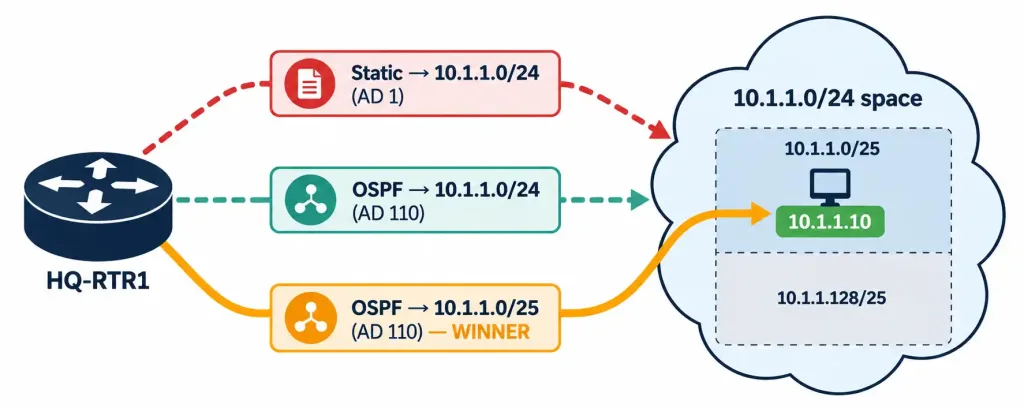
Let’s apply all three steps to a concrete scenario. A router’s routing table contains these three entries:
| # | Route Source | Prefix | Administrative Distance |
|---|---|---|---|
| 1 | Static | 10.1.1.0/24 | 1 |
| 2 | OSPF | 10.1.1.0/24 | 110 |
| 3 | OSPF | 10.1.1.0/25 | 110 |
A packet arrives destined for 10.1.1.10. Walk through the hierarchy exactly as the router does:
Step 1 — Longest prefix match. All three routes technically cover 10.1.1.10. Compare prefix lengths: routes 1 and 2 are /24, route 3 is /25. Route 3 has the longer prefix. Routes 1 and 2 are eliminated from consideration immediately — not because of their AD, not because of their source, but purely because they are less specific matches for this destination address. Route 3 wins outright at step 1. Steps 2 and 3 never execute, because there’s no tie left to break.
This is the detail that objective 3.1 flagged as a forward-reference in its misconceptions section, and it’s worth stating plainly now that we have the full mechanism in front of us: the /24 static route’s excellent AD of 1 is completely irrelevant here. A learner who stops at “static beats OSPF because AD 1 is lower than AD 110” will get this wrong every time, because that comparison never happens. The router discards both /24 routes at the prefix-length stage, before administrative distance is ever consulted.
If, hypothetically, route 3 did not exist and the table only contained routes 1 and 2, then prefix length would tie at /24 for both, and administrative distance would decide the outcome — the static route (AD 1) would be installed over the OSPF route (AD 110). That’s the scenario where the “AD is the tiebreaker” rule that most learners memorize actually applies. It’s a true rule; it’s just not the first rule.
Verification: Reading the Router’s Decision
This objective is framed as “determine,” not “configure and verify,” so there’s no full IOS configuration walkthrough here — but understanding this concept means nothing if you can’t confirm it on a live router. IOS gives you several commands to see exactly which route wins and why.
To see the entire routing table as installed:
HQ-RTR1# show ip route
Codes: L - local, C - connected, S - static, O - OSPF, ...

Gateway of last resort is not set

      10.0.0.0/8 is variably subnetted, 3 subnets, 2 masks
S        10.1.1.0/24 [1/0] via 192.168.10.1
O        10.1.1.0/24 [110/20] via 192.168.20.1, 00:14:22, GigabitEthernet0/1
O        10.1.1.0/25 [110/30] via 192.168.20.1, 00:14:22, GigabitEthernet0/1
Notice IOS lists all three routes here, because show ip route displays the full RIB, not just the one route currently being used for any single destination. The bracketed numbers are [AD/metric] — useful context, but remember they only decide the outcome for routes that already tie on prefix length.
To see which single route the router will actually use for a specific address — the real answer to “what happens to this packet” — use the address-specific form:
HQ-RTR1# show ip route 10.1.1.10
Routing entry for 10.1.1.0/25
  Known via "ospf 1", distance 110, metric 30, type intra area
  Last update from 192.168.20.1 on GigabitEthernet0/1, 00:14:30 ago
  Routing Descriptor Blocks:
  * 192.168.20.1, from 192.168.20.1, 00:14:30 ago, via GigabitEthernet0/1
      Route metric is 30, traffic share count is 1
This confirms the prediction: 10.1.1.10 resolves to the /25 OSPF route, not the /24 static route, even though the static route has a far better AD. This single command is the fastest way to settle any longest-prefix-match question on a real device or in Packet Tracer, and it’s worth building the habit of reaching for it instead of eyeballing the full table and reasoning from AD alone.
For a closer look at the hardware-accelerated forwarding path itself, on platforms that support it:
HQ-RTR1# show ip cef 10.1.1.10
10.1.1.8/29
  nexthop 192.168.20.1 GigabitEthernet0/1
CEF (Cisco Express Forwarding) builds its Forwarding Information Base directly from the RIB’s outcome of the longest-prefix-match process, then further subdivides entries for lookup efficiency — which is why the mask shown here can look slightly different from what’s in the RIB. The FIB is what actually gets consulted per-packet at line rate; the RIB is the “working” table the control plane maintains and reasons over. For CCNA purposes, know that they exist as related but distinct tables, and that the FIB always reflects whatever the RIB’s decision process (the exact three steps in this lesson) already determined.
Try It Yourself: A Verification-Only Lab
Because this objective doesn’t require a configuration walkthrough, build a light verification exercise instead — in Packet Tracer, GNS3, or physical gear if you have it:
- Configure a single router with one interface enabled and a loopback or second interface reachable via a neighbor running OSPF.
- Add a static route to
10.1.1.0/24pointing anywhere valid. - Enable OSPF and let it learn a
10.1.1.0/24route to the same destination space from a neighbor. - Confirm with
show ip route 10.1.1.5that the static route wins (AD 1 beats AD 110 — prefix lengths tie). - Now add a more specific OSPF-learned or statically configured
10.1.1.0/25route covering that same address. - Re-run
show ip route 10.1.1.5and confirm the result flips to the /25 route, regardless of its source or AD.
Seeing the output change in step 6 — after having just confirmed AD’s role in step 4 — is one of the most effective ways to make this ordering stick permanently. It’s the difference between memorizing a rule and watching it happen.
Common Misconceptions
- “Administrative distance is checked first.” This is the exam’s favorite trap, and it’s backwards. AD is checked second, only after prefix length has already been compared. A route with a terrible AD but a longer prefix will always beat a route with an excellent AD but a shorter prefix.
- “A static route always wins because its AD is 1.” Only true when prefix lengths tie. A static /24 loses to a dynamically learned /25, /26, /30, or /32 covering the same space every time.
- “Metric decides between routes from different protocols.” Metrics are not comparable across protocols — an OSPF cost of 20 and an EIGRP metric of 20 mean completely different things and are never compared to each other. AD exists specifically to resolve cross-protocol ties without needing to compare incompatible metrics.
- “The router picks the route with the lowest metric overall.” Metric is the last tiebreaker, evaluated only after both prefix length and AD have already tied. It is never the first or only factor.
- “Longest prefix match only matters when troubleshooting host routes.” It governs every single forwarding decision the router makes, for every packet, all the time — it’s just invisible in the common case where only one route exists to a given destination.
Troubleshooting Patterns
Real-world routing problems that trace back to forwarding-decision order tend to fall into a few recurring shapes:
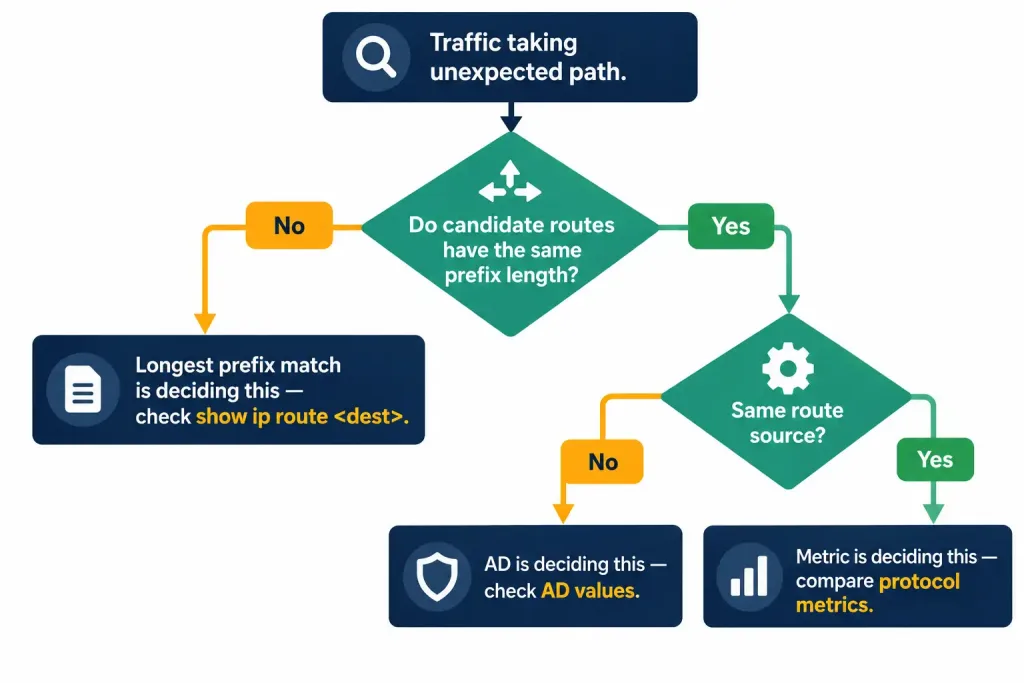
“My floating static route never takes over, even though the primary link is down.” Floating statics are deliberately configured with a high AD so they stay dormant until needed. If the floating static’s prefix length is shorter than another route still present in the table — even a route pointing out a now-useless path — that other route can still win on longest prefix match before AD is ever consulted. Check show ip route <destination> for the exact prefix being matched, not just whether the floating static appears in the table at all.
“Traffic takes an unexpected path even though I trust my static route more than the dynamic protocol.” This is almost always a prefix-length mismatch, exactly like the worked example above. Someone configured a summary static route, and a dynamic protocol is advertising a more specific subnet within that summary. The fix isn’t to change AD — it’s to recognize that the more specific route is doing exactly what it’s supposed to do, and adjust the static route’s prefix length (or its purpose) if that’s not the intended behavior.
“Two routes to the same prefix and same AD, but only one is ever used.” This points to step 3 — metric — doing its job correctly. Confirm with show ip route <destination> that the metrics genuinely differ; if they’re equal, you should see both routes installed for load-balancing rather than one being silently discarded.
“Removing a static route changed traffic paths I didn’t expect to be affected.” This usually reveals that the static route was unintentionally serving as the longest-prefix-match winner for a broader range of addresses than anyone realized, masking a dynamic route with a shorter prefix that was sitting underneath it the whole time.
Frequently Asked Questions
Does longest prefix match apply to IPv6 as well as IPv4?
Yes. The mechanism is identical in principle — IPv6 forwarding decisions also compare prefix length first, then AD, then metric. The only difference is prefix lengths are typically expressed differently in practice (e.g., /64 for most LAN segments rather than /24), but the comparison logic doesn’t change.
Can a router have two routes with the exact same prefix length, source, and metric?
Yes, and in that case both are typically installed as equal-cost paths, and traffic is load-balanced across them (per-destination or per-packet, depending on platform and configuration). This is a separate topic from route selection, but it’s the natural end state when all three tiebreakers genuinely tie.
Why does Cisco use administrative distance instead of just always trusting static routes?
Because static routes aren’t inherently more correct — they’re just manually configured. AD reflects an assumption about trustworthiness that network engineers can and do override, either by adjusting AD values directly or by working with prefix length as shown in this lesson. The default hierarchy is a sensible starting point, not an immutable law.
Is administrative distance advertised between routers?
No. AD is purely local to the router evaluating its own table — it’s not carried in routing protocol updates and isn’t visible to neighboring devices. Each router calculates and applies its own AD values independently, based on its own local configuration and defaults.
What happens if a route’s prefix length ties, and its source is identical, but the exam question doesn’t mention metric at all?
Assume the router still applies step 3 using default metric behavior for that protocol unless the question states otherwise. Exam questions are generally written to make one path clearly identifiable once you apply the correct order — if a question feels like it’s missing information, re-check whether prefix length or AD has already resolved it before step 3 is even needed.
Routing Decision Hierarchy, How a Router Makes a Forwarding Decision by Default: Practice Quiz
Longest Prefix Match, Administrative Distance, Metrics & Show Commands
Summary
- Cisco routers select among multiple matching routes to the same destination using a strict three-step hierarchy: longest prefix match first, administrative distance second, metric third.
- Longest prefix match is evaluated in complete isolation from source or trustworthiness — a more specific route always wins over a less specific one, regardless of administrative distance.
- Administrative distance only breaks ties between routes that already share the exact same prefix length; it never overrides a longer prefix match from a less-trusted source.
- Metric is the final tiebreaker, used only when prefix length and source (and therefore AD) are already identical between two or more routes.
show ip route <destination-address>is the fastest way to confirm exactly which route a router will actually use, rather than reasoning from the full table and AD values alone.



