Domain 2.0 | Infrastructure — 24% of exam
Learning Objectives
By the end of this lesson, you will be able to:
- Explain what virtualization is and describe the role of a hypervisor.
- Distinguish Type 1 and Type 2 hypervisors and identify appropriate use cases for each.
- Compare virtual machines and containers as two different approaches to isolating workloads.
- Identify the major cloud service models (IaaS, PaaS, SaaS) and describe what each provides.
- Compare cloud deployment models, including public, private, hybrid, and community clouds.
- Describe key benefits and trade-offs of adopting virtualization and cloud technologies.
Key Terms
| Term | Definition |
|---|---|
| Virtualization | The technology that allows one physical computer to run multiple independent, isolated virtual systems simultaneously. |
| Virtual machine (VM) | A software-based emulation of a complete computer, including its own virtual CPU, RAM, storage, and operating system. |
| Hypervisor | The software layer that creates and manages virtual machines, allocating physical hardware resources among them. |
| Host machine | The physical computer that runs the hypervisor and provides the actual hardware resources being virtualized. |
| Guest machine | A virtual machine running on top of a host machine’s hypervisor. |
| Container | A lightweight, isolated unit that packages an application and its dependencies, sharing the host operating system’s kernel rather than running a full separate OS. |
| IaaS (Infrastructure as a Service) | A cloud service model providing virtualized computing resources — servers, storage, networking — over the internet. |
| PaaS (Platform as a Service) | A cloud service model providing a ready-to-use platform for developing, running, and managing applications, without managing the underlying infrastructure. |
| SaaS (Software as a Service) | A cloud service model providing complete, ready-to-use software applications over the internet. |
| Public cloud | A cloud environment where infrastructure is owned and operated by a third-party provider and shared among multiple customers. |
| Private cloud | A cloud environment dedicated entirely to a single organization, whether hosted on-site or by a provider. |
| Hybrid cloud | A combination of public and private cloud environments, integrated to work together. |
Explanation
From Physical Hardware to Virtual Systems
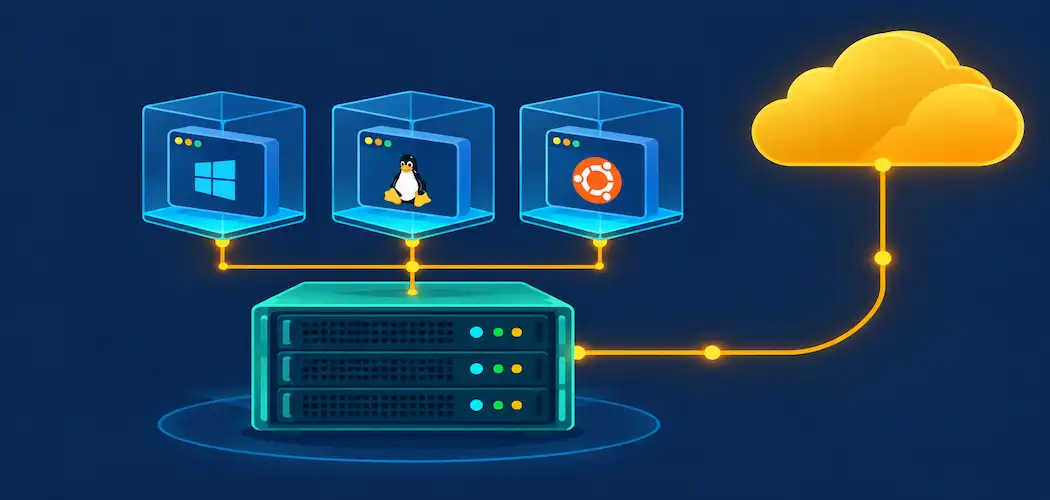
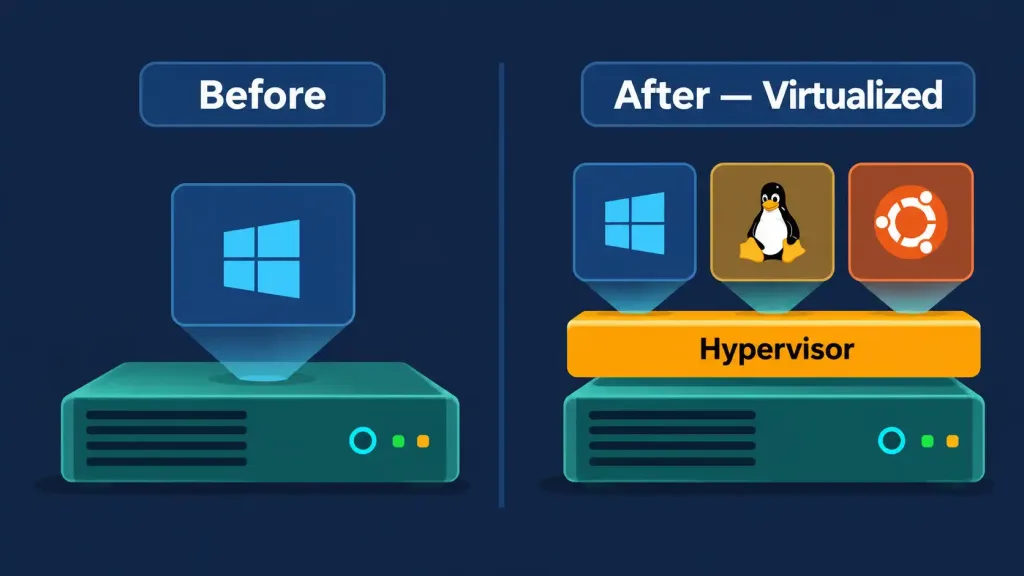
Every lesson in this module so far has focused on physical hardware: motherboards, CPUs, RAM, storage, peripherals, and connectors. Virtualization represents a genuine shift in perspective — it’s the technology that allows a single physical computer to run multiple independent, isolated computing environments simultaneously, each one behaving as though it has its own dedicated hardware even though they’re all actually sharing the same underlying physical machine underneath.
This matters practically for a simple reason: physical hardware is expensive, takes up physical space, and is often only partially used at any given moment — a single physical server, in the client-server sense covered back in Lesson 2.1, dedicated to one application might sit at 10-20% of its actual processing capacity most of the time, with the remaining capacity simply going to waste. Virtualization solves this by letting that same physical hardware host several independent virtual systems at once, each one able to use a share of the underlying resources, dramatically improving how fully a given piece of hardware actually gets used.
The Hypervisor: What Makes Virtualization Possible
The software layer that actually makes virtualization work is called a hypervisor, and understanding its role is central to this entire topic. A hypervisor sits between the physical hardware and the virtual systems running on top of it, creating and managing virtual machines (VMs) and allocating shares of the underlying physical CPU, RAM, storage, and networking resources among them. The physical computer running the hypervisor is called the host machine, and each virtual machine running on top of it is called a guest machine.
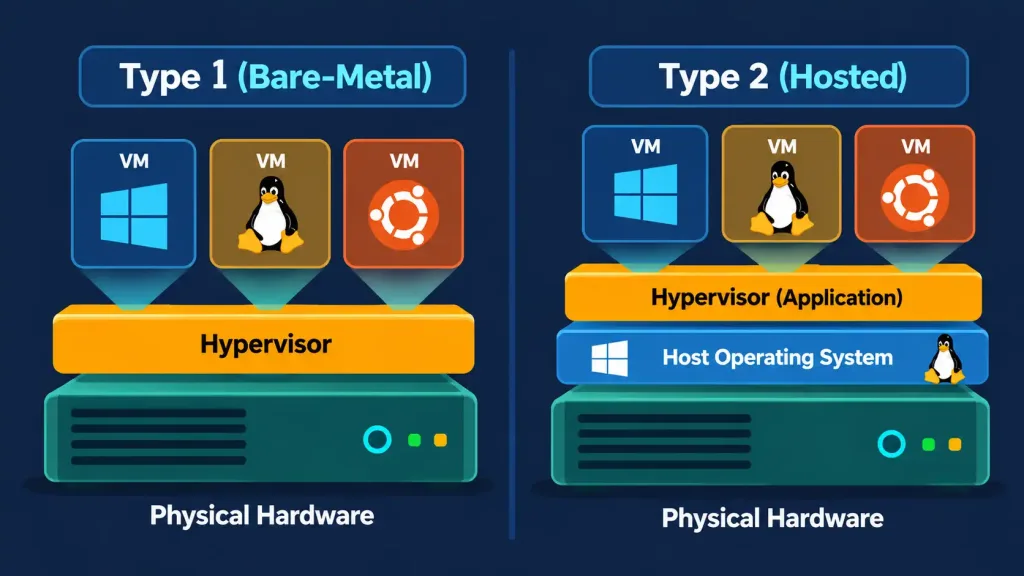
Hypervisors come in two distinct types, and the exam expects you to tell them apart clearly. A Type 1 hypervisor (sometimes called a “bare-metal” hypervisor) installs and runs directly on the physical hardware itself, with no separate host operating system underneath it at all — the hypervisor essentially is the base layer. This approach is more efficient and offers better performance, which is exactly why Type 1 hypervisors are the standard choice in enterprise data centers and cloud provider infrastructure, where efficiently running many virtual machines on powerful physical servers is the entire point.
A Type 2 hypervisor, by contrast, installs as an application on top of an already-existing host operating system — the same way any other regular software program would be installed. This introduces an extra layer of overhead compared to a Type 1 hypervisor, since the hypervisor itself has to run through the host OS rather than directly on the hardware, but it’s considerably simpler to set up and is exactly the right fit for an individual user’s specific, practical needs, like running a different operating system temporarily on a personal laptop or testing software in an isolated environment without affecting the main system.
It’s worth being able to name a familiar real-world example of each type, since the exam often frames questions around recognizable products rather than abstract categories alone. Enterprise-grade Type 1 hypervisors run the vast majority of corporate data centers and every major public cloud provider’s infrastructure behind the scenes. Type 2 hypervisors are the kind an individual technician or hobbyist is far more likely to install directly on their own personal Windows, macOS, or Linux desktop specifically to run a second operating system inside a window on their existing desktop, without needing to dedicate a whole separate physical machine to it.
Resource Allocation and Overcommitment
A hypervisor’s core job is dividing a host machine’s finite physical CPU, RAM, and storage resources among however many guest VMs are running on it, and understanding how that division actually works clarifies a lot of otherwise-confusing virtualization behavior. Each VM is typically allocated a defined share of resources — a certain number of virtual CPU cores, a fixed amount of RAM — that the hypervisor reserves and manages on its behalf, functioning much like the CPU cores and RAM covered back in Lesson 2.2, just divided up virtually rather than existing as separate physical chips.
Because most VMs don’t use 100% of their allocated resources 100% of the time, hypervisors commonly practice overcommitment: allocating more total virtual resources across all guest VMs than the host machine physically possesses, betting that not every VM will demand its full allocation simultaneously. This is precisely the efficiency mechanism that makes virtualization’s cost savings possible in the first place, though it does carry a real risk — if too many VMs genuinely do demand their full allocation at the same time, the host can become resource-constrained, and every VM sharing that host may experience degraded performance until the demand eases or additional physical capacity is added.
Virtual Machines vs. Containers
Virtual machines aren’t the only way to isolate a workload from the rest of a system, and it’s worth clearly distinguishing VMs from the increasingly popular alternative: containers.
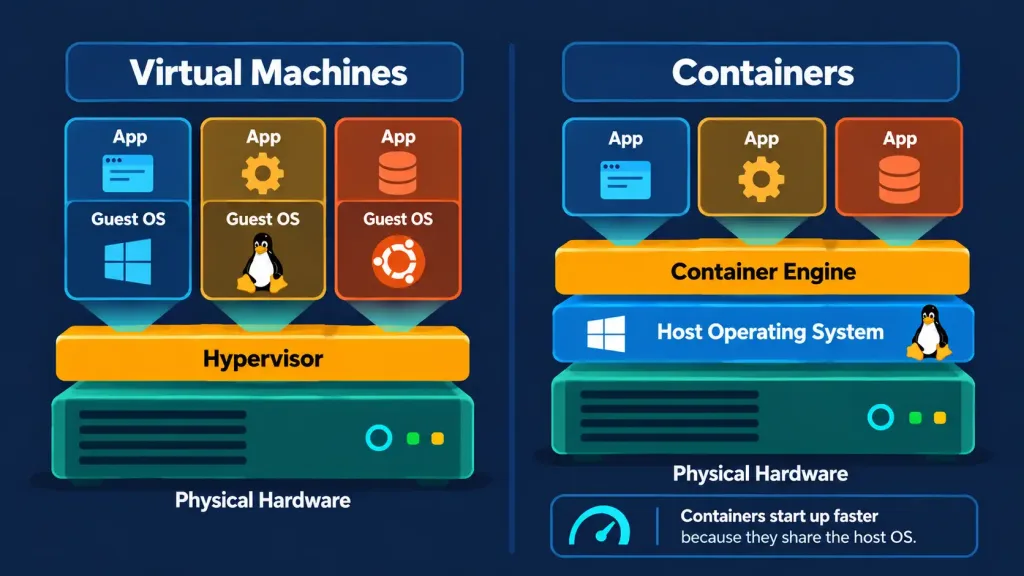
A virtual machine, as covered above, includes a complete, independent copy of an entire operating system — kernel and all — running on top of the hypervisor, which makes it fully isolated from other VMs on the same host but also comparatively heavy, since each VM needs its own full OS installation consuming its own share of storage and memory, and typically takes at least some meaningful time to boot up.
A container, by contrast, packages just an application and its specific dependencies, while sharing the host machine’s existing operating system kernel rather than running an entirely separate one. This makes containers dramatically more lightweight than VMs, capable of starting in a fraction of a second rather than the minute or more a full VM boot might take, and far more efficient when the goal is running many isolated application instances on the same hardware.
The trade-off runs in the opposite direction as well: because containers share the host’s kernel, they offer somewhat less isolation than a full VM does, and a container generally needs to be built for the same underlying operating system family as its host, while a VM can run a genuinely different operating system entirely (a Linux VM on a Windows host, for instance) since it isn’t relying on the host’s kernel at all. In practice, modern application development increasingly favors containers specifically for their speed and efficiency, while VMs remain the standard choice whenever full OS-level isolation or genuinely mixed operating systems are required on the same physical hardware.
Cloud Service Models: IaaS, PaaS, and SaaS
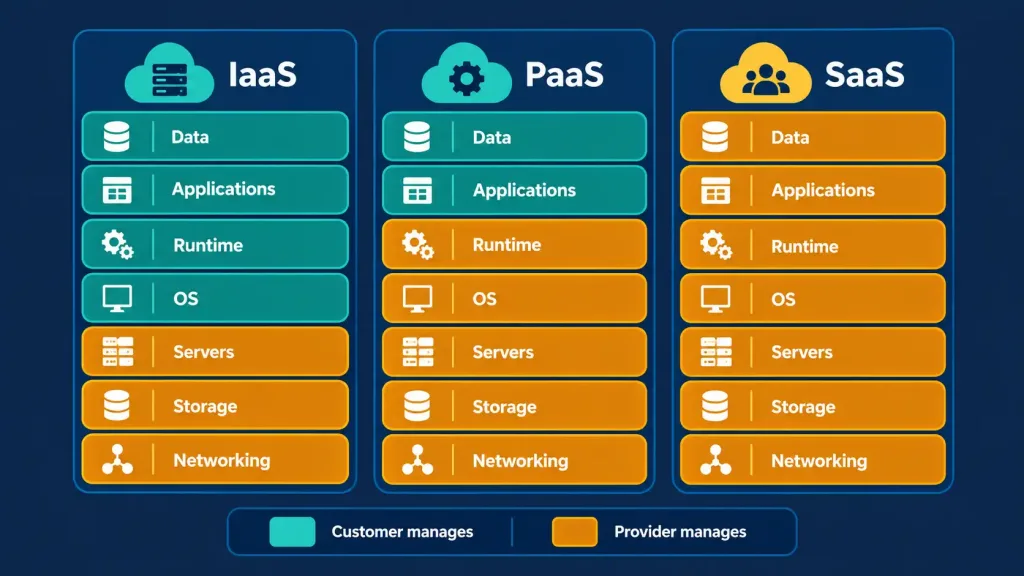
Virtualization is the underlying technology that makes modern cloud computing possible in the first place — a cloud provider’s entire business model rests on running enormous numbers of virtual machines and containers across its own physical data centers, then renting access to that virtualized capacity out to customers over the internet. Cloud services are generally organized into three layered models, each handing the customer a different amount of responsibility and control.
IaaS (Infrastructure as a Service) provides the most basic layer: virtualized computing resources — servers, storage, and networking — delivered over the internet, with the customer responsible for installing and managing their own operating system, applications, and everything running on top of that infrastructure. This is essentially renting virtual hardware instead of buying and maintaining physical hardware yourself.
PaaS (Platform as a Service) takes over one layer further up, providing a ready-to-use platform for developing, running, and managing applications, with the underlying servers, storage, networking, and operating system already managed by the provider. A developer using PaaS can focus entirely on writing and deploying their application’s code without needing to think about server maintenance, OS patching, or infrastructure scaling at all.
SaaS (Software as a Service) sits at the top of the stack, delivering a complete, ready-to-use software application over the internet, with the provider managing absolutely everything underneath — infrastructure, platform, and the application itself. A user of a SaaS product simply logs in and uses the software directly, with no installation, maintenance, or technical management required on their end whatsoever.
A genuinely useful way to remember the distinction is through a common analogy: IaaS is like renting an empty apartment (you bring your own furniture and manage everything inside); PaaS is like renting a furnished apartment (the basics are handled, but you still live your own life inside it); and SaaS is like staying at a hotel (everything is fully provided and managed, you simply show up and use it).
Cloud Deployment Models
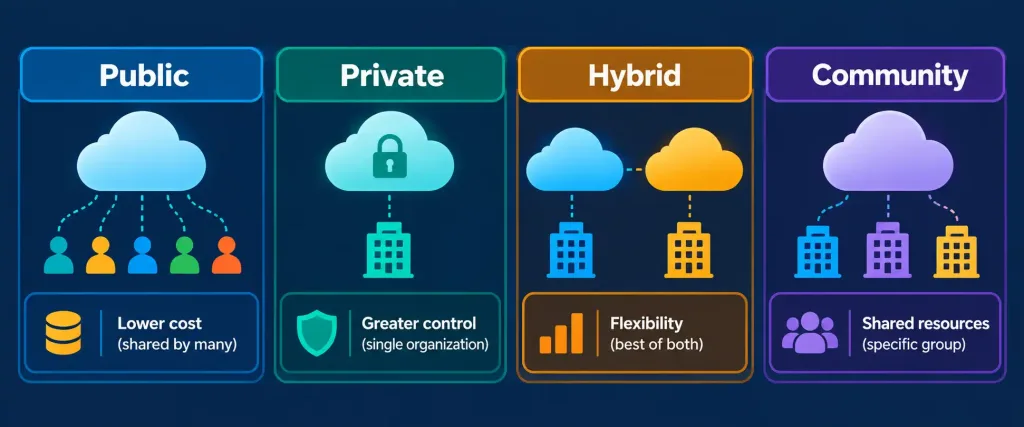
Separately from the service model (what layer of the stack you’re consuming), cloud environments are also categorized by their deployment model — essentially, who owns and who shares the underlying infrastructure.
A public cloud is owned and operated by a third-party provider, with infrastructure shared among many different customers, each kept logically separated and secure from the others despite sharing the same underlying physical hardware. Public cloud is generally the most cost-effective option, since costs are spread across many customers, and it offers virtually unlimited scalability on demand.
A private cloud, by contrast, is dedicated entirely to a single organization, whether that infrastructure is physically hosted on the organization’s own premises or hosted by a provider but reserved exclusively for that one customer. Private cloud offers greater control and can better satisfy strict security, compliance, or data residency requirements, at the cost of higher expense and reduced elasticity compared to public cloud.
A hybrid cloud combines both public and private cloud environments, integrated together so that workloads and data can move between them as needed — a common real-world pattern being an organization keeping sensitive data on a private cloud while running less sensitive, more variable workloads on public cloud for its cost efficiency and scalability, a design decision that connects directly to the network security and access-control concepts covered in far greater depth in the Network+ series’ coverage of infrastructure devices.
A community cloud, less common but still worth recognizing, is shared among several organizations with common requirements — such as a group of government agencies or healthcare providers sharing infrastructure specifically built around their common compliance needs — combining some of private cloud’s control with some of public cloud’s cost-sharing.
Benefits and Trade-Offs of Virtualization and Cloud Adoption
Bringing this lesson’s concepts together, virtualization and cloud computing offer several genuinely significant benefits that explain their widespread adoption. Cost efficiency comes from needing less physical hardware overall and, in cloud environments specifically, from paying only for the resources actually consumed rather than purchasing and maintaining excess capacity. Scalability allows resources to be increased or decreased quickly in response to changing demand, something far more difficult and slower to achieve with dedicated physical hardware alone.
Disaster recovery improves because virtual machines can be backed up, copied, and restored far more easily than physical hardware can be replaced or rebuilt, and a snapshot — a saved state of a virtual machine at a specific point in time — lets an administrator instantly roll a VM back to a known-good state if something goes wrong, a capability with no direct physical hardware equivalent.
These benefits come with genuine trade-offs worth recognizing as well. Relying on cloud infrastructure means depending on a working internet connection and on the provider’s own reliability and security practices — the same accessibility-versus-control trade-off already discussed for cloud storage back in Lesson 2.3. Virtualization also introduces a small amount of performance overhead compared to running directly on physical hardware, since the hypervisor layer itself consumes some resources, and managing a growing number of virtual machines or cloud services introduces its own genuine administrative complexity that a single physical machine running one operating system never had to deal with in the first place.
Recognition-Level Verification Concepts
- Recognize virtualization as running multiple isolated virtual systems on one physical machine, managed by a hypervisor.
- Recognize the difference between a Type 1 hypervisor (runs directly on hardware, enterprise/data center standard) and a Type 2 hypervisor (runs on top of a host OS, suited to individual user needs).
- Recognize that containers are lighter weight than virtual machines because containers share the host’s kernel while VMs each run a full separate OS.
- Recognize the three cloud service models by what layer they cover: IaaS (infrastructure only), PaaS (platform for building applications), and SaaS (complete, ready-to-use application).
- Recognize the four cloud deployment models: public (shared, third-party owned), private (dedicated to one organization), hybrid (a combination of both), and community (shared among organizations with common needs).
- Recognize a snapshot as a saved VM state that enables quick rollback, a capability with no direct physical hardware equivalent.
- Recognize overcommitment as allocating more total virtual resources than a host physically has, betting on not every VM demanding its full share simultaneously.
Common Exam Traps
- Confusing Type 1 and Type 2 hypervisors. Type 1 runs directly on hardware (bare-metal, enterprise standard); Type 2 runs on top of an existing host OS (individual user standard). A scenario describing enterprise data center infrastructure points to Type 1; a scenario describing a personal laptop running a second OS temporarily points to Type 2.
- Treating containers and virtual machines as functionally identical. Containers share the host kernel and are lightweight; VMs run a full separate OS each and offer stronger isolation at a higher resource cost.
- Mixing up IaaS, PaaS, and SaaS responsibility levels. IaaS customers manage the most (OS and up); SaaS customers manage the least (just using the application); PaaS sits in between.
- Assuming public cloud is always cheaper and private cloud is always more secure without qualification. Public cloud is generally more cost-effective and scalable; private cloud offers more control, which specific compliance or security requirements sometimes make necessary regardless of cost.
- Confusing hybrid cloud with community cloud. Hybrid combines public and private cloud for one organization; community cloud is shared infrastructure across multiple organizations with common needs.
- Assuming virtualization has no performance cost. The hypervisor layer introduces some overhead compared to running directly on physical hardware, even though the efficiency gains from better hardware utilization generally outweigh it.
- Assuming overcommitment always causes problems. It’s a normal, deliberate efficiency practice; performance issues only emerge when actual demand from guest VMs collectively exceeds the host’s real physical capacity.
Lesson 2.6 Practice Questions: Virtualization and Cloud Technologies
Summary
Virtualization lets one physical computer run multiple isolated virtual systems at once, managed by a hypervisor that allocates hardware resources among them.
A Type 1 hypervisor runs directly on hardware and is the enterprise data center standard, while a Type 2 hypervisor runs on top of an existing host OS and suits individual user needs.
Containers are a lighter-weight alternative to virtual machines, sharing the host's kernel rather than running a full separate operating system each.
IaaS, PaaS, and SaaS represent three cloud service models offering progressively more managed, ready-to-use layers of the technology stack.
Public, private, hybrid, and community clouds describe who owns and shares the underlying infrastructure, each with different trade-offs around cost, control, and scalability.
Virtualization and cloud adoption bring real benefits in cost efficiency, scalability, and disaster recovery through features like snapshots, alongside genuine trade-offs in internet dependency, performance overhead, and administrative complexity.
The next lesson turns to how devices actually connect to the internet in the first place, comparing the range of internet service types available to homes and businesses.