Domain 4.0 | Software Development Concepts — 13% of exam
Learning Objectives
By the end of this lesson, you will be able to:
- Explain what a data type is and why programs need them.
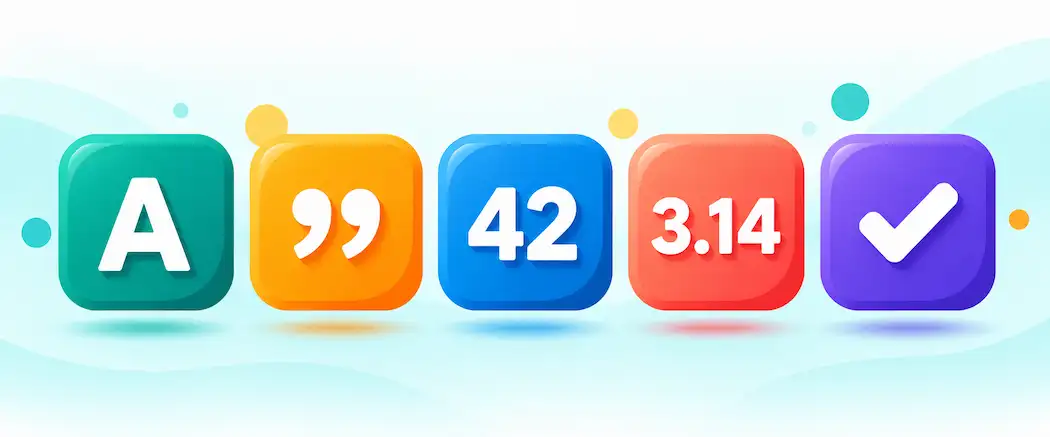
- Identify the five fundamental data types: character, string, integer, float, and boolean.
- Match a piece of data to the correct data type.
- Explain type conversion and recognize common type-related errors.
- Describe how data types relate to memory and storage.
Key Terms
| Term | Definition |
|---|---|
| Data type | A classification that tells a program what kind of value a piece of data is and what can be done with it. |
| Character (char) | A single letter, digit, or symbol. |
| String | A sequence of characters, such as a word or sentence. |
| Integer | A whole number with no decimal point, positive or negative. |
| Float | A number that includes a decimal point. |
| Boolean | A value that can only be true or false. |
| Variable | A named container that stores a value of a specific data type. |
| Type conversion | The process of changing a value from one data type to another. |
Explanation
Why Data Types Exist
Every piece of data a program works with has a data type. A data type tells the program what kind of value it’s dealing with, and what operations make sense for it. This might sound abstract. It isn’t. Think about everyday life: adding two phone numbers together makes no sense, but adding two prices does. A program faces the same issue. It needs to know whether a value is a number, a word, or a yes-or-no answer, so it knows what it can safely do with that value.
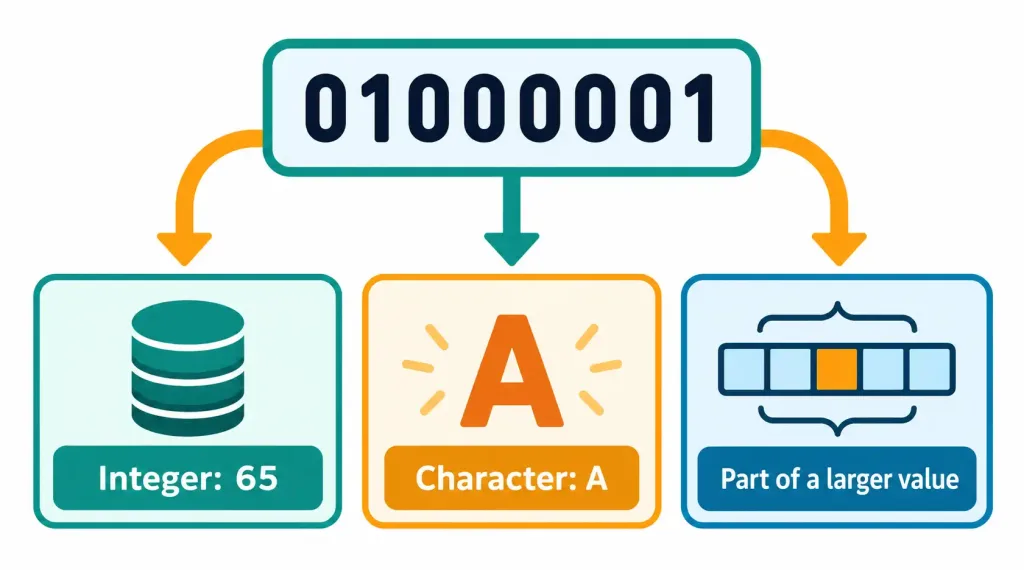
Data types also connect to something covered much earlier in this course. Back in Lesson 1.1, you learned that computers represent everything in binary. A data type is, in part, a rule for how that raw binary should be interpreted. The same sequence of ones and zeros might mean a number, a letter, or something else entirely, depending on the data type attached to it.
The Five Fundamental Data Types
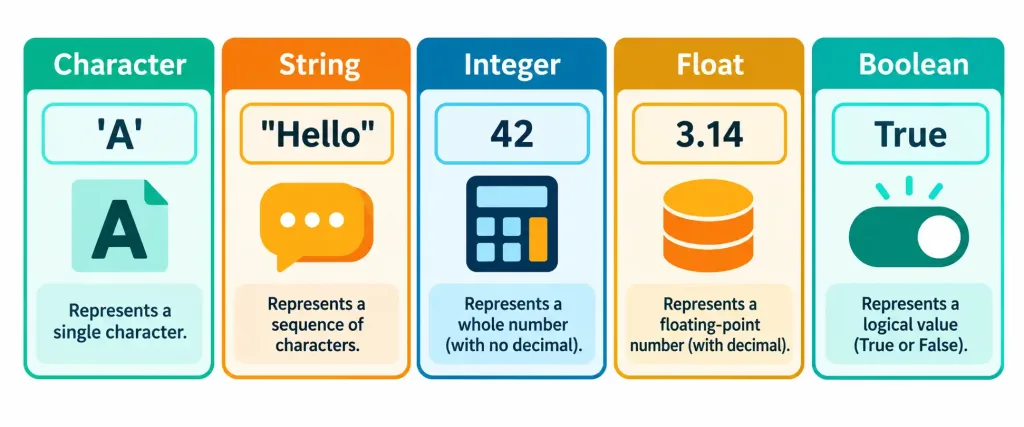
Most programming languages share a small set of basic, building-block data types. Learning these five covers the foundation for nearly everything else.
A character, often shortened to char, is a single letter, digit, or symbol. The letter “A” is a character. So is the digit “7” when treated as a symbol rather than a quantity, or the dollar sign “$”. A character holds exactly one item, nothing more.
A string is a sequence of characters strung together. A word, a sentence, or an entire paragraph is a string. “Hello” is a string. So is “Lesson 4.2.” Strings are how programs store and work with text of any kind, from a username to a full email message.
Strings come with a few handy operations worth knowing. Joining two strings together is called concatenation: combining “Good” and “morning” produces “Goodmorning,” or “Good morning” if a space is included. A program can also measure a string’s length by counting its characters, or pull out just one piece of it. These operations only make sense for strings. Trying to measure the “length” of a plain integer, for instance, doesn’t work the same way, which is yet another reason a value’s type determines what a program can actually do with it.
An integer is a whole number with no decimal point. It can be positive, negative, or zero. The number 42 is an integer. So is -17 or 0. Integers are the right choice whenever counting whole things: the number of items in a cart, a person’s age in years, or a score in a game.
A float, short for floating-point number, is a number that includes a decimal point. 3.14 is a float. So is 19.99 or -0.5. Floats are the right choice whenever precision beyond whole numbers matters, like a price, a temperature reading, or a measurement.
A boolean is a value that can only be one of two options: true or false. Nothing in between. Booleans are how programs track simple yes-or-no states, such as whether a user is logged in, whether a file exists, or whether a payment has been completed.
Matching Data to the Right Type
Choosing the correct data type isn’t always as obvious as it looks, and a few common cases are worth walking through carefully. Consider a phone number. It’s made of digits, so it might seem like an integer. In practice, it’s almost always better stored as a string. Why? Nobody ever adds phone numbers together or calculates their average. And many phone numbers start with a zero or include symbols like a plus sign or dashes, which an integer can’t store properly. A string handles all of this correctly.
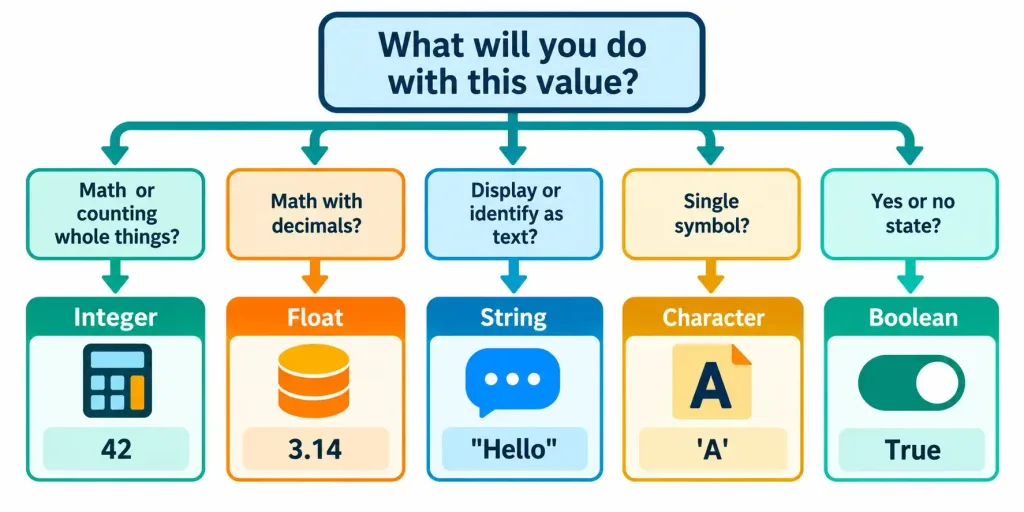
A price like 19.99 belongs in a float, since it has a decimal. A count like “3 items in cart” belongs in an integer, since you can’t have 3.5 of a physical item in a cart. A flag like “is the user an administrator” belongs in a boolean, since the answer is only ever yes or no. A person’s first name belongs in a string, since it’s text of variable length. A single letter grade like “B” could be a character, since it’s exactly one symbol.
This habit of asking “what will I actually do with this value?” is a genuinely useful way to pick a type. If the value will be used in math, it’s probably a number. If it’s just identifying or displaying something, it’s probably a string. If it’s a yes-or-no state, it’s a boolean.
A few more examples show how this plays out. A ZIP or postal code looks numeric, but it often begins with a zero, and nobody does math on it. A string is the better fit. An item’s weight, like 2.5 kilograms, needs a decimal, so a float is the right choice. The number of unread messages is a whole count, so an integer works. And whether a checkbox is ticked is a pure yes-or-no state, which is exactly what a boolean is for. In each case, the same short question leads to the right answer.
Variables: Naming and Storing Values
A variable is a named container that stores a value of a specific data type. Think of it as a labeled box. The label is the variable’s name. The contents are the value inside it. A variable might be named “age” and hold the integer 25, or be named “username” and hold the string “jordan_smith.”
Most programming languages need to know a variable’s data type, either because the programmer states it explicitly or because the language works it out automatically from the value. This matters because the data type determines how much space the value needs and what operations are allowed on it. It’s the same relationship between storage and data covered back in Lesson 2.3, just applied inside a running program rather than on a drive.
Type Conversion: Changing One Type Into Another
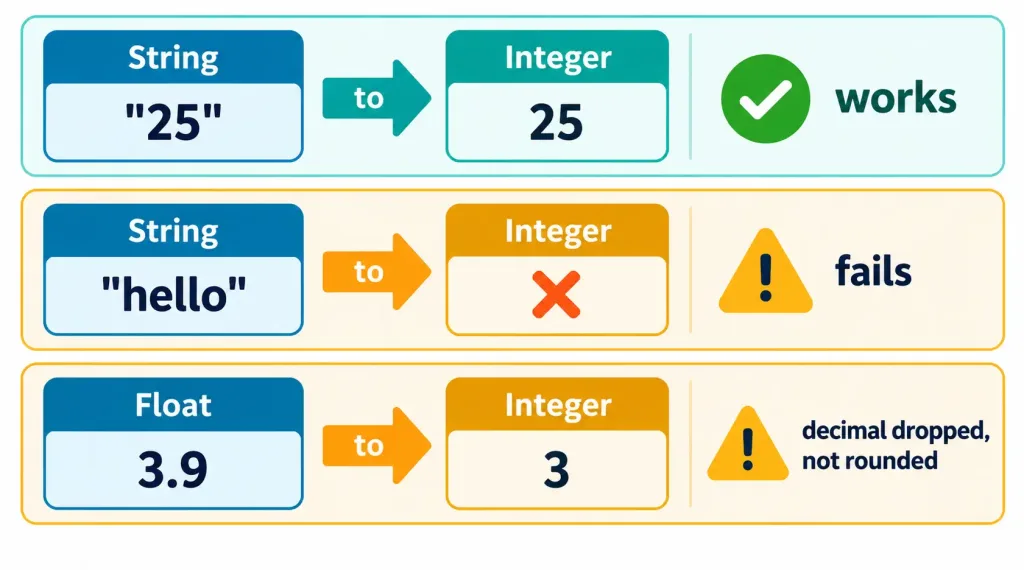
Sometimes a program needs to change a value from one data type to another. This is called type conversion, sometimes also called casting. A common example: a user types the number 25 into a web form. The form treats everything a user types as a string, so the program receives “25” as text, not as a number. Before the program can do math with it, like checking whether the person is old enough, it must convert that string into an integer.
Conversion doesn’t always work cleanly, and understanding why is important. Converting the string “25” to an integer works fine. Converting the string “hello” to an integer can’t work, since “hello” isn’t a number at all. The program will either produce an error or return an unexpected result. Converting a float like 3.9 to an integer usually drops the decimal part entirely, leaving 3 — not rounding to 4. This kind of silent change can cause subtle bugs if a programmer isn’t expecting it.
Some conversions happen automatically, without the programmer asking for them. This is called implicit conversion. A program might quietly turn an integer into a float when mixing the two in one calculation, so the result keeps its decimal precision. When a programmer deliberately asks for a conversion instead, that’s called explicit conversion. Knowing which one is happening matters, because implicit conversions are the ones most likely to surprise someone. An automatic change nobody noticed is exactly the kind that causes a puzzling bug weeks later.
Common Type-Related Errors
Many beginner programming mistakes trace back to data types. One of the most common is a type mismatch: trying to use two values together in a way their types don’t allow. Adding the number 5 to the string “apples,” for instance, doesn’t make sense, and most languages will either stop with an error or behave unexpectedly.
Another common mistake is confusing a number with the same digits stored as a string. The integer 10 and the string “10” look identical on screen, but they behave differently. Adding the integers 10 and 5 gives 15. Joining the strings “10” and “5” together, in many languages, gives “105” instead. This is a genuinely classic source of confusing bugs, and it’s exactly why understanding data types matters even for someone who never plans to become a professional programmer.
A third mistake involves floats and precision. Computers store decimal numbers in binary, and some decimal values can’t be represented perfectly that way. Adding 0.1 and 0.2 in many languages produces a result extremely close to 0.3, but not always exactly 0.3. For most everyday uses, this tiny difference never matters. For something like financial calculations, though, where exact cents matter, developers often handle the numbers differently to avoid these small rounding surprises. It’s a good reminder that even a basic data type like a float comes with trade-offs worth knowing about.
How Data Types Relate to Memory
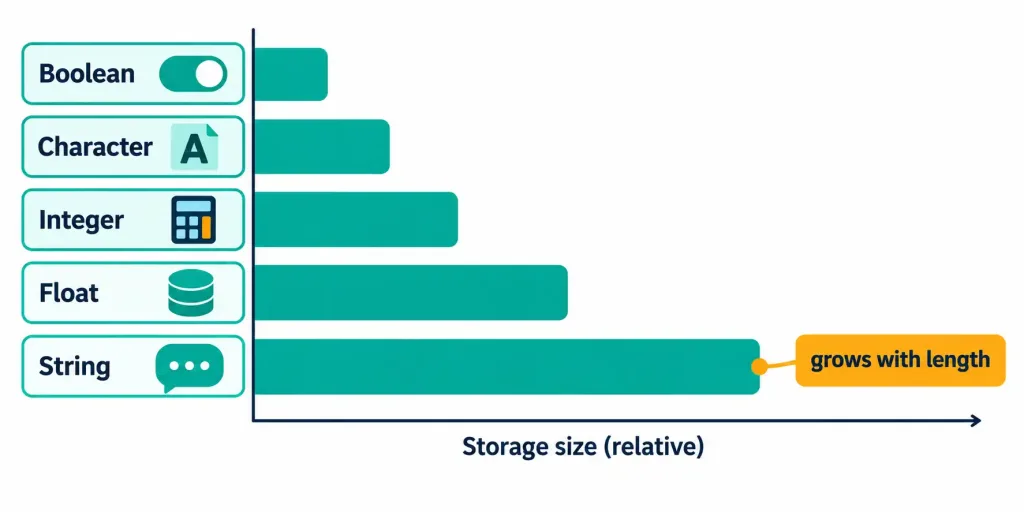
Every data type uses a certain amount of memory to store its value, and this connects back to the RAM concepts from Lesson 2.2. A single character takes up very little space. A long string takes up more, since it’s made of many characters. An integer typically uses a fixed amount of space, regardless of how large or small the number is, within a defined range. A boolean needs the least of all, since it only ever represents one of two states.
For everyday programming, this rarely needs to be a conscious worry. But it explains why programmers choose types deliberately in performance-sensitive situations. Storing a huge list of yes-or-no flags as booleans uses far less memory than storing them all as strings of text, for instance. Picking the right type isn’t just about correctness. It can also affect how efficiently a program runs.
It helps to picture this with the units of measure from Lesson 1.3. A single character typically needs about one byte. A short string needs one byte per character, so a ten-letter word needs roughly ten bytes. These numbers look tiny. But multiply them across millions of records in a large database, and the choice of type begins to add up in real, measurable storage and memory cost.
A Worked Example: Designing a Simple Sign-Up Form
Here’s a concrete way these ideas come together. A developer is building a sign-up form that collects a person’s name, age, account balance, and whether they’ve accepted the terms of service.
The name is text, so it’s a string. The age is a whole number, so it’s an integer. The account balance includes cents, so it’s a float. Whether the terms were accepted is a simple yes-or-no answer, so it’s a boolean. Now imagine the web form sends the age as the text “29,” since forms treat input as strings by default. Before checking whether the person meets a minimum age requirement, the program has to convert “29” into the integer 29. Skipping that step could cause a type mismatch error, or worse, quietly give the wrong result. This one small example touches all five types and shows exactly why type awareness matters in real software.
Recognition-Level Verification Concepts
- Recognize a data type as a classification telling a program what kind of value it’s handling and what operations are allowed.
- Recognize the five fundamental types: character (single symbol), string (sequence of characters), integer (whole number), float (number with a decimal), and boolean (true or false).
- Recognize that values like phone numbers are usually better stored as strings, since they’re identifiers rather than quantities.
- Recognize a variable as a named container holding a value of a specific data type.
- Recognize type conversion as changing a value from one type to another, and that it doesn’t always succeed or preserve the original value cleanly.
- Recognize a type mismatch as trying to combine values in a way their types don’t allow.
- Recognize that the integer 10 and the string “10” behave differently even though they look identical.
- Recognize the difference between implicit conversion (automatic, done by the language) and explicit conversion (deliberately requested by the programmer).
- Recognize that floats can introduce small precision surprises, since some decimal values can’t be stored perfectly in binary.
Common Exam Traps
- Assuming a phone number should be an integer. Phone numbers are identifiers, not quantities, and often include leading zeros or symbols — a string is almost always the better choice.
- Confusing a character with a string. A character is exactly one symbol; a string is a sequence of characters, even if that sequence happens to be only one character long.
- Confusing an integer with a float. An integer has no decimal point; a float does — even 5.0 is a float, not an integer.
- Assuming a boolean can hold more than two values. A boolean is strictly true or false, with nothing in between.
- Assuming the integer 10 and the string “10” behave the same. They look identical but behave differently — adding integers does math, while joining strings concatenates text.
- Assuming type conversion always works or preserves the exact original value. Converting text like “hello” to a number fails, and converting a float to an integer typically drops the decimal part.
- Confusing implicit and explicit conversion. Implicit conversion happens automatically without being requested; explicit conversion is deliberately requested by the programmer — implicit changes are the ones most likely to cause surprises.
Lesson 4.2 Practice Questions: Fundamental Data Types
Summary
A data type tells a program what kind of value it's handling and what operations make sense for that value.
The five fundamental types are character, string, integer, float, and boolean, each suited to a different kind of data.
Choosing the right type depends on what a program will actually do with a value, and identifiers like phone numbers are usually better stored as strings than integers.
A variable is a named container that holds a value of a specific data type.
Type conversion changes a value from one type to another, but it doesn't always succeed, and it can silently change or lose information.
Common mistakes like type mismatches usually come from forgetting that the integer 10 and the string "10" are genuinely different things.
The next lesson turns to core programming concepts, covering how programs use variables, decisions, and loops to actually do useful work.