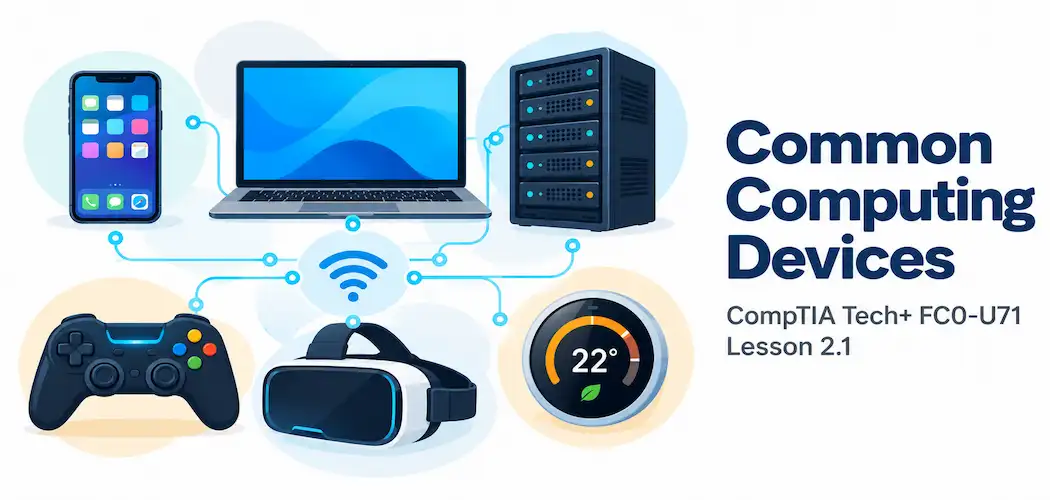
Domain 2.0 | Infrastructure — 24% of exam
Learning Objectives
By the end of this lesson, you will be able to:
- Identify common personal computing devices and explain the typical use case for each
- Distinguish a workstation from an ordinary personal computer
- Explain what makes a server fundamentally different from a client device
- Describe gaming consoles and VR/AR devices as purpose-built computing devices
- Identify the wide range of devices that fall under the Internet of Things (IoT) category, and explain what actually qualifies a device for that label
Key Terms
| Term | Definition |
|---|---|
| Workstation | A powerful personal computer built for demanding professional tasks like video editing, engineering design, or data analysis |
| Server | A device built specifically to provide services or resources to other devices over a network |
| Client-Server Relationship | An arrangement where client devices request services and servers respond to those requests |
| Internet of Things (IoT) | The broad category of everyday physical objects — appliances, vehicles, wearables, sensors — that contain embedded computing and network connectivity |
| Wearable | A computing device designed to be worn on the body, such as a smartwatch or fitness tracker |
Explanation
From the IPOS Cycle to Real Devices
Welcome to Domain 2.0 — Infrastructure, the largest single domain on this exam, covering the physical devices, components, and connections that make computing actually happen. Lesson 1.2 introduced the input-processing-output-storage cycle as something every computing device performs, and closed with a brief look at how that cycle shows up differently across device types. This lesson picks that thread up directly and runs with it in far more depth, working through the actual categories of devices you’ll encounter constantly in real IT work — from the phone in your pocket to a server humming away in a data center you’ll likely never see in person.
Personal Computing Devices: Smartphones, Tablets, Laptops, and Workstations
Most people interact with several different categories of personal computing device every single day, often without thinking carefully about what actually distinguishes one from another beyond size.
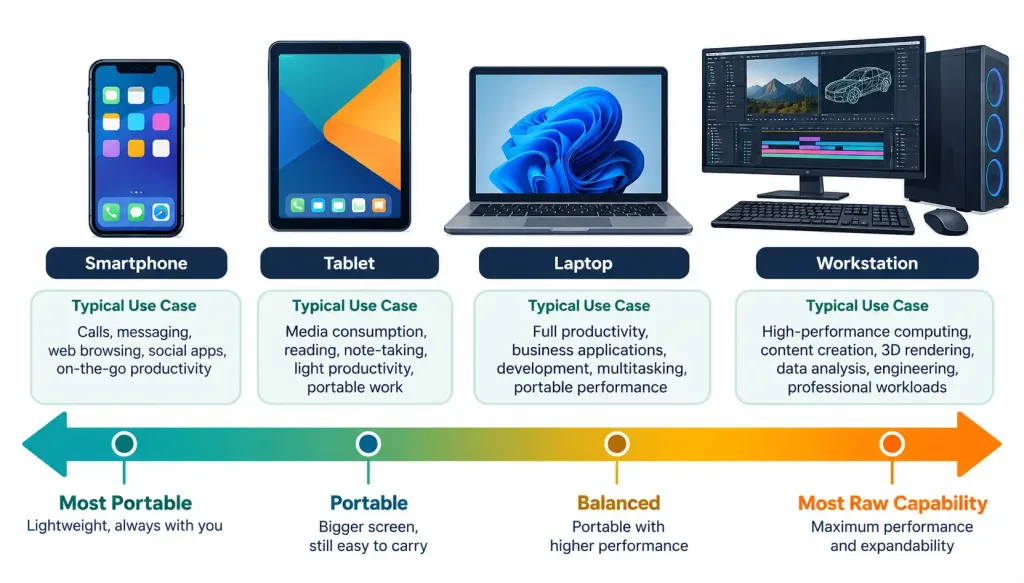
A smartphone is a highly portable, touchscreen-first device combining computing, cellular communication, and a wide range of sensors (camera, GPS, accelerometer) into a form factor small enough to fit in a pocket. Its defining trade-off is portability and constant connectivity in exchange for a smaller screen and generally less raw processing power than larger devices.
A tablet sits between a smartphone and a laptop — larger touchscreen, generally better suited to media consumption, reading, and light productivity than a phone, but still touchscreen-first rather than keyboard-first, and typically less capable than a full laptop for sustained, complex work.
A laptop is a portable, general-purpose computer with a built-in keyboard, display, and battery, designed to be usable in a wide range of locations without needing external peripherals. It trades some raw performance and upgradeability compared to a desktop, in exchange for genuine portability.
A workstation is where this category shifts noticeably in purpose. A workstation is a powerful personal computer — often, though not always, a desktop — specifically built for demanding professional tasks: video editing, 3D rendering, engineering simulation, or heavy data analysis. What actually makes something a workstation rather than just “a good laptop” or “a good desktop” isn’t really its form factor at all — it’s the intent behind its specification: workstations are deliberately over-provisioned with processing power, memory, and often specialized components (like a professional-grade graphics card) specifically to handle sustained, demanding workloads that would bog down an ordinary personal computer built for everyday tasks like browsing and email.
It’s also worth acknowledging that these categories aren’t always perfectly clean in the real world. A “2-in-1” device can fold or detach between a laptop and a tablet form factor, and a sufficiently high-end laptop with a powerful processor and dedicated graphics hardware genuinely blurs the line with a workstation. Rather than memorizing rigid boundaries, it’s more useful to think of these four categories as points along a spectrum — portability on one end, raw sustained processing capability on the other — with any specific real-world device landing somewhere along that line depending on its actual specification and intended use, not just its physical shape.
Comparing that specification directly is exactly where the units of measure covered in Lesson 1.3 come back into play — a workstation’s higher GHz processor, larger RAM footprint, and greater storage capacity are exactly the numbers that separate it from an ordinary laptop on paper.
Servers: Devices Built to Serve Other Devices
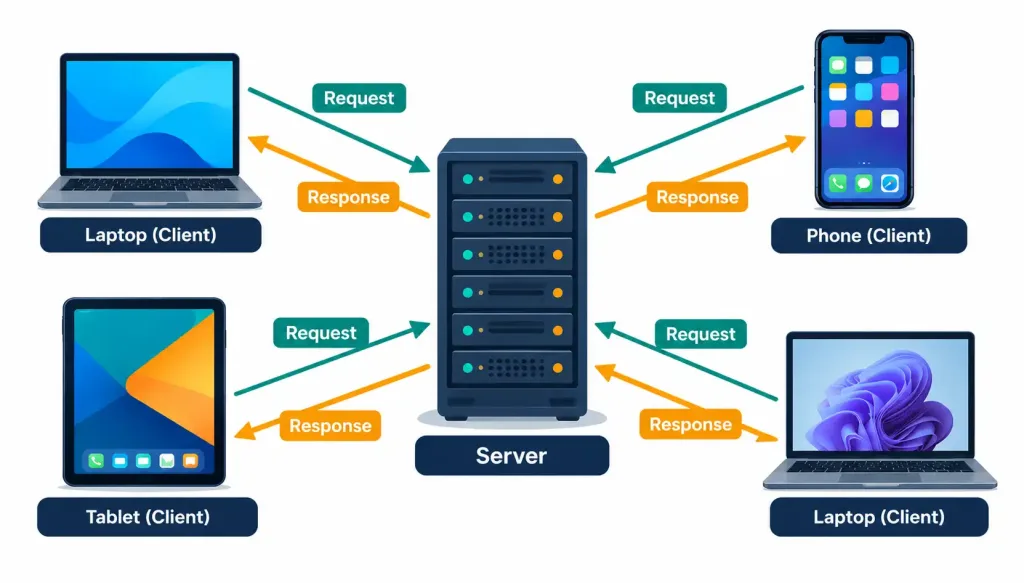
A server represents a genuinely different category of device, not just a bigger or more powerful version of a personal computer. A server is built specifically to provide services or resources to other devices over a network, rather than to be used directly and interactively by a single person sitting in front of it.
This distinction is best understood through the client-server relationship: a client (which could be a laptop, a smartphone, or any other personal device) sends a request — “give me this webpage,” “authenticate this login,” “store this file” — and a server receives that request, processes it, and sends a response back.
A single server is often built to handle requests from dozens, hundreds, or even thousands of clients simultaneously, which is exactly why servers are typically specified very differently from personal computers: prioritizing reliability, uptime, and the ability to handle heavy simultaneous demand over things like a nice display or a comfortable keyboard, since a server frequently has neither attached to it at all, and may run for months or years without anyone directly touching it.
If you continue on toward networking-specific coursework, you’ll find servers described in exactly this same functional way, alongside the other core infrastructure devices covered in the Network+ series — that lesson goes considerably deeper into the specific types of servers (file servers, web servers, print servers, and more) than this introductory lesson needs to, but it’s worth knowing even at this early stage that “server” describes a functional role rather than one single fixed type of machine.
A file server stores and shares documents, a web server delivers webpages, and a print server manages shared printers across an office — three genuinely different jobs, all still fitting the same client-server pattern described above. Servers are also typically built with reliability features personal computers rarely bother with — redundant power supplies, components designed to be swapped without shutting the whole machine down, and hardware specifically chosen to run continuously for months or years rather than being turned off at the end of each day the way a typical laptop might be.
Gaming Consoles: Purpose-Built Computing Devices
A gaming console is a specialized computing device built and optimized around a single primary purpose: playing video games, typically through a television or dedicated display, using a specialized controller rather than a keyboard and mouse. It’s worth recognizing that a gaming console is still a genuine computer under the hood — it has a CPU, memory, storage, and runs an operating system, just like a laptop or workstation does — but its hardware, software, and entire design philosophy are deliberately narrowed and optimized around one specific use case rather than being general-purpose.
This same “purpose-built computer” idea recurs constantly throughout this domain, and it’s worth internalizing now: not every computing device is meant to do everything. A device deliberately optimized for one narrow job, at the cost of flexibility elsewhere, is often a completely intentional and correct design choice, not a limitation to apologize for. Gaming consoles also illustrate this trade-off particularly clearly across their own history — early consoles were extremely limited, single-purpose devices, while modern consoles have gradually absorbed more general-purpose capability (streaming apps, web browsers, even some productivity features) while still remaining fundamentally organized around gaming as the primary use case a typical buyer has in mind.
VR/AR Devices: Extending Computing Into a New Interface
Virtual reality (VR) and augmented reality (AR) devices represent a genuinely different approach to output and interaction rather than a fundamentally different internal architecture. A VR headset fully replaces what the user sees with a computer-generated environment, typically through a pair of small displays mounted directly in front of the eyes, creating a fully immersive experience disconnected from the user’s actual physical surroundings. An AR device, by contrast, overlays computer-generated elements on top of the user’s real, physical view of the world — think of a heads-up display that adds labels or graphics to what you’re already looking at, rather than replacing it entirely.
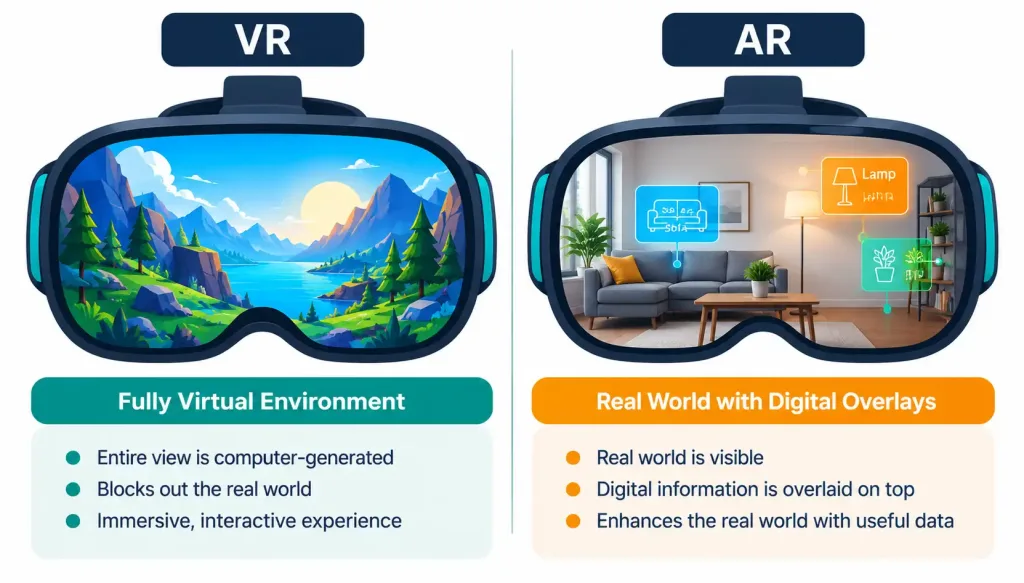
Both categories still run through the same basic input-processing-output cycle covered earlier in this course — head movement and controller input are captured (input), the device calculates what should be displayed based on that movement (processing), and a visual result is rendered back to the user (output) — just applied to a genuinely novel kind of output device compared to a traditional flat screen.
The Internet of Things (IoT): When Everyday Objects Become Computers
The Internet of Things (IoT) is easily the broadest and most rapidly growing category covered in this lesson, and it’s worth spending real time on because it covers an enormous, genuinely diverse range of devices that don’t look anything like a traditional “computer” at first glance. What actually qualifies a device as IoT isn’t its shape or its primary purpose — it’s the combination of embedded computing power and network connectivity built into an object that traditionally had neither.
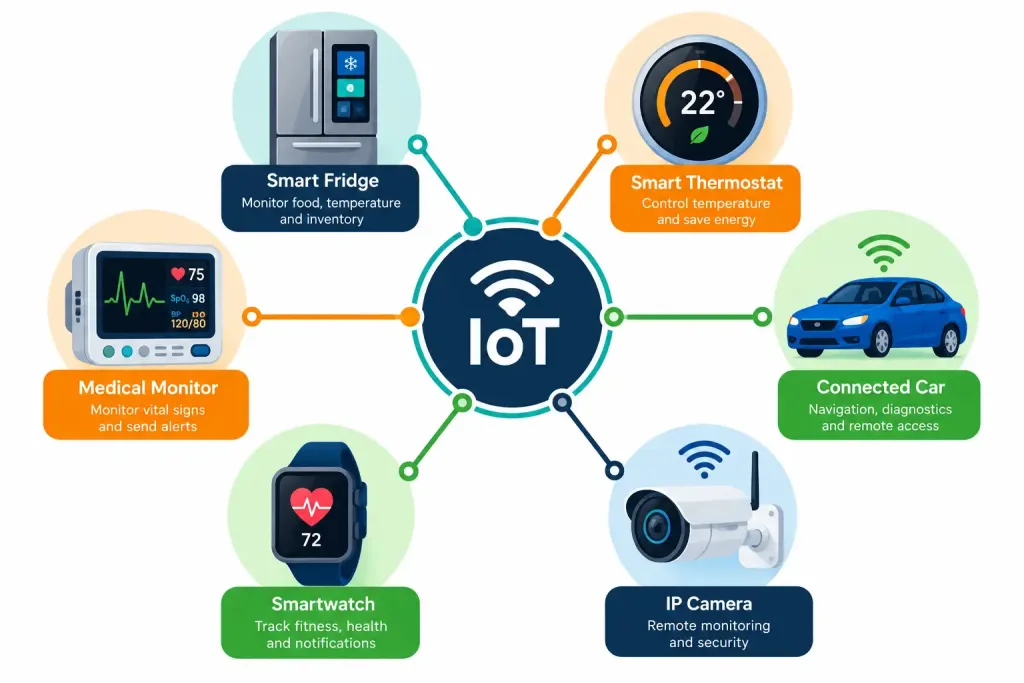
A few concrete categories worth knowing:
- Smart appliances — a refrigerator that tracks its contents and suggests recipes, a washing machine that can be started remotely from a phone app
- Home automation devices — smart thermostats, smart light bulbs, smart door locks, all connected to a home network and often to each other
- Connected vehicles — modern cars increasingly include embedded computing for navigation, diagnostics, and even remote software updates delivered over a network connection
- IP cameras — security cameras that connect directly to a network, rather than to a dedicated, isolated recording system, allowing remote viewing from anywhere
- Wearables — smartwatches and fitness trackers, worn directly on the body, collecting and transmitting data like heart rate or step count
- Medical devices — from consumer-grade continuous glucose monitors to hospital-grade connected diagnostic equipment, increasingly built with embedded connectivity to transmit readings automatically rather than requiring manual recording
The genuinely important takeaway across every single one of these examples is this: none of them would have historically been thought of as “computers” at all, and yet every one of them now runs through the exact same fundamental input-processing-output-storage cycle as a laptop or a server — a sensor captures a reading (input), an embedded processor evaluates it (processing), a result is transmitted or displayed (output), and often that data is stored, either locally or in the cloud, for later use. The IoT category is less about any single device type and more about a broader trend: computing capability quietly spreading into objects that never used to have any at all.
A Worked Example: Spotting the IoT Devices in a Single Room
A useful way to build real confidence with this category is to walk through an ordinary room and identify which objects actually qualify as IoT devices, and why. Picture a typical modern living room: a television, a smart speaker, a traditional wall clock, a smart thermostat on the wall, a laptop on the coffee table, and a doorbell camera visible through the window.
The traditional wall clock does not qualify — it has no embedded computing and no network connectivity; it’s a purely mechanical or simple electronic device with neither ingredient required for the IoT label. The laptop, despite clearly having both computing power and network connectivity, isn’t typically classified as an IoT device either — the category is specifically reserved for objects that traditionally lacked computing and connectivity, and a laptop has always been understood as a general-purpose computer first.
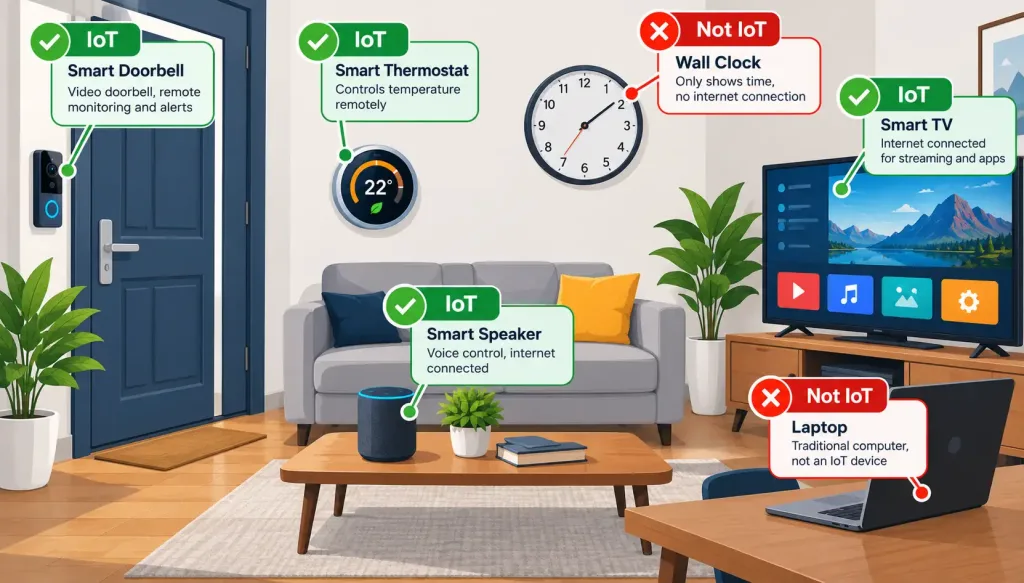
The smart speaker, the smart thermostat, and the doorbell camera, on the other hand, all genuinely qualify: each one is an object that historically had no embedded computing or network connection at all (a speaker was just a speaker, a thermostat was just a dial, a doorbell was just a button and a chime), and each now has both added deliberately. The television is a genuinely interesting edge case worth pausing on — a modern “smart TV” absolutely qualifies as IoT for the same reason, while an older, non-connected television would not.
This kind of exercise — walking through a real space and correctly sorting objects into “qualifies” and “doesn’t qualify” — is exactly the recognition skill this exam expects, far more than memorizing a fixed list of example devices ever could be.
Why This Matters for a Career in IT
Being able to correctly categorize an unfamiliar device — recognizing a workstation’s purpose at a glance, understanding why a server behaves differently from a personal computer, or immediately recognizing an unfamiliar gadget as falling under the IoT umbrella — is a genuinely practical skill that comes up constantly in real IT environments, which increasingly include a mix of traditional computers and a growing swarm of connected, embedded devices that don’t look like computers at all.
Support and security considerations differ meaningfully by device category too: a workstation used for sensitive financial modeling has very different priorities than a smart light bulb, even though both technically qualify as “computing devices” under the broad definition covered in Lesson 1.2.
This category-level thinking also sets up the rest of Domain 2.0 directly — later lessons in this module dig into the internal components that make these devices work (motherboards, CPUs, storage), the peripherals connected to them, and the networking concepts that let them all communicate, all building on the device categories introduced here as a foundation. A help desk technician who can instantly recognize “this is a workstation-class problem” versus “this is a routine laptop issue” versus “this is actually an IoT device that’s misbehaving” is already halfway to choosing the right troubleshooting approach before touching a single setting — a direct, practical payoff from the categorization skill this lesson is built around.
Recognition-Level Verification Concepts
A few patterns are worth recognizing on sight:
- A device optimized for portability and touchscreen interaction is a smartphone or tablet; a device optimized for portability with a built-in keyboard is a laptop.
- A device deliberately over-specified for sustained, demanding professional work is a workstation, regardless of whether it looks like a typical desktop or not.
- A device built to respond to requests from many other devices, rather than being used directly and interactively, is a server.
- A device that fully replaces your visual field is VR; a device that overlays information on top of your real surroundings is AR.
- Any everyday object with embedded computing and network connectivity that it traditionally lacked — an appliance, a vehicle, a wearable, a piece of medical equipment — falls under the IoT category.
Common Exam Traps
- A workstation is defined by its intended use and specification, not simply by being a desktop rather than a laptop. A high-end laptop built for demanding professional work can also reasonably be described as a workstation-class device.
- A server is not just “a really powerful personal computer.” The defining characteristic is its role in a client-server relationship, responding to requests from other devices, not raw specification alone.
- Don’t confuse VR (fully replacing your view) with AR (overlaying onto your real view). These are frequently tested as a direct pair specifically because they’re easy to mix up if you haven’t anchored the distinction clearly.
- IoT isn’t a single device type — it’s a category defined by embedded computing plus network connectivity added to an object that traditionally had neither. Don’t try to memorize a fixed list of “IoT devices”; instead, learn to recognize the underlying pattern in something you’ve never seen before.
- A gaming console being “purpose-built” doesn’t make it any less of a genuine computer. It still has a CPU, memory, storage, and an operating system — its narrower focus is a design choice, not a technical limitation on what counts as a computer.
- A laptop having both computing power and network connectivity doesn’t make it an IoT device. The category specifically applies to objects that traditionally lacked both — a general-purpose computer has never fit that description, even though it technically has the same two ingredients.
- The word “smart” attached to a product name is a strong hint, but not an automatic guarantee, that a device qualifies as IoT. Always check for the actual combination of embedded computing plus network connectivity rather than relying on marketing language alone.
Lesson 2.1 Practice Quiz — Common Computing Devices and Their Purposes
17 questions covering personal computing devices, workstations, servers, gaming consoles, VR/AR, and the Internet of Things.
Tech+ FC0-U71 · Domain 2.0Summary
Smartphones, tablets, laptops, and workstations represent a spectrum trading off portability against raw capability, with the workstation category defined by its deliberate over-specification for demanding professional work.
A server is fundamentally different from a client device because of its role in the client-server relationship, built to respond to requests from many other devices rather than being used directly by one person.
Gaming consoles are genuine, full computers — CPU, memory, storage, operating system — deliberately narrowed and optimized around one primary purpose.
VR devices fully replace a user's visual field with a computer-generated environment, while AR devices overlay computer-generated elements onto the user's real, physical surroundings.
The Internet of Things (IoT) is defined by the combination of embedded computing and network connectivity added to everyday objects — appliances, vehicles, wearables, cameras, medical devices — that traditionally had neither, and every one of them still runs through the same fundamental input-processing-output-storage cycle covered earlier in this course.