Domain 4.0 | Software Development Concepts — 13% of exam
Learning Objectives
By the end of this lesson, you will be able to:
- Explain the difference between variables and constants.
- Describe arrays, functions, and objects as ways to organize code and data.
- Identify the three basic types of operators: arithmetic, comparison, and logical.
- Explain how conditionals and loops control the flow of a program.
- Describe the purpose of comments and why readable code matters.
Key Terms
| Term | Definition |
|---|---|
| Variable | A named container whose stored value can change while a program runs. |
| Constant | A named container whose stored value is set once and does not change. |
| Array | An ordered collection of values stored together under a single name. |
| Function | A reusable block of code that performs a specific task when called. |
| Object | A structure that groups related data and the actions that work on that data. |
| Operator | A symbol that performs an operation on one or more values. |
| Conditional | A statement that runs certain code only if a condition is true. |
| Loop | A structure that repeats a block of code multiple times. |
| Comment | A note in code meant for human readers, ignored by the computer. |
Explanation
From Data to Decisions
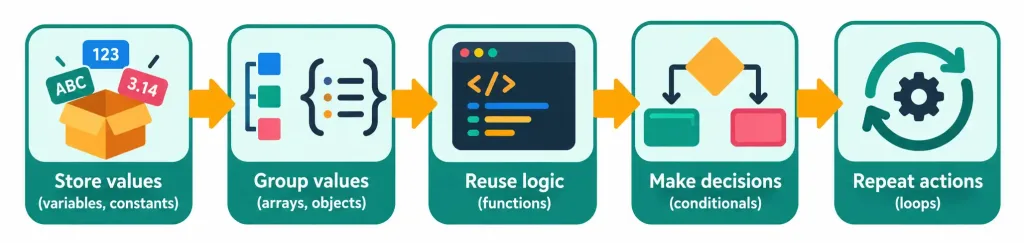
Lesson 4.2 covered the kinds of values a program can hold. This lesson covers what a program actually does with them. Every program, no matter how large, is built from a small set of core ideas. It stores values. It groups them. It makes decisions. It repeats actions. Learn these ideas once, and they carry across nearly every programming language.
This connects to something from the very start of the course. Back in Lesson 1.2, you learned the input-processing-output-storage cycle. Programming concepts are the tools for the processing step. They define exactly how input becomes output.
Variables and Constants
A variable is a named container for a value. The key word is “variable,” because its value can change. A program tracking a game score might store it in a variable called score. The score starts at zero. As the player earns points, the stored value updates again and again.
A constant is similar, with one important difference. Its value is set once and never changes while the program runs. A program might store the number of days in a week, or a tax rate, as a constant. Using a constant protects against accidents. If a value should never change, locking it in place means no part of the program can overwrite it by mistake.
Why bother using named containers at all, rather than typing values directly into code? Names make code readable. Seeing a tax rate stored as a constant called TAX_RATE tells a reader exactly what it means. Seeing a bare number like 0.07 buried in the middle of a calculation tells them nothing. Names also make updates easy. If the tax rate changes, a developer edits one constant instead of hunting down every place the number appears.
Good names follow a few simple habits. They describe what the value means, not just what it is. A variable called total_price beats one called x. Many languages also follow naming conventions. Constants are often written in all capital letters. Variables and functions often join words with underscores or capitalize each new word. The exact style varies by language, but the goal never changes: a stranger should be able to read the name and guess what it holds.
Arrays: Grouping Related Values
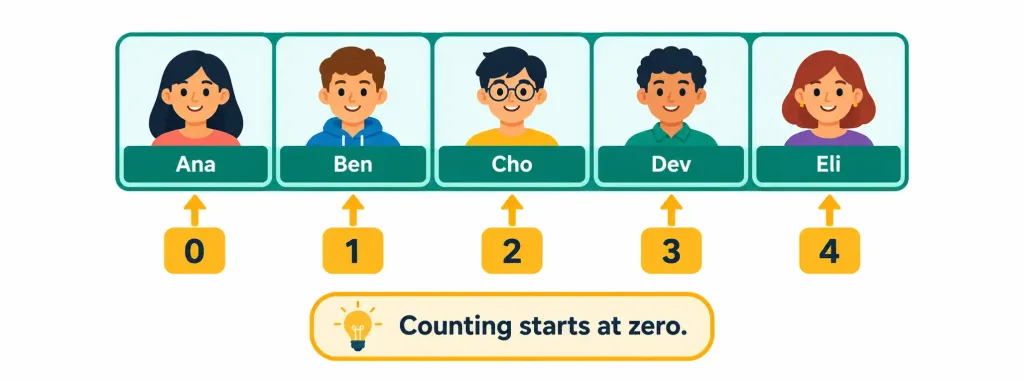
An array is an ordered collection of values stored together under one name. Instead of creating separate variables for every student in a class, a program can store all the names in a single array. Each item gets a numbered position, called an index. Most programming languages start counting at zero, so the first item sits at index 0, the second at index 1, and so on.
This zero-based counting trips up nearly every beginner. In an array of five names, the last item sits at index 4, not index 5. It’s a small detail with real consequences. Asking for index 5 in a five-item array usually causes an error, since nothing exists there. Knowing that counting starts at zero is a simple fact that saves a lot of confusion.
Arrays typically hold values of the same data type, like a list of integers or a list of strings. They’re ideal whenever a program needs to work with many similar items at once, such as a list of prices, a set of temperatures across a week, or every product in a store’s catalog.
Functions: Reusable Blocks of Code
A function is a reusable block of code that performs one specific task. A program defines the function once, gives it a name, then calls it whenever that task is needed. A function might calculate sales tax, check whether a password is long enough, or format a date for display.
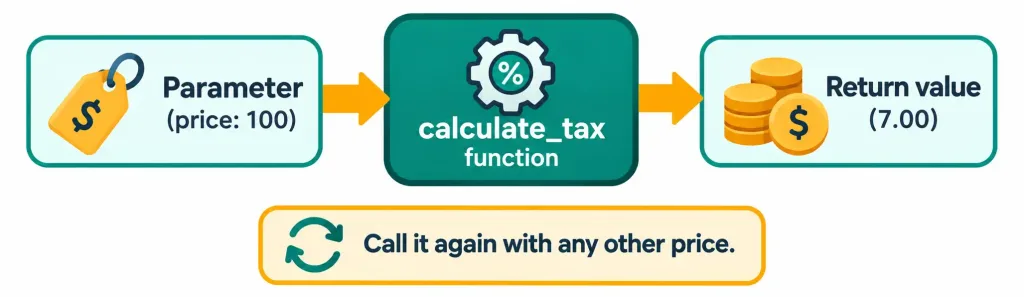
Functions often accept parameters, which are values passed in for the function to work with. They often return a result, called a return value. Imagine a function named calculate_tax. Pass it a price, and it returns the tax owed. The same function can be called a hundred times with a hundred different prices, without rewriting any of the calculation.
Reusing code this way saves time, but the bigger benefit is reliability. If a calculation lives in exactly one function, fixing a bug means fixing it once. If the same calculation were copied into twenty places, a fix would need to be repeated twenty times, with real risk of missing one. This is one of the central ideas behind well-organized software. Write it once. Reuse it everywhere.
Objects: Grouping Data and Actions Together
An object groups related data and the actions that work on that data into a single unit. Think of a car. It has properties, like color and speed. It also has things it can do, like accelerate or brake. A programmer can model this as one object, bundling the properties and the actions together.
In programming, an object’s data values are called properties or attributes, and its built-in actions are called methods. A “user” object in a program might have properties like name and email, and methods like login or logout. Grouping these together keeps related things organized in one place, rather than scattered across many unconnected variables and functions.
Objects are the foundation of an approach called object-oriented programming, widely used across many modern languages. At the recognition level for this exam, the key idea is simple. Objects bundle data and behavior together, making large programs easier to organize and reason about.
Operators: Doing Something With Values
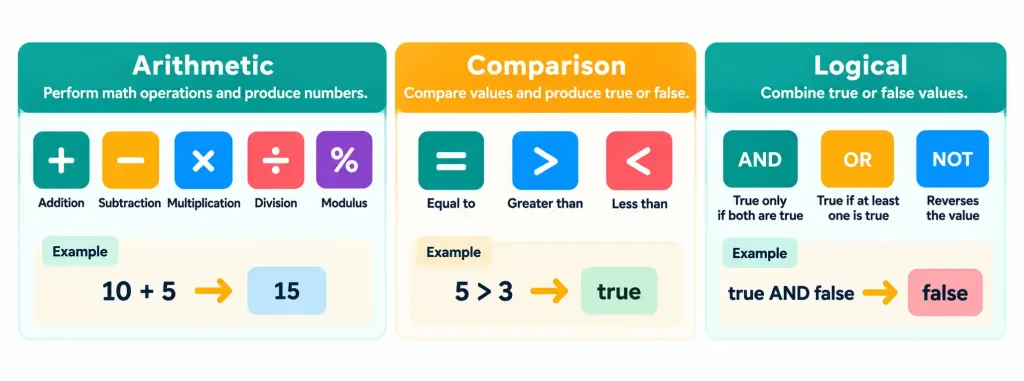
An operator is a symbol that performs an operation on one or more values. Three families of operators cover most everyday needs.
Arithmetic operators do math. These are the familiar ones: addition, subtraction, multiplication, and division. Many languages also include a modulus operator, which returns the remainder after division. Dividing 10 by 3 gives a remainder of 1, so 10 modulus 3 equals 1. It’s a surprisingly handy tool, often used to check whether a number is even or odd.
Comparison operators compare two values and produce a boolean result, true or false. They include checks for equal to, not equal to, greater than, and less than. This connects directly to the boolean data type from the last lesson. Comparison operators are where booleans actually get created in most programs.
Logical operators combine multiple true-or-false conditions into one result. The three main ones are AND, OR, and NOT. AND is true only when both conditions are true. OR is true when at least one condition is true. NOT flips a boolean to its opposite. A login check might require that the username is correct AND the password is correct. Both must be true for access to be granted.
Conditionals: Making Decisions
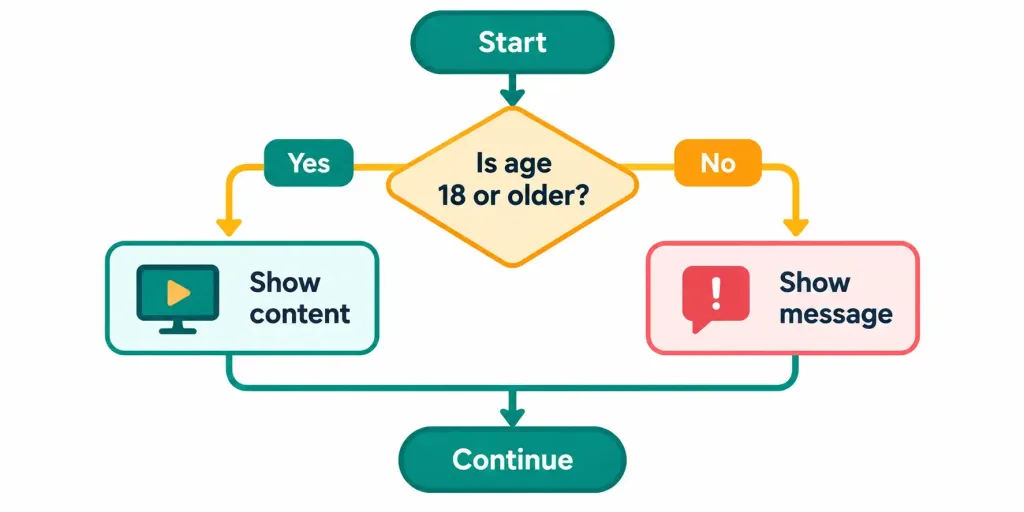
A conditional runs certain code only if a condition is true. The most common form is the if statement. If a condition is true, do this. Otherwise, optionally, do something else. A program might check whether a user is old enough to view certain content. If the age is at least 18, show the content. Otherwise, display a message instead.
Conditionals can be chained together to handle multiple possibilities. A program calculating a letter grade might check whether a score is 90 or above, then 80 or above, then 70 or above, and so on, choosing the first condition that matches. This ability to branch down different paths based on the situation is what makes software feel responsive and intelligent, even though each individual decision is simple.
Loops: Repeating Actions
A loop repeats a block of code multiple times. Without loops, a program printing the numbers one through a hundred would need a hundred separate lines of code. With a loop, it needs just a few. Two main loop types appear across most languages.
A for loop repeats a block a set number of times, or once for each item in a collection. It’s the natural choice when the number of repetitions is known in advance, such as processing every item in an array. A while loop repeats as long as a condition stays true. It’s the natural choice when the number of repetitions isn’t known ahead of time, such as repeatedly asking a user for a password until they enter the correct one.
Loops carry one famous risk worth knowing. An infinite loop happens when a loop’s condition never becomes false, so it never stops. The program just keeps running, often freezing or consuming resources until someone forcibly stops it. This usually comes from a small mistake, like forgetting to update the value the loop’s condition depends on. It’s a classic example of why careful, readable code matters.
An infinite loop also ties back to the process and memory management ideas from Lesson 3.1. A runaway loop keeps demanding CPU time, so the whole system can slow down noticeably. That’s why a frozen program often makes a computer’s fan spin up. The operating system is still handing the broken process its share of the CPU, and the process is using every bit of it. Ending the process through the operating system is usually the fix.
Comments and Readable Code
A comment is a note written in code for human readers. The computer ignores it completely. Comments explain why a piece of code does what it does, flag something tricky, or leave a reminder for later. Different languages use different symbols to mark them, but the purpose stays the same everywhere.
Good comments matter more than they might seem. Code is read far more often than it is written. A developer returning to a program after six months, or a teammate seeing it for the first time, relies on clear names and helpful comments to understand it quickly. Think of comments as the documentation sitting right next to the code it describes. They cost almost nothing to write, and they save enormous time later, especially when debugging with the same structured thinking covered back in Lesson 1.4.
A Worked Example: A Simple Login Check
Here’s a concrete way these ideas combine. A developer writes a basic login feature.
First, the correct password is stored in a constant, since it shouldn’t change while the program runs. The number of allowed attempts starts in a variable set to three, since it will count down. A while loop keeps asking for the password as long as attempts remain. Inside the loop, a comparison operator checks whether the entered password equals the stored one. A conditional decides what happens next. If the comparison is true, access is granted and the loop ends. If it’s false, the attempts variable goes down by one, and the loop continues. When attempts reach zero, a logical check combining “no attempts left” with “password still wrong” locks the account.
Notice how many of this lesson’s ideas appeared in one tiny feature: a constant, a variable, a loop, a comparison, a conditional, and a logical check. A comment above each step would make the whole thing easy for the next developer to follow. Real software is built from exactly these same pieces, just combined at much larger scale.
Recognition-Level Verification Concepts
- Recognize a variable as a named container whose value can change, and a constant as one whose value is set once and stays fixed.
- Recognize an array as an ordered collection of values, with items accessed by index, usually starting at zero.
- Recognize a function as a reusable block of code that can accept parameters and return a return value.
- Recognize an object as a structure grouping related data (properties) and actions (methods) together.
- Recognize the three operator families: arithmetic (math), comparison (produce true/false), and logical (AND, OR, NOT combine true/false values).
- Recognize a conditional as code that runs only if a condition is true.
- Recognize a for loop (known number of repetitions) versus a while loop (repeats while a condition stays true), and an infinite loop as one that never stops.
- Recognize a comment as a human-readable note ignored by the computer.
Common Exam Traps
- Confusing a variable with a constant. A variable’s value can change as the program runs; a constant’s value is set once and stays fixed.
- Forgetting that array indexes usually start at zero. In a five-item array, the first item is at index 0 and the last is at index 4.
- Confusing a parameter with a return value. A parameter is a value passed into a function; a return value is the result the function sends back out.
- Mixing up the three operator families. Arithmetic operators produce numbers; comparison operators produce true or false; logical operators combine true-or-false values.
- Misreading AND versus OR. AND requires every condition to be true; OR requires only at least one to be true.
- Confusing for loops and while loops. A for loop suits a known number of repetitions; a while loop suits repeating until a condition changes.
- Assuming comments affect how a program runs. Comments are ignored by the computer entirely and exist only for human readers.
Lesson 4.3 Practice Questions: Programming Concepts
Summary
A variable stores a value that can change, while a constant stores a value that stays fixed once set.
An array groups related values in order, accessed by an index that usually starts counting at zero.
A function is a reusable block of code that can take in parameters and send back a return value, saving time and reducing errors.
An object bundles related data and actions together, making larger programs easier to organize.
Arithmetic, comparison, and logical operators handle math, true-or-false checks, and combining conditions.
Conditionals let a program make decisions, while loops let it repeat actions, with an infinite loop as the classic risk to avoid.
Comments are notes for human readers that make code easier to understand and maintain.
The next lesson turns to organizational techniques and logic concepts, covering how developers plan programs using pseudocode, flowcharts, and sequencing.