Domain 4.0 | Software Development Concepts — 13% of exam
Learning Objectives
By the end of this lesson, you will be able to:
- Distinguish low-level languages from high-level languages.
- Explain the difference between compiled and interpreted languages.
- Identify markup and query languages, and explain how they differ from programming languages.
- Describe scripting languages and their typical use cases.
- Identify common programming languages and match them to typical real-world uses.
Key Terms
| Term | Definition |
|---|---|
| Low-level language | A programming language close to a computer’s hardware, offering fine control but requiring more code for simple tasks. |
| High-level language | A programming language closer to human language, easier to read and write, but more removed from hardware details. |
| Compiled language | A language translated entirely into machine code before the program runs. |
| Interpreted language | A language translated and executed line by line, at the time the program runs. |
| Markup language | A language used to structure and format content, rather than to perform logic or calculations. |
| Query language | A language used to request or manipulate data, typically from a database. |
| Scripting language | A language typically used to automate tasks or add behavior to another program or webpage. |
| Syntax | The specific set of rules that define how a programming language’s code must be written. |
Explanation
Low-Level vs. High-Level Languages
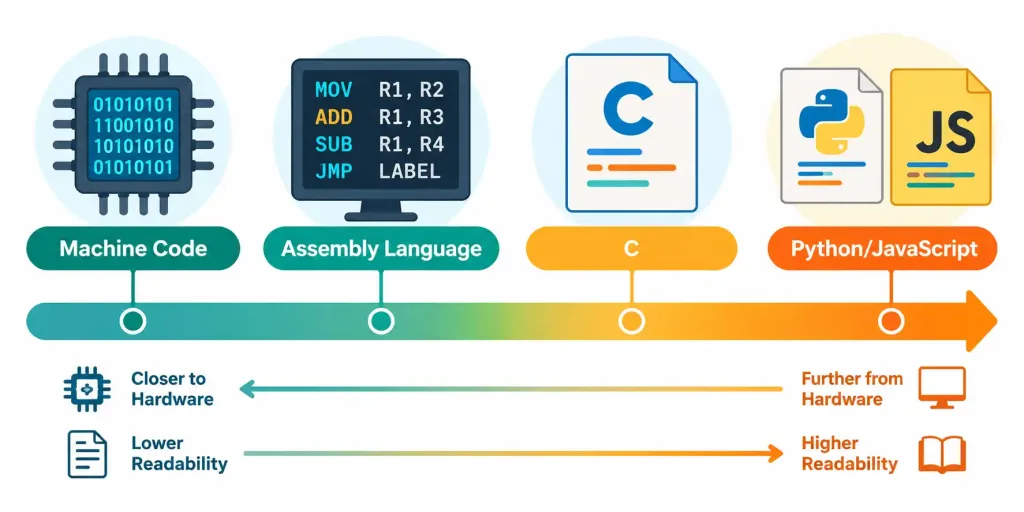
Every programming language sits somewhere on a spectrum. On one end sit low-level languages. These sit close to a computer’s actual hardware, close to the CPU instructions covered back in Lesson 2.2. Machine code is the lowest level of all — the raw binary instructions a CPU executes directly, exactly the ones and zeros of the binary system covered in Lesson 1.1. Assembly language sits just one step above machine code, using short human-readable mnemonics that map closely to those same low-level instructions.
This spectrum isn’t just an abstract classification exercise. It maps directly onto a real, practical trade-off every developer eventually runs into. Code that sits closer to the hardware can be tuned with extreme precision, squeezing every bit of performance out of a specific chip. Code that sits closer to human language sacrifices some of that precision, but it’s dramatically faster to write, easier to debug, and far more approachable for a larger team of developers to work on together.
On the other end sit high-level languages. These read much closer to human language. Python, JavaScript, and Java are common examples. A high-level language lets a developer write far more functionality with far less code, without needing to think about the specific hardware underneath at all. The trade-off runs in a predictable direction: low-level languages offer precise control and top performance, at the cost of being harder to write and read. High-level languages trade some of that fine control for speed of development and easier readability.
Consider a simple, concrete example of this trade-off. Adding two numbers together in assembly language might take several separate lines of code, each one moving a value into a specific register, performing the addition, then storing the result somewhere. The same task in Python takes a single line: add the two numbers and get a result. Neither approach is wrong. They’re built for different priorities — assembly for absolute control over exactly what the hardware does, Python for getting a working result quickly with minimal effort.
Compiled vs. Interpreted Languages
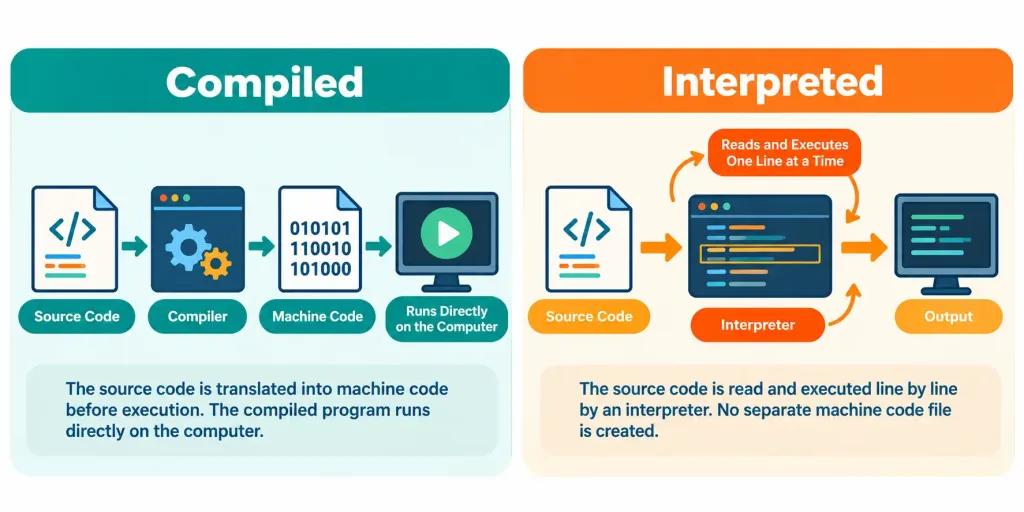
A second, entirely separate distinction concerns how a language’s code actually gets turned into something a computer can run. A compiled language gets translated all at once, ahead of time, by a program called a compiler. The result is a separate file of machine code, ready to run directly. C and C++ are classic compiled languages. Compiled programs tend to run fast, since all the translation work happened beforehand, not while the program is actually running.
An interpreted language works differently. Its code gets translated and run line by line, on the spot, each time the program executes. Python and JavaScript are common examples. This makes interpreted languages easier to test and adjust quickly — there’s no separate compile step to wait through — but it usually means somewhat slower execution than an equivalent compiled program, since translation happens continuously rather than just once.
It’s worth being precise about one detail here. Low-level versus high-level and compiled versus interpreted are two separate, independent categories. A language isn’t automatically compiled just because it’s low-level, and it isn’t automatically interpreted just because it’s high-level. Java, for instance, is a high-level language that gets partially compiled, then run through an additional interpreting layer — a genuinely useful reminder that these categories describe different things entirely, not two labels for the same idea.
There’s a practical reason this distinction matters beyond the exam itself. A developer choosing between languages for a new project weighs both factors separately. A performance-critical game engine might need a compiled, low-level language for maximum speed. A quick internal automation script might be perfectly fine as an interpreted, high-level language, since development speed matters far more than raw execution speed for a one-off task run occasionally by one person.
Markup and Query Languages
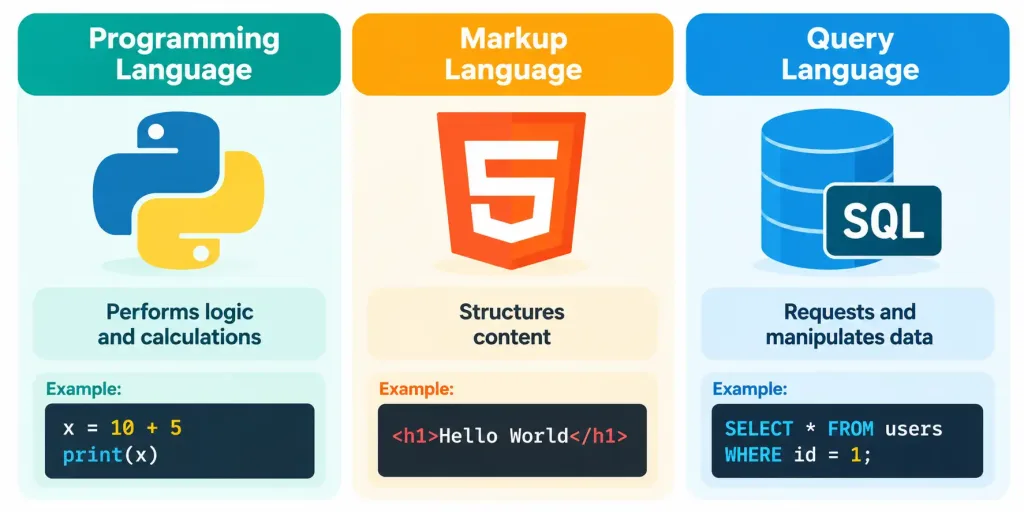
Not every language used in software development is a programming language in the traditional sense. A markup language structures and formats content, rather than performing logic, calculations, or decision-making. HTML, the language behind every webpage’s basic structure, is the most common example — it defines headings, paragraphs, links, and images, but it doesn’t calculate anything or make decisions on its own.
A query language serves a different, narrower purpose: requesting or manipulating data, almost always from a database. SQL is the standard example, used to ask a database for specific records, add new ones, or update existing data. Neither HTML nor SQL is a general-purpose programming language in the way Python or Java is. Each is purpose-built for one specific job — structuring content, or working with stored data — and recognizing that distinction matters for this exam.
It’s genuinely common for HTML and a real programming language to appear together on the same webpage, and understanding why helps clarify the distinction further. HTML lays out the page’s structure — this is a heading, this is a paragraph, this is a button. JavaScript then adds the actual behavior — what happens when that button is clicked. Neither one replaces the other. They work together, each handling a different job the other genuinely can’t do on its own.
Scripting Languages
A scripting language typically automates a task or adds behavior to something else — a webpage, an operating system, or another application — rather than building a complete, standalone program from scratch. JavaScript is the language that makes a webpage interactive, reacting to a click or updating content without reloading the whole page. Python is frequently used to automate repetitive tasks, like renaming a batch of files or pulling data from a website.
The line between a scripting language and a general-purpose programming language has blurred considerably over time. Python and JavaScript both started out with strong roots in scripting, but today both get used to build large, complete applications too. What actually distinguishes a script from a full program often comes down more to how it’s used in a specific case, rather than any fixed property of the language itself.
A useful rule of thumb: a script is usually short, focused on one specific task, and often written to run once or occasionally. A full application is usually larger, handles many different tasks together, and is built to run continuously or repeatedly for many different users. The same language can sit on either side of that line, depending entirely on what it’s actually being asked to do.
Matching Languages to Real-World Uses
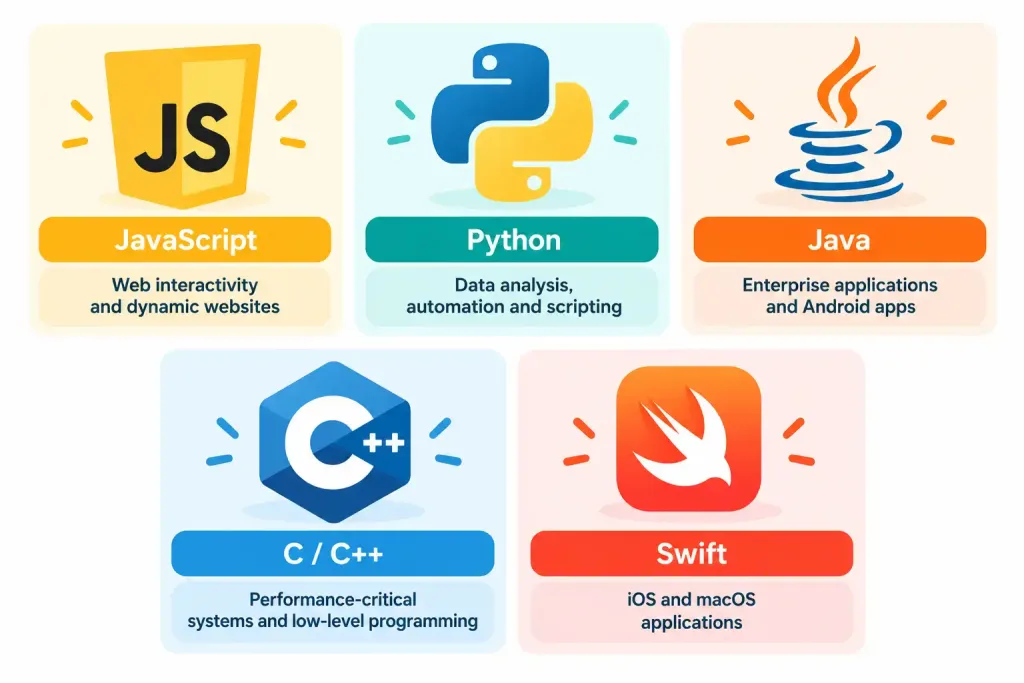
Different programming languages tend to cluster around different kinds of work, and recognizing a few common patterns is genuinely useful. JavaScript is the standard language for interactive webpages, running directly inside a browser — the same browser covered in Lesson 3.4. Python is popular for data analysis, automation, and increasingly, AI and machine learning work, thanks to its readable syntax and enormous ecosystem of existing tools. Java remains a mainstay of large enterprise applications and Android app development. C and C++ stay dominant wherever raw performance and precise hardware control genuinely matter — operating systems, game engines, embedded devices. Swift is Apple’s language for building iOS and macOS apps specifically.
A few more languages round out the picture worth knowing at a recognition level. C#, developed by Microsoft, is common in Windows applications and game development, particularly with the Unity game engine. PHP still powers a large share of the web’s backend content management systems. SQL, already introduced as a query language, deserves a second mention here specifically because nearly every application that stores data, regardless of what language it’s otherwise written in, ends up using SQL somewhere to actually talk to its database.
None of these boundaries are absolute. Most languages can technically be used for more than one of these purposes. But recognizing the typical, dominant use case for each major language is a genuinely practical skill, both for this exam and for understanding real job postings and project requirements later on.
A Worked Example: Choosing a Language for a New Project
Here’s a way to apply this lesson’s framework concretely. A small team is building three different things at once: an interactive company website, a script to automate a weekly data export, and a mobile app for iPhone users.
For the interactive website, JavaScript is the natural choice, since it’s the language browsers run directly and it’s purpose-built for exactly this kind of interactivity. For the weekly data automation task, Python fits well — it’s quick to write, easy to read, and well suited to scripting repetitive work without needing the ceremony of a full compiled application. For the iPhone app, Swift is the practical choice, since it’s Apple’s own language, built specifically for iOS development with deep platform integration. Notice that in each case, the choice comes down to matching a language’s typical strengths to the actual task at hand — the same evaluative pattern that’s recurred throughout this entire course.
It’s worth noting what this team didn’t do, too. They didn’t pick one single language and force it onto every task regardless of fit. A real software project routinely mixes several languages together, each chosen for what it does best — exactly what’s happening here, and exactly the kind of reasoning this exam’s scenario questions are built to test.
Syntax: Every Language’s Own Rulebook
Every programming language, regardless of category, has its own syntax — the specific set of rules governing exactly how its code must be written. A missing semicolon, a misplaced bracket, or an incorrectly indented line can all cause a program to fail, even when the underlying logic is otherwise sound. This is genuinely different from a spoken language, where a small grammatical slip rarely stops a listener from understanding the intended meaning. A computer, by contrast, generally can’t guess at intent. Code that breaks syntax rules usually just fails to run at all.
This is exactly why switching between languages takes real adjustment, even for an experienced developer. The underlying logic — loops, conditions, variables — carries over reasonably well from one language to another. The specific syntax rarely does. A developer fluent in Python still has to learn JavaScript’s particular punctuation and structure before writing working JavaScript code, even though the conceptual thinking behind both languages overlaps considerably.
Recognition-Level Verification Concepts
- Recognize the difference between low-level languages (close to hardware, harder to read) and high-level languages (closer to human language, easier to read).
- Recognize the difference between compiled languages (translated entirely before running) and interpreted languages (translated and run line by line).
- Recognize that low-level/high-level and compiled/interpreted are two separate, independent categories.
- Recognize a markup language (like HTML) as structuring content, not performing logic.
- Recognize a query language (like SQL) as requesting or manipulating data, typically in a database.
- Recognize a scripting language as typically automating a task or adding behavior to something else, rather than building a standalone program.
- Recognize common languages and their typical dominant use cases: JavaScript (web interactivity), Python (data/automation/AI), Java (enterprise/Android), C/C++ (performance-critical systems), Swift (iOS/macOS).
- Recognize syntax as a language’s specific rules for how code must be written, and that syntax rarely carries over between languages even when underlying logic does.
Common Exam Traps
- Assuming high-level automatically means interpreted, or low-level automatically means compiled. These are two separate categories — Java, for instance, is high-level but involves both compiling and interpreting.
- Confusing a markup language with a programming language. HTML structures content; it doesn’t perform logic or calculations the way Python or Java does.
- Confusing a query language with a general-purpose programming language. SQL is purpose-built for working with data in a database, not for building standalone applications.
- Assuming scripting languages can’t build full applications. Python and JavaScript both started as scripting-focused languages but are now used to build complete, large-scale applications too.
- Assuming one language is universally “the best.” Each language tends to fit certain kinds of work better than others — the right choice depends on the actual task.
- Treating compiled languages as always superior in every situation. Compiled languages usually run faster, but interpreted languages often allow faster, easier development and testing.
- Assuming logic and syntax transfer equally between languages. Conceptual logic often carries over; the specific syntax almost always has to be relearned.
Lesson 4.1 Practice Questions: Programming Language Categories
Summary
Low-level languages sit close to hardware and offer fine control, while high-level languages read closer to human language and are easier to write.
Compiled languages translate entirely before running, while interpreted languages translate and execute line by line — a separate distinction from low-level versus high-level.
A markup language like HTML structures content, and a query language like SQL requests or manipulates data — neither is a general-purpose programming language.
A scripting language typically automates a task or adds behavior to something else, though the line between scripting and full application development has blurred over time.
JavaScript, Python, Java, C/C++, and Swift each tend to dominate different kinds of real-world work, from web interactivity to enterprise systems to iOS development.
The next lesson turns to fundamental data types, covering how programs actually store and work with different kinds of information.