Domain 1.0 | IT Concepts and Terminology — 13% of exam
Learning Objectives
By the end of this lesson, you will be able to:
- Explain what a notational system is and why computers rely on one different from the one people use every day
- Convert numbers between decimal and binary in both directions
- Convert numbers between binary and hexadecimal, and explain why hexadecimal exists as a shorthand for binary
- Identify octal notation, convert simple values into and out of it, and explain where it’s still encountered today
- Recognize which notational system is being used just by looking at a value, without being told directly
Key Terms
| Term | Definition |
|---|---|
| Notational System | A method of representing numbers using a specific set of symbols and place values |
| Binary | A base-2 notational system using only the digits 0 and 1, the native language of computer hardware |
| Hexadecimal | A base-16 notational system using digits 0–9 and letters A–F, commonly used as a compact stand-in for binary |
| Decimal | The base-10 notational system used in everyday human counting |
| Octal | A base-8 notational system using digits 0–7, less common today but still found in certain technical contexts |
Explanation
What Is a Notational System?
A notational system is simply an agreed-upon way of writing down numbers — which symbols to use, and what each position in a number is worth. It sounds almost too basic to bother explaining, and in a sense it is, but that’s exactly the point of starting here: nearly everything else in IT, from how a file gets stored to how a network address gets calculated, ultimately rests on this one foundational idea.
The system most people grow up using without ever thinking about it is decimal. But decimal isn’t some mathematically inevitable choice — it’s just one option among several ways humans and machines have settled on to represent quantity. Historically, different cultures have used different notational systems for different reasons: some ancient number systems weren’t even positional at all, meaning the position of a symbol didn’t change its value the way it does in the systems used today.
The systems covered in this lesson — decimal, binary, hexadecimal, and octal — are all positional notational systems, meaning where a digit sits inside a number directly determines how much it’s worth. That single shared property is what makes converting between them possible in the first place, and it’s worth holding onto as you work through the rest of this lesson.
Understanding why computers use a different notational system than people do is the first real building block of IT literacy, and it’s a question this lesson will answer in detail before moving into the mechanics of conversion.
Decimal: The System We Already Know
Decimal is base 10: it uses ten digits (0 through 9), and each position in a number represents a power of ten — the ones place, the tens place, the hundreds place, the thousands place, and so on, each one ten times larger than the position before it. The reason humans settled on this particular system is mostly historical rather than mathematical — the number of fingers we have to count on.
It’s worth actually breaking a decimal number down by place value, since this same mental exercise is exactly what you’ll do with the other three systems in this lesson. Take the number 4,752. Reading right to left:
- The digit 2 sits in the ones place — worth 2 × 1 = 2
- The digit 5 sits in the tens place — worth 5 × 10 = 50
- The digit 7 sits in the hundreds place — worth 7 × 100 = 700
- The digit 4 sits in the thousands place — worth 4 × 1,000 = 4,000
Add those four values together — 4,000 + 700 + 50 + 2 — and you get 4,752 right back. That might feel almost silly to spell out for a system you’ve used your whole life, but this exact process, of multiplying each digit by the value of its position and adding the results together, is precisely how every notational system in this lesson works. Only the base changes.
Decimal works perfectly well for people, but it doesn’t map naturally onto the internal design of a computer, which is where binary comes in.
Binary: The Language Computers Actually Speak
Binary is base 2: it uses only two digits, 0 and 1, and each position represents a power of two instead of a power of ten. This isn’t an arbitrary design choice — it directly reflects how computer hardware actually works at the electrical level. A transistor inside a computer chip is fundamentally a switch: it’s either allowing current to flow or it isn’t, on or off, high voltage or low voltage.
There’s no practical, reliable way to build a transistor that cleanly represents ten distinct states the way a decimal digit would require, but building one that reliably represents exactly two states — on or off — turns out to be something engineers can do at almost unimaginable scale, packing billions of these switches onto a single chip.
That two-state design is the entire reason binary exists in computing. Every single piece of data a computer stores or processes — a letter, a photo, a song, a line of code, this very sentence as it’s stored somewhere on a server right now — is ultimately represented as a long sequence of binary digits, commonly called bits, underneath everything else that gets shown to a human user.
Converting Binary to Decimal
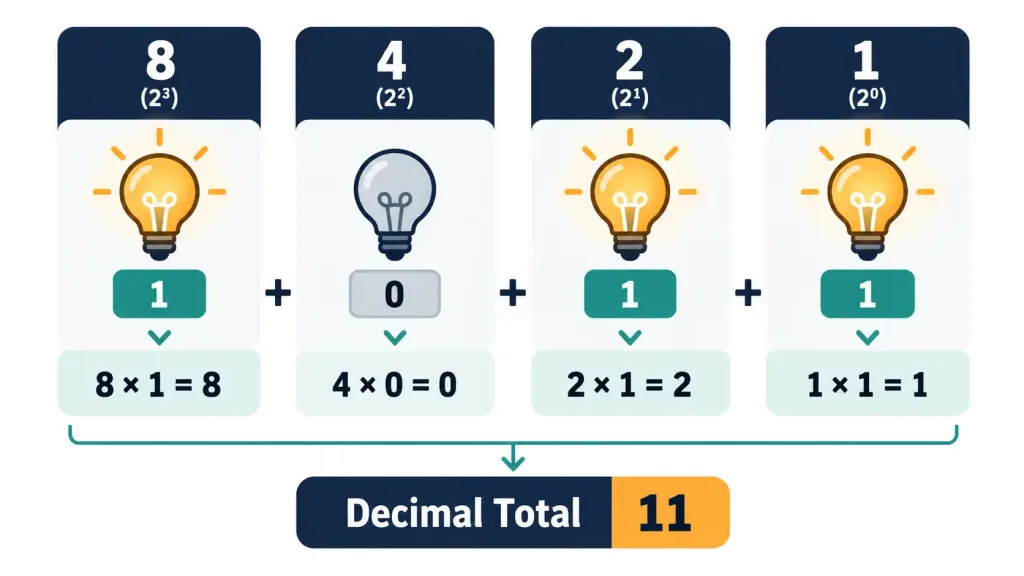
Just like decimal place values increase by a factor of ten moving left, binary place values increase by a factor of two moving left: 1, 2, 4, 8, 16, 32, 64, 128, and so on — each one simply double the last. Converting a binary number to decimal means adding up the place values wherever there’s a 1, and skipping the positions with a 0.
Take the binary number 1011. Reading right to left against the place values 8-4-2-1:
- Rightmost digit is 1, in the ones place → contributes 1
- Next digit is 1, in the twos place → contributes 2
- Next digit is 0, in the fours place → contributes 0 (skipped)
- Leftmost digit is 1, in the eights place → contributes 8
Adding those up: 8 + 0 + 2 + 1 = 11 in decimal.
Let’s try a longer one to build real confidence with this: 11010110. This is a full byte (8 bits), and its place values, from left to right, are 128-64-32-16-8-4-2-1.
- 1 × 128 = 128
- 1 × 64 = 64
- 0 × 32 = 0
- 1 × 16 = 16
- 0 × 8 = 0
- 1 × 4 = 4
- 1 × 2 = 2
- 0 × 1 = 0
Adding these together: 128 + 64 + 0 + 16 + 0 + 4 + 2 + 0 = 214 in decimal. That’s the entire process — no shortcuts needed once you have the place values memorized (or written down in front of you).
Converting Decimal to Binary
Going the other direction — decimal to binary — uses a different but equally mechanical process: repeatedly divide the decimal number by 2, writing down the remainder (which will always be 0 or 1) at each step, until the number reaches 0. Then read the remainders back in reverse order — bottom to top — to get the binary result.
Let’s convert 13 to binary:
- 13 ÷ 2 = 6, remainder 1
- 6 ÷ 2 = 3, remainder 0
- 3 ÷ 2 = 1, remainder 1
- 1 ÷ 2 = 0, remainder 1
Reading the remainders from bottom to top gives 1101. Check it against the earlier method: 8 + 4 + 0 + 1 = 13. It matches.
Hexadecimal: A Shorthand for Binary
Binary numbers get long and hard to read very quickly — representing even a fairly modest decimal number, like 214, takes eight full digits in binary, and real-world values in computing are often vastly larger than that. Imagine trying to read, write, or debug a 32-bit or 64-bit binary value by hand; it would be exhausting and extremely error-prone. Hexadecimal (often just called “hex”) solves this readability problem by using base 16 instead of base 2: the digits 0 through 9, followed by the letters A through F to represent the values 10 through 15 (since standard digits run out at 9, and hex needs six more symbols to reach up to fifteen).
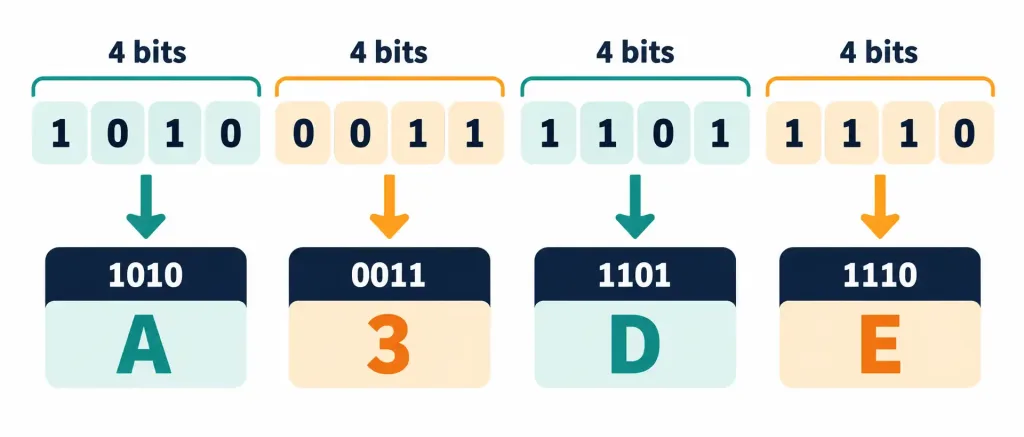
The reason hex pairs so cleanly with binary specifically — rather than, say, decimal — is that each hexadecimal digit corresponds exactly to a group of four binary digits, no messy conversion math required, just a direct grouping. This works out because 16 is exactly 2 to the fourth power (2⁴ = 16), meaning a single hex digit can represent every possible value a 4-bit binary group could hold, from 0000 (zero) all the way up to 1111 (fifteen), with nothing left over and nothing missing.
Converting Binary to Hexadecimal
To convert a binary number to hex, split it into groups of four digits starting from the right, then convert each group independently using the table below:
| Binary | Hex | Binary | Hex |
|---|---|---|---|
| 0000 | 0 | 1000 | 8 |
| 0001 | 1 | 1001 | 9 |
| 0010 | 2 | 1010 | A |
| 0011 | 3 | 1011 | B |
| 0100 | 4 | 1100 | C |
| 0101 | 5 | 1101 | D |
| 0110 | 6 | 1110 | E |
| 0111 | 7 | 1111 | F |
Take the byte from earlier, 11010110. Split into two groups of four: 1101 and 0110. Looking each group up in the table: 1101 = D, and 0110 = 6. So the full hex value is D6. Compare that to writing out all eight binary digits — D6 is dramatically shorter and much easier to communicate verbally or type without error.
Converting Hexadecimal to Binary
Going the other direction is just as direct: take each hex digit and expand it back into its four-digit binary group, then string the groups together. Converting hex A3 back to binary: A = 1010, and 3 = 0011. Combined: 10100011.
Real-World Hexadecimal: Reading a Web Color Code
One of the most common places you’ll actually encounter hexadecimal outside of pure computing theory is in web design color codes, which are typically written as six hex digits, like #1B2A4A. That six-digit code actually breaks down into three separate two-digit hex values, one each for red, green, and blue light intensity: 1B for red, 2A for green, and 4A for blue. Each two-digit hex pair ranges from 00 (none of that color) to FF (full intensity of that color) — and FF in decimal is 255, which is why you may have also seen colors expressed as RGB values like (27, 42, 74) instead; those are simply the same three values written in decimal rather than hex.
Octal: Binary’s Less Common Cousin
Octal is base 8, using digits 0 through 7, and it works on the same underlying idea as hex — grouping binary digits together for a shorter, more readable notation. In octal’s case, each digit represents a group of three binary digits rather than four, because 8 is exactly 2 to the third power (2³ = 8), so a 3-bit group can represent every value from 000 (zero) through 111 (seven) with no digit left unaccounted for.
Octal was considerably more common in earlier computing history — some older computer architectures were actually built around word sizes that divided evenly into groups of three bits, making octal a more natural fit at the time than hexadecimal turned out to be for later, more common architectures built around multiples of four and eight bits. Octal still survives today in a few specific technical corners, most notably Linux and Unix file permission notation.
Reading an Octal Permission Value
If you’ve ever seen a Linux command like chmod 754 filename.txt, that 754 is octal notation, and it’s genuinely worth understanding what it means rather than just memorizing it as a magic number. Each of the three digits represents permissions for a different category of user — owner, group, and everyone else — and within each digit, the value is built from three separate permission bits: read (worth 4), write (worth 2), and execute (worth 1), added together depending on which permissions are granted.
Breaking down 754:
- 7 for the owner = 4 (read) + 2 (write) + 1 (execute) = full permissions
- 5 for the group = 4 (read) + 0 (no write) + 1 (execute) = read and execute only
- 4 for everyone else = 4 (read) + 0 + 0 = read-only
Notice that this is exactly the same place-value logic used everywhere else in this lesson, just applied to a very practical, real system administration task rather than an abstract number.
Converting Between Systems: A Full Worked Walkthrough
To really cement how these four systems relate, it helps to take a single value and walk it through all four representations side by side. Let’s use the decimal number 58.
Step 1 — Decimal to Binary. Repeatedly divide by 2:
- 58 ÷ 2 = 29, remainder 0
- 29 ÷ 2 = 14, remainder 1
- 14 ÷ 2 = 7, remainder 0
- 7 ÷ 2 = 3, remainder 1
- 3 ÷ 2 = 1, remainder 1
- 1 ÷ 2 = 0, remainder 1
Reading remainders bottom to top: 111010.
Step 2 — Binary to Hexadecimal. Pad to a full group of four on the left if needed (0011 1010), then convert each group: 0011 = 3, 1010 = A. Result: 3A.
Step 3 — Binary to Octal. Group the same binary value into sets of three from the right instead of four: 111 and 010. Converting each: 111 = 7, 010 = 2. Result: 72.
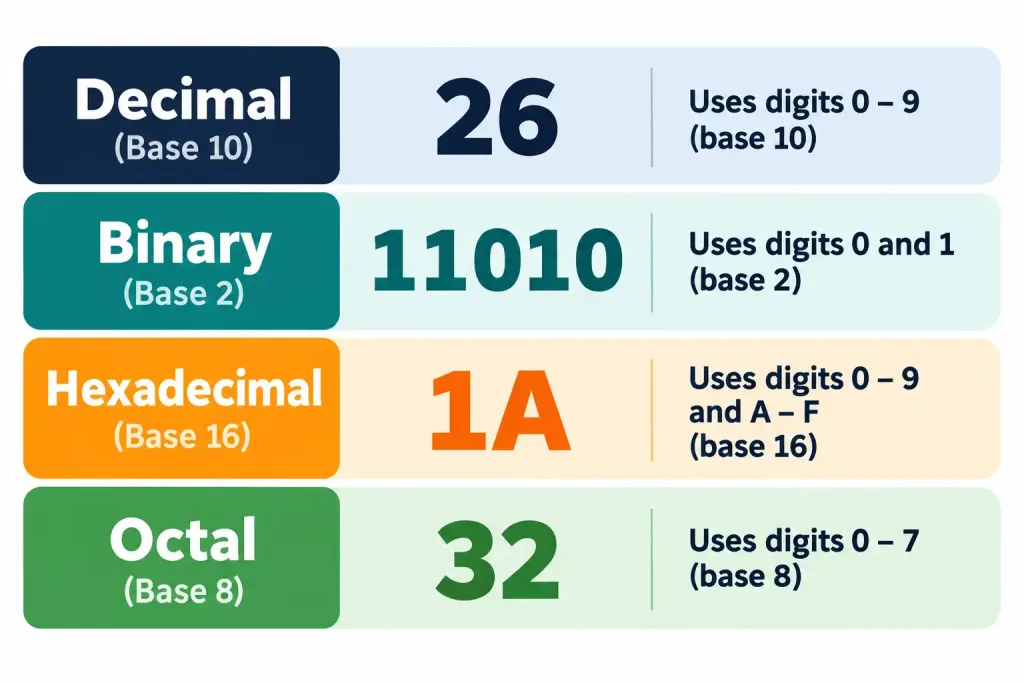
So the decimal value 58 is written as 111010 in binary, 3A in hexadecimal, and 72 in octal — four completely different-looking representations of the exact same quantity. This is the single most important conceptual takeaway of this entire lesson: none of these systems change what a number is, only how it’s written down.
Where Each System Shows Up in Real Life
It helps to anchor these four systems to places you’ll actually encounter them, rather than treating them as pure abstraction:
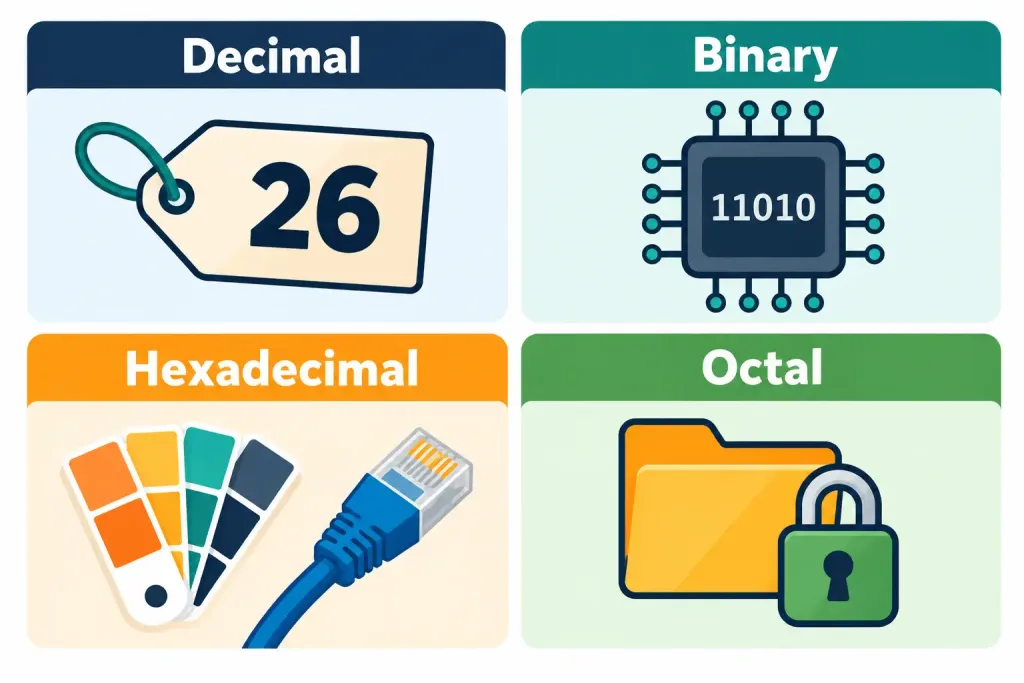
- Decimal — everyday numbers: prices, ages, file sizes shown to a regular user, the numbers on this very page.
- Binary — rarely seen directly by end users, but it’s what’s actually stored and moved around inside every device, every time, without exception.
- Hexadecimal — MAC addresses, web color codes (like
#1B2A4A), memory addresses shown in diagnostic and debugging tools, and error codes in some operating systems. - Octal — Linux/Unix file permission numbers (like
755or644), and occasionally in older networking or legacy system documentation.
Quick Conversion Steps: Decimal to Binary
Converting a decimal number to binary by hand follows a simple, repeatable process: repeatedly divide the number by 2, writing down the remainder (0 or 1) each time, until the number reaches 0 — then read the remainders back in reverse order, bottom to top.
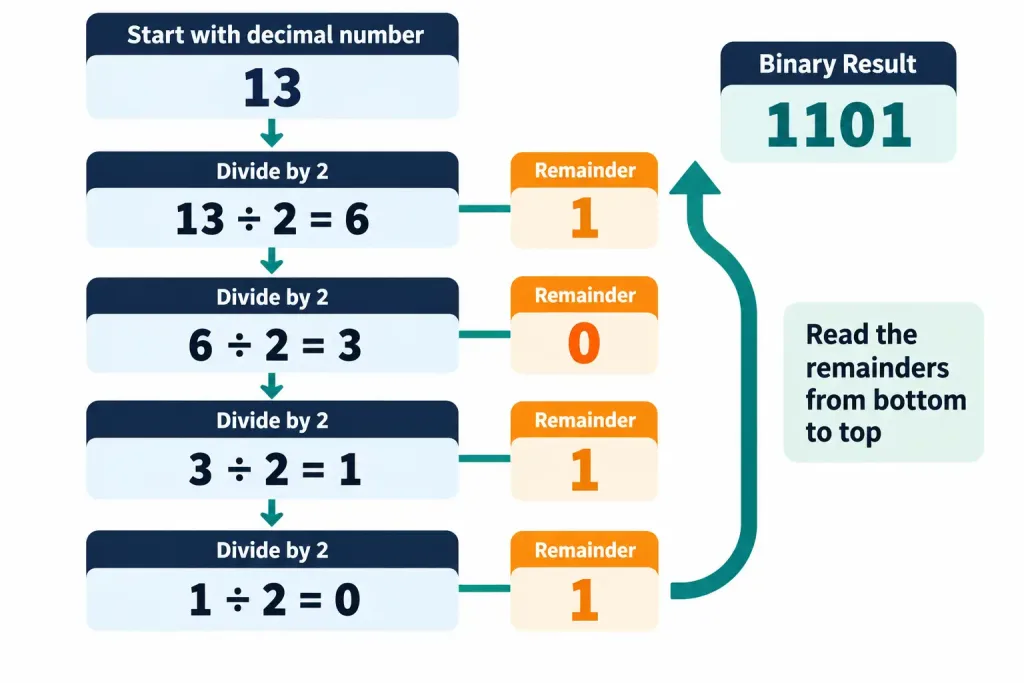
This same “divide by the base, track the remainder” approach works for converting decimal into hexadecimal or octal too — only the divisor changes (16 or 8 instead of 2). This binary fluency isn’t just theoretical, either — it becomes directly useful again if you continue on toward networking topics, where subnetting an IPv4 network is really just this same binary math applied to addresses instead of plain numbers.
Why This Matters for a Career in IT
It’s fair to ask, at this early stage, why any of this matters if you’re not planning to become a low-level hardware engineer. The honest answer is that notational systems show up constantly and quietly across almost every IT role — a help desk technician reading a MAC address off a device label, a web developer picking a color in hex, a systems administrator setting file permissions with a three-digit octal code, or a network technician converting an IP address into binary to figure out which subnet it belongs to.
None of these tasks require deep mathematical expertise, but every one of them requires being comfortable enough with these four systems to recognize what you’re looking at and know roughly how to work with it. That comfort is exactly what this lesson, and the practice quiz that follows it, are designed to build.
Recognition-Level Verification Concepts
A few patterns are worth recognizing on sight, without needing to do a full conversion first:
- A number using only 0s and 1s is binary; a number using 0–9 and A–F is hexadecimal.
- A number using only digits 0–7 is a strong hint that octal notation is in play, especially in a permissions or older systems context — but remember that a number using only 0–7 could also just be an ordinary decimal number, so context (like seeing it in a
chmodcommand) matters. - The core reason binary exists in computing at all traces back to hardware being fundamentally a two-state (on/off) system.
- Hexadecimal’s usefulness comes specifically from its clean four-bit grouping with binary — that relationship is the entire reason it’s used so widely, rather than some arbitrary preference for the number 16.
- A six-digit hex value split into three two-digit pairs is very likely an RGB color code.
- Octal’s usefulness comes from its clean three-bit grouping with binary, the same underlying idea as hex but with a different group size.
Common Exam Traps
- Don’t confuse “which system is used where.” Binary is the actual language of computer hardware; hex and octal are human-friendly shorthand notations for reading and writing binary more easily — none of the three is inherently “better,” they simply serve different purposes for different audiences.
- The letters in hexadecimal (A–F) represent numeric values (10–15), not actual letters — a common early point of confusion when first encountering hex notation. A is always 10, F is always 15, regardless of context.
- Octal groups binary in sets of three digits; hexadecimal groups it in sets of four. Mixing up which grouping belongs to which system is an easy mistake under exam time pressure — remembering that octal is base 8 (2³) and hex is base 16 (2⁴) can help you rederive the correct grouping if you forget.
- Decimal is not “more accurate” or “more real” than binary — it’s simply the notational system humans are most accustomed to; computers do not use it internally at all, and no notational system is mathematically more “correct” than another.
- A number that happens to contain only the digits 0–7 is not automatically octal — it could simply be an ordinary decimal number that never happens to use an 8 or 9. The notational system in use has to be established by context, not guessed purely from which digits appear.
- Converting between systems never changes the underlying quantity, only its written representation. If a conversion seems to change what a value “means,” a mistake has been made somewhere in the process.
Lesson 1.1 Practice Quiz — Notational Systems
17 questions covering binary, hexadecimal, decimal, and octal notational systems.
Tech+ FC0-U71 · Domain 1.0Summary
A notational system is just an agreed-upon way of representing numbers, and decimal (base 10) is only one option among several — all four systems covered here are positional, meaning a digit's position determines its value.
Binary (base 2) is the actual language of computer hardware, since transistors are fundamentally two-state on/off devices; converting between binary and decimal uses place values (for binary-to-decimal) or repeated division by 2 (for decimal-to-binary).
Hexadecimal (base 16) exists as a compact, human-readable shorthand for binary, with each hex digit representing exactly four binary digits — a relationship that makes conversion between the two systems fast and error-free once the grouping is understood.
Octal (base 8) works on the same grouping principle as hex but groups binary digits in sets of three, and survives today mainly in contexts like Linux/Unix file permission notation.
The same value can be written correctly in all four systems simultaneously — converting between them never changes the underlying quantity, only how it's displayed — and fluency with all four pays off repeatedly across real IT tasks, from reading MAC addresses to calculating IP subnets later in your studies.