Domain 3.0 | Applications and Software — 18% of exam
Learning Objectives
By the end of this lesson, you will be able to:
- Define artificial intelligence and machine learning at a basic level.
- Identify common everyday uses of AI, including recommendations, voice assistants, and image recognition.
- Explain what generative AI is and describe common examples of it.
- Describe key limitations of AI tools, including bias and hallucination.
- Apply basic best practices for using AI tools responsibly.
Key Terms – Common Uses of Artificial Intelligence
| Term | Definition |
|---|---|
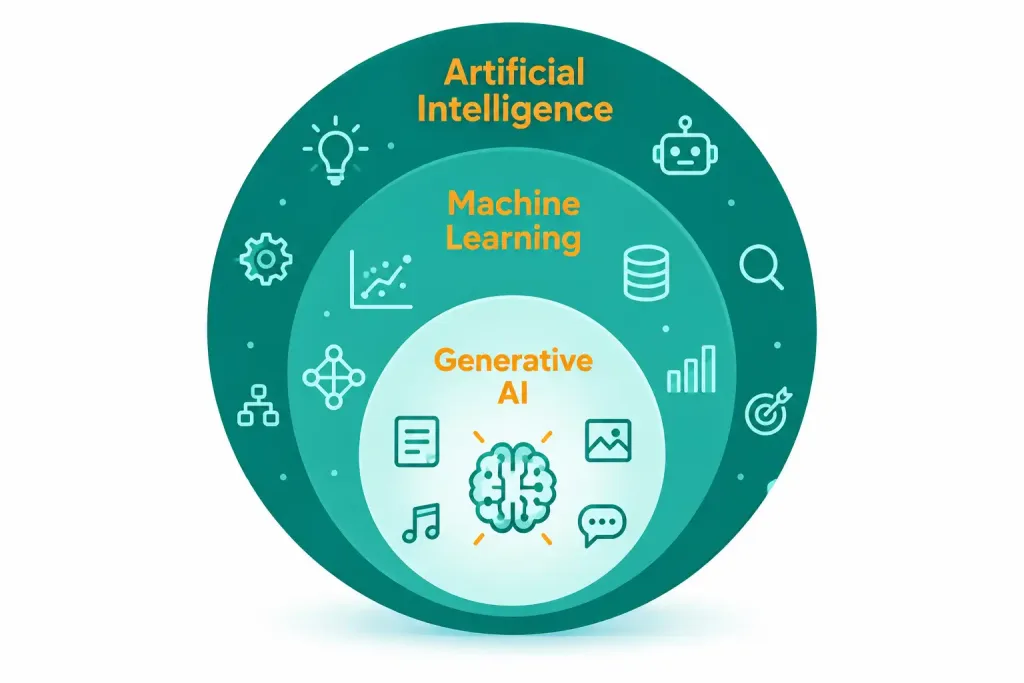
| Artificial intelligence (AI) | Technology that enables a computer system to perform tasks that normally require human intelligence. |
| Machine learning (ML) | A subset of AI where a system learns patterns from data, rather than following explicitly programmed rules. |
| Generative AI | AI that creates new content, such as text, images, or code, based on a prompt. |
| Large language model (LLM) | A type of AI model trained on large amounts of text, used to understand and generate human language. |
| Chatbot | An AI-powered application that simulates conversation with a user, often through text or voice. |
| Hallucination | An AI-generated output that sounds plausible but is factually incorrect or fabricated. |
| Bias | A systematic skew in an AI system’s output, often caused by patterns in its training data. |
| Prompt | The input, usually text, a user gives an AI system to generate a response. |
Explanation
What AI Actually Is
Artificial intelligence, or AI, is technology that lets a computer perform tasks normally requiring human intelligence. That’s a broad definition on purpose. AI covers a huge range of real capabilities: recognizing a face in a photo, translating a sentence, recommending a movie, or writing a paragraph of text. None of this is new, exactly. AI has existed in various forms for decades. What’s changed recently is scale, accessibility, and how visible AI has become in everyday consumer tools.
Machine learning, often shortened to ML, is a specific approach within AI. Rather than following rules a programmer writes out by hand, a machine learning system learns patterns directly from data. Show it thousands of labeled photos of cats and dogs, and it gradually learns to tell the difference on its own. This data-driven approach is what powers most of the AI tools people interact with today, from spam filters to voice assistants.
It helps to contrast this with how older software typically worked. A traditional program follows a fixed set of rules a developer wrote in advance — if this condition is true, do this specific thing. A machine learning system works the opposite way. It’s shown many examples, and it figures out the pattern connecting them on its own, without anyone explicitly writing out every rule by hand. This is exactly why machine learning handles messy, real-world tasks — like recognizing handwriting or understanding spoken language — far better than traditional rule-based programming ever could, since writing an explicit rule for every possible variation simply isn’t practical.
Everyday Uses of AI
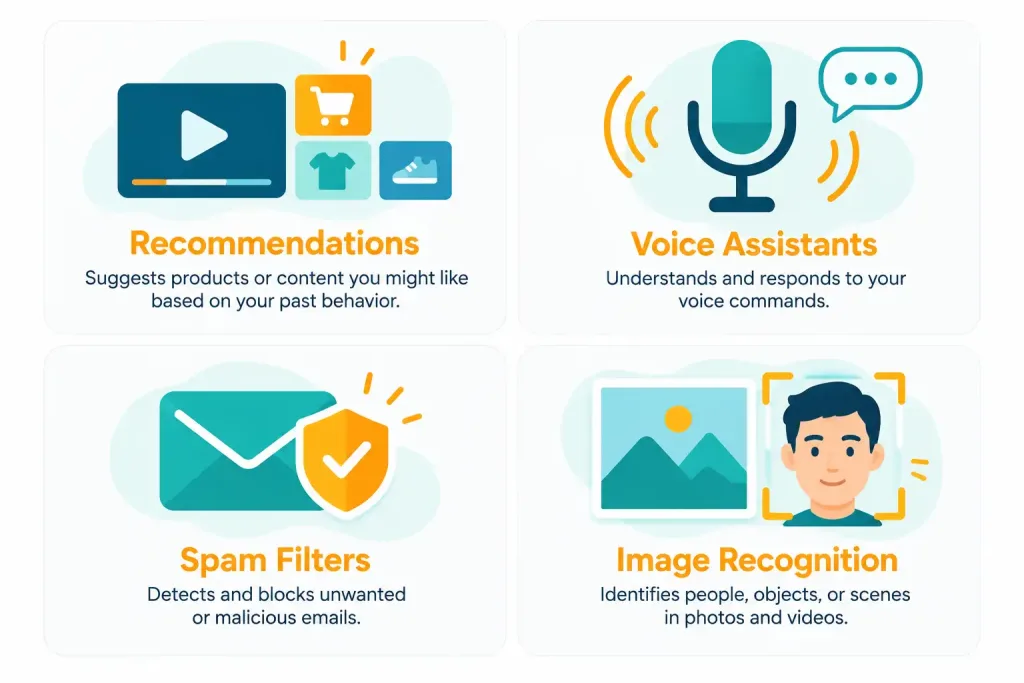
AI shows up constantly in ordinary consumer technology, often without a person even noticing. Recommendation systems are one of the most common examples — a streaming service suggesting a show, an online store suggesting a product, a music app building a personalized playlist. These systems learn from a user’s past behavior, then predict what else that same user is likely to want.
Voice assistants, like the ones built into many phones and smart speakers, use AI to understand spoken language and respond appropriately. Spam filters use AI to recognize patterns common to unwanted email, learning and adjusting over time as spam tactics change. Image recognition powers things like a phone automatically sorting photos by the people or objects in them, or a security camera distinguishing a person from a passing car.
Each of these tools relies on the same underlying idea from the last section: a system trained on large amounts of data, learning patterns well enough to make useful predictions on new, unseen input. None of them require a user to understand the technical details underneath. That’s part of the point.
Several of these tools connect directly to concepts covered earlier in this course. A spam filter, running on a mail server, works alongside the network infrastructure covered back in Domain 2.0, filtering incoming traffic before it ever reaches an inbox. A voice assistant relies on a microphone, one of the input peripherals covered in Lesson 2.4, to actually capture speech in the first place. AI doesn’t replace the hardware and infrastructure covered throughout this course — it runs on top of it, exactly like any other application software.
Generative AI: Creating New Content
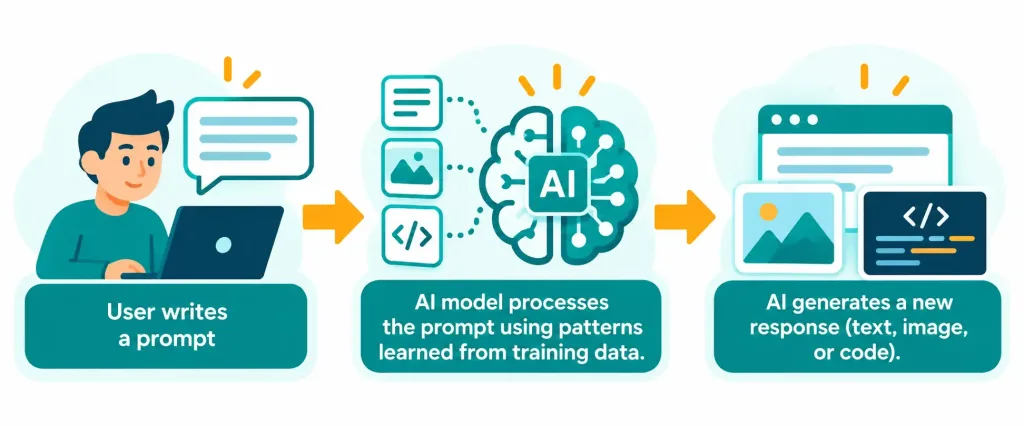
Generative AI is a specific, increasingly visible category of AI. Rather than just recognizing or classifying existing data, it creates new content: text, images, code, even audio and video. A user provides a prompt — usually a written instruction — and the system generates a response based on patterns learned from enormous amounts of training data.
Large language models, or LLMs, are the technology behind most text-based generative AI tools today, including AI chatbots and writing assistants. An LLM is trained on massive amounts of text, learning the statistical patterns of language well enough to generate coherent, often genuinely useful responses to a huge range of prompts. The same underlying approach extends to other formats too: image-generation tools create pictures from a text description, and code-generation tools help write or explain programming code from a plain-language request.
The quality of a prompt genuinely matters here, too. A vague, one-word prompt gives an AI system very little to work with, and the response tends to reflect that — generic, unfocused, and often not quite what the person actually wanted. A specific, detailed prompt, describing exactly what’s needed and in what format, tends to produce a far more useful result. This isn’t unique to AI. It’s the same basic principle behind asking a colleague a clear, well-formed question instead of a vague one, just applied to a new kind of tool.
A chatbot is one of the most common ways people actually interact with this technology. It simulates a conversation, responding to a user’s messages in a natural, back-and-forth way. Chatbots now show up in customer service, personal productivity tools, and general-purpose AI assistants alike.
It’s worth being precise about what “generating” content actually means here. A generative AI tool isn’t searching a database and copying an existing answer word for word. It’s predicting, piece by piece, what the most statistically likely next word — or pixel, in the case of an image — should be, based on everything it learned during training. This is exactly why two people can ask an AI tool the same question and sometimes get slightly different answers each time, and it’s also part of why the technology can occasionally produce something entirely new, but also occasionally produce something confidently wrong.
Limitations Worth Understanding
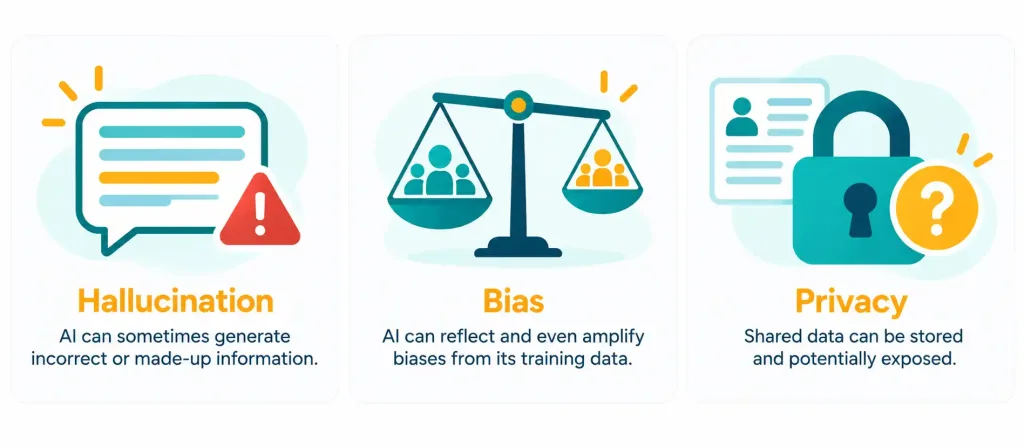
AI tools are genuinely useful, but they have real limitations, and understanding them matters for using these tools responsibly. Hallucination is one of the most important to know. This is when an AI system generates an answer that sounds confident and plausible, but is actually wrong or entirely made up. A hallucinated answer isn’t flagged as uncertain by the system itself — it reads exactly like a correct one, which is precisely why it’s genuinely dangerous to trust AI output blindly, especially for anything factual or high-stakes.
Hallucination tends to show up most often with very specific, checkable details: exact dates, statistics, citations, or quotes. A general summary of a well-known topic is usually fairly reliable. A specific number or an exact quote embedded inside that same summary is exactly where a plausible-sounding fabrication is most likely to slip in unnoticed. This is a genuinely useful pattern to watch for: the more specific and checkable a claim is, the more worth verifying it actually becomes.
Bias is another key limitation. Since an AI system learns from existing data, and that data reflects the real world, any patterns of unfairness or imbalance already present in that data can get learned and repeated by the system too. A hiring tool trained on historical data from a workforce that skewed heavily toward one group, for instance, might learn to favor that same group going forward, even without anyone intending that outcome. Recognizing that AI output can carry this kind of inherited bias is an important part of using these tools critically, rather than treating their output as automatically neutral or objective.
Bias isn’t always obvious or dramatic. It can show up in subtle ways: an image generator that draws a “doctor” as one gender far more often than another, or a language tool that handles one dialect or accent noticeably less accurately than another. These patterns usually aren’t intentional. They come from imbalances in the training data itself, which is exactly why bias is often described as a data problem, not a deliberate design choice — though the practical effect on the people affected by it is real either way.
Privacy is a further, practical concern. Information typed into a public AI tool may be stored, reviewed, or used to improve the underlying model, depending on that specific tool’s policies. This connects directly back to the same privacy considerations covered in Lesson 3.4 regarding browser data — entering sensitive personal or business information into an AI tool without checking its privacy policy first carries genuine, practical risk.
Using AI Tools Responsibly
A few practical habits help someone get real value from AI tools while managing their limitations sensibly. Verifying important information independently, rather than trusting an AI’s answer outright, directly addresses the hallucination risk — treating AI output as a helpful starting point rather than a guaranteed-correct final answer. Writing clear, specific prompts tends to produce noticeably better results than vague ones, since the system has more to work with when the request itself is precise.
Reviewing a tool’s privacy policy before entering sensitive information addresses the privacy concern directly, the same due-diligence habit already covered for software generally back in Lesson 3.3. And maintaining a critical eye toward AI-generated content — checking it for accuracy, fairness, and appropriateness before actually using or sharing it — is exactly the mindset this whole lesson has been building toward. AI tools are genuinely powerful assistants. They work best as one part of a person’s own judgment, not as a replacement for it.
One more habit worth naming: disclosing AI use when it’s expected or required. Many schools, employers, and publications now have specific policies about when AI-assisted work needs to be labeled as such. Treating this as a genuine professional and academic expectation, not an optional courtesy, is an increasingly important part of using these tools responsibly in any formal setting.
A Worked Example: Fact-Checking an AI-Generated Summary
Here’s a concrete way these ideas come together. A student asks an AI chatbot to summarize a historical event, and the response includes a specific date and a named quote attributed to a historical figure.
Applying the habits from this lesson: the date and the quote are both the kind of specific factual claims most likely to be hallucinated, even inside an otherwise well-written summary. Checking both against a reliable, independent source — rather than assuming the AI got every detail right just because the overall summary reads smoothly — is exactly the right move here. In this case, the date checks out, but the quote turns out to be paraphrased rather than exact, a subtle but genuinely important distinction the student would have missed by trusting the response at face value. This is precisely the kind of verification habit that separates using AI well from being misled by it.
Notice what this example does and doesn’t say. It doesn’t say the AI tool was useless, or that the summary was worthless. Most of it was accurate and genuinely saved the student real time. It says something narrower and more practical: the specific, checkable claims deserved a quick independent check, and that one habit caught a real, meaningful error before it made its way into the student’s own work.
Recognition-Level Verification Concepts
- Recognize AI as technology performing tasks that normally require human intelligence, with machine learning as a data-driven subset of it.
- Recognize common everyday AI uses: recommendation systems, voice assistants, spam filters, and image recognition.
- Recognize generative AI as creating new content from a prompt, with large language models powering most text-based tools.
- Recognize a chatbot as an AI application simulating conversation with a user.
- Recognize hallucination as confident but incorrect or fabricated AI output.
- Recognize bias as a skew in AI output caused by patterns already present in its training data.
- Recognize the practical privacy risk of entering sensitive information into a public AI tool without reviewing its privacy policy.
- Recognize that specific, checkable claims — dates, statistics, quotes — are the details most likely to be hallucinated, and are worth verifying first.
- Recognize disclosing AI-assisted work as an increasingly common academic and professional expectation.
Common Exam Traps
- Treating AI and machine learning as identical terms. Machine learning is a specific, data-driven subset of the broader field of AI, not a synonym for it.
- Assuming confident-sounding AI output is automatically accurate. Hallucination means a wrong answer can sound just as polished and certain as a correct one.
- Assuming AI output is inherently neutral or unbiased. Bias in the training data can carry directly into the AI’s output, often without obvious signs.
- Assuming information entered into any AI tool stays private by default. Privacy handling varies by tool, and checking the policy first is a genuinely practical habit.
- Confusing generative AI with AI broadly. Generative AI specifically creates new content; recommendation systems and spam filters are AI too, but they don’t generate new content the way a chatbot or image generator does.
- Treating AI output as a final answer rather than a starting point. Verifying important claims independently is a core part of using these tools responsibly.
- Assuming disclosure of AI use is always optional. Many schools, employers, and publications now expect it as a matter of policy, not courtesy.
Lesson 3.5 Practice Questions: Common Uses of Artificial Intelligence
Summary
AI is technology performing tasks that normally require human intelligence, with machine learning as a data-driven subset of that broader field.
Everyday AI shows up in recommendation systems, voice assistants, spam filters, and image recognition, often invisibly.
Generative AI creates new content from a prompt, powered largely by large language models, with a chatbot as one of the most common ways people interact with it.
Hallucination and bias are two key limitations worth understanding, alongside genuine, practical privacy considerations around what gets typed into a public AI tool.
Verifying important claims, writing clear prompts, checking privacy policies, and keeping a critical eye on AI output are all practical habits for using these tools responsibly.
With this lesson, Domain 3.0 (Applications and Software) is now complete. The next domain shifts to software development concepts, starting with the major categories of programming languages.