Domain 1.0 | IT Concepts and Terminology — 13% of exam
Learning Objectives
By the end of this lesson, you will be able to:
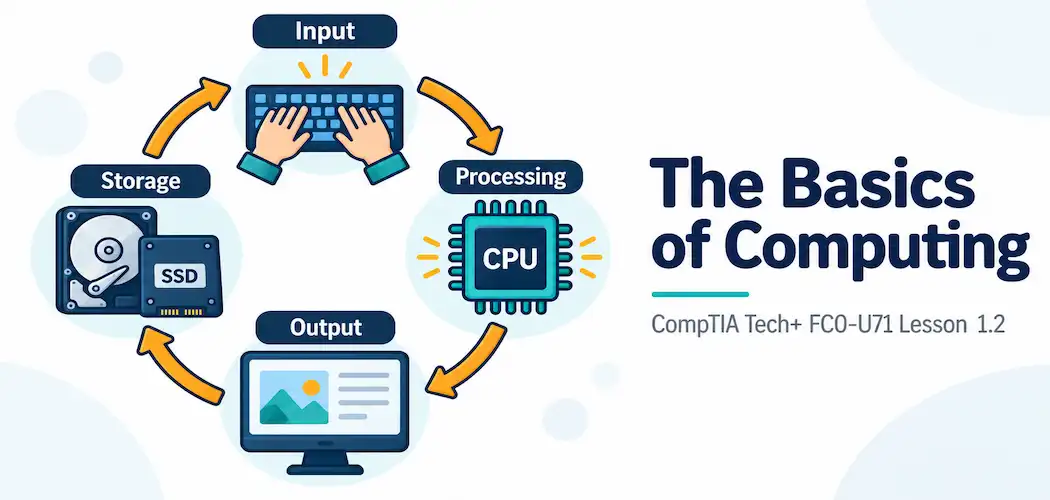
- Identify the four basic stages of computing: input, processing, output, and storage
- Give real-world examples of hardware associated with each stage
- Explain how these four stages work together as a continuous cycle rather than isolated, one-time events
- Trace a single everyday task, step by step, through all four stages
- Explain why understanding this cycle matters even for non-technical IT roles
Key Terms
| Term | Definition |
|---|---|
| Input | The stage where raw data enters a computing system from the outside world |
| Processing | The stage where the CPU manipulates data according to instructions to produce a result |
| Output | The stage where processed information is presented back to a user or another system |
| Storage | The stage where data is retained, either temporarily or permanently, for later use |
| IPOS Cycle | The continuous, repeating cycle of input, processing, output, and storage that describes how a computer handles data |
Explanation
From Notational Systems to the Basics of Computing
The previous lesson covered how computers represent data at the lowest level — as binary digits, and the shorthand systems built on top of that representation. This lesson zooms out one level and asks a more practical question: what does a computer actually do with that data, from the moment it arrives to the moment a result appears in front of you? The answer is a four-stage cycle that repeats constantly, on every device, for every task, whether that task is opening an app, sending a text, or running a search.
The Four Stages: Input, Processing, Output, and Storage
Every computing task, no matter how simple or complex, can be broken down into four basic stages:
- Input — data enters the system from the outside world
- Processing — the system does something with that data
- Output — the result is presented back out to a user or another system
- Storage — data is kept, either briefly or permanently, so it can be used again later
It’s tempting to think of these as four separate, one-time steps that happen once in strict order and then stop, but that’s not really how computing works in practice. In reality, this is a continuous cycle — often called the IPOS cycle (input-processing-output-storage) — that a device runs through constantly, sometimes dozens or hundreds of times per second, and the four stages frequently overlap and feed back into one another rather than running as a single clean, linear sequence.
Let’s take each stage in turn, with concrete examples, before putting the whole cycle back together with a full worked walkthrough.
Input: Getting Data Into the System
Input is any process by which raw data enters a computing system from outside itself — from a person, from the physical environment, or from another system entirely. The most familiar input devices are the ones people interact with directly every day:
- A keyboard captures individual keystrokes as a person types
- A mouse or trackpad captures position and click/tap events
- A touchscreen captures the location and pressure of a finger or stylus
- A microphone captures sound waves and converts them into an electrical signal
- A webcam captures light and converts it into a sequence of images
- A scanner captures a physical document as a digital image
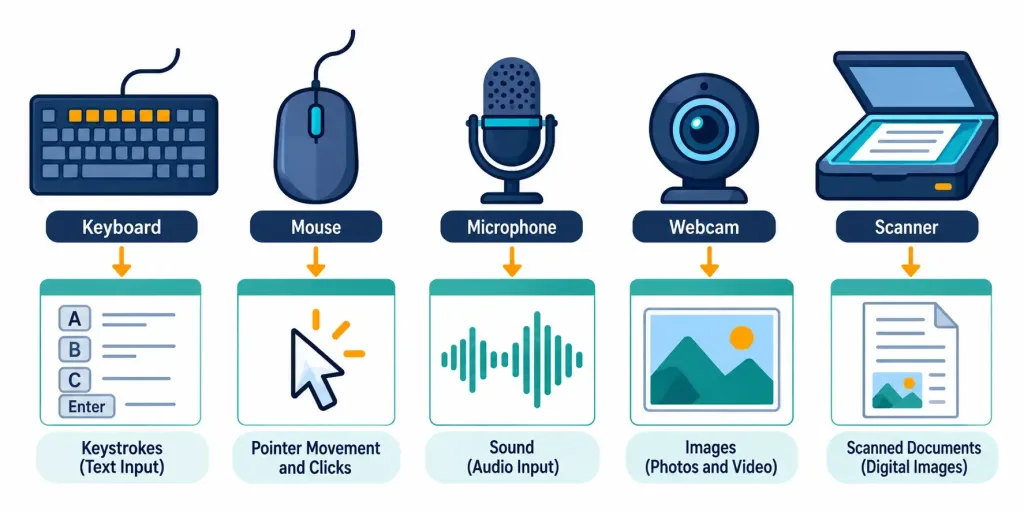
Input isn’t limited to devices a human directly touches, either. A sensor — a thermostat’s temperature sensor, a fitness tracker’s heart rate sensor, a smart doorbell’s motion sensor — is also performing input, just from the physical environment rather than from direct human interaction. In every case, the underlying job of input is the same: take something that exists in the analog, physical world (a voice, a temperature, a fingerprint, a beam of light bouncing off a printed page) and convert it into a digital form the rest of the system can actually work with — which, as covered in the previous lesson, ultimately means converting it into binary.
Processing: Where the Actual Work Happens
Processing is the stage where the system does something with the data it received as input — calculating, comparing, transforming, or otherwise manipulating it according to a set of instructions. This is the job of the CPU (Central Processing Unit), often described as the “brain” of a computer, though that metaphor undersells just how mechanical and literal the CPU’s actual behavior is: it executes an enormous number of extremely simple instructions, one after another, at extraordinary speed.
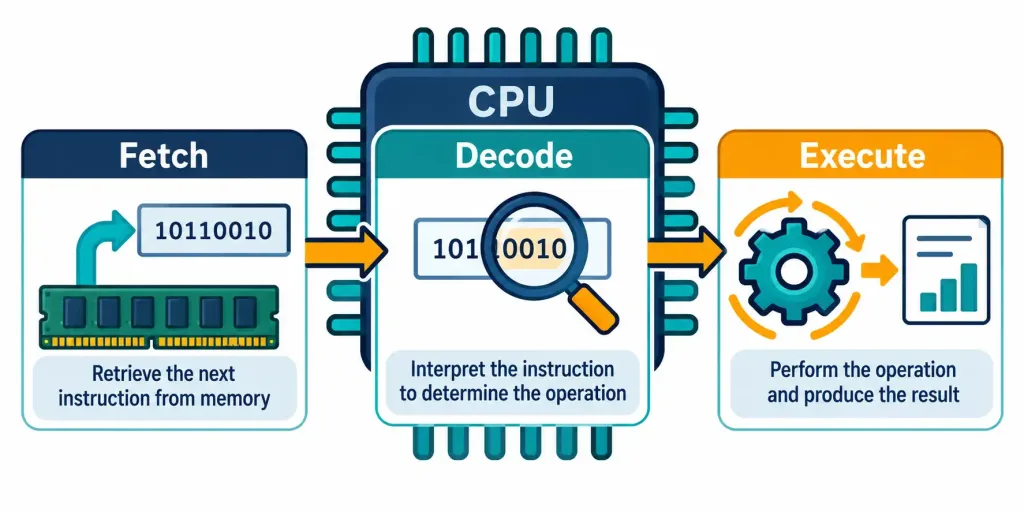
A useful, simplified way to think about what happens during processing is a repeating cycle of its own: the CPU fetches an instruction (pulls it from memory), decodes it (figures out what the instruction is actually asking it to do), and executes it (actually carries out the operation — adding two numbers, comparing two values, moving a piece of data from one location to another). This fetch-decode-execute pattern happens continuously, billions of times per second on a modern processor, and it’s the reason processor speed is measured in gigahertz (GHz) — a unit covered in more depth later in this domain.
To make this concrete rather than abstract, imagine a spreadsheet cell containing the formula =2+2. When that cell needs to be calculated, the CPU doesn’t understand “add two numbers” as a single, human-readable idea the way a person would read it. Instead, it works through something closer to: fetch the instruction that says “load the value 2,” fetch the instruction that says “load the second value 2,” fetch the instruction that says “add these two loaded values together,” and fetch the instruction that says “store the result (4) back where the spreadsheet expects to find it.”
What looks like one simple calculation to a person is actually several distinct fetch-decode-execute cycles happening in sequence, just at a speed far too fast for a human to perceive as anything other than instantaneous.
It’s worth being clear that processing doesn’t require any input from a person specifically at every single moment. A background task — an antivirus scan running quietly, a cloud backup syncing in the background, a spreadsheet recalculating a formula after a single cell changes — is processing that happens continuously, triggered by something other than a person actively sitting at the keyboard in that exact instant.
Output: Getting Results Back Out
Output is the stage where the result of processing is presented back to a user, or passed along to another system entirely. Just as input devices span a wide range, so do output devices:
- A monitor displays visual output — text, images, video
- Speakers or headphones produce audio output
- A printer produces physical, paper-based output
- A haptic motor (the vibration in a phone or game controller) produces tactile output
- A smart home device might produce output in the form of physically unlocking a door or adjusting a thermostat setting
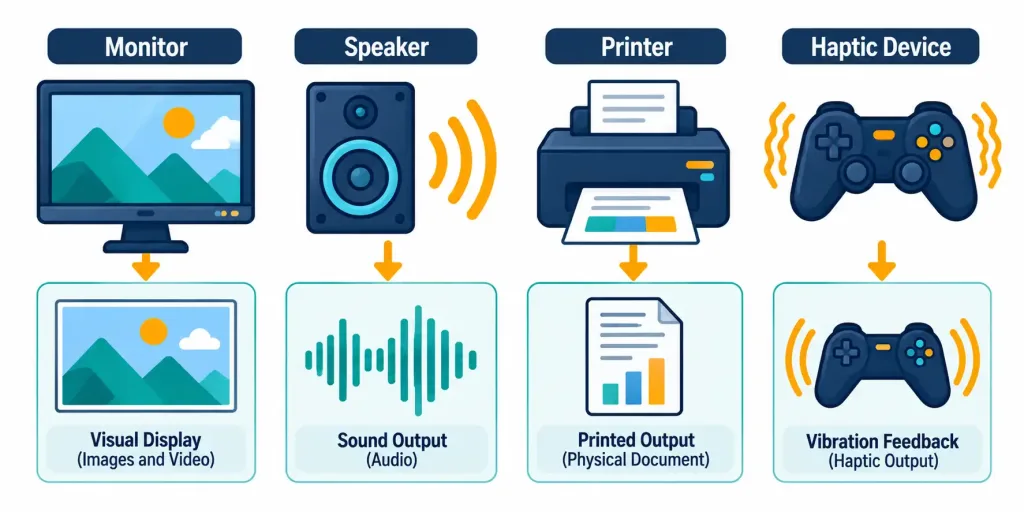
Output, importantly, doesn’t always go to a human being at all. When one computer sends data to another computer — a web server sending a page to a browser, a smart thermostat reporting its current temperature to a phone app — that’s also output, just directed at another system rather than a person standing in front of a screen. This is a genuinely important point to internalize: the IPOS cycle describes computing in general, not just the specific case of a single person using a single device.
Storage: Keeping Data for Later
Storage is the stage where data is retained so it can be used again later, rather than existing only for the instant it was processed. Storage comes in two broad flavors, a distinction this course will return to in much greater depth in a later lesson dedicated specifically to storage types:
- Temporary (volatile) storage — most notably RAM (Random-Access Memory) — holds data only while a device is actively powered on and running a task. The moment power is lost, whatever was held in RAM is gone entirely. RAM exists because it’s extremely fast to read from and write to, which matters enormously for data the CPU needs to access constantly during active processing.
- Permanent (non-volatile) storage — hard drives, solid-state drives, USB flash drives, cloud storage — retains data even after power is removed, which is exactly why a document is still there the next time you turn a laptop back on, but anything that was only ever held in RAM (like an unsaved draft) is not.
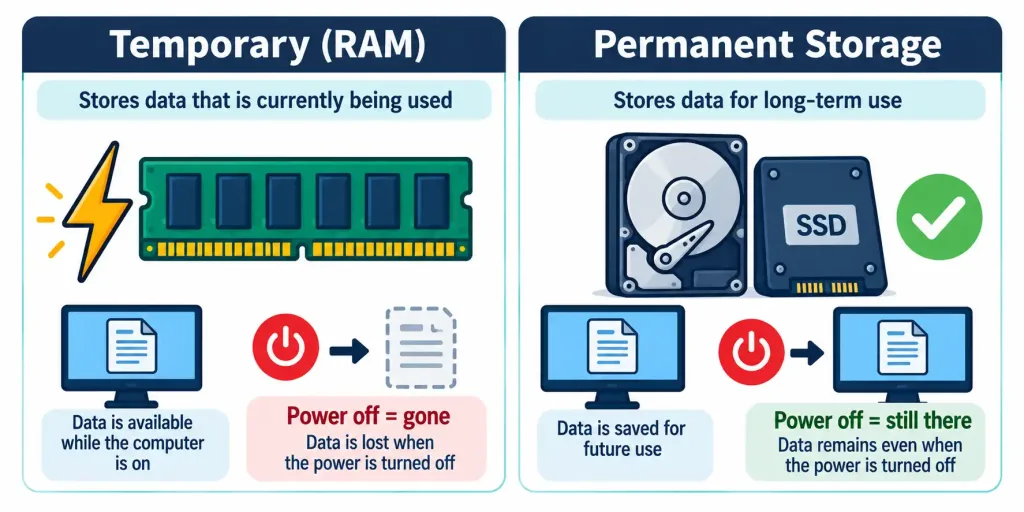
This is exactly why “save your work” is such persistent, practical advice: it’s the deliberate act of moving data from temporary storage into permanent storage, specifically so it survives beyond the current session.
There’s also a middle ground worth knowing about at this introductory level: many devices use a small amount of extremely fast, extremely close-to-the-CPU temporary storage called cache, which holds a copy of data the processor is likely to need again very soon, so it doesn’t have to go all the way back to slower storage to fetch it repeatedly. Cache is a more advanced topic covered in greater depth later in this course, but it’s worth knowing at this stage that “temporary vs. permanent” isn’t strictly a two-tier system — there are actually several layers of storage in between, each trading off speed against how much data they can hold and how long that data survives.
How the Four Stages Show Up Differently Across Device Types
It’s easy to picture the IPOS cycle purely in terms of a laptop with a keyboard and monitor, but the same four stages apply just as completely to devices that look nothing like that. A smartphone takes input from a touchscreen, a microphone, and a camera; processes it with a mobile-optimized CPU; outputs to a small display and speaker; and stores data both locally and, very often, synced to the cloud.
A smart thermostat takes input from a temperature sensor and a phone app; processes that input against a programmed schedule; outputs by turning a heating or cooling system on or off; and stores a history of temperature readings and schedule changes. A web server takes input in the form of incoming requests from other computers over a network; processes those requests by retrieving or generating the appropriate response; outputs that response back across the network; and stores the files, databases, or session data needed to keep doing this for the next request. In every one of these cases — despite how different the devices look and what they’re actually used for — the same four-stage pattern holds up without exception.
Putting It All Together: A Full Worked Example
Abstract stages are much easier to hold onto once they’re anchored to a single, complete, real task from start to finish. Let’s walk through something almost everyone has done: typing a short message and sending it.
- Input — You press keys on a keyboard (or tap letters on a touchscreen). Each keystroke is captured as input, one character at a time.
- Processing — The CPU takes each keystroke and determines which character it represents, then updates the in-progress message accordingly. As you keep typing, this processing repeats continuously, character by character.
- Output — Each character appears on the screen almost instantly after you type it — that’s output, letting you see what you’ve written so far.
- Storage (temporary) — While you’re actively typing, the message itself is sitting in RAM — fast, temporary storage — so the device can keep updating it instantly as you continue typing.
- Processing (again) — When you hit “send,” the device processes the message again: formatting it correctly, attaching any necessary information (like the recipient’s address), and preparing it to be transmitted.
- Output (again) — The message is sent out — output directed at another system this time, specifically the recipient’s device or a server that will relay it onward.
- Storage (permanent) — A copy of the sent message is typically saved to permanent storage — a message history, a “sent” folder — so it’s still there the next time you open the app, even after the device has been turned off and back on.
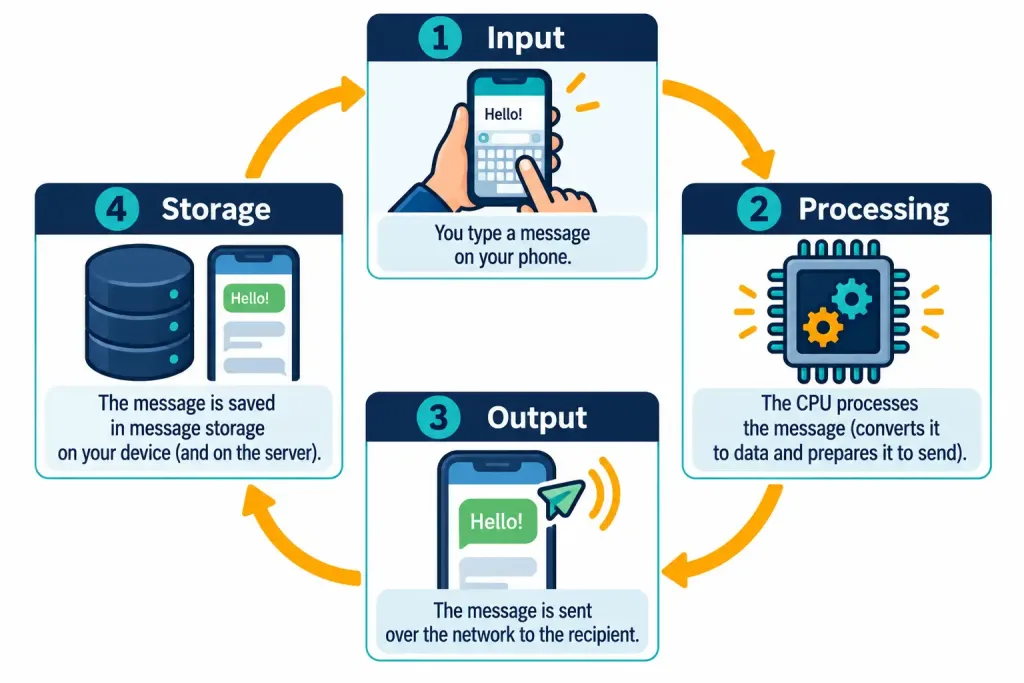
Notice how the four stages don’t run once, in a single tidy pass — processing happens more than once, output happens more than once, and storage happens in two genuinely different forms (temporary, then permanent) within this one simple task. This is exactly why thinking of the IPOS cycle as a repeating, overlapping loop is far more accurate than thinking of it as four boxes you check off once in order.
Why This Matters for a Career in IT
It might seem like this level of detail belongs only in a hardware engineering course, but the IPOS framework quietly underlies an enormous amount of everyday IT troubleshooting language, even when nobody explicitly names it that way. When a user reports “the computer isn’t responding to anything I type,” that’s an input problem.
When someone says “it’s thinking forever and nothing is happening,” that often points to a processing bottleneck. When a user says “I typed it but nothing shows up on screen,” that’s pointing at output. And when someone says “I saved it yesterday and now it’s gone,” that’s a storage problem. Being able to quickly sort a vague complaint into one of these four buckets is often the very first, fastest step toward figuring out what’s actually gone wrong — long before you touch any specific tool or run any specific command.
This four-stage way of thinking about computing also connects directly forward to how servers and workstations are described later in networking coursework — a server, at the end of the day, is still just a device performing the same input-processing-output-storage cycle, just usually without a person sitting directly in front of it, handling requests that arrive over a network instead of from a keyboard. If you continue on toward networking topics, core infrastructure devices like servers and workstations are described in exactly these same functional terms — devices built to receive input, process it, and return output, just operating at a much larger scale.
A little practice sorting real complaints into the right stage goes a long way. Consider a few examples: “The mouse cursor won’t move at all” points at input — the device isn’t successfully capturing the physical action. “The app is frozen and the fan is spinning loudly” points at processing — the CPU is clearly still working, just not producing a usable result yet. “I hear a notification sound but nothing appears on my screen” points at a mismatch between two different output channels (audio worked, visual didn’t). “My files were there this morning and now the folder is empty” points at storage.
Learning to ask “which of the four stages does this complaint actually describe?” is a genuinely transferable skill that applies to troubleshooting conversations you’ll have throughout an entire IT career, regardless of which specific specialty you eventually move into.
Recognition-Level Verification Concepts
A few patterns are worth recognizing on sight:
- A device or action that brings new data into a system — typing, scanning, sensing, clicking — is input.
- A device or action that presents a result back out — displaying, printing, playing sound — is output.
- The CPU carrying out instructions on data, whether or not a person is actively watching, is processing.
- Data held only while a device is powered on is in temporary (volatile) storage; data that survives a restart is in permanent (non-volatile) storage.
- A single task very often touches more than one stage more than once — this is the normal pattern, not an exception.
Common Exam Traps
- Don’t assume the four stages always occur in a strict, one-time, linear order. Real tasks frequently loop back through processing, output, or storage more than once, as the worked example in this lesson demonstrated directly.
- Output isn’t always aimed at a human. Data sent from one system to another — a server responding to a request, one device relaying data to another — is still output, even with no person watching a screen at that moment.
- Losing power doesn’t erase permanent storage, only temporary (volatile) storage like RAM. Confusing which type of storage is affected by a power loss is a common early mistake.
- Processing doesn’t require someone actively pressing keys at that exact instant. Background tasks, scheduled jobs, and automated processes are all still processing, even with no direct user interaction happening in real time.
- Input and output are not the same as storage. A monitor displaying something is output; that same content sitting in a saved file afterward is a completely separate, later storage event — don’t collapse these into one stage just because they happen close together in time.
Lesson 1.2 Practice Quiz — The Basics of Computing
17 questions covering input, processing, output, storage, and the IPOS cycle.
Tech+ FC0-U71 · Domain 1.0Summary
Every computing task can be broken down into four basic stages: input (data entering the system), processing (the CPU acting on that data), output (results presented back out), and storage (data retained for later use).
Input devices convert real-world actions and physical signals — keystrokes, sound, light, temperature — into digital data; output devices convert processed data back into a form people or other systems can use.
Processing is carried out by the CPU through a continuous fetch-decode-execute cycle, and doesn't require direct, real-time human interaction to occur.
Storage comes in two forms: temporary (volatile) storage like RAM, which is lost when power is removed, and permanent (non-volatile) storage, which survives a restart — which is exactly why saving work matters.
These four stages form a continuous, overlapping cycle rather than a single linear sequence, and a single everyday task — like sending a short message — typically passes through several of them, sometimes more than once, before it's complete.