Mujtaba Khattak
Mujtaba Khattak is a network solutions architect specializing in SD-WAN, cloud infrastructure, and network optimization. He holds a BS in Artificial Intelligence from SZABIST, an MBA from Virtual University (VU), and Cisco certifications (CCNA and CCNP). As the founder of NetworkUstad.com, He produce technical guides and tutorials on networking, cybersecurity, and AI applications.
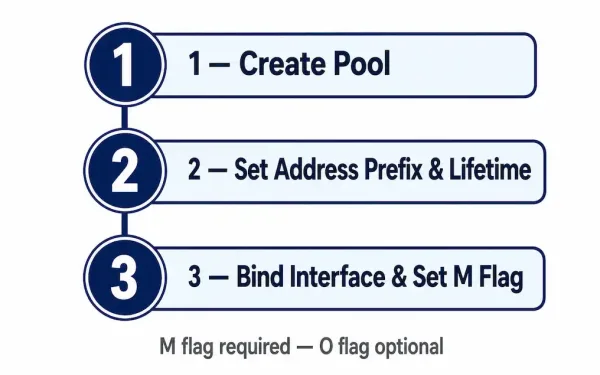
Configuring a Stateful DHCPv6 Server on a Cisco Router
Stateful DHCPv6 is the IPv6 mode that behaves the way DHCPv4 always has: the server assigns the address itself, tracks which client has which address, and hands out supplementary options alongside it — no SLAAC involved on the client side at any point. That’s the core distinction from stateless DHCPv6, and it changes almost every...
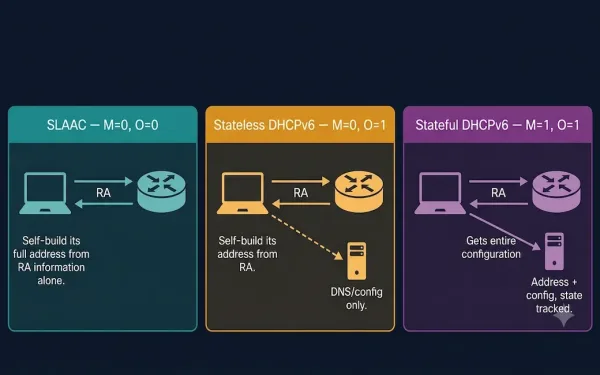
SLAAC and DHCPv6
Recall that the router sends a Router Advertisement (RA) message, and the settings within that RA message decide whether a client can obtain its IPv6 address information automatically using SLAAC, DHCPv6, or a combination of both. This guide covers both methods, the three possible RA flag combinations, and how to configure and verify each on...

Cisco Borderless Networks: Hierarchical Campus Design Explained
Cisco Borderless Networks is an architecture designed to enable secure, seamless connectivity for any user, device, or location, integrating wired and wireless access with unified policy and performance management. It’s built to address common enterprise IT challenges — mobility, security, and scalability — using Cisco Catalyst switches, ISR routers, and management tools like Cisco DNA...
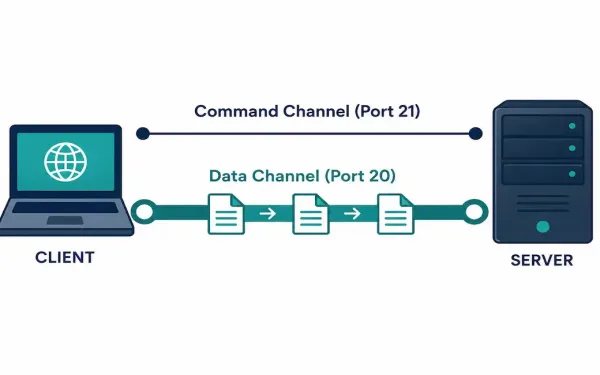
File Transfer Protocol (FTP): How It Works and How to Secure It
File Transfer Protocol is one of the oldest application layer protocols still in active use today. Its original specification, RFC 114, dates back to 1971 — decades before the modern web existed. It’s still worth understanding in depth, both because it shows up regularly in CCNA and CCNP material and because plenty of real infrastructure...
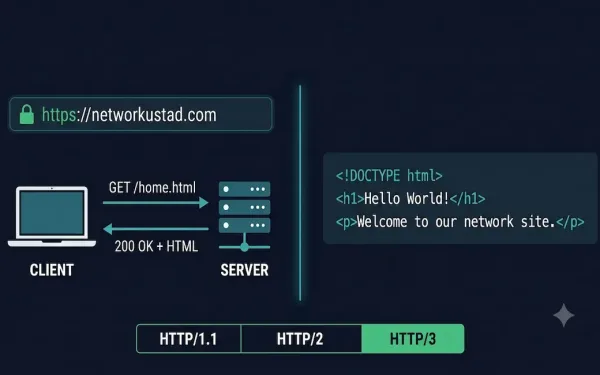
HTTP and HTML Explained: How the Web Communicates
HTTP and HTML are the two foundational technologies behind every web page you visit. They work together but do completely different jobs. HTTP (HyperText Transfer Protocol) is the application-layer protocol that governs how data is requested and delivered between a web server and a client. HTML (HyperText Markup Language) is the markup language that structures...
Client-Server vs. Peer-to-Peer: Network Models Explained
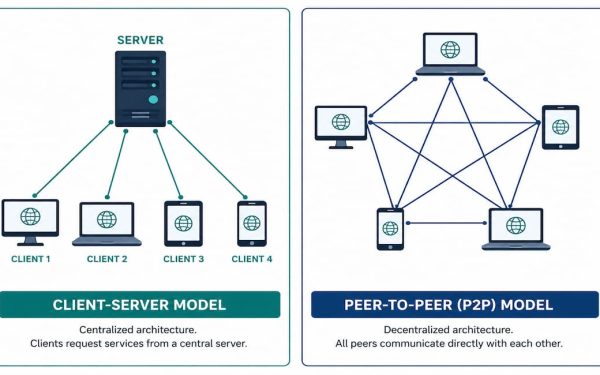
Almost every network interaction you have falls into one of two models: client-server, where a dedicated device provides a service to others, or peer-to-peer, where devices share resources directly with each other, no dedicated server required. Understanding both — and knowing which one a given application actually uses — matters for everything from troubleshooting to...
The Application Layer: Protocols, Function, and How It Fits the Network Stack
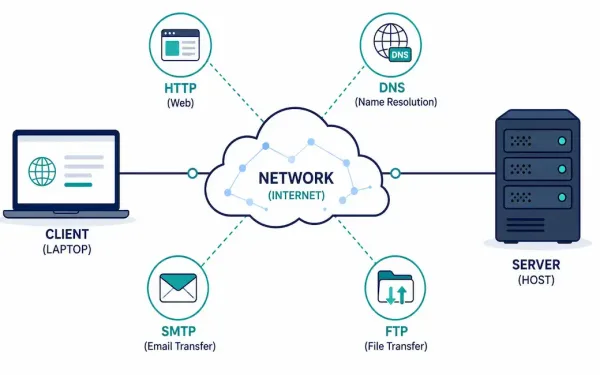
Every time you load a web page, send an email, or transfer a file, you’re using the application layer — the topmost layer of the network stack, and the only one most users ever interact with directly. Everything below it exists to support what happens here. This guide covers what the application layer actually does,...
User Datagram Protocol (UDP): Complete Guide for CCNA
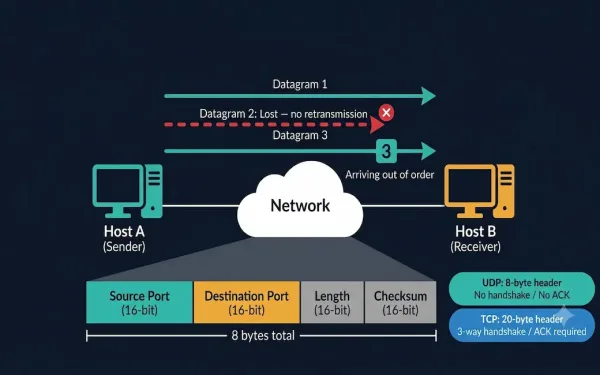
The User Datagram Protocol (UDP) is a lightweight Transport Layer protocol that provides fast, low-overhead data transmission between applications without establishing a connection first. Defined in RFC 768, UDP is one of the two core Transport Layer protocols alongside TCP and is directly tested on the CCNA 200-301 exam. Understanding UDP — its header structure,...
Network Prefix, Network Address, Broadcast Address, and Host Address Explained
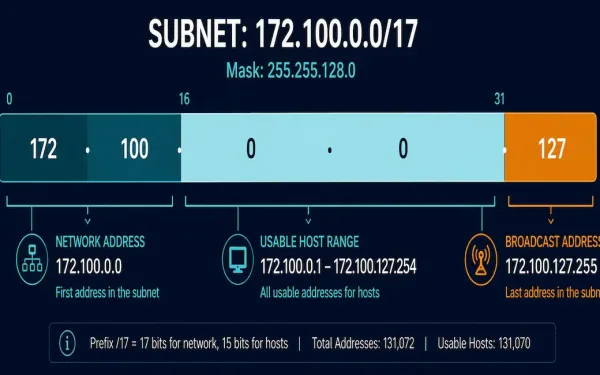
Every IPv4 subnet has a handful of specific addresses with fixed roles: one identifies the network itself, one is reserved for broadcasting to every device on it, and the rest are available for hosts. This guide covers exactly how to calculate each one, using prefix notation and binary math, with one consistent worked example carried...

Positional Number System and Examples
In a positional number system, each symbol represents a different value depending on the position it occupies in a number, and each system has a value that relates to the number directly next to it. The total value of a positional number is the total of the resultant value of all positions. The decimal number...