Muhammad Khattak
Routing and switching specialist, CCNA certified, with extensive experience in network configuration and troubleshooting. Covers OSPF, EIGRP, VLAN management, and advanced routing concepts.
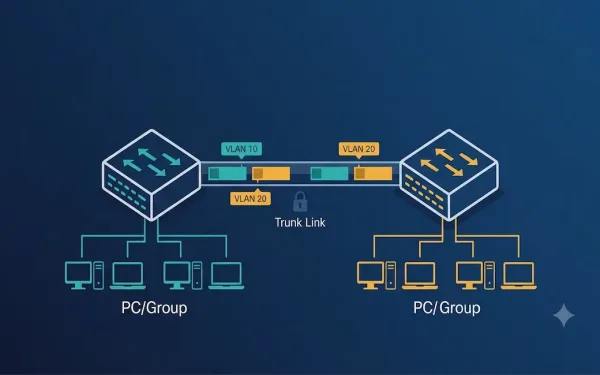
VLAN Trunking on Cisco Switches: Configuration and Troubleshooting Guide
VLAN trunking is a critical networking concept that allows multiple VLANs to traverse a single link between network devices, such as switches or routers. By enabling communication between devices in the same VLAN across different switches without requiring a router, trunking enhances network efficiency and scalability. For CCNA and CCNP students, understanding VLAN trunking is...
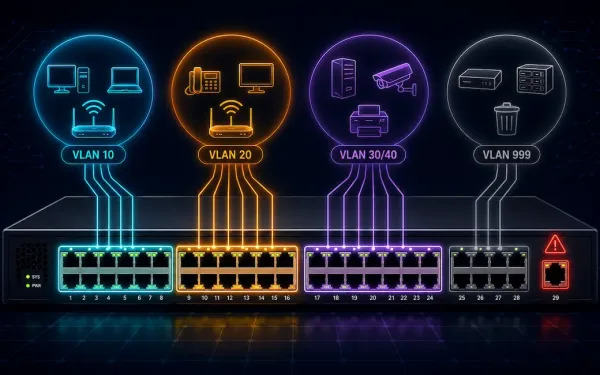
VLAN Configuration on Cisco Switches: A Step-by-Step Guide
Virtual Local Area Networks (VLANs) are a fundamental concept in network engineering, allowing network administrators to segment a physical network into multiple logical networks. (Note: this link points to an unrelated article about automating Salesforce data exports — an inherited link mismatch from the original article, flagged here per audit policy.) This segmentation enhances security,...
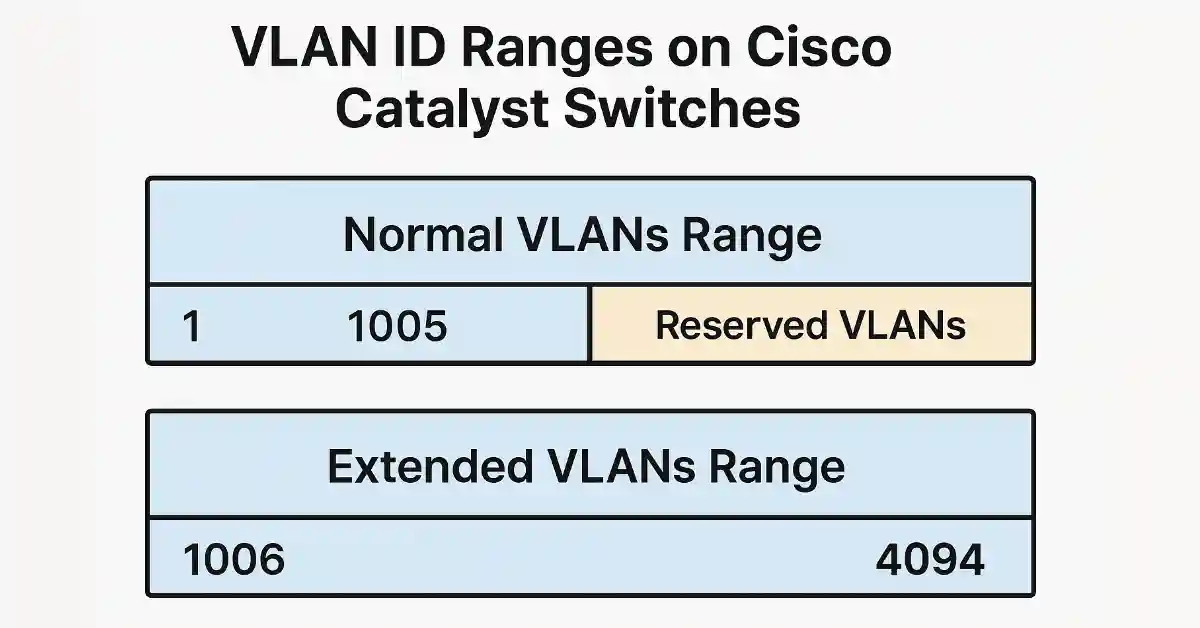
VLAN ID Range Explained: Normal and Extended Ranges on Cisco Switches
An accurate, practical guide to VLAN ID ranges for anyone studying CCNA or managing a Cisco network. Technical details here follow the IEEE 802.1Q standard and Cisco’s official documentation. Cisco Catalyst switches support a VLAN ID range from 1 to 4094, divided into a normal range (1–1005) and an extended range (1006–4094). The normal range...
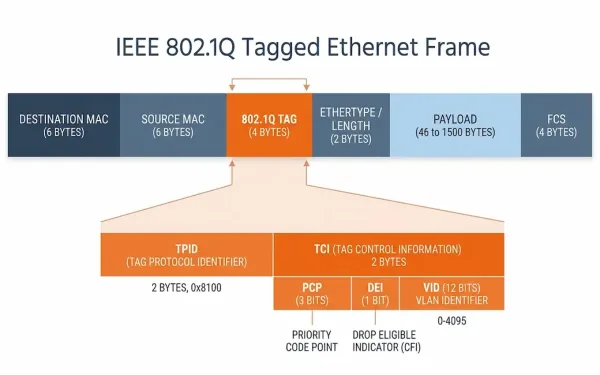
VLAN Identification: A Complete Guide to VLAN Tagging (802.1Q)
Virtual Local Area Networks (VLANs) are a cornerstone of modern network design, enabling segmentation, security, and efficient traffic management in Ethernet networks. For CCNA and CCNP students, understanding VLAN tagging for VLAN identification — particularly the IEEE 802.1Q standard — is essential for configuring and troubleshooting Cisco switches. This guide explains VLAN tagging, native VLANs,...
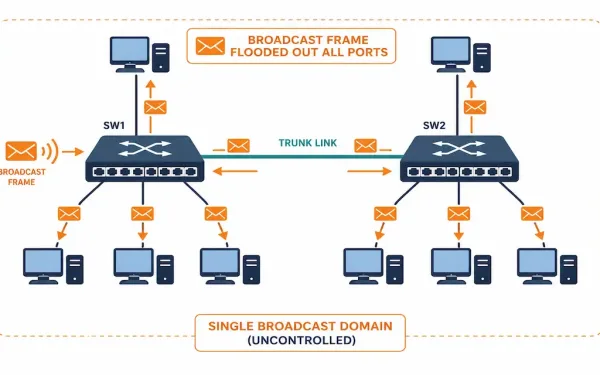
Controlling Broadcast Domains: Flooding, VLANs, and Storm Control
Broadcast traffic is necessary — ARP requests, DHCP discovers, and similar traffic all rely on it — but an uncontrolled broadcast domain scales badly. Every additional device adds more broadcast traffic that every other device on the same domain has to process, whether it’s relevant to them or not. Controlling broadcast domains is how networks...
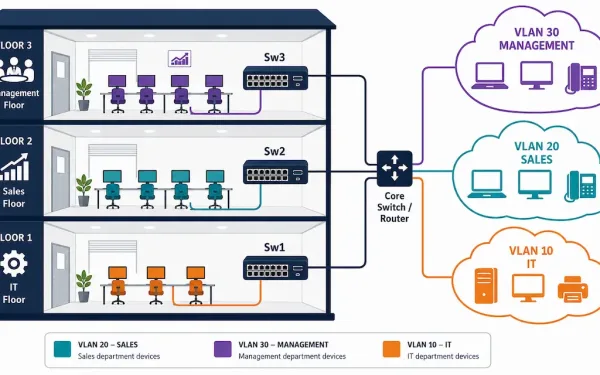
Virtual LANs (VLANs): Concepts, Types, and Configuration
A router blocks broadcast traffic between networks, but routers typically have a limited number of LAN interfaces — you can’t practically give every department its own physical router port. VLANs solve this at Layer 2 instead, letting a single switch (or group of switches) segment traffic into multiple logically separate networks without any additional physical...
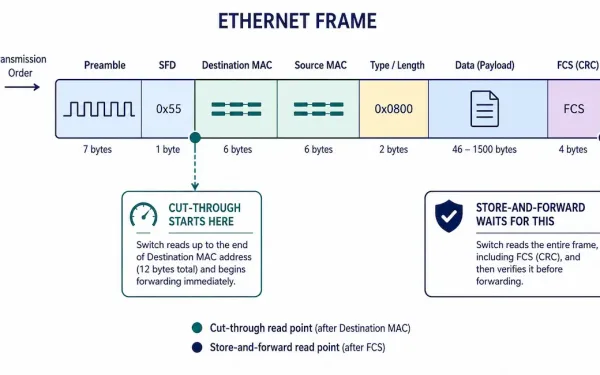
Data Frame Forwarding: Store-and-Forward, Cut-Through, and Fragment-Free Switching
Every switch has to decide exactly when to start forwarding a frame — wait for the whole thing, or start moving it the instant enough information is available. That decision defines the three switching methods every CCNA and CCNP candidate needs to know: store-and-forward, cut-through, and fragment-free. Each represents a different trade-off between reliability and...
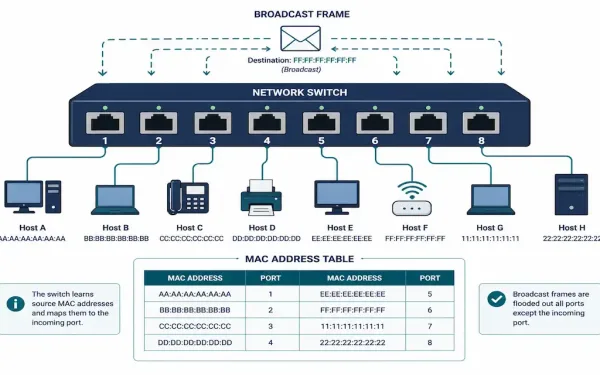
Switching Concepts in Networking: How Switches Forward Frames
Every Ethernet switch makes the same basic decision millions of times a second: given a frame that just arrived, where should it go? The answer comes down to two pieces of information — the port the frame arrived on and the frame’s destination MAC address — and a dynamically-built table that maps addresses to ports....
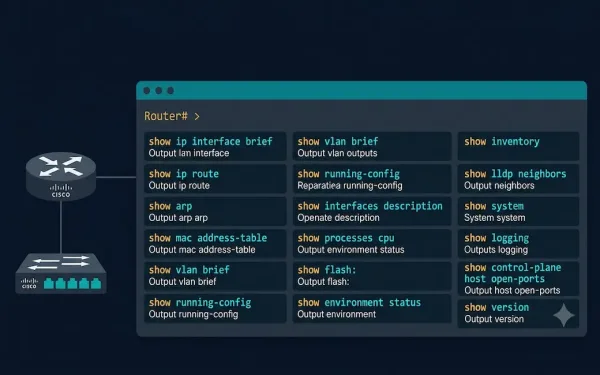
Important Show Commands in Cisco IOS: Complete Reference Guide
The show commands display important information about a device’s configuration and operation in Cisco IOS Command Line Interface (CLI) mode. Network administrators use show commands to check device status, interfaces, processes, and configuration files to confirm operational status, verify configurations, and diagnose problems — all without disrupting live traffic. The network administrator can also view...
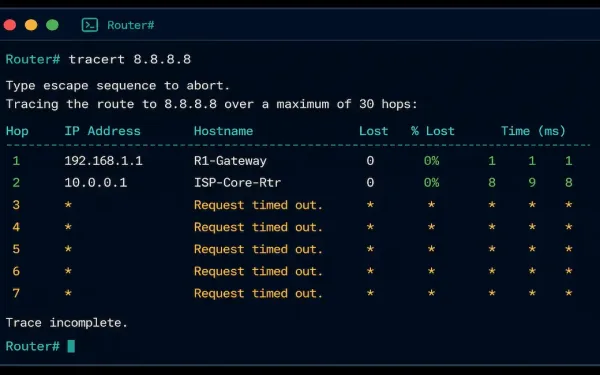
Traceroute and Tracert: How They Work and How to Read the Output
When a connection fails somewhere between your device and its destination, ping tells you that something’s wrong, but not where. Traceroute — called tracert on Windows — fills that gap by mapping every router hop along the path, showing exactly how far a packet gets before something stops responding. This guide covers how traceroute actually...