Networking
CCNA tutorials, Cisco guides, and enterprise networking insights for IT professionals.
Network Baseline: What It Is, How to Establish One, and Why It Matters
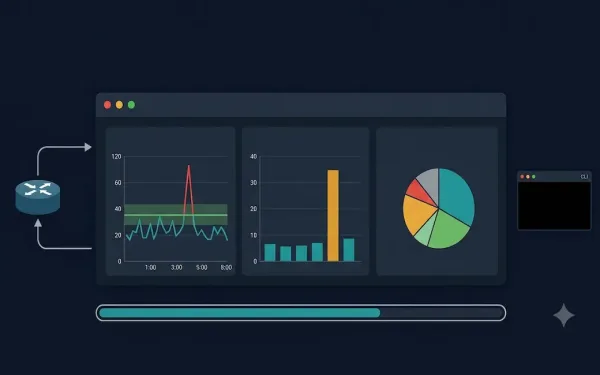
Do you know your standard network throughput volume and the types of traffic used in your network? If you cannot answer those questions with specific numbers, you need a network baseline. A network baseline is one of the most valuable tools available to network administrators for monitoring performance, detecting anomalies, and troubleshooting problems before they...
Understanding Ping Indicators and Ping Results in Cisco IOS
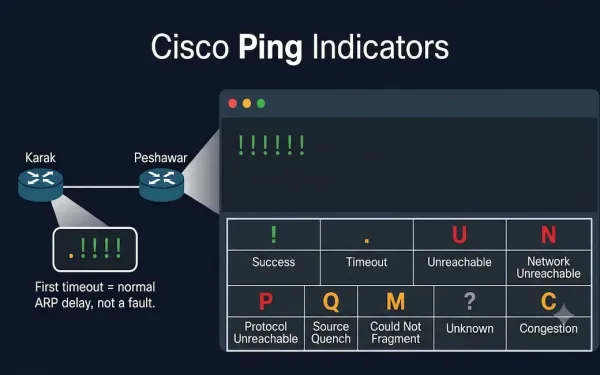
The ping command is a fundamental network troubleshooting tool that uses the Internet Control Message Protocol (ICMP), as defined in RFC 792, to test connectivity between devices. It is essential for CCNA (ICND1, ICND2) and CCNP (ROUTE, SWITCH, TSHOOT) exam preparation, helping students verify Layer 3 connectivity by interpreting ping results correctly. This guide covers...
Cisco Router File System: Flash, NVRAM, and Backup Methods
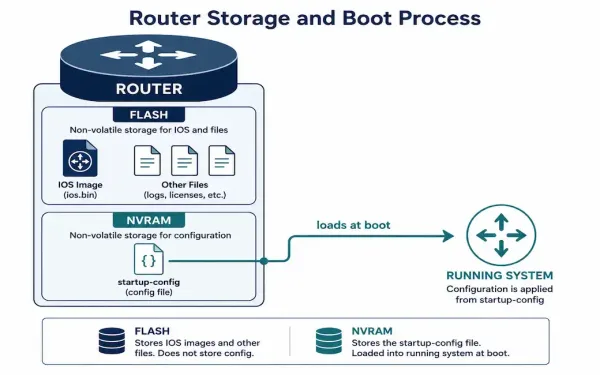
Every Cisco router runs on a small, purpose-built file system that stores the IOS image, configuration files, and a handful of supporting files. Understanding how it’s organized — and how to back it up properly — is a core skill for anyone managing Cisco equipment, whether that’s for CCNA study or day-to-day network administration. This...
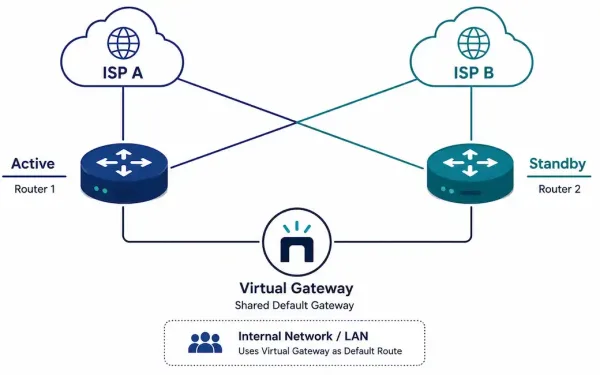
Redundancy and Traffic Management for Small Networks
A single point of failure is exactly what it sounds like: one router, one link, or one ISP connection that, if it fails, takes the whole network down with it. Redundancy eliminates these single points of failure. Traffic management ensures that when bandwidth gets tight, the traffic that actually needs priority — voice, video —...
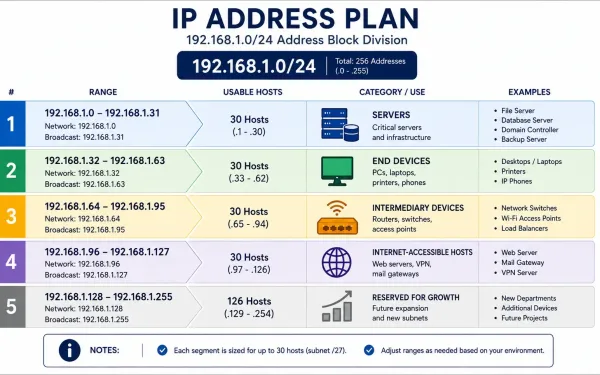
IP Address Planning for a Small Network
Every device on a network needs a unique IP address, but “make sure nothing conflicts” is a low bar. Good IP address planning goes further: it groups devices logically, makes troubleshooting faster, and makes security policy dramatically easier to write and maintain. A network where you can tell a device’s role just by looking at...
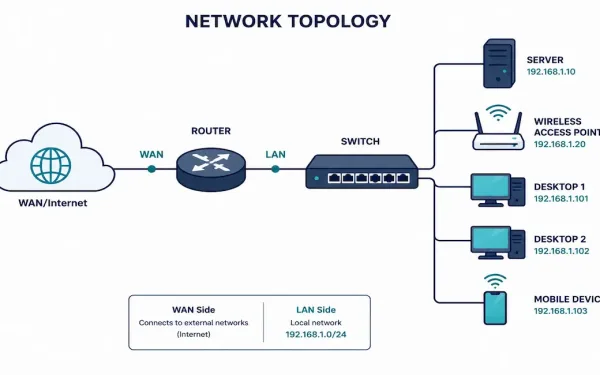
Small Network Topologies: Design, Configuration, and Growth Planning
Most businesses don’t run sprawling enterprise networks — they run small ones: a single router, one or two switches, a handful of access points, and a modest number of users. Understanding how to design, secure, and eventually grow a small network well is one of the most practically useful skills in networking, precisely because it’s...
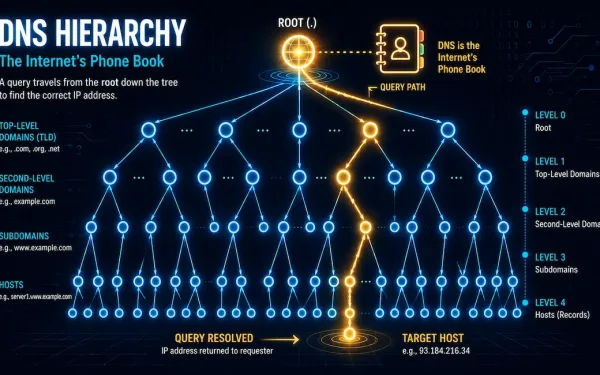
Domain Name System (DNS): Message Format, Hierarchy, and Cisco Configuration
DNS translates human-readable domain names, like networkustad.com, into machine-readable IP addresses, like 64.91.237.241. It’s the backbone of modern networking. Without it, you’d need to memorize an IP address for every site you visit. For CCNA and CCNP students, DNS matters beyond just browsing the web. It underpins how devices find each other across IP networks,...
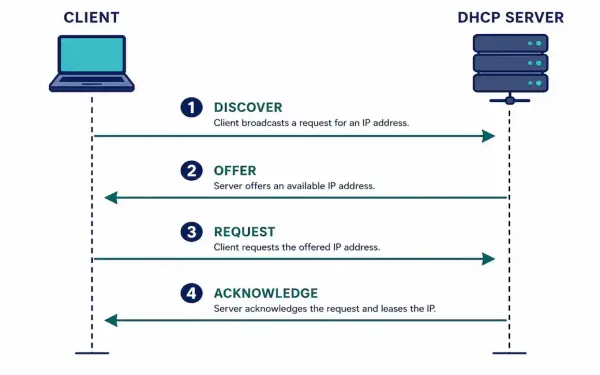
Dynamic Host Configuration Protocol (DHCP): How It Works and How to Configure It
Dynamic Host Configuration Protocol automates one of the most repetitive tasks in networking: assigning IP addresses, subnet masks, default gateways, and DNS servers to every device that joins a network. Without it, every device would need manual configuration — workable for a handful of servers, unmanageable for an office of hundreds of laptops and phones...
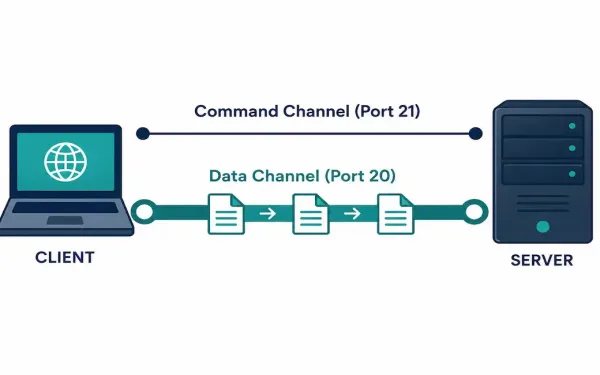
File Transfer Protocol (FTP): How It Works and How to Secure It
File Transfer Protocol is one of the oldest application layer protocols still in active use today. Its original specification, RFC 114, dates back to 1971 — decades before the modern web existed. It’s still worth understanding in depth, both because it shows up regularly in CCNA and CCNP material and because plenty of real infrastructure...
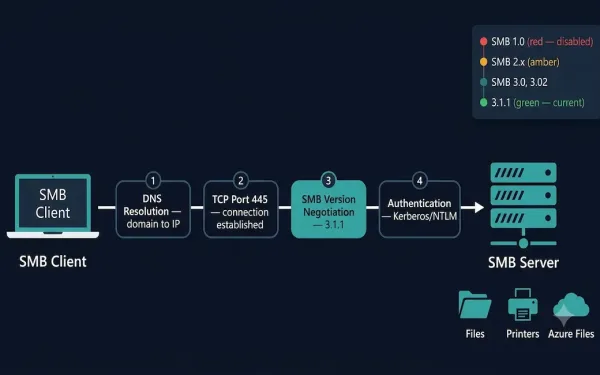
Server Message Block (SMB) Protocol: A Complete Guide
The Server Message Block (SMB) protocol enables hosts to share files, directories, printers, and other resources across a network as if those resources were local. It is a request-response protocol that operates at the Application layer, using TCP port 445 for direct communication. Every message in the SMB protocol follows a standard structure: a fixed-size...