
Networking
CCNA tutorials, Cisco guides, and enterprise networking insights for IT professionals.
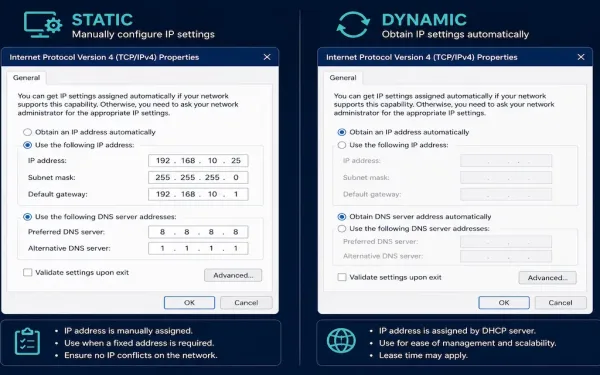
How to Assign an IP Address on a Windows PC
Every host on a network needs an IP address, and there are exactly two ways to give it one: type it in manually (static) or let a DHCP server assign it automatically (dynamic). Knowing both isn’t just a CCNA exam requirement — it’s the first troubleshooting question worth asking whenever a Windows machine can’t reach...
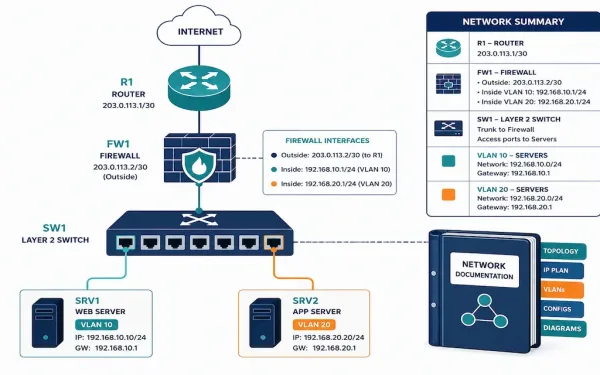
Network Documentation: A Practical Guide for CCNA and CCNP
Undocumented networks work fine right up until something breaks, and then every minute spent reverse-engineering what should already be written down is a minute of downtime that didn’t need to happen. Network documentation is the difference between a five-minute fix and an hour of guessing, and it’s a skill that matters just as much in...
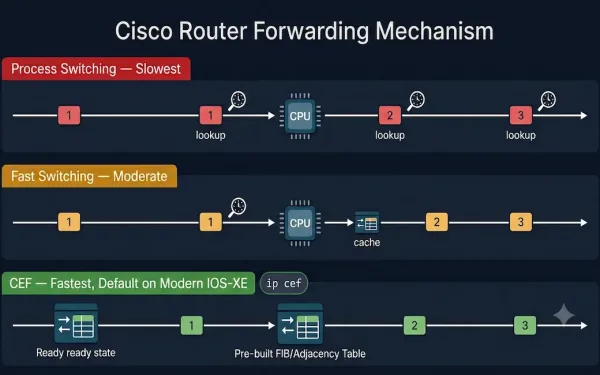
Cisco Router Forwarding Mechanisms: Process Switching, Fast Switching, and CEF
Understanding Cisco router forwarding mechanisms is a cornerstone of networking for CCNA and CCNP students. Routers, the backbone of network connectivity, rely on efficient packet-forwarding mechanisms to direct traffic toward its destination. Cisco routers support three primary methods, Process Switching, Fast Switching, and Cisco Express Forwarding (CEF), each with unique characteristics affecting performance, scalability, and...
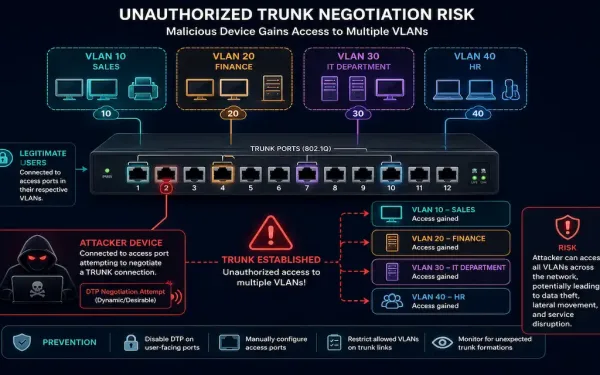
VLAN Attacks: How They Work and How to Defend Against Them
Trunk ports carry traffic for multiple VLANs across a single physical link by default, which is exactly what makes VLANs so convenient to administer — and exactly what creates an attack surface if that trunk configuration isn’t locked down properly. Understanding how these attacks actually work is what makes the standard mitigations make sense, rather...
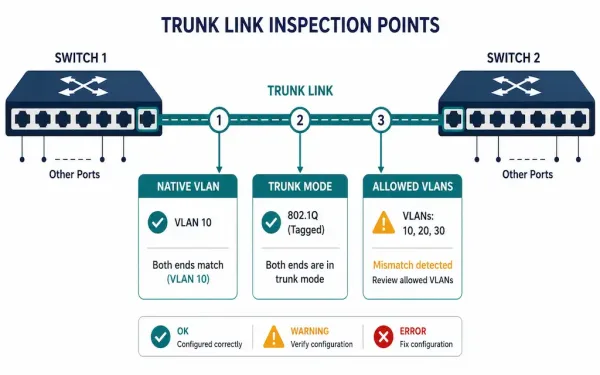
Trunk Link Problems and Troubleshooting
Trunk links carrying multiple VLANs between switches fail in a small number of well-known ways, and almost all of them come down to a mismatch between what’s configured on one end and what’s configured on the other. Knowing the standard troubleshooting order — native VLAN, then trunk mode, then allowed VLAN list — turns a...
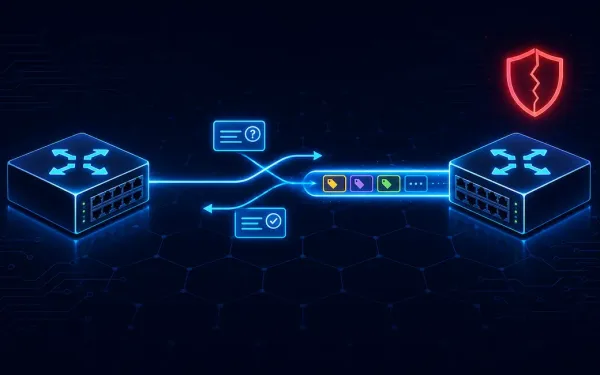
Dynamic Trunking Protocol (DTP) Explained
Dynamic Trunking Protocol, or DTP, is a Cisco proprietary protocol. It negotiates trunking between Cisco switches automatically. Instead of manually deciding whether a link should be access or trunk, two Cisco switches can figure it out between themselves. For CCNA and CCNP students, DTP shows up constantly. It’s part of every serious VLAN configuration discussion,...
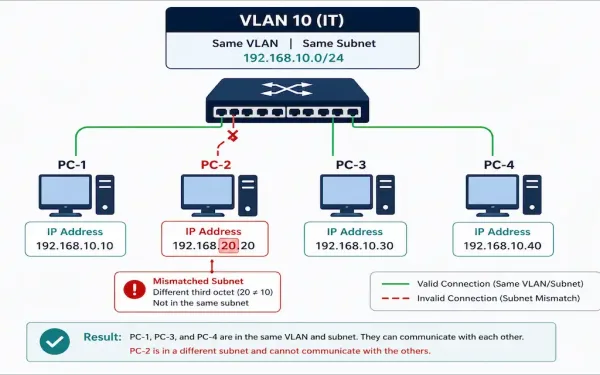
IP Addressing Issues with VLAN and SVI: Diagnosis and Configuration
Two devices in the same VLAN with mismatched subnet configuration simply can’t communicate — no amount of correct VLAN assignment or trunk configuration fixes an IP addressing problem. This is one of the most common real-world VLAN issues, and it’s frustrating precisely because the Layer 2 configuration can be entirely correct while the problem sits...
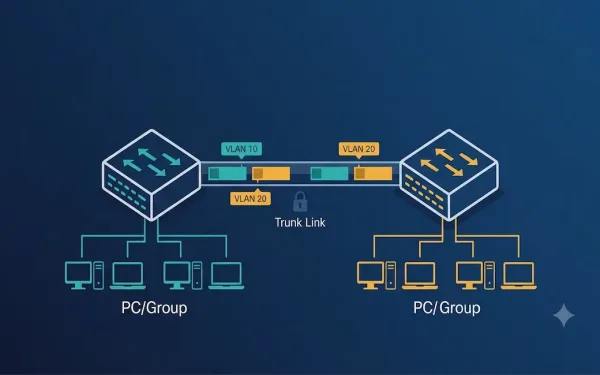
VLAN Trunking on Cisco Switches: Configuration and Troubleshooting Guide
VLAN trunking is a critical networking concept that allows multiple VLANs to traverse a single link between network devices, such as switches or routers. By enabling communication between devices in the same VLAN across different switches without requiring a router, trunking enhances network efficiency and scalability. For CCNA and CCNP students, understanding VLAN trunking is...
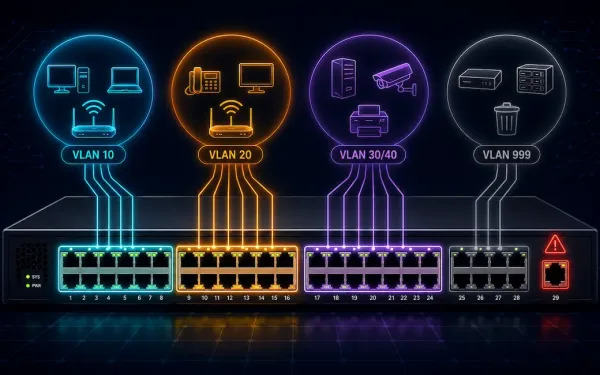
VLAN Configuration on Cisco Switches: A Step-by-Step Guide
Virtual Local Area Networks (VLANs) are a fundamental concept in network engineering, allowing network administrators to segment a physical network into multiple logical networks. (Note: this link points to an unrelated article about automating Salesforce data exports — an inherited link mismatch from the original article, flagged here per audit policy.) This segmentation enhances security,...
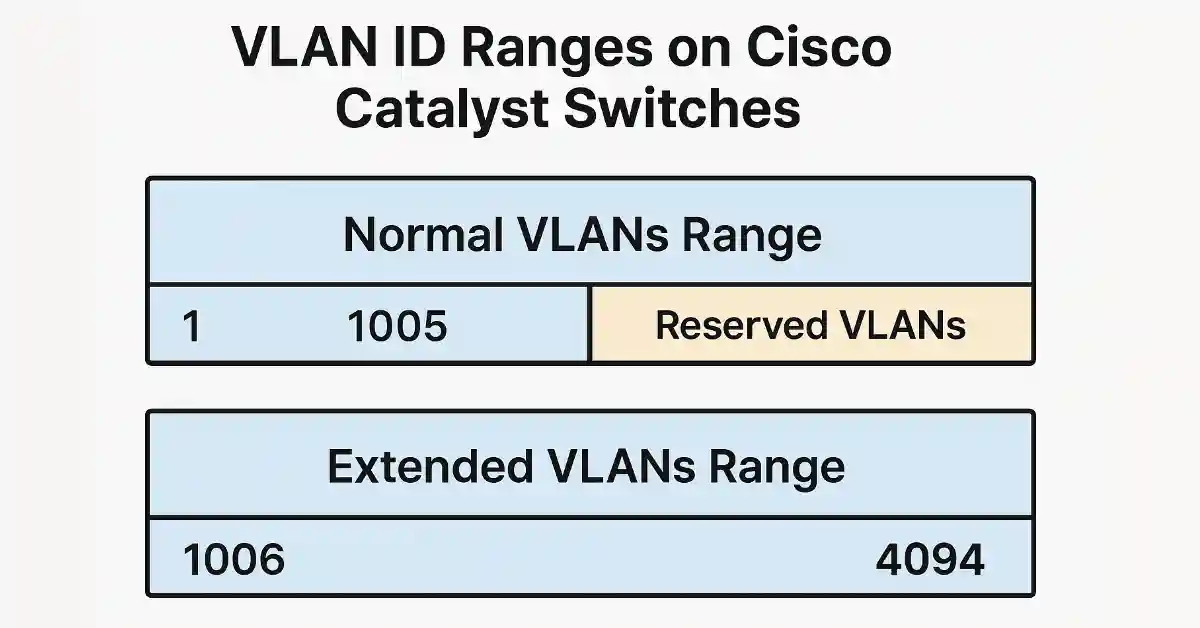
VLAN ID Range Explained: Normal and Extended Ranges on Cisco Switches
An accurate, practical guide to VLAN ID ranges for anyone studying CCNA or managing a Cisco network. Technical details here follow the IEEE 802.1Q standard and Cisco’s official documentation. Cisco Catalyst switches support a VLAN ID range from 1 to 4094, divided into a normal range (1–1005) and an extended range (1006–4094). The normal range...