
Networking
CCNA tutorials, Cisco guides, and enterprise networking insights for IT professionals.
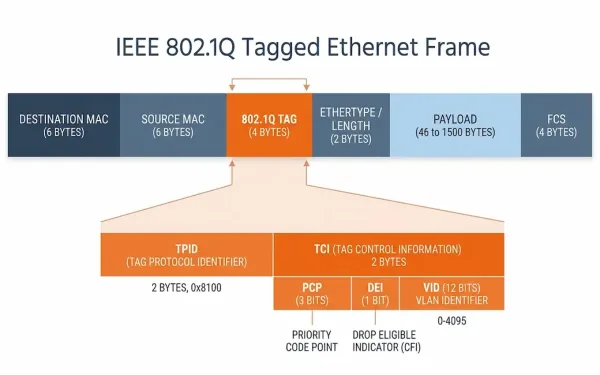
VLAN Identification: A Complete Guide to VLAN Tagging (802.1Q)
Virtual Local Area Networks (VLANs) are a cornerstone of modern network design, enabling segmentation, security, and efficient traffic management in Ethernet networks. For CCNA and CCNP students, understanding VLAN tagging for VLAN identification — particularly the IEEE 802.1Q standard — is essential for configuring and troubleshooting Cisco switches. This guide explains VLAN tagging, native VLANs,...
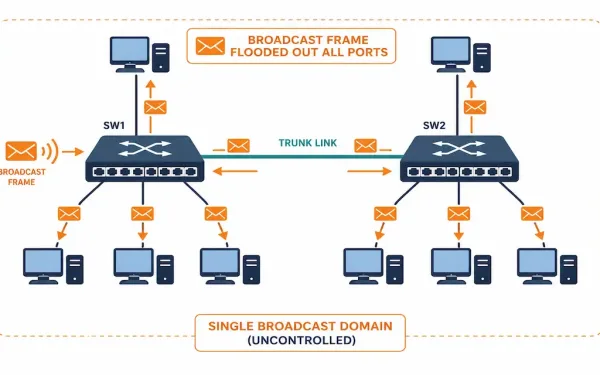
Controlling Broadcast Domains: Flooding, VLANs, and Storm Control
Broadcast traffic is necessary — ARP requests, DHCP discovers, and similar traffic all rely on it — but an uncontrolled broadcast domain scales badly. Every additional device adds more broadcast traffic that every other device on the same domain has to process, whether it’s relevant to them or not. Controlling broadcast domains is how networks...
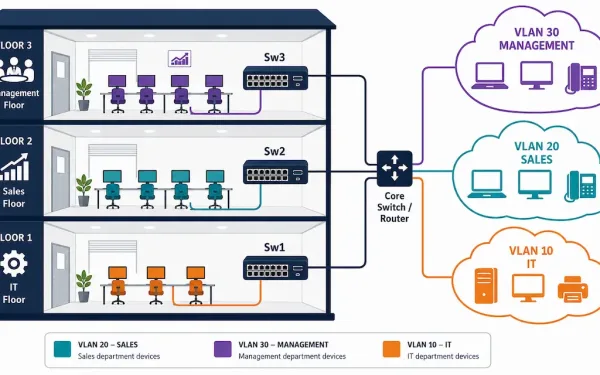
Virtual LANs (VLANs): Concepts, Types, and Configuration
A router blocks broadcast traffic between networks, but routers typically have a limited number of LAN interfaces — you can’t practically give every department its own physical router port. VLANs solve this at Layer 2 instead, letting a single switch (or group of switches) segment traffic into multiple logically separate networks without any additional physical...
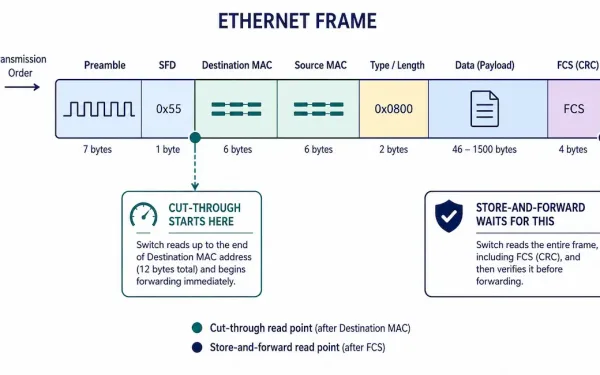
Data Frame Forwarding: Store-and-Forward, Cut-Through, and Fragment-Free Switching
Every switch has to decide exactly when to start forwarding a frame — wait for the whole thing, or start moving it the instant enough information is available. That decision defines the three switching methods every CCNA and CCNP candidate needs to know: store-and-forward, cut-through, and fragment-free. Each represents a different trade-off between reliability and...
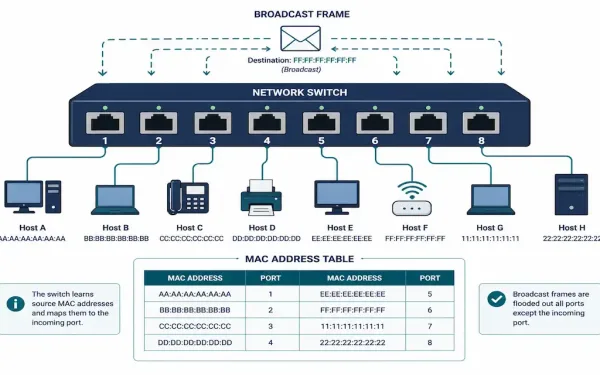
Switching Concepts in Networking: How Switches Forward Frames
Every Ethernet switch makes the same basic decision millions of times a second: given a frame that just arrived, where should it go? The answer comes down to two pieces of information — the port the frame arrived on and the frame’s destination MAC address — and a dynamically-built table that maps addresses to ports....
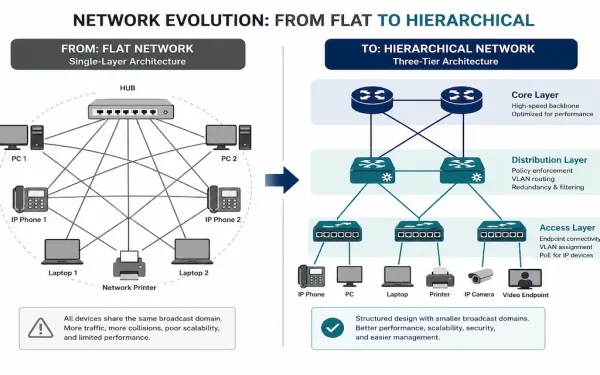
The Role of Switched Networks: From Flat LANs to Hierarchical Design
Early campus LANs relied on hubs and repeaters — simple devices that repeated every incoming signal out every other port, regardless of who actually needed it. As networks grew, this flat design became a genuine bottleneck: more devices meant more broadcast traffic flooding every segment, whether or not it was relevant there. Switched networks, built...
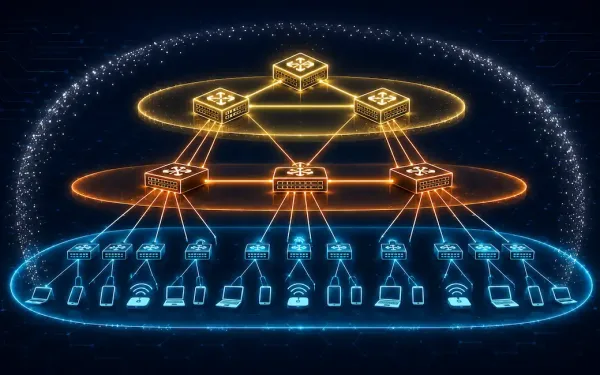
Cisco Borderless Networks: Hierarchical Campus Design Explained
Cisco Borderless Networks is an architecture designed to enable secure, seamless connectivity for any user, device, or location, integrating wired and wireless access with unified policy and performance management. It’s built to address common enterprise IT challenges — mobility, security, and scalability — using Cisco Catalyst switches, ISR routers, and management tools like Cisco DNA...
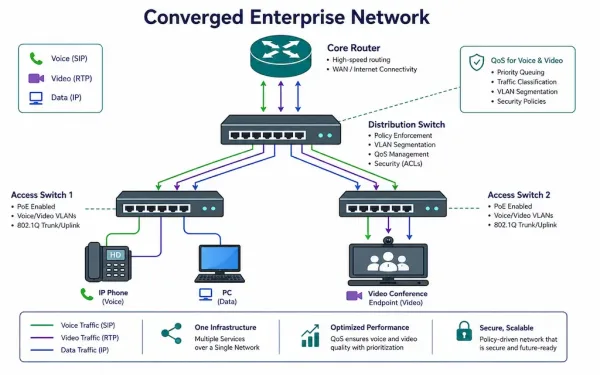
What Is a Converged Network? Architecture, QoS, and Cisco Tools
A converged network carries voice, video, and data over a single IP infrastructure, rather than maintaining separate physical networks for phones, video systems, and computers. This is standard practice in modern enterprise networking, but making it work well — without voice calls sounding choppy the moment someone starts a large file transfer — depends entirely...
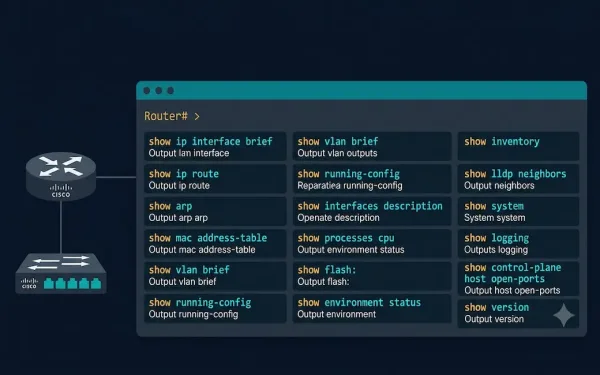
Important Show Commands in Cisco IOS: Complete Reference Guide
The show commands display important information about a device’s configuration and operation in Cisco IOS Command Line Interface (CLI) mode. Network administrators use show commands to check device status, interfaces, processes, and configuration files to confirm operational status, verify configurations, and diagnose problems — all without disrupting live traffic. The network administrator can also view...
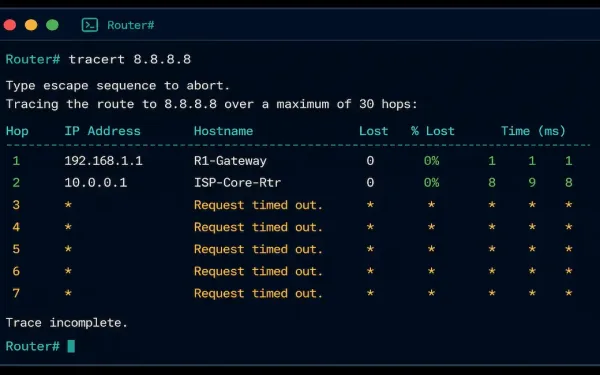
Traceroute and Tracert: How They Work and How to Read the Output
When a connection fails somewhere between your device and its destination, ping tells you that something’s wrong, but not where. Traceroute — called tracert on Windows — fills that gap by mapping every router hop along the path, showing exactly how far a packet gets before something stops responding. This guide covers how traceroute actually...