
CCNA
Cisco Certified Network Associate certification resources
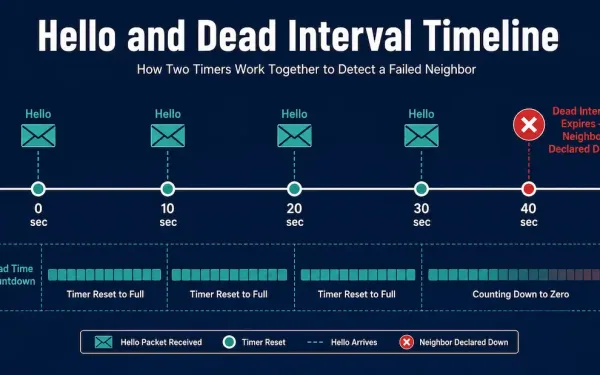
OSPF Hello and Dead Intervals
OSPF routers constantly track whether their neighbors are still alive using two timers built into every Hello packet: the Hello interval and the Dead interval. Understanding how these two timers interact — including a genuinely useful Cisco IOS behavior that surprises a lot of people — is essential for both the CCNA exam and real-world...
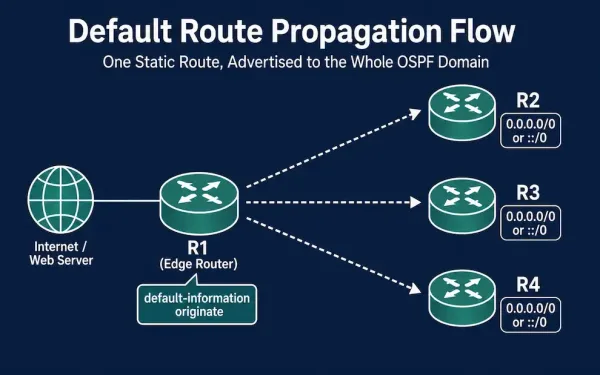
Propagating a Default Static Route in OSPF (OSPFv2 and OSPFv3)
When a network has a single exit point to the internet or another external service, it’s usually more efficient to advertise one default route through that exit point than to inject every specific external route into OSPF. This guide covers how to configure a default static route on an edge router and propagate it through...
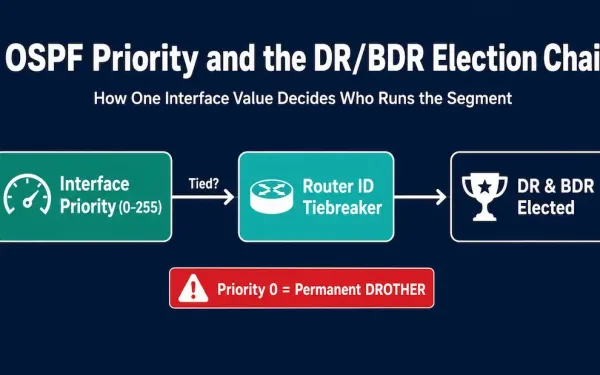
OSPF Priority: DR/BDR Election, Configuration, and Verification
Each broadcast and Non-Broadcast Multi-Access (NBMA) network has a designated router. This router is the central point for collecting and distributing LSAs (Link-State Advertisements), so it must have enough CPU and memory capability to handle the workload. The OSPF priority value is the primary mechanism for controlling which router wins the DR/BDR election on these...
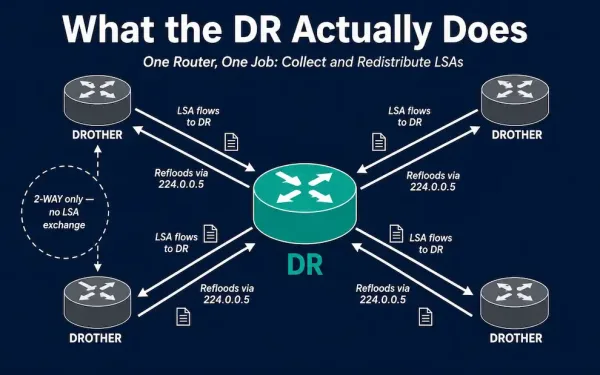
OSPF Designated Router: Role, Election, and a Worked Failure Scenario
The previous article in this series covered the scalability challenges multiaccess OSPF segments face — unnecessary adjacencies and duplicated LSA flooding. The Designated Router (DR) is OSPF’s solution to both problems. This article covers exactly what the Designated Router does, how it and the Backup Designated Router (BDR) are elected, and walks through a complete,...
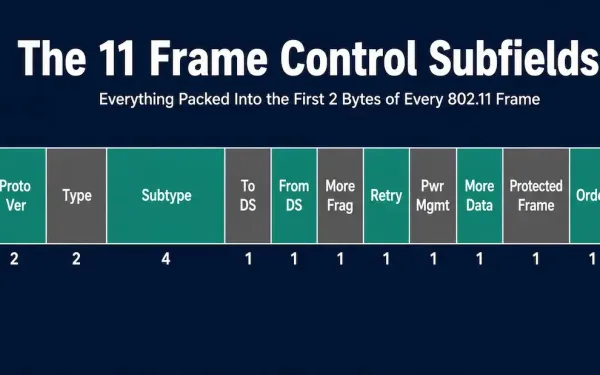
Frame Control Field Format: The 11 Subfields Explained
The Frame Control field is the first two bytes of every 802.11 frame, and it’s arguably the single most important part of the header — it’s what tells a receiving station what kind of frame it’s looking at before anything else gets parsed. This guide breaks down all eleven subfields packed into those 2 bytes...
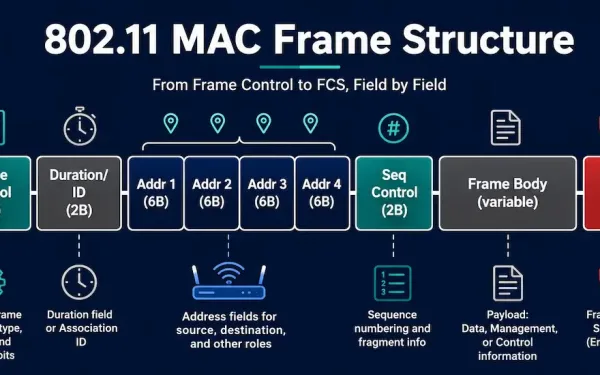
The 802.11 Wireless Frame: MAC Header Fields Explained
Every piece of data that travels over Wi-Fi is wrapped inside an 802.11 frame before it hits the air. Like any Layer 2 frame, an 802.11 frame consists of a header, a payload (frame body), and a Frame Check Sequence (FCS) for error detection. The 802.11 frame format is closely related to the Ethernet frame...
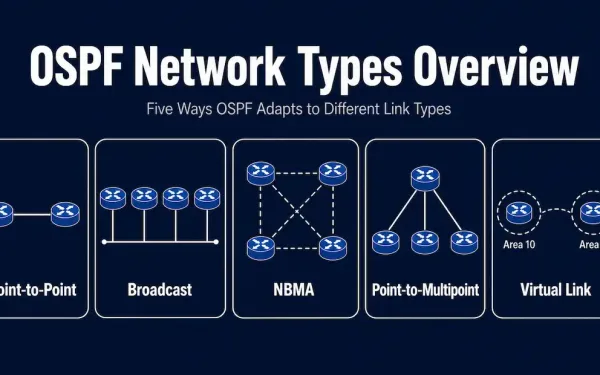
Types of OSPF Networks: Point-to-Point, Broadcast, NBMA, and More
OSPF is a dynamic link-state routing protocol that largely replaced RIP, an older distance-vector protocol, in most enterprise networks. OSPF converges faster and scales to far larger networks than RIP ever could, but part of what makes it powerful is that it doesn’t treat every network link the same way. OSPF classifies the network connected...
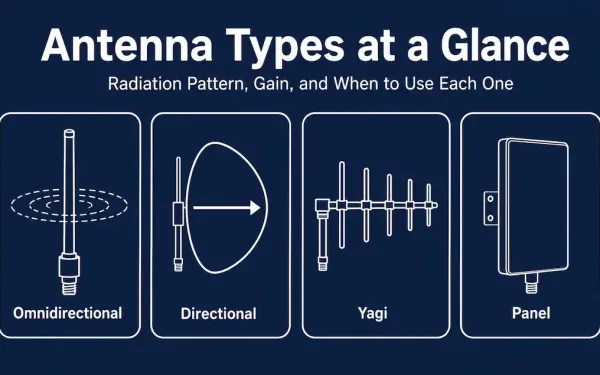
Wireless Antennas: Types, Gain, and How to Choose the Right One
A wireless antenna is the component that actually radiates and collects radio frequency (RF) energy — it’s the physical interface between an electrical signal inside a device and a radio wave traveling through the air. Antennas connect to radios through low-loss coaxial cable, or in many consumer devices, directly to the radio chip inside the...
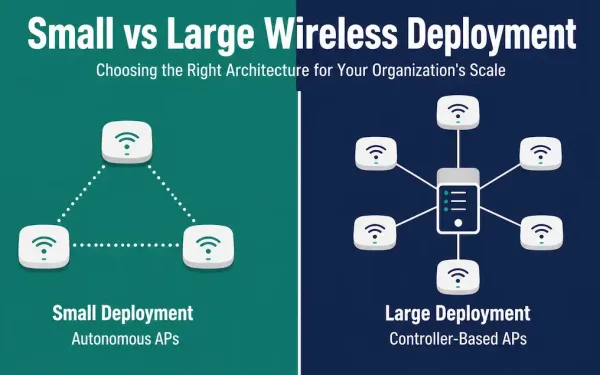
Wireless Deployment Solutions: Small vs. Large Scale, Explained for 2026
Wireless deployment strategy depends heavily on the size of the organization. A small office with a handful of users needs a very different approach than a campus or multi-site enterprise with hundreds of access points. Cisco offers distinct solutions for both ends of that spectrum, and the specific products involved have changed considerably since this...
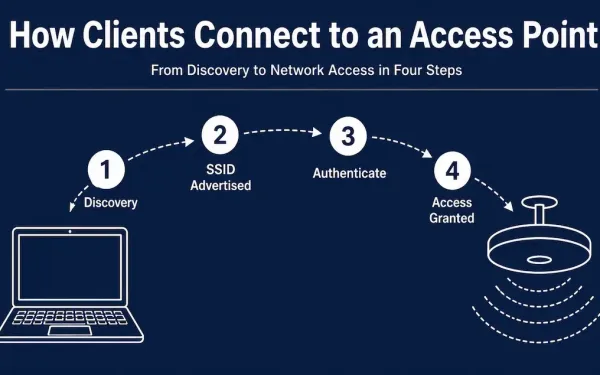
Wireless Access Points: How They Work and How They’re Managed in 2026
In a wired LAN, every client connects to a switch, which acts as the central point of access to the network. A wireless network needs an equivalent device to play that role over the air — that device is the wireless access point (AP). This guide explains how APs work, the two fundamental deployment models...