
Domain 2.8 | Network Access — 20% of exam
Learning Objectives
By the end of this lesson, you will be able to:
- Distinguish in-band from out-of-band management access
- Compare Telnet, SSH, HTTP, and HTTPS across security and typical use
- Explain why console access remains essential despite being the oldest, most basic method
- Describe TACACS+ and RADIUS at a conceptual level, ahead of full detail in Domain 5
Key Terms
| Term | Definition |
|---|---|
| In-band management | Managing a device over the same network it also carries production traffic on |
| Out-of-band management | Managing a device through a path separate from the production network |
| Telnet | An unencrypted protocol for remote CLI access, TCP port 23 |
| SSH | Secure Shell; an encrypted protocol for remote CLI access, TCP port 22 |
| Console | A direct physical connection to a device, requiring no network access at all |
| TACACS+ | A centralized AAA protocol, encrypting the entire packet, commonly used for device administration |
Explanation
Discovering, Connecting, Managing: The Progression This Module Has Followed
The previous lesson covered how APs and WLCs physically connect to the network. This lesson addresses the next logical question: once that physical connection exists, how does an administrator actually reach the device to configure, monitor, or troubleshoot it? The answer isn’t a single method — it’s a set of options with genuinely different security properties, and knowing which one fits which situation matters both for the exam and for real device management.
In-Band vs. Out-of-Band: The Foundational Distinction
Before comparing individual protocols, it’s worth understanding the broader category each one falls into.
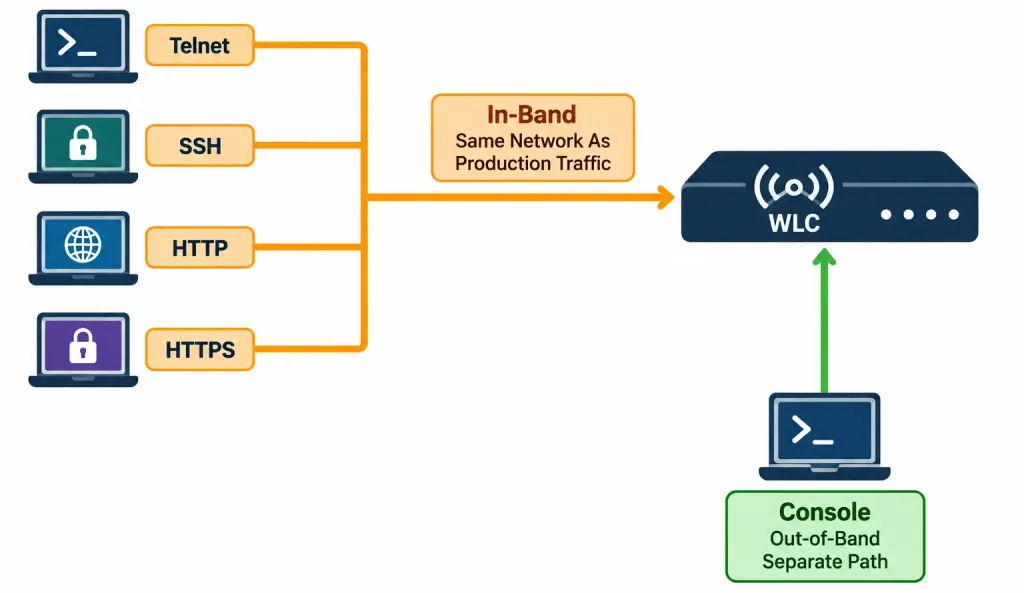
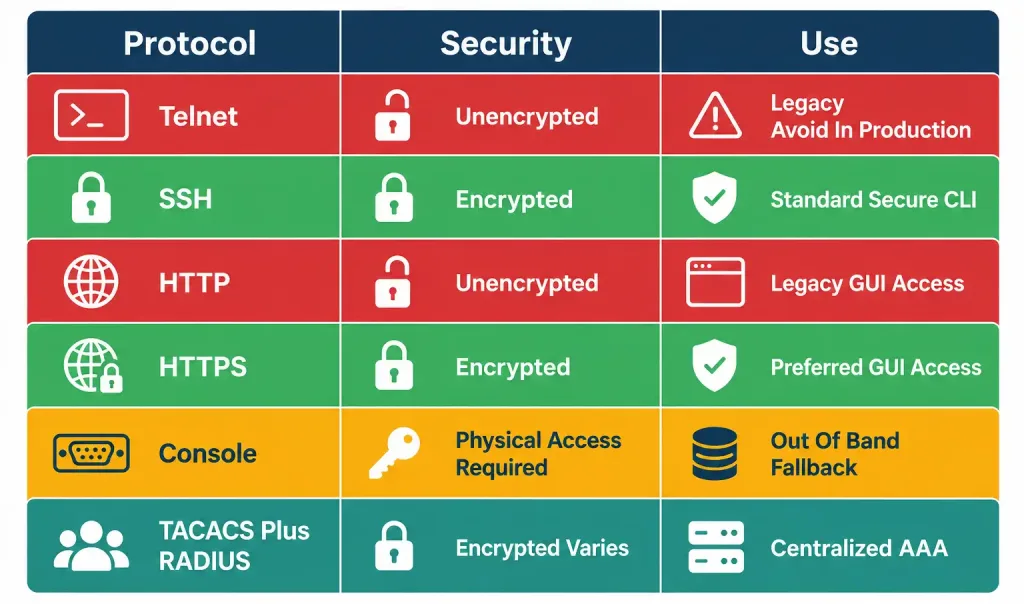
In-band management reaches a device over the same network that device is also using to carry its normal production traffic — Telnet, SSH, HTTP, and HTTPS are all in-band methods, since each depends on the device’s own network connectivity actually being functional to work at all.
Out-of-band management reaches a device through an entirely separate path, independent of the production network’s own health — a direct console connection is the classic example, since it requires no network connectivity whatsoever, just a direct physical (or occasionally a dedicated separate management network) connection to the device itself.
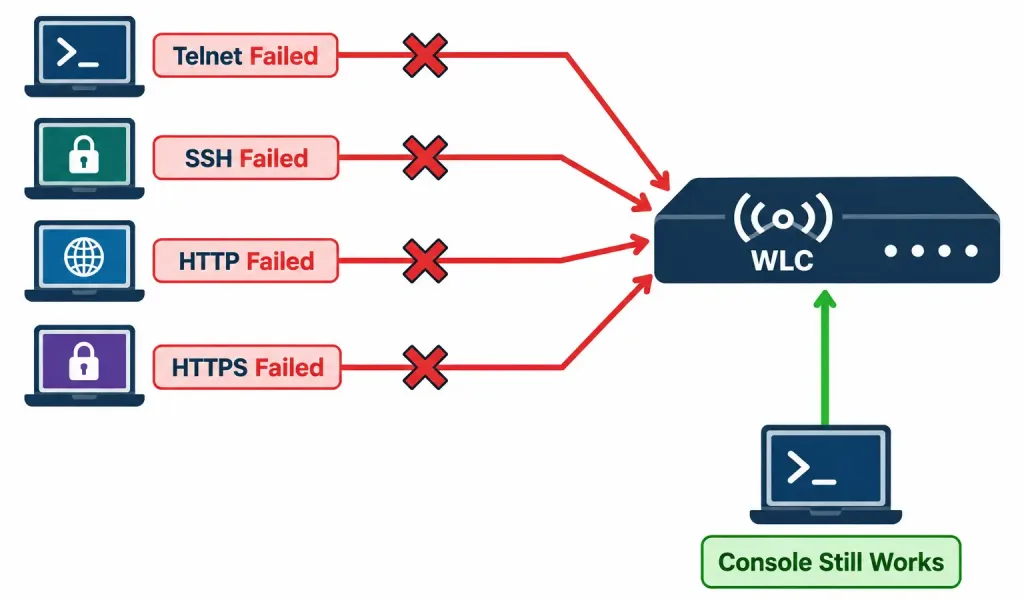
Why this distinction matters practically, not just as a categorization exercise: if an administrator makes a configuration change that breaks the device’s own network connectivity — an incorrect IP address, a misapplied access control list blocking management traffic, a VLAN misconfiguration — every in-band method becomes instantly unusable, since all of them depend on exactly the network connectivity that just broke. Console access, being entirely out-of-band, remains available specifically because it never depended on that connectivity in the first place.
Telnet vs. SSH: CLI Access, With a Genuinely Critical Difference
Both Telnet and SSH provide remote command-line access to a device, but the difference between them isn’t cosmetic — it’s a fundamental difference in whether the session’s contents are protected at all.
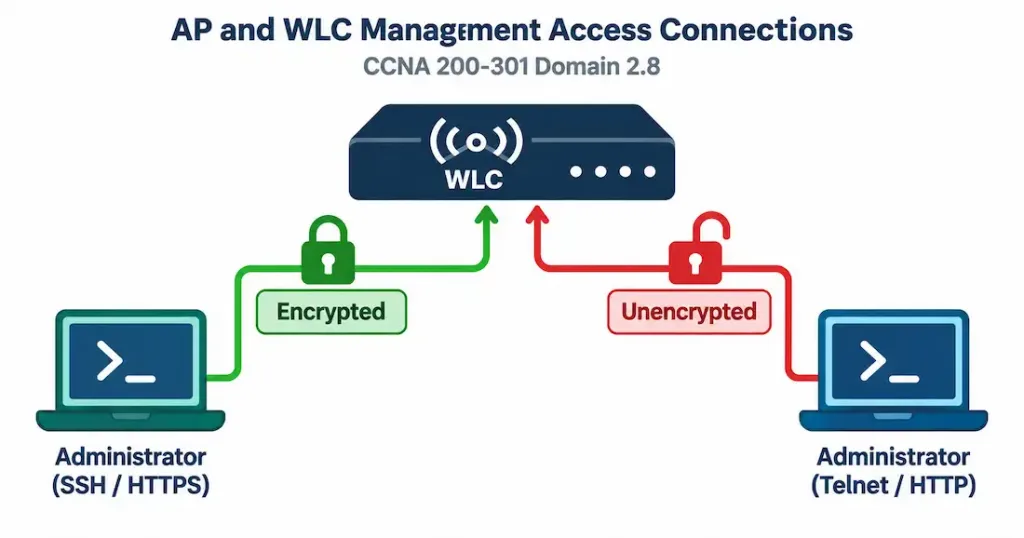
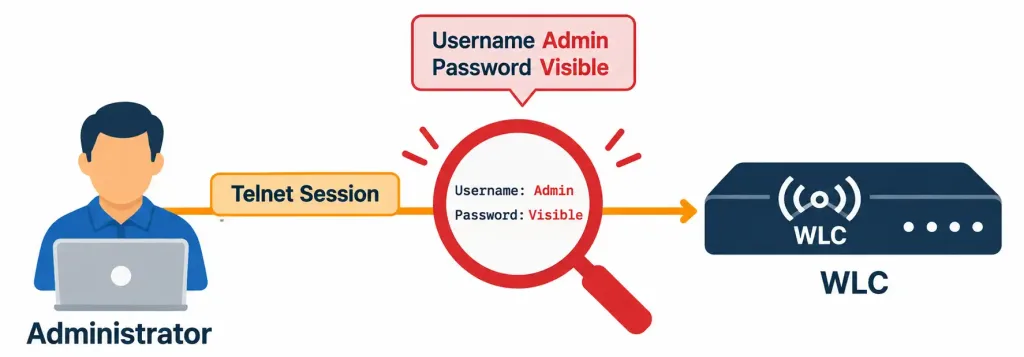
Telnet, operating over TCP port 23, transmits everything — including the administrator’s own login credentials — in plaintext. Anyone capturing traffic anywhere along the path between the administrator’s device and the device being managed can read the entire session in the clear: the username, the password, every command typed, and every line of output returned. This isn’t a theoretical risk requiring sophisticated tools — basic, freely available packet capture software reveals a Telnet session’s full contents to anyone positioned to observe that traffic at all.
SSH, operating over TCP port 22, encrypts the entire session using cryptographic key exchange — recall from an earlier lesson’s crypto key generate rsa configuration step that establishing SSH requires generating this cryptographic key pair before the protocol can function at all. Even if an attacker captures the exact same traffic that would have exposed a Telnet session completely, an SSH session’s actual content remains protected, unreadable without the corresponding cryptographic keys.
Worked example demonstrating the real-world stakes: an administrator managing a WLC over Telnet, from a coffee shop’s shared public Wi-Fi network, has their login credentials and every command from that session transmitted in plaintext across a network shared with genuinely unknown other users. The identical management session conducted over SSH instead remains fully protected under the exact same network conditions — the difference here isn’t theoretical or minor, it’s the difference between credentials being trivially exposed versus genuinely protected, on the exact same physical network.
This is precisely why Telnet is considered legacy and should be avoided in production environments today — the plaintext exposure risk is real, well-documented, and entirely avoided by simply using SSH instead, which provides equivalent CLI functionality with genuine encryption protecting the session.
HTTP vs. HTTPS: The Same Security Contrast, Applied to GUI Management
WLCs, and many APs, offer a graphical web-based management interface as an alternative to CLI access — genuinely useful for administrators who prefer a visual dashboard over command-line configuration, or for quicker, less command-intensive checks and adjustments.
HTTP delivers this web interface without encryption, meaning login credentials and every subsequent interaction with the management interface travel in plaintext, carrying exactly the same fundamental risk Telnet carries for CLI access — anyone capturing traffic along the path can read the entire session’s contents.
HTTPS encrypts this same web interface using TLS (Transport Layer Security), the same underlying encryption technology securing the vast majority of legitimate websites across the broader internet. A device’s HTTPS management interface typically uses a certificate — either self-signed (generated locally by the device itself) or issued by a trusted certificate authority — to establish this encrypted connection, protecting the session’s contents exactly as SSH protects a CLI session.
The parallel to Telnet versus SSH is direct and worth stating explicitly: HTTP is to HTTPS exactly what Telnet is to SSH — an older, functionally similar but fundamentally unencrypted option, versus a modern, encrypted replacement providing equivalent functionality with genuine session protection. This parallel is precisely why the exam tip covered later in this lesson applies identically across both pairs: whenever a choice exists between an encrypted and unencrypted option serving the same management purpose, the encrypted option is virtually always the better, and typically the “correct,” answer.
A practical note on self-signed certificates, worth knowing since it comes up constantly in real device management: many devices, including WLCs, ship with a self-signed HTTPS certificate by default rather than one issued by a widely trusted external certificate authority.
This commonly triggers a browser warning about an “untrusted” or “invalid” certificate when first connecting — this warning reflects the certificate’s origin (self-signed rather than externally validated), not necessarily that the connection itself is insecure; the traffic is still genuinely encrypted, even though the browser can’t independently verify the certificate’s issuing authority the way it could for a publicly-trusted certificate. Administrators managing internal devices commonly accept this warning (after confirming they’re actually connecting to the correct, intended device) rather than treating it as equivalent to a genuinely compromised or untrustworthy connection.
Console: The Fallback That Doesn’t Depend on the Network at All
Console access connects directly to a device through a physical cable (traditionally a serial/RJ45 connection, increasingly USB on newer hardware) attached to a nearby computer running terminal software — no IP address, no network path, no dependency on any of the connectivity the in-band methods above all require.
This is precisely why console access exists as the ultimate management fallback, not as a minor, rarely-used legacy option. Every in-band method — Telnet, SSH, HTTP, HTTPS — genuinely requires the device’s own network connectivity to already be functioning correctly. Console access requires none of that at all, which makes it specifically valuable in exactly the scenarios where every in-band method has already failed.
Worked example illustrating exactly this scenario, genuinely common in real network administration: an administrator remotely configuring a WLC over SSH accidentally applies an incorrect IP addressing change, or an access control list that inadvertently blocks the very management traffic being used to make the change. The moment that change takes effect, the SSH session itself typically drops — and worse, every subsequent attempt to reconnect via SSH, or any other in-band method, fails identically, since the underlying network connectivity that all of them depend on is now genuinely broken.
Console access, requiring only a physical cable connection rather than any of that now-broken network connectivity, remains the one path back into the device to actually fix the mistake. This “locked yourself out” scenario is common enough in real network administration that experienced engineers specifically avoid making risky connectivity-affecting changes over an in-band connection alone, without console access physically available as a fallback, precisely because of scenarios exactly like this one.
Console access trades convenience for this guaranteed fallback availability — it requires physical proximity to the device (or, in larger deployments, a console server providing remote access to console ports specifically), it’s slower to work with than a full network-based session, and it doesn’t scale to managing many devices simultaneously the way in-band methods do. This is precisely why it’s used specifically as the fallback and initial-setup method, not as the everyday, primary management method for routine, ongoing device administration.
TACACS+ and RADIUS: A Preview of Centralized AAA
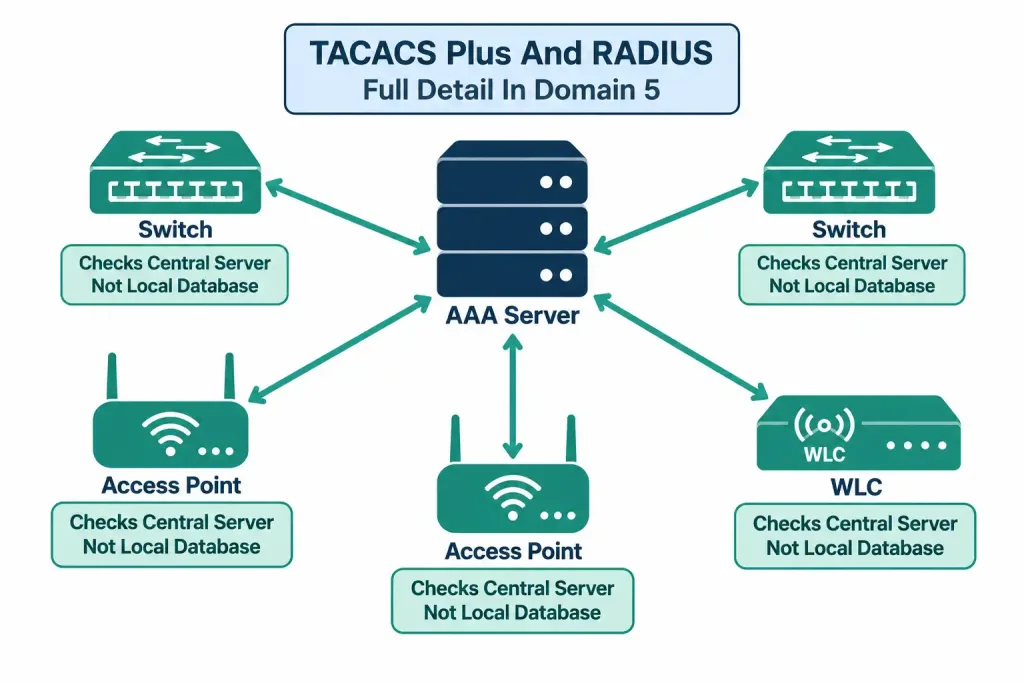
Every method covered so far assumes each device maintains its own local username and password database — genuinely workable for a handful of devices, but facing exactly the same scaling problem covered in earlier lessons about autonomous AP configuration: a change to administrative credentials (adding a new administrator, revoking access for someone who’s left the organization) would otherwise need to be repeated individually across every single device.
TACACS+ and RADIUS solve this by centralizing authentication, authorization, and accounting (AAA) for administrative access — rather than each device checking its own local credential database, it instead checks with a central AAA server, meaning credential changes happen once, centrally, rather than being repeated device by device.
This objective’s scope is deliberately limited to recognizing that these protocols exist and understanding their basic purpose — full technical detail on TACACS+ versus RADIUS specifically (encryption scope, typical use cases, protocol-level differences) is covered in complete depth in Domain 5 (Security Fundamentals). For now, the key takeaway is conceptual: centralized AAA is the natural next step beyond individually-managed local credentials on every device, addressing exactly the same kind of scaling problem centralized WLC management solved for AP configuration earlier in this module.
The Exam Tip, Explained in Depth
This is worth taking seriously as an actual test-taking strategy, not just a passing remark, since it resolves a genuinely large share of scenario questions built around this specific objective quickly and reliably.
Whenever a question presents a choice between an encrypted and unencrypted option serving the same management purpose — Telnet versus SSH, HTTP versus HTTPS — the encrypted option is virtually always the intended, best-practice answer. This directly reflects the real-world guidance covered throughout this lesson: encryption protects credentials and session content from interception, and there’s essentially no legitimate, security-conscious reason to prefer the unencrypted option when an equivalent encrypted alternative exists and is properly supported by the device.
The explicit exception, worth being precise about: if a question is specifically testing recognition of legacy or intentionally insecure configurations — asking you to identify why a given setup is a security risk, or to recognize Telnet or HTTP specifically as the vulnerable element in a described scenario — the “correct” answer in that specific context is identifying the insecure option, not defaulting to assuming the encrypted option is always what the question is looking for. The distinction is what the question is actually asking: “which is the better practice” points to the encrypted option; “which of these is the security vulnerability in this scenario” points to correctly identifying the unencrypted one as the actual answer.
Worked example illustrating both sides of this distinction: a question asking “which protocol should be used for secure remote CLI management” is testing the first framing — SSH is the correct answer, straightforwardly. A different question describing a specific scenario (“an administrator configured remote management using Telnet on a WLC exposed to the internet — what security risk does this introduce?”) is testing the second framing — correctly explaining that Telnet’s plaintext transmission exposes credentials to interception is the actual expected answer, even though the “better practice” in the abstract would obviously be SSH instead.
Common Misconceptions Worth Correcting Directly
“Console access is inherently less secure than the encrypted in-band methods, since it doesn’t use encryption at all.” This misunderstands what console access’s security model actually is. Console access doesn’t need encryption specifically because its security comes from an entirely different property — requiring genuine physical access to the device, rather than protecting data traveling across a network at all. A method requiring physical presence and an unencrypted network protocol vulnerable to remote interception aren’t the same security model, and comparing them purely on “is it encrypted” misses this distinction entirely.
“Using HTTPS or SSH alone makes a device’s management fully secure.” Encryption in transit is necessary, but it isn’t sufficient on its own — a device still needs proper authentication (strong, unique credentials, ideally centralized AAA as previewed above), and typically access control restricting which source addresses can even attempt a management connection in the first place, covered more fully in Domain 5. Encrypting the session protects it from interception; it doesn’t, by itself, prevent someone with valid (or successfully guessed/stolen) credentials from connecting, which is exactly why encryption is one necessary layer among several, not a complete security solution on its own.
“Telnet is fine to use on an internal, trusted network, since there’s no external exposure.” This significantly understates real risk — internal networks aren’t automatically free of threats; a compromised internal device, a malicious insider, or simply a misconfigured internal segment inadvertently reachable from elsewhere can all still capture Telnet’s plaintext traffic. “Internal” and “trusted” aren’t synonymous, and Telnet’s plaintext exposure risk remains genuinely real regardless of which network segment it happens to be running on.
“A self-signed HTTPS certificate warning means the connection isn’t actually encrypted.” As covered above, this conflates two genuinely separate things — a self-signed certificate warning reflects the browser’s inability to independently verify the certificate’s issuing authority, not a failure of the encryption itself; the session remains genuinely encrypted even when this warning appears, though verifying you’re actually connecting to the intended, correct device remains a reasonable precaution before proceeding past the warning.
Frequently Asked Questions
Can Telnet and SSH both be enabled simultaneously on the same device?
Yes, technically, though this isn’t generally recommended as a deliberate practice — many hardening guides specifically recommend disabling Telnet entirely (rather than simply leaving it available alongside SSH) precisely to eliminate the plaintext exposure risk as an available option at all, not just as a discouraged one that remains technically accessible.
Does using HTTPS instead of HTTP require any additional configuration on most devices, or is it typically available by default?
Most modern devices, including WLCs, support HTTPS out of the box, often with a self-signed certificate generated automatically — genuinely accessible without extensive additional configuration, though some environments may choose to install a certificate from a trusted internal or external certificate authority instead of relying on the default self-signed one.
Is a console connection ever accessible remotely, or does it always require physical presence at the device?
A dedicated console server (a device specifically designed to provide network-based access to multiple devices’ console ports) can extend console access remotely — but this is a deliberate additional piece of infrastructure specifically built for this purpose, not something the console port itself inherently provides on its own without that additional hardware in place.
Why does the exam specifically test the encrypted-versus-unencrypted distinction so heavily across multiple different protocol pairs (Telnet/SSH, HTTP/HTTPS)?
Because this distinction reflects a genuinely fundamental, recurring security principle applicable across many different technologies, not just these two specific protocol pairs — understanding why encryption matters here transfers directly to recognizing the same underlying principle in other contexts throughout the broader security domain covered later in this course.
If TACACS+/RADIUS centralizes authentication, does that mean local device credentials become entirely unnecessary? ‘
Not entirely — many deployments retain a local fallback credential specifically for scenarios where the centralized AAA server itself becomes unreachable, ensuring administrative access to the device remains possible even if the centralized authentication system it normally relies on is temporarily unavailable. Full detail on this specific design consideration belongs to Domain 5’s fuller AAA coverage.
Layering These Methods Together in a Real Deployment
It’s worth closing with a genuine, realistic picture of how these methods typically combine in practice, rather than treating each one as an isolated, standalone choice.
A typical, reasonably hardened WLC deployment disables Telnet and HTTP entirely, rather than merely discouraging their use while leaving them technically available — removing the insecure options from the equation rather than trusting that administrators will simply always choose the better one manually. SSH and HTTPS remain available for genuine day-to-day in-band management, ideally restricted through access control to only the specific administrative source networks that genuinely need to reach the device’s management interface at all, rather than being reachable from anywhere.
Authentication for both is handled through centralized TACACS+ or RADIUS rather than local device credentials alone, with a local fallback account retained specifically for the AAA-server-unreachable scenario covered above. And console access remains physically available, specifically reserved as the fallback for exactly the kind of connectivity-breaking misconfiguration scenario covered earlier in this lesson, rather than being used for routine, everyday management.
This layered approach reflects a broader security principle worth carrying forward into later modules: no single method or control fully addresses every risk on its own. Encryption protects data in transit; centralized AAA addresses credential management at scale; access control restricts who can even attempt a connection in the first place; and out-of-band console access provides a guaranteed fallback independent of everything else. Each layer addresses a genuinely different aspect of the overall management-access security picture, which is precisely why real deployments combine several of these approaches together rather than relying on any single one in isolation.
AP and WLC Management Access Connections:Practice Quiz
Test your knowledge of in-band and out-of-band management, SSH, Telnet, HTTPS, AAA, and secure device administration.
Summary
- In-band management (Telnet, SSH, HTTP, HTTPS) depends on the device’s own network connectivity; out-of-band management (console) does not, making it a guaranteed fallback.
- Telnet and HTTP transmit session content, including credentials, in plaintext; SSH and HTTPS encrypt the same functionality, making them the preferred choice in virtually all cases.
- A self-signed HTTPS certificate warning reflects an unverified issuing authority, not a failure of the encryption itself.
- Console access remains essential specifically because it doesn’t depend on the network connectivity that in-band methods require — the classic “locked yourself out” scenario is exactly what it exists to solve.
- TACACS+ and RADIUS centralize authentication, authorization, and accounting for administrative access, addressing the same scaling problem individually-managed local credentials face across many devices, with full detail covered in Domain 5.
- The exam tip’s core rule — encrypted options win by default — has one deliberate exception: when a question specifically tests recognizing an insecure configuration’s actual risk, rather than selecting the best practice.
- Real deployments layer these methods together: disabling insecure options entirely, centralizing authentication, restricting access, and keeping console available as the ultimate fallback.



