
Domain 2.3 | Network Access — 20% of exam
Learning Objectives
By the end of this lesson, you will be able to:
- Describe what CDP reveals about directly connected neighbors and why it’s useful
- Describe LLDP and explain when it’s needed instead of, or alongside, CDP
- Configure and verify both protocols on Cisco IOS
- Explain the security risk discovery protocols pose and how to selectively mitigate it
Key Terms
| Term | Definition |
|---|---|
| CDP | Cisco Discovery Protocol; a Cisco-proprietary Layer 2 protocol for discovering directly connected neighbors |
| LLDP | Link Layer Discovery Protocol; the vendor-neutral IEEE 802.1AB standard equivalent to CDP |
| Neighbor | A directly connected device discovered via CDP or LLDP |
| Holdtime | The duration a device retains neighbor information before considering it stale |
| TLV | Type-Length-Value; the extensible data structure LLDP uses to encode neighbor information |
Explanation
From Trunking to Discovery: Knowing What’s Actually Connected
The previous lesson on trunking assumed you already knew which switches were connected to each other and through which specific interfaces. In real networks — especially ones you’ve inherited without complete documentation — that assumption often doesn’t hold. This lesson covers the tools that answer a genuinely basic but essential question: what, exactly, is connected to what?
CDP: Cisco’s Built-In Answer to That Question
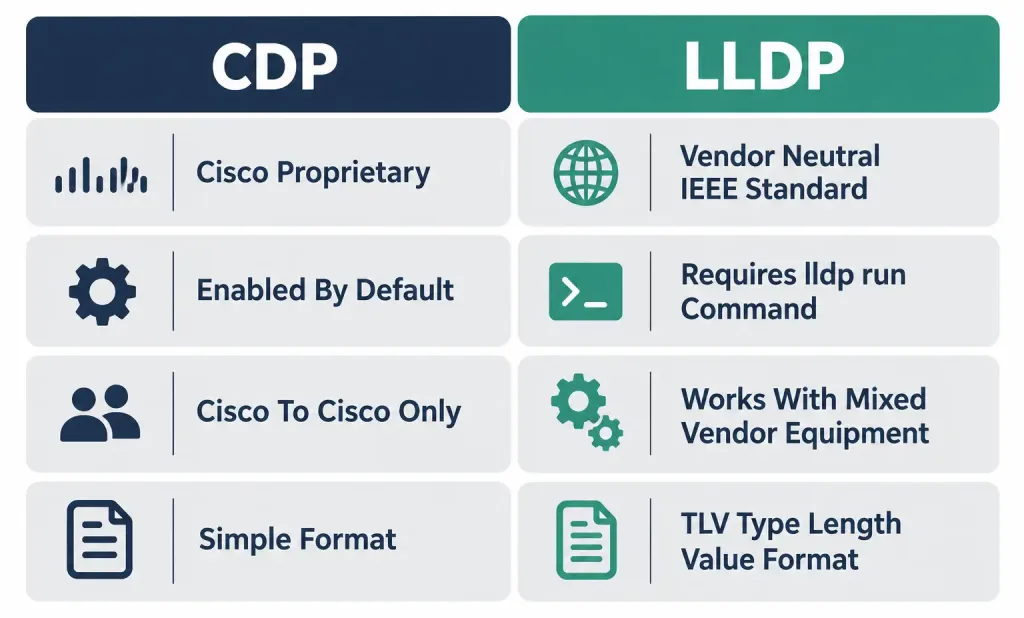
CDP (Cisco Discovery Protocol) is a Cisco-proprietary Layer 2 protocol, enabled by default on virtually all Cisco devices, that periodically advertises information about itself to any directly connected neighbor also running CDP. Because it’s enabled out of the box, a network built entirely (or even mostly) on Cisco equipment typically has CDP already actively running and available for use without any explicit configuration step required at all.
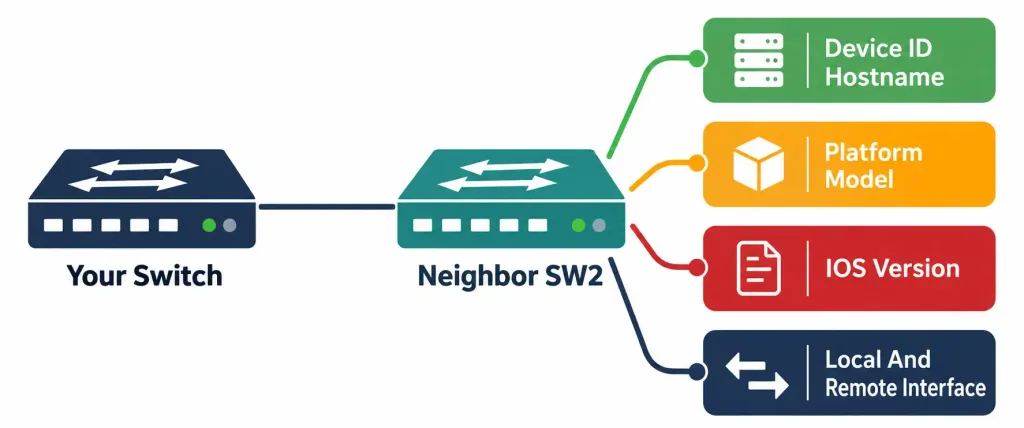
What CDP actually reveals about a neighbor:
- Device ID — typically the neighbor’s configured hostname, immediately identifying which specific device you’re looking at.
- Platform — the specific hardware model (e.g., a specific Catalyst switch model or ISR router model), useful for confirming exactly what hardware exists at a given point in the topology.
- IOS version — the exact software version running on that neighbor, genuinely useful both for inventory purposes and for confirming whether a device needs a software update.
- Local and remote interface — which specific interface on your own device connects to which specific interface on the neighbor, resolving exactly the kind of “which port goes where” question that’s otherwise easy to lose track of, especially across many switches and long cable runs.
Worked example demonstrating CDP’s practical value, precisely the scenario it’s genuinely built for: a network engineer joins a new organization and inherits a network with incomplete, outdated documentation — a common, entirely realistic scenario. Rather than physically tracing cables switch by switch, or trusting documentation that might not reflect the network’s actual current state, running show cdp neighbors detail on each switch quickly reveals every directly connected Cisco neighbor, its hostname, platform, and the exact interfaces connecting them — building an accurate, current picture of the real topology directly from the network’s own live behavior, not from potentially stale paperwork.
CDP’s Advertisement Timer and Holdtime
CDP doesn’t just announce itself once — it advertises periodically, and understanding the specific timing involved matters for interpreting how current the information you’re seeing actually is.
By default, CDP advertisements are sent every 60 seconds, and each device maintains a holdtime of 180 seconds (three times the advertisement interval) for information received from a neighbor. If three consecutive advertisements are missed — 180 seconds passing with no fresh update from a given neighbor — that neighbor’s entry is aged out and removed, conceptually similar to the MAC address table aging mechanism covered earlier in this course, though operating on entirely different information (neighbor identity rather than MAC-to-port mappings) and a different specific timer value.
Why this timing matters practically: if a neighbor switch is powered off or disconnected, its CDP entry doesn’t disappear from your device’s table instantly — there’s a genuine delay, up to the full 180-second holdtime, before that stale entry actually clears. This is worth knowing specifically when troubleshooting, since show cdp neighbors output reflecting a device that was just powered off moments ago isn’t a sign the command is broken; it’s simply showing information that hasn’t aged out yet.
LLDP: The Vendor-Neutral Equivalent
LLDP (Link Layer Discovery Protocol), standardized as IEEE 802.1AB, serves fundamentally the same purpose as CDP — announcing device information to directly connected neighbors — but does so as an open, vendor-neutral standard rather than a Cisco-proprietary mechanism.
Why this distinction matters practically: CDP only works between devices that both understand CDP specifically — which, in practice, generally means Cisco devices exclusively, or occasionally other vendors that have specifically implemented CDP compatibility. In a genuinely mixed-vendor environment — a Cisco switch connected to an HP, Aruba, or Juniper device that has no CDP support at all — CDP simply won’t discover that neighbor, regardless of how correctly everything else is configured. LLDP, being an open standard rather than a single vendor’s proprietary protocol, is far more likely to be supported across genuinely diverse, multi-vendor hardware, making it the practical discovery option specifically in environments CDP alone can’t fully cover.
LLDP’s underlying data structure uses TLVs (Type-Length-Value) — a flexible, extensible format where each piece of advertised information is encoded as a type identifier, a length indicating how much data follows, and the actual value itself. This structure is genuinely more extensible than CDP’s own format, part of why LLDP has become the broader industry-standard choice as networking environments have become more heterogeneous over time.
An important practical fact worth flagging directly, since it trips people up: unlike CDP, LLDP is not enabled by default on Cisco IOS — it requires explicit configuration to activate, covered in the hands-on section below. This is a genuine, testable point of contrast between the two protocols’ default states, not a minor technicality.
The Security Consideration: Discovery Protocols Leak Real Information
This is worth taking seriously, not treating as a minor footnote, since it’s precisely the kind of concept that connects this lesson forward to the security mindset covered in full in Domain 5.
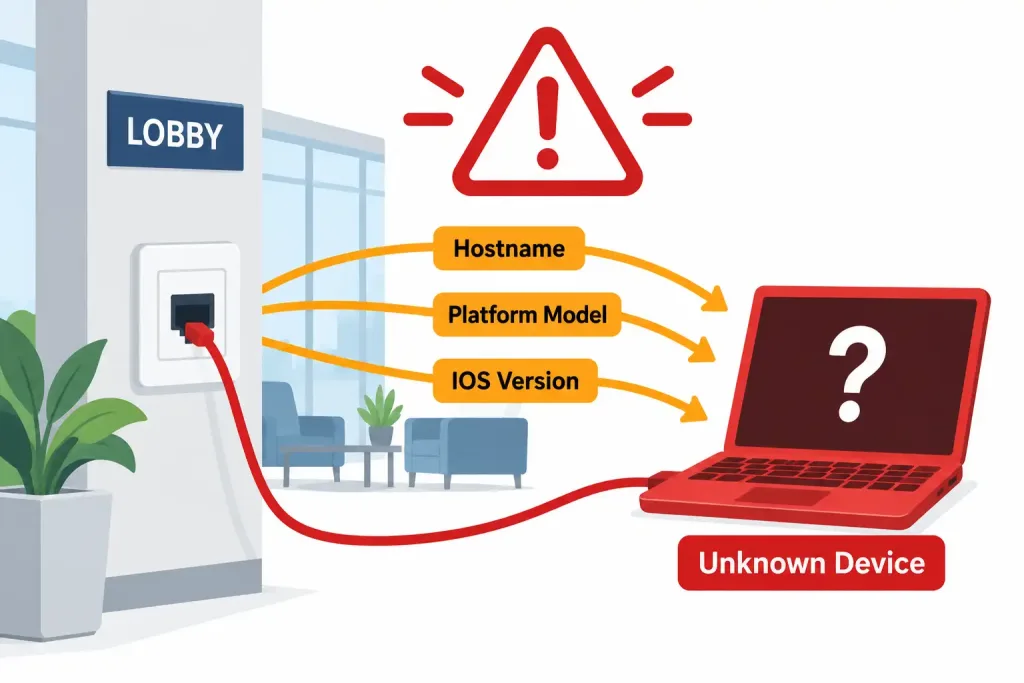
Both CDP and LLDP broadcast genuinely sensitive reconnaissance information to anything listening on the local segment — device hostname, exact hardware platform, and exact software version, all delivered automatically, with no authentication or access control determining who’s allowed to receive it. Any device physically connected to that segment, whether an authorized piece of network equipment or an unauthorized device plugged in by someone who shouldn’t be there, receives these advertisements identically.
Why this specifically matters for security, not just as an abstract information-leakage concern: knowing a device’s exact IOS version is genuinely useful reconnaissance for an attacker, since publicly known vulnerabilities are typically tied to specific software versions — an attacker who passively captures a CDP or LLDP advertisement revealing, for instance, an outdated IOS version with a known, unpatched vulnerability has just been handed a specific, actionable starting point for a targeted attack, entirely for free, without needing to actively probe or scan the device at all.
Worked example illustrating the realistic risk scenario: consider a network jack in a building’s public lobby or a conference room accessible to visitors — a genuinely common real-world scenario, not a contrived edge case. If that jack connects to a switch port with CDP and LLDP both left in their default, fully active state, anyone plugging in a laptop there — an authorized guest, or someone with less benign intent — passively receives detailed information about the connected switch itself: its hostname, exact model, and exact software version, all without needing to do anything more sophisticated than simply connecting a device and listening.
The practical mitigation: selective disabling, not a blanket network-wide shutdown. The right response isn’t disabling CDP and LLDP everywhere across the entire network — doing so would eliminate the genuine, ongoing topology-mapping value these protocols provide on trusted interswitch links, exactly the value demonstrated in the earlier worked example.
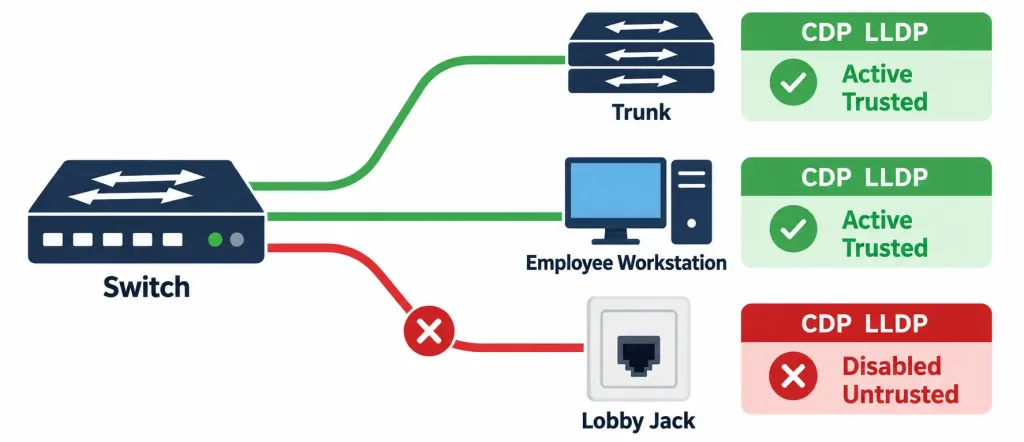
The better, more precise approach is disabling these protocols specifically on ports facing untrusted networks or untrusted physical locations — end-user access ports generally, and especially ports in publicly accessible areas — while leaving CDP and LLDP fully active on the trusted switch-to-switch and switch-to-router links where their topology-mapping benefit genuinely matters and the security exposure is far lower, since those links typically aren’t physically accessible to an untrusted party in the same way a lobby wall jack is.
Configuring and Verifying CDP and LLDP: A Complete Walkthrough
Scenario: SW1 has three types of connections: a trunk link to SW2 (another Cisco switch, trusted), an access port to an internal employee workstation (trusted), and an access port to a lobby network jack (untrusted, publicly accessible).
Verifying CDP (already enabled by default):
SW1# show cdp neighbors

Capability Codes: R - Router, T - Trans Bridge, B - Source Route Bridge
                  S - Switch, H - Host, I - IGMP, r - Repeater

Device ID        Local Intrfce     Holdtme    Capability  Platform  Port ID
SW2              Gig 0/24            156           S      WS-C2960  Gig 0/24

SW1# show cdp neighbors detail

-------------------------
Device ID: SW2
Entry address(es):
  IP address: 192.168.1.2
Platform: cisco WS-C2960-24TT-L,  Capabilities: Switch
Interface: GigabitEthernet0/24,  Port ID (outgoing port): GigabitEthernet0/24
Holdtime : 156 sec
Version:
Cisco IOS Software, C2960 Software...
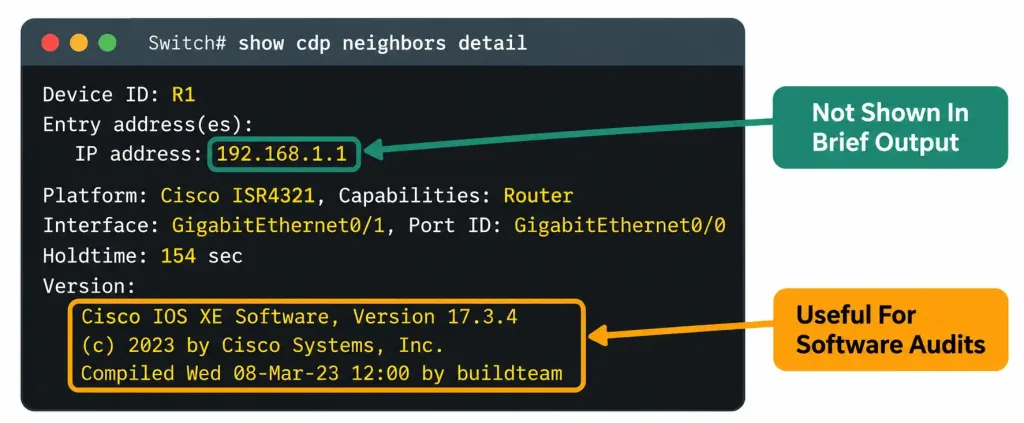
Reading this output: show cdp neighbors gives the quick summary — device ID, local interface, remaining holdtime, and platform. show cdp neighbors detail expands this considerably, adding the neighbor’s actual IP address and full version string — genuinely useful when you need more than just “which device is on the other end,” such as confirming a specific software version during an audit or troubleshooting session.
Enabling LLDP (not on by default, requiring explicit activation):
SW1(config)# lldp runThis single global command enables LLDP device-wide. Unlike CDP, no equivalent “already there by default” assumption applies — this step is mandatory before LLDP will function at all on Cisco IOS.
Verifying LLDP:
SW1# show lldp neighbors

Device ID           Local Intf     Hold-time  Capability      Port ID
SW2                  Gi0/24         120        B,R             Gi0/24
Selectively disabling both protocols on the untrusted lobby port, per the security guidance covered above:
SW1(config)# interface GigabitEthernet0/5
SW1(config-if)# no cdp enable
SW1(config-if)# no lldp transmit
SW1(config-if)# no lldp receive
Notice this is applied per-interface, specifically on the untrusted port — GigabitEthernet0/24 (the trunk to SW2) and whatever interface connects to the trusted internal workstation both retain full CDP and LLDP functionality, since neither faces the same physical-access risk the lobby jack does. This directly reflects the selective-disabling principle covered above, rather than a blunt, network-wide shutdown of both protocols entirely.
Verifying the interface-level disable took effect:
SW1# show cdp interface GigabitEthernet0/5
% CDP is not enabled on this interface.
Packet Tracer Practice Activity: Discovery Protocols and Selective Hardening
Background/Scenario: You’ve inherited a network with three switches and incomplete documentation. Your task is to use CDP to map the actual topology, enable LLDP as a secondary discovery method, and then selectively disable both protocols on a designated public-facing access port.
Topology (build this in Packet Tracer or GNS3):
[SW1]======Trunk======[SW2]======Trunk======[SW3]
   |                                            |
[PC-Employee]                          [PC-LobbyJack]
Part 1: Configure basic device settings
- Configure hostnames on all three switches matching the topology.
Part 2: Use CDP to map the topology
- Without referring to the topology diagram above, run
show cdp neighbors detailon SW2 (the middle switch) and use the output alone to determine which interfaces connect to SW1 and SW3, and confirm their platform and IOS version. - Document what you found, then compare it against the actual topology to confirm CDP’s information was accurate.
Part 3: Enable and verify LLDP
- Enable LLDP globally on all three switches using
lldp run. - Verify LLDP neighbor relationships have formed using
show lldp neighborson each switch.
Part 4: Selectively harden the public-facing port
- Identify the access port on SW3 connecting to PC-LobbyJack, representing a publicly accessible network jack.
- Disable CDP and LLDP transmit/receive specifically on this one interface, leaving all other interfaces (including the trunks and the port connecting to PC-Employee) fully functional with both protocols still active.
- Verify the specific port shows CDP and LLDP disabled, while confirming the trunk interfaces and the employee-facing port still show both protocols active and functioning normally.
Verification steps — expected output when done correctly:
show cdp neighborsandshow lldp neighborson each switch should show accurate, matching neighbor relationships reflecting the actual physical topology.- The interface facing PC-LobbyJack should show CDP and LLDP both disabled when checked individually.
- Every other interface, including both trunk links and the employee-facing access port, should continue showing normal CDP and LLDP neighbor information, confirming the hardening was applied precisely to the intended single port rather than accidentally affecting the whole switch.
You can build this same topology yourself in Packet Tracer or GNS3 to practice hands-on — deliberately practicing the selective, single-port hardening approach (rather than a blanket global disable) reinforces exactly the balanced security mindset this lesson’s guidance is built around.
Common Misconceptions Worth Correcting Directly
“LLDP is enabled by default on Cisco IOS, just like CDP.” This is a genuinely important, specifically testable point of contrast covered directly above — CDP is on by default; LLDP requires the explicit lldp run command before it functions at all. Assuming LLDP behaves like CDP in this respect is a common, avoidable mistake.
“CDP and LLDP should always be disabled entirely for security reasons.” As covered in detail above, this overcorrects — the right response is selective, per-interface disabling specifically on untrusted-facing ports, not a network-wide shutdown that discards the genuine, ongoing topology-mapping value these protocols provide on trusted interswitch links.
“CDP can discover any device on the network, not just directly connected ones.” CDP (and LLDP) only discover directly connected neighbors — a device two or more hops away, with an intermediate device in between, won’t appear in either protocol’s neighbor table at all, regardless of how the broader network is configured.
“If a neighbor’s CDP entry disappears immediately, that confirms the neighbor just went down.” As covered in the holdtime discussion above, there’s a genuine delay (up to 180 seconds by default) before a stale entry actually clears — an entry disappearing could reflect the neighbor going down anywhere within roughly the last three minutes, not necessarily the exact instant the entry was removed from the table.
Frequently Asked Questions
Can CDP and LLDP both run simultaneously on the same interface without conflict? Yes — there’s no inherent conflict between them, and many real deployments run both simultaneously specifically to maximize discovery coverage, since LLDP might discover a non-Cisco device CDP can’t see, while CDP might provide richer detail for Cisco-to-Cisco connections specifically.
Does disabling CDP or LLDP on an interface affect that interface’s ability to actually pass regular network traffic? No — CDP and LLDP are purely discovery/advertisement mechanisms, entirely separate from an interface’s actual data-forwarding function. Disabling either protocol on a given interface has zero effect on that interface’s ability to switch or route ordinary network traffic.
Is there a way to see LLDP’s more detailed neighbor information, similar to CDP’s “detail” keyword? Yes — show lldp neighbors detail provides expanded information similar in spirit to CDP’s detailed output, including additional TLV-encoded fields depending on what the specific neighbor device advertises.
Why would a network specifically need both CDP and LLDP rather than just picking one? Mixed-vendor environments are the most common genuine reason — CDP alone won’t discover non-Cisco equipment at all, while running LLDP alongside CDP (rather than replacing it) preserves CDP’s richer detail for the Cisco-to-Cisco portions of the network while extending discovery coverage to non-Cisco neighbors LLDP can reach that CDP simply cannot.
How quickly does a newly connected neighbor actually appear in the neighbor table after a link comes up? Generally quite quickly, typically within the first advertisement interval after the link becomes active, rather than needing to wait for the full periodic cycle — devices commonly send an initial advertisement promptly once a link comes up, rather than waiting the full 60-second interval before the very first announcement.
Additional Real-World Troubleshooting Applications
Beyond initial topology mapping, discovery protocols earn their keep in several other genuinely common, practical troubleshooting scenarios worth knowing about.
Confirming a cable actually goes where documentation claims it does. Physical cabling mistakes — a cable run terminated in the wrong patch panel port, or two cables accidentally swapped during an office move — are a persistent, real source of network problems. Rather than physically tracing a cable through a ceiling or under a raised floor, checking show cdp neighbors detail on both ends of a suspected connection immediately confirms or refutes whether the expected two devices are actually the ones connected to each other, often resolving in seconds a question that could otherwise take considerably longer to answer by physical inspection alone.
Detecting an unexpected or unauthorized device. If show cdp neighbors or show lldp neighbors reveals a neighbor that shouldn’t be there at all — a device with an unfamiliar hostname connected to a port that should only ever see a specific expected switch — this is a genuine, actionable signal worth investigating immediately, potentially indicating anything from a simple undocumented change to a genuinely unauthorized device connection.
Verifying a newly deployed switch actually connected correctly before moving on to further configuration. When racking and cabling new equipment, a quick CDP or LLDP check immediately after the physical connection confirms the new device is actually seen by its intended neighbor, catching a bad cable, an incorrect port, or a failed physical connection early — well before spending time on further configuration that would ultimately depend on that basic physical connectivity being correct in the first place.
CDP & LLDP Discovery Protocols: Practice Quiz
Test your knowledge of Cisco Discovery Protocol, LLDP, neighbor discovery, and security considerations.
Summary
- CDP is Cisco-proprietary and enabled by default, revealing device ID, platform, IOS version, and interface connections between directly connected Cisco neighbors.
- CDP advertises every 60 seconds by default, with a 180-second holdtime before a stale neighbor entry is removed.
- LLDP is the vendor-neutral IEEE 802.1AB equivalent, necessary in mixed-vendor environments, but unlike CDP, it requires explicit activation via lldp run.
- Both protocols broadcast sensitive device information (hostname, platform, software version) to anything listening on the segment, with no authentication controlling access.
- The recommended mitigation is selective, per-interface disabling on untrusted-facing ports, preserving the genuine topology-mapping value both protocols provide on trusted interswitch links.
- Beyond initial topology mapping, discovery protocols are genuinely useful for confirming cabling accuracy, detecting unauthorized devices, and verifying new equipment connected correctly.



