Domain 3.0 | Applications and Software — 18% of exam
Learning Objectives
By the end of this lesson, you will be able to:
- Distinguish system software from application software and describe how they relate to each other.
- Identify common categories of application software and their typical use cases.
- Compare common software licensing models, including subscription, one-time purchase, and freemium.
- Explain the purpose of an End User License Agreement (EULA).
- Describe best practices for installing, updating, and removing software responsibly.
Key Terms
| Term | Definition |
|---|---|
| System software | Software that manages a computer’s hardware and provides a platform for other software, including the operating system. |
| Application software | Software designed to help a user perform specific tasks, such as writing documents or editing photos. |
| Productivity software | Application software designed to support everyday work tasks, such as word processing or spreadsheets. |
| Utility software | Application software designed to maintain, analyze, or optimize a computer system. |
| Subscription licensing | A software licensing model requiring ongoing, recurring payment to continue using the software. |
| One-time purchase licensing | A software licensing model requiring a single upfront payment for perpetual use of a specific software version. |
| Freemium | A software licensing model offering basic functionality for free, with advanced features available for an additional payment. |
| EULA (End User License Agreement) | A legal agreement between a software publisher and a user, defining the terms under which the software may be used. |
| Software piracy | The unauthorized copying, distribution, or use of software in violation of its license terms. |
Explanation
System Software vs. Application Software
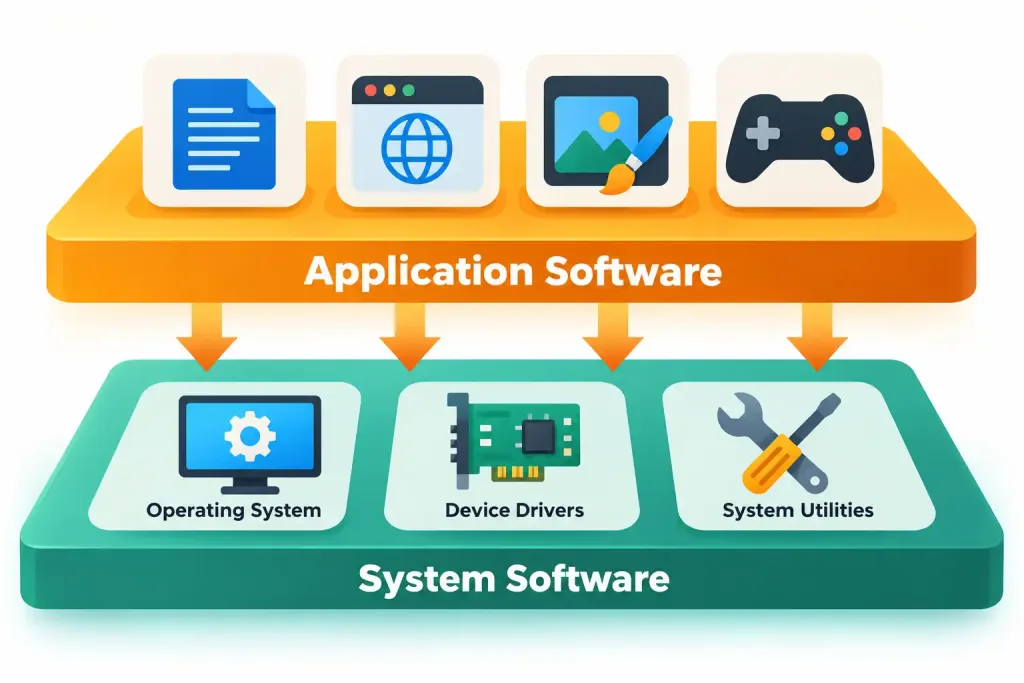
Lessons 3.1 and 3.2 focused on system software. That includes the operating system, drivers, and utilities that manage a device’s hardware. This lesson shifts to application software: the programs a user actually interacts with. A word processor, a web browser, a photo editor, a game — these are all applications.
The relationship between the two is foundational. Application software cannot run without system software beneath it. Every application depends on the operating system to manage CPU time, memory, and hardware access, exactly as covered in Lesson 3.1.
This connects directly to process and memory management. When a user opens a word processor, that application becomes a running process. The OS allocates it CPU time and a share of RAM, just like the worked example from Lesson 3.1. No matter how polished an application looks on the surface, it’s still just another process the OS is managing.
This point is worth dwelling on for a moment, because it explains a lot of everyday computer behavior. When several applications run at once and the system starts to feel sluggish, the cause is rarely the applications themselves misbehaving. More often, it’s simply the OS dividing a finite amount of CPU time and RAM among more processes than it can comfortably support at once — the exact scenario Lesson 3.1 described when introducing memory management.
Categories of Application Software
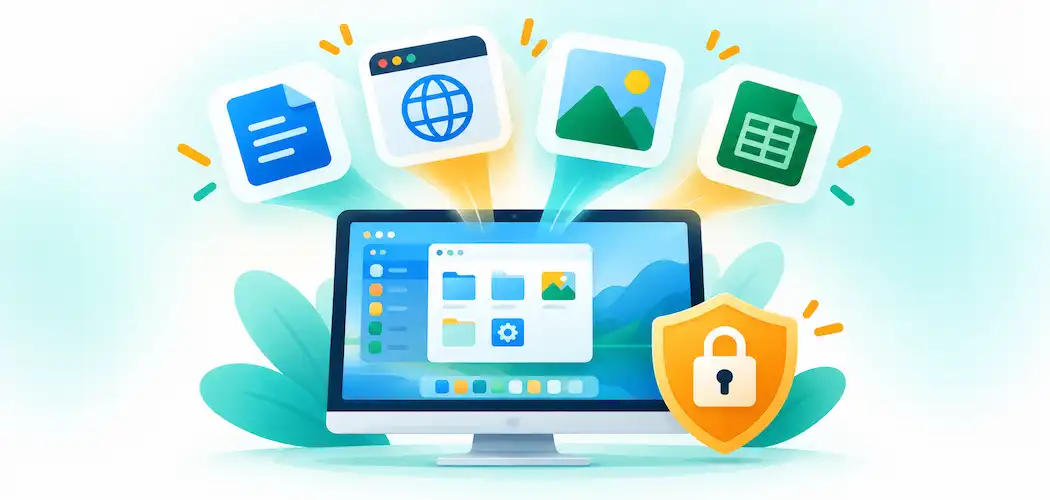
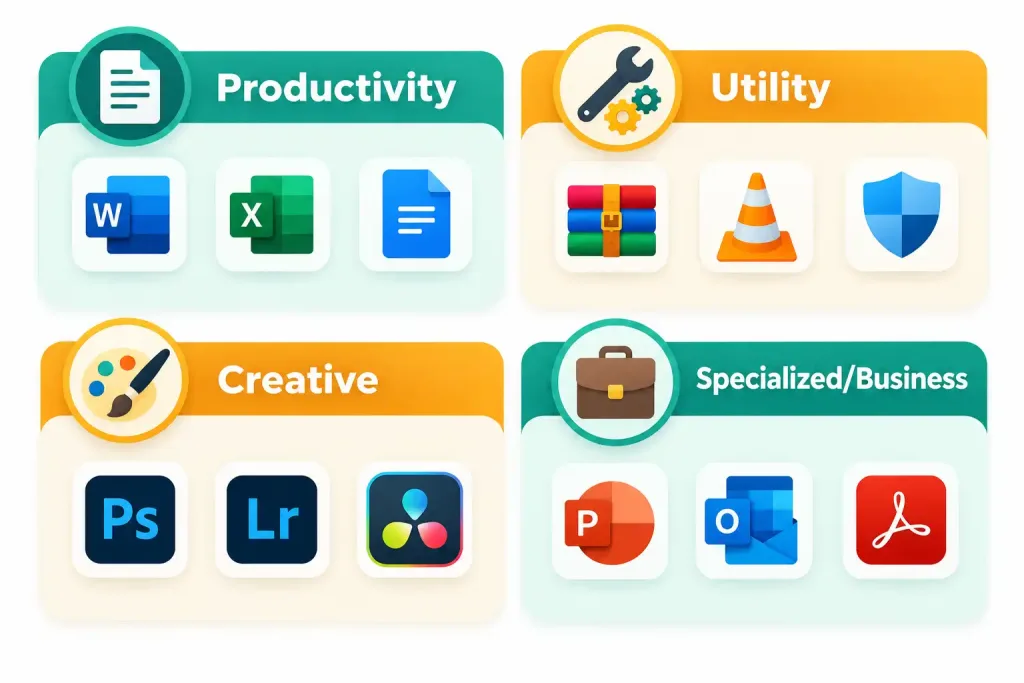
Application software spans an enormous range of purposes. A few broad categories cover most everyday use cases. Productivity software supports common work tasks: word processors for writing, spreadsheets for calculations, presentation software for slides, and email clients for communication. Utility software serves a different purpose. It maintains, analyzes, or optimizes the system itself, rather than helping a user create content. Antivirus software, disk cleanup tools, and file compression utilities all fall into this category.
Beyond these two categories, countless specialized ones exist. Accounting software, computer-aided design (CAD) software, video and audio editing suites, and industry-specific business applications are just a few examples. What ties every category together is the same underlying relationship: every application depends on system software beneath it.
Some applications are also described by how broadly they’re used. General-purpose software works for a wide range of tasks across many industries — a spreadsheet program is a good example, since it’s equally useful for a school budget, a restaurant’s inventory, or a construction firm’s cost estimates. Specialized software, by contrast, is built for one narrow purpose or industry. Medical imaging software or airline scheduling software are good examples. Neither type is inherently better. The right choice just depends on the task at hand.
A growing share of software today runs partly or entirely through a web browser. This category is sometimes called web applications. When delivered as a subscription over the internet, it connects directly to the SaaS cloud model covered in Lesson 2.6. A locally installed application uses the local device’s own CPU and RAM. A web application shifts most processing to a remote server. The local device mainly displays the result. This distinction affects offline availability and how updates get delivered — a web app typically updates automatically on the server side, with nothing for the user to install.
Software Licensing Models
Software is rarely “owned” outright like a physical object. It’s licensed under specific terms instead. Several licensing models are common today, and each works differently.
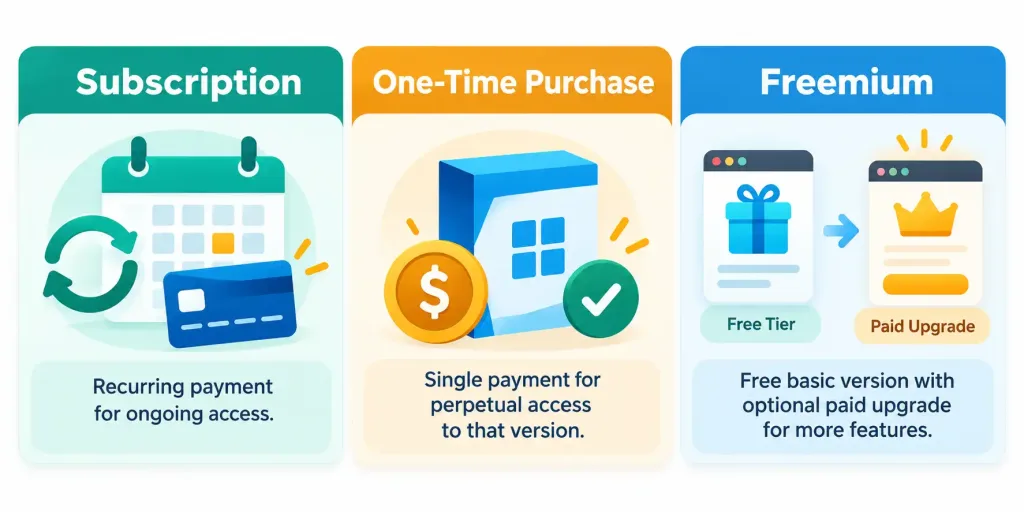
Subscription licensing requires ongoing payment — monthly or annually — to keep using the software. Access typically ends if payments stop. This model has become dominant across many software categories. It gives the publisher predictable revenue, and it usually includes continuous updates. One-time purchase licensing works differently: a single upfront payment grants perpetual use of that specific version. Future major upgrades often cost extra.
Freemium software offers basic functionality for free. Advanced features, extra capacity, or an ad-free experience cost more. This model is extremely common in mobile apps and consumer web services. Each model trades off upfront cost, ongoing cost, and what a user actually gets. Recognizing which model a piece of software uses is a practical skill well beyond this exam.
Choosing between these models comes down to weighing total cost against flexibility. Subscription licensing spreads cost out and guarantees the latest features. That suits software that changes often, but it can cost more over a long enough stretch of continuous use. One-time purchase can be cheaper for software that doesn’t change much. It risks going outdated without a clear upgrade path, though. Freemium works well for trialing software widely before committing budget to specific features.
None of these models is inherently the “right” one. Each fits a different situation. A fast-moving creative tool that adds new features every few months suits a subscription well. A simple, stable utility that rarely changes might make more financial sense as a one-time purchase. And a new team evaluating several competing products before settling on one often benefits most from starting with a freemium tier, upgrading only once the choice is confirmed.
The EULA: The Legal Terms of Use
Nearly every piece of commercial software comes with a EULA. This is a legal agreement between the publisher and the person installing it. It defines what the user is and isn’t permitted to do. A EULA typically covers device limits, resale rights, publisher liability, and data collection.
Most people click “Agree” without reading it. But a EULA is genuinely binding. Understanding its general purpose matters in a professional IT context. Violating a EULA — even by accident — carries real risk. Installing a single-user license on far more devices than permitted is a common example. That’s exactly why organizations keep careful licensing records.
A related, easy-to-confuse pair of terms: per-user and per-device licenses. A per-user license follows one person. That person can often install it on several of their own devices, as long as only one runs it at a time. A per-device license works the opposite way — it’s tied to one machine, no matter who uses it. Several employees sharing that machine would all be covered under one license. But that same employee moving to a second device would need a separate license entirely. Mixing these two up when purchasing licenses is a genuinely common, costly mistake.
One more licensing detail worth knowing: a site license. This covers every device within one specific physical location or organization, regardless of the exact number of users or machines. A school district or a large office might use this model to cover an entire building or campus with one agreement, rather than tracking licenses one device or one person at a time. It’s a genuinely practical option once an organization’s device count grows large enough that per-user or per-device tracking becomes cumbersome.
Software Piracy and Legitimate Use
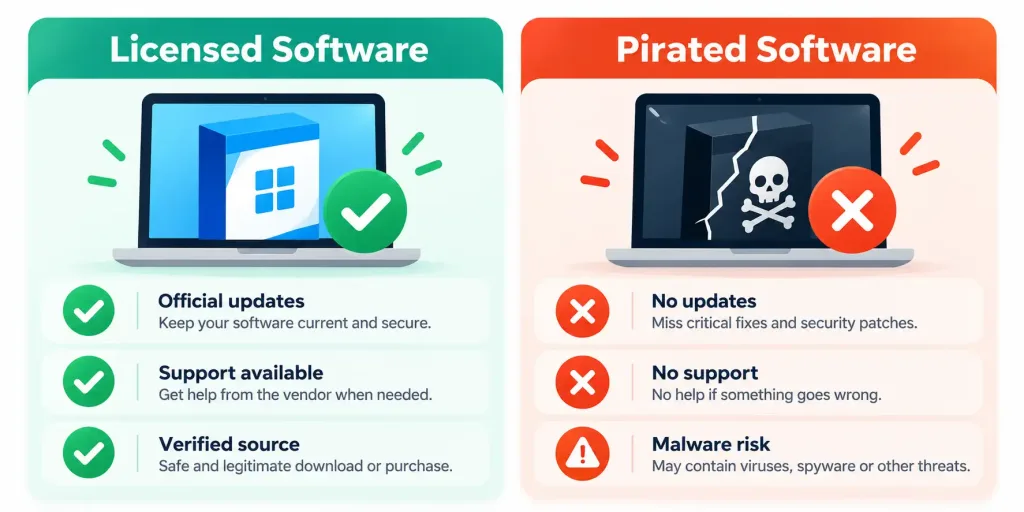
Software piracy means using, copying, or distributing software outside its license terms. It’s worth understanding as both an ethical and a practical issue, not just a legal technicality. Pirated software commonly comes from untrusted sources. That makes it a common vector for malware. A person downloading a cracked copy has no reliable way to verify the file hasn’t been tampered with.
Piracy takes a few common forms. Counterfeiting means distributing an unauthorized copy disguised as the real product. License overuse happens when software gets installed well beyond its permitted count — often by accident, inside a growing organization that hasn’t tracked its licenses carefully. Softlifting means casually sharing a personal copy with friends or coworkers. It might feel harmless, but it’s still a EULA violation.
Organizations sometimes fall into these patterns without any malicious intent at all. A new employee gets set up with a spare, already-licensed laptop, and nobody updates the license count. A department buys five seats but grows to eight people over the next year, and nobody notices the gap. These situations rarely start as deliberate piracy. But left unaddressed, they add up to a genuine compliance problem, and they carry the same legal exposure as more intentional violations.
Licensed software offers real, practical benefits beyond staying legal. Legitimate copies receive official updates and security patches, the same ones covered in Lesson 3.2. They come with access to official support. And they carry no hidden code slipped in by an untrusted third party. This is exactly why organizations track their licenses so carefully — to stay compliant and secure at the same time.
Installing, Updating, and Removing Software Responsibly
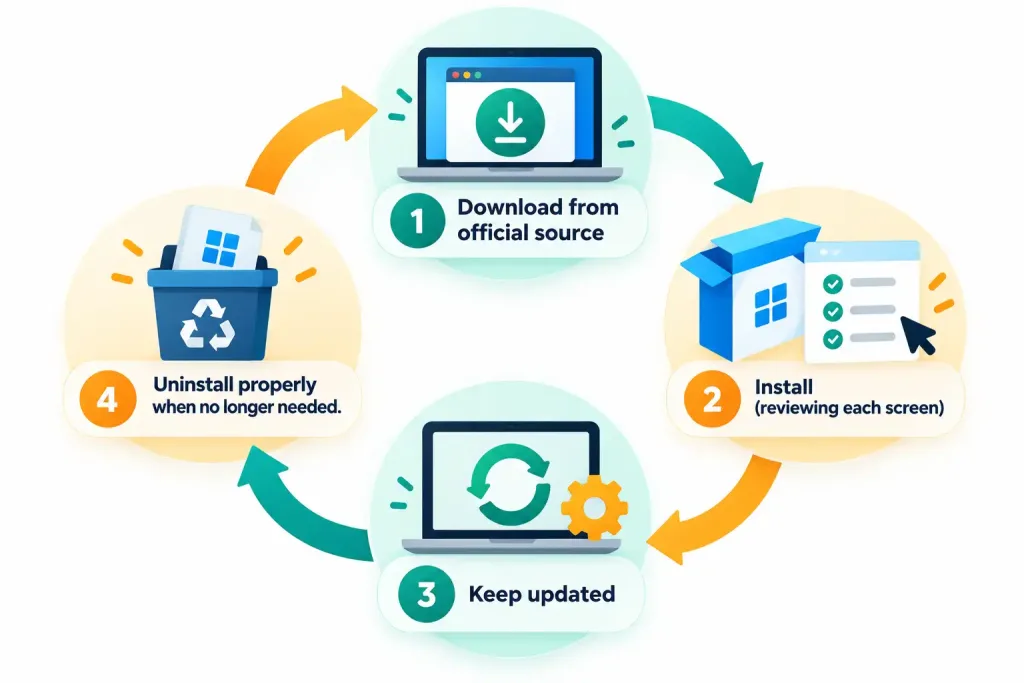
A few practical habits matter for managing software responsibly. Before installing anything, download only from the publisher’s official site or a trusted, verified app store. This is the single most effective way to avoid the malware risk discussed above. The same logic applies whether the source is licensed or pirated — an unverified download is a risk either way.
Pay attention during installation, too. Don’t just click through every screen automatically. Many installers bundle extra software by default: browser toolbars, unrelated trial programs, and other unwanted extras. A careless, rapid install is exactly how unwanted software ends up on a system. Reading each screen, even briefly, and unchecking bundled extras is a small habit that pays off over time.
Once installed, keep the software updated. The same security logic from the last lesson’s discussion of patches applies here. An outdated application can carry known, documented vulnerabilities that an update would have already fixed. And when software is no longer needed, uninstall it properly. Don’t just delete the shortcut. A proper uninstall removes the program’s files and its configuration entries, and it frees up real storage space. Deleting a shortcut alone leaves all of that behind.
Most operating systems include a built-in tool for this exact purpose — a dedicated “Apps & Features” or “Add/Remove Programs” panel, depending on the OS. This tool walks through the program’s own uninstall routine, rather than relying on a user to manually track down and delete every file scattered across the system. Some applications also leave behind small leftover files even after a proper uninstall, particularly saved settings or cached data, which a periodic system cleanup can catch over time.
A Worked Example: Choosing How to License a New Design Tool
Here’s a concrete way to apply this lesson’s licensing framework. A small design agency needs new software for a six-week project. Future work beyond that is uncertain.
Subscription licensing makes the most sense here. The agency pays for exactly the weeks it needs, then cancels if the follow-up work doesn’t materialize. No large upfront cost gets sunk into a purchase that might turn out unnecessary. A one-time purchase would only make better sense with confidence in long-term, continuous use — the upfront cost only pays off over sustained use. This is exactly the kind of cost-versus-certainty reasoning worth walking through whenever a licensing decision comes up.
Now imagine a second, contrasting case at the same agency: a core piece of design software the team expects to use for years, on the same handful of workstations, with no plans to change tools anytime soon. Here, the math flips. A one-time purchase, paid off once, likely costs less over several years than an ongoing subscription for the exact same tool. Comparing these two examples side by side is a useful habit — the timeframe and certainty of use, not the software itself, are what actually decide the better licensing choice.
Recognition-Level Verification Concepts
- Recognize the relationship between system software (the platform, including the OS) and application software (task-specific programs), with the latter always depending on the former.
- Recognize productivity software (documents, spreadsheets, presentations) and utility software (system maintenance, antivirus, compression) as two broad application categories among many.
- Recognize the trade-offs between subscription (recurring cost, ongoing updates), one-time purchase (single cost, that version only), and freemium (free base tier, paid upgrades) licensing models.
- Recognize a EULA as the legal agreement defining how software may be used, including install limits, resale rights, and liability terms.
- Recognize the difference between a per-user license (follows one person) and a per-device license (tied to one machine).
- Recognize software piracy as both a legal risk and a genuine malware vector, since unofficial sources can’t be reliably verified.
- Recognize common forms of piracy: counterfeiting, license overuse, and softlifting.
- Recognize that downloading software only from official, trusted sources is a foundational security practice.
- Recognize that a proper uninstall removes an application’s files and configuration entries, unlike simply deleting a shortcut.
Common Exam Traps
- Assuming application software can run independently of system software. Every application depends on the operating system beneath it to manage CPU time, memory, and hardware access.
- Confusing subscription and one-time purchase licensing. Subscription requires ongoing payment for continued access; one-time purchase grants perpetual use of that specific version for a single upfront cost, often without free major upgrades.
- Assuming freemium software has no cost implications at all. The base tier is free, but advanced features or capacity typically require payment.
- Treating a EULA as unimportant boilerplate. It’s a legally binding agreement defining real usage limits, and violating it — even unintentionally — carries genuine legal and organizational risk.
- Confusing a per-user license with a per-device license. A per-user license follows one person across their devices; a per-device license covers one machine regardless of who uses it — mixing these up can lead to over- or under-purchasing licenses.
- Assuming pirated software is only a legal issue. It’s also a genuinely common, practical malware risk, since unofficial sources can’t be verified as untampered.
- Assuming deleting a shortcut fully removes an application. A proper uninstall is required to remove the program’s actual files and configuration entries and reclaim storage space.
Lesson 3.3 Practice Questions: The Purpose and Proper Use of Software
Summary
Application software depends entirely on system software beneath it, including the operating system covered in the previous two lessons.
Productivity software and utility software represent two broad application categories among many, alongside numerous specialized and creative software types.
Subscription, one-time purchase, and freemium licensing models each represent a different trade-off between upfront cost, ongoing cost, and what a user actually receives.
A EULA is a legally binding agreement defining the terms under which software may be used, including install limits and liability terms.
Software piracy carries both legal risk and genuine malware risk, since pirated software commonly comes from unverified, untrusted sources.
Downloading software only from official sources, keeping it updated, and properly uninstalling it when no longer needed are all foundational, practical software management habits.
The next lesson turns to a specific, widely used category of application software: web browsers, covering how to configure and use their features effectively.