Explain what CIDR notation means and how it maps to a subnet mask
Calculate the number of usable host addresses in a given subnet
Identify the network address, broadcast address, and usable host range for a subnet
Explain why organizations subnet their networks instead of using one flat address block
Key Terms
Term
Definition
CIDR (Classless Inter-Domain Routing)
A notation that specifies how many bits of an address are network bits, written as a slash followed by a number, like /24
Subnet Mask
A 32-bit value that marks which bits of an address are network bits and which are host bits
Network Address
The first address in a subnet, representing the subnet itself rather than any individual device
Broadcast Address
The last address in a subnet, used to reach every device in that subnet at once
Host Bits
The bits left over after network bits are accounted for, used to number individual devices within a subnet
Subnetting
Splitting one larger network into multiple smaller ones
Explanation
Picking Up Where Classful Addressing Left Off
Lesson 1.7.1 ended on a specific complaint: classful addressing wasted a lot of address space. A Class C network gave you 254 addresses, take it or leave it. A Class B gave you over 65,000, even if you only needed a few hundred. CIDR fixed that by letting a network be exactly the size it needs, instead of one of three fixed sizes.
What CIDR Notation Actually Means
CIDR notation looks like this: 192.168.1.0/24. That slash and number — the “/24” — tells you how many bits of the address are network bits. The rest are host bits, available for numbering individual devices.
An IPv4 address is 32 bits total. So /24 means 24 network bits, leaving 8 host bits. /26 means 26 network bits, leaving just 6 host bits. More network bits means fewer host bits, and fewer host bits means fewer devices that particular subnet can hold. That trade-off is the entire game of subnetting.
CIDR notation is really just a shorthand for a subnet mask, and you’ll see both used interchangeably.
CIDR
Subnet Mask
Host Bits
/24
255.255.255.0
8
/25
255.255.255.128
7
/26
255.255.255.192
6
/27
255.255.255.224
5
/28
255.255.255.240
4
/29
255.255.255.248
3
/30
255.255.255.252
2
Cidr Notation And Subnet Masks Explained
Memorizing this table cold pays off constantly, both on the exam and in real work. You’ll see /24 and /30 especially often — /24 for typical LANs, /30 for point-to-point links between routers, since a link between exactly two devices only needs two usable addresses.
Here’s the binary underneath one of those rows, so the conversion isn’t just a memorized table. Take 255.255.255.192. In binary, that last octet — 192 — is 11000000. Count the 1-bits: two of them. Add those two to the 24 bits already represented by the first three full octets (255.255.255), and you land on 26 total network bits. That’s /26. Every mask in the table above works exactly the same way — count the 1-bits across all four octets, and that count is your CIDR prefix.
Counting Hosts: The 2^n − 2 Rule
Every subnet reserves two addresses that can’t be assigned to a device. The network address — the very first address — represents the subnet itself. The broadcast address — the very last address — reaches every device in that subnet at once. Neither one can be handed out to an individual host.
That gives you a simple formula: usable hosts equals 2 raised to the number of host bits, minus 2.
A /24 has 8 host bits. 2^8 is 256. Subtract 2, and you get 254 usable addresses. A /26 has 6 host bits — 2^6 is 64, minus 2 is 62 usable addresses. Smaller subnets, predictably, hold fewer devices.
Usable Host Counts By Cidr Prefix
Working Through a Real Example
Take 192.168.1.0/24. The network address is 192.168.1.0. The broadcast address is 192.168.1.255. Everything in between — 192.168.1.1 through 192.168.1.254 — is fair game for actual devices. That’s 254 usable addresses, matching the formula exactly.
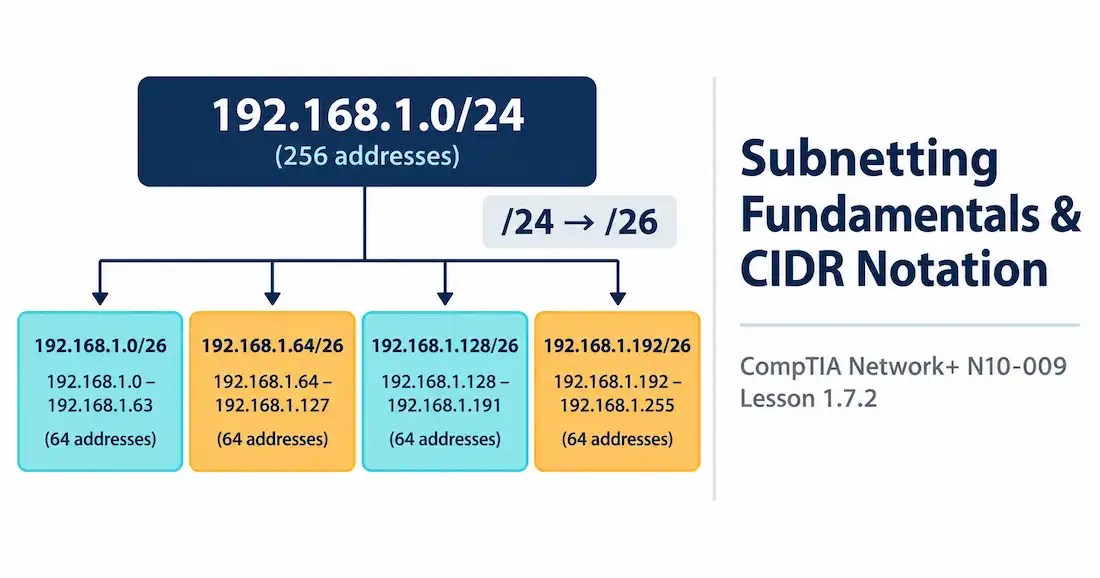
Now suppose that one /24 needs to become four separate subnets — maybe for four different departments, each wanting its own segment for the security and broadcast-domain reasons covered back in Lesson 1.2.1. To make four subnets out of one, you borrow bits from the host portion. Four subnets needs 2 borrowed bits (2² = 4), turning your /24 into four /26 networks:
Subnet
Network Address
Broadcast Address
Usable Range
1
192.168.1.0
192.168.1.63
.1 – .62
2
192.168.1.64
192.168.1.127
.65 – .126
3
192.168.1.128
192.168.1.191
.129 – .190
4
192.168.1.192
192.168.1.255
.193 – .254
Each of those four now holds 62 usable hosts instead of the original 254 — but you’ve gone from one flat network to four separate, isolated ones, each with its own network and broadcast address, each capable of enforcing its own policy at the boundary.
Splitting A /24 Into Four /26 Subnets
Notice something about that four-way split: every subnet came out the exact same size, 62 hosts each. That’s fine when every department genuinely needs a similar number of addresses. It’s wasteful when they don’t — a department with 5 people and a department with 55 people would both get the same 62-host block, burning addresses on the smaller department for no reason. Fixing that unevenness is exactly what VLSM (Variable Length Subnet Masking) is for, letting different subnets use different prefix lengths sized to their actual needs. That’s the next lesson’s territory — for now, the key takeaway is that equal-sized subnetting like the example above is a starting point, not the only option.
Why Bother Subnetting at All
A few genuinely practical reasons drive this, beyond just “because the exam says so.”
Smaller broadcast domains, for one. Recall from Lesson 1.2.1 that broadcast traffic reaches every device in the domain, whether it’s wanted or not. A flat network of a thousand devices means every broadcast reaches all thousand. Split that into ten subnets of a hundred, and a broadcast in one subnet stays contained to that subnet alone — less noise, less wasted bandwidth, less unnecessary processing on every device.
Security and organization matter too. Subnets give you a natural boundary to apply firewall rules or ACLs against — the security appliances from Lesson 1.2.2 can filter traffic moving between subnets in ways that are much harder to enforce inside one flat, undivided network.
And there’s the address-efficiency point this lesson opened with. Subnetting means an organization doesn’t have to hand a whole /24 to a point-to-point link that only needs two addresses. A /30 does that job with zero waste.
A Common Mistake, Caught in the Act
Picture a technician configuring a new server on the 192.168.1.128/26 subnet from the table above. They type in 192.168.1.191 as the server’s address, and nothing works — the server can’t communicate with anything else on the network at all.
Look at the subnet again: 192.168.1.128 through 192.168.1.191 is the range, but 192.168.1.191 is the broadcast address for that specific subnet, not a usable host address. The technician picked the very last number in the range, assuming it was fair game the same way it would be in a /24 they were more used to working with. It isn’t. This exact mistake — grabbing the network or broadcast address by accident, especially in a subnet smaller than the default /24 — is one of the most common real-world subnetting errors, and it’s exactly why walking through the network and broadcast address explicitly, every time, is worth the extra thirty seconds.
Two Special Cases: /31 and /32
Two prefix lengths break the usual pattern, and they’re worth knowing specifically because they look like exceptions to the 2^n − 2 rule.
A /31 has just 1 host bit — normally that would round down to zero usable addresses after subtracting network and broadcast. But a specific standard (RFC 3021) allows /31 to be used anyway, treating both addresses as usable, specifically for point-to-point links where there’s no need for a broadcast address at all. It’s a deliberate exception, not a mistake.
A /32 identifies a single, specific host — no network portion left to subnet at all. You’ll see this show up in static routes pointing to one exact device, or in access control rules targeting a single IP precisely. Think of /32 as the far end of the same spectrum this whole lesson has been walking down — /8 covers millions of addresses, /24 covers a couple hundred, and /32 covers exactly one, with every step in between just adjusting how finely that address space gets sliced.
Recognition-Level Verification Concepts
This objective leans on calculation, but recognizing the pieces matters just as much as doing the math:
A subnet mask of 255.255.255.0 is /24 — instantly recognizable, and the most common LAN subnet you’ll encounter.
Any device configuration showing a subnet mask can be converted straight to CIDR by counting the consecutive 1-bits — 255.255.255.192 is /26, since 192 in binary is 11000000, adding 2 more 1-bits to the 24 already accounted for by the first three octets.
The lowest address in a range is the network address; the highest is the broadcast address — neither is ever assignable to a host.
Common Exam Traps
Forgetting to subtract 2 is the single most common subnetting mistake. 2^n alone gives you the total addresses in the subnet, not the usable ones — always subtract network and broadcast.
The network address and broadcast address are not usable hosts, even though they sit right at the edges of the range and are easy to mistake for the first and last assignable devices.
More network bits means a smaller subnet, not a bigger one. A /28 is smaller than a /24, not larger — it’s easy to instinctively read the higher number as “more” and get this backward.
/31 is a genuine, intentional exception for point-to-point links, not a mistake or a typo in a scenario question.
CIDR isn’t tied to the old class boundaries anymore. A /27 or /29 can be carved out of what used to be Class A, B, or C space — CIDR doesn’t care what class an address block would have belonged to under the old system.
Equal-sized subnetting isn’t the only option, and it isn’t always the right one. Splitting a network into equal blocks is simple, but wastes addresses when the actual devices needed per subnet vary a lot — the kind of unevenness VLSM exists to solve.
# Lesson 1.7.2 — Subnetting Fundamentals & CIDR Notation
**Domain 1.0 | Networking Concepts — 23% of exam**
## Learning Objectives
By the end of this lesson, you will be able to:
- Explain what CIDR notation means and how it maps to a subnet mask
- Calculate the number of usable host addresses in a given subnet
- Identify the network address, broadcast address, and usable host range for a subnet
- Explain why organizations subnet their networks instead of using one flat address block
## Key Terms
| Term | Definition |
|---|---|
| CIDR (Classless Inter-Domain Routing) | A notation that specifies how many bits of an address are network bits, written as a slash followed by a number, like /24 |
| Subnet Mask | A 32-bit value that marks which bits of an address are network bits and which are host bits |
| Network Address | The first address in a subnet, representing the subnet itself rather than any individual device |
| Broadcast Address | The last address in a subnet, used to reach every device in that subnet at once |
| Host Bits | The bits left over after network bits are accounted for, used to number individual devices within a subnet |
| Subnetting | Splitting one larger network into multiple smaller ones |
## Explanation
### Picking Up Where Classful Addressing Left Off
[Lesson 1.7.1](https://networkustad.com/network-plus/lessons/lesson-1-7-1-ipv4-address-classes-special-ranges/) ended on a specific complaint: classful addressing wasted a lot of address space. A Class C network gave you 254 addresses, take it or leave it. A Class B gave you over 65,000, even if you only needed a few hundred. **CIDR** fixed that by letting a network be exactly the size it needs, instead of one of three fixed sizes.
### What CIDR Notation Actually Means
CIDR notation looks like this: 192.168.1.0/24. That slash and number — the "/24" — tells you how many bits of the address are **network bits**. The rest are **host bits**, available for numbering individual devices.
An IPv4 address is 32 bits total. So /24 means 24 network bits, leaving 8 host bits. /26 means 26 network bits, leaving just 6 host bits. More network bits means fewer host bits, and fewer host bits means fewer devices that particular subnet can hold. That trade-off is the entire game of subnetting.
CIDR notation is really just a shorthand for a subnet mask, and you'll see both used interchangeably.
| CIDR | Subnet Mask | Host Bits |
|---|---|---|
| /24 | 255.255.255.0 | 8 |
| /25 | 255.255.255.128 | 7 |
| /26 | 255.255.255.192 | 6 |
| /27 | 255.255.255.224 | 5 |
| /28 | 255.255.255.240 | 4 |
| /29 | 255.255.255.248 | 3 |
| /30 | 255.255.255.252 | 2 |
[See Diagram: CIDR Notation and Subnet Masks]
Memorizing this table cold pays off constantly, both on the exam and in real work. You'll see /24 and /30 especially often — /24 for typical LANs, /30 for point-to-point links between routers, since a link between exactly two devices only needs two usable addresses.
Here's the binary underneath one of those rows, so the conversion isn't just a memorized table. Take 255.255.255.192. In binary, that last octet — 192 — is 11000000. Count the 1-bits: two of them. Add those two to the 24 bits already represented by the first three full octets (255.255.255), and you land on 26 total network bits. That's /26. Every mask in the table above works exactly the same way — count the 1-bits across all four octets, and that count is your CIDR prefix.
### Counting Hosts: The 2^n − 2 Rule
Every subnet reserves two addresses that can't be assigned to a device. The **network address** — the very first address — represents the subnet itself. The **broadcast address** — the very last address — reaches every device in that subnet at once. Neither one can be handed out to an individual host.
That gives you a simple formula: usable hosts equals 2 raised to the number of host bits, minus 2.
A /24 has 8 host bits. 2^8 is 256. Subtract 2, and you get 254 usable addresses. A /26 has 6 host bits — 2^6 is 64, minus 2 is 62 usable addresses. Smaller subnets, predictably, hold fewer devices.
[See Diagram: Usable Hosts by CIDR Prefix]
### Working Through a Real Example
Take 192.168.1.0/24. The network address is 192.168.1.0. The broadcast address is 192.168.1.255. Everything in between — 192.168.1.1 through 192.168.1.254 — is fair game for actual devices. That's 254 usable addresses, matching the formula exactly.
Now suppose that one /24 needs to become four separate subnets — maybe for four different departments, each wanting its own segment for the security and broadcast-domain reasons covered back in [Lesson 1.2.1](https://networkustad.com/network-plus/lessons/lesson-1-2-1-core-infrastructure-devices/). To make four subnets out of one, you borrow bits from the host portion. Four subnets needs 2 borrowed bits (2² = 4), turning your /24 into four /26 networks:
| Subnet | Network Address | Broadcast Address | Usable Range |
|---|---|---|---|
| 1 | 192.168.1.0 | 192.168.1.63 | .1 – .62 |
| 2 | 192.168.1.64 | 192.168.1.127 | .65 – .126 |
| 3 | 192.168.1.128 | 192.168.1.191 | .129 – .190 |
| 4 | 192.168.1.192 | 192.168.1.255 | .193 – .254 |
Each of those four now holds 62 usable hosts instead of the original 254 — but you've gone from one flat network to four separate, isolated ones, each with its own network and broadcast address, each capable of enforcing its own policy at the boundary.
[See Diagram: Subnetting a /24 into Four /26 Networks]
Notice something about that four-way split: every subnet came out the exact same size, 62 hosts each. That's fine when every department genuinely needs a similar number of addresses. It's wasteful when they don't — a department with 5 people and a department with 55 people would both get the same 62-host block, burning addresses on the smaller department for no reason. Fixing that unevenness is exactly what VLSM (Variable Length Subnet Masking) is for, letting different subnets use different prefix lengths sized to their actual needs. That's the next lesson's territory — for now, the key takeaway is that equal-sized subnetting like the example above is a starting point, not the only option.
### Why Bother Subnetting at All
A few genuinely practical reasons drive this, beyond just "because the exam says so."
Smaller broadcast domains, for one. Recall from Lesson 1.2.1 that broadcast traffic reaches every device in the domain, whether it's wanted or not. A flat network of a thousand devices means every broadcast reaches all thousand. Split that into ten subnets of a hundred, and a broadcast in one subnet stays contained to that subnet alone — less noise, less wasted bandwidth, less unnecessary processing on every device.
Security and organization matter too. Subnets give you a natural boundary to apply firewall rules or ACLs against — the security appliances from [Lesson 1.2.2](https://networkustad.com/network-plus/lessons/lesson-1-2-2-security-appliances/) can filter traffic moving between subnets in ways that are much harder to enforce inside one flat, undivided network.
And there's the address-efficiency point this lesson opened with. Subnetting means an organization doesn't have to hand a whole /24 to a point-to-point link that only needs two addresses. A /30 does that job with zero waste.
### A Common Mistake, Caught in the Act
Picture a technician configuring a new server on the 192.168.1.128/26 subnet from the table above. They type in 192.168.1.191 as the server's address, and nothing works — the server can't communicate with anything else on the network at all.
Look at the subnet again: 192.168.1.128 through 192.168.1.191 is the range, but 192.168.1.191 is the **broadcast address** for that specific subnet, not a usable host address. The technician picked the very last number in the range, assuming it was fair game the same way it would be in a /24 they were more used to working with. It isn't. This exact mistake — grabbing the network or broadcast address by accident, especially in a subnet smaller than the default /24 — is one of the most common real-world subnetting errors, and it's exactly why walking through the network and broadcast address explicitly, every time, is worth the extra thirty seconds.
### Two Special Cases: /31 and /32
Two prefix lengths break the usual pattern, and they're worth knowing specifically because they look like exceptions to the 2^n − 2 rule.
A **/31** has just 1 host bit — normally that would round down to zero usable addresses after subtracting network and broadcast. But a specific standard (RFC 3021) allows /31 to be used anyway, treating both addresses as usable, specifically for point-to-point links where there's no need for a broadcast address at all. It's a deliberate exception, not a mistake.
A **/32** identifies a single, specific host — no network portion left to subnet at all. You'll see this show up in static routes pointing to one exact device, or in access control rules targeting a single IP precisely. Think of /32 as the far end of the same spectrum this whole lesson has been walking down — /8 covers millions of addresses, /24 covers a couple hundred, and /32 covers exactly one, with every step in between just adjusting how finely that address space gets sliced.
### Recognition-Level Verification Concepts
This objective leans on calculation, but recognizing the pieces matters just as much as doing the math:
- A subnet mask of 255.255.255.0 is /24 — instantly recognizable, and the most common LAN subnet you'll encounter.
- Any device configuration showing a subnet mask can be converted straight to CIDR by counting the consecutive 1-bits — 255.255.255.192 is /26, since 192 in binary is 11000000, adding 2 more 1-bits to the 24 already accounted for by the first three octets.
- The lowest address in a range is the network address; the highest is the broadcast address — neither is ever assignable to a host.
### Common Exam Traps
- **Forgetting to subtract 2 is the single most common subnetting mistake.** 2^n alone gives you the total addresses in the subnet, not the usable ones — always subtract network and broadcast.
- **The network address and broadcast address are not usable hosts**, even though they sit right at the edges of the range and are easy to mistake for the first and last assignable devices.
- **More network bits means a smaller subnet, not a bigger one.** A /28 is smaller than a /24, not larger — it's easy to instinctively read the higher number as "more" and get this backward.
- **/31 is a genuine, intentional exception** for point-to-point links, not a mistake or a typo in a scenario question.
- **CIDR isn't tied to the old class boundaries anymore.** A /27 or /29 can be carved out of what used to be Class A, B, or C space — CIDR doesn't care what class an address block would have belonged to under the old system.
- **Equal-sized subnetting isn't the only option, and it isn't always the right one.** Splitting a network into equal blocks is simple, but wastes addresses when the actual devices needed per subnet vary a lot — the kind of unevenness VLSM exists to solve.
## Summary
- CIDR notation (like /24) specifies how many bits of an address are network bits, replacing the old rigid class system with flexible, exactly-sized subnets.
- Usable hosts in a subnet equal 2 raised to the number of host bits, minus 2 — the minus 2 accounts for the network and broadcast addresses, which are never assignable.
- The network address is the first address in a subnet; the broadcast address is the last; neither can be given to a device.
- Subnetting shrinks broadcast domains, creates natural security boundaries, and avoids wasting address space on links that only need a couple of addresses.
- /31 and /32 are special cases worth knowing — /31 for point-to-point links using both addresses, /32 for identifying one single host.
📝
Summary
CIDR notation (like /24) specifies how many bits of an address are network bits, replacing the old rigid class system with flexible, exactly-sized subnets.
Usable hosts in a subnet equal 2 raised to the number of host bits, minus 2 — the minus 2 accounts for the network and broadcast addresses, which are never assignable.
The network address is the first address in a subnet; the broadcast address is the last; neither can be given to a device.
Subnetting shrinks broadcast domains, creates natural security boundaries, and avoids wasting address space on links that only need a couple of addresses.
/31 and /32 are special cases worth knowing — /31 for point-to-point links using both addresses, /32 for identifying one single host.
Lead Networking Architect and Editor at NetworkUstad. BS in Computer Networks and Security, CCNP and CCNA certified, with 11+ years of experience in enterprise network design, implementation, and troubleshooting. Writes practical tutorials on routing, IPv4 management, network automation, and security fundamentals.