
Networking
CCNA tutorials, Cisco guides, and enterprise networking insights for IT professionals.
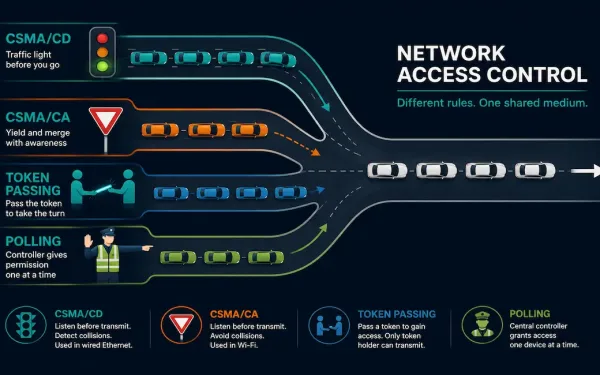
Media Access Control Methods Explained: CSMA/CD, CSMA/CA, Token Passing, and Polling
Whenever more than one device shares a physical network medium, something has to decide who gets to transmit and when. That’s the job of a Media Access Control (MAC) method: a set of rules, implemented at the data link layer, that governs how devices gain and control access to shared network media. Without one, two...
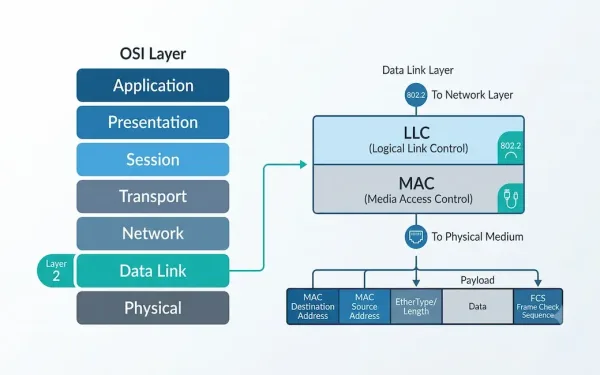
What Is the Data Link Layer? A Complete Guide to OSI Layer 2
The Data Link Layer is the second layer of the OSI model, and it plays a critical role in how devices communicate across a network. Sitting between the physical layer below and the network layer above, it is responsible for reliable node-to-node delivery of data over a physical link. This guide explains what the Data...
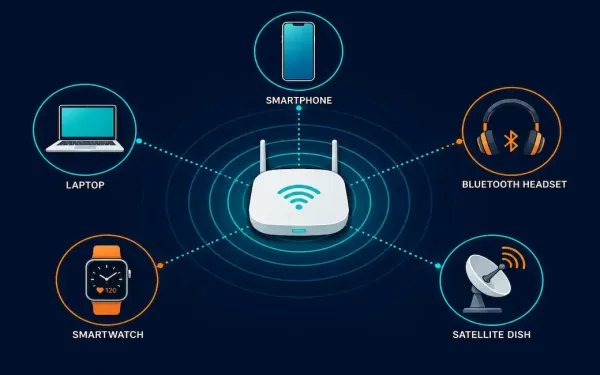
Wireless Media Explained: Wi-Fi, Bluetooth, WiMAX, and Cellular
Wireless media carries data through radio frequency (RF) signals instead of a physical cable. It’s the technology behind Wi-Fi, Bluetooth, cellular networks, satellite internet, and dozens of other everyday connections, from cordless keyboards to GPS receivers. This guide covers how wireless media actually works at the physical and data link layers, the main standards you’ll...
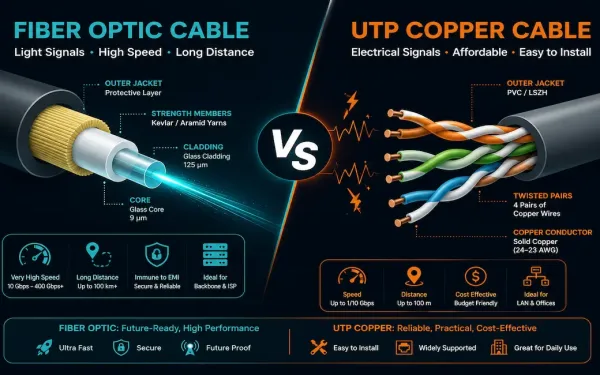
Fiber vs Copper Cabling: How to Choose the Right One
Fiber optic and copper cabling solve the same basic problem, getting data from one point to another, in fundamentally different ways. Neither one is universally “better.” Each makes a different set of tradeoffs around bandwidth, distance, cost, and installation complexity, and the right choice depends entirely on what you’re building. This guide breaks down exactly...
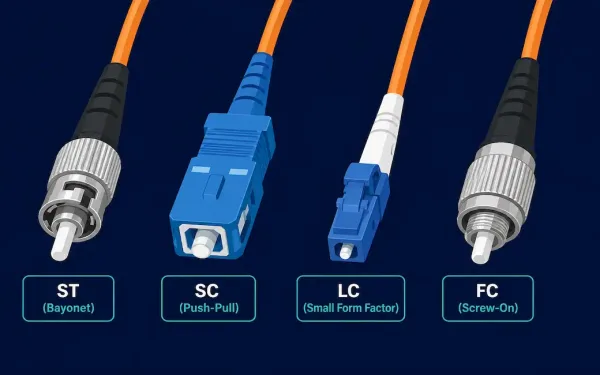
Fiber Optic Connectors Explained: ST, SC, LC, and FC Types
Fiber optic connectors terminate the ends of an optical fiber and let it plug into a port, patch panel, or another fiber run. Dozens of connector types exist, but the differences that actually matter for day-to-day work come down to three things: ferrule size, mating mechanism, and how much loss the connector introduces at the...
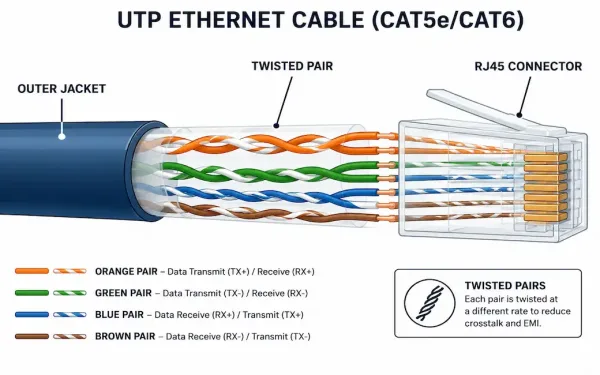
Unshielded Twisted Pair (UTP) Cabling Explained
Unshielded Twisted Pair, or UTP, is the cabling behind most Ethernet networks and telephone systems in use today. It’s lightweight, inexpensive, and easy to install, which is exactly why it became the default choice for LAN cabling decades ago and still is. This guide covers how UTP actually works, what each cable category really supports,...
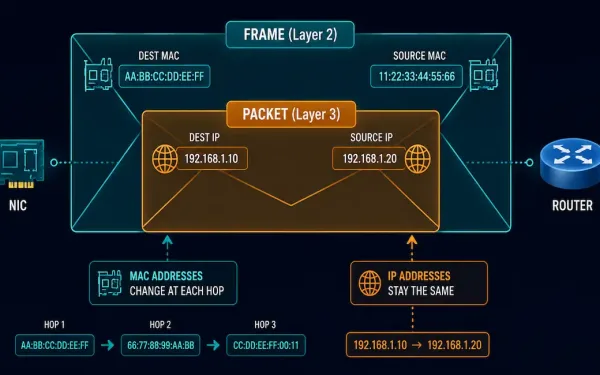
Data Link Layer and Network Layer Addresses Explained
Every packet that crosses a network carries two different kinds of addresses at once. One address stays the same for the whole trip. The other changes at every single hop. Mixing these two up is one of the most common sources of confusion for anyone studying networking or working toward CCNA. This guide breaks down...
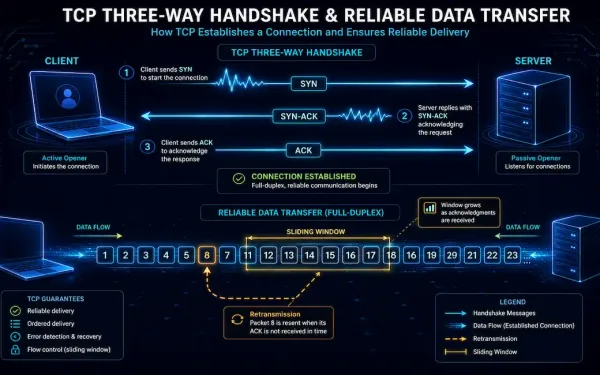
Transmission Control Protocol (TCP) Explained
Transmission Control Protocol, TCP, is a transport-layer protocol in the OSI model. It’s what actually creates a reliable connection between two remote computers, guaranteeing that data sent from one side arrives at the other, intact and in order. When the application layer has data to send, it hands that data down to the transport layer,...
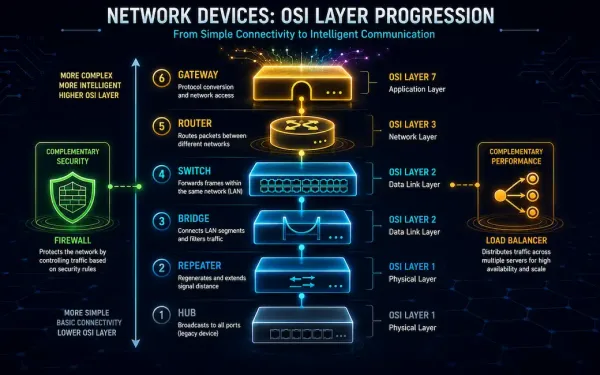
Network Devices: Hubs, Switches, Routers, and More Explained
Network devices are the unsung hardware behind every connection you make. From streaming video to running enterprise infrastructure, they keep data moving, secure, and reliable. Whether you’re studying for CCNA or building out real infrastructure, understanding what each device actually does, and where it fits, is foundational. This guide covers the core network devices, hubs,...

جانئے فیس بک نے کیس ملک کے صارفین کا سب سے زیادہ مواد اپنے سسٹم سے ڈیلیٹ کیا ہے۔
In early 2026, Facebook’s network infrastructure processes over 4 million video streams, 350 million photo uploads, and 100 billion messages every single day. The platform serves 3.07 billion monthly active users — roughly 40% of the global population — across more than 18 data center campuses, hundreds of edge points of presence, and an undersea...