
CCNA
Cisco Certified Network Associate certification resources
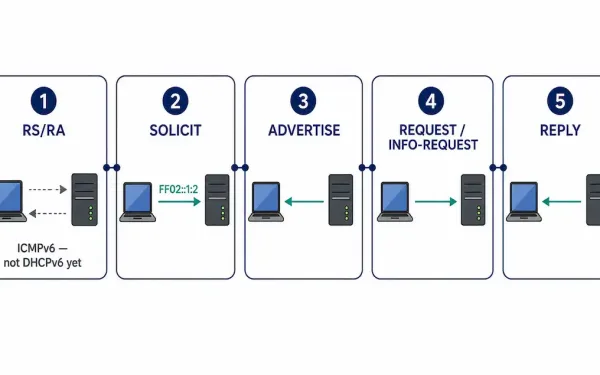
How DHCPv6 Operation Works
DHCPv6 doesn’t start the way DHCPv4 does. There’s no equivalent of a client blindly broadcasting into the dark hoping something answers — in IPv6, the very first thing that happens is an ICMPv6 Router Advertisement, and that message is what tells a client whether it should even bother starting a DHCPv6 conversation at all in...
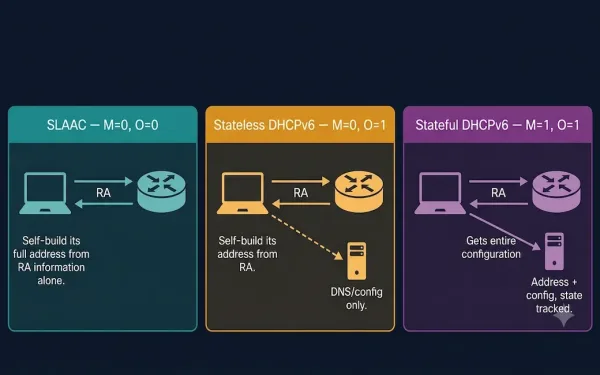
SLAAC and DHCPv6
Recall that the router sends a Router Advertisement (RA) message, and the settings within that RA message decide whether a client can obtain its IPv6 address information automatically using SLAAC, DHCPv6, or a combination of both. This guide covers both methods, the three possible RA flag combinations, and how to configure and verify each on...
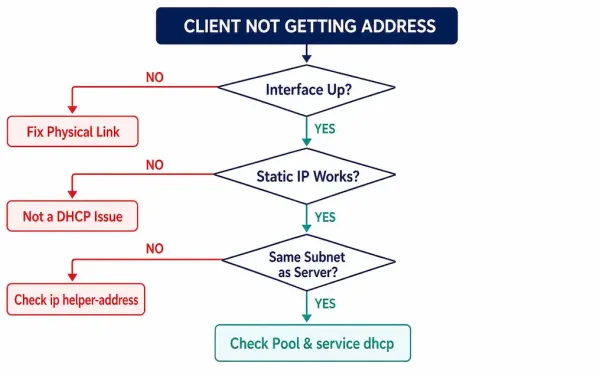
How to Troubleshoot DHCPv4 Problems
DHCP failures rarely announce their cause directly — a client just sits without an address, or ends up with the wrong one, and the actual reason could be anywhere from a bad cable to a missing relay command to a full address pool sitting quietly exhausted. What separates a fast fix from an hour of...
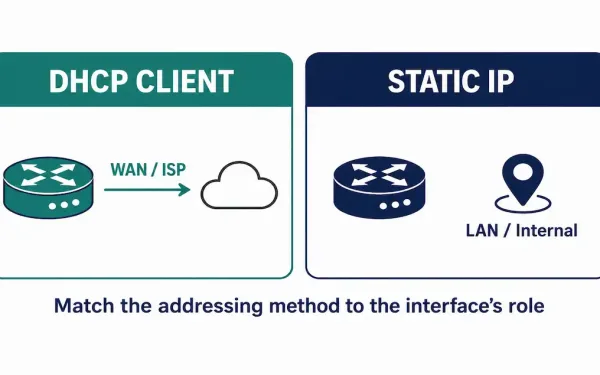
Configuring a Router as a DHCPv4 Client
A router can learn its own IP address the same way an ordinary client computer does — by asking a DHCP server for one, instead of having an address typed in manually on the device itself. This isn’t the normal setup for a router’s internal, LAN-facing interfaces, where a stable, known address matters. But it’s...
What Is DHCPv4 Relay?
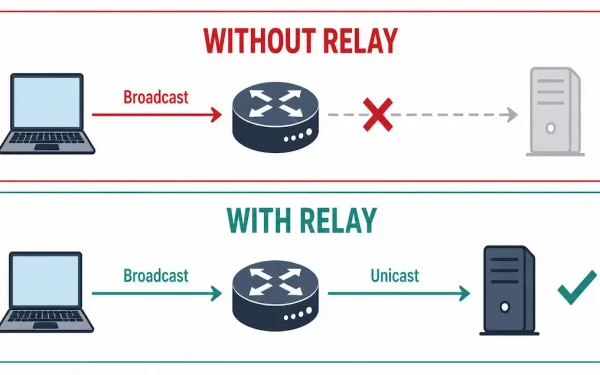
Routers don’t forward broadcast traffic between subnets — that’s the whole point of a router, keeping broadcast domains contained. Most of the time that’s exactly what you want. But DHCP’s initial DISCOVER message is a broadcast, sent by a client that has no IP address yet and therefore no way to address anything directly. If...
Configuring a Basic DHCPv4 Server on a Cisco Router
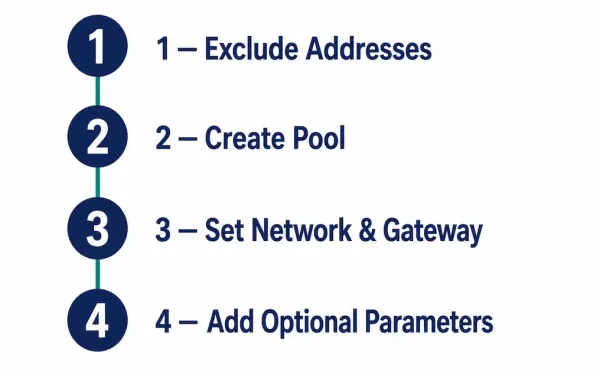
A Cisco router doesn’t need a dedicated server to hand out IP addresses — IOS can run the DHCP server role itself, assigning and managing addresses from a defined pool to clients on the LAN without any separate hardware or software required. This is the “Easy IP” setup common in small offices and labs, and...
Understanding the DHCPv4 Message Format
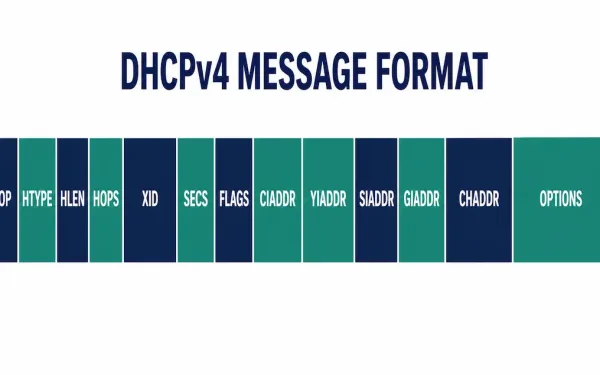
Every DHCPv4 exchange — Discover, Offer, Request, Acknowledge — rides inside the same fixed DHCPv4 message format, inherited from BOOTP. Once you know what the message format is, what each field actually holds, and why, reading a DHCP packet capture stops being guesswork and starts being straightforward: the fields tell you exactly what stage of...
Understanding DHCPv4: A Complete Guide
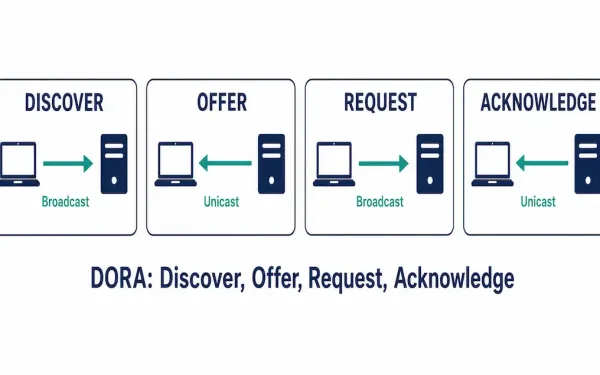
Every device on a network needs a unique IP address to communicate. Static addressing — manually typing an IP into a router, server, or printer — works fine for devices that never move and never change. It falls apart fast for laptops, phones, and anything else that joins and leaves the network constantly. That’s the...
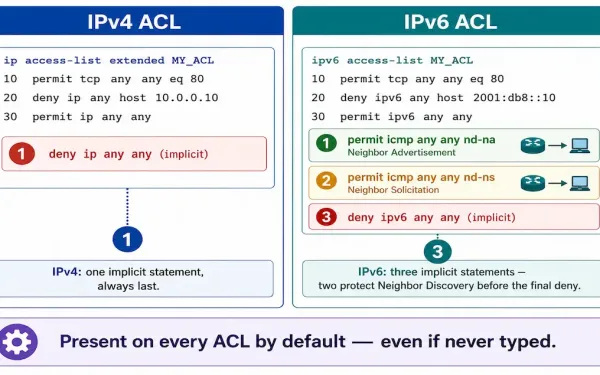
Understanding IPv6 ACLs Configuration: Step-by-Step Guide
Access Control Lists are a fundamental component of network security, and understanding IPv6 ACLs matters more every year as networks transition from IPv4 to accommodate the growing number of connected devices. IPv6 ACLs share the same core purpose as their IPv4 counterparts — filtering traffic based on permit and deny statements — but differ enough...
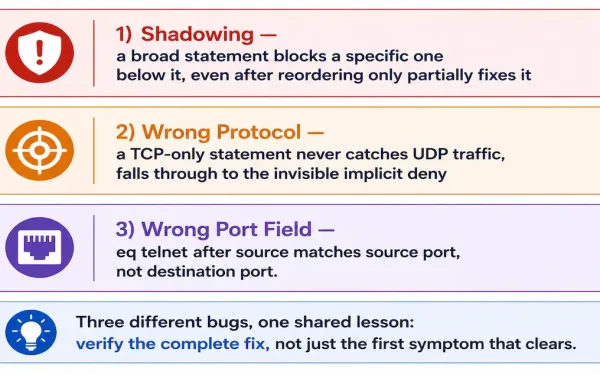
How to Troubleshoot ACL Errors
Access Control Lists are fundamental to network security and traffic management in Cisco environments, but misconfigurations can block legitimate traffic or allow unauthorized access just as easily as a correctly written ACL prevents both. This guide walks through three real categories of ACL bugs, using show access-lists to diagnose each one, and gives the genuinely...