CCNA
Cisco Certified Network Associate certification resources
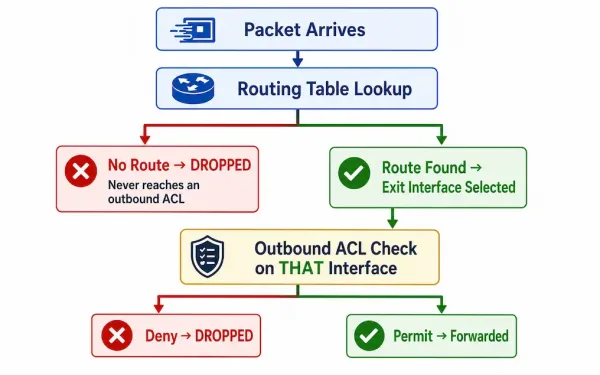
Inbound and Outbound ACL Logic
Access Control Lists are a fundamental component of Cisco networking, filtering traffic based on predefined rules. For CCNA and CCNP students, understanding the exact order in which a router processes packets against an ACL — not just how to write one — is what separates a memorized configuration from a genuine understanding of why a...
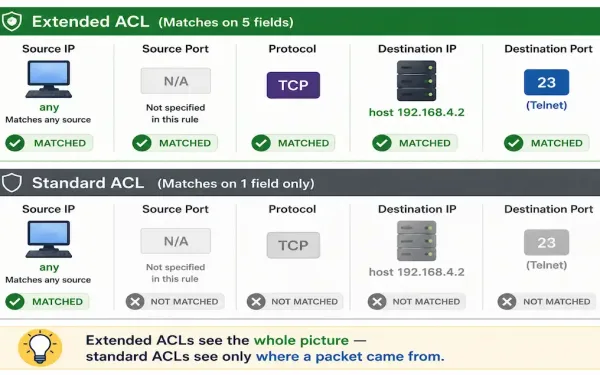
How to Configure Extended ACLs
Extended ACLs are used more than standard ACLs because of their far greater precision. Where a standard ACL can only match source address, extended ACLs check source address, destination address, protocol, and port number together — enabling filtering standard ACLs simply can’t express. An extended ACL can, for example, allow FTP traffic from a network...
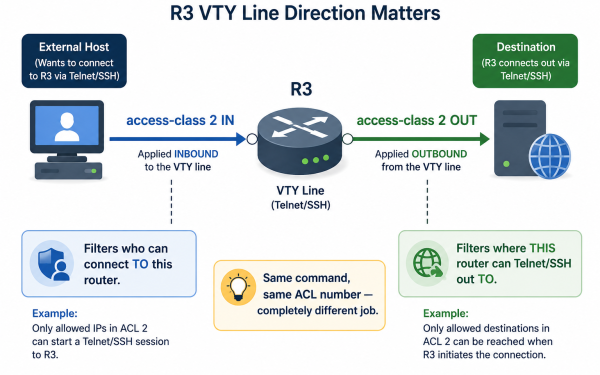
How to Configure Standard ACLs to Secure VTY Ports
Cisco routers and switches don’t allow meaningful remote access out of the box — VTY lines need at least a password configured before any Telnet or SSH session succeeds at all. Remote connectivity options are Telnet, over the VTY port, or SSH. SSH provides encrypted sessions and is strongly recommended by Cisco for remote administration,...
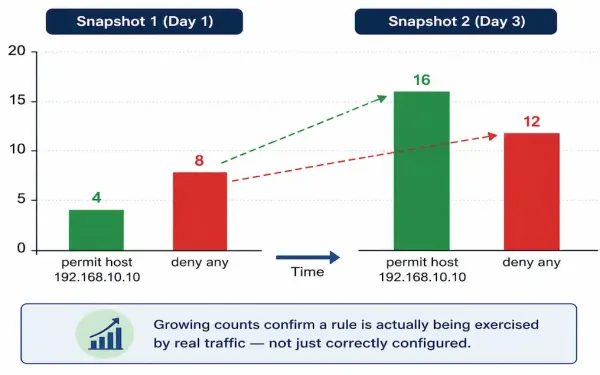
ACL Statistics in Cisco Networks: Monitoring Matches with show access-lists
Access Control Lists are essential for filtering traffic in Cisco networks. For CCNA students, understanding ACL statistics is what turns “I configured a rule” into “I can prove the rule is actually doing something.” CCNP candidates should note how these stats aid in troubleshooting more complex, multi-interface ACL deployments where a rule might be working...
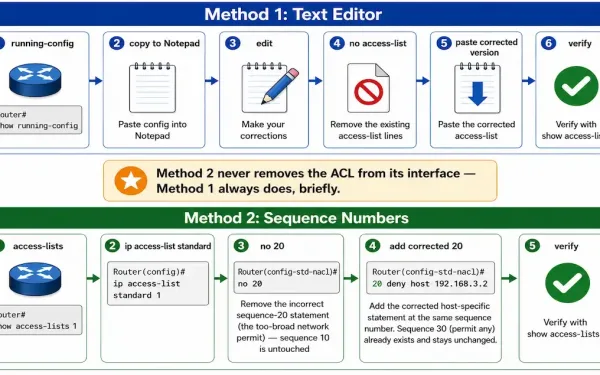
How to Edit Standard ACLs
Network administrators sometimes need to edit a standard ACL after it’s already been configured — an address was mistyped, a rule needs tightening, or a statement that made sense at the time no longer fits the network. As covered in the standard ACL configuration guide, each new entry you add to an ACL appears at...
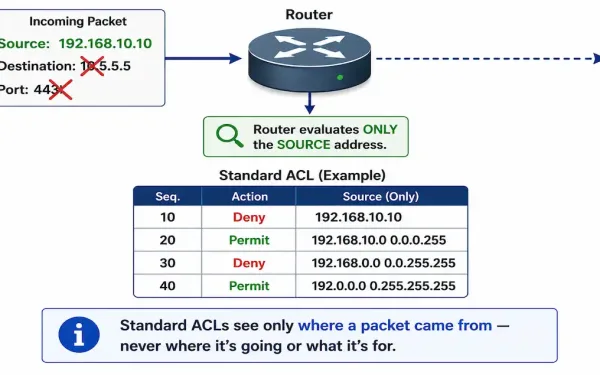
How to Configure Standard ACLs
Standard ACLs permit or deny traffic based on source addresses only. They match a packet’s source IP address against a list of address ranges and a corresponding permit-or-deny statement — nothing else. The port and destination of the packet are never evaluated, which is the single most important thing to understand about standard ACLs before...
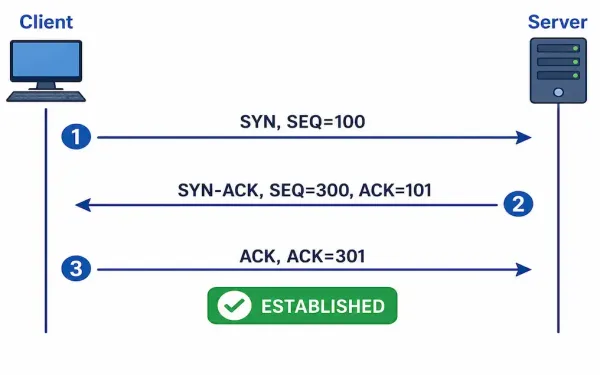
Understanding TCP Three-Way Handshake: A Comprehensive Guide
In networking, the TCP three-way handshake (often called a “TCP conversation”) establishes reliable connections, which is crucial for Access Control Lists (ACLs) to filter traffic effectively. ACLs manage inbound and outbound traffic based on IP addresses, ports, and TCP flags. This article explains TCP fundamentals before diving into ACL integration, helping CCNA students grasp transport...
How to Configure OSPFv3: Complete Guide
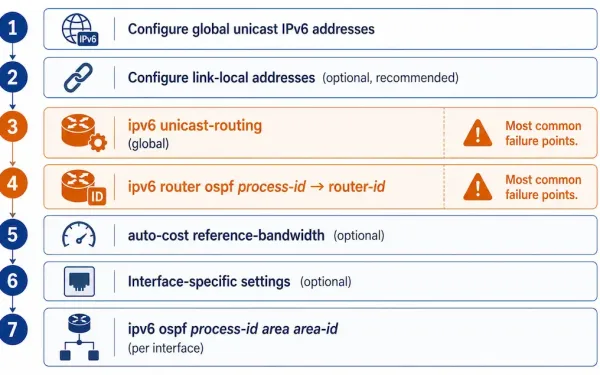
Figure 1 shows the reference topology for this guide: Router1 through Router4, connected via a mix of GigabitEthernet, FastEthernet, and Serial interfaces. This walkthrough configures OSPFv3 on Router1 step by step; assume Router2, Router3, and Router4 already have their global IPv6 and link-local addresses configured. This topology is IPv6-only, no dual-stack, to keep the focus...
What is a Link-Local IPv6 Address
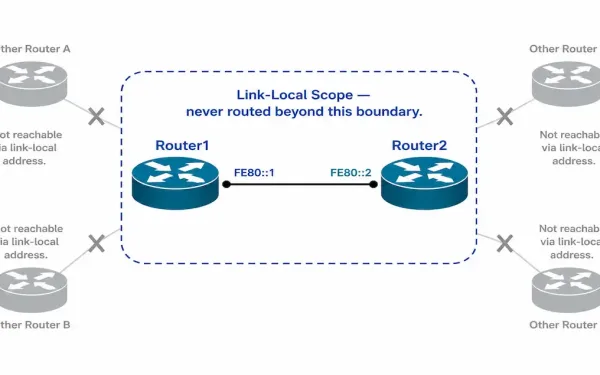
Routers configured with dynamic routing protocols such as OSPF or EIGRP must send and receive routing protocol messages with their directly connected neighbors, exchanging those messages between neighbors on the same subnet. In IPv4, those messages are sourced from the router’s configured IPv4 interface address — the same address used for everything else on that...
OSPFv2 vs OSPFv3: Key Differences and Similarities
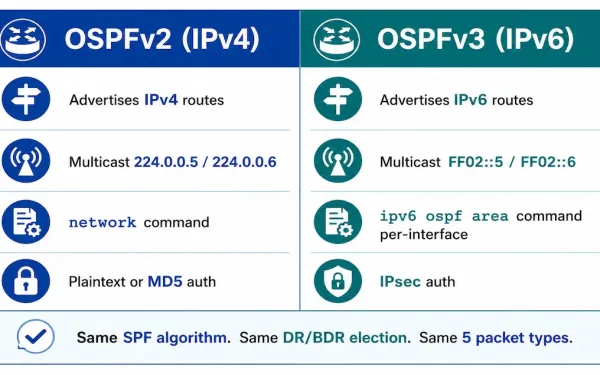
OSPFv3 is a routing protocol for IPv6, just as OSPFv2 is for IPv4. While both share core principles, there are vital differences in their operation. OSPFv3 serves as the IPv6 equivalent to OSPFv2 for exchanging prefixes, making it essential for modern networks handling dual-stack environments. In IPv6, the network address is referred to as the...