

Domain 2.6 | Network Access — 20% of exam
Learning Objectives
By the end of this lesson, you will be able to:
- Describe autonomous AP architecture and explain why it doesn’t scale well
- Describe lightweight AP architecture, the role of the WLC, and how CAPWAP connects the two
- Describe mesh architecture and identify when it’s the appropriate choice
- Compare all three architectures across management model, scalability, and typical use case
Key Terms
| Term | Definition |
|---|---|
| Autonomous AP | An access point independently configured and managed with no central controller |
| Lightweight AP | An access point that receives its configuration from a central WLC |
| WLC | Wireless LAN Controller; centrally manages lightweight APs |
| CAPWAP | Control and Provisioning of Wireless Access Points; the tunneling protocol between AP and WLC |
| Mesh AP | An AP that relays traffic wirelessly to other APs rather than requiring its own wired connection |
| RAP | Root AP; a mesh AP with an actual wired connection back to the network |
Explanation
The Real Question Behind Architecture Choice
The wireless principles lesson covered the RF fundamentals — channels, signal strength, interference — that govern how any single access point actually performs. This lesson addresses a different, equally practical question: once a deployment needs more than just one or two access points, how do you actually manage all of them, coordinate their RF behavior with each other, and keep client devices connected as they physically move between coverage areas? The answer depends entirely on which of three architectures a deployment chooses.
Autonomous APs: Simple, But It Doesn’t Scale
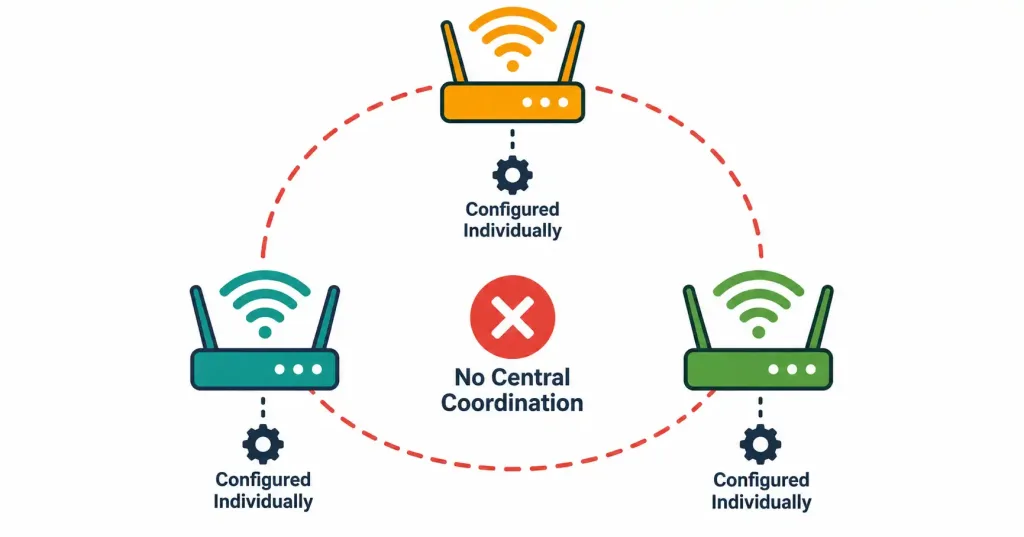
An autonomous access point is a fully self-contained device — its own configuration interface (web GUI or CLI), its own independent operation, with absolutely no central controller coordinating it alongside any other AP in the deployment. Each autonomous AP genuinely stands alone, functioning as a complete, independent wireless system in its own right.
This is genuinely fine, even ideal, for a very small deployment — a single AP in a small office or a home network has no coordination problem to solve in the first place, since there’s nothing else to coordinate with. The simplicity is a real advantage at this scale: no additional controller hardware to purchase, no additional management concept to learn beyond configuring the one device directly.
The problem emerges specifically as the deployment grows beyond a handful of APs. Every single configuration change — updating an SSID’s password, adjusting a security setting, modifying which VLAN a wireless network maps to — must be manually repeated on every individual autonomous AP in the deployment, one at a time, with no mechanism for pushing that change out centrally.
Worked example illustrating the scaling problem concretely: an organization with 50 autonomous APs deployed across a large building needs to change its main SSID’s password following a security incident. Under autonomous architecture, this requires logging into all 50 individual AP configuration interfaces separately and making the identical change 50 separate times — a genuinely significant administrative burden, and one that scales linearly (and painfully) with the number of APs deployed, with real risk of human error or inconsistency creeping in across that many repeated manual changes.
A second, distinct problem beyond configuration burden: no coordinated RF management. Recall from the wireless principles lesson that adjacent APs sharing the same or overlapping channel cause genuine co-channel interference. With autonomous APs, there’s no central system observing the RF environment across the whole deployment and automatically adjusting channel or power settings to avoid this — each AP operates with whatever channel and power settings it was individually, manually configured with, and detecting or correcting an interference problem between two specific APs requires an administrator to notice and manually intervene, rather than the system self-correcting automatically.
Lightweight APs and the WLC: The Standard Enterprise Architecture
Lightweight access points solve both problems autonomous APs face, through a fundamentally different architectural split. Rather than each AP being a complete, independent system, a lightweight AP handles only the real-time, latency-sensitive RF and 802.11 functions directly — while genuinely offloading its configuration, management, and coordination to a central Wireless LAN Controller (WLC).
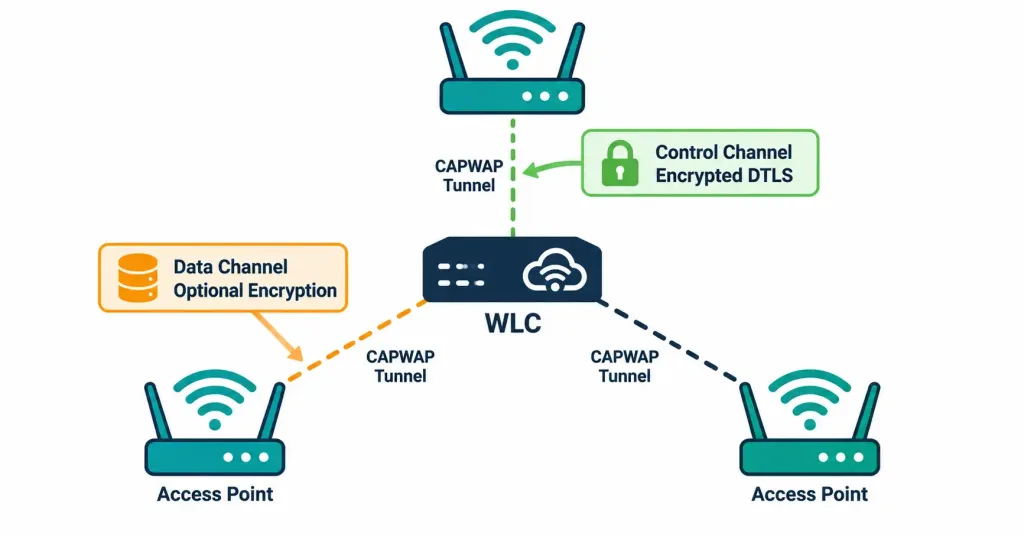
CAPWAP (Control and Provisioning of Wireless Access Points) is the specific tunneling protocol connecting each lightweight AP back to its WLC. It’s worth understanding this connection isn’t just a management convenience layered on top of otherwise-independent APs — CAPWAP genuinely carries the control-plane traffic (configuration, coordination) between the AP and WLC, and depending on the specific deployment mode, potentially data-plane traffic as well, tunneled back through the WLC rather than the AP handling everything locally and independently.
How a lightweight AP actually finds and joins its WLC: this isn’t manually configured on each individual AP the way an autonomous AP’s settings would be — a lightweight AP uses one of several discovery mechanisms (DHCP Option 43 carrying the WLC’s address, DNS resolution of a specific hostname, local subnet broadcast, or a previously “primed” WLC address stored from an earlier join) to automatically locate an available WLC and establish its CAPWAP tunnel, receiving its actual operational configuration from the WLC only after that tunnel is established — genuinely automated, rather than requiring an administrator to manually configure each individual AP’s location and settings by hand.
Solving the configuration-scaling problem directly: the identical 50-AP password-change scenario covered above, under lightweight architecture with a WLC, becomes a single configuration change made once, on the WLC itself — the WLC then pushes that change out to every managed AP automatically through their respective CAPWAP tunnels, eliminating the repeated, error-prone manual process autonomous architecture requires entirely.
Solving the RF-coordination problem directly, through a capability called RRM (Radio Resource Management): the WLC maintains centralized visibility into the RF environment across every AP it manages, and can automatically, dynamically adjust channel and power settings across the entire deployment specifically to minimize interference between APs — directly addressing the exact co-channel interference problem covered in the wireless principles lesson, but now handled automatically and continuously by the controller rather than requiring manual administrator intervention every time conditions change.
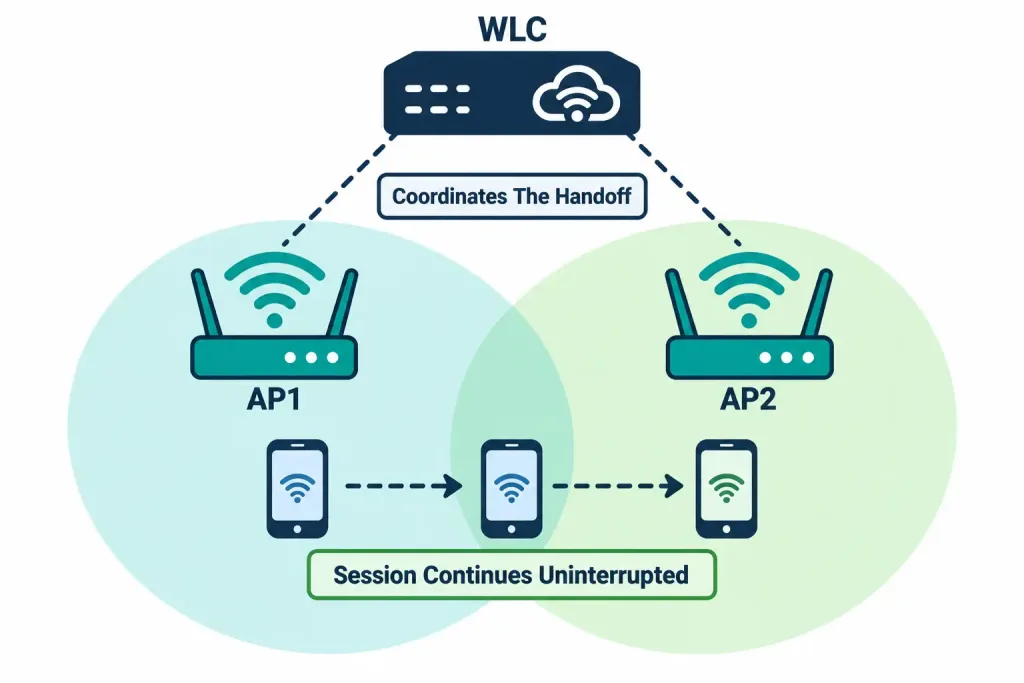
Enabling seamless roaming, the third major lightweight-architecture benefit: as a wireless client physically moves from one AP’s coverage area into an adjacent AP’s coverage area, the WLC coordinates the handoff between the two APs, allowing the client’s active session (a video call, a file transfer) to continue uninterrupted rather than requiring the client to fully disconnect and reconnect to what would otherwise look like an entirely separate network. This is precisely why large deployments broadcast the identical SSID from every AP throughout a building — the WLC’s coordination is what makes that appear, from the client’s perspective, as one single continuous wireless network rather than dozens of independent ones.
Mesh: When Running a Cable to Every AP Isn’t Practical
Mesh architecture addresses a different constraint entirely — not management complexity, but the physical impracticality of running Ethernet cable to every single AP location a deployment actually needs.
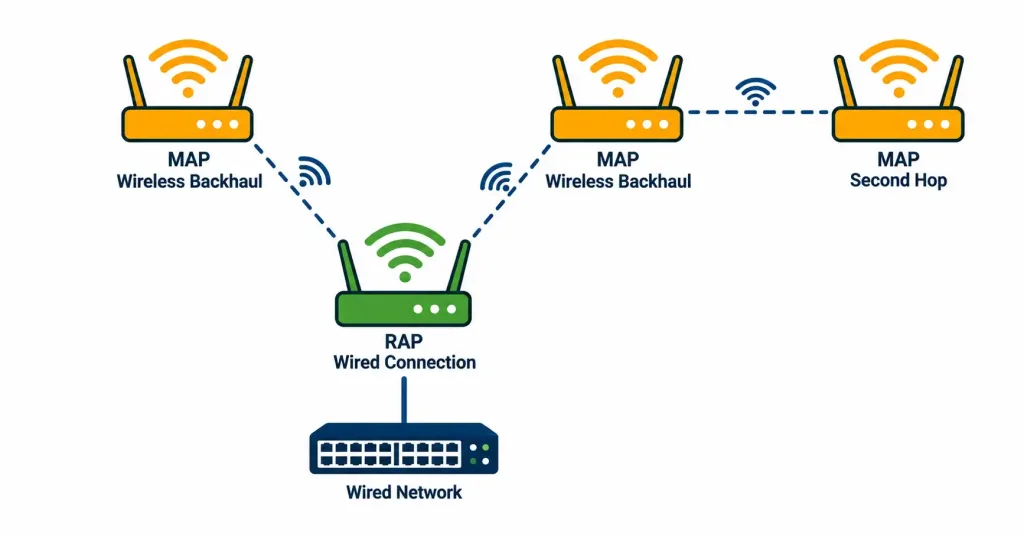
In a mesh deployment, APs relay traffic wirelessly to each other, rather than every single AP requiring its own direct, individual wired connection back to the network. Two specific AP roles matter here:
- RAP (Root AP) — a mesh AP that does have an actual wired Ethernet connection back to the network, serving as the entry and exit point for the wireless mesh’s traffic to reach the rest of the wired infrastructure.
- MAP (Mesh AP) — an AP with no direct wired connection at all, instead relaying its traffic wirelessly to another mesh AP (either directly to a RAP, or through one or more intermediate MAPs) until that traffic eventually reaches a RAP and, from there, the wired network.
Where mesh genuinely earns its place, rather than being chosen out of convenience alone: outdoor deployments (a campus quad, a parking area, a stadium) where trenching cable across open ground is expensive and disruptive; historic buildings where regulations or genuine structural concerns prohibit running new cable through walls or ceilings; and temporary event deployments (a conference, an outdoor festival) where the entire wireless infrastructure needs to go up and come back down again quickly, making permanent cabling installation impractical or simply unnecessary for the deployment’s short lifespan.
The genuine trade-off worth understanding, not glossing over: a MAP’s wireless backhaul connection to its next hop (whether that’s a RAP or another MAP) shares the same finite RF spectrum resources that AP is also using to serve its actual connected wireless clients.
This means a MAP’s backhaul traffic and its client-serving traffic are, in a real sense, competing for the same underlying RF capacity — a genuinely different situation from a wired lightweight AP, whose Ethernet backhaul connection to the network is completely separate from, and doesn’t compete with, the RF spectrum it uses to serve wireless clients. This is precisely why mesh is chosen specifically where wired cabling genuinely isn’t practical, rather than being treated as a universally interchangeable substitute for wired lightweight AP deployment even where cabling would have been perfectly feasible.
Worked example: an outdoor stadium deployment needs Wi-Fi coverage across the entire seating bowl. Running individual Ethernet cable to dozens of AP locations across that physical span would be enormously expensive and logistically difficult. A mesh deployment instead places a small number of RAPs at points where wired connectivity is genuinely feasible, with additional MAPs filling in coverage across the rest of the seating area, relaying their traffic wirelessly back through the RAPs — accepting some backhaul capacity trade-off specifically in exchange for avoiding what would otherwise be a prohibitively expensive and disruptive cabling project.
Comparing All Three Architectures Directly
It’s worth stating plainly: these three architectures aren’t ranked best-to-worst — each fits a genuinely different deployment scenario, and understanding which specific constraint each one solves is more useful than memorizing a simple ranking.
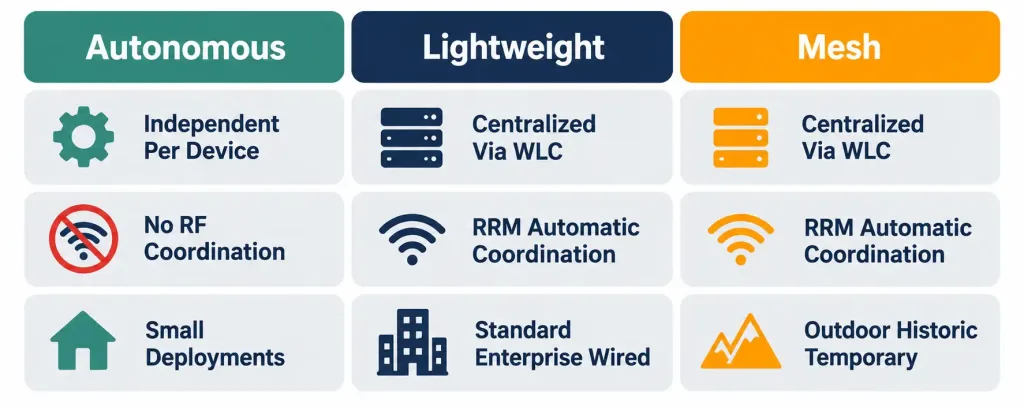
Management model: autonomous is fully independent per-device; lightweight is fully centralized through the WLC; mesh typically also uses a WLC for the actual configuration and coordination layer, with the wireless backhaul specifically being what distinguishes it from a standard wired lightweight deployment.
Scalability: autonomous scales poorly, since every change requires per-device repetition; lightweight scales well, since the WLC pushes changes centrally; mesh scales similarly well to lightweight from a management perspective, since it’s still WLC-coordinated, but its physical scalability is genuinely constrained by backhaul RF capacity as more hops or more clients compete for the same wireless backhaul resources.
RF coordination: autonomous has none, requiring manual administrator intervention to address interference; both lightweight and mesh benefit from RRM’s centralized, automatic coordination through the WLC.
Typical use case: autonomous fits a very small deployment (a handful of APs, a small office or home); lightweight fits the standard enterprise campus deployment where wired connectivity to every AP location is feasible; mesh fits specifically outdoor, historic, or temporary deployments where wired cabling to every AP location genuinely isn’t practical.
A Brief Note on Verification
While this specific objective focuses on description rather than hands-on configuration, it’s worth knowing that a WLC provides direct visibility into every lightweight or mesh AP it manages — commands and dashboard views showing which APs are currently joined to the controller, their CAPWAP tunnel status, and (for mesh deployments specifically) each AP’s current role (RAP or MAP) and its relay path back to the wired network.
This centralized visibility is itself a direct, practical benefit of the lightweight/mesh model covered throughout this lesson — an administrator can see the status of every managed AP from one single place, a capability that has no real equivalent under autonomous architecture, where checking on 50 individual APs would again mean checking 50 individual devices separately.
Common Misconceptions Worth Correcting Directly
“Autonomous APs are simply an outdated technology nobody should use anymore.” This overstates the case — autonomous architecture is a genuinely reasonable, appropriate choice specifically for very small deployments where the scaling and RF-coordination problems it faces never actually materialize in the first place, since there’s nothing to coordinate with a single AP or a small handful of them. The issue isn’t that autonomous is universally obsolete; it’s that it doesn’t scale, which matters enormously in a 50-AP deployment and barely at all in a 2-AP one.
“A lightweight AP can function completely independently if it can’t reach its WLC.” A lightweight AP’s core design assumption is receiving its configuration and coordination from a central WLC — losing that connection is a genuinely significant operational condition, not a minor inconvenience, since the AP’s entire operational model depends on that relationship (though many deployments do include some limited local fallback behavior specifically to reduce total service disruption during a temporary WLC outage).
“Mesh is just a cheaper, universally interchangeable alternative to wired lightweight AP deployment.” As covered above, mesh specifically trades away dedicated wired backhaul capacity for the ability to avoid running cable to every AP location — this is a genuine, real trade-off with real performance implications from shared RF backhaul capacity, not a strictly superior or cost-free substitute for wired connectivity wherever cabling would actually have been feasible.
“CAPWAP only handles management traffic between AP and WLC, nothing else.” Depending on the specific deployment mode, CAPWAP can tunnel both control-plane and data-plane traffic between the AP and WLC — it’s not purely a management-only protocol layered on top of otherwise fully independent AP-to-client data handling.
Frequently Asked Questions
Can a single deployment use more than one of these architectures simultaneously?
Yes, genuinely common in practice — a large organization might run standard lightweight APs throughout its main office buildings while using mesh specifically for an outdoor courtyard or parking area extension, both managed by the same underlying WLC infrastructure, choosing the architecture that fits each specific physical location’s actual constraints.
Is RRM something that requires ongoing manual tuning, or does it genuinely run automatically?
RRM is specifically designed to operate automatically and continuously, dynamically adjusting channel and power settings in response to real, ongoing RF conditions — while administrators can influence its behavior through configuration, its core value proposition is precisely that it doesn’t require constant manual intervention the way autonomous architecture’s complete lack of coordination would.
How many hops can a mesh network’s wireless backhaul path support before reaching a RAP?
This varies by specific vendor and deployment guidance, but every additional wireless hop between a MAP and its eventual RAP generally introduces additional latency and further divides available backhaul capacity, which is exactly why real mesh deployments are typically designed to minimize hop count rather than treating it as an unlimited, cost-free chain.
Does switching from autonomous to lightweight architecture require replacing all existing AP hardware?
Not necessarily — depending on the specific hardware, some autonomous APs can be converted to lightweight mode through a firmware/image change rather than requiring entirely new physical hardware, though this depends heavily on the specific AP model and its underlying hardware capability.
Why does seamless roaming matter specifically for real-time applications like voice or video calls?
Because these applications are genuinely sensitive to even brief interruptions — a voice call that has to fully disconnect and reconnect as a user walks between two APs’ coverage areas would produce an audible, disruptive gap, whereas the WLC-coordinated handoff covered above allows the underlying wireless connection to transition between APs while the actual application session continues uninterrupted throughout.
CAPWAP Encryption: What’s Actually Protected
It’s worth being specific about what CAPWAP does and doesn’t encrypt by default, since this is a genuine, testable detail rather than a minor implementation footnote. The CAPWAP control channel — carrying configuration and management traffic between the AP and WLC — is encrypted by default using DTLS (Datagram Transport Layer Security), protecting the sensitive configuration information passing between controller and access point from interception. The CAPWAP data channel — carrying actual client traffic tunneled between the AP and WLC — is not encrypted by default, though it can be explicitly configured to use DTLS encryption as well, at some additional processing overhead cost on both the AP and WLC.
Why this distinction matters practically: an administrator specifically concerned about the confidentiality of client data traversing the CAPWAP tunnel — not just the AP’s own configuration traffic — needs to deliberately enable data channel encryption, since it isn’t automatically protected the same way the control channel already is out of the box. This is a genuinely common point of confusion, since “CAPWAP is encrypted” is true for the control channel by default but not automatically true for the data channel without explicit additional configuration.
A Worked Example: Tracing a Lightweight AP’s Full Join Process
Bringing the discovery and configuration concepts together into one complete sequence: a new lightweight AP is unboxed and connected to the network for the first time, with no prior configuration at all.
- Discovery: the AP attempts to locate a WLC using its available discovery mechanisms in sequence — checking for a previously stored (primed) WLC address first, then attempting DHCP Option 43, then DNS resolution of a well-known hostname, then local subnet broadcast, depending on which methods are actually available on this specific network.
- CAPWAP tunnel establishment: once a WLC is located, the AP establishes its CAPWAP control channel to it, automatically encrypted via DTLS as covered above.
- Configuration download: the WLC pushes the AP’s actual operational configuration — SSIDs to broadcast, channel and power settings (or instructions to participate in RRM’s automatic management), security settings — down through the established CAPWAP tunnel, with no manual, per-AP configuration step required from an administrator at all.
- Operational state: the AP begins actively serving wireless clients according to its received configuration, while remaining in ongoing contact with the WLC through the CAPWAP tunnel for continued coordination, monitoring, and any future configuration changes.
This entire sequence — from unboxing to fully operational — happens automatically once the AP has basic network connectivity, directly illustrating the “centralized, not manually configured per-device” advantage that distinguishes lightweight architecture from the autonomous model covered at the start of this lesson.
Cisco Wireless Architectures and AP Modes: Practice Quiz
Test your knowledge of autonomous APs, lightweight APs, CAPWAP, RRM, roaming, and mesh deployments.
Summary
- Autonomous APs are independently configured with no central controller — simple for small deployments, but every change must be manually repeated per device, and there’s no automatic RF coordination between APs.
- Lightweight APs receive their configuration from a central WLC via CAPWAP, solving both the configuration-scaling problem (one centralized change) and RF coordination (via RRM) that autonomous architecture faces.
- CAPWAP’s control channel is encrypted by default via DTLS; the data channel requires explicit configuration to be encrypted as well.
- Seamless roaming lets a client’s active session continue uninterrupted as it moves between AP coverage areas, coordinated by the WLC.
- Mesh architecture uses RAPs (wired) and MAPs (wirelessly relayed) to extend coverage where running cable to every AP location isn’t practical, trading dedicated wired backhaul for shared wireless backhaul capacity.
- None of the three architectures is universally best — each fits a genuinely different deployment scenario, and organizations commonly mix architectures across different physical locations within the same overall deployment.



