
Networking
CCNA tutorials, Cisco guides, and enterprise networking insights for IT professionals.
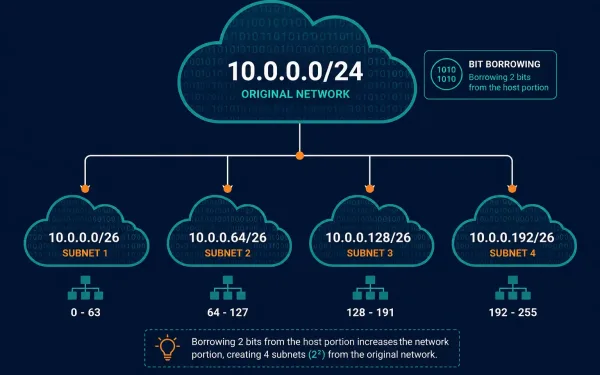
Introduction to Subnetting: How and Why to Divide a Network
Subnetting lets a network administrator divide a large network into smaller, more manageable sub-networks by borrowing bits from the host portion of an IP address. Rather than running one enormous flat network, subnetting adds a third level to the addressing hierarchy, network, subnetwork, and host, giving administrators far more control over how a network actually...
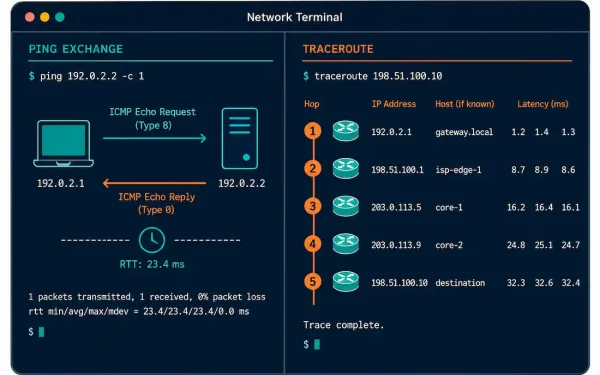
Ping and Traceroute: The Essential Network Troubleshooting Toolkit
Ping and traceroute are the first tools most network engineers reach for when something isn’t working. Both rely on ICMP, but they answer different questions: ping tells you whether a destination is reachable at all, while traceroute maps out exactly which hops a packet passes through along the way. This guide covers both in depth,...
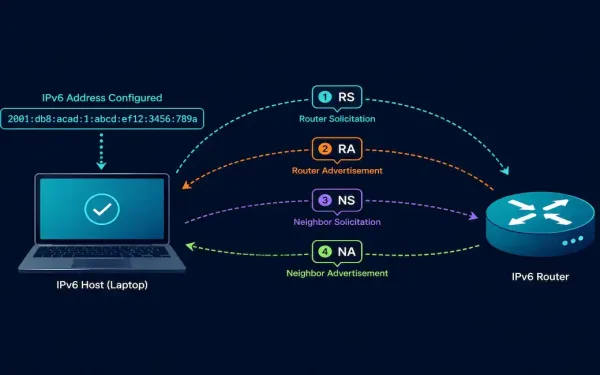
ICMPv6 Neighbor Discovery: RS, RA, NS, and NA Messages Explained
ICMPv6 does considerably more than its IPv4 counterpart. Beyond basic error reporting, it absorbs an entire protocol’s worth of functionality through the Neighbor Discovery Protocol (NDP), four distinct message types working together to replace ARP, handle address resolution, and drive SLAAC. This guide covers each of the four NDP message types, how they interact, and...
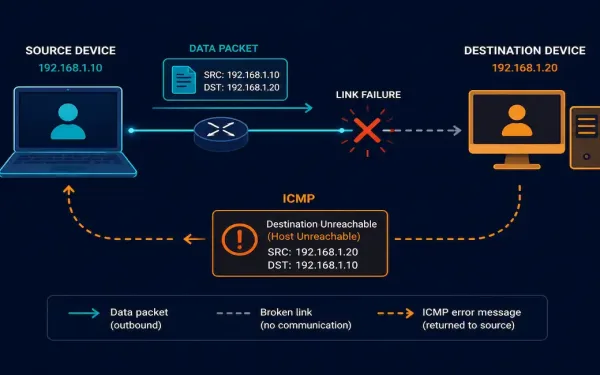
Internet Control Message Protocol (ICMP) Explained
IP is deliberately unreliable: it has no built-in mechanism to report when something goes wrong. That’s exactly the gap the Internet Control Message Protocol (ICMP) fills. It doesn’t make IP more reliable, it doesn’t retransmit or guarantee delivery, but it does report problems back to the source, which is what makes tools like ping and...
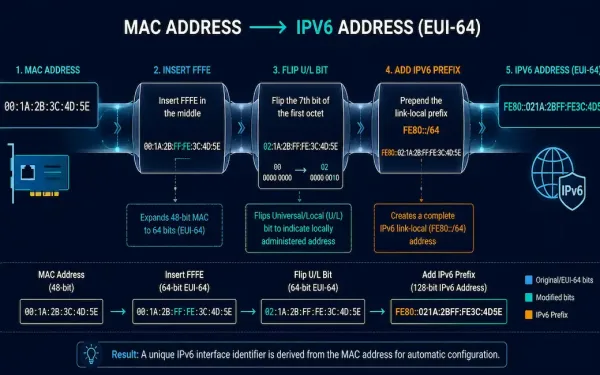
The EUI-64 Process: How IPv6 Interface IDs Are Generated
When a device configures an IPv6 address through Stateless Address Autoconfiguration (SLAAC), it gets the network prefix, typically a /64, from a Router Advertisement, but it has to generate its own 64-bit Interface ID independently. This guide covers exactly how that generation works: the EUI-64 process that derives an Interface ID from a MAC address,...
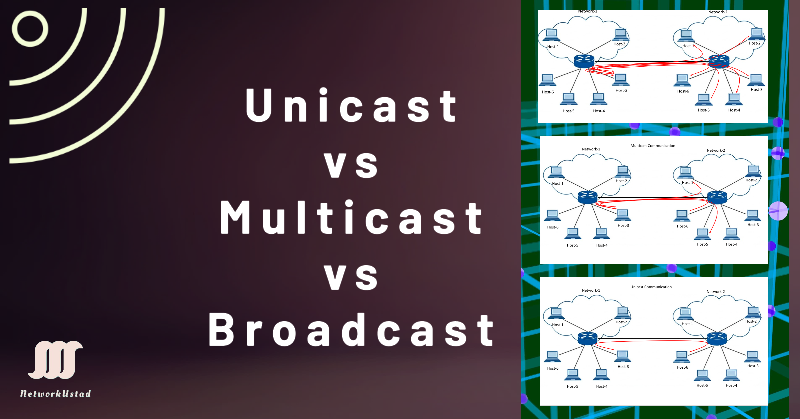
Unicast, Multicast, and Broadcast Communication Explained
Every packet that moves across a network is delivered using one of three fundamental communication methods: unicast, multicast, or broadcast. Each defines how many devices receive a given transmission — one, a selected group, or all of them — and choosing the right one is central to how efficiently a network runs. As video streaming,...
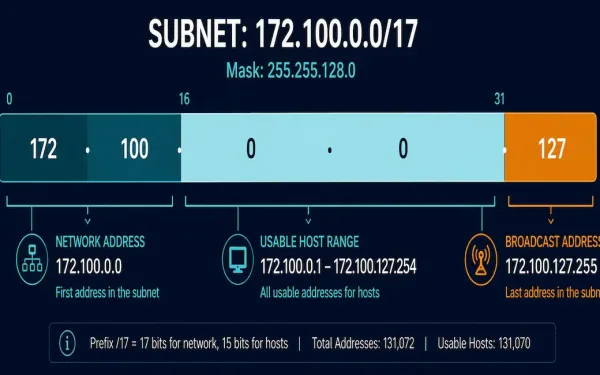
Network Prefix, Network Address, Broadcast Address, and Host Address Explained
Every IPv4 subnet has a handful of specific addresses with fixed roles: one identifies the network itself, one is reserved for broadcasting to every device on it, and the rest are available for hosts. This guide covers exactly how to calculate each one, using prefix notation and binary math, with one consistent worked example carried...
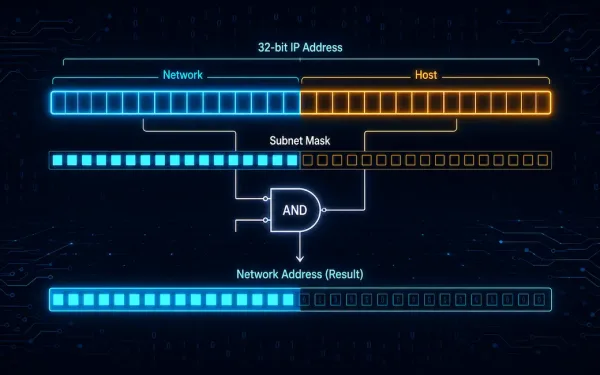
Network and Host Portion of an IPv4 Address
Every network needs a unique network number. Every host needs a unique IP address. The IPv4 address is a 32-bit number. It identifies both a network and a host on that network. This split is one of the very first things you learn in networking, and it stays useful for your entire career. We usually...

Positional Number System and Examples
In a positional number system, each symbol represents a different value depending on the position it occupies in a number, and each system has a value that relates to the number directly next to it. The total value of a positional number is the total of the resultant value of all positions. The decimal number...
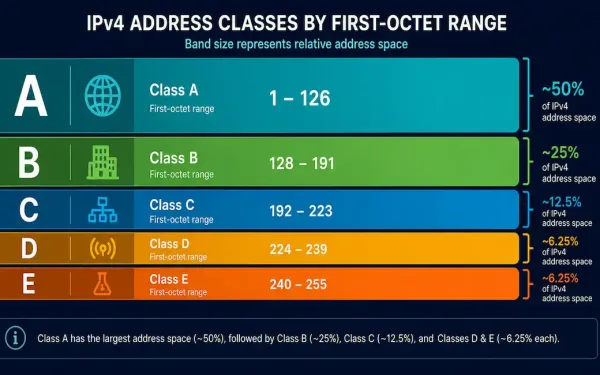
IPv4 Address Classes Explained: A, B, C, D, and E
An IPv4 address identifies a device on a network, similar to how a street address identifies a physical location. Every device on an IP-based network, including the internet, needs one to communicate. This guide covers the five IPv4 address classes, how to identify each one from its first octet, and the specific network and host...