
CCNA
Cisco Certified Network Associate certification resources
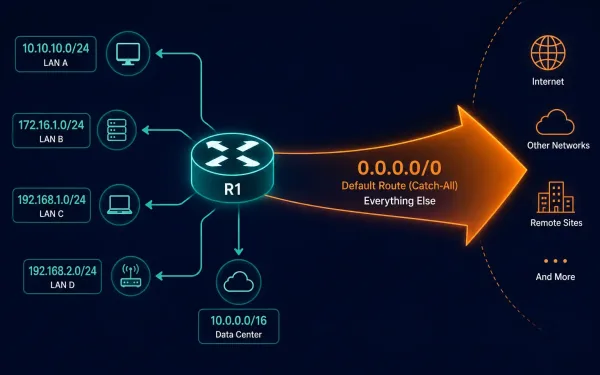
How to Configure a Default Route on a Cisco Router
A default static route is a route that matches any destination network not otherwise present in a router’s routing table. Routers use default routes that are either configured locally as static entries or learned dynamically from another router through a routing protocol — this guide covers the static configuration. [See Infographic: Default Route as the...
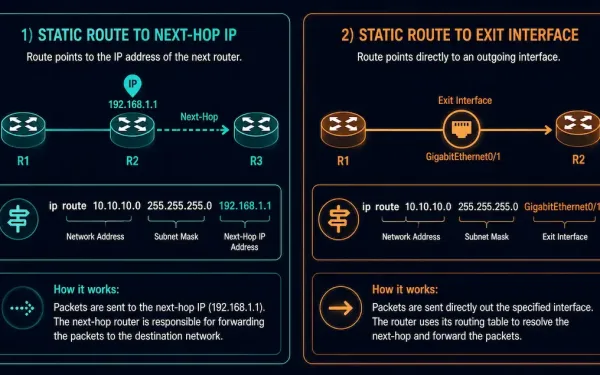
Directly Connected Static Routes: Configuration and When to Use Them
A static route can point to a destination in one of two ways: by specifying the next-hop IP address, or by specifying the exit interface directly. This second form — using the exit interface — is what’s called a directly connected static route, and understanding when and why to use it is a useful piece...
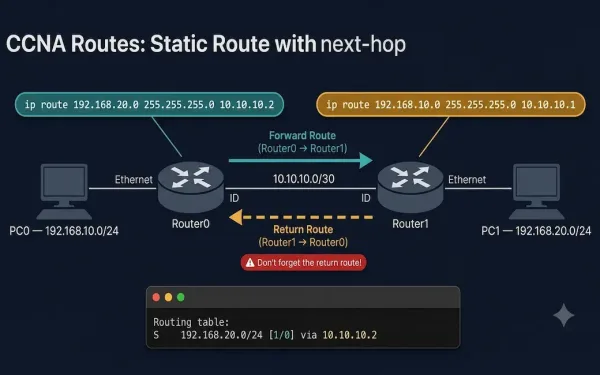
How to Configure a Static Route with a Next-Hop Address
Static routing is a fundamental skill for network engineers, essential for directing traffic in small to medium-sized networks or as a backup in dynamic routing environments. For students, understanding how to configure static routes using next-hop addresses is critical for mastering Cisco router configurations. In this guide you will learn: What Is a Next-Hop Address...
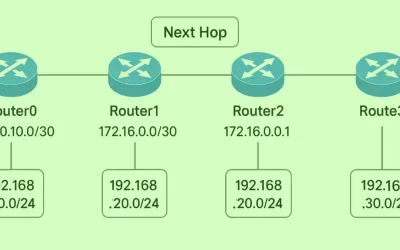
What Is the Next-Hop in Networking?
The next-hop is the IP address of the next router a packet is forwarded to on its way toward its final destination. When a router receives a packet, it looks up the destination in its routing table and forwards the packet to the next-hop — the immediately adjacent router along the best path. That router...
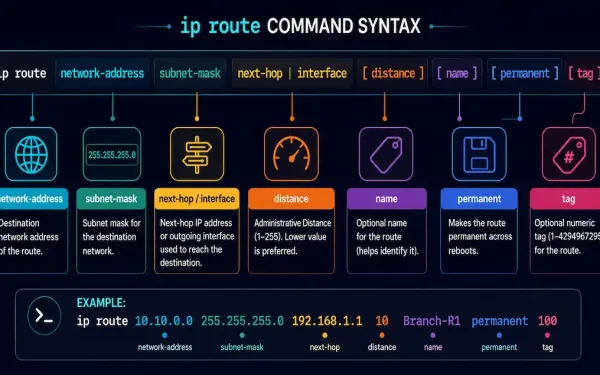
The ip route Command: Syntax and Parameters Explained
The ip route command is the fundamental tool for configuring static routes on Cisco IOS devices. Static routes give a secure, predictable way to direct traffic in small to medium-sized networks, and understanding every parameter of this command is a core CCNA and CCNP skill. Here’s what each parameter does. network-address The first parameter —...
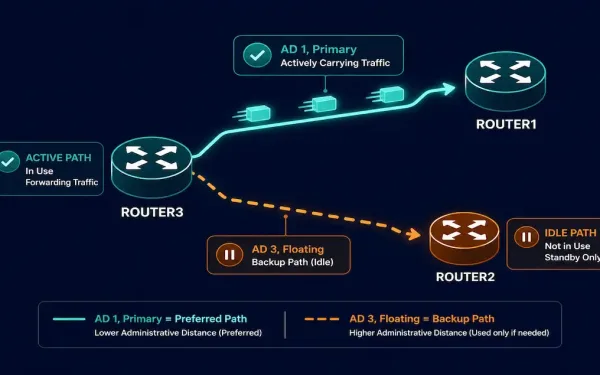
Floating Static Routes: Configuration, Verification, and Troubleshooting
Static routes are manually configured paths in a router’s routing table, giving precise control over traffic flow. Unlike dynamic routing protocols such as EIGRP or OSPF, static routes suit small networks and backup scenarios particularly well. A floating static route takes that idea further: it’s a backup path configured with a higher administrative distance (AD)...
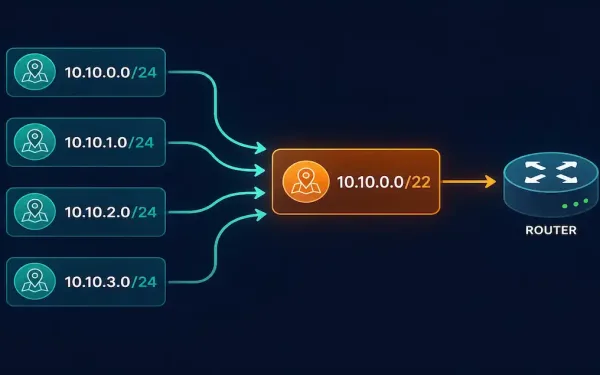
Summary Static Routes: How to Calculate and Configure Them
Static routes are manually configured entries in a router’s routing table that direct traffic to specific destinations. Unlike dynamic routing protocols such as OSPF or EIGRP, static routes offer simplicity and precise control, which makes them a natural fit for small networks, stub networks, or default gateways. For CCNA and CCNP study, mastering static routes...
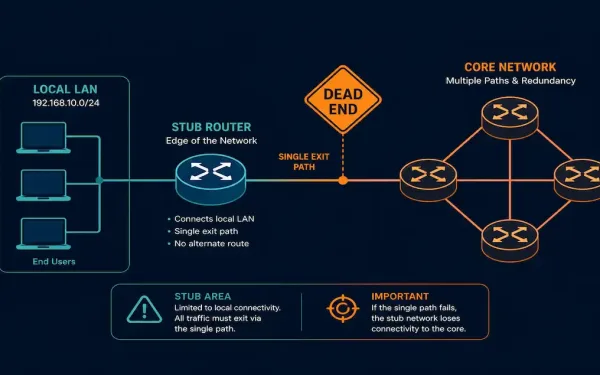
What Is a Stub Network? Routing, Configuration, and Real-World Use
Understanding stub networks and stub routers is fundamental to designing efficient networks, and a direct requirement for the CCNA exam. Stub networks show up in branch office designs, service provider edge connections, and anywhere a network segment has only one path in and out. This guide covers what a stub network is, why static and...
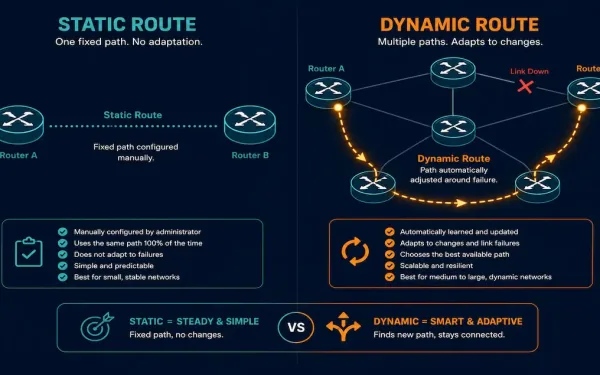
Static Routing vs Dynamic Routing: Complete Explanation
Routing is the process of selecting paths in a network along which to send traffic. It’s the backbone of all data communication in IP networks, enabling devices to exchange data across different networks. Routers forward packets based on the destination IP address, and they learn about remote networks through two primary methods: static routing and...
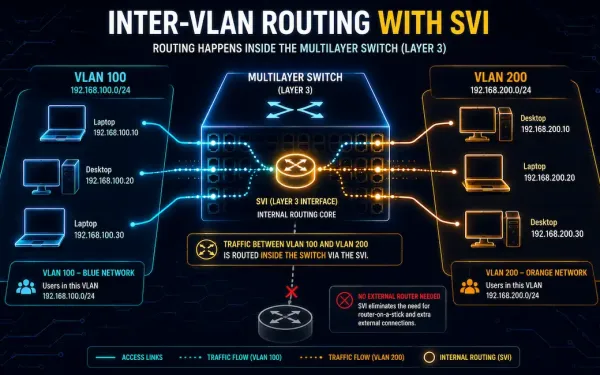
Switch Virtual Interface (SVI): Configuration, Verification, and Troubleshooting
Switch Virtual Interfaces, or SVIs, are a cornerstone of modern enterprise networking. They enable efficient inter-VLAN routing directly on a multilayer switch, no separate router required. This guide covers SVI configuration, verification, troubleshooting, and real-world tradeoffs, for CCNA and CCNP study alike. Evolution of Layer 2 and Layer 3 Switching In early networking, Layer 2...