
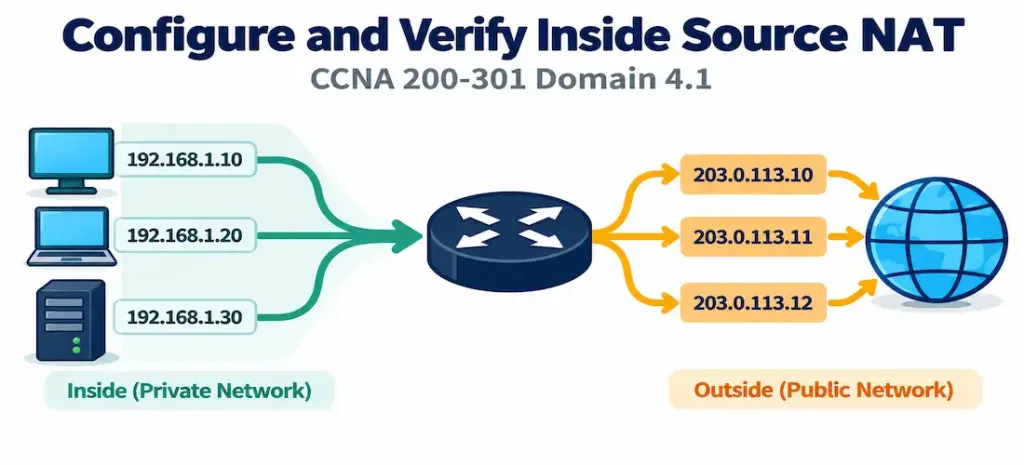
Domain 4.1 | IP Services — 10% of exam
Learning Objectives
By the end of this lesson, you will be able to:
- Explain why NAT exists and distinguish between inside local, inside global, outside local, and outside global addresses.
- Configure static NAT for a one-to-one, permanent private-to-public address mapping.
- Configure dynamic NAT using an address pool and an access list to define which traffic is eligible for translation.
- Configure PAT (NAT overload) to allow many internal hosts to share a single public IP address simultaneously.
- Correctly designate NAT inside and outside interfaces, and explain why NAT will not function at all without this step.
- Verify active NAT translations and overall NAT activity using
show ip nat translationsandshow ip nat statistics.
Key Terms Glossary
| Term | Definition |
|---|---|
| NAT (Network Address Translation) | The process of translating IP addresses as traffic crosses between two networks, most commonly private to public. |
| Inside local address | A host’s real, private IP address as seen from inside the local network. |
| Inside global address | The translated, public-facing IP address representing an inside host as seen from outside the network. |
| Outside local address | An outside host’s IP address as seen from inside the local network — typically identical to its outside global address unless outside NAT is also in use. |
| Outside global address | An outside host’s real, public IP address as seen from the outside network. |
| Static NAT | A permanent, fixed one-to-one mapping between one private IP and one public IP. |
| Dynamic NAT | A translation method that maps private addresses to any currently available address from a defined public IP pool. |
| NAT pool | A defined range of public IP addresses available for dynamic NAT to allocate from. |
| PAT (Port Address Translation) / NAT overload | A translation method mapping many private addresses to a single public IP simultaneously, distinguished by source port number. |
| NAT inside interface | The interface designated as facing the private/internal network, configured with ip nat inside. |
| NAT outside interface | The interface designated as facing the public/external network, configured with ip nat outside. |
Why NAT Exists
The internet was designed around globally unique IP addresses, but the number of available IPv4 addresses is far smaller than the number of devices that need one. NAT solves this by letting an entire private network — potentially thousands of devices — share a much smaller number of public addresses, often just one, when communicating with the outside world. RFC 1918 private address ranges (10.0.0.0/8, 172.16.0.0/12, 192.168.0.0/16) are reserved specifically for this purpose: they’re never routed on the public internet, so any organization can reuse them internally without conflict, and NAT is the mechanism that translates those private addresses into something globally routable at the network’s edge.
There’s a secondary benefit worth naming even though it isn’t NAT’s primary design purpose: because internal addressing is never directly exposed to the outside world, NAT provides a mild degree of obscurity about internal network structure — not a substitute for a firewall or genuine security controls, but a real side effect of the translation process nonetheless.
The Four Address Types: Inside/Outside, Local/Global
This is the single most conceptually confusing part of NAT terminology for most learners, and it’s worth working through carefully rather than memorizing by rote. NAT defines addresses along two independent dimensions: inside vs. outside (which network the host belongs to) and local vs. global (which perspective you’re viewing the address from).
- Inside local address — an inside host’s real address, as configured on that host. Example:
192.168.1.10. - Inside global address — that same inside host, but as it appears to anyone outside the network, after translation. Example:
203.0.113.10. - Outside global address — an outside host’s real address, as configured on that host, from its own network’s perspective. Example: a public web server at
93.184.216.34. - Outside local address — that same outside host, as it appears to inside hosts. In the overwhelming majority of configurations, this is identical to the outside global address, because outside NAT (translating outside addresses as they enter the inside network) is a far less common configuration than inside NAT.
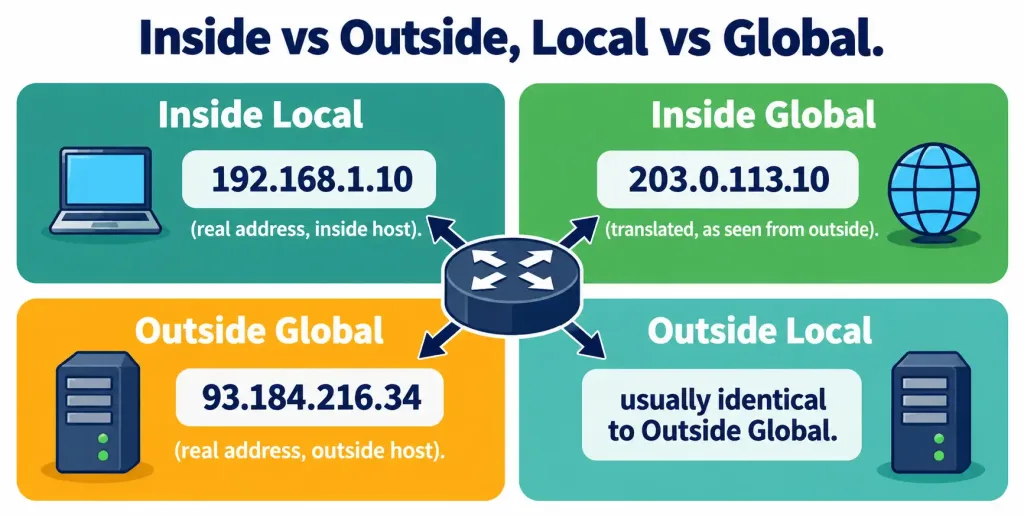
For this objective’s scope — inside source NAT — you’re translating an inside host’s local address into a global one as it heads toward the outside network. Every configuration example in this lesson works with that inside local → inside global translation.
Static NAT: A Permanent One-to-One Mapping
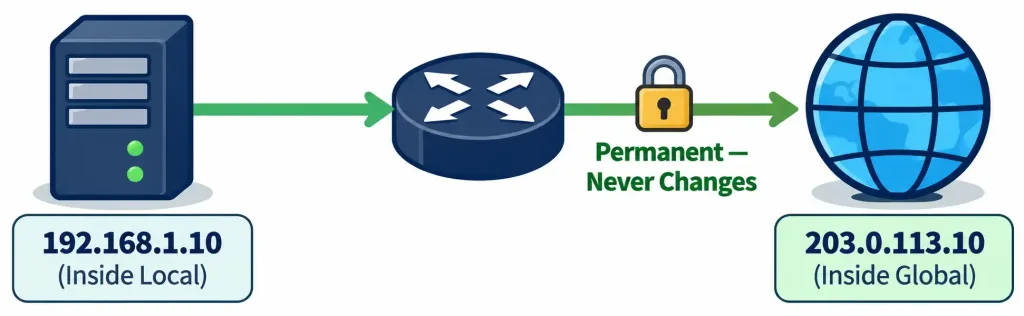
Static NAT creates a fixed, unchanging relationship between exactly one private address and exactly one public address:
ip nat inside source static 192.168.1.10 203.0.113.10This single line tells the router: whenever 192.168.1.10 sends traffic outward, translate its source address to 203.0.113.10, and whenever traffic arrives destined for 203.0.113.10, translate it back and deliver it to 192.168.1.10. This mapping never changes and never expires on its own — it exists in the configuration exactly as typed until an administrator removes it.
Static NAT is the correct choice whenever something needs to be reliably reachable at a consistent public address — most commonly a server. A web server, mail server, or any service that DNS records point to needs its public-facing address to never change, since a shifting address would break every existing DNS record and any cached client connections. Static NAT is inherently a 1:1 relationship, which also means it doesn’t conserve public address space at all — it’s the right tool for reachability, not for address conservation.
Dynamic NAT: Pooled Addresses, First-Come First-Served
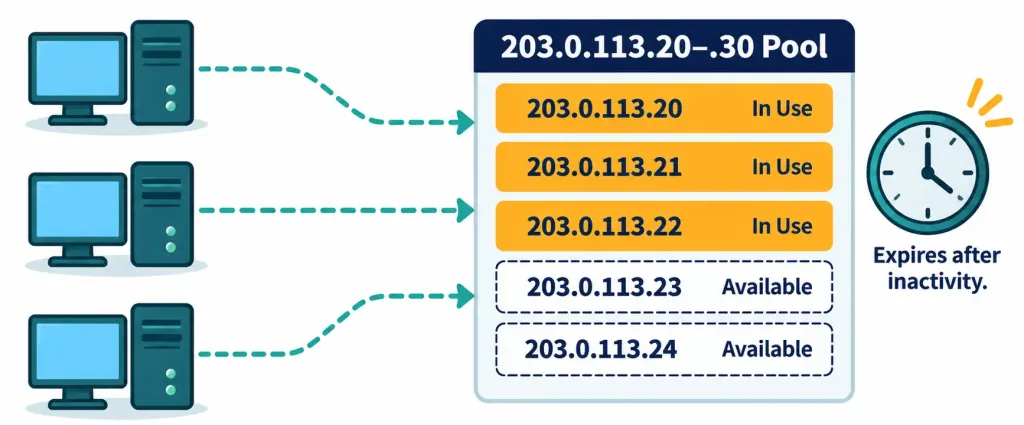
Dynamic NAT maps private addresses to whichever public address is currently available from a defined pool, rather than a fixed permanent assignment:
ip nat pool PUBLIC-POOL 203.0.113.20 203.0.113.30 netmask 255.255.255.0
access-list 1 permit 192.168.1.0 0.0.0.255
ip nat inside source list 1 pool PUBLIC-POOL
Three things are happening here. First, ip nat pool defines the range of public addresses available for translation — in this case, eleven usable addresses from 203.0.113.20 through 203.0.113.30. Second, the access list identifies which internal traffic is eligible for translation at all — here, the entire 192.168.1.0/24 subnet. Third, ip nat inside source list 1 pool PUBLIC-POOL ties the two together: traffic matching access list 1 gets translated using an address drawn from the pool.
The access list here is doing something subtly different from its more familiar role as a security filter. In this context, it is purely a classification tool telling NAT which traffic qualifies for translation — it is never applied to an interface, and it never blocks or permits traffic in the traditional access-control sense. This dual-purpose use of access lists (security filtering in one context, traffic classification in another) is a recurring theme across several IOS features, and NAT is one of the clearest examples of it.
Dynamic NAT’s practical limitation is the same as static NAT’s, just spread across a pool instead of a single address: the pool can run out. If eleven internal hosts are already using all eleven pool addresses and a twelfth host tries to reach the internet, that twelfth host’s traffic fails to translate until one of the existing mappings times out and frees an address — dynamic NAT entries do expire after a period of inactivity, unlike static NAT’s permanent mapping.
PAT (NAT Overload): The Real-World Default
In practice, most deployments today don’t use a straight dynamic pool at all — they use PAT, also called NAT overload, which allows many internal addresses to share a single public IP address simultaneously. This is the exact mechanism that lets an entire household or small office connect dozens of devices to the internet while their ISP has assigned them only one public address.
PAT accomplishes this by tracking not just the source IP address, but the source port number as well. Two internal hosts can both be translated to the same public IP at the same time, because their sessions are distinguished by different source port numbers on the outside — the router maintains a table mapping each unique (inside local IP, inside local port) pair to a unique (inside global IP, inside global port) pair, and uses that table to correctly route return traffic back to the right internal host.
ip nat inside source list 1 interface GigabitEthernet0/1 overloadThe overload keyword is what actually enables the many-to-one, port-based behavior — without it, this would be ordinary dynamic NAT (of the address referenced) rather than PAT. Notice this example references an interface rather than a pool: this is the most common real-world form, where the router uses the IP address already assigned to its own outside-facing interface as the single shared public address, rather than maintaining a separate pool at all. The interface referenced here must be the outside interface specifically, since its own IP address is what becomes the shared translation address for every internal host — referencing the inside interface by mistake would attempt to use a private address as the “public” translation target, which defeats the entire purpose.

Interface Designation: The Step That’s Easy to Forget
None of the translation logic above does anything at all until the router knows which of its interfaces face the inside network and which face the outside:
interface GigabitEthernet0/0
 ip nat inside
interface GigabitEthernet0/1
 ip nat outside
This is arguably the single most common NAT configuration mistake at the CCNA level — not a syntax error in the translation statement itself, but simply forgetting this interface designation step entirely. A perfectly correct ip nat inside source command will silently do nothing if the router hasn’t been told which interfaces represent “inside” and “outside” in the first place, because NAT only evaluates traffic crossing between an interface marked ip nat inside and one marked ip nat outside. Traffic between two inside interfaces, or between two outside interfaces, is never subject to NAT translation regardless of any other configuration present.
Common Misconceptions
- “Configuring the
ip nat inside sourcecommand is enough on its own.” It does nothing without the correspondingip nat insideandip nat outsideinterface designations — this two-part requirement (translation rule plus interface roles) trips up more CCNA candidates than the syntax of the translation commands themselves. - “The access list used in dynamic NAT and PAT configuration acts as a security filter.” In this context, it’s a classification tool identifying which traffic is eligible for translation — it is never applied to an interface and doesn’t block or permit anything in the traditional access-control sense.
- “Dynamic NAT conserves public IP addresses better than static NAT.” Dynamic NAT still maintains a strict one-to-one relationship at any given moment — it just draws that one address from a pool rather than a fixed assignment. PAT is the method that actually allows many-to-one sharing and genuine address conservation.
- “PAT and dynamic NAT are the same thing.” PAT (NAT overload) specifically tracks port numbers to allow many inside addresses to share a single outside address simultaneously; plain dynamic NAT without
overloadstill allocates one pool address per internal host, one at a time. - “The interface used in an overload command can be either the inside or outside interface.” It must be the outside interface, since its IP address becomes the shared translation address every internal host’s traffic appears to come from.
Configure and Verify: Full Lab Walkthrough
Topology: HQ-RTR1 connects an internal network, 192.168.1.0/24, to the internet through an ISP-facing link. GigabitEthernet0/0 (192.168.1.1) faces the inside network; GigabitEthernet0/1 (203.0.113.1/30) faces the ISP. A web server at 192.168.1.10 needs a permanent public address for DNS purposes, while general internal hosts (192.168.1.20 through .250) share internet access via PAT.
   [Internal LAN]  192.168.1.0/24
         |
   Gi0/0 192.168.1.1  [HQ-RTR1]  Gi0/1 203.0.113.1/30  --- [ISP] --- Internet
         |
   WebServer: 192.168.1.10 (needs static public address)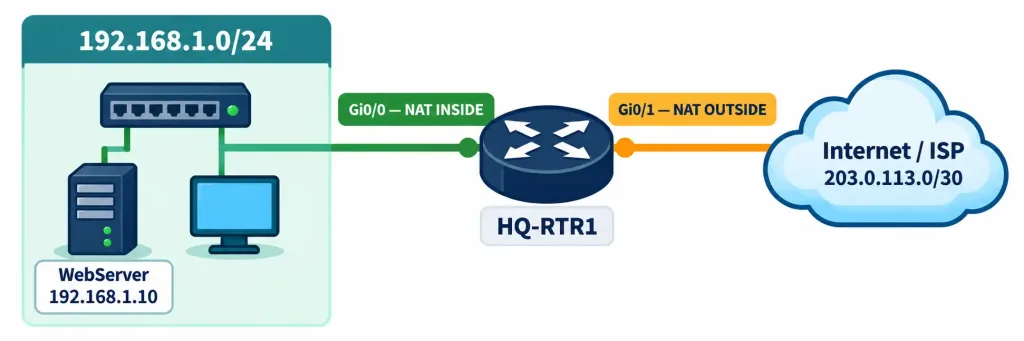
Step 1 — Designate the inside and outside interfaces. Nothing else in this lab functions without this step:
HQ-RTR1(config)# interface GigabitEthernet0/0
HQ-RTR1(config-if)# ip nat inside
HQ-RTR1(config)# interface GigabitEthernet0/1
HQ-RTR1(config-if)# ip nat outside
Step 2 — Configure static NAT for the web server, giving it a permanent public address:
HQ-RTR1(config)# ip nat inside source static 192.168.1.10 203.0.113.10Step 3 — Define an access list identifying the general internal traffic eligible for PAT:
HQ-RTR1(config)# access-list 1 permit 192.168.1.0 0.0.0.255Step 4 — Configure PAT using the outside interface’s own address, so the entire internal subnet shares it:
HQ-RTR1(config)# ip nat inside source list 1 interface GigabitEthernet0/1 overloadStep 5 — Verify active translations from an internal host generating traffic:
HQ-RTR1# show ip nat translations
Pro  Inside global         Inside local          Outside local         Outside global
---  203.0.113.10          192.168.1.10          ---                   ---
tcp  203.0.113.1:1024      192.168.1.20:52344    93.184.216.34:80      93.184.216.34:80
tcp  203.0.113.1:1025      192.168.1.21:60112    93.184.216.34:80      93.184.216.34:80
The first line shows the static mapping for the web server — no port number involved, since it’s a permanent 1:1 relationship. The two lines below show PAT in action: two entirely different internal hosts (192.168.1.20 and 192.168.1.21) are both translated to the same outside interface address, 203.0.113.1, distinguished only by their different source port numbers (1024 and 1025).
Step 6 — Verify overall NAT activity counters:
HQ-RTR1# show ip nat statistics
Total active translations: 3 (1 static, 2 dynamic; 2 extended)
Outside interfaces:
  GigabitEthernet0/1
Inside interfaces:
  GigabitEthernet0/0
Hits: 47  Misses: 0
This summary confirms which interfaces are correctly designated inside and outside, the current translation count broken down by type, and hit/miss counters that indicate whether existing translation table entries are being successfully reused (hits) versus requiring a new lookup or failing entirely (misses) — a rising miss count during troubleshooting is a strong signal something in the NAT configuration isn’t matching traffic as expected.
Step 7 — Clear translations if testing requires a fresh table:
HQ-RTR1# clear ip nat translation *Dynamic and PAT entries expire on their own after a period of inactivity, but this command is useful during lab testing to force an immediate reset rather than waiting out the timeout.
Packet Tracer Practice Activity
Scenario: Your organization needs internet access for its internal LAN, plus a permanently reachable public address for an internal web server. Configure static NAT for the server and PAT for general internal traffic on a single router.
Addressing table:
| Device | Interface | IP Address | Role |
|---|---|---|---|
| HQ-RTR1 | GigabitEthernet0/0 | 192.168.1.1/24 | NAT inside |
| HQ-RTR1 | GigabitEthernet0/1 | 203.0.113.1/30 | NAT outside |
| WebServer | NIC | 192.168.1.10/24 | Needs static NAT to 203.0.113.10 |
| PC1 | NIC | 192.168.1.20/24 | Uses PAT for internet access |
| PC2 | NIC | 192.168.1.21/24 | Uses PAT for internet access |
| ISP-RTR | Serial/Gig (varies by simulation) | 203.0.113.2/30 | Represents the internet edge |
Part 1: Configure basic device settings. Set hostnames and configure all interfaces per the addressing table, including a default route on HQ-RTR1 toward the ISP router.
Part 2: Designate NAT interfaces. Apply ip nat inside on GigabitEthernet0/0 and ip nat outside on GigabitEthernet0/1.
Part 3: Configure static NAT. Add ip nat inside source static 192.168.1.10 203.0.113.10 for the web server.
Part 4: Configure PAT. Create an access list permitting 192.168.1.0/24, then configure ip nat inside source list 1 interface GigabitEthernet0/1 overload.
Part 5: Verify. From PC1 and PC2, generate traffic toward the simulated internet (a ping to the ISP router, or an HTTP request if a server is reachable in the simulation). Confirm on HQ-RTR1 with show ip nat translations that both PCs appear translated to the same outside address with different ports, and that the web server’s static entry is present without a port number.
Expected result: show ip nat translations shows one static entry for the web server and separate dynamic PAT entries for PC1 and PC2, all sharing the outside interface’s IP address but distinguished by port. If no translations appear at all, the most likely cause is a missing or reversed inside/outside interface designation — check that before troubleshooting the translation statements themselves.
Troubleshooting Patterns
“NAT is configured, but show ip nat translations shows nothing at all, even after generating traffic.” Confirm both ip nat inside and ip nat outside are applied to the correct interfaces. This is by far the most common cause of NAT appearing to do nothing — the translation rule itself may be entirely correct.
“NAT works for some internal hosts but not others.” Check the access list used to classify eligible traffic. A wildcard mask that’s too narrow will silently exclude hosts outside its matched range from translation, with no error message indicating why.
“PAT stopped working for new connections, but existing ones still function.” For interface-based PAT, this usually isn’t a pool exhaustion issue (a single IP with port-based multiplexing has enormous session capacity), but for pool-based dynamic NAT specifically, this is a classic pool exhaustion symptom — every address in the pool is currently allocated. show ip nat statistics will show the current translation count relative to the pool size.
“A static NAT entry doesn’t seem to be working, but the syntax looks correct.” Confirm the outside address in the static mapping isn’t also included in a separate dynamic pool or PAT configuration, which can create a conflict. Also confirm the interface designations are correct — static NAT is just as dependent on ip nat inside/ip nat outside as dynamic NAT and PAT are.
“Return traffic from the internet never reaches the internal host, even though outbound traffic works.” This usually points to a missing or incorrect static or dynamic NAT entry for the specific service, or in more advanced scenarios, a missing port-forwarding style static NAT entry when a specific TCP or UDP port needs to be exposed rather than the whole host.
Frequently Asked Questions
Can a single router run static NAT, dynamic NAT, and PAT all at the same time? Yes — as shown in this lesson’s lab walkthrough, it’s common to combine a static mapping for a server that needs a permanent address with PAT for general internal traffic, all on the same router and the same set of NAT inside/outside interfaces.
Does NAT translate the destination address as well as the source? Inside source NAT, the focus of this objective, translates the source address of outbound traffic (and correspondingly the destination address of the matching return traffic). Translating destination addresses on inbound traffic is a related but distinct concept sometimes called destination NAT or port forwarding, and is not part of this objective’s scope.
What happens to a dynamic NAT or PAT translation table entry over time? Unlike static NAT, which never expires on its own, dynamic and PAT entries have an idle timeout and are removed from the table automatically after a period of inactivity, freeing that address (or port, for PAT) for reuse.
Is the access list used in NAT configuration ever applied directly to an interface? No — in the context of NAT configuration, the access list is referenced only within the ip nat inside source list command itself, purely to classify eligible traffic. It is not applied with an ip access-group command the way a traditional security access list would be.
Why would an organization use a pool-based dynamic NAT instead of PAT if PAT is more efficient with addresses? Some specific applications behave poorly with port translation, or an organization may have enough spare public addresses that straightforward one-to-one dynamic mapping (still with the flexibility of a pool rather than fully static assignments) meets their needs without added complexity — though in most modern deployments, PAT is genuinely the default choice.
NAT and PAT Configuration: Practice Quiz
Static NAT, Dynamic NAT, PAT, Interface Roles, and Troubleshooting
Summary
- NAT translates IP addresses as traffic crosses between networks, most commonly translating private RFC 1918 addresses to public addresses for internet-bound traffic.
- Inside local, inside global, outside local, and outside global describe an address from two independent dimensions — inside/outside network and local/global perspective; this objective focuses on inside source translation.
- Static NAT creates a permanent one-to-one mapping, ideal for servers needing a consistent public address; dynamic NAT draws from a pool on a first-come, first-served basis; PAT (NAT overload) allows many hosts to share one address simultaneously using port numbers.
- NAT inside and outside interfaces must be explicitly designated with
ip nat insideandip nat outside— forgetting this step is the most common reason NAT appears not to work despite an otherwise correct translation rule. show ip nat translationsconfirms active mappings, andshow ip nat statisticssummarizes overall NAT activity, interface roles, and hit/miss counters for troubleshooting.



