
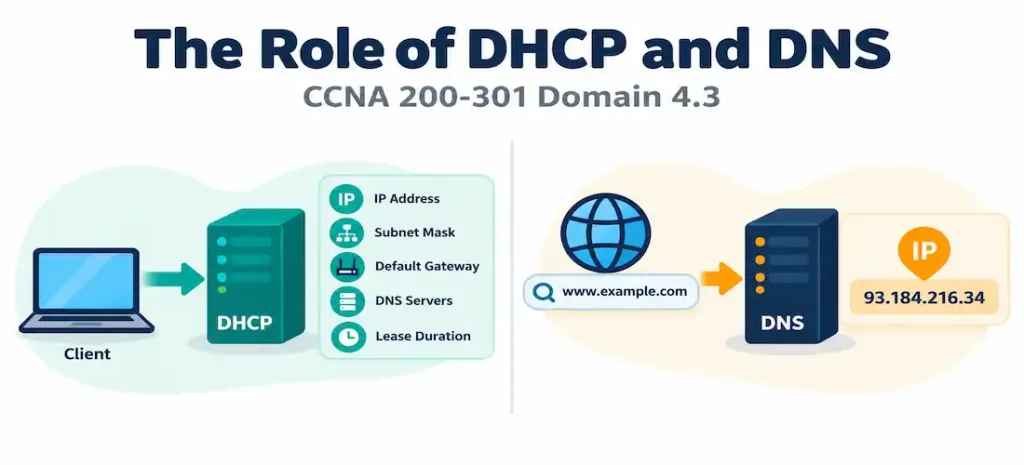
Domain 4.3 | IP Services — 10% of exam
Learning Objectives
By the end of this lesson, you will be able to:
- Explain the problem DHCP solves and describe each step of the DORA process in order.
- List the addressing information DHCP can automatically provide to a client, beyond just an IP address.
- Explain the concept of a DHCP lease, including renewal and expiration behavior.
- Explain the problem DNS solves and describe the general path a DNS query takes from a client to an authoritative answer.
- Identify common DNS record types and what each one is used for.
- Explain how DHCP and DNS work together in practice, rather than as two unrelated services.
Key Terms Glossary
| Term | Definition |
|---|---|
| DHCP (Dynamic Host Configuration Protocol) | A protocol that automatically assigns IP addressing information to clients, eliminating manual configuration on every host. |
| DORA | The four-step DHCP process: Discover, Offer, Request, Acknowledge. |
| DHCP lease | The period of time a client is permitted to use an assigned IP address before it must renew or release it. |
| DHCP scope | The range of IP addresses (and associated options) a DHCP server is configured to hand out for a given subnet. |
| DNS (Domain Name System) | A hierarchical system that translates human-readable domain names into the IP addresses computers use to route traffic. |
| Recursive resolver | A DNS server that performs the full lookup process on behalf of a client, querying other servers as needed. |
| Root server | The top of the DNS hierarchy, responsible for directing queries to the correct top-level domain server. |
| TLD (Top-Level Domain) server | A DNS server responsible for a specific domain suffix (.com, .org, .net), directing queries to the correct authoritative server. |
| Authoritative server | The DNS server that holds the actual, definitive record for a specific domain and can answer a query directly. |
| A record | A DNS record type mapping a domain name to an IPv4 address. |
| PTR record | A DNS record type mapping an IP address back to a domain name — the reverse of an A record. |
The Problem DHCP Solves
Every device on an IP network needs, at minimum, an IP address, a subnet mask, and a default gateway before it can communicate at all — and in practice, it also needs to know which DNS servers to query for name resolution. Manually typing this information into every laptop, phone, printer, and server on a network of any real size is tedious, error-prone, and doesn’t scale. A typo in a subnet mask, a duplicate IP address assigned to two devices by mistake, or an outdated gateway address left over after a network redesign are all everyday consequences of manual addressing at scale.
DHCP (Dynamic Host Configuration Protocol) exists to eliminate this entirely. A DHCP-enabled client requests addressing information automatically the moment it connects to a network, and a DHCP server responds with everything needed: an IP address, subnet mask, default gateway, DNS server addresses, and potentially other options like an NTP server address or a domain name suffix. The client can start communicating within seconds, with zero manual configuration, and the network administrator manages addressing centrally from the DHCP server’s configuration rather than device by device.
The DORA Process
DHCP’s client-server exchange follows a fixed four-step sequence, commonly remembered by the acronym DORA:
- Discover — the client, which has no IP address yet, broadcasts a DHCPDISCOVER message to the local network, essentially asking, “is any DHCP server out there willing to give me an address?” Because the client has no address of its own yet, this message is sent as a broadcast, addressed to every device on the local segment.
- Offer — any DHCP server that receives the Discover and has an available address responds with a DHCPOFFER, proposing a specific IP address and the associated configuration details (subnet mask, gateway, DNS servers, lease time).
- Request — the client selects one offer (if multiple servers responded) and broadcasts a DHCPREQUEST, formally asking to use that specific offered address. This message is also broadcast rather than sent directly back to the offering server, specifically so that any other DHCP servers that made competing offers can see the request and understand they weren’t selected, allowing them to release their offered address back into their own available pool.
- Acknowledge — the selected server responds with a DHCPACK, confirming the assignment. The client can now begin using the address, and the lease officially begins.
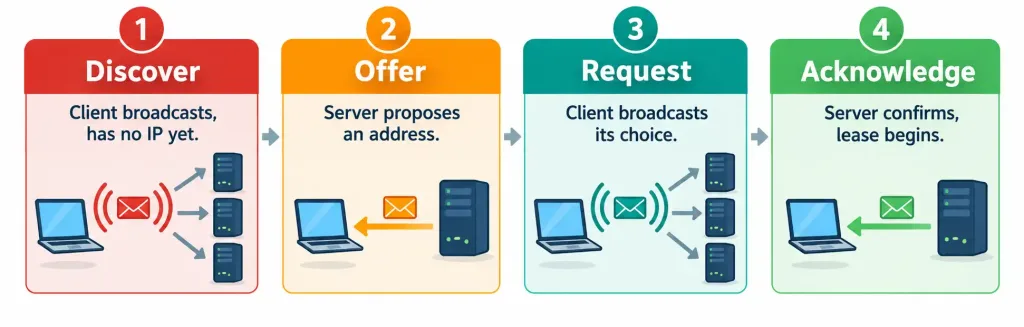
Every message in this exchange uses UDP, with clients sending from port 68 and servers listening on port 67 — worth knowing at a recognition level, since it explains why DHCP relay (covered in objective 4.6) matters: broadcast-based Discover messages don’t cross subnet boundaries on their own, which is precisely the problem DHCP relay solves for centralized DHCP server deployments.
What DHCP Actually Provides
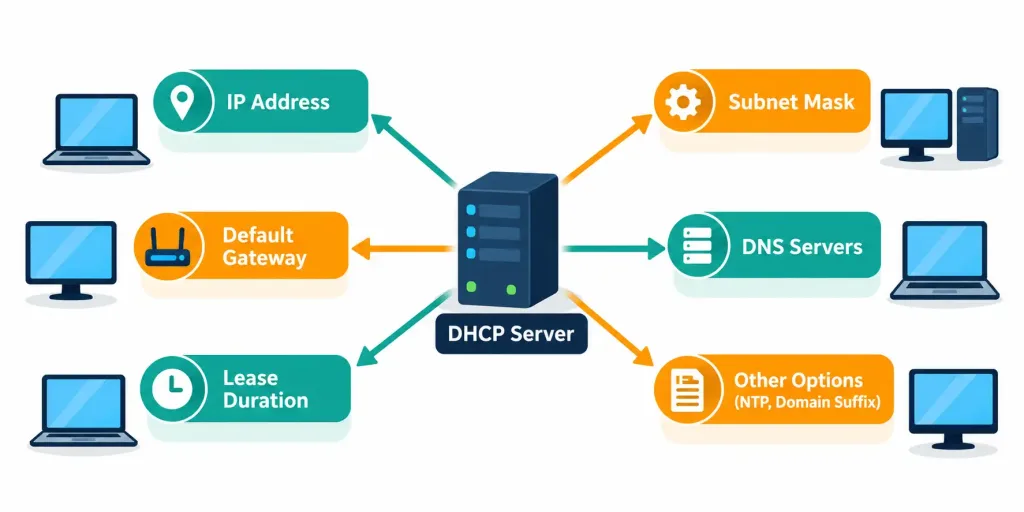
It’s easy to think of DHCP as “the thing that hands out IP addresses,” but a single DHCP transaction typically delivers considerably more than just an address:
- The IP address itself
- The subnet mask
- The default gateway address
- One or more DNS server addresses
- The lease duration
- Optionally, a wide range of additional options: a domain name suffix, an NTP server address, a TFTP server address for devices that need to boot a configuration file, and many other vendor-specific or standard options defined in the DHCP specification
This breadth is exactly why DHCP scales so well operationally: changing a single setting on the DHCP server — say, migrating to a new DNS server — automatically propagates to every client that renews its lease afterward, with no need to touch each device individually.
DHCP Leases: Not a Permanent Assignment
An IP address handed out via DHCP isn’t assigned forever — it comes with a lease, a defined period of time the client is permitted to use that address before needing to renew it. As a lease approaches expiration, the client attempts to renew it directly with the server that originally issued it, typically starting at the halfway point of the lease duration (commonly referred to as the T1 timer).
If that renewal attempt fails for some reason, the client tries again later in the lease period (the T2 timer, commonly around 87.5% of the lease duration), this time broadcasting to any DHCP server rather than only the original one. If the lease expires entirely without a successful renewal, the client must release the address and restart the full DORA process from scratch to obtain a new one.
This lease mechanism exists specifically to reclaim addresses from devices that have left the network — a laptop that’s been powered off for a month shouldn’t permanently hold an address it’s no longer using, and the lease timeout is what eventually returns that address to the available pool.
DHCP Scopes and Address Exhaustion
A DHCP scope defines the actual range of addresses a server is configured to hand out for a given subnet, along with any options (DNS servers, gateway, lease time) tied to that scope. A scope is typically configured as a contiguous range — for example, 192.168.1.10 through 192.168.1.200 — deliberately leaving room outside that range for statically assigned devices like printers, servers, and network infrastructure that need a predictable, unchanging address rather than a leased one.
Scope sizing matters more than it might initially seem. A scope that’s too small for the number of devices actually requesting addresses will exhaust its available pool, leaving later-arriving clients unable to obtain a lease at all — the practical, everyday symptom of this being a device falling back to a self-assigned APIPA address, discussed further in the troubleshooting section below. Conversely, a scope that overlaps with another DHCP server’s scope on the same segment risks two different servers offering the same address to two different clients, producing a duplicate-address conflict that can be genuinely disruptive to diagnose after the fact, since neither client did anything wrong from its own perspective.
The Problem DNS Solves
Every device on the internet is ultimately reached by an IP address, but IP addresses are difficult for humans to remember and don’t survive a server migration to new infrastructure. DNS (Domain Name System) solves both problems by providing a hierarchical, distributed system that translates memorable domain names — example.com — into the numeric IP addresses that actually route traffic. Without DNS, using the modern internet at human scale would be effectively impossible; every bookmark, every typed URL, and every email address would need to reference a raw IP address instead of a name, and that address would need to be manually updated by every single user anytime the underlying server changed.
How a DNS Query Actually Resolves
A simplified but conceptually accurate path for resolving a domain name looks like this: a client queries a configured recursive resolver (often provided by an ISP, an organization’s internal DNS server, or a public option like a well-known third-party resolver). If that resolver doesn’t already have the answer cached from a previous query, it queries a root server, which doesn’t know the specific answer but knows which TLD server is responsible for the domain’s suffix (.com, .org, .net, and so on).
The TLD server, in turn, doesn’t know the specific answer either, but knows which authoritative server holds the actual, definitive record for that specific domain. The authoritative server provides the real answer, which travels back up the chain to the resolver, gets cached for future queries, and is finally delivered to the original client.
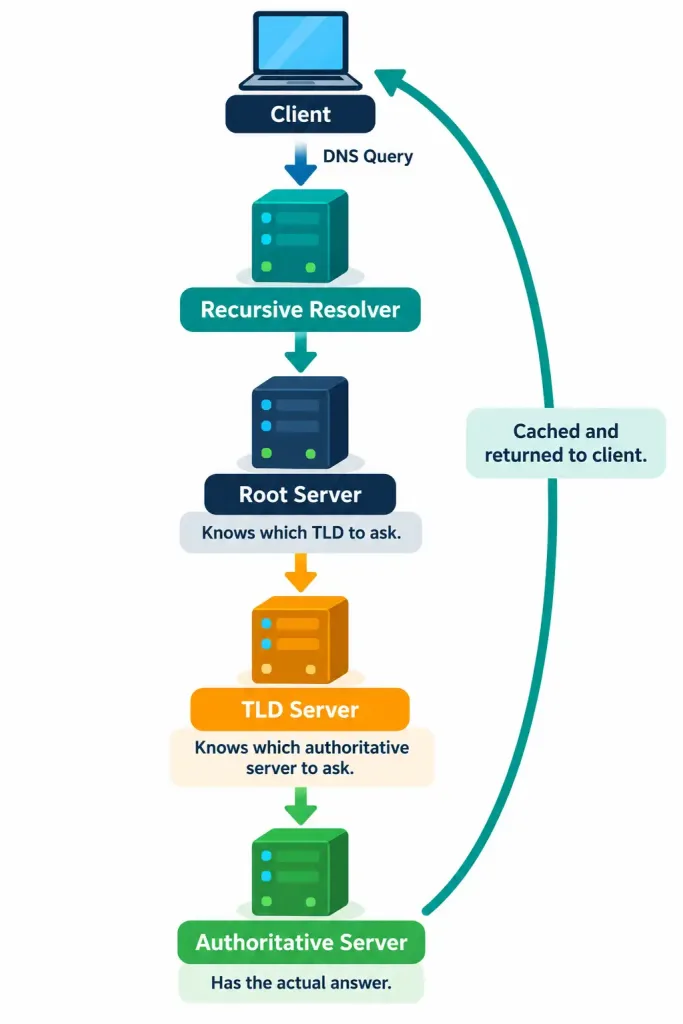
This layered structure is what allows DNS to scale globally — no single server needs to know every domain’s IP address; each layer only needs to know which server to ask next, narrowing the search at each step.
Common DNS Record Types
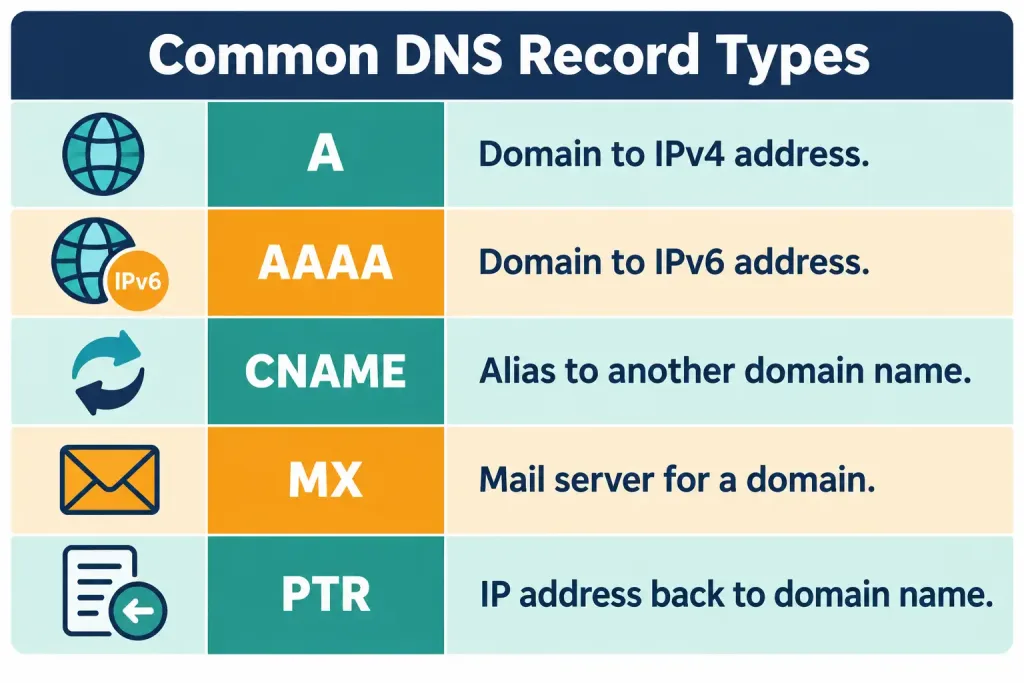
DNS doesn’t only store domain-to-IP mappings; several record types exist for different purposes, and recognizing the most common ones is useful both for CCNA and for real-world troubleshooting:
| Record Type | Purpose |
|---|---|
| A | Maps a domain name to an IPv4 address |
| AAAA | Maps a domain name to an IPv6 address |
| CNAME | Maps an alias domain name to another domain name (a canonical name), rather than directly to an address |
| MX | Specifies the mail server(s) responsible for accepting email on behalf of a domain |
| PTR | Maps an IP address back to a domain name — the reverse of an A record, used for reverse DNS lookups |
DHCP and DNS Working Together
These two services are frequently taught as separate topics, but in practice they’re tightly connected: DHCP is very often the mechanism that tells a client which DNS servers to use in the first place. A DHCPACK message commonly includes DNS server addresses as one of its delivered options, meaning a client can obtain both an IP address and full DNS resolution capability from a single automatic exchange, with no separate manual DNS configuration step required.
This is precisely why a device that can reach an IP address directly but fails to resolve any domain name is often a DHCP-related DNS option issue rather than a DNS server itself being down — the client may never have received correct DNS server information in the first place.
Common Misconceptions
- “DHCP only assigns an IP address.” A single DHCP transaction commonly delivers the subnet mask, default gateway, DNS servers, lease duration, and potentially many other options, not just an address.
- “The DHCPREQUEST message is sent directly to the server that made the offer.” It’s broadcast, specifically so that any other DHCP servers that made competing offers can see it and release their unused offered addresses.
- “An IP address obtained via DHCP is permanent once assigned.” It comes with a lease and must be periodically renewed; an unrenewed lease eventually expires and the address returns to the available pool.
- “DNS servers store every domain’s IP address directly.” Most DNS servers along the resolution path don’t know the final answer themselves — they know which server to ask next, narrowing the search at each layer of the hierarchy.
- “DHCP and DNS are unrelated services that happen to both matter for networking.” DHCP very commonly delivers the DNS server addresses a client will use, tightly linking the two in typical real-world operation.
Verification: Confirming DHCP and DNS Are Working
This objective is framed as explaining the role of these services rather than a full configuration walkthrough, but a few verification commands are worth knowing at a recognition level, since they confirm whether these concepts are actually functioning correctly on real equipment.
On a Cisco router acting as a DHCP server, active leases can be reviewed with:
Router# show ip dhcp binding
IP address       Client-ID/Hardware address    Lease expiration       Type
192.168.1.20      0100.5056.9a3f.21             Sep 08 2026 03:14 PM   Automatic
192.168.1.21      0100.5056.9a3f.22             Sep 08 2026 03:16 PM   Automatic
This confirms which addresses are currently leased, to which clients, and when each lease expires — useful for confirming DHCP is actively assigning addresses as expected.
On a Windows client, ipconfig /all displays the addressing information that client actually received via DHCP, including the DNS servers it was assigned — a fast way to confirm whether a client-side name resolution problem stems from a missing or incorrect DNS server address rather than a routing issue.
For confirming DNS resolution itself is functioning, a simple lookup tool (nslookup on Windows, dig or host on Linux/macOS) queries a domain name directly and reports the resolved address, isolating whether a connectivity problem is a DNS resolution failure versus a routing or reachability failure further downstream.
Troubleshooting Patterns
“A device can ping an IP address directly but can’t reach anything by domain name.” This is the classic signature of a DNS problem rather than a routing problem — check the device’s configured DNS server addresses first, since a missing or unreachable DNS server produces exactly this symptom while basic IP connectivity remains fine.
“A device has no IP address at all, or has a 169.254.x.x address.” A self-assigned address in that specific range indicates the device attempted DHCP, received no response, and fell back to APIPA (Automatic Private IP Addressing) rather than obtaining a real lease — check whether the DHCP server is reachable, whether its scope has available addresses left, and whether DHCP relay is correctly configured if the server sits on a different subnet.
“A client seems to be using outdated DNS server addresses even after the DHCP server’s configuration was updated.” The client is likely still operating on an existing lease obtained before the change and hasn’t yet renewed. Forcing a lease renewal (or waiting for the natural renewal cycle) will pick up the updated configuration.
“Two devices ended up with the same IP address.” This is a DHCP conflict, and it typically indicates either a statically configured device using an address that falls within the DHCP scope’s range, or a DHCP server scope that overlaps with another DHCP server’s scope on the same segment.
Frequently Asked Questions
Can a network have more than one DHCP server? Yes, but their scopes must be carefully coordinated to avoid overlapping address ranges, which would otherwise risk two servers offering the same address to different clients simultaneously.
What happens if a client doesn’t renew its DHCP lease in time? The lease expires, and the client must restart the full DORA process to obtain a new address, potentially receiving a different address than it had before if its previous one has since been reassigned.
Is DNS only used for websites? No — DNS resolves names for any network resource that’s referenced by domain name, including internal corporate resources, mail servers (via MX records), and many application-layer services that rely on name resolution rather than hardcoded addresses.
Does every DNS query travel all the way to a root server? No — most queries are answered from a resolver’s cache, since a resolver stores previously resolved answers for a period of time (the record’s TTL) rather than repeating the entire hierarchical lookup for every single request.
Why would DHCP hand out a domain name suffix as an option, not just a DNS server address? The domain name suffix option lets a client automatically append a default domain to an unqualified hostname during lookups, which is a convenience feature reducing the need to type a fully qualified domain name for internal resources.
DHCP and DNS Fundamentals: Practice Quiz
DORA, DHCP Leases, DNS Records, APIPA, and Name Resolution
Summary
- DHCP automatically assigns IP addressing information — address, subnet mask, gateway, DNS servers, and more — eliminating the need for manual configuration on every network device.
- The DORA process (Discover, Offer, Request, Acknowledge) governs how a client obtains an address, with both the Discover and Request messages broadcast for specific structural reasons.
- DHCP addresses are leased, not permanent; a client must periodically renew its lease or restart the DORA process entirely once the lease expires.
- DNS translates human-readable domain names into IP addresses through a hierarchical system of root, TLD, and authoritative servers, with most queries actually answered from a resolver’s cache.
- Common DNS record types include A (IPv4 address), AAAA (IPv6 address), CNAME (alias), MX (mail server), and PTR (reverse lookup), each serving a distinct purpose.
- DHCP and DNS are closely linked in practice — DHCP commonly delivers the DNS server addresses a client will use, meaning a name-resolution failure is often traceable back to a DHCP-provided configuration issue rather than DNS itself being broken.



