
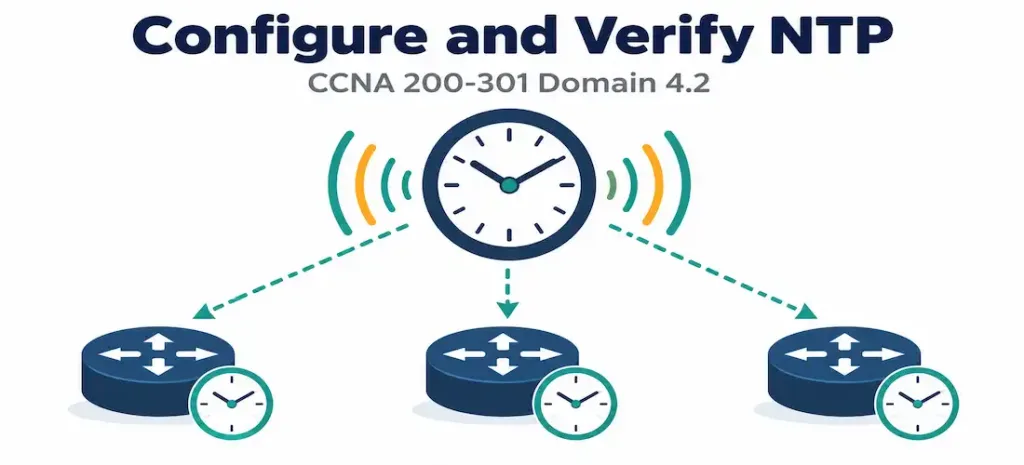
Domain 4.2 | IP Services — 10% of exam
Learning Objectives
By the end of this lesson, you will be able to:
- Explain why synchronized clocks matter operationally, beyond simply displaying the correct time.
- Distinguish between a device operating in NTP client mode and NTP server mode, and explain why a single device commonly does both simultaneously.
- Explain the concept of stratum and correctly interpret which of two stratum numbers represents a more authoritative time source.
- Configure a router as an NTP client pointing to an upstream time source.
- Verify NTP synchronization state and stratum level using
show ntp statusandshow ntp associations.
Key Terms Glossary
| Term | Definition |
|---|---|
| NTP (Network Time Protocol) | The protocol used to synchronize device clocks across a network. |
| NTP client | A device configured to synchronize its own clock to an upstream time source. |
| NTP server | A device configured to provide time to downstream devices requesting synchronization. |
| Stratum | A number indicating how many hops a device is removed from an authoritative, reference-clock-connected time source. |
| Stratum 0 | A reference clock itself (an atomic clock or GPS receiver) — not directly network-addressable. |
| Stratum 1 | A device directly attached to a stratum 0 reference clock, and therefore the most authoritative network-reachable time source. |
| Clock drift | The gradual inaccuracy that accumulates in a device’s internal clock over time without periodic correction. |
| NTP association | The relationship between an NTP client and a specific time source it is synchronizing against, visible in show ntp associations. |
| Offset | The measured difference between a device’s current clock and the time reported by its NTP source. |
Why Synchronized Time Actually Matters
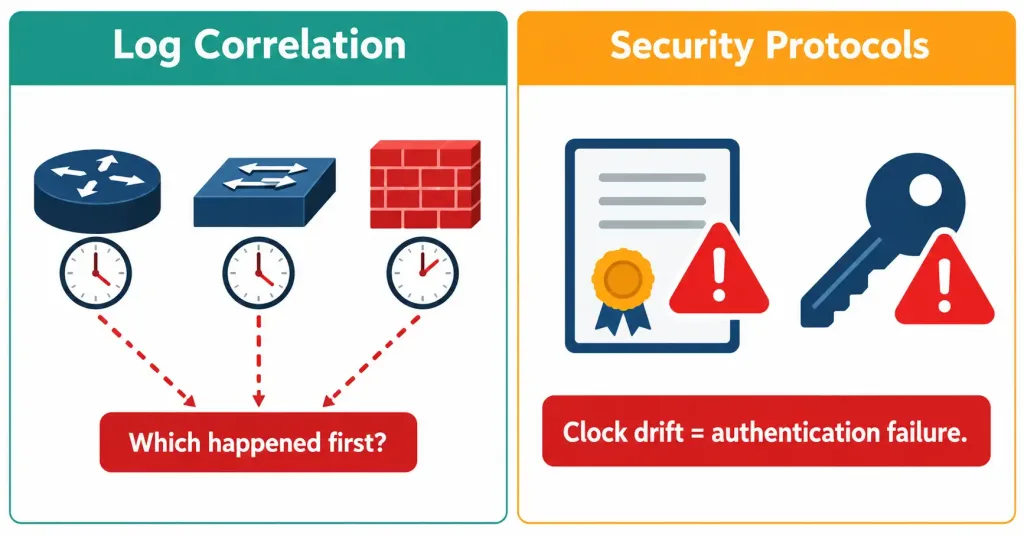
It’s tempting to file NTP under “minor administrative housekeeping” — after all, what’s really at stake if a router’s clock is a few minutes off? In practice, quite a lot. Two operational problems make accurate, synchronized time genuinely critical rather than cosmetic.
First, log correlation. When troubleshooting an incident that touches multiple devices — a router, a switch, a firewall, a server — the only way to reconstruct the actual sequence of events is by comparing timestamps across all of their logs. If each device’s clock is drifting independently, “Router A logged an interface flap at 14:32:07 and Firewall B logged a blocked connection at 14:32:11” might actually describe events that happened in the opposite order, or four minutes apart, or four seconds apart — you simply can’t know, and reconstructing what happened during a security incident or an outage becomes far harder than it needs to be.
Second, and more concretely disruptive: security protocols that depend on time. Certificate validation checks whether a certificate’s validity window (not-before and not-after dates) currently applies — a device with a badly wrong clock can reject perfectly valid certificates, or worse, accept expired ones. Kerberos authentication, used in many enterprise environments, explicitly rejects authentication attempts if the client and server clocks differ by more than a configured tolerance (commonly five minutes), specifically as a defense against certain replay attacks. An organization with unsynchronized clocks can experience mysterious authentication failures that have nothing to do with passwords or permissions at all.
Client and Server Mode: Often the Same Device, Different Roles
NTP defines two roles a device can play, and understanding that they aren’t mutually exclusive is the key conceptual point of this objective.
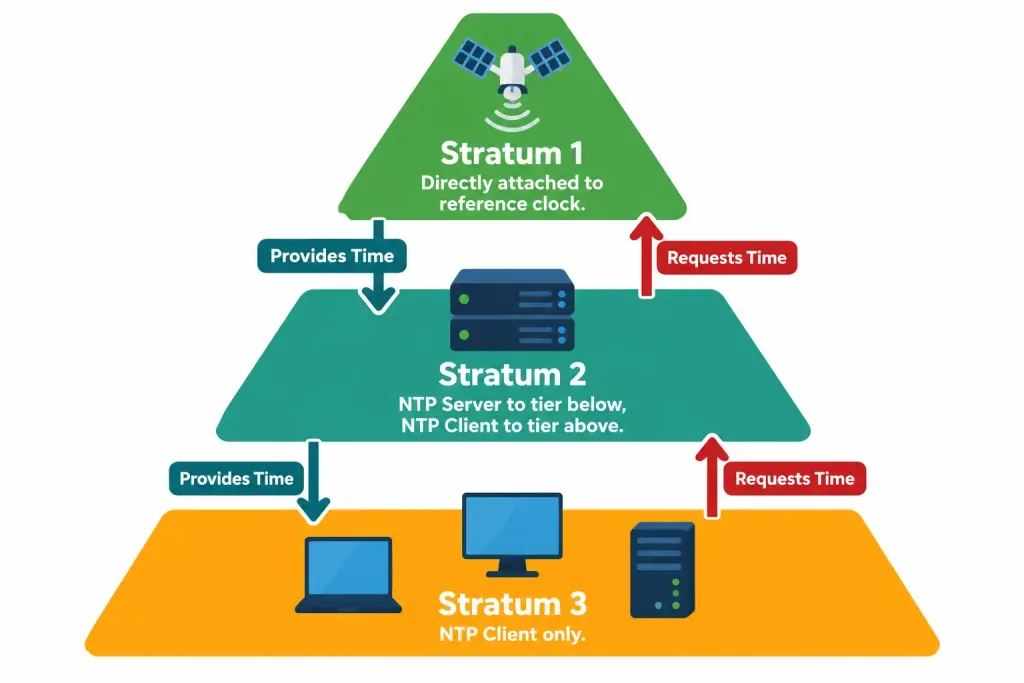
A device in NTP client mode synchronizes its own clock to an upstream source — it’s asking, “what time is it, according to something more authoritative than me?” A device in NTP server mode answers that same question for others — it’s providing time to any downstream device that asks.
Most real deployments use both roles on the same device simultaneously, forming a hierarchy. A core router might synchronize to an external, highly authoritative time source (acting as a client toward that source) while also serving time to every access-layer switch beneath it (acting as a server toward those switches). Each of those switches, in turn, might do the same for other devices further down the hierarchy. This layered structure is precisely what stratum numbers are designed to describe.
Stratum: How Authoritative Is This Time Source?
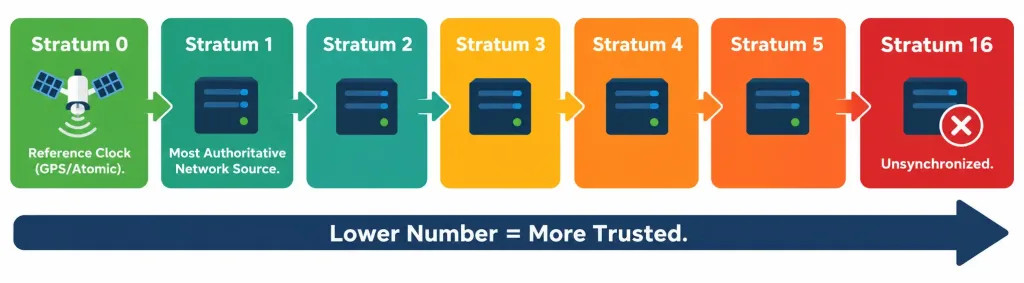
Stratum measures how many hops a device sits away from a true reference clock. Stratum 0 refers to the reference clocks themselves — atomic clocks, GPS receivers — devices so precise they’re used as the ultimate source of truth, but which aren’t directly addressable on an IP network. Stratum 1 devices are directly attached to a stratum 0 source and are the most authoritative time sources actually reachable over a network. A device synchronizing to a stratum 1 source becomes stratum 2; a device synchronizing to that stratum 2 device becomes stratum 3; and so on.
The counterintuitive part, worth stating explicitly because it trips up a fair number of candidates: lower stratum numbers are more authoritative, not higher ones. A stratum 2 source is more trustworthy and more accurate than a stratum 5 source, in the same conceptual direction as syslog’s severity numbering (covered in objective 4.5) — both use “lower number means more significant/authoritative,” which is worth remembering as a pattern rather than two unrelated facts to separately memorize.
Configuring NTP
The core configuration for a device acting as an NTP client is a single line:
ntp server 192.168.1.1This tells the router to synchronize its clock against the device at 192.168.1.1. Multiple ntp server statements can be configured simultaneously, pointing at different sources — NTP is designed to compare multiple sources against each other and favor the most consistent and reliable one, providing resilience if a single source becomes unreachable or starts reporting inaccurate time.
A router automatically operates in NTP server mode toward any device that queries it, without requiring separate configuration to “turn on” server functionality — if a downstream device points its own ntp server command at this router’s address, this router will respond and provide time, whether or not it’s also configured as a client of some other upstream source itself. This dual-role behavior being automatic, rather than something you explicitly enable, is a detail worth internalizing: there’s no separate “become an NTP server” command distinct from simply being reachable and running NTP.
For a device intended to act as an authoritative time source itself — useful in a lab environment with no real external time source available — the ntp master command configures the router to use its own internal clock as a stratum-appropriate reference (stratum 8 by default) for anything that synchronizes against it:
ntp master 5The optional number sets the stratum this router will claim (here, 5), useful for controlling how far down the trust hierarchy this artificially-authoritative source is treated relative to other sources that might exist in a mixed lab and production environment.
NTP Authentication: A Brief but Worthwhile Addition
By default, a router will synchronize against any device that answers its ntp server request, which is a reasonable assumption on a trusted internal network but a genuine risk if an NTP request could reach an untrusted or spoofed source — a malicious or misconfigured device claiming to be an authoritative time source could feed a router deliberately incorrect time, potentially disrupting certificate validation or Kerberos authentication as a side effect. NTP authentication addresses this by requiring a matching key between client and server before synchronization is accepted:
ntp authentication-key 1 md5 MyStrongKey
ntp trusted-key 1
ntp server 192.168.1.1 key 1
This isn’t the primary focus of this objective’s testable detail, but recognizing that NTP supports authentication — and understanding why an organization might want it on a network where NTP traffic could originate from outside a fully trusted boundary — rounds out the practical picture beyond the basic client/server mechanics.
Verifying NTP Synchronization
Two commands cover nearly everything you need to confirm NTP is working correctly:
HQ-RTR1# show ntp status
Clock is synchronized, stratum 3, reference is 192.168.1.1
nominal freq is 250.0000 Hz, actual freq is 250.0000 Hz, precision is 2**18
reference time is EA5C6A21.5A3F0000 (14:32:01.352 UTC Tue Sep 1 2026)
clock offset is 0.0342 msec, root delay is 12.45 msec
The most important line is the first one: Clock is synchronized confirms NTP is actually working, not just configured, and stratum 3 tells you exactly how many hops removed this device is from an authoritative source. If synchronization hasn’t yet completed, this line instead reads Clock is unsynchronized, which is the first thing to check when NTP configuration seems correct but something still feels wrong.
HQ-RTR1# show ntp associations
      address         ref clock       st   when   poll reach  delay  offset   disp
*~192.168.1.1     .GPS.             1     34     64   377   1.2     0.034    0.9
 * sys.peer, # selected, + candidate, - outlyer, x falseticker, ~ configured
This output shows each configured NTP association individually — useful when multiple ntp server statements are configured and you need to see which source is actually being used (marked with *, indicating the current system peer) versus which are configured but not currently selected as the best source.
[See Diagram: Lab Topology — NTP Client/Server Hierarchy]
Common Misconceptions
- “Higher stratum numbers are more authoritative, since they sound bigger or more advanced.” The opposite is true — lower stratum numbers indicate a source closer to an authoritative reference clock, and are therefore more trustworthy.
- “A device needs a separate command to act as an NTP server, distinct from being a client.” NTP server behavior is automatic for any reachable device running NTP — there’s no dedicated “enable server mode” command separate from simply configuring the protocol and being network-reachable.
- “NTP is just a nice-to-have for displaying the correct time on the CLI.” Accurate time is operationally critical for log correlation during troubleshooting and for security protocols like certificate validation and Kerberos, which can fail outright if clocks drift too far apart.
- “A router can only be an NTP client or an NTP server, not both.” Most real-world deployments have devices acting as both simultaneously — synchronizing upward to a more authoritative source while serving time downward to less authoritative devices.
- “
show ntp statusshowing configuration means synchronization has succeeded.” The command can show a correctly configured NTP relationship that is stillunsynchronizedif the source is unreachable or hasn’t yet been contacted successfully — always check the synchronization status explicitly, not just whether a server is configured.
Configure and Verify: Full Lab Walkthrough
Topology: HQ-RTR1 sits at the network core and needs to serve as the authoritative internal time source, since no reliable external time source is available in this lab environment. BR-RTR1, a branch router, should synchronize to HQ-RTR1 as its NTP client.
   [HQ-RTR1]  10.1.1.1  <---WAN link--->  10.1.1.2  [BR-RTR1]
   (NTP master, acting as authoritative source)      (NTP client of HQ-RTR1)
Step 1 — Configure HQ-RTR1 as an authoritative source for this lab, since no real external stratum 1 source is reachable:
HQ-RTR1(config)# ntp master 3This makes HQ-RTR1 claim stratum 3 for anything synchronizing against it — an arbitrary but reasonable choice for a lab-internal authoritative source, leaving room below it in the hierarchy for downstream devices.
Step 2 — Configure BR-RTR1 as an NTP client of HQ-RTR1:
BR-RTR1(config)# ntp server 10.1.1.1Step 3 — Verify synchronization on BR-RTR1 (allow a minute or two for initial synchronization to complete):
BR-RTR1# show ntp status
Clock is synchronized, stratum 4, reference is 10.1.1.1
nominal freq is 250.0000 Hz, actual freq is 250.0000 Hz, precision is 2**18
reference time is EA5C6B10.1A2B0000 (14:36:00.102 UTC Tue Sep 1 2026)
clock offset is 0.0198 msec, root delay is 8.32 msec
BR-RTR1 shows stratum 4 — one higher than HQ-RTR1’s claimed stratum 3, exactly as expected, since BR-RTR1 is one hop further from the (artificial, in this lab) authoritative source.
Step 4 — Confirm the association explicitly:
BR-RTR1# show ntp associations
      address         ref clock       st   when   poll reach  delay  offset   disp
*~10.1.1.1        127.127.1.1      3     28     64   377   4.1     0.020    1.1
The asterisk confirms 10.1.1.1 (HQ-RTR1) is the currently selected system peer for BR-RTR1’s synchronization.
Packet Tracer Practice Activity
Scenario: Your organization has no external NTP source available for lab purposes. Configure the core router as an internal authoritative time source and the branch router as its client, then confirm synchronization end to end.
Addressing table:
| Device | Interface | IP Address | NTP Role |
|---|---|---|---|
| HQ-RTR1 | Serial0/0/0 | 10.1.1.1/30 | NTP master (authoritative source) |
| BR-RTR1 | Serial0/0/1 | 10.1.1.2/30 | NTP client of HQ-RTR1 |
Part 1: Configure basic connectivity. Set hostnames and interface addressing per the table, and confirm basic reachability between the two routers with a ping before configuring NTP.
Part 2: Configure HQ-RTR1 as the authoritative source. Apply ntp master 3 on HQ-RTR1.
Part 3: Configure BR-RTR1 as an NTP client. Apply ntp server 10.1.1.1 on BR-RTR1.
Part 4: Verify. Wait at least a minute, then run show ntp status and show ntp associations on BR-RTR1. Confirm the clock shows as synchronized, the stratum is exactly one higher than HQ-RTR1’s configured value, and the association output shows HQ-RTR1’s address marked as the selected system peer.
Expected result: BR-RTR1 reports Clock is synchronized, stratum 4, reference is 10.1.1.1. If it still shows unsynchronized after several minutes, treat basic IP reachability between the two routers as the first thing to re-verify, since NTP configuration syntax errors are less common at this level than simple connectivity problems between the client and its configured source.
Troubleshooting Patterns
“NTP is configured correctly, but show ntp status still shows unsynchronized after several minutes.” Confirm basic IP reachability to the configured NTP server address first — a routing or access-list problem blocking UDP port 123 will prevent synchronization entirely, and the NTP configuration itself may be flawless. Initial synchronization can also genuinely take a few minutes even under normal conditions, so premature troubleshooting before that window has passed is a common false alarm.
“The device’s clock is synchronized, but log timestamps still look wrong.” Check the device’s configured time zone (clock timezone) separately from NTP synchronization itself — NTP synchronizes to UTC internally, and a missing or incorrect time zone configuration will display a technically-synchronized clock at the wrong local time.
“Multiple NTP servers are configured, but only one ever shows as selected.” This is expected, correct behavior — NTP compares all configured sources and selects the single best one as the system peer, shown with an asterisk in show ntp associations. The other configured sources remain available as backups if the selected one becomes unreachable or its time quality degrades.
“A device configured with ntp master isn’t providing time to downstream clients as expected.” Confirm downstream devices are actually configured with an ntp server statement pointing at this device’s correct, reachable IP address — ntp master makes a device an authoritative source for anything that asks, but doesn’t push time to devices that haven’t been configured to ask it specifically.
Frequently Asked Questions
Can a device be an NTP client of more than one server at once?
Yes, and this is common practice for resilience — NTP is designed to evaluate multiple sources and select the most reliable one, falling back to another configured source automatically if the primary becomes unreachable.
Does ntp master mean this router has an actual, real-world accurate clock?
No — ntp master simply tells the router to treat its own internal clock as authoritative for anything synchronizing against it. In a lab with no real external time source, this produces a consistent, internally-agreed-upon time across the topology, but it isn’t tied to any real-world reference clock unless the router’s own clock happens to be independently accurate.
What transport protocol does NTP use?
NTP uses UDP, specifically port 123 — worth knowing if you ever need to troubleshoot an access list or firewall rule that might be silently blocking synchronization traffic.
How is stratum different from hop count in a routing protocol?
They’re conceptually similar (both count distance from something), but stratum specifically measures distance from an authoritative time source in the NTP hierarchy, and has no bearing on network path length or routing metrics covered elsewhere in the CCNA blueprint.
Is it possible for a device to briefly show a stratum of 16?
Yes — stratum 16 is reserved to indicate a device that is unsynchronized, functioning as a sentinel value rather than a genuine 16th layer of hierarchy. Seeing stratum 16 is functionally equivalent to seeing Clock is unsynchronized.
NTP and Time Synchronization: Practice Quiz
NTP Configuration, Stratum Levels, Troubleshooting, and Security
Summary
- Synchronized time matters operationally for correlating logs across multiple devices during troubleshooting, and because security protocols like certificate validation and Kerberos can fail outright if clocks drift too far apart.
- A device can act as an NTP client (synchronizing to an upstream source) and an NTP server (providing time downstream) simultaneously — server behavior is automatic and requires no separate enabling command.
- Stratum measures distance from an authoritative reference clock; lower stratum numbers indicate more authoritative sources, the opposite of what many candidates initially assume.
ntp server <address>configures client synchronization;ntp master <stratum>makes a router an authoritative source using its own internal clock, useful when no real external source is available.show ntp statusconfirms whether synchronization has actually succeeded and shows the current stratum;show ntp associationsshows every configured source and which one is currently selected as the system peer.



