
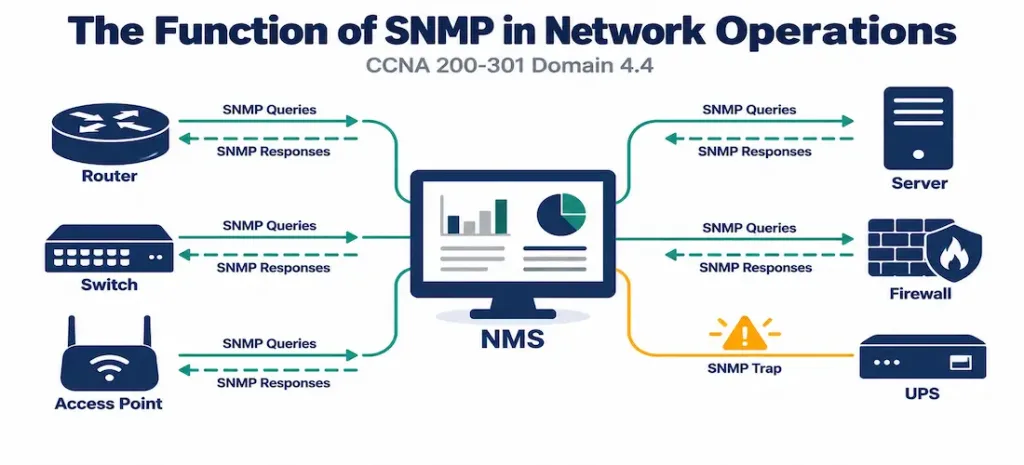
Domain 4.4 | IP Services — 10% of exam
Learning Objectives
By the end of this lesson, you will be able to:
- Explain the problem SNMP solves and describe its three core components: managed device, agent, and NMS.
- Distinguish between polling and traps, and explain why real-world monitoring typically uses both together.
- Explain what a MIB and an OID are, and how SNMP uses them to identify specific pieces of data.
- Describe the security differences between SNMPv1/v2c and SNMPv3, and explain why community strings alone are considered weak security.
- Recognize the basic SNMP configuration elements and verification commands at a conceptual level.
Key Terms Glossary
| Term | Definition |
|---|---|
| SNMP (Simple Network Management Protocol) | A protocol enabling centralized monitoring and management of network devices from a Network Management System. |
| Network Management System (NMS) | The central system that collects, stores, and presents monitoring data gathered via SNMP. |
| Managed device | A network element (router, switch, server) being monitored or managed via SNMP. |
| Agent | The software running on a managed device that responds to SNMP queries and generates traps. |
| Polling | The NMS periodically querying a managed device for specific data, using GET requests. |
| Trap | An unsolicited alert a managed device sends to the NMS when a significant event occurs, without being asked. |
| MIB (Management Information Base) | A structured, hierarchical database defining the specific data points a managed device can report via SNMP. |
| OID (Object Identifier) | A unique, dotted-numeric address identifying one specific data point within a MIB. |
| Community string | A shared, password-like value used in SNMPv1/v2c to control read or write access to a managed device’s data. |
| SNMPv3 | The version of SNMP that adds genuine authentication and encryption, addressing the security weaknesses of earlier versions. |
The Problem SNMP Solves
A network of any meaningful size can easily involve dozens, hundreds, or thousands of individual devices — routers, switches, firewalls, servers — each with its own CPU load, interface utilization, error counters, and operational status. Logging into each device individually to check its health is obviously unworkable past a handful of devices, and yet an administrator genuinely needs visibility into all of it, ideally from one place, without constantly context-switching between device CLIs.
SNMP (Simple Network Management Protocol) solves exactly this problem: it enables centralized monitoring and management of network devices from a single Network Management System (NMS), which can query hundreds of devices’ operational data and present it all in one dashboard, one set of graphs, or one alerting system, rather than requiring an administrator to check each device by hand.
The Three Core Components
SNMP’s architecture involves three distinct pieces, and understanding how they relate to each other clarifies almost everything else in this objective:
- The managed device is the actual network element being monitored — a router, switch, server, or any other SNMP-capable equipment.
- The agent is software running on that managed device, responsible for collecting local data and responding to queries from the NMS, as well as generating alerts when something noteworthy happens locally.
- The NMS (Network Management System) is the central system an administrator actually interacts with — it sends queries to agents, receives their responses and alerts, and stores and presents that data in a usable form (graphs, dashboards, alert notifications).
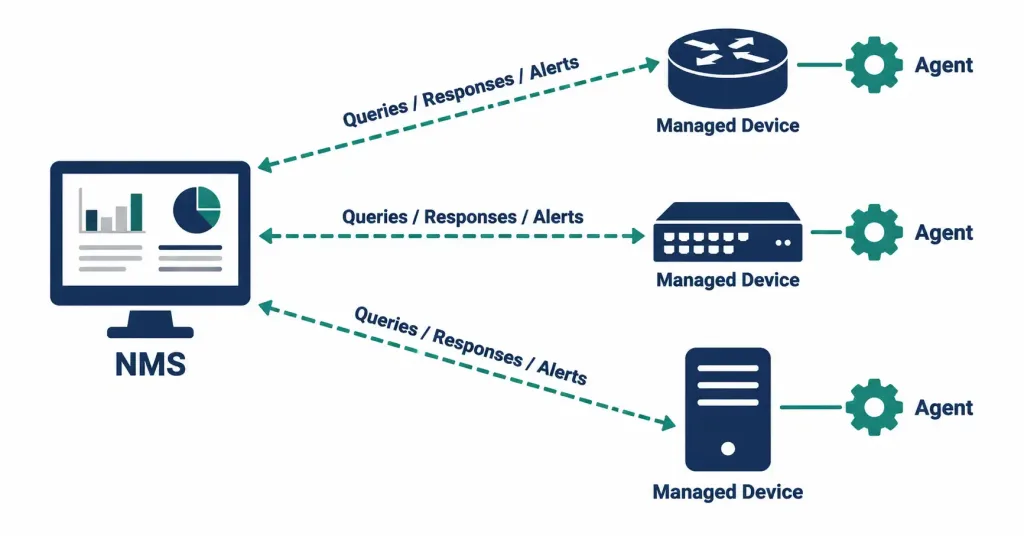
It’s worth being precise about where the “SNMP conversation” actually happens: the NMS talks to the agent running on a managed device, not to the managed device as an abstract concept. This distinction matters once you start troubleshooting — a managed device that seems unreachable via SNMP might have a perfectly healthy network connection but a misconfigured or disabled agent, which is a meaningfully different problem than a routing or connectivity issue.
Two Interaction Models: Polling and Traps
SNMP supports two fundamentally different ways for the NMS and a managed device to exchange information, and knowing when each is the right tool is one of the more frequently tested conceptual points in this objective.
Polling: The NMS Asks
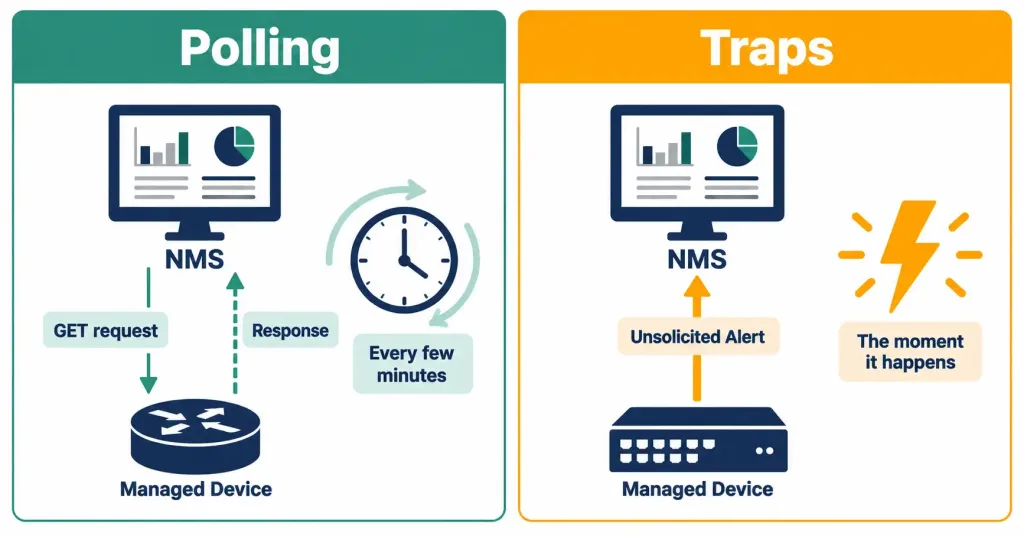
Polling is NMS-initiated: the NMS periodically sends a GET request to a managed device’s agent, asking for a specific piece of data — interface utilization, CPU load, an error counter — and the agent responds with the current value. This is repeated on a schedule, commonly every few minutes, building up a time-series history of each monitored value that can be graphed and reviewed over time.
Polling is well suited to routine, ongoing health metrics — the kind of data you want a continuous historical record of, whether or not anything unusual is happening. It’s also predictable and administrator-controlled: the NMS decides what to ask and how often, rather than depending on managed devices to proactively report anything.
Polling does have a genuine cost, though: querying every managed device for every metric of interest, frequently enough to catch problems quickly, generates a real and continuous amount of traffic and processing overhead, scaled across potentially thousands of devices and metrics. Polling frequently enough to catch a rare, urgent event (like an interface going completely down) the moment it happens would require polling constantly, which is inefficient for something that occurs rarely.
Traps: The Managed Device Reports Proactively
Traps flip the direction: rather than waiting to be asked, the managed device’s agent proactively sends an unsolicited alert to the NMS the moment a significant event occurs — an interface transitioning to a down state, a temperature threshold being exceeded, an unauthorized login attempt. The NMS doesn’t need to have been polling for that specific condition at all; the managed device pushes the notification the instant it happens.
This solves polling’s efficiency problem directly: rather than polling constantly for rare, urgent conditions, the managed device only communicates when something actually worth reporting has occurred, and reports it immediately rather than waiting for the next scheduled poll interval to pass.
A closely related but distinct mechanism worth knowing at a recognition level is the inform — essentially a trap with acknowledgment. A standard trap is sent once and the managed device has no way of knowing whether the NMS actually received it, since traps use UDP and there’s no built-in confirmation. An inform request asks the NMS to explicitly acknowledge receipt, and the managed device will retransmit if no acknowledgment arrives — a meaningful reliability improvement for critical alerts where silently losing a notification would be a real problem.
Why Real Deployments Use Both
Polling and traps aren’t competing approaches — they’re complementary, and most real SNMP deployments use both simultaneously for good reason. Polling builds the continuous historical baseline needed for capacity planning, trend analysis, and understanding “normal” behavior over time. Traps provide immediate notification of urgent, discrete events that shouldn’t wait for the next poll cycle. An organization relying on polling alone might not notice an interface failure until the next scheduled poll, potentially minutes later; an organization relying on traps alone would have alerts for discrete events but no ongoing historical record of gradual trends, like utilization slowly climbing toward capacity over weeks.
None of this historical trending is meaningful, though, if the timestamps attached to that data can’t be trusted across devices — comparing a spike on one router against a trap from another only works if both devices agree on what time it actually is, which is exactly the problem NTP (objective 4.2) exists to solve. SNMP monitoring and NTP synchronization are frequently deployed as a pair for precisely this reason.
Beyond a Single GET: GETNEXT and GETBULK
A single GET request retrieves exactly one OID’s value, which works fine for checking one specific metric but becomes inefficient when an NMS needs to walk through an entire table of related values — every interface’s utilization counter on a switch with 48 ports, for example. GETNEXT retrieves the next OID in sequence after the one specified, allowing an NMS to “walk” through a MIB table one entry at a time without needing to know each individual OID in advance.
GETBULK, introduced in SNMPv2c, improves on this further by retrieving multiple sequential values in a single request-response exchange rather than requiring a separate round trip for each one, meaningfully reducing the overhead of polling large tables of data compared to repeated individual GETNEXT operations. Neither of these is a deeply tested implementation detail at the CCNA level, but recognizing that SNMP has efficient mechanisms for retrieving more than a single value at a time rounds out the practical picture of how polling actually scales to real device inventories.
MIB and OID: How SNMP Identifies Specific Data
SNMP doesn’t just vaguely ask a device “how are you doing” — every piece of data it can query or report is precisely identified. A MIB (Management Information Base) is a structured, hierarchical database defining every specific data point a given device supports reporting on — CPU utilization, a specific interface’s byte counter, memory usage, and so on. Each individual data point within that hierarchy is addressed by an OID (Object Identifier) — a unique, dotted-numeric string (something like 1.3.6.1.2.1.1.3.0) that functions like a precise address for exactly one specific value.
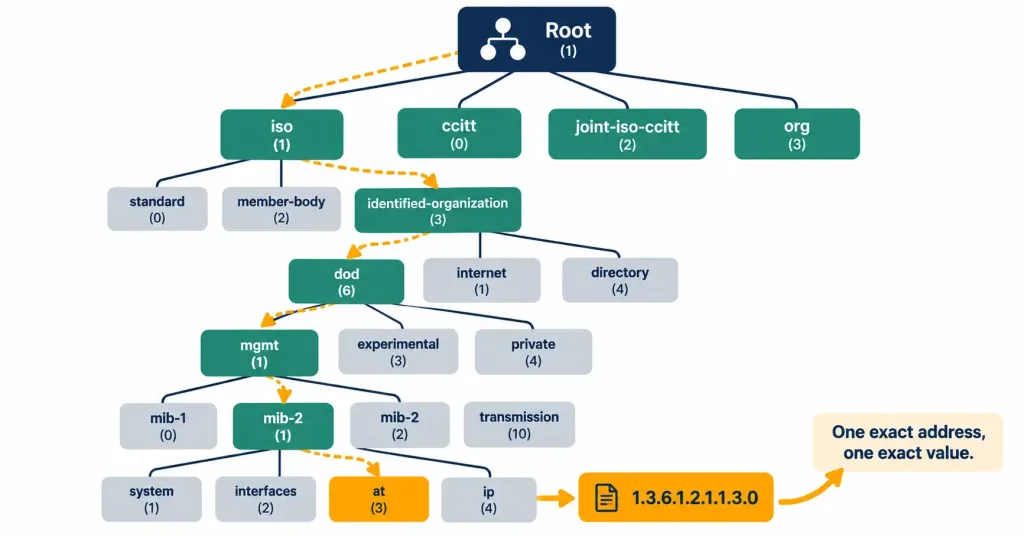
Think of the MIB as a tree structure, with broader categories branching into more specific ones the deeper you go, and an OID as the full path from the root of that tree down to one specific leaf — one exact metric on one exact device. This structure is what allows an NMS to request precisely the data it needs (a specific interface’s error counter, say) rather than receiving an entire dump of everything a device could possibly report.
What Gets Monitored in Practice
It’s worth grounding this in concrete examples rather than staying purely abstract. Common metrics an NMS polls via SNMP include interface utilization and error/discard counters (helping spot a saturated or flaky link before it becomes a user-facing outage), CPU and memory utilization (surfacing a device quietly running out of headroom before it starts dropping traffic or becoming unresponsive), and environmental data like temperature and power supply status on hardware that reports it.
Common trap-worthy events include an interface transitioning up or down, a device rebooting unexpectedly, or a configured threshold — say, CPU sustained above 90% — being crossed. None of this is exotic: it’s the same handful of health indicators any experienced network engineer would check manually on a single device, just automated and centralized across an entire inventory of them.
SNMP Versions and Security
SNMP has evolved through several versions, and the differences between them matter far more for security than for basic functionality.
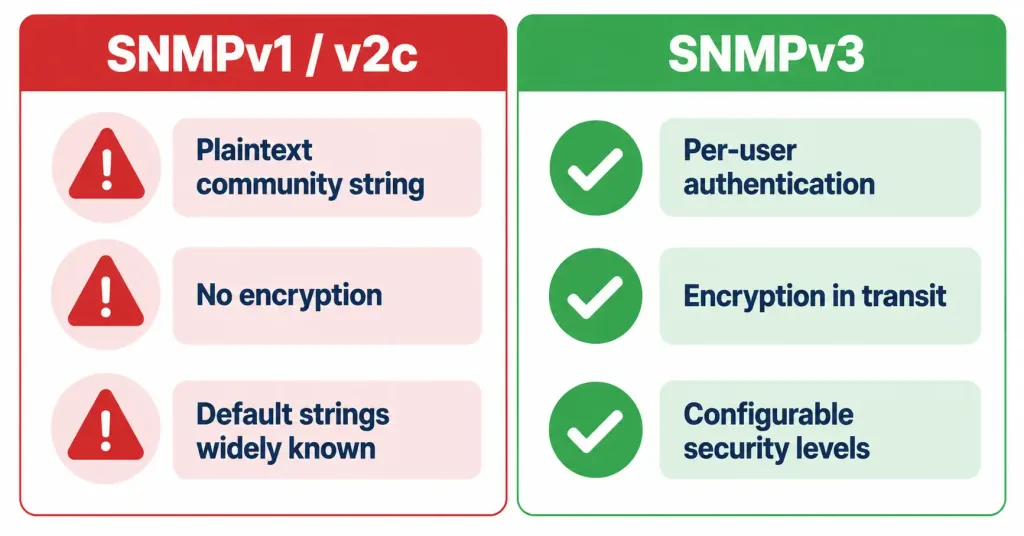
SNMPv1 and SNMPv2c both rely on community strings — shared, password-like values that control read access (commonly defaulting to public) or read-write access (commonly defaulting to private) to a device’s SNMP data. The significant weakness here: community strings are transmitted in plaintext, with no encryption, meaning anyone able to observe network traffic could capture the community string and gain the same access level it grants. Default community strings left unchanged (public/private) are also a well-known, commonly scanned-for weakness in real-world security assessments.
SNMPv3 addresses this directly by adding genuine authentication and encryption. Rather than a single shared community string, SNMPv3 supports per-user authentication (confirming who is actually making the request) and encryption of the data in transit (preventing anyone observing the traffic from reading its contents even if they intercept it). This is a substantial security improvement, and for any production network handling anything sensitive, SNMPv3 is the appropriate choice over the earlier, plaintext-community-string versions.
SNMPv3 further refines this with three distinct security levels an administrator can choose between, trading off convenience against protection: noAuthNoPriv (no authentication and no encryption — effectively similar in protection to v1/v2c, though still using SNMPv3’s structure), authNoPriv (authentication is required, confirming the requester’s identity, but the data itself travels unencrypted), and authPriv (both authentication and encryption are applied, the strongest and generally recommended level for any sensitive environment). Recognizing that SNMPv3 isn’t an all-or-nothing security upgrade, but a version that supports a spectrum of configurable protection, is a useful nuance beyond simply knowing that “v3 is more secure than v1/v2c.”
Common Misconceptions
- “SNMP only supports polling; traps are a separate, unrelated feature.” Both are part of SNMP itself, and most real deployments use them together — polling for continuous historical data, traps for immediate alerting on discrete events.
- “A trap guarantees the NMS received the alert.” A standard trap uses UDP with no acknowledgment, so it’s genuinely possible for a trap to be lost in transit with the managed device having no way to know. An inform request specifically adds acknowledgment and retransmission for cases where this matters.
- “An OID is just an arbitrary identifier with no real structure.” An OID represents a specific, exact path through a hierarchical MIB tree — it isn’t arbitrary at all, and the structure is what allows precise, unambiguous addressing of individual data points.
- “Community strings in SNMPv1/v2c function like a genuinely secure password.” They’re transmitted in plaintext with no encryption, making them fundamentally weaker than a real authentication mechanism — SNMPv3 exists specifically to correct this.
- “SNMP is only used for reading data, never for making changes.” SNMP also supports SET operations, allowing an NMS to modify a managed device’s configuration remotely, not just read its current status — though GET-based monitoring is by far the more commonly tested and commonly used function at this level.
Configuration and Verification at a Conceptual Level
This objective focuses on explaining SNMP’s function rather than a full configuration walkthrough, but seeing the basic configuration elements makes the theory concrete. A simple SNMPv2c configuration enabling read-only access looks like:
snmp-server community NetOpsRO RO
snmp-server location Data Center Rack 4
snmp-server contact netops@example.com
Here, NetOpsRO replaces the weak default public community string with a custom read-only (RO) value — still plaintext under SNMPv2c, but at minimum not a well-known default that’s trivially guessed. The location and contact fields are informational metadata often surfaced in NMS dashboards to help identify a device without needing to separately look up its physical location or responsible team.
Verification at a basic level uses:
Router# show snmp
Chassis: FTX1234A5BC
0 SNMP packets input
0 SNMP packets output
SNMP logging: disabled
This confirms whether SNMP is active on the device at all and shows basic packet counters — a rising input count over time confirms the NMS is actually successfully querying this device, while a count that never increases despite an NMS supposedly polling it points toward a connectivity or configuration mismatch worth investigating further.
Troubleshooting Patterns
“The NMS shows a managed device as unreachable, but the device itself is clearly up and reachable over the network.” Check whether the SNMP agent is actually enabled and correctly configured on that device, and whether the community string (or SNMPv3 credentials) configured on the NMS matches what the device expects — a mismatch here produces exactly this symptom despite otherwise healthy connectivity.
“Traps aren’t arriving at the NMS, even though polling works fine for the same device.” Confirm the managed device is actually configured to send traps to the correct NMS address, since trap configuration is often separate from basic SNMP agent enablement. Also check for anything filtering UDP traffic on the trap destination port between the device and the NMS.
“A security assessment flagged SNMP as a vulnerability.” This very commonly points to SNMPv1/v2c still in use with default or weak community strings — the practical remediation is migrating to SNMPv3 with genuine authentication and encryption, or at minimum changing default community strings and restricting SNMP access via an access list if migration isn’t immediately feasible.
“Historical trend graphs show gaps or missing data points.” This typically indicates missed poll cycles, which can result from the managed device being temporarily unreachable, the agent being overloaded, or a polling interval configured too aggressively for the device’s processing capacity.
Frequently Asked Questions
Can SNMP be used to configure a device, not just monitor it?
Yes — the SET operation allows an NMS to modify configuration values on a managed device remotely, though this is used far less commonly than GET-based monitoring in most real-world deployments, and carries obvious security implications if access isn’t tightly controlled.
Is SNMPv2c backward compatible with SNMPv1?
They’re similar in their reliance on community strings and share much of the same basic structure, but they aren’t fully interchangeable — a managed device and NMS generally need to be configured for the same version to communicate correctly.
Why would an organization still use SNMPv1/v2c today given SNMPv3’s security advantages?
Legacy equipment that doesn’t support SNMPv3, or organizations that haven’t yet completed a migration, are common real-world reasons — this is exactly why default and weak community strings remain a frequently flagged security finding in practice.
What happens if a MIB isn’t supported by a particular device?
A device can only report data for OIDs actually defined in the MIBs it implements — querying an OID the device doesn’t support simply returns no data or an error, rather than any kind of approximate or partial answer.
Do traps use the same port as polling?
No — SNMP polling (GET/SET requests) typically uses UDP port 161, while traps are typically sent to UDP port 162, a detail worth knowing if you ever need to troubleshoot a firewall or access list silently blocking one but not the other.
SNMP Monitoring and Management: Practice Quiz
Test your knowledge of SNMP components, polling, traps, MIBs, OIDs, ports, and security.
Summary
- SNMP enables centralized monitoring and management of network devices from a single NMS, built around three components: the managed device, its agent, and the NMS itself.
- Polling (NMS-initiated GET requests) builds continuous historical data; traps (managed-device-initiated unsolicited alerts) provide immediate notification of urgent events — most real deployments use both together.
- MIBs define the hierarchical structure of data a device can report, and OIDs are the unique, dotted-numeric addresses identifying one specific data point within that structure.
- SNMPv1 and SNMPv2c rely on plaintext community strings, a significant security weakness; SNMPv3 adds genuine authentication and encryption and is the appropriate choice for production networks handling sensitive data.
- SNMP polling typically uses UDP port 161, while traps typically use UDP port 162 — a useful detail for troubleshooting connectivity or firewall issues affecting one but not the other.



