
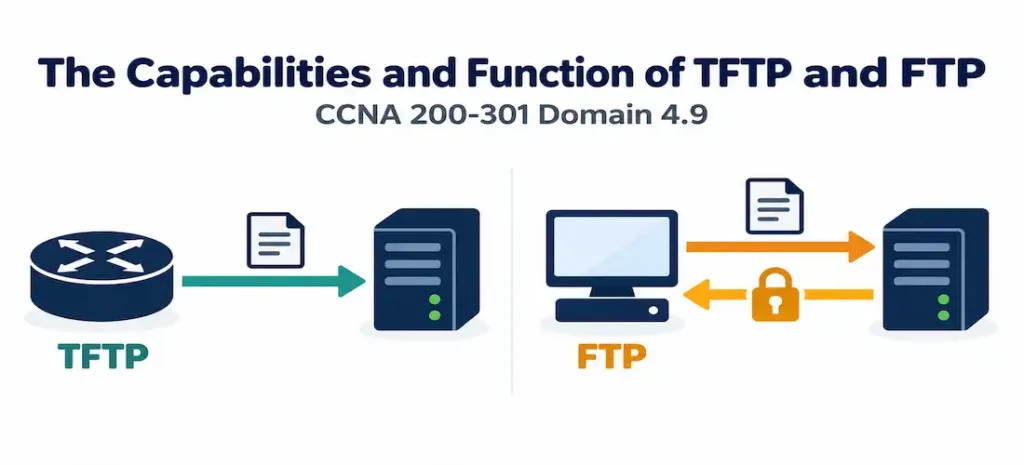
Domain 4.9 | IP Services — 10% of exam
Learning Objectives
By the end of this lesson, you will be able to:
- Describe TFTP’s design characteristics — UDP-based, connectionless, and deliberately minimal — and explain why it’s commonly used for Cisco IOS image and configuration file transfers.
- Describe FTP’s design characteristics — TCP-based, connection-oriented, and authentication-capable — and explain when it’s the more appropriate choice than TFTP.
- Identify the ports each protocol uses and recognize the security implications of each design.
- Explain the difference between FTP’s active and passive modes at a conceptual level.
- Recognize SFTP and FTPS as more secure modern alternatives to plain FTP.
Key Terms Glossary
| Term | Definition |
|---|---|
| TFTP (Trivial File Transfer Protocol) | A UDP-based, connectionless, minimal file transfer protocol with no built-in authentication. |
| FTP (File Transfer Protocol) | A TCP-based, connection-oriented file transfer protocol that supports authentication. |
| Connectionless protocol | A protocol (like UDP, and by extension TFTP) that sends data without first establishing or maintaining a session state. |
| Connection-oriented protocol | A protocol (like TCP, and by extension FTP) that establishes and maintains a session before and during data transfer. |
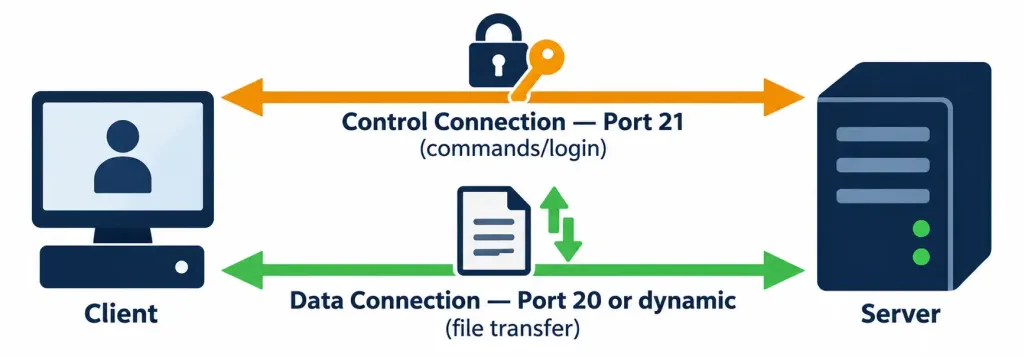
| Control connection | FTP’s connection (port 21) used for commands and session management, separate from actual file data. |
| Data connection | FTP’s connection (port 20 in active mode, a dynamic port in passive mode) used for the actual file transfer. |
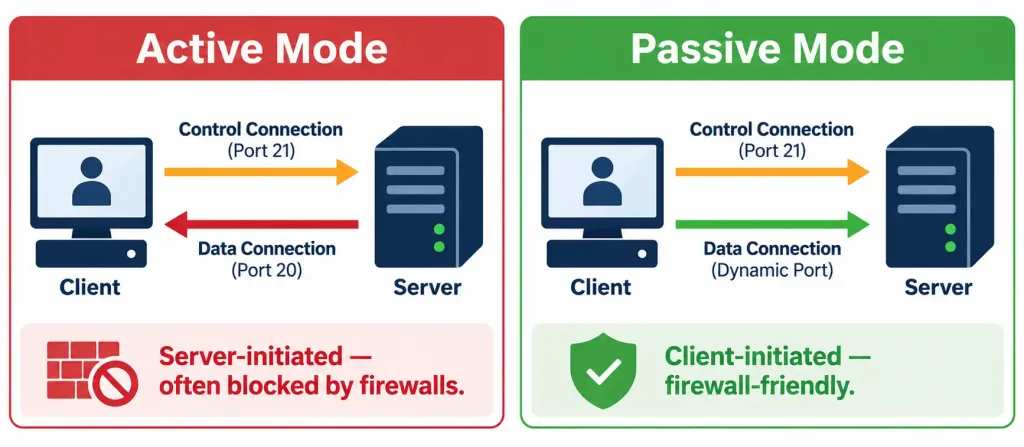
| Active FTP mode | An FTP mode where the server initiates the data connection back to the client. |
| Passive FTP mode | An FTP mode where the client initiates both the control and data connections, generally more firewall-friendly. |
| SFTP (SSH File Transfer Protocol) | A secure file transfer protocol operating over an SSH connection, encrypting both credentials and data. |
| FTPS (FTP Secure) | FTP with added TLS/SSL encryption, distinct from SFTP despite the similar name. |
TFTP: Simple, Minimal, and Deliberately Unauthenticated
TFTP (Trivial File Transfer Protocol) is, true to its name, about as basic as a file transfer protocol gets. It runs over UDP, is entirely connectionless (no session is established or maintained the way TCP requires), and includes no built-in authentication whatsoever — any device that can reach a TFTP server over the network can request or send files to it, with no username, password, or credential check involved at the protocol level.
This might sound like a design flaw, and in many contexts it would be, but TFTP’s minimalism is precisely the point for its intended use case. TFTP is overwhelmingly used for a specific, narrow purpose in Cisco environments: transferring IOS images and configuration files to and from network devices, typically within a trusted internal management network where the simplicity and low overhead matter more than authentication or encryption.
Backing up a router’s running configuration, pushing a new IOS image to a switch during an upgrade, or restoring a saved configuration after a device replacement are all classic TFTP use cases — situations where the network performing the transfer is already assumed to be under the organization’s own control, making TFTP’s lack of built-in security a reasonable trade-off for its simplicity and speed.
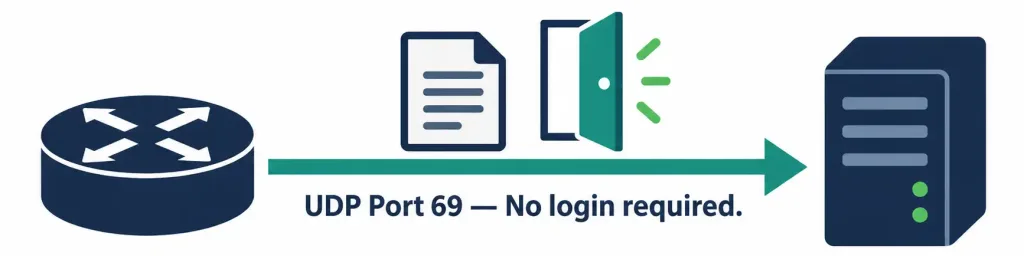
TFTP operates on UDP port 69. Because it’s connectionless, there’s no formal session setup overhead the way there is with TCP-based transfers — packets simply flow, with TFTP’s own lightweight application-layer acknowledgment scheme handling reliability instead of relying on TCP’s built-in mechanisms.
This port number is worth recognizing beyond just this objective: it’s one of the default protocols forwarded by ip helper-address, covered in objective 4.6. That command’s broader-than-DHCP-alone default scope exists precisely because protocols like TFTP historically relied on broadcast-friendly behavior in some legacy bootstrap scenarios, and the same relay mechanism that solves DHCP’s broadcast problem across subnets was built to accommodate TFTP traffic as well.
TFTP in Practice: IOS Commands
A few representative commands illustrate TFTP’s practical role in day-to-day device management:
copy running-config tftpThis backs up a router’s current running configuration to a TFTP server, prompting for the server’s IP address and a filename to save it under — a common, quick way to snapshot a configuration before making risky changes.
copy tftp: flash:This pulls a file (commonly a new IOS image) from a TFTP server into the device’s local flash storage, the typical first step in an IOS upgrade process.
How TFTP Achieves Reliability Without TCP
It’s worth understanding briefly how TFTP manages to work reliably at all despite running over UDP, which provides no inherent delivery guarantee on its own. TFTP transfers data in small, fixed-size blocks (512 bytes historically, though extensions allow larger sizes), and after sending each block, the sender waits for an explicit acknowledgment from the receiver before sending the next one. If an acknowledgment doesn’t arrive within a timeout period, the sender simply retransmits the same block.
This lockstep, one-block-at-a-time approach is far simpler than TCP’s sliding window and congestion control mechanisms, but it’s sufficient for TFTP’s typical use case — transferring a configuration file or IOS image within a fast, low-latency local network segment, where the simplicity outweighs the throughput limitations this approach would impose over a slower or higher-latency path.
FTP: Connection-Oriented, Authenticated, General-Purpose
FTP (File Transfer Protocol) takes a fundamentally different design approach. It runs over TCP, meaning it’s connection-oriented — a session is formally established before any data moves, with TCP’s built-in reliability mechanisms (acknowledgments, retransmission, ordered delivery) handling the underlying transport concerns that TFTP leaves to its own simpler scheme. FTP also supports authentication, requiring a username and password before granting access, making it a meaningfully more access-controlled option than TFTP’s open-door design.
FTP is better suited to general-purpose file transfer scenarios where reliability and at least basic access control genuinely matter — transferring files between systems where you want some assurance about who’s allowed to do the transferring, rather than TFTP’s trusted-network-only assumption.
FTP’s Two Connections: Control and Data
A detail worth understanding rather than just memorizing: FTP actually uses two separate connections, not one. The control connection, on TCP port 21, handles commands and session management — logging in, navigating directories, issuing the actual transfer request. The data connection handles the real file transfer itself, and how that connection gets established is where FTP has two distinct modes:
- In active mode, the FTP server initiates the data connection back to the client, typically from TCP port 20. This can be problematic in modern network environments, since it requires the client’s firewall to accept an inbound connection it didn’t itself initiate — exactly the kind of traffic a properly configured firewall is often designed to block by default.
- In passive mode, the client initiates both the control and data connections itself, with the server simply listening on a dynamically assigned port for the data connection rather than reaching back out to the client. This is considerably more firewall-friendly, since it doesn’t require any inbound connection to the client at all, which is why passive mode is the more commonly used default in modern FTP client software.
FTP in Practice: IOS Commands
Configuring a router to act as an FTP client for file transfers involves setting credentials before initiating a transfer:
ip ftp username admin
ip ftp password StrongPassword123
copy flash: ftp:
Here, the router is configured with FTP credentials, then a file in local flash storage is copied outward to a configured FTP server — the reverse direction (pulling a file inward) follows the same credential-setup pattern with the source and destination reversed in the copy command.
Direct Comparison
| Characteristic | TFTP | FTP |
|---|---|---|
| Transport protocol | UDP | TCP |
| Connection model | Connectionless | Connection-oriented |
| Authentication | None | Username/password required |
| Port(s) | 69 | 21 (control), 20 or dynamic (data) |
| Typical use case | IOS images, configuration file backup/restore | General-purpose file transfer with access control |
| Security posture | No encryption, no authentication — trusted network assumption | No encryption by default, but authentication provides basic access control |
Security Considerations and Modern Alternatives
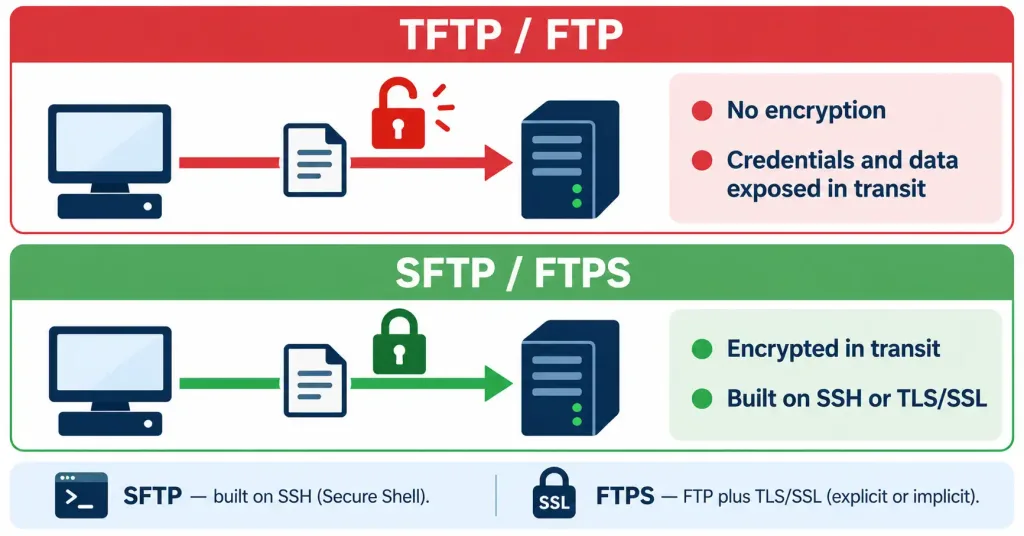
It’s worth being direct about something both protocols share despite their differences: neither plain TFTP nor plain FTP encrypts data in transit. TFTP’s complete lack of authentication makes it appropriate only within a genuinely trusted network segment, never across an untrusted path. FTP’s authentication provides access control, but the credentials themselves — along with the actual file data — still travel unencrypted by default, meaning an observer on the network path could intercept login credentials or file contents just as easily as with Telnet, discussed in objective 4.8 as a parallel example of a plaintext-by-default legacy protocol.
This is exactly why security-conscious environments increasingly move away from plain FTP toward more secure alternatives:
- SFTP (SSH File Transfer Protocol) operates over an SSH connection, inheriting SSH’s encryption for both credentials and data — a genuinely secure option built on the same underlying technology covered in objective 4.8.
- FTPS (FTP Secure) adds TLS/SSL encryption to traditional FTP, distinct from SFTP despite the similar name and easy to confuse with it — FTPS is FTP with an encryption layer added, while SFTP is an entirely different protocol built on SSH rather than being FTP with encryption bolted on.
TFTP has a less commonly used but conceptually similar secure alternative in some environments, though it’s TFTP’s simplicity — not enhanced security — that keeps it in active, ongoing use for IOS-related file transfers specifically, precisely because that use case typically occurs within networks already considered internally trusted.
A Realistic Scenario Tying Both Protocols Together
Consider a mid-sized organization performing a scheduled IOS upgrade across a stack of access-layer switches. The network team stages the new IOS image on an internal TFTP server sitting on the management VLAN — a segment already firewalled off from general user traffic and considered trusted for exactly this kind of operation. Each switch pulls the image via copy tftp: flash:, benefiting from TFTP’s simplicity and the fact that no credential needs to be typed, stored, or potentially exposed in a script running unattended overnight.
Separately, the same organization needs to transfer collected log archives and configuration backups off-site to a vendor’s support portal for a scheduled audit — a transfer crossing outside the trusted internal network entirely. Here, plain FTP would be a poor choice regardless of its authentication support, since the credentials and archive contents would traverse an untrusted path unencrypted. SFTP is the appropriate choice for this second scenario, leveraging the same SSH foundation from objective 4.8 to protect both the login and the data in transit. This contrast — trusted-internal TFTP for routine device management versus SFTP for anything crossing outside that trust boundary — reflects how these protocols actually get chosen in practice, rather than treating the decision as arbitrary.
Common Misconceptions
- “TFTP’s lack of authentication makes it unsuitable for any real use.” Within a genuinely trusted internal management network, TFTP’s simplicity is an advantage, not a flaw — it’s specifically inappropriate for transfers across an untrusted or public network, not for every use case universally.
- “FTP encrypts data because it requires a username and password.” Authentication and encryption are separate concerns — plain FTP requires credentials but still transmits both those credentials and the file data unencrypted by default.
- “FTPS and SFTP are the same protocol with different names.” They’re built on entirely different foundations — FTPS is traditional FTP with TLS/SSL encryption added, while SFTP is a distinct protocol operating over SSH.
- “Active and passive FTP modes only differ in performance, not security-relevant behavior.” The meaningful difference is which side initiates the data connection — active mode requires the client to accept an unsolicited inbound connection, which is often blocked by modern firewalls, while passive mode avoids this entirely.
- “TFTP uses TCP because file transfer inherently requires reliable, ordered delivery.” TFTP deliberately uses UDP and implements its own lightweight application-layer reliability mechanism instead, precisely to avoid the overhead of a full TCP connection for its narrow, typically small-file use case.
Verification and Practical Recognition
Since this objective focuses on describing capabilities rather than a full configuration and verification lab, the most useful “verification” skill here is pattern recognition — correctly identifying which protocol a given scenario is describing. A few IOS-level checks are still worth knowing:
Router# copy tftp: flash:
Address or name of remote host []? 192.168.1.100
Source filename []? c2900-universalk9-mz.SPA.155-3.M.bin
Destination filename [c2900-universalk9-mz.SPA.155-3.M.bin]?
Accessing tftp://192.168.1.100/...
This interactive prompt sequence is a familiar sight during an IOS upgrade — no username or password prompt appears at any point, directly reflecting TFTP’s lack of built-in authentication.
Router# copy flash: ftp://admin:StrongPassword123@192.168.1.100/FTP’s URL-style syntax option here embeds credentials directly in the command itself, which is functionally convenient but worth pairing with awareness that this credential is now visible in command history and any logging of the command itself — a practical security consideration beyond the protocol’s own inherent design.
Troubleshooting Patterns
“A TFTP transfer times out or never completes.” Since TFTP uses UDP, check for anything filtering UDP port 69 between the device and the TFTP server — a firewall or access list blocking this specific port produces exactly this symptom, and TFTP’s connectionless nature means there’s no handshake failure message the way a blocked TCP connection might produce; it simply appears to hang.
“An FTP transfer works in one environment but fails in another with a similar configuration.” This often points to an active-versus-passive mode mismatch interacting with a firewall — active mode’s server-initiated data connection is commonly blocked in environments with stricter perimeter firewall rules, while passive mode typically succeeds in the same environment since it avoids any unsolicited inbound connection to the client.
“FTP login fails despite correct-looking credentials.” Confirm the credentials are being supplied in the format and at the point IOS expects — using ip ftp username and ip ftp password globally versus embedding credentials directly in a URL-style copy command are two different approaches, and mixing them inconsistently can produce authentication failures that look like a credentials problem but are actually a configuration-method mismatch.
“A security review flags plain FTP usage as a finding.” This is an expected and common finding — the appropriate response is migrating to SFTP or FTPS rather than continuing to rely on unencrypted credential and data transmission, similar in spirit to migrating from Telnet to SSH. A reviewer flagging this isn’t identifying a broken configuration; plain FTP working exactly as designed is itself the finding, since the protocol’s own design predates modern expectations around encrypting data in transit by default.
Frequently Asked Questions
Why does Cisco default to TFTP for IOS image transfers rather than FTP? TFTP’s simplicity and low overhead make it well suited to this specific, narrow, typically-trusted-network use case; FTP’s added connection management and authentication overhead offer little practical benefit for a task like pulling an IOS image from a server on the same trusted management network.
Can a router act as both a TFTP/FTP client and a destination simultaneously? The copy command’s source and destination arguments determine direction — a router can pull a file inward from a TFTP or FTP server, or push a file outward to one, using the same underlying client capability in either direction. IOS itself doesn’t typically act as a TFTP or FTP server in a default configuration, though some platforms support enabling server-side functionality when a specific need calls for it.
Is SFTP related to FTP in any technical sense? Not in its underlying transport mechanism — despite the similar name, SFTP is built entirely on SSH rather than extending FTP’s protocol design, which is precisely why it inherits SSH’s encryption rather than needing a separate encryption layer bolted onto FTP itself, the way FTPS does.
Does passive FTP mode eliminate all firewall-related complications? It resolves the specific problem of the server needing to initiate an inbound connection to the client, but a passive-mode data connection still requires appropriate firewall rules allowing the dynamically assigned data port to be reached, which some firewall configurations still need to explicitly account for.
Would TFTP ever be appropriate for transferring files across the public internet? No — TFTP’s complete lack of authentication and encryption makes it inappropriate for any transfer across an untrusted network path; its appropriate use case is specifically within a network already considered trusted, such as an internal management segment.
Does TFTP have any practical limitations beyond its lack of security? Historically, TFTP implementations had a maximum file size limitation tied to its 16-bit block-numbering scheme at the original fixed block size, though modern extensions to the protocol have largely addressed this for practical purposes like transferring modern, larger IOS images. Its lockstep, one-block-at-a-time acknowledgment model also means TFTP transfers can be noticeably slower than a TCP-based transfer over a higher-latency path, reinforcing why it’s best suited to fast, low-latency local segments rather than long-distance transfers.
Can FTP’s control and data connections use different network paths in complex environments? In principle, yes, since they’re technically independent connections — but this is exactly why FTP’s active mode can create firewall and NAT complications in more complex environments, and it’s part of why passive mode’s simpler, client-initiated approach to both connections is generally preferred in modern deployments outside of tightly controlled legacy environments.
TFTP, FTP, SFTP, and FTPS: Practice Quiz
Test your knowledge of file-transfer protocols, ports, security, and Cisco IOS configuration backups.
Summary
- TFTP is UDP-based, connectionless, and includes no built-in authentication, making it well suited to transferring IOS images and configuration files within a trusted network, on UDP port 69.
- FTP is TCP-based, connection-oriented, and supports authentication, using a control connection (port 21) separate from its data connection (port 20 in active mode, or a dynamic port in passive mode).
- Passive FTP mode is generally more firewall-friendly than active mode, since the client initiates both connections rather than requiring the server to open an unsolicited inbound connection.
- Neither plain TFTP nor plain FTP encrypts data in transit by default — SFTP (built on SSH) and FTPS (FTP with TLS/SSL added) are the modern, more secure alternatives.
- Recognizing the exam’s pattern is useful in practice: “simple,” “lightweight,” or “IOS image” points to TFTP; “authentication” or “reliable, general-purpose transfer” points to FTP.
- Choosing between them in practice usually comes down to trust boundaries: TFTP fits routine device management within an already-trusted internal segment, while anything crossing outside that boundary calls for an authenticated, and ideally encrypted, alternative like SFTP.



