
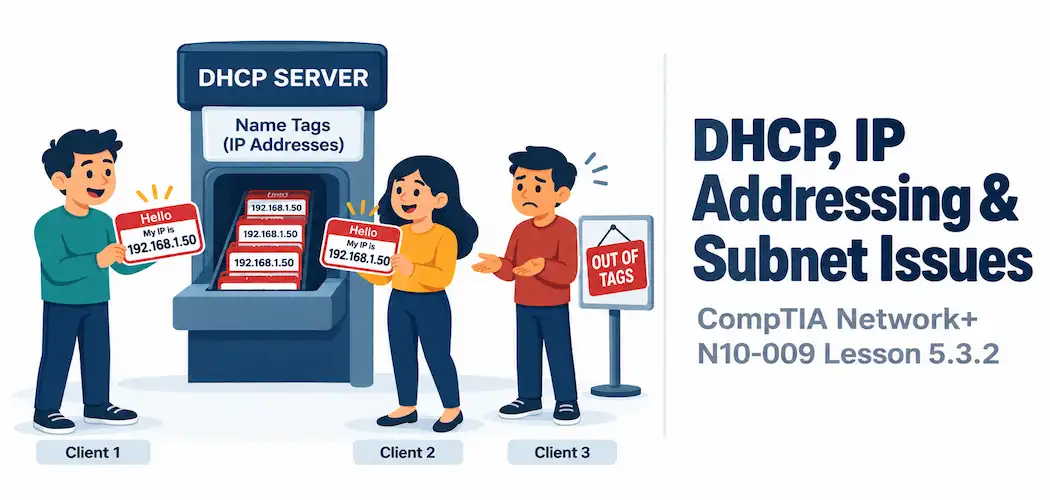
Domain 5.0 | Network Troubleshooting — 24% of exam
Learning Objectives
By the end of this lesson, you will be able to:
- Explain DHCP address pool exhaustion and recognize its distinctive symptom pattern
- Describe duplicate IP address conflicts and how they typically present
- Explain the impact of an incorrectly assigned IP address
- Describe how an incorrect subnet mask disrupts a device’s understanding of local versus remote traffic
Key Terms
| Term | Definition |
|---|---|
| Address Pool Exhaustion | A DHCP scope running out of available addresses to assign to new clients |
| APIPA | An automatically self-assigned address (169.254.x.x) a device uses when it can’t reach a DHCP server |
| Duplicate IP Address | Two devices on the same network configured with the identical IP address |
| Incorrect IP Address | A manually or automatically assigned address that’s wrong for its intended subnet or purpose |
| Incorrect Subnet Mask | A subnet mask that doesn’t match the actual network design, causing a device to misjudge which addresses are local |
Explanation
From Routing to Addressing Issues
The previous lesson covered problems with the path traffic takes once it leaves a device. This lesson steps back one stage further, to problems with the addressing itself — before a packet even gets to the point of needing a route at all.
DHCP Address Pool Exhaustion
Address pool exhaustion happens when a DHCP scope runs out of available addresses to hand out. The symptom pattern is genuinely distinctive: devices already holding a valid lease continue working completely normally, while any new device trying to join the network fails to obtain an address at all.
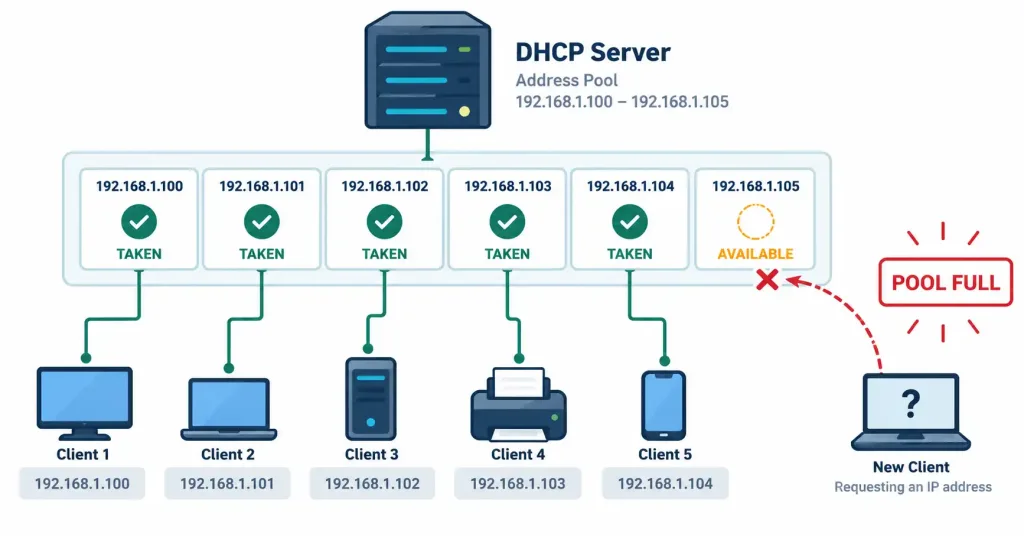
A particularly strong giveaway sign on the affected device itself is an APIPA address — something in the 169.254.x.x range. When a Windows device (and several other operating systems implement similar behavior) can’t reach a DHCP server at all, it self-assigns an APIPA address as a fallback, which lets it communicate with other APIPA-addressed devices on the same local segment but nothing else. Seeing an APIPA address on an affected device is close to a direct confirmation that DHCP simply wasn’t available — whether due to pool exhaustion or the DHCP server being unreachable entirely.
Duplicate IP Address Conflicts
A duplicate IP address conflict occurs when two devices on the same network end up configured with the identical address — commonly from a statically configured device using an address that falls inside the active DHCP range, or two statically configured devices simply given the same address by mistake. This connects directly back to DHCP exclusions covered earlier in this course — an exclusion exists specifically to prevent this exact scenario by keeping statically assigned addresses out of the DHCP pool entirely, and a missing or misconfigured exclusion is a very common root cause of duplicate IP conflicts in practice.
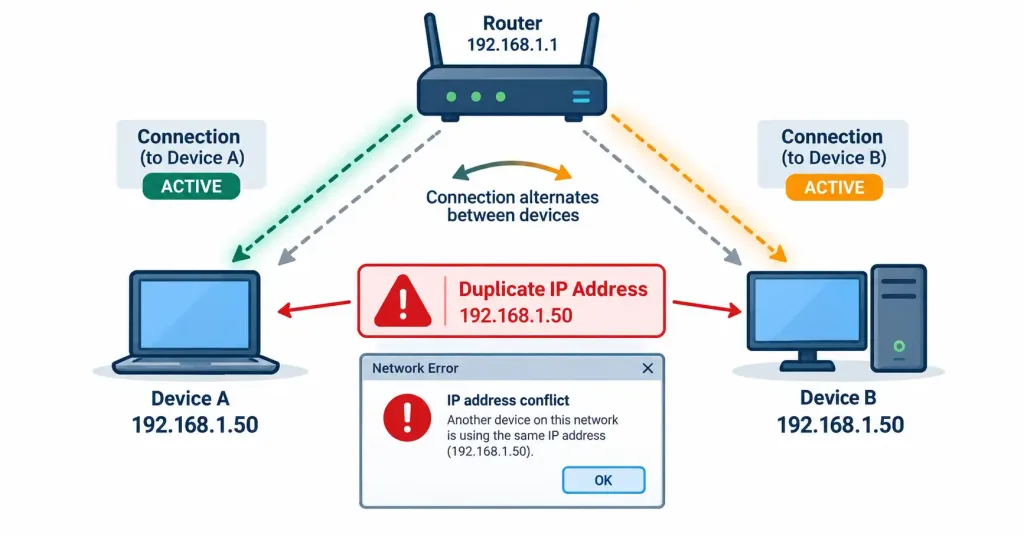
The resulting symptoms are often intermittent and genuinely confusing: both affected devices may experience unpredictable connectivity, since traffic destined for that IP address may reach either device depending on which one most recently announced itself on the network. Many operating systems will actively detect this condition and display an explicit IP conflict warning, which is a much faster path to diagnosis than working backward from vague, inconsistent symptoms alone.
Incorrect IP Address Assignment
An incorrect IP address — a typo in a manually configured static address, or an address assigned for entirely the wrong subnet — produces a range of outcomes depending on exactly how it’s wrong. An address genuinely outside the intended subnet’s range can leave a device unable to communicate with anything on its actual local network at all, since its own understanding of what counts as “local” no longer lines up with where it’s physically or logically connected. A more subtle typo — one digit off, but still within a plausible range — can produce confusing partial connectivity that takes more careful verification to actually catch.
Incorrect Subnet Mask
An incorrect subnet mask disrupts something less obvious but equally fundamental: a device’s own calculation of which addresses count as “local” (reachable directly) versus which need to be sent to the default gateway instead. This calculation depends entirely on the subnet mask, a concept covered back in the subnetting fundamentals lesson in Module 1.
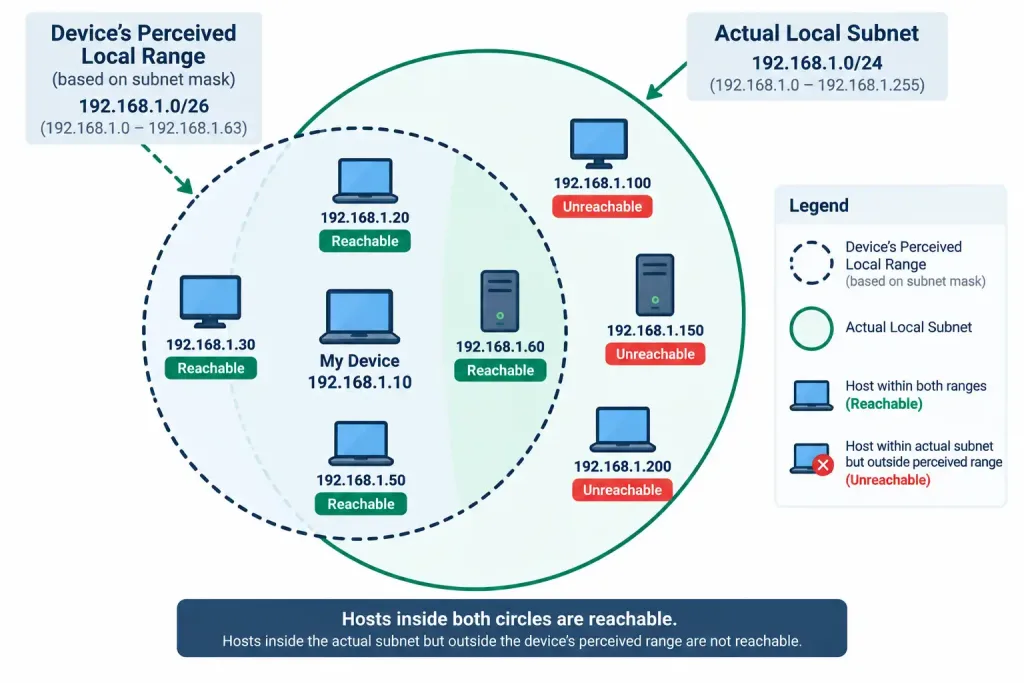
A subnet mask that’s too narrow (implying a smaller local range than actually exists) can cause a device to incorrectly route traffic through the gateway for destinations that are actually on the same local segment — an unnecessary, sometimes-failing detour. A mask that’s too wide (implying a larger local range than actually exists) can cause the opposite problem: the device assumes it can reach certain addresses directly, without going through the gateway, when it actually can’t. The specific symptom pattern — some local hosts reachable, others mysteriously not — is a strong clue pointing at a subnet mask problem specifically, rather than a gateway or DHCP issue.
Recognition-Level Verification Concepts
A few patterns are worth recognizing on sight:
- Existing devices working fine while new devices fail to obtain an address at all points toward DHCP pool exhaustion.
- A device showing a self-assigned 169.254.x.x address is a strong, direct indicator that DHCP was unreachable for that device.
- Intermittent, unpredictable connectivity affecting two specific devices simultaneously, especially alongside an OS-generated IP conflict warning, points toward a duplicate IP address.
- Some local hosts reachable while others on the same subnet mysteriously aren’t points toward an incorrect subnet mask rather than a gateway or DHCP problem.
Common Exam Traps
- Address pool exhaustion affects only new address requests, not existing leases. Don’t assume every device on the network is affected equally — already-connected devices typically keep working fine.
- An APIPA address is a symptom, not the underlying cause. It confirms DHCP wasn’t reachable, but the actual root cause (pool exhaustion, a downed DHCP server, a broken relay) still needs to be identified separately.
- A duplicate IP address doesn’t necessarily break connectivity completely — the intermittent, unpredictable nature of the symptom is exactly what makes it a distinctly recognizable pattern, rather than an outright, consistent failure.
- An incorrect subnet mask is easy to overlook as a cause of partial reachability, since the symptom (some hosts reachable, others not) doesn’t obviously point toward addressing at all on first glance.
- Missing or misconfigured DHCP exclusions are a common, preventable root cause of duplicate IP conflicts — a properly configured exclusion for every statically assigned address closes this gap entirely.
Lesson 5.3.2 Practice Quiz — DHCP, IP Addressing & Subnet Issues
17 questions covering DHCP pool exhaustion, APIPA, duplicate IP addresses, incorrect IP assignment, and subnet mask issues.
N10-009 · Domain 5.3Summary
DHCP address pool exhaustion blocks new devices from obtaining an address while leaving existing leases unaffected, often revealed by an APIPA (169.254.x.x) address on the affected device.
Duplicate IP address conflicts, frequently caused by a missing DHCP exclusion, produce intermittent, unpredictable connectivity for both affected devices, sometimes flagged directly by the operating system.
An incorrectly assigned IP address — wrong subnet or a simple typo — can range from total local isolation to confusing partial connectivity depending on exactly how far off the address is.
An incorrect subnet mask disrupts a device's own calculation of what counts as local versus remote, producing the distinctive symptom of some local hosts being reachable while others mysteriously aren't.
This lesson completes N10-009 objective 5.3 (Network Services Issues) at 2/2 lessons; the next lessons move into objective 5.4, performance issues.



