
Domain 5.0 | Network Troubleshooting — 24% of exam
Learning Objectives
By the end of this lesson, you will be able to:
- Explain how incorrect route selection causes connectivity or performance problems
- Describe the classic symptom pattern of an incorrect default gateway
- Explain asymmetric routing and why it causes problems for stateful devices
- Use routing table entries, administrative distance, and metrics to diagnose route selection problems
Key Terms – Troubleshooting Routing & Gateway
| Term | Definition |
|---|---|
| Route Selection | The process a router uses to choose which path to forward traffic along when multiple options exist |
| Default Gateway | The device a host sends traffic to when the destination isn’t on its local subnet |
| Asymmetric Routing | Traffic taking a different path in each direction between two endpoints |
| Routing Table | A router’s list of known destination networks and the paths used to reach them |
| Administrative Distance | A value used to rank the trustworthiness of different routing sources when multiple routes to the same destination exist |
Explanation
From Physical Layer to Layer 3 Issues
The previous lesson covered issues at the physical and interface level. This lesson moves further up — following exactly the bottom-to-top OSI approach covered at the start of this module — to problems in how traffic actually gets routed once it’s past the physical connection entirely.
Incorrect Route Selection
When multiple possible paths exist to the same destination, a router has to choose one, and that choice is governed by administrative distance and route metrics, covered back in Module 2. When route selection goes wrong — an unintended route with a lower administrative distance being unexpectedly preferred, or a dynamic routing protocol converging on a suboptimal path — traffic can end up taking a technically functional but genuinely wrong path: slower, less direct, or simply not the path an administrator actually intended.
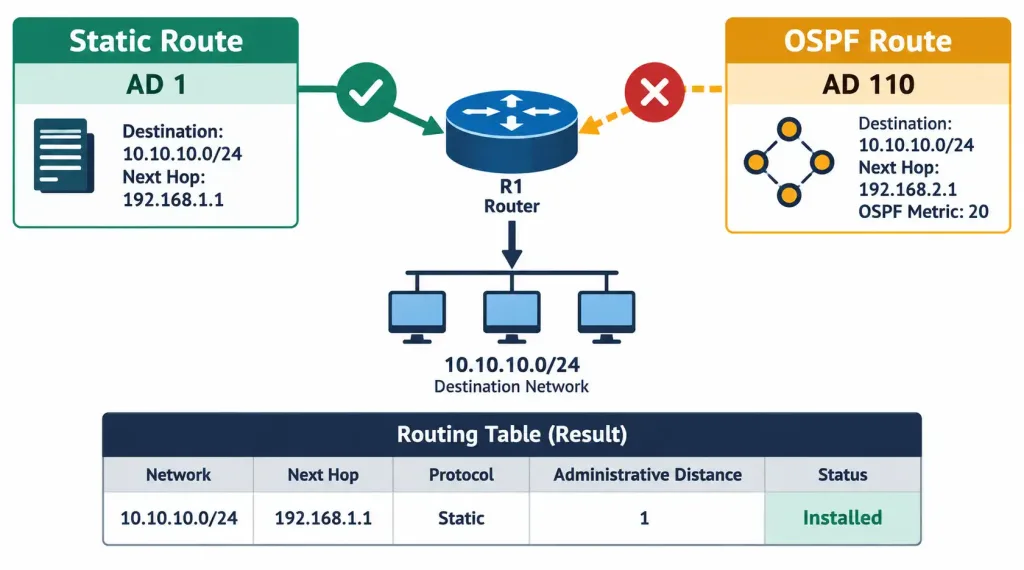
Diagnosing this kind of issue means actually examining the routing table directly — checking which route is currently installed for a given destination, what its administrative distance and metric are, and comparing that against what was actually intended. A route that’s technically valid but unintended rarely announces itself as an error; it just quietly sends traffic somewhere other than where it should go.
Incorrect Default Gateway
An incorrect default gateway produces one of the most recognizable, distinctive symptom patterns in network troubleshooting: a host can communicate perfectly fine with other devices on its own local subnet, but anything beyond that subnet — including the wider internet — is completely unreachable. This makes sense once you consider what the default gateway actually does: local subnet communication never needs to go through it at all, so a broken or incorrect gateway setting has zero effect on local traffic while completely blocking everything that needs to leave the subnet.
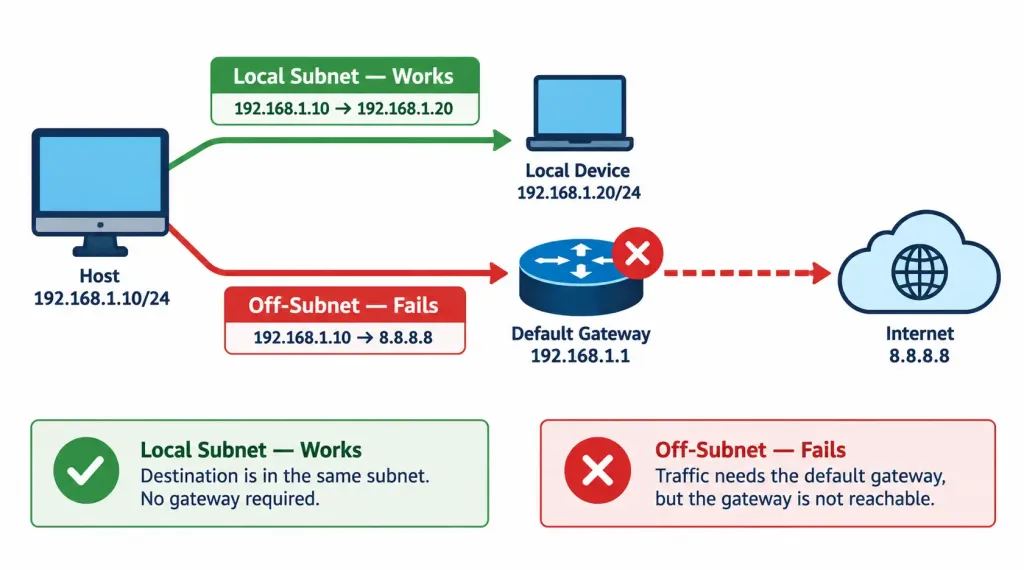
Since the gateway address is typically handed out automatically, this problem often traces back to something upstream rather than the affected device itself — a misconfigured DHCP scope handing out the wrong gateway address, or in a more serious case, a rogue DHCP server deliberately or accidentally handing out an incorrect one.
Asymmetric Routing
Asymmetric routing occurs when traffic between two endpoints takes a different physical or logical path in each direction — outbound traffic goes one way, but the return traffic comes back along an entirely different route. This can happen naturally in networks with multiple available paths of differing cost or preference in each direction, and it isn’t necessarily a problem for basic connectivity on its own.
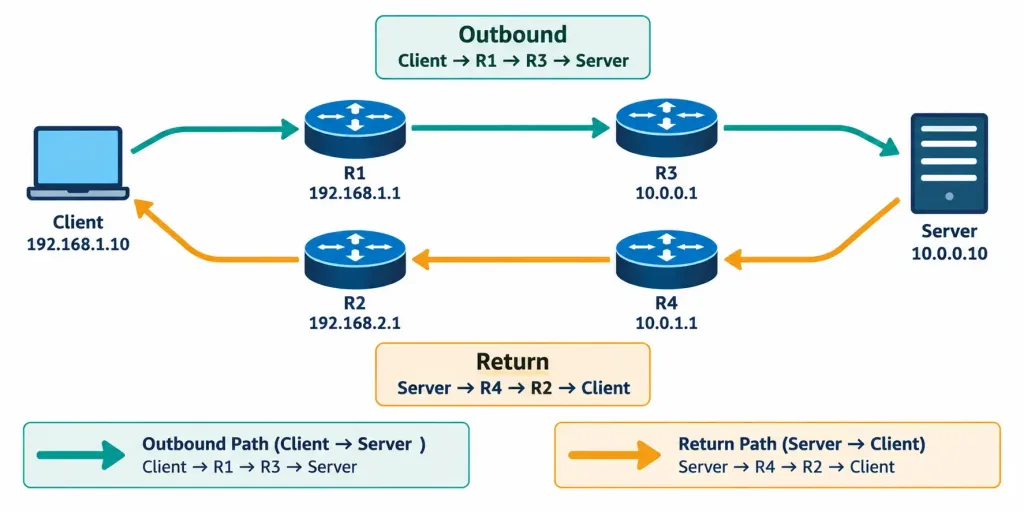
The real trouble appears with stateful devices along the path — particularly firewalls, which typically expect to see both directions of a given traffic flow passing through the same device to properly track and permit that connection. If outbound traffic passes through one firewall and the return traffic arrives via a completely different path that never saw the outbound leg, the firewall has no established connection state to match the return traffic against — and may block it outright, producing a connectivity failure that looks like nothing is wrong with the path itself when tested individually in each direction.
Using the Routing Table to Diagnose Problems
In practice, diagnosing route selection and gateway problems comes back to actually examining the routing table: confirming which specific route is installed for a given destination, checking its administrative distance and metric against what’s expected, and verifying the default route or default gateway entry matches the intended configuration. A routing table showing an unexpected route, an unusually high metric, or a missing default route entry each point toward a distinct, specific cause rather than a vague “routing is broken.”
Recognition-Level Verification Concepts
A few patterns are worth recognizing on sight:
- Local subnet communication working normally while all off-subnet communication fails completely is the signature pattern of an incorrect default gateway.
- A destination reachable, but via a slower or less direct path than expected, points toward incorrect route selection rather than a complete routing failure.
- A connection that fails intermittently or unpredictably, especially behind a firewall, with each direction testing fine individually, is worth investigating for asymmetric routing.
- A routing table entry with a different administrative distance or metric than expected for a given destination reveals exactly why a particular path was chosen over another.
Common Exam Traps
- An incorrect default gateway doesn’t affect local subnet communication at all — don’t assume that working local connectivity rules out a gateway problem; it’s actually consistent with one.
- Route selection issues often produce a technically working but suboptimal result, not an outright failure. A “wrong but functional” path can be harder to notice than a completely broken one.
- Asymmetric routing is not inherently a fault — it only becomes a real problem in the presence of stateful devices like firewalls that need to see both directions of a flow.
- A lower administrative distance is preferred over a higher one, and confusing this direction is a common mistake when reading a routing table to explain why a particular route was chosen.
- A default gateway problem is frequently a downstream symptom of a DHCP issue, rather than something manually misconfigured on the affected device itself — check the DHCP source before assuming manual misconfiguration.
Lesson 5.3.1 Practice Quiz — Troubleshooting Routing & Gateway Issues
17 questions covering route selection, default gateway misconfiguration, asymmetric routing, and routing table diagnosis.
N10-009 · Domain 5.3Summary
Incorrect route selection sends traffic along a technically functional but unintended path, diagnosed by examining the routing table's administrative distance and metric values against what's expected.
An incorrect default gateway produces a distinctive pattern: local subnet communication works fine, but all off-subnet traffic fails completely — often traceable to a DHCP misconfiguration or rogue DHCP server upstream.
Asymmetric routing sends outbound and return traffic along different paths, which is only a genuine problem in the presence of stateful devices like firewalls that expect to see both directions of a flow.
Diagnosing Layer 3 routing issues comes back to directly examining the routing table rather than treating "routing is broken" as a single undifferentiated problem.



