
Domain 5.0 | Network Troubleshooting — 24% of exam
Learning Objectives
By the end of this lesson, you will be able to:
- Explain how channel overlap and interference degrade wireless performance
- Describe the common causes of wireless signal degradation and loss
- Explain how AP placement and coverage gaps affect wireless reliability
- Describe client-side wireless issues, including sticky clients and band steering problems
Key Terms
| Term | Definition |
|---|---|
| Channel Overlap | Two or more access points operating on the same or overlapping channels, causing interference between them |
| Co-Channel Interference | Interference specifically caused by multiple access points sharing the identical channel |
| Coverage Gap | An area with insufficient or no wireless signal, often called a dead zone |
| Sticky Client | A wireless client that remains connected to a distant, weaker access point instead of roaming to a closer, stronger one |
| Band Steering | A mechanism that encourages capable clients toward the 5 GHz band instead of the more congested 2.4 GHz band |
Explanation
From Wired Addressing to Wireless Performance
The previous lesson covered addressing problems that apply to any network, wired or wireless. This lesson turns to performance issues specific to wireless networks, building directly on the wireless frequency bands, channels, and deployment concepts covered back in Module 2.
Interference and Channel Overlap
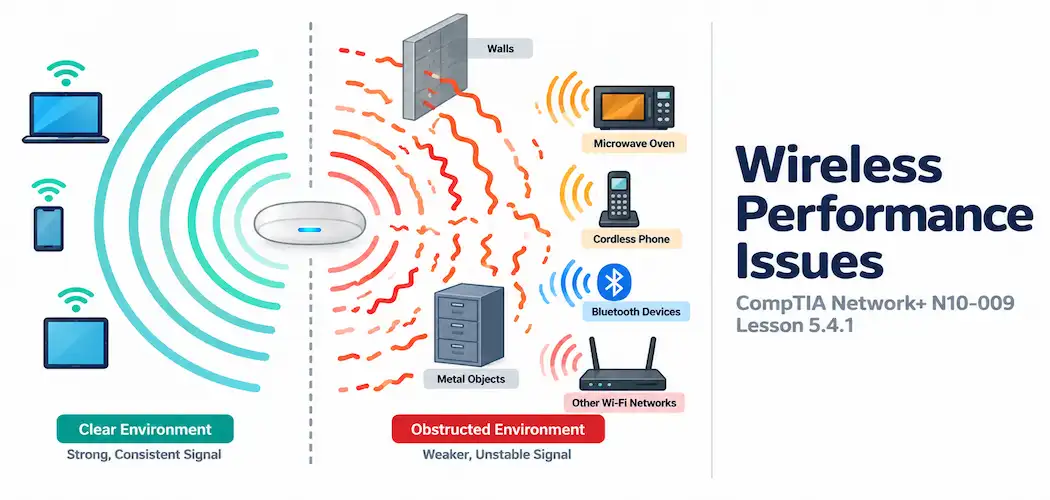
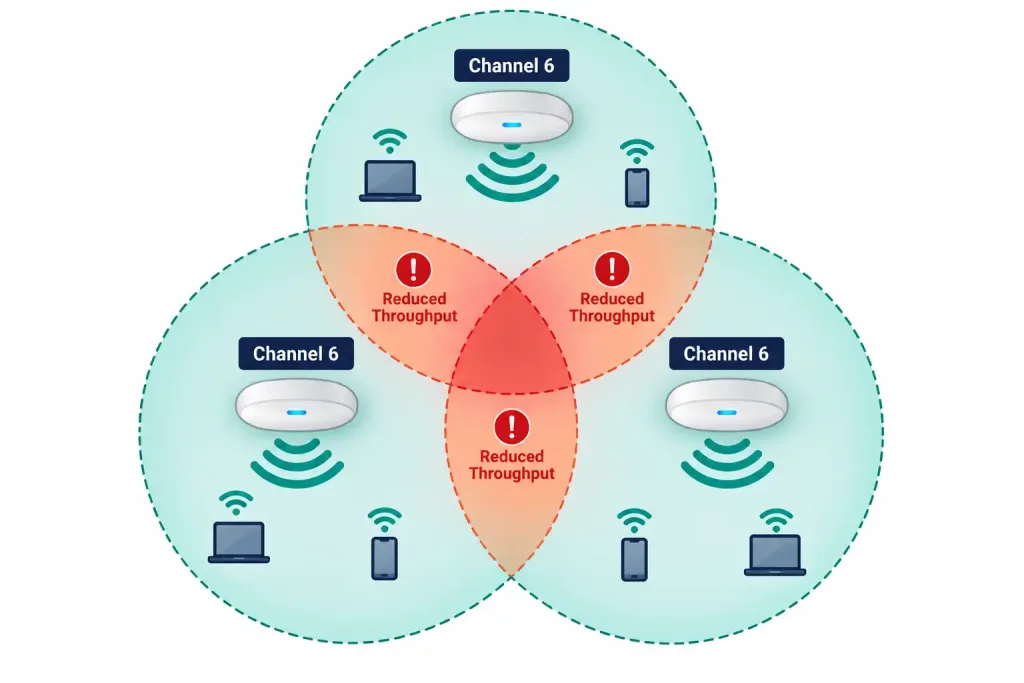
Channel overlap occurs when two or more access points operate on the same or adjacent channels within range of each other, and the resulting co-channel interference degrades throughput and reliability for every client connected to either AP. This is exactly why non-overlapping channel planning matters so much in real deployments — a network that looks fine on paper can perform poorly in practice if neighboring APs weren’t assigned genuinely separated channels.
Interference doesn’t only come from other Wi-Fi networks, either — non-Wi-Fi devices operating in the same frequency range, like older cordless phones or microwave ovens on the 2.4 GHz band, can degrade wireless performance in ways that look identical to channel overlap from a symptom standpoint, even though the actual source is a completely different type of device.
Signal Degradation and Loss
Wireless signal weakens for many of the same underlying reasons a wired signal does — distance and obstruction — even though the specific mechanism is different. This connects to both the AP placement concepts from the antennas and deployment lesson earlier in this course, and the broader idea of signal attenuation covered in the wired cabling lesson — the underlying principle (signal weakens with distance and obstruction) applies to both mediums, even though the physical cause differs.
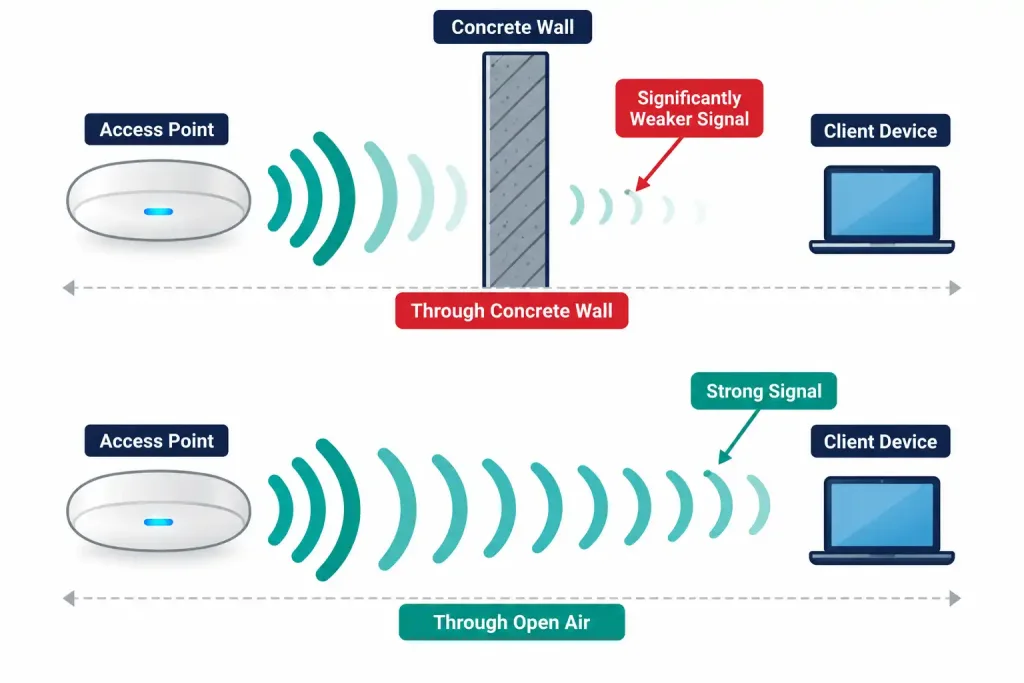
Dense building materials — concrete, metal, even certain types of glass — attenuate wireless signal significantly more than drywall or open air, which is exactly why a client can show a weak signal despite being physically close to an access point, if a substantial obstruction sits directly between them.
AP Placement and Coverage Gaps
A coverage gap (or dead zone) is an area receiving insufficient or no wireless signal at all, typically resulting from insufficient AP density for the physical space, poor placement relative to obstructions, or simply not accounting for a building’s actual layout during initial deployment planning. This is precisely the kind of problem a proper site survey — covered in the antennas and AP deployment lesson referenced above — is designed to catch before it becomes a live production issue rather than after users start complaining about dead zones.
Client-Side Factors: Sticky Clients and Band Steering Issues
Not every wireless performance problem originates at the access point. Two client-side behaviors are worth recognizing specifically:
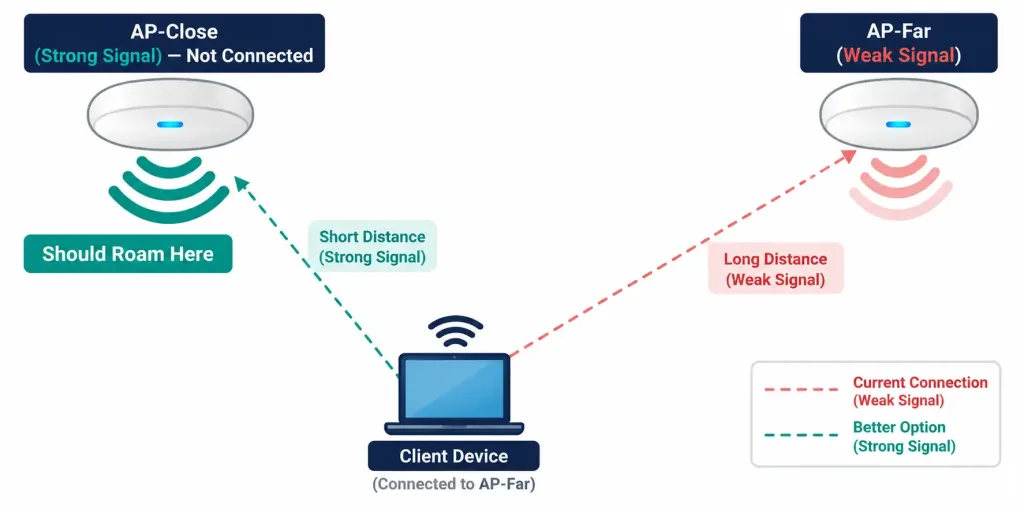
- A sticky client is a device that remains connected to a distant, weaker access point rather than roaming to a closer, stronger one — even when a better option is clearly available. This happens because many client devices are conservative about roaming, sometimes staying connected to a marginal signal longer than would actually be optimal, producing degraded performance that has nothing to do with the AP infrastructure itself being misconfigured.
- Band steering issues occur when the mechanism designed to push capable clients toward the less congested 5 GHz band, covered in the AP modes lesson earlier in this course, malfunctions or is misconfigured — leaving capable devices stuck on the more congested 2.4 GHz band, or conversely, pushing a device with poor 5 GHz range toward a band it can’t reliably maintain a connection on.
Recognition-Level Verification Concepts
A few patterns are worth recognizing on sight:
- Degraded performance affecting multiple nearby access points simultaneously, especially ones on the same or adjacent channels, points toward channel overlap and co-channel interference.
- A weak signal reading despite physical proximity to an access point points toward an obstruction-related signal degradation issue rather than a distance problem.
- An area with consistently poor or absent coverage, regardless of which specific client device is tested there, points toward a genuine coverage gap requiring an AP placement or density fix.
- A client device staying connected to a distant AP with a poor signal, despite a much closer AP being available, is a classic sticky client symptom rather than an infrastructure fault.
Common Exam Traps
- Interference isn’t always from other Wi-Fi networks. Non-Wi-Fi devices sharing the same frequency range can produce symptoms that look identical to channel overlap from another access point.
- Signal degradation from obstruction can occur even at short physical distances. Don’t assume proximity alone guarantees a strong signal — the material between the client and the AP matters just as much.
- A coverage gap is a placement/density problem, not something individual client troubleshooting can fix. No amount of client-side adjustment resolves an area that genuinely has no adequate signal reaching it.
- A sticky client issue is a client-side behavior, not necessarily evidence of an AP misconfiguration. Don’t assume every wireless performance complaint traces back to the infrastructure — client roaming behavior is a genuinely separate category.
- Band steering problems can push a device toward the wrong band in either direction — either failing to steer a capable device to 5 GHz, or steering a device with poor 5 GHz range there anyway — don’t assume the fault only runs one way.
Lesson 5.4.1 Practice Quiz — Troubleshooting Wireless Performance Issues
17 questions covering channel overlap, co-channel interference, signal degradation, coverage gaps, sticky clients, and band steering issues.
N10-009 · Domain 5.4Summary
Channel overlap between nearby access points, and non-Wi-Fi interference sharing the same frequency range, both degrade wireless performance in ways that can look identical from a symptom standpoint.
Wireless signal degrades from distance and physical obstruction, with dense materials like concrete and metal attenuating signal significantly more than open air or drywall.
Coverage gaps result from insufficient AP density or poor placement relative to a building's actual layout, and are best caught proactively through a proper site survey.
Sticky clients remain connected to a distant, weaker AP instead of roaming to a closer one, and band steering issues can push clients toward either the wrong band or fail to steer them at all — both genuinely client-side behaviors rather than AP infrastructure faults.



